2010 SUZUKI KIZASHI lights
[x] Cancel search: lightsPage 121 of 388

2-102
BEFORE DRIVING
57L20-03E
To turn the lights on or off, twist the knob
on the end of the lever. There are four posi-
tions:
OFF (1)
All lights are off.
AUTO (2)
This function works when the ignition
mode has been changed to “ON” by press-
ing the engine switch. The headlights and
position lights are turned on and off auto-
matically according to the amount of out-
side light detected by a sensor. They go
out automatically when you change the
ignition mode to “ACC” or “LOCK” by
pressing the engine switch.
The light sensor (5) for sensing the
amount of outside light is installed on the
upper part of the windshield. It also
serves as the rain sensor for the rain-
sensing wipers.NOTE:
Avoid covering the light sensor area of
the windshield with a sticker. The sticker
may impair the performance of the sen-
sor and make the system unable to con-
trol operation of the lights correctly.
If you changed the ignition mode to “ON”
by pressing the engine switch and the
“AUTO” position remains selected, the
headlights and position lights come on
automatically as the outside gets dark
even with the engine not running. Leav-
ing the lights lit for a long time may lead
to a completely discharged battery.
(3)
Front position lights, tail lights, license
plate light and instrument lights are on, but
headlights are off.
(4)
Front position lights, tail lights, license
plate light, instrument lights and headlights
are on.
CAUTION
If the light sensor area of the wind-
shield is covered with mud, ice, or
other similar substances, the head-
lights and position lights may be
turned on even when it is still light
outside. Before removing such sub-
stances from the windshield, always
set the wiper control lever to the
“OFF” position. If the lever is left in
the “AUTO” position, the wipers
could unexpectedly operate and
cause injury, and could also be dam-
aged.
Page 122 of 388

2-103BEFORE DRIVING
57L20-03E
57L21065
With the headlights on, push the lever for-
ward to switch to the high beams (main
beams) or pull the lever toward you to
switch to the low beams. When the high
beams (main beams) are on, a light on the
instrument panel will come on. To momen-
tarily activate the high beams (main
beams) as a passing signal, pull the lever
slightly toward you and release it when you
have completed the signal.
Auto-On Headlight System
57L21118
The Auto-on headlight system automati-
cally turns on all lights that are operated by
the lighting control lever on the steering
column, when the following three condi-
tions are all met.
Conditions for Auto-on headlight system
operation:
1) It is dark around the light sensor (5).
2) The lighting control lever is in the
“AUTO” position.
3) You press the engine switch to change
the ignition mode to “ON”.
This system is operated by a signal from
the light sensor (5) on the front wind shield.
Do not cover the sensor (5). If you do, the
system will not work correctly.NOTE:
The light sensor reacts even to infrared
rays, so it may operate incorrectly when
there are strong infrared rays.
Reprogramming the Automatic Light
Function
The following settings of the automatic light
function can be customized to your prefer-
ence. Please contact an authorized
SUZUKI dealer if you want the function
reprogrammed.
EXAMPLE
(5)
WARNING
It takes about 5 seconds for the light
sensor to react to a change in light-
ing conditions. To help avoid an acci-
dent due to reduced visibility, turn on
your headlights before driving into a
tunnel, parking structure or the like.
Page 123 of 388

2-104
BEFORE DRIVING
57L20-03E
Sensitivity of the light sensor
The amount of outside light needed to turn
the lights on and off is pre-set at the fac-
tory. The sensitivity of the light sensor can
be adjusted so that the lights are turned on
and off when it is:
lighter outside than the pre-set condition,
or
darker outside than the pre-set condition
Rain-triggered automatic lighting oper-
ation
The setting of the auto-on headlight sys-
tem can be changed to make it turn on the
headlights:
when the rain sensor senses heavy rain-
fall (pre-set at the factory)
when the rain sensor senses light and
heavy rainfall (in coordination with rain-
sensing wiper operation), or
independently from rain-sensing wiper
operation.
Light Reminder BuzzerThe interior buzzer continuously beeps if
you open the driver’s door without turning
off the headlights and position lights. This
function is triggered under the following
condition:
The headlights and position lights are on
even after you change the ignition mode
to “LOCK” (OFF) by pressing the engine
switch.
The buzzer stops sounding when you turn
off the headlights and position lights.
NOTE:
A message is indicated on the information
display in the instrument cluster while the
buzzer is sounding.
Daytime Running Light (D.R.L.)
System
57L21129
(1) D.R.L. indicator light
(2) Illumination indicator light
The headlights light, but are dimmer than
the low beam, when the following three
conditions are all met. Also, the D.R.L. indi-
cator light (1) on the instrument panel
comes on.
Conditions for D.R.L. system operation:
1) The engine is running.
2) The parking brake is released.
3) The headlights are off, or the lighting
switch in the “AUTO” position and it is
light around the light sensor.
(1) (2)
Page 124 of 388

2-105BEFORE DRIVING
57L20-03E
NOTE:
Be sure to turn the headlights on at night
or at any time of the day when driving or
weather conditions require the headlights
to operate at full brightness and the tail-
lights to be on.
Lights “On” reminder
A buzzer sounds to remind you to turn off
the lights if they are left on when you press
the engine switch to change the ignition
mode to “LOCK” (OFF) and the driver’s
door is opened.
NOTE:
The warning and indicator message and
the illumination indicator light (2) will be
shown on the information display when this
reminder is activated.
Front Fog Light Switch
(if equipped)
64J058
The front fog light comes on when the fog
light switch is pushed in with the headlights
are on and the beams set to the low beam
position.
Turn Signal Control Lever
57L21128
WARNING
To avoid possible injury, do not oper-
ate controls by reaching through the
steering wheel.
Page 125 of 388
2-106
BEFORE DRIVING
57L20-03E
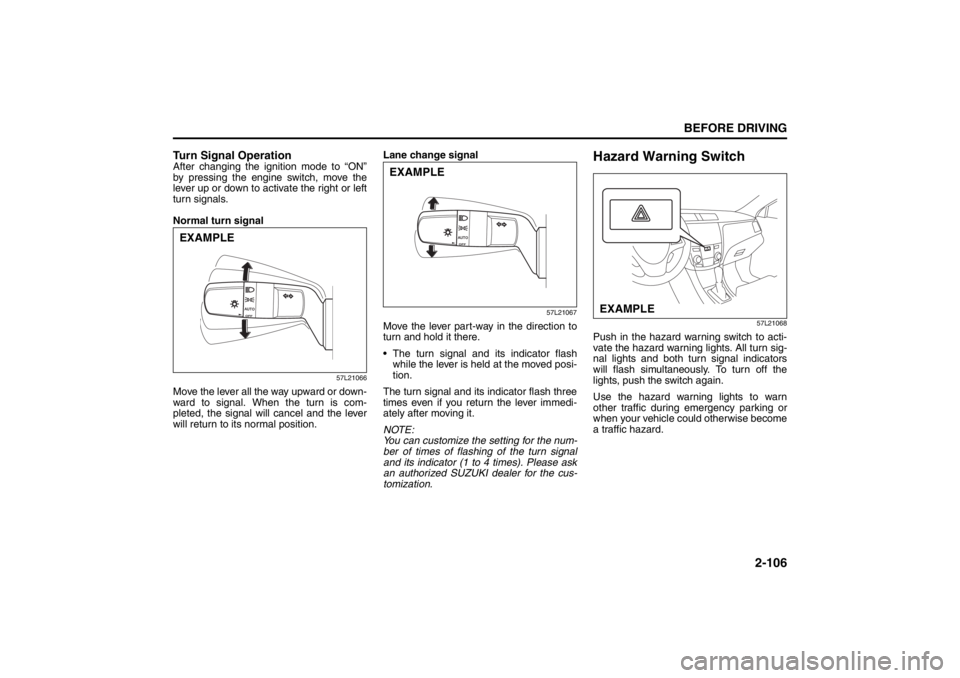
Turn Signal OperationAfter changing the ignition mode to “ON”
by pressing the engine switch, move the
lever up or down to activate the right or left
turn signals.
Normal turn signal
57L21066
Move the lever all the way upward or down-
ward to signal. When the turn is com-
pleted, the signal will cancel and the lever
will return to its normal position.Lane change signal
57L21067
Move the lever part-way in the direction to
turn and hold it there.
The turn signal and its indicator flash
while the lever is held at the moved posi-
tion.
The turn signal and its indicator flash three
times even if you return the lever immedi-
ately after moving it.
NOTE:
You can customize the setting for the num-
ber of times of flashing of the turn signal
and its indicator (1 to 4 times). Please ask
an authorized SUZUKI dealer for the cus-
tomization.
Hazard Warning Switch
57L21068
Push in the hazard warning switch to acti-
vate the hazard warning lights. All turn sig-
nal lights and both turn signal indicators
will flash simultaneously. To turn off the
lights, push the switch again.
Use the hazard warning lights to warn
other traffic during emergency parking or
when your vehicle could otherwise become
a traffic hazard.
EXAMPLE
EXAMPLE
EXAMPLE
Page 132 of 388

3-1OPERATING YOUR VEHICLE
57L20-03E
Exhaust Gas Warning
52D334
Daily Inspection ChecklistBefore Driving1) Make sure that windows, mirrors, lights
and reflectors are clean and unob-
structed.
2) Visually check the tires for the following
points:
– the depth of the tread groove
– abnormal wear, cracks and damage
– loose wheel nuts
– existence of foreign material such as
nails, stones, etc.
Refer to “Tires” in “INSPECTION AND
MAINTENANCE” section for details.
3) Look for fluid, oil leaks.
NOTE:
It is normal for water to drip from the air
conditioning system after use.
4) Make sure the hood is fully closed and
latched.
5) Check the headlights, turn signal lights,
brake lights and horn for proper opera-
tion.
6) Lock all doors.
7) Adjust the seat and adjustable head
restraints (if equipped).
8) Check the brake pedal.
9) Adjust the mirrors.
10)Make sure that you and all passengers
have properly fastened your seat belts.
11)Make sure that all warning lights come
on as the ignition mode is changed to
“ON” by pressing the engine switch.
WARNING
Avoid breathing exhaust gases.
Exhaust gases contain carbon mon-
oxide, a potentially lethal gas that is
colorless and odorless. Since carbon
monoxide is difficult to detect by
itself, be sure to take the following
precautions to help prevent carbon
monoxide from entering your vehicle.
Do not leave the engine running in
garages or other confined areas.
(Continued)
WARNING
(Continued)
Do not park with the engine run-
ning for a long period of time, even
in an open area. If it is necessary to
sit for a short time in a parked vehi-
cle with the engine running, make
sure the air intake selector is set to
“FRESH AIR” and the blower is at
high speed.
Avoid operating the vehicle with
the trunk open. If it is necessary to
operate the vehicle with the trunk
open, make sure the sunroof (if
equipped) and all windows are
closed, and the blower is at high
speed with the air intake selector
set to “FRESH AIR”.
To allow proper operation of your
vehicle’s ventilation system, keep
the air inlet grille in front of the
windshield clear of snow, leaves or
other obstructions at all times.
Keep the exhaust tailpipe area clear
of snow and other material to help
reduce the buildup of exhaust
gases under the vehicle. This is
particularly important when parked
in blizzard conditions.
Have the exhaust system inspected
periodically for damage and leaks.
Any damage or leaks should be
repaired immediately.
Ignition Switch: 8
Page 135 of 388

3-4
OPERATING YOUR VEHICLE
57L20-03E
Keyless Push Start SystemProvided the keyless start system remote
controller is within the “interior workable
area” (Refer to the related explanation in
this section), you can use the engine
switch for starting the engine and selecting
a power supply mode (“ACC” or “ON”). In
addition, the following functions can be
used:
Keyless entry function. Refer to “KeylessStart System Remote Controller” in the
“Before Driving” section for details.
Locking and unlocking doors using a request switch. Refer to “Keyless Start
System Remote Controller” in the
“Before Driving” section for details.
Opening the trunk lid from outside using the trunk lid request switch.
Immobilizer (anti-theft) function. Refer to “Immobilizer System” in the “Before Driv-
ing” section for details.Engine Switch IlluminationThe engine switch is illuminated lit in the
following situations:
The driver’s door is open (only when the
engine is not in operation).
For 15 seconds after the driver’s door is closed (only when the engine is not in
operation).
The position lights are on.
The illumination will fade out when it is not
required.
82K253
NOTE:
To save the battery, the illumination will be
automatically turned off when both of the
following conditions are simultaneously
met (battery saver function):
The headlights and position lights are turned off.
A period of 15 minutes has elapsed after opening the driver’s door.
Selection of Power Supply ModesPress the engine switch to select the
“ACC” or “ON” mode as follows when you
use an electric accessory or check the
operation of instruments without running
the engine.
1) Bring the keyless start system remote controller with you and sit in the driver’s
seat.
2) Without depressing the brake pedal, press the engine switch (1).
82K254
Every time you push the engine switch
without the brake pedal depressed, the
power supply mode changes as follows.
(1)
Lighting/Turn Signal Control Lever: 8
Windshield Wiper and Washer Lever: 8
Page 137 of 388

3-6
OPERATING YOUR VEHICLE
57L20-03E
on the information display when you
press the engine switch to change the
ignition mode to “ON”. Refer to “Informa-
tion Display” in the “Before Driving” sec-
tion for details. For details on replacing
the battery, refer to the “Keyless Start
System Remote Controller” section in
the “Before Driving” chapter.“Remote Controller Outside” Warn-
ingWhen the conditions described below are
met, the system gives a “remote controller
outside” warning by sounding the interior
and exterior buzzers and flashing the
immobilizer/keyless start system and mas-
ter warning indicator lights.
The remote controller is not inside the vehicle when any of the doors is opened
when the engine is running or when the
engine switch is pressed to change the
ignition mode to “ACC” or “ON” and then
all doors are closed.
The remote controller is not inside the vehicle when you attempt to start the
engine after changing the ignition mode
to “ACC” or “ON” by pressing the engine
switch.
57L31003
(1) Immobilizer/keyless start system
warning light (flashing)
(2) Master warning indicator light (flash- ing)
NOTE:
If the warning is given, locate the remote controller as soon as possible.
Any attempt to start the engine will fail while the warning is active. The mes-
sage appearing on the information dis-
play in the instrument cluster will also
indicate this condition. Refer to “Informa-
tion display” in the “Before Driving” sec-
tion for details.
Flashing of the immobilizer/keyless start
system warning light and the master
warning indicator light should stop
shortly after the remote controller is
brought back inside the vehicle. If they
do not stop flashing, change the ignition mode to “LOCK” (OFF) by pressing the
engine switch and then perform the
engine starting operation.
Always keep the remote controller with
you as the driver.
Interior Workable Area for Engine
Starting, Power Supply Mode Selec-
tion and “Remote Controller Out-
side” Warning
57L31004
(1) Interior workable area
The “interior workable area” for these func-
tions is defined as all the interior spaces
except for the space above the instrument
panel.
NOTE:
Even when the remote controller is in the “interior workable area”, if it is in any of
(1)
(2)
(1)
Rear Window Wiper/Washer Switch: 8
Tilt Steering Lock Lever: 6
Cruise Control: 7, 8