2010 SUZUKI KIZASHI Parking light switch
[x] Cancel search: Parking light switchPage 122 of 388

2-103BEFORE DRIVING
57L20-03E
57L21065
With the headlights on, push the lever for-
ward to switch to the high beams (main
beams) or pull the lever toward you to
switch to the low beams. When the high
beams (main beams) are on, a light on the
instrument panel will come on. To momen-
tarily activate the high beams (main
beams) as a passing signal, pull the lever
slightly toward you and release it when you
have completed the signal.
Auto-On Headlight System
57L21118
The Auto-on headlight system automati-
cally turns on all lights that are operated by
the lighting control lever on the steering
column, when the following three condi-
tions are all met.
Conditions for Auto-on headlight system
operation:
1) It is dark around the light sensor (5).
2) The lighting control lever is in the
“AUTO” position.
3) You press the engine switch to change
the ignition mode to “ON”.
This system is operated by a signal from
the light sensor (5) on the front wind shield.
Do not cover the sensor (5). If you do, the
system will not work correctly.NOTE:
The light sensor reacts even to infrared
rays, so it may operate incorrectly when
there are strong infrared rays.
Reprogramming the Automatic Light
Function
The following settings of the automatic light
function can be customized to your prefer-
ence. Please contact an authorized
SUZUKI dealer if you want the function
reprogrammed.
EXAMPLE
(5)
WARNING
It takes about 5 seconds for the light
sensor to react to a change in light-
ing conditions. To help avoid an acci-
dent due to reduced visibility, turn on
your headlights before driving into a
tunnel, parking structure or the like.
Page 123 of 388

2-104
BEFORE DRIVING
57L20-03E
Sensitivity of the light sensor
The amount of outside light needed to turn
the lights on and off is pre-set at the fac-
tory. The sensitivity of the light sensor can
be adjusted so that the lights are turned on
and off when it is:
lighter outside than the pre-set condition,
or
darker outside than the pre-set condition
Rain-triggered automatic lighting oper-
ation
The setting of the auto-on headlight sys-
tem can be changed to make it turn on the
headlights:
when the rain sensor senses heavy rain-
fall (pre-set at the factory)
when the rain sensor senses light and
heavy rainfall (in coordination with rain-
sensing wiper operation), or
independently from rain-sensing wiper
operation.
Light Reminder BuzzerThe interior buzzer continuously beeps if
you open the driver’s door without turning
off the headlights and position lights. This
function is triggered under the following
condition:
The headlights and position lights are on
even after you change the ignition mode
to “LOCK” (OFF) by pressing the engine
switch.
The buzzer stops sounding when you turn
off the headlights and position lights.
NOTE:
A message is indicated on the information
display in the instrument cluster while the
buzzer is sounding.
Daytime Running Light (D.R.L.)
System
57L21129
(1) D.R.L. indicator light
(2) Illumination indicator light
The headlights light, but are dimmer than
the low beam, when the following three
conditions are all met. Also, the D.R.L. indi-
cator light (1) on the instrument panel
comes on.
Conditions for D.R.L. system operation:
1) The engine is running.
2) The parking brake is released.
3) The headlights are off, or the lighting
switch in the “AUTO” position and it is
light around the light sensor.
(1) (2)
Page 125 of 388
2-106
BEFORE DRIVING
57L20-03E
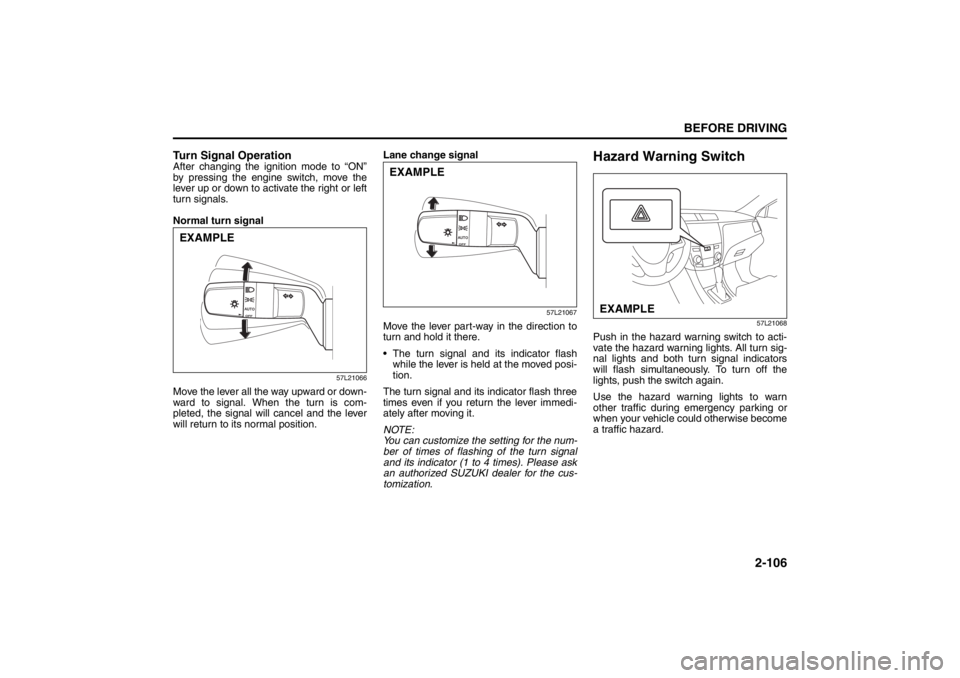
Turn Signal OperationAfter changing the ignition mode to “ON”
by pressing the engine switch, move the
lever up or down to activate the right or left
turn signals.
Normal turn signal
57L21066
Move the lever all the way upward or down-
ward to signal. When the turn is com-
pleted, the signal will cancel and the lever
will return to its normal position.Lane change signal
57L21067
Move the lever part-way in the direction to
turn and hold it there.
The turn signal and its indicator flash
while the lever is held at the moved posi-
tion.
The turn signal and its indicator flash three
times even if you return the lever immedi-
ately after moving it.
NOTE:
You can customize the setting for the num-
ber of times of flashing of the turn signal
and its indicator (1 to 4 times). Please ask
an authorized SUZUKI dealer for the cus-
tomization.
Hazard Warning Switch
57L21068
Push in the hazard warning switch to acti-
vate the hazard warning lights. All turn sig-
nal lights and both turn signal indicators
will flash simultaneously. To turn off the
lights, push the switch again.
Use the hazard warning lights to warn
other traffic during emergency parking or
when your vehicle could otherwise become
a traffic hazard.
EXAMPLE
EXAMPLE
EXAMPLE
Page 133 of 388

3-2
OPERATING YOUR VEHICLE
57L20-03E
12)Check all gauges.
13)Make sure that the BRAKE light turnsoff when the parking brake is released.
Once a week, or each time you fill your fuel
tank, perform the following under-hood
checks:
1) Engine oil level
2) Coolant level
3) Brake fluid level
4) Windshield washer fluid level
5) Hood latch operation Pull the hood release handle inside the
vehicle. Make sure that you cannot
open the hood all the way without
releasing the secondary latch. Be sure
to close the hood securely after check-
ing for proper latch operation. See the
item “All latches, hinges and locks” of
“CHASSIS AND BODY” in the “Periodic
Maintenance Schedule” section in the
“INSPECTION AND MAINTENANCE”
section for lubrication schedule. Once a month, or each time you fill your
fuel tank, check the tire pressure using a
tire pressure gauge. Also check the tire
pressure of the spare tire.
Engine Switch
57L31001
LOCK (OFF)
This is the mode for parking. When this
mode is selected by pressing the engine
switch and you open the deriver’s door, the
steering will be automatically locked.
NOTE:
The steering is not automatically locked
when the front passenger’s door and/or
rear door(s) alone are opened.
ACC
Press the engine switch to select this igni-
tion mode to use such electric equipment
as the audio system, outside rearview mir-
rors and accessory socket with the engine
off. When this position is selected, the
information display in the instrument clus-
ter shows the following message: IGNI-
WARNING
Make sure the hood is fully closed
and latched before driving. If it is not,
it can fly up unexpectedly during
driving, obstructing your view and
resulting in an accident.
Ignition Switch: 8
Page 139 of 388

3-8
OPERATING YOUR VEHICLE
57L20-03E
You should turn off such loads as theheadlights and air conditioning system to
facilitate starting of the engine.
Even if you fail to start the engine, the
starter motor will stop turning automati-
cally after a short time. After the starter
motor has stopped or if there is some
problem with the system, the starter
motor will rotate only while the engine
switch is being pressed.Stopping the engine Depress the engine switch to stop theengine after the vehicle stopped com-
pletely.
In case of emergency, you can stop the engine by depressing the engine switch
more than 3 seconds while the vehicle in
motion.
NOTE:
Except in emergency, do not stop the
engine while the vehicle in motion.
The steering and braking operation will
require more effort s when the engine
stopped.
Refer to “Braking” in the “OPERATING
YOUR VEHICLE” section.
Starting a Cold EngineWith your foot off the accelerator pedal,
crank the engine by pressing the engine
switch to change the ignition mode to
“START”.
After pressing the engine switch to change
the ignition mode to “START”, the starter
cranks the engine for about 12 seconds
before it can start the engine. If the engine
fails to start at the first attempt, wait about
15 seconds, then try again while keeping
the engine switch pressed while pressing
down the accelerator pedal to 1/3 of its
travel. Release the accelerator pedal when
the engine starts.
If the engine still does not start, try holding
the accelerator pedal all the way to the
floor while cranking. Th is should clear the
engine if it is flooded.
If you are unable to start the engine using
this procedure, consult your SUZUKI
dealer.
Starting a Warm EngineUse the same procedure as for “Starting a
Cold Engine”.If the master warning light flashes
and the engine cannot be startedYour keyless start system remote controller
may not be sensed as being within the
“interior workable area”. Try again after
making sure that you have the remote con-
troller with you. If the engine still cannot be
started, the battery of the remote controller
may be discharged. You must then use the
following method to be able to start the
engine.
57L21124
1) Make sure the parking brake is set fully.
2) Manual Transaxle – Shift to “N” (Neu- tral) and fully depress the clutch pedal.
Hold the clutch and brake pedals fully
depressed.
CAUTION
If the engine doesn’ t start on the first
try, wait about 15 seconds before try-
ing again.
(1)
(2)
Cruise Control: 7, 8
Remote Audio Controls:
Horn: 6
Page 141 of 388
3-10
OPERATING YOUR VEHICLE
57L20-03E
Steering lock warning buzzer
If the steering lock fails to engage due to a
fault in the system even when you press
the engine switch to change the ignition
mode to “LOCK” (OFF), the interior buzzer
will warn you of this condition with
repeated short beeps. If this happens,
have the vehicle inspected by an autho-
rized SUZUKI dealer.
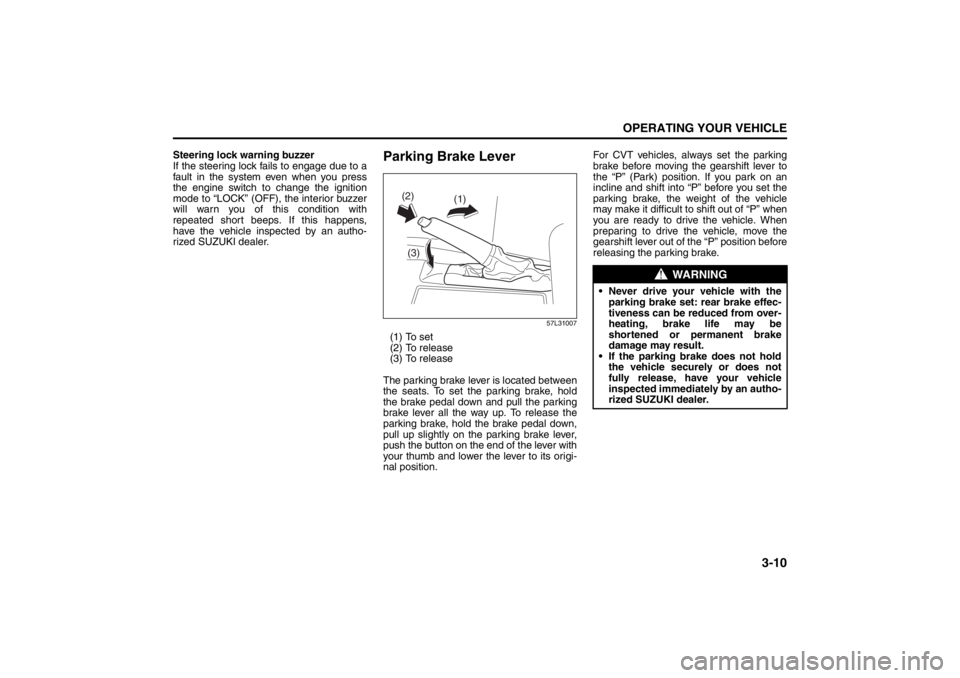
Parking Brake Lever
57L31007
(1) To set
(2) To release
(3) To release
The parking brake lever is located between
the seats. To set the parking brake, hold
the brake pedal down and pull the parking
brake lever all the way up. To release the
parking brake, hold the brake pedal down,
pull up slightly on the parking brake lever,
push the button on the end of the lever with
your thumb and lower the lever to its origi-
nal position. For CVT vehicles, always set the parking
brake before moving the gearshift lever to
the “P” (Park) position. If you park on an
incline and shift into “P” before you set the
parking brake, the weight of the vehicle
may make it difficult to
shift out of “P” when
you are ready to drive the vehicle. When
preparing to drive the vehicle, move the
gearshift lever out of the “P” position before
releasing the parking brake.
(1)
(2)
(3)
WARNING
Never drive your vehicle with the parking brake set: rear brake effec-
tiveness can be reduced from over-
heating, brake life may be
shortened or permanent brake
damage may result.
If the parking brake does not hold the vehicle securely or does not
fully release, have your vehicle
inspected immediately by an autho-
rized SUZUKI dealer.
Page 154 of 388

3-23OPERATING YOUR VEHICLE
57L20-03E
steadily increase. When you release the
switch, the new speed will be maintained.
To reset at a slower cruising speed, press
repeatedly or hold push down the “RES +/
SET –” switch (3) until the vehicle has
slowed to the desired speed, then release
the switch. The new speed will be main-
tained.
NOTE:
You can adjust the set speed by approxi-
mately 1.0 mph (1.6 km/h) by pushing a
cruise control switch quickly.
Cancellation of the Cruise Control
The “SET” indicator light will go off and the
cruise control will be canceled temporarily
with following procedures:
Push the “CANCEL” switch (2).
Depress the brake pedal.
For manual transaxle, depress the clutch
pedal.
For CVT, downshift from 3rd to 2nd in the
manual mode.
The vehicle speed falls more than about
20 percent from the set speed.
Any time the vehicle speed falls below
25 mph (40 km/h).
When the vehicle skids and ESP
® (if
equipped) is activated.
To resume the previously set speed, push
up the “RES +/SET –” switch (3) and turn
on the “SET” indicator light. Besides, the
vehicle speed has to be above 25 mph (40km/h) when the vehicle is not in the above
conditions.
To turn off the cruise control system, push
the “CRUISE” switch (1) and make sure
the “CRUISE” indicator light is off.
Also, if the malfunction indicator light in the
instrument cluster comes on or blinks, the
cruise control system will be turned off.
NOTE:
If you turn off the cruise control system, the
previously set speed in the memory is
cleared. Reset your cruising speed again.
Parking Sensors
(if equipped)
57L40019
(1) Symbol representing an obstacle
detected by parking sensor*
* This symbol represents an obstacle that
is located to the right rear at the vehicle.
The parking sensor system uses ultra-
sonic sensors to detect obstacles near
the rear bumper. If obstacles are sensed
while you are parking or moving the
vehicle slowly, the system warns you by
sounding a buzzer and displaying sym-
bols representing the obstacles on the
information display in the instrument
cluster.
The system emits an ultrasonic wave
and the relevant sensor detects the
return of the wave reflected by an obsta-
cle. The system measures the time
(1)
Page 157 of 388

3-26
OPERATING YOUR VEHICLE
57L20-03E
How to Use the Parking SensorParking Sensor Switch
57L31021
(1) Parking sensor switch
(2) Indicator
When you push the parking sensor
switch with the engine switch in the “ON”
mode, the switch releases to the ON
position and the indicator in the switch
comes on. If you then place the gearshift
lever in the “R” position, the parking sen-
sor system is activated.
Push the switch again and it stays in; this
is the OFF position. The indicator in the
switch goes out and the parking sensor
is deactivated.NOTE:
If you push the parking sensor switch from
the OFF to ON position when the ignition
mode has been changed to “ON” by press-
ing the engine switch, the inside buzzer
sounds once.
Obstacle Indication by Parking Sen-
sor
57L31020
(1) Obstacle detected by rear center sen-
sors
(2) Obstacle detected by rear corner sen-
sors
Upon detecting an obstacle, the parking
sensor causes an interior buzzer to sound
and a symbol representing the obstacle
appears an the information display in the
instrument cluster.
A different symbol is displayed depend-
ing on the direction and distance of the
obstacle.
A buzzer located behind the rear seat
sounds when a sensor at the rear
detects an obstacle.
(2) (1)
Switch
posi-
tionState
ON
The indicator lights up and
when all necessary condi-
tions are met, system
becomes ready for opera-
tion.
OFF
The system does not
operate. Place the switch
in this position if you do
not wish to use the park-
ing sensor.
(1) (2) (2)