Page 223 of 388

5-44
OTHER CONTROLS AND EQUIPMENT
57L20-03E
Security number (PIN)
The security number (PIN) is specified.
Once PIN is specified, PIN entry is
required when toggling Phonebook
between locking and unlocking.
1) Press the Off Hook button (7).
The Bluetooth
® main menu appears.
2) Turn the TUNE FOLDER PUSH
SOUND knob (1) to select “Setup”,
and press the TUNE FOLDER PUSH
SOUND knob (1) to determine the
selection.
3) Turn the TUNE FOLDER PUSH
SOUND knob (1) to select “Security”,
and press the TUNE FOLDER PUSH
SOUND knob (1) to determine the
selection.
4) Turn the TUNE FOLDER PUSH
SOUND knob (1) to select “Set PIN”,
and press the TUNE FOLDER PUSH
SOUND knob (1) to determine the
selection.
If the PIN is already specified, PIN
entry is required. If the PIN needs to
be changed, enter the current PIN.
5) Turn the TUNE FOLDER PUSH
SOUND knob (1) to select a number
for ones digit, and press the TUNE
FOLDER PUSH SOUND knob (1) to
determine the selection. Determine the
tens, hundreds, and thousands digits
in the same manner.6) Turn the TUNE FOLDER PUSH
SOUND knob (1) to select “Confirm”,
and press the TUNE FOLDER PUSH
SOUND knob (1) to determine the
selection.
NOTE:
Selection of “Go Back” displays the previ-
ous menu.Phonebook lock
Locking Phonebook disables users from
referring to, using, editing, and deleting
Phonebook, outgoing call record, and
incoming call record.
1) Press the Off Hook button (7).
The Bluetooth
® main menu appears.
2) Turn the TUNE FOLDER PUSH
SOUND knob (1) to select “Setup”,
and press the TUNE FOLDER PUSH
SOUND knob (1) to determine the
selection.
3) Turn the TUNE FOLDER PUSH
SOUND knob (1) to select “Security”,
and press the TUNE FOLDER PUSH
SOUND knob (1) to determine the
selection.
4) Turn the TUNE FOLDER PUSH
SOUND knob (1) to select “Phbk
Lock”, and press the TUNE FOLDER
PUSH SOUND knob (1) to determine
the selection.
If Phonebook is already set to Lock,
“Phbk Lock.” is displayed.
5) Enter a PIN number.
NOTE:
Selection of “Go Back” displays the previ-
ous menu.
Page 224 of 388

5-45OTHER CONTROLS AND EQUIPMENT
57L20-03E
Phonebook unlock
1) Press the Off Hook button (7).
The Bluetooth
® main menu appears.
2) Turn the TUNE FOLDER PUSH
SOUND knob (1) to select “Setup”,
and press the TUNE FOLDER PUSH
SOUND knob (1) to determine the
selection.
3) Turn the TUNE FOLDER PUSH
SOUND knob (1) to select “Security”,
and press the TUNE FOLDER PUSH
SOUND knob (1) to determine the
selection.
4) Turn the TUNE FOLDER PUSH
SOUND knob (1) to select “Phbk
Unlock”, and press the TUNE
FOLDER PUSH SOUND knob (1) to
determine the selection.
If Phonebook is already set to Unlock,
“Phbk Unlock.” is displayed.
5) Enter a PIN number.
NOTE:
Selection of “Go Back” displays the previ-
ous menu.Adjusting the guidance volume
You can adjust the guidance volume.
1) Press the Off Hook button (7).
The Bluetooth
® main menu appears.
2) Turn the TUNE FOLDER PUSH
SOUND knob (1) to select “Setup”,
and press the TUNE FOLDER PUSH
SOUND knob (1) to determine the
selection.
3) Turn the TUNE FOLDER PUSH
SOUND knob (1) to select “System
Setup”, and press the TUNE FOLDER
PUSH SOUND knob (1) to determine
the selection.
4) Turn the TUNE FOLDER PUSH
SOUND knob (1) to select “Guidance
Vol”, and press the TUNE FOLDER
PUSH SOUND knob (1) to determine
the selection.
The current guidance volume is dis-
played.
5) Turn the TUNE FOLDER PUSH
SOUND knob (1) to select guidance
volume, and press the TUNE FOLDER
PUSH SOUND knob (1) to determine
the selection.
NOTE:
Selection of “Go Back” displays the previ-
ous menu.Display of device data (Device Name)
BD address and device name is displayed.
1) Press the Off Hook button (7).
The Bluetooth
® main menu appears.
2) Turn the TUNE FOLDER PUSH
SOUND knob (1) to select “Setup”,
and press the TUNE FOLDER PUSH
SOUND knob (1) to determine the
selection.
3) Turn the TUNE FOLDER PUSH
SOUND knob (1) to select “System
Setup”, and press the TUNE FOLDER
PUSH SOUND knob (1) to determine
the selection.
4) Turn the TUNE FOLDER PUSH
SOUND knob (1) to select “Device
Name”, and press the TUNE FOLDER
PUSH SOUND knob (1) to determine
the selection.
5) Turn the TUNE FOLDER PUSH
SOUND knob (1) to display the BD
address and the device name.
NOTE:
Selection of “Go Back” displays the previ-
ous menu.
Page 239 of 388
5-60
OTHER CONTROLS AND EQUIPMENT
57L20-03E
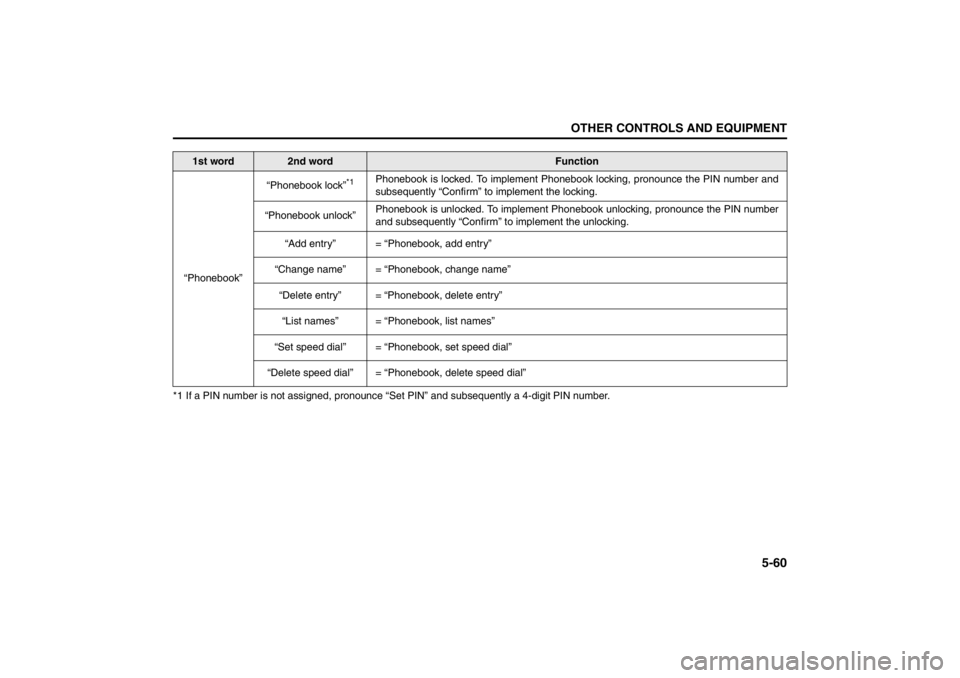
*1 If a PIN number is not assigned, pronounce “Set PIN” and subsequently a 4-digit PIN number.
1st word
2nd word
Function
“Phonebook”“Phonebook lock”
*1
Phonebook is locked. To implement Phonebook locking, pronounce the PIN number and
subsequently “Confirm” to implement the locking.
“Phonebook unlock”Phonebook is unlocked. To implement Phonebook unlocking, pronounce the PIN number
and subsequently “Confirm” to implement the unlocking.
“Add entry” = “Phonebook, add entry”
“Change name” = “Phonebook, change name”
“Delete entry” = “Phonebook, delete entry”
“List names” = “Phonebook, list names”
“Set speed dial” = “Phonebook, set speed dial”
“Delete speed dial” = “Phonebook, delete speed dial”
Page 242 of 388
5-63OTHER CONTROLS AND EQUIPMENT
57L20-03E
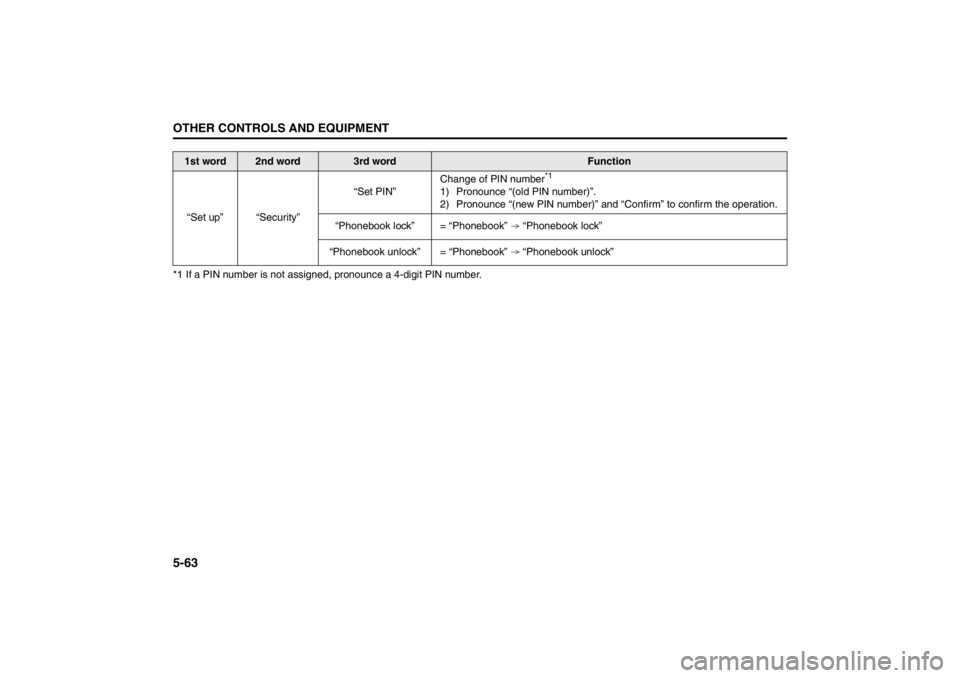
*1 If a PIN number is not assigned, pronounce a 4-digit PIN number.
1st word
2nd word
3rd word
Function
“Set up” “Security”“Set PIN”Change of PIN number
*1
1) Pronounce “(old PIN number)”.
2) Pronounce “(new PIN number)” and “Confirm” to confirm the operation.
“Phonebook lock” = “Phonebook” “Phonebook lock”
“Phonebook unlock” = “Phonebook” “Phonebook unlock”
Page 252 of 388
5-73OTHER CONTROLS AND EQUIPMENT
57L20-03E
Fuel Filler Door
57L51054
(2) Unlock
57L51058
The fuel filler door (3) is located on the left
rear side of the vehicle. To access the fuel
filler cap, the fuel filler door must be
opened by unlocking it using the power
door locking switch (1), keyless start sys-
tem remote controller, request switch, or
key and then pushing the fuel filler door (3)
at the location indicated by the arrow.If the fuel filler door fails to openIf the fuel filler door fails to open due to a
problem in the system or a flat battery,
have the vehicle inspected by an autho-
rized SUZUKI dealer. If you must open the
door immediately, do the following.
57L51055
Remove the trim (1) inside the trunk.
57L51056
Pull the rod (2) toward you. The fuel filler
door will be unlocked.
Push the rod inward to lock the door.
(3) Unlock
(4) Lock
(1)
(3) (2)
(3)
(1)
(2)(3)
(4)
Page 253 of 388
5-74
OTHER CONTROLS AND EQUIPMENT
57L20-03E
57L51057
From the outside, push the part indicated
by the arrow of the fuel filler door (5) (see
the illustration). The door will open slightly.
Fuel Filler Cap
79K053
To remove the fuel filler cap:
1) Open the fuel filler door.
2) Remove the cap by turning it counter-
clockwise.
57L51019
NOTE:
The cap holder (1) can hold the fuel filler
cap (2) when refueling.
To reinstall the fuel filler cap:
1) Turn the cap clockwise until you hear
several clicks.
2) Close the fuel filler door.
(5)
WARNING
Remove the fuel filler cap slowly. The
fuel may be under pressure and may
spray out, causing injury.Open CloseEXAMPLE
WARNING
Fuel is extremely flammable. Do not
smoke when refueling, and make
sure there are no open flames or
sparks in the area.
(1) (2)
Page 254 of 388
5-75OTHER CONTROLS AND EQUIPMENT
57L20-03E
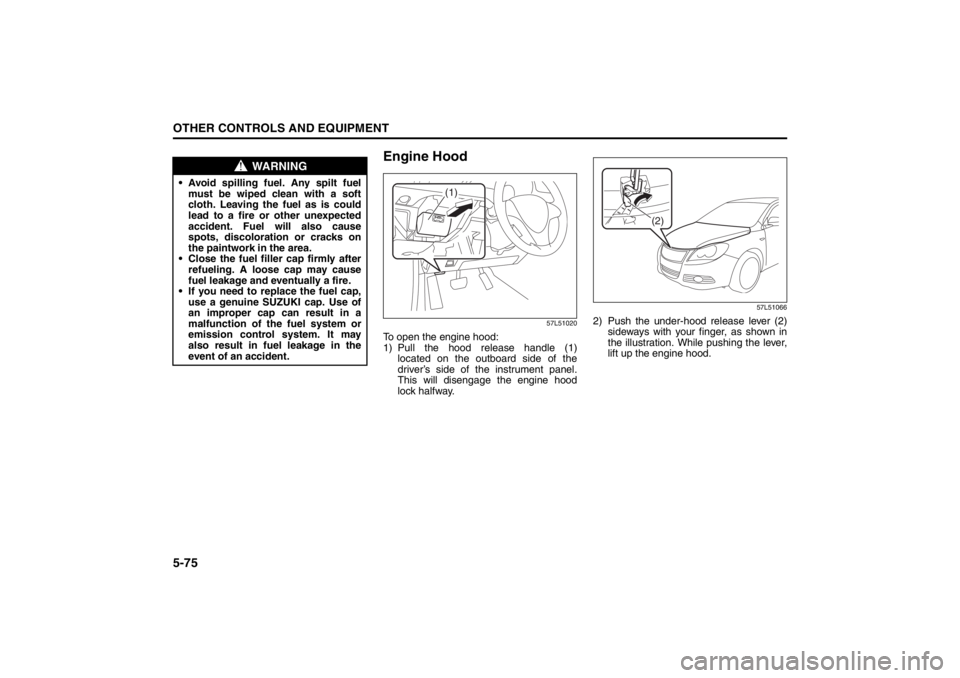
Engine Hood
57L51020
To open the engine hood:
1) Pull the hood release handle (1)located on the outboard side of the
driver’s side of the instrument panel.
This will disengage the engine hood
lock halfway.
57L51066
2) Push the under-hood release lever (2) sideways with your finger, as shown in
the illustration. While pushing the lever,
lift up the engine hood.
WARNING
• Avoid spilling fuel. Any spilt fuelmust be wiped clean with a soft
cloth. Leaving the fuel as is could
lead to a fire or other unexpected
accident. Fuel will also cause
spots, discoloration or cracks on
the paintwork in the area.
Close the fuel filler cap firmly after refueling. A loose cap may cause
fuel leakage and eventually a fire.
If you need to replace the fuel cap, use a genuine SUZUKI cap. Use of
an improper cap can result in a
malfunction of the fuel system or
emission control system. It may
also result in fuel leakage in the
event of an accident.
(1)
(2)
Page 256 of 388
5-77OTHER CONTROLS AND EQUIPMENT
57L20-03E
Sun Visor
57L50032
(1) Hook
(2) Vanity mirror cover
(3) Ticket holder
(4) Extension
The sun visors can be pulled down to block
glare coming through the windshield, or
they can be unhooked and turned to the
side to block glare coming through the side
window.
The extension (4) can be drawn out to
block glare widely. Both the driver’s and passenger’s sun
visors have a ticket holder on the side fac-
ing the interior when they are pulled down.
The ticket holder is on the vanity mirror
cover.
(1)
(2)
(3)
(4)
CAUTION
When unhooking and hooking a sun
visor, be sure to handle it by the hard
plastic parts or the sun visor can be
damaged.
CAUTION
Do not leave cards or similar plastic
objects in the ticket holder when
parking under the sun. The cabin
temperature may rise high enough to
cause the plastic objects to crack or
deform.