2010 SKODA FABIA Eco
[x] Cancel search: EcoPage 50 of 244

Lights and Visibility
49
Using the system
Safety
Driving Tips
General Maintenance
Breakdown assistance
Technical Data
– Turn the light switch into position O
page 48, fig. 36
- left.
– Switch on the switch for daylight driving lights
page 48, fig. 36
- right.
Activating daylight driving lights*
on vehicles with the “START-STOP”
system– Pull the turn signal light lever towards the
steering wheel, at the same time slide it
to the top and hold it in this position.
– Switch on the ignition - the right turn signal light flashes 4x.– Switch off the ignition - an audible signal
sounds, which confirms
the activation of
the daylight driving lights.
– Release the turn signal light lever.Deactivating daylight driving lights*– Switch off the switch for daylight driving lights
page 48, fig. 36
- right.
– Turn the light switch to the position side lights
or low beam
page 48,
fig. 36
- left.
Deactivating daylight driving ligh
ts* on vehicles with the “START-
STOP” system– Pull the turn signal light lever towards the
steering wheel, at the same time slide it
to the bottom and hold it in this position.
– Switch on the ignition - the left turn signal light flashes 4x.– Switch off the ignition - an audible signal
sounds, which confir
ms the deactivation
of the daylight driving lights.
– Release the turn signal light lever. On vehicles with separate ligh
ts* for daylight driving lights in the fog lights or in the
front bumper, the parking lights and the lice
nce plate light do not come on when acti-
vating the function daylight drivin
g lights (neither front nor rear).
If the vehicle is not equipped with separate lights* for daylight driving lights, the combination of the low beam, the parking ligh
ts (front and rear) including the licence
plate light is used as daylight driving lights.
In some countries, the national
legal provisions require that the rear parking lights also
come on together with the separate lights* for daylight driving lights when activating the function daylight driving lights.Halogen projector headlights with cornering light function*For a better cornering illumination, the halogen projector headlights with cornering light function are set in the optimal position in line with the vehicle speed and the steering angle. If the warning light
comes on while driving or after the ignition is switched on, a
fault is confirmed.
WARNING
If there is a fault in the halogen projec
tor headlights with
cornering light func-
tion, the warning light
lights up in the instrument cluster. The halogen
projector headlights with cornering light function are automatically lowered to the emergency position, which prevents a po
ssible dazzling of oncoming traffic.
Thus the illuminated length of the road is shortened. Drive carefully and have the car inspected immediately by a specialist garage.Tourist light*Halogen projector headlights with cornering light functionThis mode makes it possible to drive in countries with opposing traffic system, driving on the left/right, without dazzling the oncoming vehicles. When the mode “tourist light” is active, the side to side swivel of the headlights is deactivated.Activating tourist lightBefore activating the tourist light,
the following condit
ions must be met:
Ignition switched off, light switched off (light switch in the position O), control dial for the headlamp beam adjustment in the position
0, no gear engaged or selector lever in
the position
N (automatic gearbox), tourist light deactivated.
– Switch on the ignition.Up to 10 seconds after the ignition is switched on:
s3j8.a.book Page 49 Tuesday, April 20, 2010 1:10 PM
Page 51 of 244

Lights and Visibility
50– Turn the light switch to the position
page 48.
– Engage the reverse gear (manual gearbox) or move the selector lever into the posi-
tion
R (automatic gearbox).
– Turn the control dial for headlamp
beam adjustment fr
om the position
0 to the
position
3 page 51.
Deactivating tourist lightBefore deactivating the tourist light, the following conditions must be met: Ignition switched off, light switched off (light switch in the position O), control dial for the headlamp beam adjustment in the position
3, no gear engaged or selector lever in
the position
N (automatic gearbox),
tourist light activated.
– Switch on the ignition.Up to 10 seconds after the ignition is switched on:– Turn the light switch to the position
page 48.
– Engage the reverse gear (manual gearbox) or move the selector lever into the posi-
tion
R (automatic gearbox).
– Turn the control dial for headlamp
beam adjustment fr
om the position
3 to the
position
0 page 51.
The adaptation of the halogen projector he
adlights must be performed as follows
page 150.Fog lights*
Switching on the fog lights– First of all turn the light switch into position
or fig. 37
.
– Pull the light switch out to the
first
detent .
The warning light
lights up in the instrument cluste
r when the fog lights are switched
on page 26.
Fog lights with the function “CORNER”* The fog lights with the function “CORNER” are designed for a better illu- mination of the surrounding area
near the vehicle when corning,
parking etc.The fog lights with the function “CORNER” ar
e adjusted according to the steering angle
or after switching on the turn signal light
6) in the following circumstances:
the vehicle is stationary and the engine
is running or it moves with a speed of
maximum 40 km/h;
the daylight driving lights are not switched on;
Low beam switched on.
A fault in the system of the fog lights with
the function “CORNER” is confirmed by the
warning light
lighting up.
Note
If the fog lights are switched on, the functi
on of the lights “CORNER” is not active.
Rear fog light
Switching on the rear fog light– First of all turn the light switch into position
or fig. 37
.
– Pull the switch into position . The fog lights* light up at the same time.
Fig. 37 Dash panel: Light switch
6)If both switch on versions are conflicting, for
example if the steering wheel is turned to the left
and the right turn signal light is switched on,
the turn signal light has the higher priority.
A1
A2
s3j8.a.book Page 50 Tuesday, April 20, 2010 1:10 PM
Page 54 of 244

Lights and Visibility
53
Using the system
Safety
Driving Tips
General Maintenance
Breakdown assistance
Technical Data
Interior lightingLighting of the interior of the vehicle front/rear* - typ 1Door contact switching mechanism (front and rear* doors)– Press the switch to the right, the symbol
appears
fig. 41
.
Switching the interior light on– Press the switch to the left, the symbol
appears.
Switching the interior light off– Press the switch into
the middle position
O.
Reading lights
– Press on one of the switches
fig. 41
in order to switch the right or left reading
light on or off.
On vehicles with central locking, the interi
or light is switched on for about 30 seconds
when the vehicle is unlocked, when a door is
opened or after withdrawing the ignition
key (if the relevant switch is in the door co
ntact position). The inner light goes out out
immediately after the ignition is switched on. A time delay switch* causes
the inner lighting on vehicl
es without a central locking
system stays on for a few seconds after the doors have been closed. The inner light goes out out immediately after the ignition is switched on.
The interior lighting is switched off after
about 10 minutes when a door has been left
open in order to avoid discharg
ing the battery of the vehicle.
Front interior lighting - without reading lightsThe rear interior lighting
fig. 42
is actuated by moving the switch to the symbol
,
O or to the middle position
.
The same principles apply for th
e interior lighting at the rear as for the for the interior
lighting at the front
page 53.
Note
We recommend having the bulb re
placed by a specialist garage.
Rear interior lighting* - type 2
Fig. 41 Detail of the headliner: Interior lighting front / rear
AAAAAA
AB
Fig. 42 Roof liner lightFig. 43 Roof liner light
s3j8.a.book Page 53 Tuesday, April 20, 2010 1:10 PM
Page 55 of 244

Lights and Visibility
54The rear interior lighting is op
erated by pressi
ng the button
page 53, fig. 43
.
The button has two positions for the interior li
ghting at the rear. In the first position, the
interior lighting is switched on permanently, in the second position (after pressing) it is switched via the door contacts.
Note
We recommend having the bulb replaced by a specialist garage.Luggage compartment lightThe lighting comes on automatically when th
e boot lid is opened. If the lid remains
open for more than about 10
minutes, the luggage compartment lighting switches off
automatically.VisibilityRear window heater– You can switch the rear window heater
on or off by pressing the switch
fig. 44
- the indicator light in the switch comes on or goes out.
The rear window heater only operates when the engine is running. The rear wind
ow heater
switches
off automatically after 7 minutes.
If the on-board voltage drops, the rear window
heater is switched off automatically, the
warning light flashes in the button.
For the sake of the environment
As soon as the window is de-iced or free fr
om mist, the heating should be switched off.
The reduced current consumption will have a favourable effect on fuel economy page 149, “Saving electricity”.Sun visorsYou can pull the sun visor for the driver or front passenger out of the fixture and swivel it toward the door in the direction of the arrow
fig. 45
.
The vanity mirrors* in the sun visors are provided with covers. Push the cover in direc- tion of arrow .
WARNING
The sun visors must not be swivelled to the side windows into the deployment area of the head airbags if any objects, su
ch as ball-point pens
etc. are attached
to them. This might result in injuries to the occupants if the head airbag is deployed.
Fig. 44 Switch for rear window heater
Fig. 4 Sun visor: swivelling outA1
A2
s3j8.a.book Page 54 Tuesday, April 20, 2010 1:10 PM
Page 56 of 244

Lights and Visibility
55
Using the system
Safety
Driving Tips
General Maintenance
Breakdown assistance
Technical Data
Windshield wiper and wash systemWindshield wiper You can operate the windscreen wipers and automatic wipe/wash using the windscreen wiper lever.The windscreen wiper lever
fig. 46
has the following positions:
Finger-operated wiping– If you wish to wipe the windscreen only
briefly
, push the lever into the sprung
position .
Intermittent wiping– Position the lever up into position . – Set with the switch the desired brea
k between the individual wiper strokes
Slow wipe– Position the lever up into position .Fast wipe– Position the lever up into position .
Automatic wipe/wash for windscreen– Pull the lever towards the steering wheel into the spring-tensioned position ,
the wash system and the windscreen wipers will operate.
– Release the lever. The windscreen wash system stops and the wiper continues for
another 1 - 3 wiper strokes (depending on
the period of spraying of the wind-
screen).
Wiping the rear window pane– Push the lever away from the st
eering wheel into position
fig. 46
, the wide-
screen wiper will operate every 6 seconds.
Automatic wipe/wash for the rear window pane– Push the lever away from the steering wheel into the spring-tensioned position ,
the windscreen wiper and wash system will operate.
– Letting go of the lever will cause the windscreen wash system to stop and the wiper
to continue for another 1 - 3 wiper strokes
(depending on the period of spraying of
the windscreen).
The lever will stay in position after releasing it
.
Switching windscreen wipers off– Move the lever back into
its home position .
The windscreen wipers and the windscreen washer system only operate if the ignition is switched on. The rear window will be wiped again if the window wipers are on when reverse gear is selected. The windscreen washer nozzles for the windscreen are heated* when the ignition is switched on. Top up with wash liquid
page 176.
WARNING
Properly maintained windscreen wiper blades are essential for clear visi-
bility and safe driving
page 56.
Fig. 46 Windscreen wiper lever
A4
A1
AA
A2A3
A5
A6
A7
A6
A0
s3j8.a.book Page 55 Tuesday, April 20, 2010 1:10 PM
Page 57 of 244

Lights and Visibility
56
Do not use the windscreen washer sy
stem at low temperatures, without
heating the windscreen beforehand.
Otherwise the window cleaner could
freeze on the windscreen and re
strict the view to the front.
In the event of a freezing up of the wi
ndscreen, first of al
l eliminate the ice
page 157 and then operate the windscr
een wiper otherwise the windscreen
wiper blades could be damaged.
Caution
In frosty weather, please firs
t of all check whether the windscreen wiper blades are not
frozen to the windscreen before switching
them on. Switching on windscreen wipers
when the blades are frozen to the windscreen may result in damage both to the blades and the motor of the windscreen wipers!
Note
The content of the windscreen wiper reserv
oir is 3.5 litres. On vehicles which are
equipped with a headlight cleaning system*, the content of the reservoir is 5.4 litres.Headlight cleaning system*The headlights are being cleaned after the windscreen washer system has been oper- ated for the fifth time, the low beam or main
beam are switched on as well as the wind-
screen wiper lever is held in the position
page 55, fig. 46
for about 1 second.
You should remove stubborn dirt (such as in
sect residues) from the headlight lenses at
regular intervals, for example when refuelling
. Please refer to the following guidelines
page 158, “The headlight lenses”. You should remove any snow from the fixtur
es of the washer nozzles and clear ice in
winter with a de-icing spray in order to
ensure proper operation of the cleaning
system.
Replacing wiper blades for the windscreen wipersTaking off the wiper blade– Fold windscreen wiper arm away from the windscreen. – Press the locking button, in order to un
lock the wiper blade and pull off in the
direction of arrow.
Attaching a wiper blade– Push the wiper blade until it locks up to the stop. – Check whether the wiper blade is correctly attached.– Fold the windscreen wiper ar
m back onto the windscreen.
Wiper blades in proper condition are essentia
l to obtain good visibility. Wiper blades
should not be allowed to become dirtied by
dust, insect remains and preserving wax.
Juddering or smearing of the wiper blades co
uld then be due to wax residues left on
the windscreen by vehicle washing in automa
tic vehicle wash systems. It is therefore
important to
degrease
the lips of the wiper blades after every pass through an
auto-
matic vehicle wash system
.
WARNING
If the windscreen wipers are handled ca
relessly, there is a risk of damage to
the windscreen.
WARNING (continued)
A5
Fig. 47 Wiper blade for the windscreen wiper
s3j8.a.book Page 56 Tuesday, April 20, 2010 1:10 PM
Page 58 of 244
Lights and Visibility
57
Using the system
Safety
Driving Tips
General Maintenance
Breakdown assistance
Technical Data
You should clean the wiper blades regu
larly with a windscreen cleaner in
order to avoid any smears. Clean a wiper blad
e with a sponge or cloth if it is very
dirty, for example from insect residues.
Replace the wiper blades once or twice a year for safety reasons. The wiper
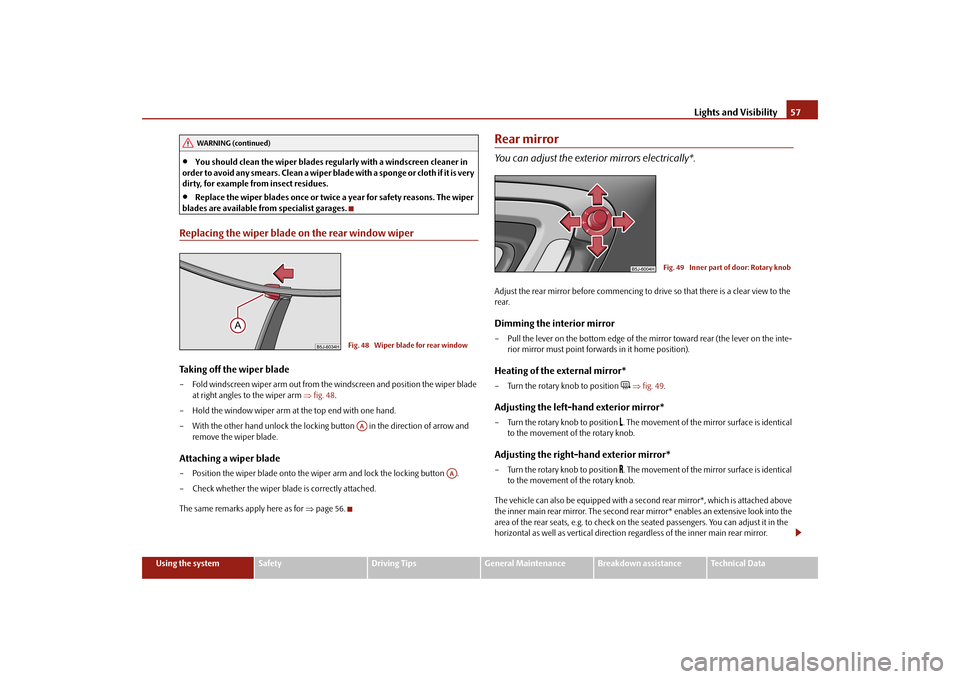
blades are available from specialist garages.Replacing the wiper blade on the rear window wiperTaking off the wiper blade– Fold windscreen wiper arm out from the windscreen and position the wiper blade
at right angles to the wiper arm
fig. 48
.
– Hold the window wiper arm at the top end with one hand.– With the other hand unlock the locking button in the direction of arrow and
remove the wiper blade.
Attaching a wiper blade– Position the wiper blade onto the wiper arm and lock the locking button . – Check whether the wiper bl
ade is correctly attached.
The same remarks apply here as for
page 56.
Rear mirrorYou can adjust the exterior mirrors electrically*.Adjust the rear mirror before commencing to drive so that there is a clear view to the rear.Dimming the interior mirror– Pull the lever on the bottom edge of the mirror toward rear (the lever on the inte-
rior mirror must point forwards in it home position).
Heating of the external mirror*– Turn the rotary knob to position
fig. 49
.
Adjusting the left-hand exterior mirror*– Turn the rotary knob to position
. The movement of the mirror surface is identical
to the movement of the rotary knob.
Adjusting the right-hand exterior mirror*– Turn the rotary knob to position
. The movement of the mirror surface is identical
to the movement of the rotary knob.
The vehicle can also be equipp
ed with a second rear mirror*, which is attached above
the inner main rear mirror. Th
e second rear mirror* enables an extensive look into the
area of the rear seats, e.g. to check on the seated passengers. You can adjust it in the horizontal as well as vertical direction re
gardless of the inner main rear mirror.
WARNING (continued)
Fig. 48 Wiper blade for rear windowAA
AA
Fig. 49 Inner part of door: Rotary knob
s3j8.a.book Page 57 Tuesday, April 20, 2010 1:10 PM
Page 60 of 244

Seats and Storage
59
Using the system
Safety
Driving Tips
General Maintenance
Breakdown assistance
Technical Data
Seats and StorageFront seatsBasic informationThe front seats have a wide range of differ
ent settings and can thus be matched to the
physical characteristics of the driver and
front passenger. Correct adjustment of the
seats is particularly important for:
safely and quickly reaching the controls;
a relaxed, fatigue-free body position;
achieving the maximum protection offered by the seat belts and the airbag
system. The chapters which follow describe the procedure which you should adopt for adjusting the seats.
WARNING
Never transport more occupants than the maximum seating in the vehicle.
Each occupant must correctly fasten the seat belt belonging to the seat.
Children must be fastened
page 130, “Transporting children safely” with a
suitable restraint system.
The front seats and the head restraints must always be adjusted to match
the body size of the seat occupant as well as the seat belts must always be correctly fastened in order to provide an optimal protection for you and your occupants.
Always keep your feet in the footwell
when the vehicle is being driven -
never place your feet on the instrument panel, out of the window or on the surfaces of the seats. This is particular
ly important for the front seat passenger.
You will be exposed to increased risk of
injury if it becomes necessary to apply
the brake or in the event of an accident.
If an airbag is deployed, you may suffer
fatal injuries when adopting an incorrect seated position!
It is important for the driver and front
passenger to maintain
a distance of at
least 25 cm from the steering wheel or
dash panel. Not maintaining this
minimum distance will mean that the airbag
system will not be able to properly
protect you - hazard! The front seats and the head restraints must always also be correctly adjusted to match the body size of the occupant.
Ensure that there are no objects in
the footwell as any objects may get
behind the pedals during a driving or braking manoeuvre. You would then no longer be able to operate the clutch, to brake or accelerate.
Do not transport any objects on the front passenger seat except those
provided for this purpose (e.g. child safety seat) - risk of accident!Adjusting the front seatsAdjusting a seat in a forward/back direction–Pull the lever
fig. 50
up and push the seat into the desired position.
– Release the lever and push the seat further until the lock is heard to engage.Adjusting height of seat*– Lift the seat if required by pulling or pumping lever upwards.– Lower the seat if required by pushing or pumping lever downwards.
WARNING (continued)
Fig. 50 Controls at seat
A1A1
A2A2
s3j8.a.book Page 59 Tuesday, April 20, 2010 1:10 PM