Page 38 of 212
32 Keys, doors, windows
Picture no: 15987s.tif
Light emitting diode (LED)
During the first 10 seconds of anti-theft
alarm system activation: After the first 10 seconds of anti-theft
alarm system activation:
Contact a workshop for assistance if
problems are encountered.
Picture no: 15335t.tif
To deactivate
Press button q on radio remote control.
– or –
Switch on ignition.
If there is a fault in remote control, turn key
in driver’s door lock toward front of vehicle
as far as it will go. Then turn key back to
vertical position and remove.
If the alarm is triggered when the driver’s
door is opened, deactivate the anti-theft
alarm system by switching on the ignition. zLED comes on
=Test, delayed
switch-on,
zLED flashes
rapidly= Door, luggage
compartment or
bonnet open or
system fault.
zLED flashes
slowly=System switched on,
zLED
illuminates
for approx.
1second= Switch-off function.
Page 39 of 212

33
Keys, doors, windows
Picture no: 18094s.tif
Opening and closing the luggage
compartment 3 when the anti-theft
alarm system is enabled
1. To unlock:
Tailgate:
Turn key clockwise all the way
past the horizontal position. The tailgate
is unlocked and monitoring of the
passenger compartment and vehicle tilt
are disabled.
Picture no: 18120s.tif
Leaf doors:
Turn key anticlockwise all the
way past the vertical position. The leaf
doors are unlocked and monitoring of
the passenger compartment and vehicle
tilt are disabled.
2. Open the tailgate or leaf doors.
3. Close the tailgate or leaf doors.
4. To lock: Turn key back to horizontal or
vertical position. Monitoring of the
interior and vehicle tilt is enabled after
approx. 10 seconds. Note
zModifications to the passenger
compartment, such as fitting seat
covers, could hinder the function of
passenger compartment monitoring.
zSwitch off passenger compartment
monitoring of the interior of the parked
vehicle is being heated.
Alarm
When triggered, the alarm gives off an
acoustic signal (horn) and a visual signal
(hazard warning flashers). The number
and duration of the alarms are stipulated
by legislation.
The alarm can be silenced by pressing a
button on the remote control or by
switching on the ignition. The anti-theft
alarm system is deactivated at the same
time.
Page 40 of 212

34 Keys, doors, windows
Picture no: 18083s.tif
Exterior mirrors Adjust manually using handles in the front
doors or electrically 3 using switches in the
driver’s door console.
Manual exterior mirror adjustment
Adjust the exterior mirror using the handle.
Picture no: 18084s.tif
Electrical exterior mirror adjustment 3
Select the corresponding exterior mirror
with the rocker switch and adjust with the
four-way switch.
Aspherical exterior mirror 3
The aspherical mirror glass makes the blind
angle smaller. The curvature makes objects
look smaller, making it more difficult to
estimate how far away following vehicles
are.
Picture no: 18085s.tif
To retract exterior mirrors
The exterior mirrors can be folded in by
pressing gently on the outer edge of the
housing.
Return the mirrors to the driving position
before starting off.
For the safety of pedestrians, the exterior
mirrors will swing out of their normal
mounting position if they are bumped with
sufficient force. Reposition the mirror by
applying slight pressure to the mirror
housing.
Page 41 of 212
35
Keys, doors, windows
Picture no: 11549s.tif
Heated exterior mirrors 3
Heating is activated or deactivated by
pressing the Ü button.
Heating is operable when the ignition is
switched on.
Picture no: 18082s.tif
Interior mirror Swivel mirror housing to adjust.
To reduce dazzle, swivel the lever on the
underside of the mirror housing.
Picture no: 18104s.tif
Manual window operation,
front doors The door windows can be operated using
window winders.
Page 42 of 212

36 Keys, doors, windows
Picture no: 18105s.tif
Window in the sliding doors
3 Electric windows
3
Operational readiness
Operational when the ignition key is in
position 1 in the ignition switch.
Illumination of the rocker switches
indicates operational readiness.
Operational readiness ceases when the
driver’s door is open.
Picture no: 18106s.tif
Operation
To operate the window in stages, tap the
rocker switch. For automatic opening or
closing, hold the switch pressed for slightly
longer; to stop window movement, tap
rocker switch again.
Safety function
If the window glass encounters resistance
above the middle of the window during
automatic closing, it is immediately
stopped and the window opened again.
If the windows do not move easily (e.g. due
to frost), repeatedly tap the rocker switch
for the window in question repeatedly until
the window has been closed in stages. zTo open
= Release joint and push
outwards.
zTo close
= Pull joint and engage.
9 Warning
Exercise care when operating electric
windows. Risk of injury, especially for
children.
Keep a close watch on the windows
when closing them. Ensure that nothing
becomes trapped in them as they move.
Page 43 of 212

37
Keys, doors, windows
Picture no: 17899s.tif
Closing windows from the outside 3
The windows can be closed from the
outside using the remote control.
Hold the p button on the remote control
depressed until the front windows are
closed.
Overload
If the windows are repeatedly operated at
short intervals, the power supply is briefly
cut off. Fault
If the windows cannot be opened and
closed automatically, activate the window
electronics as follows:
1. Close doors.
2. Switch on ignition.
3. Close the window completely and hold
the rocker switch depressed for at least
another 5 seconds.
4. Open the window completely and hold
the rocker switch depressed for at least
another 1 second.
5. Repeat for each window.
Picture no: 11549s.tif
Heated rear window
3
Heating is activated or deactivated by
pressing the Ü button.
Heating is operable when the ignition is
switched on.
The heated rear window automatically
switches on when the diesel particle filter is
being cleaned 3 depending on the engine.
Page 99 of 212
93
Climate control
Picture no: 15928s.tif
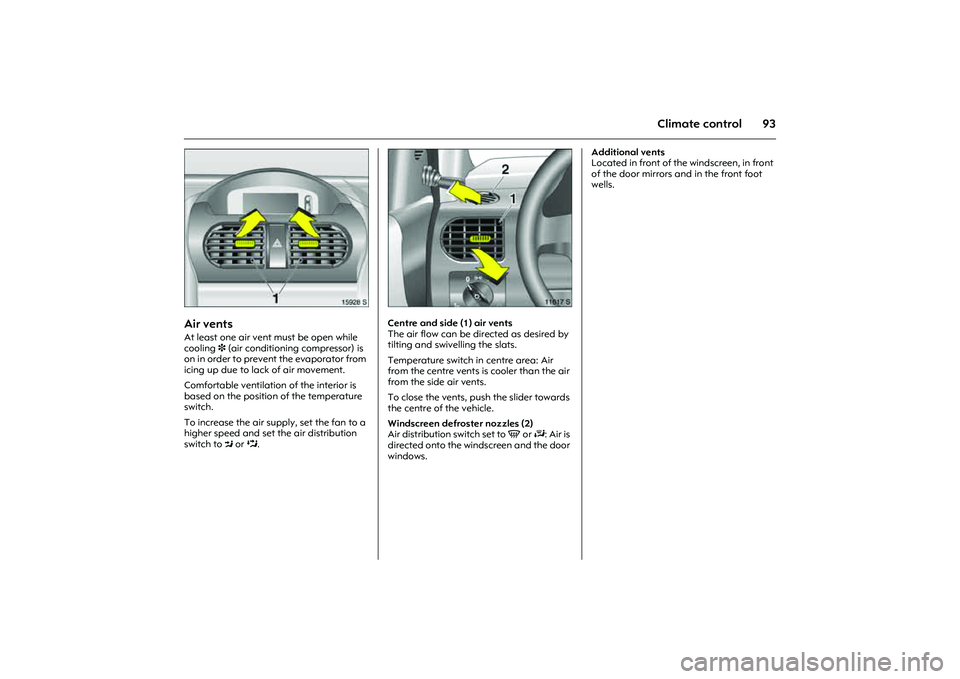
Air vents At least one air vent must be open while
cooling 3 (air conditioning compressor) is
on in order to prevent the evaporator from
icing up due to lack of air movement.
Comfortable ventilation of the interior is
based on the position of the temperature
switch.
To increase the air supply, set the fan to a
higher speed and set the air distribution
switch to M or L.
Picture no: 11617s.tif
Centre and side (1) air vents
The air flow can be directed as desired by
tilting and swivelling the slats.
Temperature switch in centre area: Air
from the centre vents is cooler than the air
from the side air vents.
To close the vents, push the slider towards
the centre of the vehicle.
Windscreen defroster nozzles (2)
Air distribution switch set to V or J: Air is
directed onto the windscreen and the door
windows. Additional vents
Located in front of the windscreen, in front
of the door mirrors and in the front foot
wells.
Page 100 of 212
94 Climate control
Picture no: 11612s.tif
Heating and ventilation systemTemperature
Adjusted using left-hand rotary switch.
The amount of heat is dependent on the
coolant temperature and is thus not fully
attained until the engine is warm.
Picture no: 11613s.tif
Air flow
Adjusted using centre rotary switch.
The rate of air flow is determined by the
fan. The fan should therefore also be
switched on during a journey.
Picture no: 11614s.tif
Air distribution
Adjusted using right-hand rotary switch.
Open the air vents when the switch is set
toL or M. Red area = warm
Blue area = cold
xoff
1-4selected fan speed
Vto windscreen and front side
windows
Jto windscreen, front side windows
and footwell
Kto footwell
Lto headroom and footwell
Mto headroom