2010 NISSAN MURANO remote control
[x] Cancel search: remote controlPage 242 of 425

Black plate (238,1)
Model "Z51-D" EDITED: 2009/ 8/ 3
will turn off automatically after a period of time.
To turn it on again, push the “DISC” button once
more.DVD operation keysTo operate the DVD drive, select the preferred
key displayed on the operation screen using the
multi-function controller.
PAUSE:
Select the “
” key and push the ENTER
button to pause the DVD. To resume playing the
DVD, use the “PLAY” key.
To pause the DVD, it is also possible to push the
“
” button on the keypad of the remote
controller.PLAY:
Select the “
” key and push the ENTER
button to start playing the DVD, for example,
after pausing the DVD.
To start playing the DVD, it is also possible to
push the “” button on the keypad of the
remote controller.
STOP:
Select the “
” key and push the ENTER
button to stop playing the DVD. To stop playing the DVD, it is also possible to
push the “
” button on the keypad of the
remote controller.
SKIP (FORWARD):
Select the “
” key and push the ENTER
button to skip the chapter(s) of the disc forward.
The chapters will advance the number of times
the ENTER button is pushed.
To skip the chapter(s) forward, it is also possible
to push the “” button on the keypad of the
remote controller.
SKIP (REWIND):
Select the “
” key and push the ENTER
button to skip the chapter(s) of the disc back-
ward. The chapters will go back the number of
times the ENTERbutton is pushed.
To skip the chapter(s) backward, it is also
possible to push the “
” button on the
keypad of the remote controller.
SAA2003
Setting (front) — DVD VIDEO-1
SAA1831
Setting (front) — DVD VIDEO-2
4-70
Monitor, heater, air conditioner, audio, phone and voice recognition systems
Page 243 of 425
Black plate (239,1)
Model "Z51-D" EDITED: 2009/ 8/ 3
SAA2013
Setting (front) — DVD VIDEO-3
SAA2014
Setting (rear) — DVD VIDEO-1
SAA1194
Setting (rear) — DVD VIDEO-2
SAA1195
Setting (rear) — DVD VIDEO-3
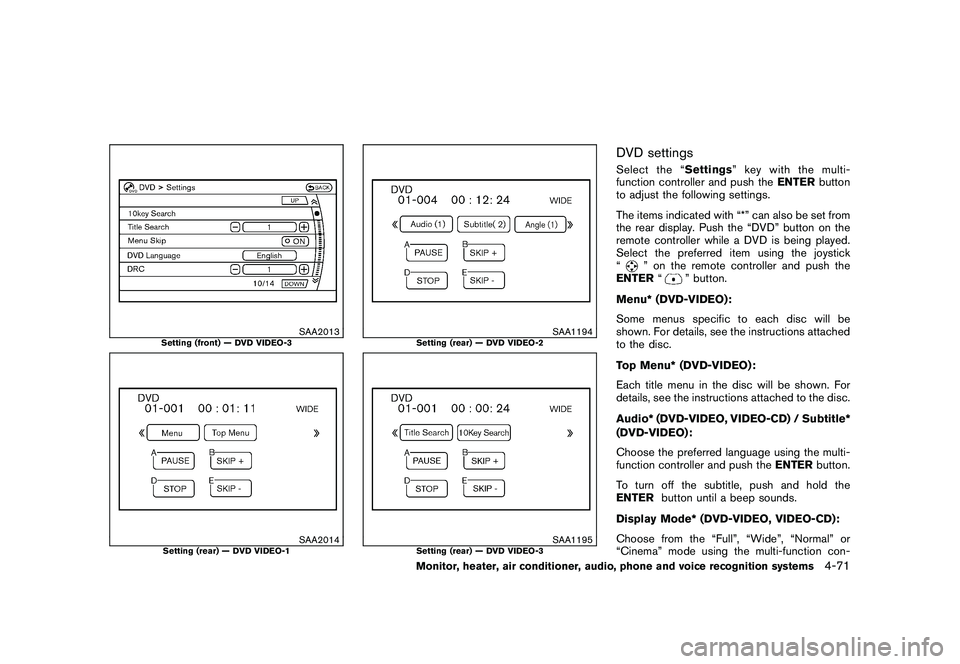
DVD settingsSelect the “Settings” key with the multi-
function controller and push the ENTERbutton
to adjust the following settings.
The items indicated with “*” can also be set from
the rear display. Push the “DVD” button on the
remote controller while a DVD is being played.
Select the preferred item using the joystick
“
” on the remote controller and push the
ENTER “
” button.
Menu* (DVD-VIDEO):
Some menus specific to each disc will be
shown. For details, see the instructions attached
to the disc.
Top Menu* (DVD-VIDEO):
Each title menu in the disc will be shown. For
details, see the instructions attached to the disc.
Audio* (DVD-VIDEO, VIDEO-CD) / Subtitle*
(DVD-VIDEO):
Choose the preferred language using the multi-
function controller and push the ENTERbutton.
To turn off the subtitle, push and hold the
ENTER button until a beep sounds.
Display Mode* (DVD-VIDEO, VIDEO-CD):
Choose from the “Full”, “Wide”, “Normal” or
“Cinema” mode using the multi-function con-
Monitor, heater, air conditioner, audio, phone and voice recognition systems
4-71
Page 244 of 425

Black plate (240,1)
Model "Z51-D" EDITED: 2009/ 8/ 3
troller and push theENTERbutton again.
Angle* (DVD-VIDEO):
If the DVD contains different angles (such as
moving images) , the current image angle can be
switched to another one.
Select the “ Angle” key and push the ENTER
button. When the “+” side or “ ” side is
selected, the angle will change.
Angle Mark (DVD-VIDEO):
When this item is turned on, an angle mark will
be shown on the bottom of the screen if the
scene can be seen from a different angle.
10 Key Search* (DVD-VIDEO, VIDEO-CD,
CD-DA):
Select the “10 Key Search ” key and push the
ENTER button to open the number entry screen.
Input the number you want to search for and
select the “OK ” key with the multi-function
controller. Then push the ENTERbutton. The
specified Title/Chapter or Group/Track will be
played.
Title Search* (DVD-VIDEO) :
The scene with the specified title will be
displayed the number of times the “+” side or
“ ” side is selected. Select No.* (VIDEO-CD):
Select the “Select No.
” key and push the
ENTER button to open the number entry screen.
Input the number you wish to search for and
select the “OK ” key with the multi-function
controller, and then push the ENTERbutton.
The specified scene will be played.
Menu Skip (DVD-VIDEO):
DVD menus are automatically configured and
the contents will be played directly when the
“Menu Skip ” key is turned on. Note that some
discs may not be played directly even if this item
is turned on.
DVD Language (DVD-VIDEO, VIDEO-CD):
Select the “DVD Language” key and push the
ENTER button to open the number entry screen.
Input the number corresponding to the preferred
language and select the “OK ” key with the multi-
function controller. Then push the ENTER
button. The DVD top menu language will be
changed to the one specified.
DRC (DVD-VIDEO) :
DRC (Dynamic Range Compression) allows you
to tune the dynamic range of the sound
recorded in the Dolby Digital format.
Remote controller operationUse the remote controller to adjust the following
items.
Rear display open/close:
To open or close the flip-down rear display, push
the “
” button on the remote controller.
Joystick:
Use the joystick “
” to select the items
displayed on the rear screen.
ENTER button:
Push the ENTER“” button to make the
selected item complete on the rear screen.
BACK button:
Press to go back to the previous screen or
cancel the selection.
Display tilt:
Adjust the display angle by pushing the “DIS-
PLAY TILT” buttonor
.
DVD mode:
To select the DVD mode, push the DVD button.
AUX mode:
To select the AUX (Auxiliary input jacks) mode,
push the AUX button.
4-72
Monitor, heater, air conditioner, audio, phone and voice recognition systems
Page 245 of 425
Black plate (241,1)
Model "Z51-D" EDITED: 2009/ 8/ 3
Volume:
To control the volume level, push the “VOL”
button
or
.
Display:
Press to adjust the rear display screen bright-
ness, tint, contrast, etc.
Aspect:
To change the display size, push the “ASPECT”
button. Each time the button is pushed, the
display size will change to “Cinema”, “Wide”,
“Full” or “Normal”.
Sound:
To change the language, push the “SOUND”
button. Each time the button is pushed, the
language will change to each language stored in
the DVD.
Headphones:
The DVD sound can be heard through the
headphones.
Push the “
” button. Each time the button is
pushed the mode will switch to ON or OFF.
To control the volume of sound from the
headphones, use the VOLUME CONTROL
knob attached to the headphones. Track/Channel:
Press to skip to the previous or next DVD scene
selection.
Keypad:
: PLAY/PAUSE button: STOP button: FORWARD button: REWIND button: FORWARD button for still images (for
DVD-AUDIO): REWIND button for still images (for DVD-AUDIO)
CARE AND MAINTENANCEUse a lightly dampened, lint free cloth to clean
the surfaces of your Mobile Entertainment
System. (DVD player face, screen, remote
controller, etc.)
CAUTION
. Do not use any solvents or cleaning
solutions when cleaning the video
system.
. Do not use excessive force on the
monitor screen. .
Avoid touching or scratching the
monitor screen as it may become
dirty or damaged.
. Do not attempt to operate the
system in extreme temperature con-
ditions [below 48F( 208 C) and
above 158 8F (70 8C)].
. Do not attempt to operate the
system in extreme humidity condi-
tions (less than 10% or more than
75%) .
Monitor, heater, air conditioner, audio, phone and voice recognition systems
4-73
Page 419 of 425

Black plate (3,1)
Front manual seat adjustment....................... 1-3
Front passenger air bag and status light ........ 1-52
Front power seat adjustment ....................... 1-4
Front seat, Front seat adjustment .................. 1-3
Front-seat active head restraint ................... 1-11
Fuel Capacities and recommended fuel/
lubricants ......................................... 9-2
Distance to empty ............................. 2-23
Fuel economy .................................. 5-20
Fuel economy information (display) ............. 4-9
Fuel octane rating ................................ 9-3
Fuel recommendation ............................ 9-3
Fuel-filler cap ................................... 3-23
Fuel-filler door .................................. 3-23
Gauge ............................................ 2-7
Fuses ............................................... 8-20
Fusible links ........................................ 8-20
G
Garage door opener, HomeLink
®Universal
Transceiver ......................................... 2-55
Gas cap ............................................ 3-23
Gauge ................................................ 2-4
Engine coolant temperature gauge ............. 2-6
Fuel gauge ....................................... 2-7
Odometer ......................................... 2-5
Speedometer ..................................... 2-5
Tachometer ....................................... 2-6
Trip computer .................................. 2-21
General maintenance ................................ 8-2
Glove box. .......................................... 2-43 H
Hands-free phone system Bluetooth
®(with navigation system) .......... 4-75
Bluetooth®(without navigation system) ...... 4-85
Hazard warning flasher switch .................... 2-36
Head restraints ....................................... 1-9
Headlights Bulb replacement .............................. 8-25
Headlight switch ............................... 2-32
Xenon headlights .............................. 2-32
Headphones (See INFINITI mobile
entertainment system) ...................... 4-66, 4-73
Heated seats ....................................... 2-37
Heater Engine block heater ........................... 5-30
Heater and air conditioner operation ......... 4-26
HomeLink
®Universal Transceiver ................. 2-55
Hood release ....................................... 3-18
Hook Coat hooks ..................................... 2-48
Luggage hook .................................. 2-46
Horn ................................................ 2-36
I
Ignition switch (Push-button) ....................... 5-9
Immobilizer system ................................. 2-27
In-cabin microfilter ................................. 4-30
Indicator Dot matrix display .............................. 2-17
Lights ........................................... 2-14
INFO button .......................................... 4-8
Inside mirror ........................................ 3-27
Inspection/maintenance (I/M) test ................ 9-26Instrument brightness control
..................... 2-35
Instrument panel ..................................... 2-2
Intelligent Key system ......................... 3-3, 3-7
Key operating range ............................. 3-9
Key operation .................................. 3-10
Warning light ................................... 2-12
Warning signals ................................ 3-13
Intelligent Key warning light ....................... 2-12
Interior light control switch ........................ 2-53
Interior light replacement .......................... 8-27
Interior lights ....................................... 2-53
iPod
®player operation ............................. 4-51
ISOFIX child restraint .............................. 1-28
J
Jump starting ......................................... 6-9
K
Keyless entry
(See remote keyless entry system) ............... 3-15
Keys................................................... 3-2 For Intelligent Key system ................. 3-3, 3-7
L
Labels Air bag warning labels ......................... 1-58
Air conditioner specification label ............ 9-10
Emission control information label ............ 9-10
Engine serial number ............................ 9-9
F.M.V.S.S./C.M.V.S.S. certification label. ....... 9-9
Tire and Loading information label .... 8-31, 9-10
Vehicle identification number (VIN) ............. 9-8
LATCH system ..................................... 1-28
10-3
Model "Z51-D" EDITED: 2009/ 8/ 3
Page 421 of 425
Black plate (5,1)
Parking on hills................................. 5-24
Personal lights ..................................... 2-53
Phone Bluetooth
®Hands-Free Phone System
(with navigation system) ....................... 4-75
Bluetooth®Hands-Free Phone System
(without navigation system) ................... 4-85
Car phone or CB radio ........................ 4-74
Power Front seat adjustment ........................... 1-4
Power door lock ................................. 3-4
Power outlet .................................... 2-39
Power steering fluid ........................... 8-11
Power steering system ........................ 5-25
Power windows ................................ 2-48
Precautions
Audio operation ................................ 4-31
Braking precautions ........................... 5-25
Child restraints ................................. 1-26
Cruise control .................................. 5-18
Driving safety ..................................... 5-7
Maintenance ...................................... 8-5
On-pavement and off-road driving ............. 5-5
Seat belt usage ................................ 1-15
Supplemental restraint system ................ 1-45
When starting and driving ....................... 5-2
Push starting ....................................... 6-10
Push-button ignition switch .................. 5-9, 5-10
“PUSH” warning ................................... 2-19
R
Radio ............................................... 4-31
Car phone or CB radio ........................ 4-74 FM-AM radio with Compact Disc (CD)
changer
.................................. 4-44, 4-39
Rain-sensing auto wiper system .................. 2-29
Rapid air pressure loss .............................. 5-6
Readiness for inspection/maintenance (I/M)
test .................................................. 9-26
Rear center seat belt .............................. 1-22
Rear door lock, Child safety rear door lock ........ 3-7
Rear seats ............................................ 1-6
Rear window and outside mirror defroster
switch ............................................... 2-31
Rear window wiper and washer switch .......... 2-30
Rearview monitor .................................. 4-19
Recorders, Event data ............................. 9-27
Registering your vehicle in another country ........ 9-8
Remote controller (DVD) .......................... 4-72
Remote keyless entry system ..................... 3-15
Reporting safety defects (US only) ............... 9-25
Rollover ............................................... 5-5
Roof, Roof rack .................................... 2-47
S
Safety Child seat belts ................................ 1-17
Reporting safety defects (US only) ........... 9-25
Towing safety .................................. 9-20
Seat adjustment Front manual seat adjustment. .................. 1-3
Front power seat adjustment ................... 1-4
Front seats ....................................... 1-3
Seat belt(s) Child safety ..................................... 1-17
Infants ........................................... 1-17
Injured persons ................................. 1-18 Larger children
................................. 1-18
Precautions on seat belt usage ............... 1-15
Pregnant women ............................... 1-18
Rear center seat belt .......................... 1-22
Seat belt cleaning ............................... 7-5
Seat belt extenders ............................ 1-25
Seat belt hooks ................................ 1-22
Seat belt maintenance ......................... 1-25
Seat belt warning light ........................ 2-14
Seat belts ...................................... 1-15
Seat belts with pretensioners ................. 1-57
Shoulder belt height adjustment .............. 1-21
Small children .................................. 1-18
Three-point type ............................... 1-18
Seat(s) Driver-side memory ............................ 3-30
Heated seats ................................... 2-37
Seats .............................................. 1-2
Security system, Vehicle security system ........ 2-25
Security system (NISSAN Vehicle Immobilizer
System) , Engine start .............................. 2-27
Selector lever Shift lock release .............................. 5-16
Servicing air conditioner ........................... 4-30
SETTING button ................................... 4-12
SHIFT “P” warning ................................. 2-19
Shift lock release, Transmission .................. 5-16
Shifting, CVT
(Continuously Variable Transmission) ............. 5-13
Shoulder belt height adjustment .................. 1-21
Small light indicator light .......................... 2-16
Spare tire ...................................... 8-39, 9-7
Spark plugs ........................................ 8-16
Speedometer ......................................... 2-5
10-5
Model "Z51-D" EDITED: 2009/ 8/ 3
Page 422 of 425

Black plate (6,1)
10-6StartingBefore starting the engine .................... 5-12
Jump starting ..................................... 6-9
Precautions when starting and driving ......... 5-2
Push starting ................................... 6-10
Starting the engine ............................ 5-13
STATUS button ...................................... 4-8
Status light, Front passenger air bag ............ 1-52
Steering Power steering fluid ........................... 8-11
Power steering system ........................ 5-25
Steering lock ................................... 5-10
Steering lock release malfunction
indicator ........................................ 2-18
Steering-wheel-mounted controls for
audio ............................................ 4-61
Tilt/telescopic steering ........................ 3-25
Storage ............................................. 2-41
Storage box ........................................ 2-44
Sun visors .......................................... 3-26
Sunglasses holder ................................. 2-42
Supplemental air bag warning labels ............. 1-58
Supplemental air bag warning light ....... 1-58, 2-14
Supplemental restraint system .................... 1-45
Precautions on supplemental restraint
system .......................................... 1-45
Switch Autolight switch ................................ 2-33
Fog light switch ................................ 2-35
Hazard warning flasher switch ................ 2-36
Headlight switch ............................... 2-32
Overdrive OFF switch ......................... 5-15
Power door lock switch ......................... 3-6
Rear window and outside mirror defroster
switch ........................................... 2-31 Turn signal switch
.............................. 2-35
Vehicle dynamic control (VDC) off switch . . . 2-39
T
Tachometer ........................................... 2-6
Temperature display ............................... 2-23
Temperature gauge, Engine coolant
temperature gauge ................................... 2-6
Theft (NISSAN Vehicle Immobilizer System) ,
Engine start ........................................ 2-27
Three-way catalyst ................................... 5-2
Tilt/telescopic steering ............................ 3-25
“Time to rest” indicator ............................ 2-20
Tire Pressure, Low tire pressure warning light . . . 2-12
Tire replacement indicator ..................... 2-20
Tires Flat tire ............................................ 6-2
Low tire pressure warning system .............. 5-3
Tire and Loading information label .... 8-31, 9-10
Tire chains ...................................... 8-36
Tire dressing ..................................... 7-3
Tire pressure ................................... 8-30
Tire pressure monitoring system
(TPMS) ..................................... 5-3, 6-2
Tire rotation .................................... 8-36
Types of tires ................................... 8-35
Uniform tire quality grading ................... 9-24
Wheel/tire size ................................... 9-7
Wheels and tires ............................... 8-30
Tonneau cover (see cargo cover) ................. 2-45
Top tether strap child restraints .................. 1-29
Touch screen system ................................ 4-4 Towing
Flat towing ...................................... 9-23
Tow truck towing ............................... 6-12
Towing a trailer ................................. 9-15
Towing safety .................................. 9-20
TPMS, Tire pressure monitoring system ........... 5-3
TPMS, Tire pressure warning system .............. 6-2
Trailer towing ....................................... 9-15
Transceiver, HomeLink
®Universal
Transceiver ......................................... 2-55
Transmission Continuously Variable Transmission (CVT)
fluid ............................................. 8-11
Driving with CVT
(Continuously Variable Transmission) ......... 5-13
Transmission selector lever lock release ..... 5-16
Transmitter
(See remote keyless entry system) ............... 3-15
Traveling or registering your vehicle in another
country ................................................ 9-8
Trip computer ...................................... 2-21
Trip odometer ...................................... 2-22
Turn signal switch .................................. 2-35
U
Underbody cleaning ................................. 7-3
Uniform tire quality grading ....................... 9-24
V
Vanity mirror ........................................ 3-30
Vanity mirror lights ................................. 2-55
Variable voltage control system ................... 8-15
Vehicle Dimensions and weights ........................ 9-8
Model "Z51-D" EDITED: 2009/ 8/ 3