Page 17 of 438
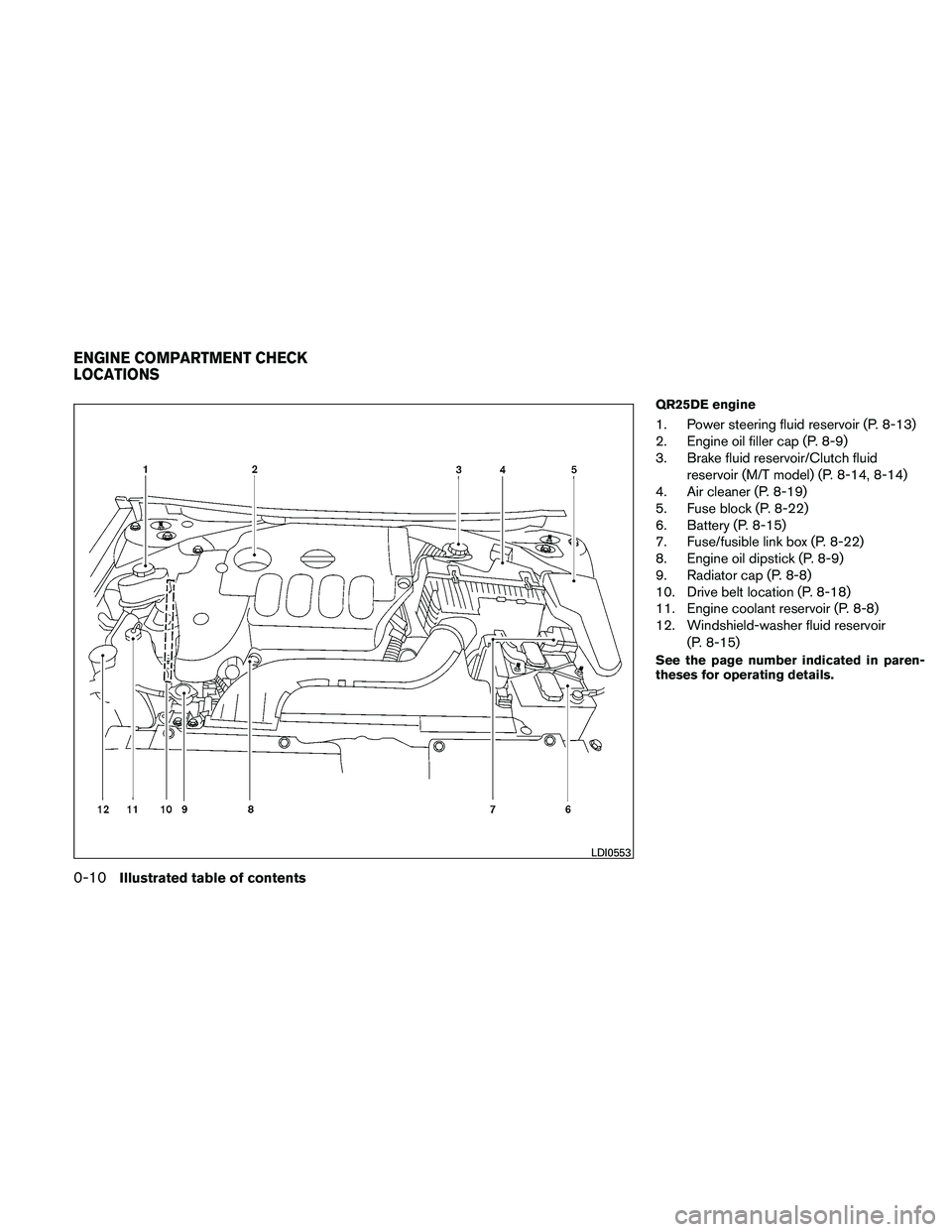
QR25DE engine
1. Power steering fluid reservoir (P. 8-13)
2. Engine oil filler cap (P. 8-9)
3. Brake fluid reservoir/Clutch fluidreservoir (M/T model) (P. 8-14, 8-14)
4. Air cleaner (P. 8-19)
5. Fuse block (P. 8-22)
6. Battery (P. 8-15)
7. Fuse/fusible link box (P. 8-22)
8. Engine oil dipstick (P. 8-9)
9. Radiator cap (P. 8-8)
10. Drive belt location (P. 8-18)
11. Engine coolant reservoir (P. 8-8)
12. Windshield-washer fluid reservoir
(P. 8-15)
See the page number indicated in paren-
theses for operating details.
Page 18 of 438
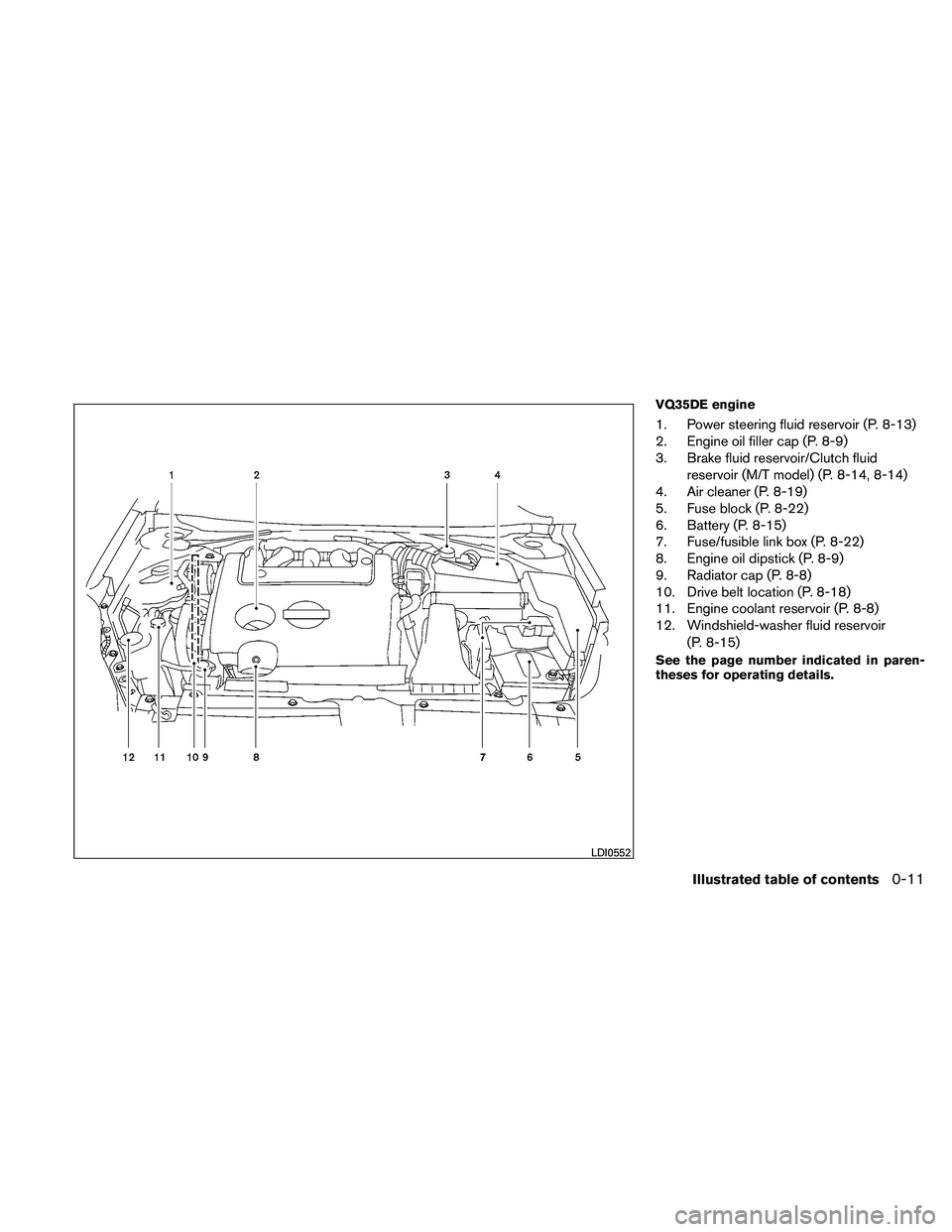
VQ35DE engine
1. Power steering fluid reservoir (P. 8-13)
2. Engine oil filler cap (P. 8-9)
3. Brake fluid reservoir/Clutch fluidreservoir (M/T model) (P. 8-14, 8-14)
4. Air cleaner (P. 8-19)
5. Fuse block (P. 8-22)
6. Battery (P. 8-15)
7. Fuse/fusible link box (P. 8-22)
8. Engine oil dipstick (P. 8-9)
9. Radiator cap (P. 8-8)
10. Drive belt location (P. 8-18)
11. Engine coolant reservoir (P. 8-8)
12. Windshield-washer fluid reservoir
(P. 8-15)
See the page number indicated in paren-
theses for operating details.
Page 22 of 438
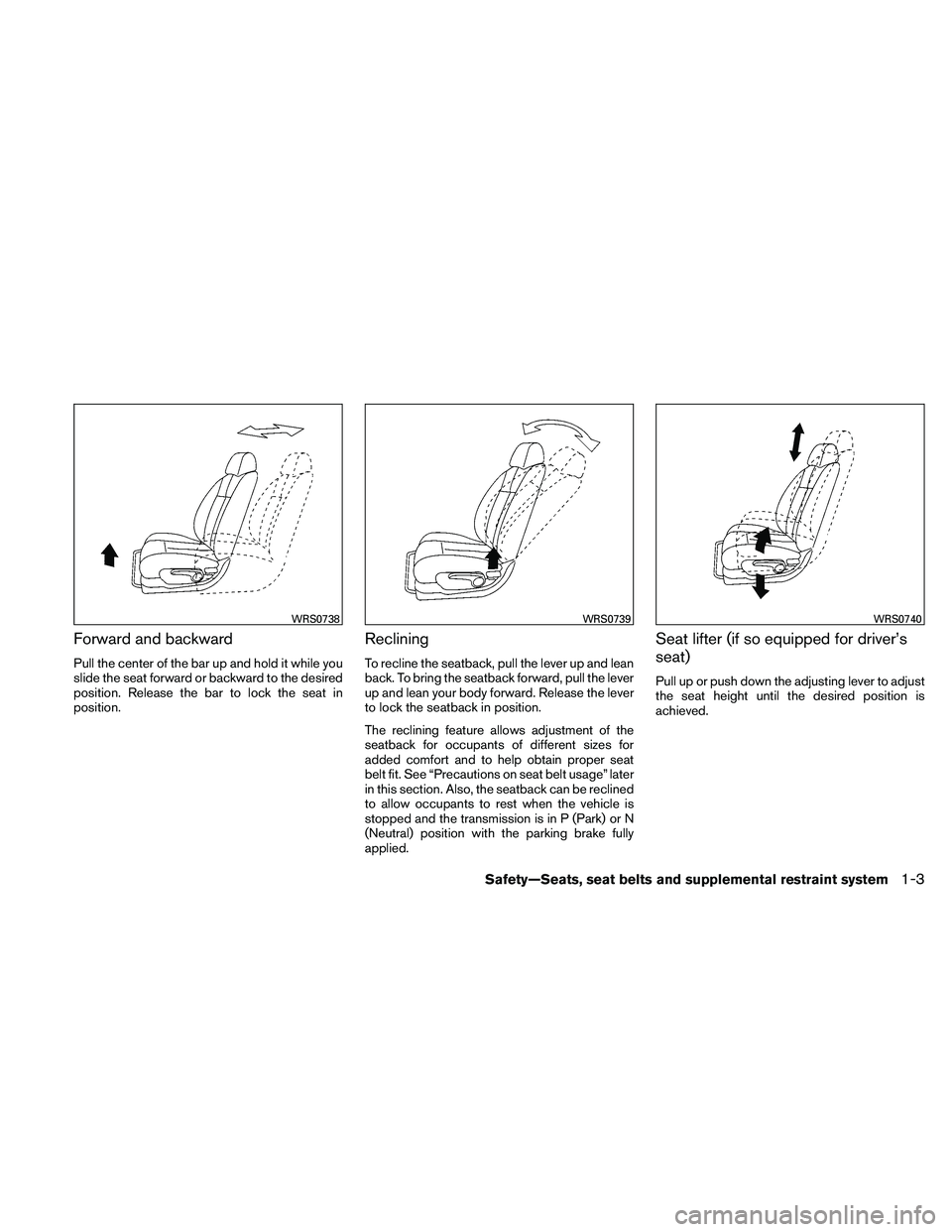
Forward and backward
Pull the center of the bar up and hold it while you
slide the seat forward or backward to the desired
position. Release the bar to lock the seat in
position.
Reclining
To recline the seatback, pull the lever up and lean
back. To bring the seatback forward, pull the lever
up and lean your body forward. Release the lever
to lock the seatback in position.
The reclining feature allows adjustment of the
seatback for occupants of different sizes for
added comfort and to help obtain proper seat
belt fit. See “Precautions on seat belt usage” later
in this section. Also, the seatback can be reclined
to allow occupants to rest when the vehicle is
stopped and the transmission is in P (Park) or N
(Neutral) position with the parking brake fully
applied.
Seat lifter (if so equipped for driver’s
seat)
Pull up or push down the adjusting lever to adjust
the seat height until the desired position is
achieved.
Page 24 of 438
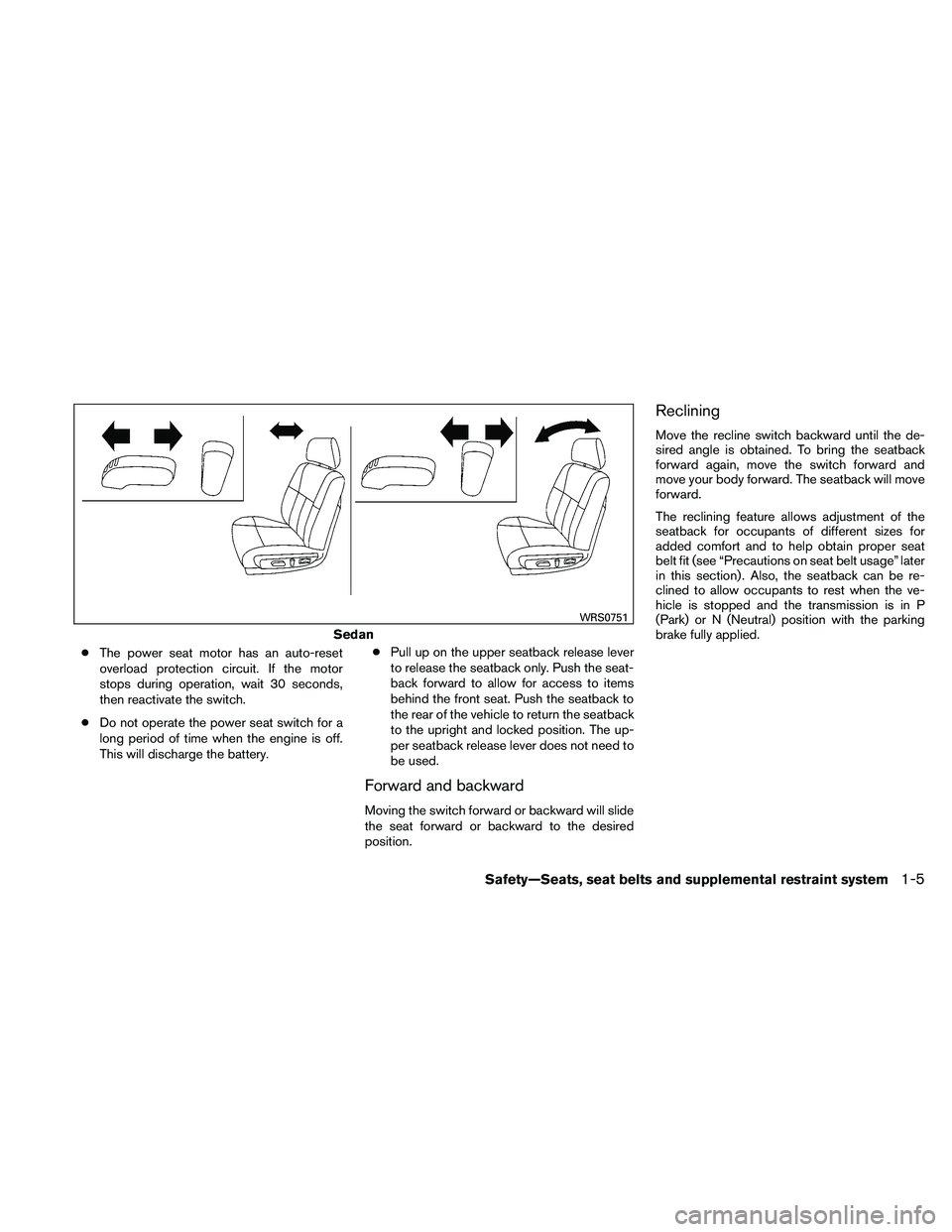
●The power seat motor has an auto-reset
overload protection circuit. If the motor
stops during operation, wait 30 seconds,
then reactivate the switch.
● Do not operate the power seat switch for a
long period of time when the engine is off.
This will discharge the battery. ●
Pull up on the upper seatback release lever
to release the seatback only. Push the seat-
back forward to allow for access to items
behind the front seat. Push the seatback to
the rear of the vehicle to return the seatback
to the upright and locked position. The up-
per seatback release lever does not need to
be used.
Forward and backward
Moving the switch forward or backward will slide
the seat forward or backward to the desired
position.
Reclining
Move the recline switch backward until the de-
sired angle is obtained. To bring the seatback
forward again, move the switch forward and
move your body forward. The seatback will move
forward.
The reclining feature allows adjustment of the
seatback for occupants of different sizes for
added comfort and to help obtain proper seat
belt fit (see “Precautions on seat belt usage” later
in this section) . Also, the seatback can be re-
clined to allow occupants to rest when the ve-
hicle is stopped and the transmission is in P
(Park) or N (Neutral) position with the parking
brake fully applied.
Page 99 of 438
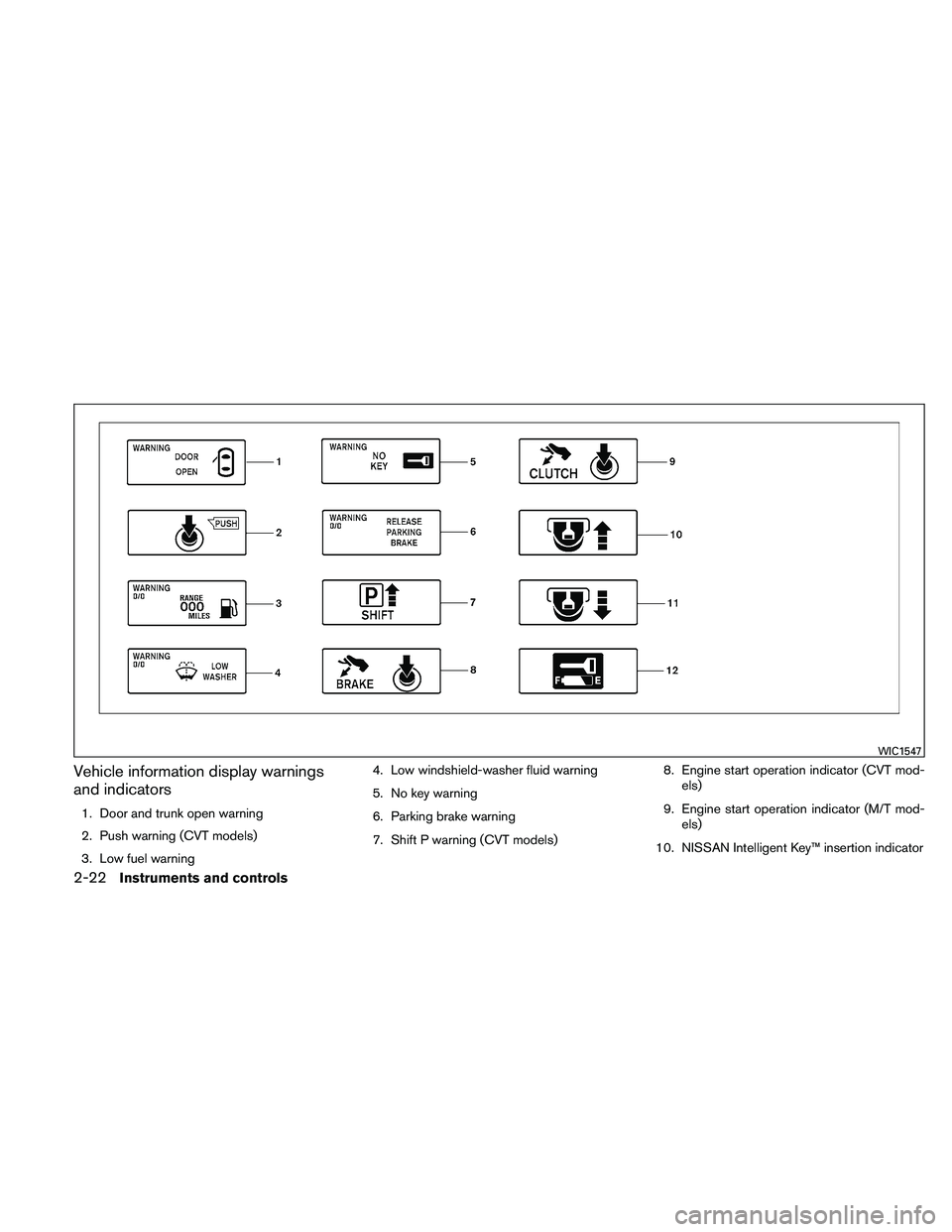
Vehicle information display warnings
and indicators
1. Door and trunk open warning
2. Push warning (CVT models)
3. Low fuel warning4. Low windshield-washer fluid warning
5. No key warning
6. Parking brake warning
7. Shift P warning (CVT models)
8. Engine start operation indicator (CVT mod-
els)
9. Engine start operation indicator (M/T mod- els)
10. NISSAN Intelligent Key™ insertion indicator
Page 100 of 438
11. NISSAN Intelligent Key™ removal indicator
12. NISSAN Intelligent Key™ battery dischargeindicator
Door and trunk open warning
This warning illuminates when a door or the trunk
has been opened when the engine is running.
Push warning (CVT models)
After the Shift P warning illuminates, the Push
warning will illuminate if the ignition switch is
placed in the ACC position when the shift selec-
tor is moved to the P (Park) position.
See “Shift P warning (CVT models)” in this sec-
tion for additional information.
To turn off the Push warning, place the ignition
switch in the ON position and then in the LOCK
position.
Low fuel warning
This warning illuminates when the fuel level in the
fuel tank is getting low. Refuel as soon as it is
convenient, preferably before the fuel gauge
reaches E (Empty) . There will be a small re-
serve of fuel in the tank when the fuel
gauge needle reaches E (Empty) . Low windshield-washer fluid warning
This warning illuminates when the windshield-
washer fluid is at a low level. Add windshield-
washer fluid as necessary. See “Windshield-
washer fluid” in the “Maintenance and do-it-
yourself” section of this manual.
No key warning
This warning illuminates following two conditions:
1. When the ignition switch is pushed and the
Intelligent Key cannot be recognized by the
system. If this warning illuminates, you can-
not start the engine.
Check for the following causes and perform
the assigned remedies:
– The battery of the Intelligent Key carried with you is discharged completely. Re-
place the battery with a new one.
– The Intelligent Key carried with you is not registered to the system. Use the regis-
tered Intelligent Key.
– You do not have an Intelligent Key with you. Carry an Intelligent Key with you.
2. When the door is closed with the Intelligent Key left outside the vehicle and the ignition
switch is placed in the ACC or ON position.
A chime will also sound. Parking brake warning
This warning illuminates when the parking brake
is set and the vehicle is driven.
SHIFT P warning (CVT models)
This warning illuminates when the ignition switch
is pushed to stop the engine with the shift selec-
tor in any position except in the P (Park) position.
If this warning illuminates, the ignition switch is
placed in the OFF position. Move the shift selec-
tor to the P (Park) position or place the ignition
switch in the ON position.
An inside warning chime will also sound.
If the shift selector is moved to the P (Park)
position, the Push warning will appear. Refer to
“Push warning (CVT models)” in this section.
For additional information about Intelligent Key,
see “NISSAN Intelligent Key™ ” in the “Pre-
driving checks and adjustments” section.
Engine start operation indicator (CVT mod-
els)
This indicator illuminates when the ignition switch
is placed in the LOCK, OFF, ACC or ON position
with the shift selector in the P (Park) position.
This indicator means that the engine will start by
pushing the push-button ignition switch with the
brake pedal depressed.
Instruments and controls2-23
Page 101 of 438
Engine start operation indicator (M/T mod-
els)
This indicator illuminates when the ignition switch
is placed in the LOCK, OFF, ACC or ON position
with the shift selector in neutral and the parking
brake on.
This indicator means that the engine will start by
pushing the ignition switch with the clutch and
the brake pedal depressed.
NISSAN Intelligent Key™ insertion indica-
tor
This indicator illuminates when the Intelligent Key
needs to be inserted into the Intelligent Key port.
(For example, the Intelligent Key battery is dis-
charged.)
If this indicator illuminates, insert the Intelligent
Key into the Intelligent Key port in the correct
direction. See “Push-button ignition switch” in
the “Starting and driving” section.
NISSAN Intelligent Key™ removal indicator
This indicator illuminates when the driver’s door
is opened with the ignition switch placed in the
OFF position and the Intelligent Key placed in the
Intelligent Key port. A key reminder chime also
sounds.If this indicator illuminates, remove the Intelligent
Key from the Intelligent Key port and take it with
you when leaving the vehicle.
NISSAN Intelligent Key™ battery discharge
indicator
This indicator illuminates when the Intelligent Key
battery is running out of power.
If this indicator illuminates, replace the battery
with a new one. See “NISSAN Intelligent Key™” in
the “Maintenance and do-it-yourself” section.
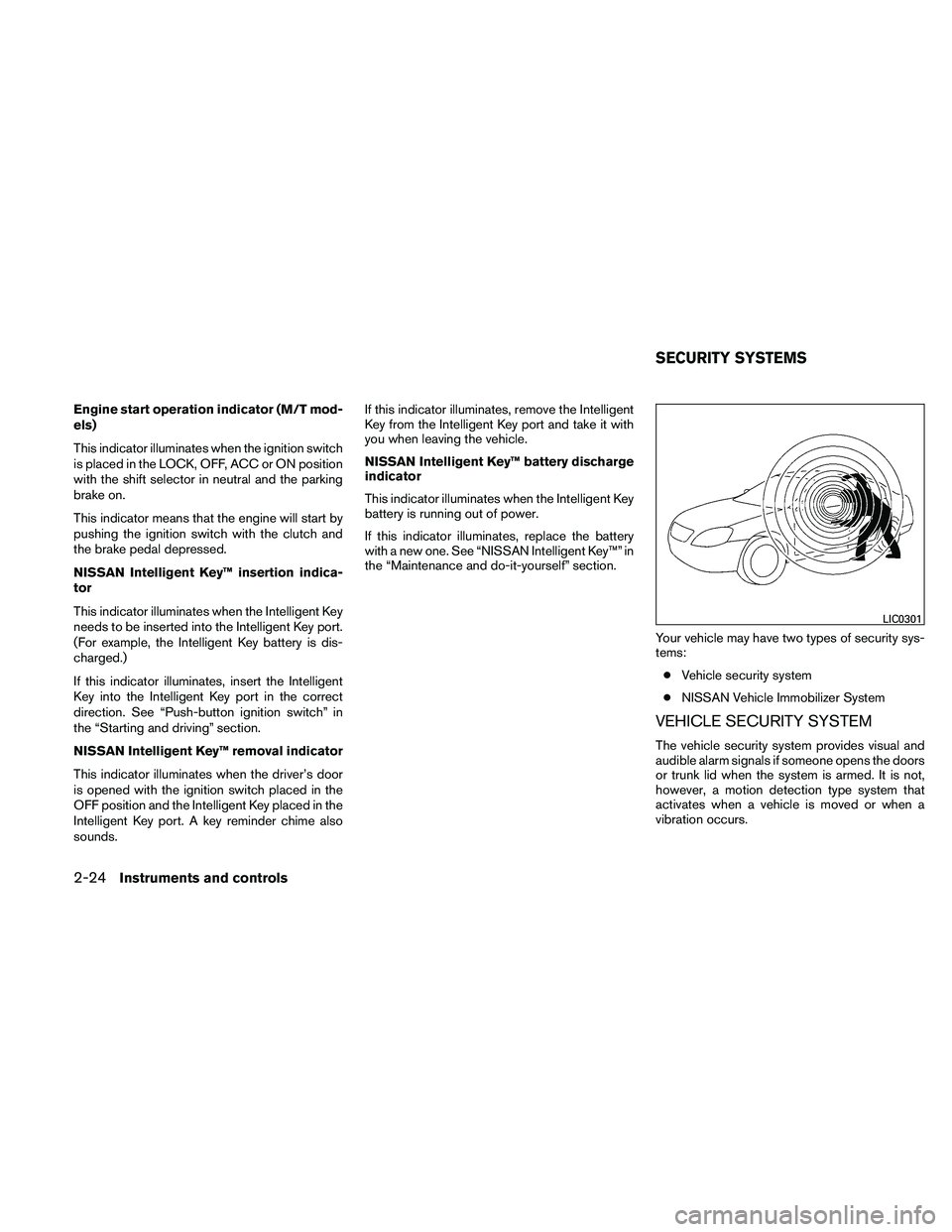
Your vehicle may have two types of security sys-
tems:● Vehicle security system
● NISSAN Vehicle Immobilizer System
VEHICLE SECURITY SYSTEM
The vehicle security system provides visual and
audible alarm signals if someone opens the doors
or trunk lid when the system is armed. It is not,
however, a motion detection type system that
activates when a vehicle is moved or when a
vibration occurs.
Page 224 of 438
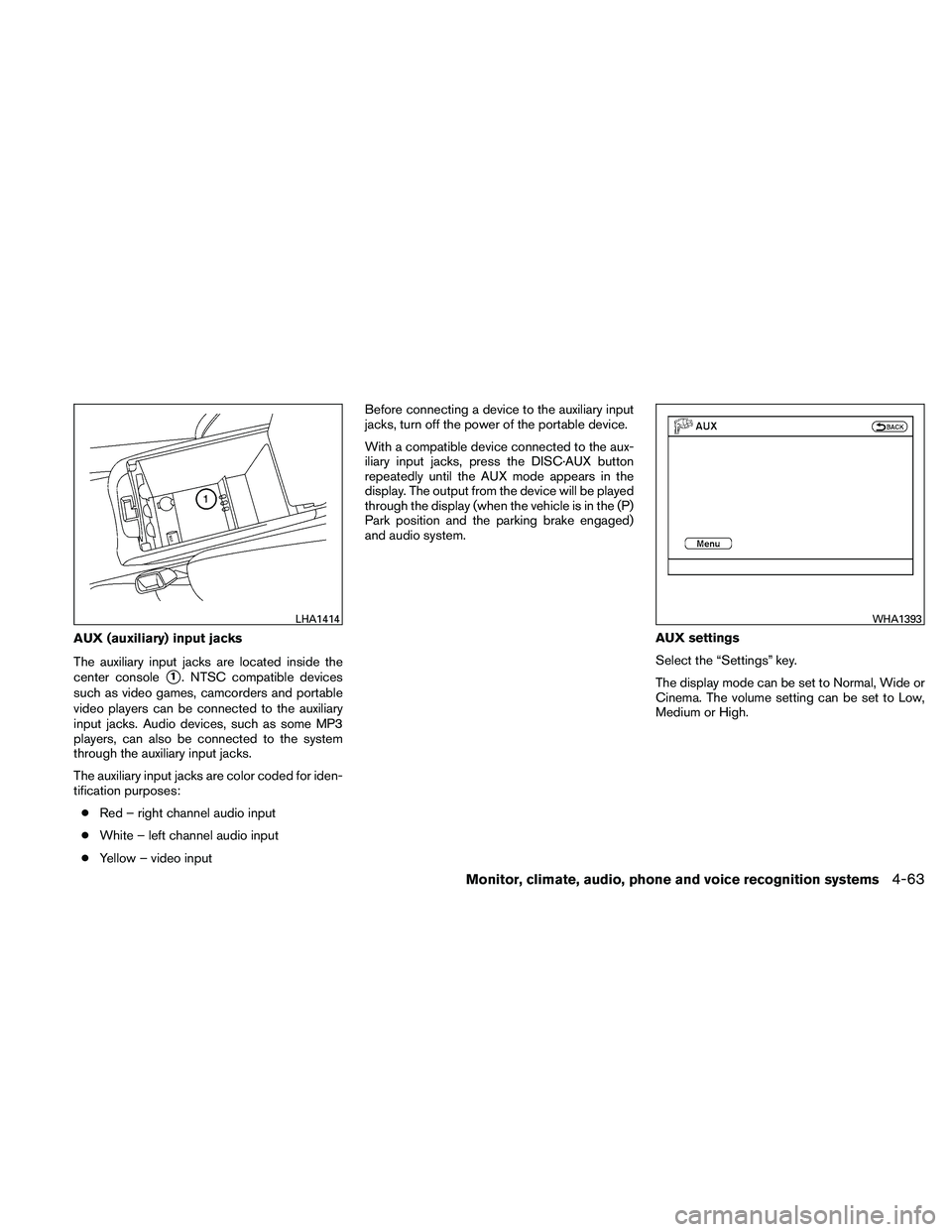
AUX (auxiliary) input jacks
The auxiliary input jacks are located inside the
center console
�1. NTSC compatible devices
such as video games, camcorders and portable
video players can be connected to the auxiliary
input jacks. Audio devices, such as some MP3
players, can also be connected to the system
through the auxiliary input jacks.
The auxiliary input jacks are color coded for iden-
tification purposes:
● Red – right channel audio input
● White – left channel audio input
● Yellow – video input Before connecting a device to the auxiliary input
jacks, turn off the power of the portable device.
With a compatible device connected to the aux-
iliary input jacks, press the DISC·AUX button
repeatedly until the AUX mode appears in the
display. The output from the device will be played
through the display (when the vehicle is in the (P)
Park position and the parking brake engaged)
and audio system.
AUX settings
Select the “Settings” key.
The display mode can be set to Normal, Wide or
Cinema. The volume setting can be set to Low,
Medium or High.