Page 176 of 594
Features and controls
3-91
3 Manual transaxle
N00512700070
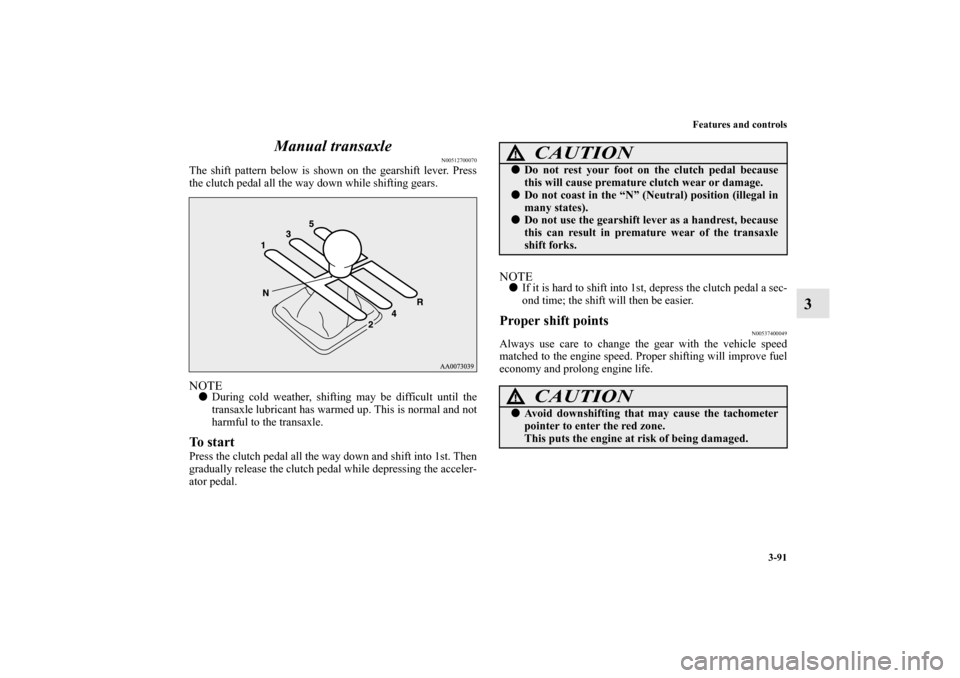
The shift pattern below is shown on the gearshift lever. Press
the clutch pedal all the way down while shifting gears.NOTE�
During cold weather, shifting may be difficult until the
transaxle lubricant has warmed up. This is normal and not
harmful to the transaxle.
To startPress the clutch pedal all the way down and shift into 1st. Then
gradually release the clutch pedal while depressing the acceler-
ator pedal.
NOTE�
If it is hard to shift into 1st, depress the clutch pedal a sec-
ond time; the shift will then be easier.
Proper shift points
N00537400049
Always use care to change the gear with the vehicle speed
matched to the engine speed. Proper shifting will improve fuel
economy and prolong engine life.
CAUTION
!�
Do not rest your foot on the clutch pedal because
this will cause premature clutch wear or damage.
�
Do not coast in the “N” (Neutral) position (illegal in
many states).
�
Do not use the gearshift lever as a handrest, because
this can result in premature wear of the transaxle
shift forks.CAUTION
!�
Avoid downshifting that may cause the tachometer
pointer to enter the red zone.
This puts the engine at risk of being damaged.
BK0105501US.book 91 ページ 2009年8月10日 月曜日 午前10時32分
Page 190 of 594

Features and controls
3-105
3
NOTE�
Only the forward gears 1 to 6 can be selected.
To reverse or park, place the gearshift lever in the “R”
(REVERSE) or “P” (PARK) position.
�
During manual shifting, downshifting will be performed
automatically when the vehicle slows down and the trans-
mission will downshift to 1st gear before the vehicle
stops.
�
If the gearshift lever or sportronic steering wheel shifters
are operated repeatedly, the transmission will also shift
repeatedly.
�
In order to ensure driving performance, upshifting may
not occur depending on the vehicle speed even if the gear-
shift lever or sportronic steering wheel shifters are oper-
ated. In addition, in order to prevent excessive engine
speed, the buzzer sounds and downshifting may not occur
depending on the vehicle speed even if the gearshift lever
or sportronic steering wheel shifters are operated.
�
When driving in an aggressive manner involving high
engine rpm, sudden acceleration and/or deceleration, the
Twin Clutch SST could take longer to shift due to higher
fluid temperatures.
CAUTION
!�
When manually shifting while the vehicle is being
driven, select the correct shift position to control the
engine speed so that the tachometer indicator does
not enter the red zone.
�
Sudden engine braking and rapid acceleration can
cause the vehicle to skid. Shift down according to
road conditions and vehicle speed.
�
If both the left and right sportronic steering wheel
shifters are operated at the same time, the transmis-
sion may not change gears.
BK0105501US.book 105 ページ 2009年8月10日 月曜日 午前10時32分
Page 204 of 594
Features and controls
3-119
3
S-AWC control mode switchWhen the ignition switch is set to the “ON” position, operate
the AWC switch to change the control mode.
Except for vehicles with steering wheel audio remote con-
trol switches
Push the switch down to change the control mode in the order
“TARMAC” → “GRAVEL” → “SNOW” or push it up to
change the control mode in the order “SNOW” → “GRAVEL”
→ “TARMAC”.Vehicles with steering wheel audio remote control switches
Each time the switch is pushed, the control mode changes in
the order “TARMAC” → “GRAVEL” → “SNOW” → “TAR-
MAC”.
NOTE�
The control mode can be changed while the vehicle is
moving.
�
The selected control mode is stored in memory even if the
engine is stopped.
However, if a battery terminal is disconnected, the control
mode stored in memory will be erased and the control
mode will be set to the “TARMAC” mode.
BK0105501US.book 119 ページ 2009年8月10日 月曜日 午前10時32分
Page 205 of 594
3-120 Features and controls
3
S-AWC control mode displayThe currently selected control mode is displayed on the multi-
information display.
In addition, when the control mode is changed, the selected
mode appears on the interrupt display screen of the information
screen in the multi-information display.
The control mode display will appear on the information
screen for a few seconds, and then the original screen will
return.Example: “TARMAC” mode is selected.
CAUTION
!�
The S-AWC control mode display may flash under
aggressive driving conditions.
At this time, S-AWC control is temporarily sus-
pended in order to protect the S-AWC device, but
this will not affect normal driving.
After the vehicle is driven for a while, if the S-AWC
control mode display remains on, the S-AWC con-
trol will start operating again.
BK0105501US.book 120 ページ 2009年8月10日 月曜日 午前10時32分
Page 214 of 594

Features and controls
3-129
3
NOTE�
When moving out of mud, sand or fresh snow, pressing
the accelerator pedal may not allow the engine speed to
increase. In such situations, temporarily turning off the
ASC with the “ASC OFF” switch will make it easier to
move out your vehicle.
�
By pressing the ASC OFF switch, both the skid control
function and the traction control function are turned OFF.
�
By pressing down the “ASC OFF” switch for 3 seconds or
longer, you can deactivate the ASC and the braking con-
trol of the AYC.
At this time, the display will appear for a few sec-
onds on the information screen in the multi-information
display.
Then, the previous screen will return and the “!” mark will
come on.
Press the ASC OFF switch again to turn ON the ASC.
�
If the ASC OFF switch is continuously pressed after the
ASC has been turned OFF or the ASC and the braking
control of AYC have been turned off, an erroneous opera-
tion prevention function operates and the ASC is automat-
ically turned ON.
ASC operation display, ASC OFF display or ASC
indicator
N00546500062
Indicator
Display
- ASC operation display
When the ASC is operating, the information screen in the
multi-information display will change and the ASC opera-
tion display will blink.
-ASC OFF display
The display is displayed when the ASC has been deac-
tivated with the “ASC OFF” switch.
- ASC indicator
Indicator blinks when the ASC is operating.
CAUTION
!�
When display blinks, ASC is operating, which
means that the road is slippery or that your vehicle’s
wheels are beginning to slip. If this happens, drive
slower.
BK0105501US.book 129 ページ 2009年8月10日 月曜日 午前10時32分
Page 235 of 594

3-150 Features and controls
3
Rheostat meter illumination button
N00554900111
Each time you press this button, there is a sound and the bright-
ness of the instruments changes.NOTE�
You can adjust to 8 different levels respectively for when
the tail lights are illuminated and when they are not.
�
If the vehicle is equipped with the automatic lamp control,
when the lamp switch is in the “AUTO” position, the
meter illumination switches automatically to the adjusted
brightness, depending on the brightness outside the vehi-
cle.
�
The brightness level of the instruments is stored when the
ignition switch is turned off.
�
If you press and hold the button for longer than about 1
second when the parking lights are illuminated, the bright-
ness level changes to the maximum level. Pressing and
holding the button for longer than about 1 second again
returns the brightness level to the previous level.
1- Brightness display
2- Rheostat illumination button
BK0105501US.book 150 ページ 2009年8月10日 月曜日 午前10時32分
Page 238 of 594

Features and controls
3-153
3
Multi-information meter switch
N00555100110
The multi-information meter switch is a button marked
“INFO” on the left side of the dash.
Each time the multi-information meter switch is operated, a
sound is emitted and the multi-information display changes
between information such as warnings, service reminder, aver-
age and momentary fuel consumption, driving range, average
speed, and S-AWC operation display.
It is also possible to change elements such as the language and
units used on the multi-information display by operating the
multi-information meter switch.
“!” Warning display screen (With ignition switch
in the “OFF” position)
N00555200078
If you press the multi-information meter switch and return
from the warning display screen to the previous screen, the “!”
warning is displayed.
Refer to “Returning to the display screen from before the warn-
ing display” on page 3-156.
This mark is also displayed if there is another warning other
than the one displayed. When the cause of the warning display
is eliminated, the “!” warning goes out automatically.NOTE�
When the “!” warning is displayed, the warning display
screen can be redisplayed on the information screen.
Refer to “Information screen (With ignition switch in the
“OFF” position)” on page 3-154.
Refer to “Information screen (With ignition switch in the
“ON” position)” on page 3-160.
BK0105501US.book 153 ページ 2009年8月10日 月曜日 午前10時32分
Page 257 of 594

3-172 Features and controls
3
3. Press and hold the multi-information meter switch (for
about 2 seconds or more) to switch from the setting mode
screen to the menu screen.
NOTE�
To return the menu screen to the function setting screen,
press and hold the multi-information meter switch (for
about 2 seconds or more).
�
If no operations are made within about 15 seconds of the
menu screen being displayed, the display returns to the
function setting screen.
4. Select the item to change on the menu screen and change
to the desired setting. For further details on the operation
methods, refer to the following sections.
Refer to “Changing the reset mode for average fuel con-
sumption and average speed” on page 3-173.
Refer to “Changing the fuel consumption display unit” on
page 3-174.
Refer to “Changing the temperature unit” on page 3-176.
Refer to “Changing the display language” on page 3-177.
Refer to “Changing the language on Mitsubishi Multi-
Communication System or the Hands-free Bluetooth
®
system to match the multi-information display (if so
equipped)” on page 3-178.
Refer to “Operation sound setting” on page 3-179.
Refer to “Changing the time until “REST REMINDER” is
displayed” on page 3-180.
Refer to “Changing the turn-signal sound” on page 3-181.
Refer to “Changing the momentary fuel consumption dis-
play” on page 3-181.
Refer to “Returning to the factory settings” on page 3-
182.
CAUTION
!�
For safety, stop the vehicle before operating.
While driving, even if you operate the multi-infor-
mation meter switch, the function setting screen is
not displayed.
BK0105501US.book 172 ページ 2009年8月10日 月曜日 午前10時32分

