Page 340 of 514
Comfort controls
5-21
5
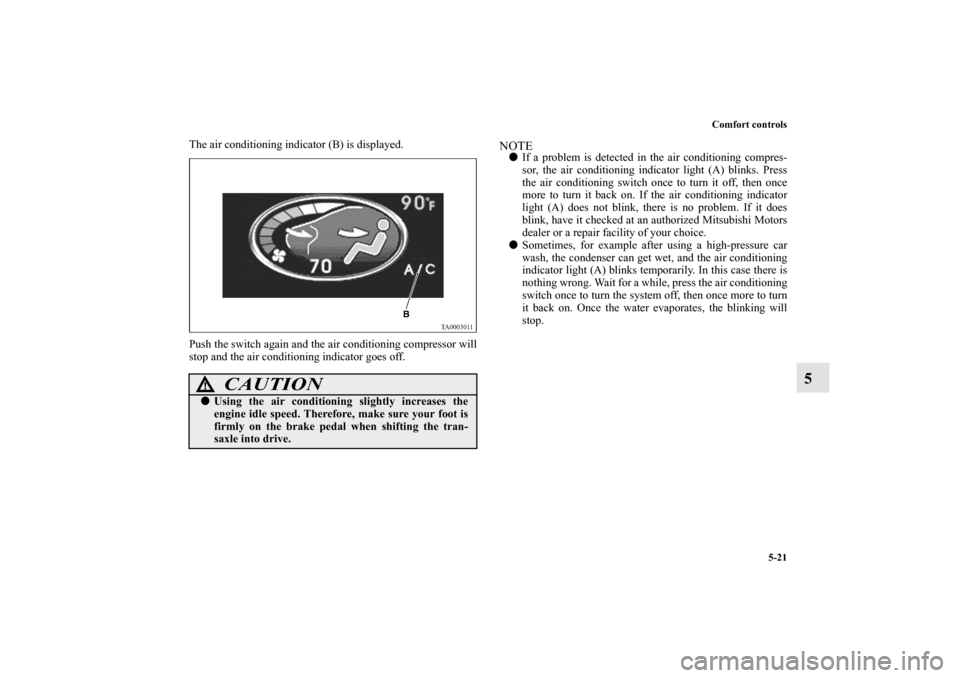
The air conditioning indicator (B) is displayed.
Push the switch again and the air conditioning compressor will
stop and the air conditioning indicator goes off.
NOTE�If a problem is detected in the air conditioning compres-
sor, the air conditioning indicator light (A) blinks. Press
the air conditioning switch once to turn it off, then once
more to turn it back on. If the air conditioning indicator
light (A) does not blink, there is no problem. If it does
blink, have it checked at an authorized Mitsubishi Motors
dealer or a repair facility of your choice.
�Sometimes, for example after using a high-pressure car
wash, the condenser can get wet, and the air conditioning
indicator light (A) blinks temporarily. In this case there is
nothing wrong. Wait for a while, press the air conditioning
switch once to turn the system off, then once more to turn
it back on. Once the water evaporates, the blinking will
stop.
CAUTION
!�Using the air conditioning slightly increases the
engine idle speed. Therefore, make sure your foot is
firmly on the brake pedal when shifting the tran-
saxle into drive.
BK0102600US.book 21 ページ 2009年3月30日 月曜日 午後2時2分
Page 343 of 514
5-24 Comfort controls
5
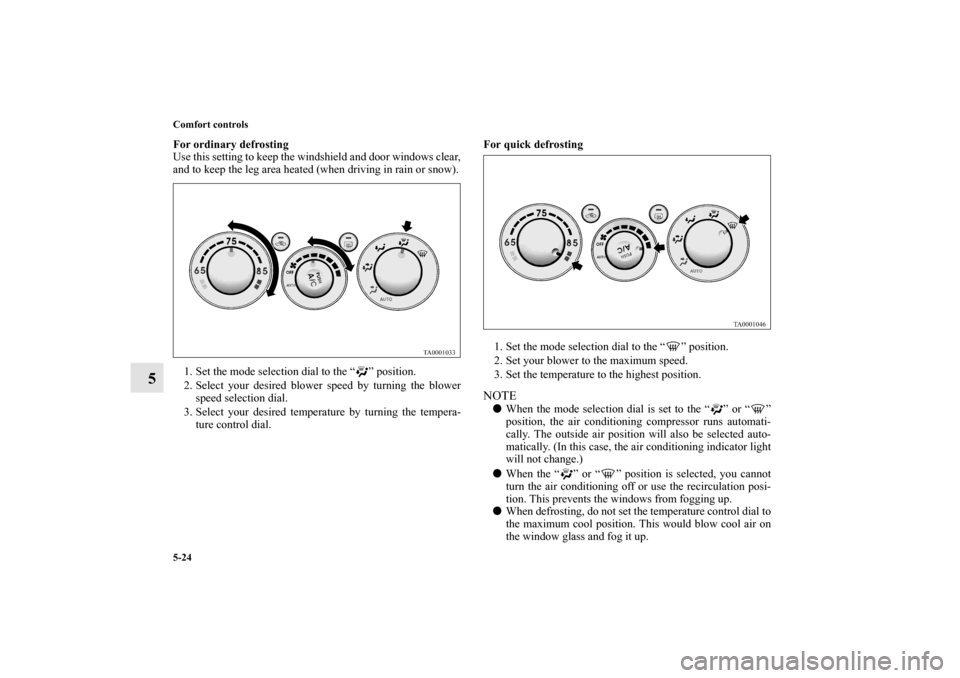
For ordinary defrosting
Use this setting to keep the windshield and door windows clear,
and to keep the leg area heated (when driving in rain or snow).
1. Set the mode selection dial to the “ ” position.
2. Select your desired blower speed by turning the blower
speed selection dial.
3. Select your desired temperature by turning the tempera-
ture control dial.For quick defrosting
1. Set the mode selection dial to the “ ” position.
2. Set your blower to the maximum speed.
3. Set the temperature to the highest position.
NOTE�When the mode selection dial is set to the “ ” or “ ”
position, the air conditioning compressor runs automati-
cally. The outside air position will also be selected auto-
matically. (In this case, the air conditioning indicator light
will not change.)
�When the “ ” or “ ” position is selected, you cannot
turn the air conditioning off or use the recirculation posi-
tion. This prevents the windows from fogging up.
�When defrosting, do not set the temperature control dial to
the maximum cool position. This would blow cool air on
the window glass and fog it up.
BK0102600US.book 24 ページ 2009年3月30日 月曜日 午後2時2分
Page 344 of 514
Comfort controls
5-25
5
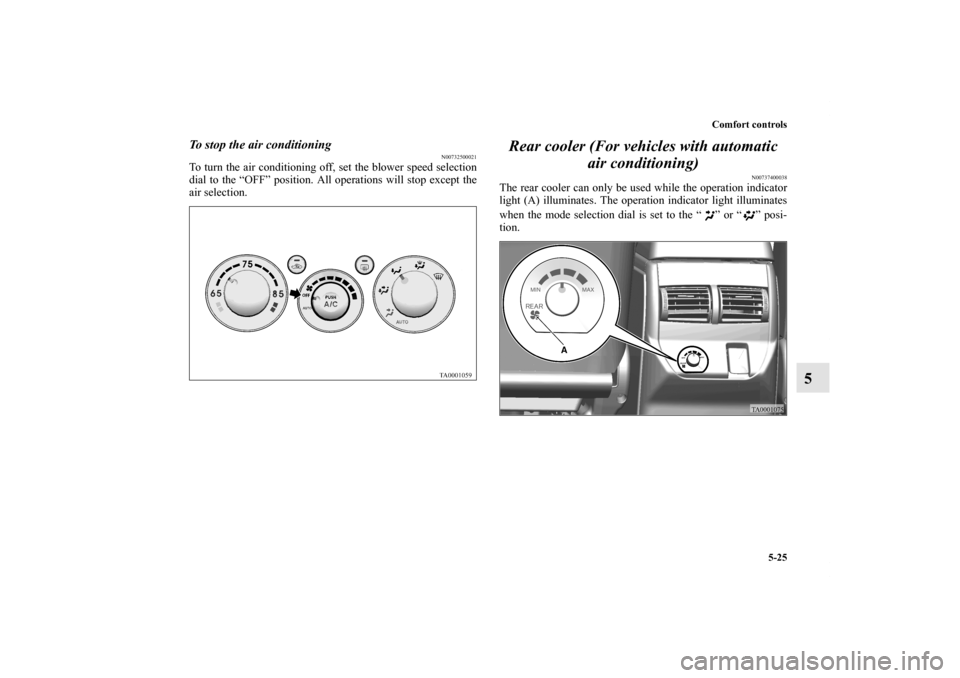
To stop the air conditioning
N00732500021
To turn the air conditioning off, set the blower speed selection
dial to the “OFF” position. All operations will stop except the
air selection.
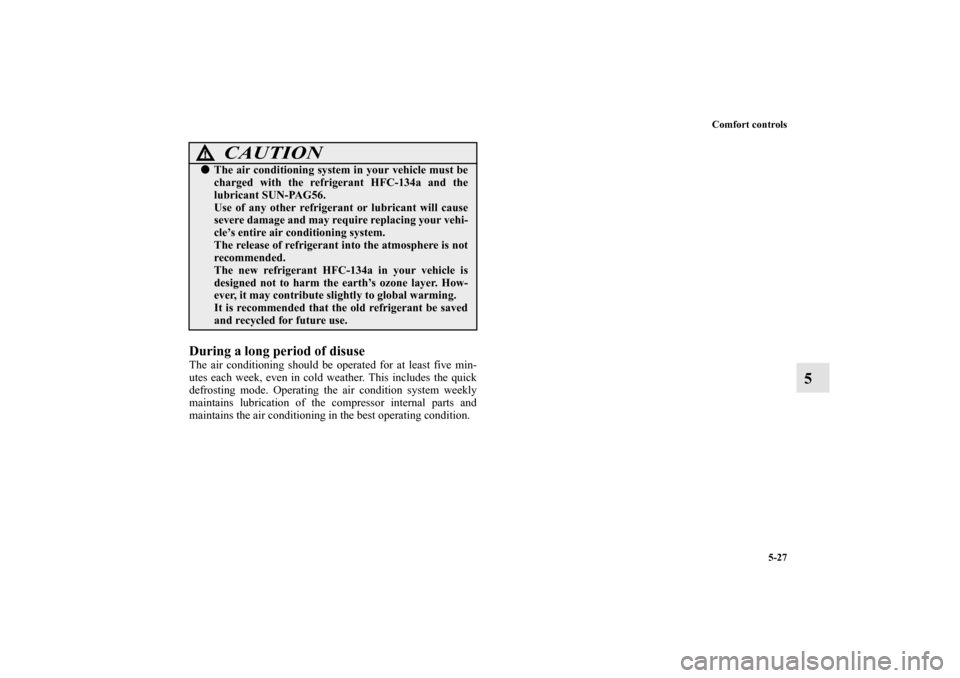
Rear cooler (For vehicles with automatic
air conditioning)
N00737400038
The rear cooler can only be used while the operation indicator
light (A) illuminates. The operation indicator light illuminates
when the mode selection dial is set to the “ ” or “ ” posi-
tion.
BK0102600US.book 25 ページ 2009年3月30日 月曜日 午後2時2分
Page 346 of 514
Comfort controls
5-27
5
During a long period of disuse The air conditioning should be operated for at least five min-
utes each week, even in cold weather. This includes the quick
defrosting mode. Operating the air condition system weekly
maintains lubrication of the compressor internal parts and
maintains the air conditioning in the best operating condition.
CAUTION
!�The air conditioning system in your vehicle must be
charged with the refrigerant HFC-134a and the
lubricant SUN-PAG56.
Use of any other refrigerant or lubricant will cause
severe damage and may require replacing your vehi-
cle’s entire air conditioning system.
The release of refrigerant into the atmosphere is not
recommended.
The new refrigerant HFC-134a in your vehicle is
designed not to harm the earth’s ozone layer. How-
ever, it may contribute slightly to global warming.
It is recommended that the old refrigerant be saved
and recycled for future use.
BK0102600US.book 27 ページ 2009年3月30日 月曜日 午後2時2分
Page 365 of 514
5-46 Comfort controls
5
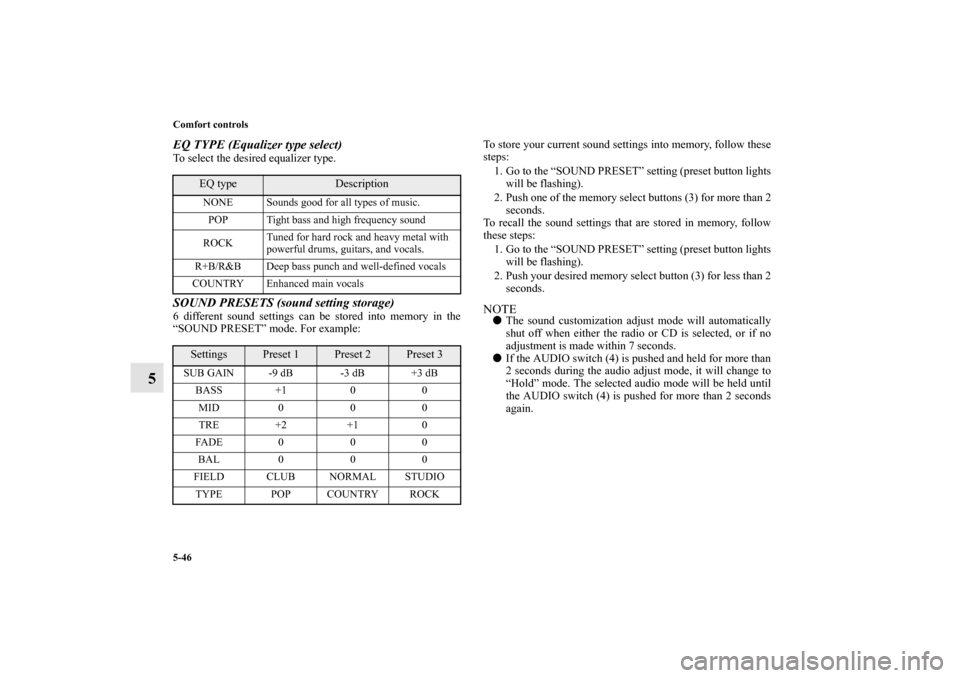
EQ TYPE (Equalizer type select)To select the desired equalizer type.SOUND PRESETS (sound setting storage)6 different sound settings can be stored into memory in the
“SOUND PRESET” mode. For example:To store your current sound settings into memory, follow these
steps:
1. Go to the “SOUND PRESET” setting (preset button lights
will be flashing).
2. Push one of the memory select buttons (3) for more than 2
seconds.
To recall the sound settings that are stored in memory, follow
these steps:
1. Go to the “SOUND PRESET” setting (preset button lights
will be flashing).
2. Push your desired memory select button (3) for less than 2
seconds.
NOTE�The sound customization adjust mode will automatically
shut off when either the radio or CD is selected, or if no
adjustment is made within 7 seconds.
�If the AUDIO switch (4) is pushed and held for more than
2 seconds during the audio adjust mode, it will change to
“Hold” mode. The selected audio mode will be held until
the AUDIO switch (4) is pushed for more than 2 seconds
again.
EQ type
Description
NONE Sounds good for all types of music.
POP Tight bass and high frequency sound
ROCKTuned for hard rock and heavy metal with
powerful drums, guitars, and vocals.
R+B/R&B Deep bass punch and well-defined vocals
COUNTRY Enhanced main vocals
Settings
Preset 1
Preset 2
Preset 3
SUB GAIN -9 dB -3 dB +3 dB
BASS +1 0 0
MID 0 0 0
TRE +2 +1 0
FADE 0 0 0
BAL 0 0 0
FIELD CLUB NORMAL STUDIO
TYPE POP COUNTRY ROCK
BK0102600US.book 46 ページ 2009年3月30日 月曜日 午後2時2分
Page 380 of 514
Comfort controls
5-61
5
To listen to a CD
N00735500989
1. Press the CD button (6) and the CD mode will be selected,
starting a playback.NOTE�As many as 6 CDs can be inserted into the CD
autochanger.
2. To adjust the volume and tone, refer to “To adjust the vol-
ume” on page 5-44 and “To adjust the tone” on page 5-44.
3. To stop the disc, turn off the power by pressing the PWR
switch (4) or switch to the other mode by pressing the
RADIO button (5).NOTE�For information concerning the handling of the compact
discs, refer to “Handling of compact discs” on page 5-74.
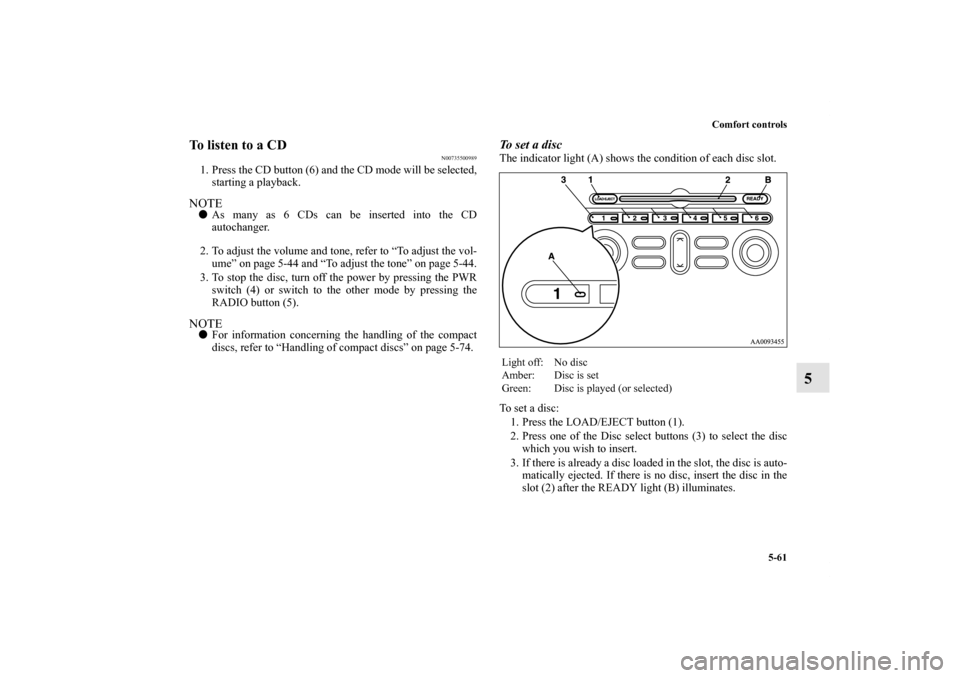
To s e t a d i s cThe indicator light (A) shows the condition of each disc slot.
To set a disc:
1. Press the LOAD/EJECT button (1).
2. Press one of the Disc select buttons (3) to select the disc
which you wish to insert.
3. If there is already a disc loaded in the slot, the disc is auto-
matically ejected. If there is no disc, insert the disc in the
slot (2) after the READY light (B) illuminates.Light off: No disc
Amber: Disc is set
Green: Disc is played (or selected)
BK0102600US.book 61 ページ 2009年3月30日 月曜日 午後2時2分
Page 387 of 514
5-68 Comfort controls
5Steering wheel remote control switch
(if so
equipped)N00714800338
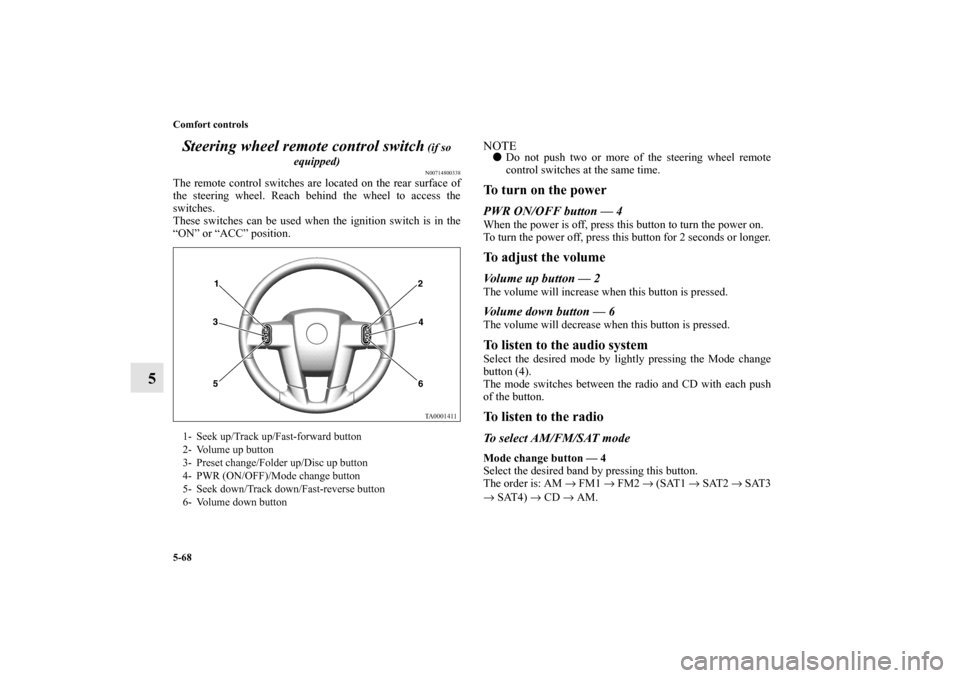
The remote control switches are located on the rear surface of
the steering wheel. Reach behind the wheel to access the
switches.
These switches can be used when the ignition switch is in the
“ON” or “ACC” position.
NOTE�Do not push two or more of the steering wheel remote
control switches at the same time.To turn on the powerPWR ON/OFF button — 4When the power is off, press this button to turn the power on.
To turn the power off, press this button for 2 seconds or longer.To adjust the volumeVolume up button — 2The volume will increase when this button is pressed.Volume down button — 6The volume will decrease when this button is pressed.To listen to the audio systemSelect the desired mode by lightly pressing the Mode change
button (4).
The mode switches between the radio and CD with each push
of the button.To listen to the radioTo select AM/FM/SAT modeMode change button — 4
Select the desired band by pressing this button.
The order is: AM → FM1 → FM2 → (SAT1 → SAT2 → SAT3
→ SAT4) → CD → AM.
1- Seek up/Track up/Fast-forward button
2- Volume up button
3- Preset change/Folder up/Disc up button
4- PWR (ON/OFF)/Mode change button
5- Seek down/Track down/Fast-reverse button
6- Volume down button
BK0102600US.book 68 ページ 2009年3月30日 月曜日 午後2時2分
Page 394 of 514
Comfort controls
5-75
5
�In the following circumstances, moisture can form on
compact discs and inside the audio system, preventing
normal operation.
• When there is high humidity (for example, when it is
raining).
• When the temperature suddenly rises, such as right after
the heater is turned on in cold weather.
In this case, wait until the moisture has had time to dry
out.
�When the CD player is subjected to violent vibrations,
such as during off-road driving, the tracking may not
work.
�When storing compact discs, always store them in their
separate cases. Never place compact discs in direct sun-
light, or in any place where the temperature or humidity is
high.
�Never touch the flat surface of the disc where there isn’t a
label. This will damage the disc surface and could affect
the sound quality. When handling a compact disc, always
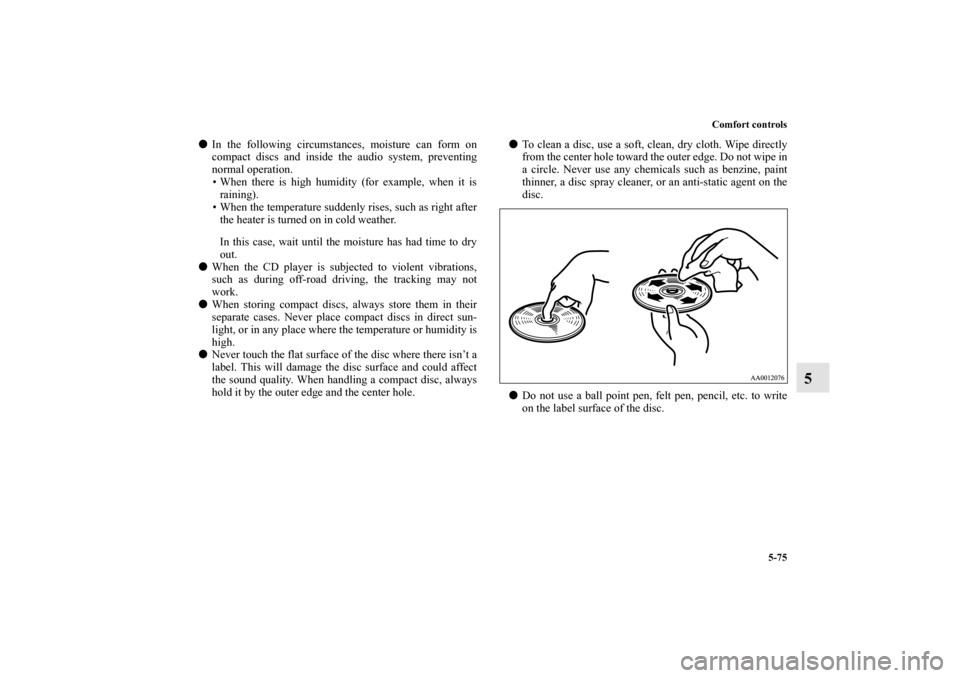
hold it by the outer edge and the center hole.�To clean a disc, use a soft, clean, dry cloth. Wipe directly
from the center hole toward the outer edge. Do not wipe in
a circle. Never use any chemicals such as benzine, paint
thinner, a disc spray cleaner, or an anti-static agent on the
disc.
�Do not use a ball point pen, felt pen, pencil, etc. to write
on the label surface of the disc.
BK0102600US.book 75 ページ 2009年3月30日 月曜日 午後2時2分