Page 260 of 514
Features and controls
3-171
3
1. Press the SPEECH button.
2. Say “Setup.”
3. Say “Confirmation prompts.”
4. The voice guide will say “Confirmation prompts are
. Would you like to turn confirmation prompts
.”
Answer “Yes” to change the setting or answer “No” to
keep the current setting.
5. The voice guide will say “Confirmation prompts are
, ready” and then the system will return to the
main menu.Security function
N00538900012
It is possible to use a passcode as a security function by setting
a passcode of your choice for the Bluetooth
® HFP.
When the security function is turned on, it is necessary to make
a voice input of a 4-digit passcode in order to use all functions
of the Bluetooth
® HFP, except for reception.
Setting the passcode
N00539000010
Use the following procedure to turn on the security function by
setting a passcode.
1. Press the SPEECH button.
2. Say “Setup.”
3. Say “Passcode.”
4. The voice guide will say “Passcode is disabled. Would
you like to enable it?” Answer “Yes.”
Answer “No” to cancel the setting of the passcode and
return to the main menu.
5. The voice guide will say “Please say a 4-digit passcode.
Remember this passcode. It will be required to use this
system.” Say 4 numbers of your choice from 0 to 9 in
order to input the 4-digit passcode.
6. For confirmation purposes, the voice guide will say “Pass-
code <4-digit passcode>. Is this correct?” Answer “Yes.”
Answer “No” to return to the passcode input in Step 5.
7. When the registration of the passcode is completed, the
voice guide will say “Passcode is enabled returning to
main menu, ready” and the system will return to the main
menu.Entering the passcode
N00539100024
If a passcode has been set and the security function is enabled,
the voice guide will say “Hands-free System is locked. State
the passcode to continue” when the SPEECH button is pressed
to enter voice recognition mode. Say the 4-digit passcode num-
ber to enter the passcode.
BK0102600US.book 171 ページ 2009年3月30日 月曜日 午後2時2分
Page 283 of 514
3-194 Features and controls
3Sun visors
N00524600324
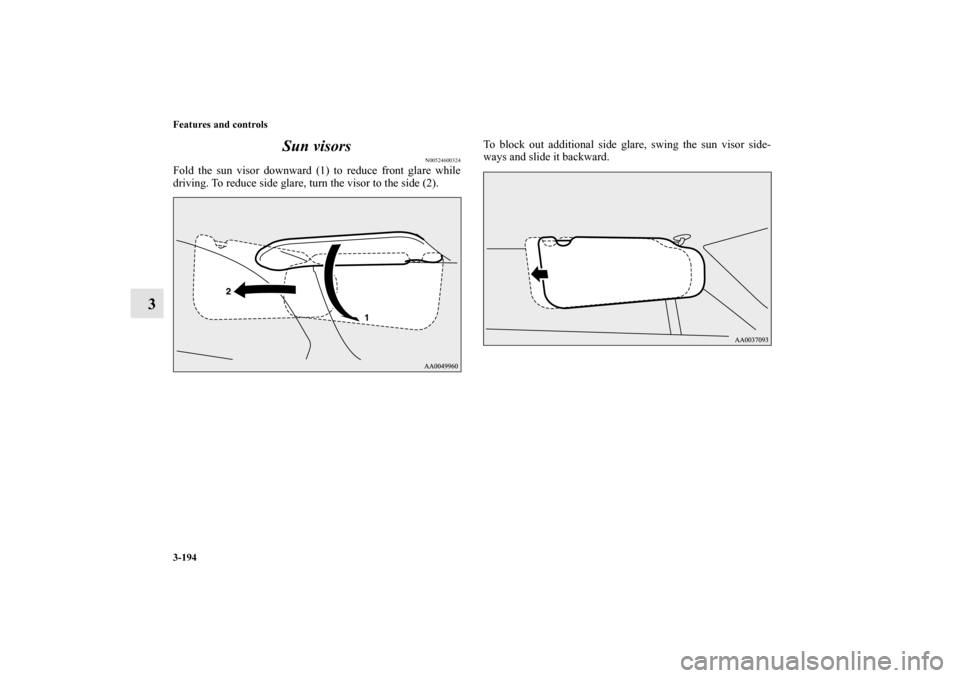
Fold the sun visor downward (1) to reduce front glare while
driving. To reduce side glare, turn the visor to the side (2).To block out additional side glare, swing the sun visor side-
ways and slide it backward.BK0102600US.book 194 ページ 2009年3月30日 月曜日 午後2時2分
Page 286 of 514
Features and controls
3-197
3 Digital clock
(if so equipped)
N00525100182
When the ignition switch is in the “ACC” or “ON” position,
the time is displayed.How each button works:Set the time by pressing the various buttons as described
below.NOTE�If the battery cables are disconnected or the battery
becomes discharged, the clock will have to be reset.
�For vehicles with multi center display, see “Digital
clock/Calender” on page 3-90.
Interior lights
N00525300474
H (HOUR)- Press and hold the “H” button until the correct
hour appears.
M (MINUTE)- Press and hold the “M” button until the correct
minute appears.
Luggage room light
→ P. 3 - 2 0 2Dome light/
Reading lights
→ P.3-200, 3-200
Door lights
→ P.3-202 Rear personal lights
→P.3-201
BK0102600US.book 197 ページ 2009年3月30日 月曜日 午後2時2分
Page 287 of 514
3-198 Features and controls
3
Interior light switch
N00537900132
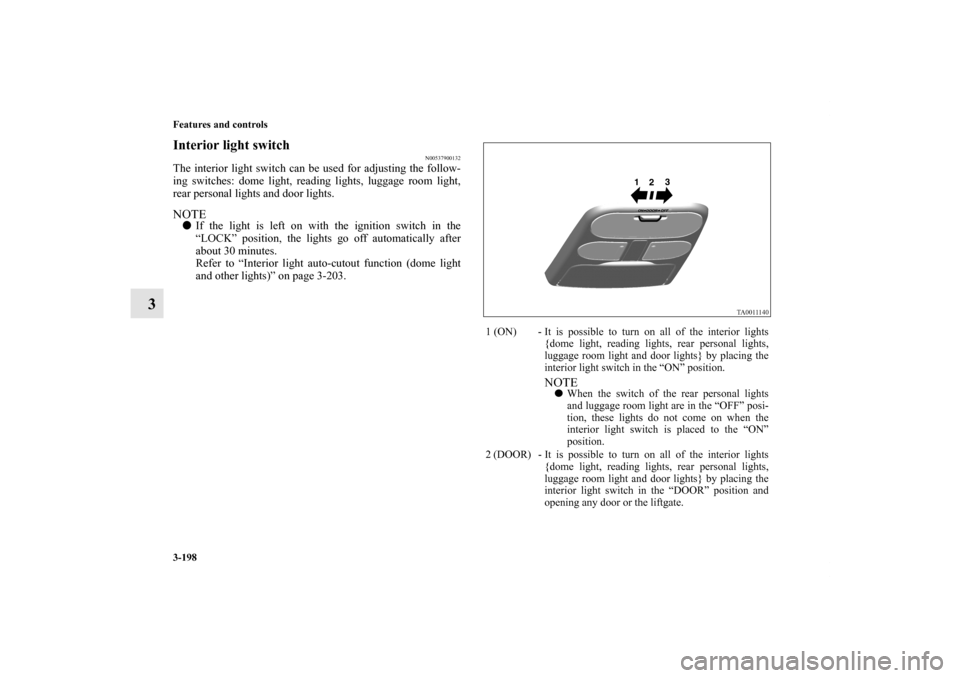
The interior light switch can be used for adjusting the follow-
ing switches: dome light, reading lights, luggage room light,
rear personal lights and door lights.NOTE�If the light is left on with the ignition switch in the
“LOCK” position, the lights go off automatically after
about 30 minutes.
Refer to “Interior light auto-cutout function (dome light
and other lights)” on page 3-203.
1 (ON) - It is possible to turn on all of the interior lights
{dome light, reading lights, rear personal lights,
luggage room light and door lights} by placing the
interior light switch in the “ON” position.
NOTE�When the switch of the rear personal lights
and luggage room light are in the “OFF” posi-
tion, these lights do not come on when the
interior light switch is placed to the “ON”
position.
2 (DOOR) - It is possible to turn on all of the interior lights
{dome light, reading lights, rear personal lights,
luggage room light and door lights} by placing the
interior light switch in the “DOOR” position and
opening any door or the liftgate.
BK0102600US.book 198 ページ 2009年3月30日 月曜日 午後2時2分
Page 288 of 514
Features and controls
3-199
3
NOTE�With the switches on the rear personal lights
and luggage room light in the “OFF” position,
the rear personal lights and luggage room light
stay off when the interior light switch is in the
“DOOR” position and a door or the liftgate is
opened.
When all the doors and the liftgate are closed, the
interior lights are dimmed gradually for 30 seconds
then go off. However, the lights go off immediately
without being dimmed if:
�The ignition switch is turned to the “ON”
position.
�All the doors and the liftgate are locked using
the lock knobs of the front doors, the power
door lock switch, or the remote control switch
from the keyless entry system.NOTE�If the ignition key is removed with the doors
and the liftgate closed, the interior lights come
on for 30 seconds period then go off.
�When the switches of the reading lights, rear
personal lights and luggage room light are in
the “ON” position, these lights do not go off
when all the doors and the liftgate are closed.
�In a vehicles with multi center display, the
multi center display can be used to change the
dimming period of interior lights.
For details, refer to “Setting and customiza-
tion” on page 3-108.3 (OFF) - It is possible to turn off all of the interior lights
{dome light, reading lights, rear personal lights,
luggage room light and door lights} by placing the
interior light switch in the “OFF” position.
NOTE�When the switches of the reading lights, rear
personal lights and luggage room light are in
the “ON” position, these lights do not go off
when the interior light switch is placed to the
“OFF” position.
BK0102600US.book 199 ページ 2009年3月30日 月曜日 午後2時2分
Page 292 of 514
Features and controls
3-203
3
Interior light auto-cutout function (dome light
and other lights)
N00526300367
If any of the interior lights are left on with the ignition switch
in the “LOCK” position, the lights go off automatically after
about 30 minutes.
The lights come on again if the ignition switch is turned to the
“ON” or “ACC” position, any door or the liftgate is opened and
closed, or the keyless entry system is operated.NOTE�In a vehicle with a multi center display, the multi center
display can be used to alter functions as listed below.
For details, please refer to “Setting and customization” on
page 3-108.
• The interior light auto-cutout function can be turned off.
• The interior light auto-cutout delay can be changed.
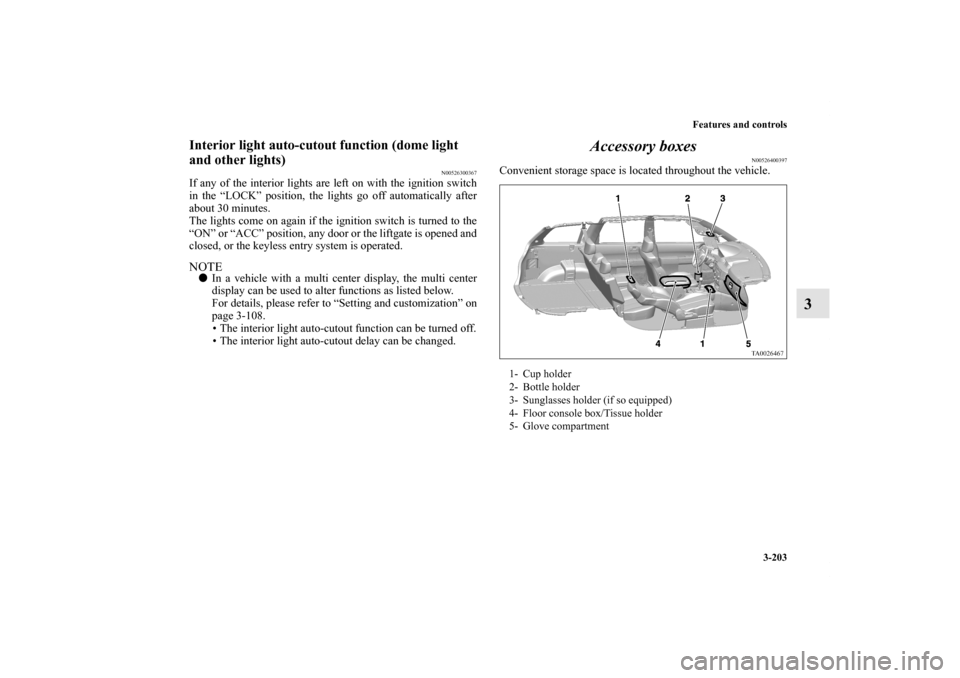
Accessory boxes
N00526400397
Convenient storage space is located throughout the vehicle.1- Cup holder
2- Bottle holder
3- Sunglasses holder (if so equipped)
4- Floor console box/Tissue holder
5- Glove compartment
BK0102600US.book 203 ページ 2009年3月30日 月曜日 午後2時2分
Page 302 of 514
Driving safety
4-3
4 Driving, alcohol and drugs
N00628900010
Drunk driving is one of the most frequent causes of accidents.
Your driving ability can be seriously impaired even with blood
alcohol levels far below the legal minimum. If you have been
drinking, don’t drive. Ride with a designated non-drinking
driver, call a cab or a friend, or use public transportation.
Drinking coffee or taking a cold shower will not make you
sober.
Similarly, prescription and nonprescription drugs affect your
alertness, perception and reaction time. Consult with your doc-
tor or pharmacist before driving while under the influence of
any of these medications.
Vehicle preparation before driving
N00629000513
For a safer and more enjoyable trip, always observe the follow-
ing: Seat belts and seats�Before starting the vehicle, make certain that you and all
passengers are seated and wearing their seat belts properly
(with children in the rear seat, in appropriate restraints),
and that all the doors and the liftgate are locked.
�Move the driver’s seat as far backward as possible, while
still keeping good visibility, and good control of the steer-
ing wheel, brakes, accelerator, and controls. Check the
instrument panel indicators for any possible problem.
�Move the front passenger seat as far back as possible.
�Make sure that infants and small children are properly
restrained in accordance with all laws and regulations.
WA R N I N G
!�NEVER DRINK AND DRIVE.
Your perceptions are less accurate, your reflexes are
slower and your judgment is impaired.
BK0102600US.book 3 ページ 2009年3月30日 月曜日 午後2時2分
Page 306 of 514
Driving safety
4-7
4 Parking
N00629600245
Parking on a hillWhen parking on a hill, set the parking brake, and turn the
front wheels toward the curb on a downhill, or away from the
curb on an uphill.
If necessary, apply chocks to wheels.
Be sure that the parking brake is firmly set when parked and
that the selector lever is in the “P” (PARK) position.
When parking on a hill, it is important to set the parking brake
before moving the selector lever to the “P” (PARK) position.
This prevents loading the parking brake against the transaxle
gear. When this happens, it is difficult to move the selector
lever out of the “P” (PARK) position.Parking with the engine runningNever leave the engine running while you take a short
sleep/rest. Also, never leave the engine running in a closed or
poorly ventilated place.
Where you park
When leaving the vehicleAlways remove the key from the ignition switch and lock all
doors and the liftgate when leaving the vehicle unattended.
Always try to park your vehicle in a well lit area.
WA R N I N G
!�Leaving the engine running risks injury or death
from accidentally moving the selector lever or the
accumulation of toxic exhaust fumes in the passen-
ger compartment.
WA R N I N G
!�Do not park your vehicle in areas where combustible
materials such as dry grass or leaves can come in
contact with a hot exhaust, since a fire could occur.
BK0102600US.book 7 ページ 2009年3月30日 月曜日 午後2時2分