Page 223 of 496
![MITSUBISHI ECLIPSE 2010 4.G Owners Manual 3-128 Features and controls
3
[The engine is not running, or the engine is running but the
parking brake has not been released]
The engine can be started with the headlights off when the
vehicle is st](/manual-img/19/7423/w960_7423-222.png "MITSUBISHI ECLIPSE 2010 4.G Owners Manual 3-128 Features and controls
3
[The engine is not running, or the engine is running but the
parking brake has not been released]
The engine can be started with the headlights off when the
vehicle is st")
3-128 Features and controls
3
[The engine is not running, or the engine is running but the
parking brake has not been released]
The engine can be started with the headlights off when the
vehicle is stationary.NOTE�Do not leave the headlights and other lights on for a long
period of time when the engine is not running. The battery
will run down.
�When it rains, or when the vehicle has been washed, the
inside of the lens sometimes becomes foggy. This is the
same as when window glass mists up on a humid day, and
does not indicate a problem. When the light is switched
on, the heat will dry out the fog. However, if water col-
lects inside the light, have it checked by an authorized
Mitsubishi Motors dealer or a repair facility of your
choice. Light auto-cutout function (headlights and other
lights)
N00532600264
�If the ignition key is turned to “LOCK” or “ACC” posi-
tion or removed from the ignition switch and the driver’s
door is opened with the light switch in the “ ” or “ ”
position, the lights automatically turn off.• If the driver’s door is opened after the key is removed
from the ignition switch, a high-pitched constant tone
will sound to remind you to turn off the lights.
• If the driver’s door is opened with the key in the ignition
switch, a low-pitched tone will sound to remind you to
remove the key.
�If the ignition key is turned to “LOCK” or “ACC” posi-
tion or removed from the ignition switch with the driver’s
door closed and the light switch in the “ ” or “ ”
position, the lights will stay on for about 3 minutes and
then turn off automatically. OFF All lights off
Parking, tail, front and rear side-marker lights, license
plate and instrument panel lights on
Headlights and other lights onBK0098300US.book 128 ページ 2008年12月8日 月曜日 午前11時37分
Page 227 of 496
3-132 Features and controls
3
NOTE�A light in the instrument panel flashes to show when the
front and rear turn signal lights are working properly.
If this light flashes faster than usual, check for a burned
out lamp bulb or malfunctioning connection.
If the panel light does not come on when the lever is
moved, check for a blown fuse or a burned out bulb in the
panel.
Have the vehicle inspected by an authorized Mitsubishi
Motors dealer or a repair facility of your choice.
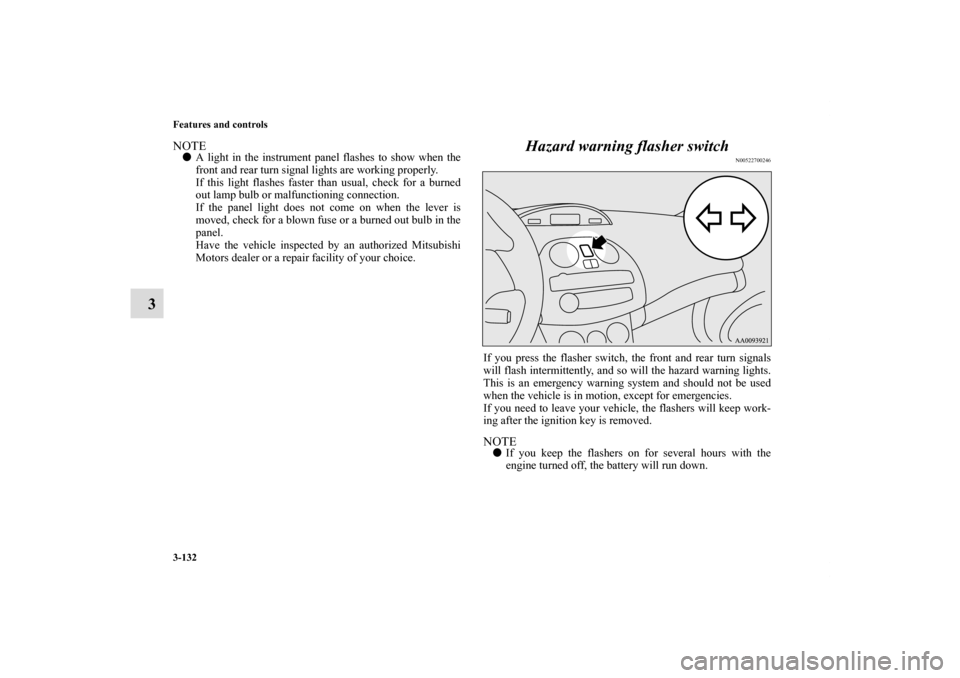
Hazard warning flasher switch
N00522700246
If you press the flasher switch, the front and rear turn signals
will flash intermittently, and so will the hazard warning lights.
This is an emergency warning system and should not be used
when the vehicle is in motion, except for emergencies.
If you need to leave your vehicle, the flashers will keep work-
ing after the ignition key is removed. NOTE�If you keep the flashers on for several hours with the
engine turned off, the battery will run down.
BK0098300US.book 132 ページ 2008年12月8日 月曜日 午前11時37分
Page 233 of 496
3-138 Features and controls
3
NOTE�If your vehicle is equipped with heated mirrors, mist can
also be removed from the outside rearview mirrors when
the rear window defogger switch is pressed. (Refer to
“Heated mirror” on page 3-60.)
Horn switch
N00523800143
To honk the horn, press around the “ ” mark on the steering
wheel.
CAUTION
!�The rear window defogger is not designed to melt
snow. Remove any snow manually before using the
rear window defogger.�Use the rear window defogger only after the engine
has started and is running. Be sure to turn the
defogger switch off immediately after the window is
clear to save on battery power.�Do not place stickers, tape, or other items that are
attached with adhesive over the grid wires on the
rear window.�When cleaning the inside rear window, use a soft
cloth and wipe lightly over the grid wires.
BK0098300US.book 138 ページ 2008年12月8日 月曜日 午前11時37分
Page 234 of 496

Features and controls
3-139
3 Hands-free Bluetooth
® cellular phone
interface system with voice recognition
(if so equipped)
N00506400069
The Hands-free Bluetooth
® cellular phone interface system
with voice recognition (Bluetooth
® HFP) uses a wireless com-
munication technology known as Bluetooth
® to allow you to
make hands-free calls in your vehicle using your Bluetooth
®
compatible cellular phone with Hands-free profile.
The system is equipped with a voice recognition function,
which lets you make hands-free calls by simple switch opera-
tions and voice command operations using a defined voice tree.
The Bluetooth
® HFP can be used when the ignition switch is in
the “ON” or “ACC” position.
To use the Bluetooth
® HFP, you should first connect your
Bluetooth
® compatible cellular phone to the Bluetooth
® HFP.
Refer to “Pairing a cellular phone” on page 3-147.
Bluetooth
® is a registered trademark of BLUETOOTH SIG,
INC.
NOTE�You cannot use the Bluetooth
® HFP if your cellular phone
has a dead battery or is turned off.
�Hands-free calls will not be possible in areas outside your
cellular phone service area or locations where a signal
cannot reach your phone.
WA R N I N G
!�Although the Bluetooth
® HFP allows you to make
hands-free calls, if you choose to use the cellular
phone while driving, you must not allow that usage
to distract you in the safe operation of your vehicle.
Anything, including cellular phone usage, that dis-
tracts you from the safe operation of your vehicle
increases your risk of an accident. Refer to and fol-
low all state and local laws in your area regarding
cellular phone usage while driving.
BK0098300US.book 139 ページ 2008年12月8日 月曜日 午前11時37分
Page 236 of 496

Features and controls
3-141
3
NOTE�When you press the SPEECH button to enter voice recog-
nition mode with a cellular phone paired to the system,
current information on the cellular phone, such as
“remaining battery life,” “signal strength” or “roaming,”
will be displayed on the audio display.* (Refer to “Pairing
a cellular phone” on page 3-147.)
*: Some cellular phones will not send this information to
the Bluetooth
® HFP.
�Call waiting and three-way calls can be used by the Blue-
tooth
® HFP, only when those services can be used with
your cellular phone.
�Users may experience a delay in vehicle audio when plac-
ing or answering a call from the handset. To reduce
delays, users should place calls and receive calls through
the Hands-free System.
Voice recognition function
N00506600090
The Bluetooth
® HFP is equipped with a voice recognition
function. Your voice will be recognized by a microphone in the
front pillar (driver’s side), allowing you to make hands-free
calls with voice commands.
Voice recognition is possible in US English, North American
Spanish and Canadian French. The factory setting is US
English.
Some of the voice commands indicated below have a number
of alternative commands. For a table showing the voice com-
mands in each language and the corresponding alternative
commands, refer to “Commands and Alternatives” on page 3-
161.
NOTE�If the voice command that you say differs from the pre-
defined command or cannot be recognized due to ambient
noise or some other reason, the Bluetooth
® HFP will ask
you for the voice command again up to 3 times.
�For best performance and further reduction of ambient
noise, the vehicle windows and the electric convertible
top (ECLIPSE SPYDER only) should be closed while
engaging the voice recognition function.
Selecting the LanguageThere are two ways to change the language. NOTE�The more entries that are registered in the phonebook, the
longer it will take to change the language.
BK0098300US.book 141 ページ 2008年12月8日 月曜日 午前11時37分
Page 248 of 496

Features and controls
3-153
3
Switching between hands-free mode and private
mode
N00508100031
The Bluetooth
® HFP can switch between Hands-free mode
(Hands-free calls) and private mode (calls using cellular
phone).
If you press the SPEECH button and say “Transfer call” during
a Hands-free call, you can stop the Hands-free mode and talk in
private mode on your cellular phone.
To return to Hands-free mode, press the SPEECH button again
and say “Transfer call.”
Receiving calls
N00508200032
If an incoming phone call is received while the ignition switch
is in the “ACC” or “ON” position, the audio system will be
automatically turned on and Incoming Call will be played,
even when the audio system was originally off.
The voice guide announcement for the incoming call will be
output from the front passenger’s seat speaker.
If the CD player or radio was playing when the incoming call
was received, the audio system will mute the sound from the
CD player or radio and output only the Incoming Call.
To receive the call, press the PHONE button on the overhead
console control switch.
When the call is over, the audio system will return to its previ-
ous state.
Phonebook function
N00508300020
The Bluetooth
® HFP has its own phonebook separate from the
phonebook on the cellular phone.
This phonebook is used when making calls with the voice rec-
ognition function.
You can register up to 32 names for each language in the
phonebook.
Also, each entry has 4 locations associated with: HOME,
WORK, MOBILE and PAGER. You can register one telephone
number for each location.
The phonebook main menu is used to register or edit informa-
tion in the phonebook.
Use the following procedure to call up the phonebook main
menu.
1. Press the SPEECH button.
2. Say “Phonebook.”
3. The voice guide will say “Select one of the following:
new entry, edit, list names, delete or erase all, or say can-
cel to return to main menu” and will wait for your com-
mand.
NOTE�Disconnecting the battery cable will not delete informa-
tion registered in the phonebook.
BK0098300US.book 153 ページ 2008年12月8日 月曜日 午前11時37分
Page 264 of 496
Features and controls
3-169
3 Vanity mirror
(if so equipped)
N00524700194
The vanity mirrors are located on the back of the sun visors.
Opening the lid (A) of the vanity mirror will automatically turn
on the mirror light (B).
CAUTION
!�If the lid of the lighted vanity mirror is kept open for
prolonged periods of time, the battery may be dis-
charged.Ty p e 1
Ty p e 2
BK0098300US.book 169 ページ 2008年12月8日 月曜日 午前11時37分
Page 265 of 496
3-170 Features and controls
3Power outlet
N00525000426
To use a “plug-in” type accessory open the cover located in
front of the floor console then insert the plug in the socket.
The accessory can be operated when the ignition key is in the
“ON” or “ACC” position.
Interior lights
N00525300490
ECLIPSE
CAUTION
!�Be aware that using electronic equipment with the
engine off may run the battery down.�When the power outlet is not in use, be sure to close
the power outlet cover. This will prevent the power
outlet from becoming dirty and possibly short-cir-
cuiting.�Be sure to use a “plug-in” type accessory operating
at 12 V and 120 W or less.
1- Dome light (Rear) (if so equipped) → P.3-175
2- Dome light (Front)/Reading lights-Type 1 (if so equipped)
→ P.3-171
Dome light (Front)/Reading lights-Type 2 (if so equipped)
→ P.3-173
3- Reading lights (if so equipped) → P.3-174
4- Cargo area light → P.3-176
BK0098300US.book 170 ページ 2008年12月8日 月曜日 午前11時37分


