2010 MERCEDES-BENZ CLS COUPE brake sensor
[x] Cancel search: brake sensorPage 190 of 337
G
Risk of accident
Active Blind Spot Assist is only an aid and may
detect vehicles/obstacles incorrectly or not
at all.
The system may be impaired or may not func-
tion if:
R there is poo rvisibility, e.g. due to snow,
rain, fog or spray.
R the rear and/or front sensors are dirty.
Active Blind Spot Assist may not detect nar-
row vehicles, such as motorcycles or bicycles,
or only detect the mtoo late. It cannot detect
vehicles which are overtaken at a small dis-
tance and then enter the blind spot area.
Active Blind Spot Assist cannot detect road
and traffic conditions. It is not a substitute for
attentive driving. You are responsible for the
vehicle's speed, braking in good time, and
steering correctly. Always adapt your driving
style to suit the prevailing road and weather
conditions. Always pay attention to traffic
conditions and your surroundings. Otherwise,
you may fail to recognise dangers in time,
cause an accident and injure yourself and oth-
ers.
The radar sensor system is automatically
deactivated near radio telescope facilities
(Y page 327).
For Active Blind Spot Assist to assist you
when driving, the radar sensor system must
be activated (Y page 210) and operational.
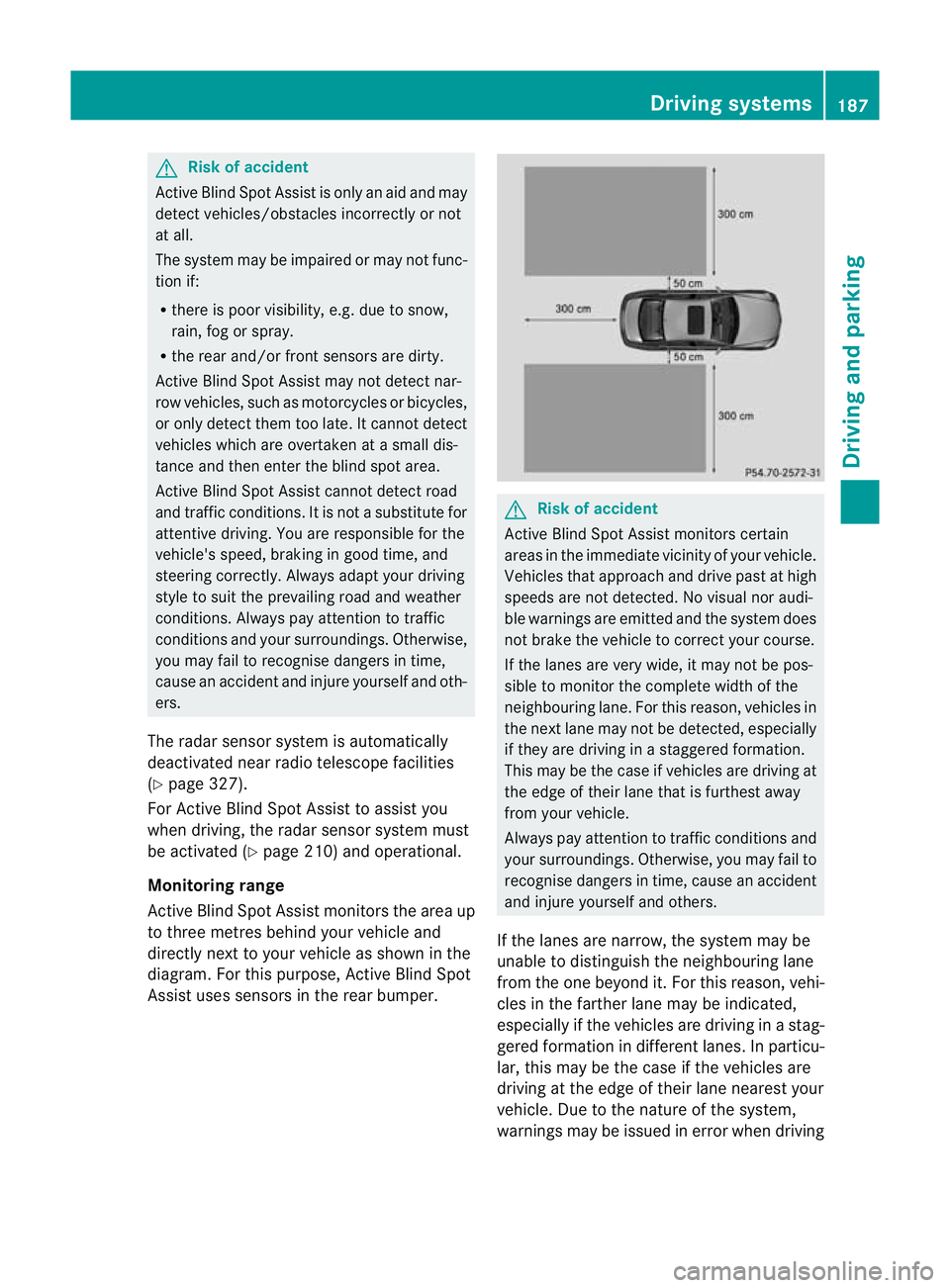
Monitoring range
Active Blind Spot Assist monitors the area up
to three metres behind your vehicle and
directly next to your vehicle as shown in the
diagram. For this purpose, Active Blind Spot
Assist uses sensors in the rear bumper. G
Risk of accident
Active Blind Spot Assist monitors certain
areas in the immediate vicinity of your vehicle.
Vehicles that approach and drive past at high
speeds are not detected. No visual nor audi-
ble warnings are emitted and the system does
not brake the vehicle to correct your course.
If the lanes are very wide, it may not be pos-
sible to monitor the complete width of the
neighbouring lane. For this reason, vehicles in
the next lane may not be detected, especially
if they are driving in a staggered formation.
This may be the case if vehicles are driving at
the edge of their lane that is furthest away
from your vehicle.
Always pay attention to traffic conditions and
your surroundings. Otherwise, you may fail to
recognise dangers in time, cause an accident
and injure yourself and others.
If the lanes are narrow, the system may be
unable to distinguish the neighbouring lane
from the one beyond it. For this reason, vehi-
cles in the farther lane may be indicated,
especially if the vehicles are driving in a stag-
gered formation in different lanes. In particu-
lar, this may be the case if the vehicles are
driving at the edge of their lane nearest your
vehicle. Due to the nature of the system,
warnings may be issued in error when driving Driving systems
187Driving and parking Z
Page 191 of 337
close to crash barriers or similar solid lane
borders.
Two Active Blind Spot Assist sensors are inte-
grated into the front and rear bumpers
respectively. An additiona lsensor is located
behind the cover in the radiator grille. Make
sure that the bumpers are free from dirt, ice
or slush around the sensors. The rear radar
sensors must not be covered, for example by
cycle racks or overhanging loads. Following a
severe impact or in the event of damage to
the bumpers, have the function of the radar
sensors checked at a qualified specialist
workshop, e.g. a Mercedes-Benz Service
Centre. Active Blind Spot Assist may other-
wise fail to work correctly.
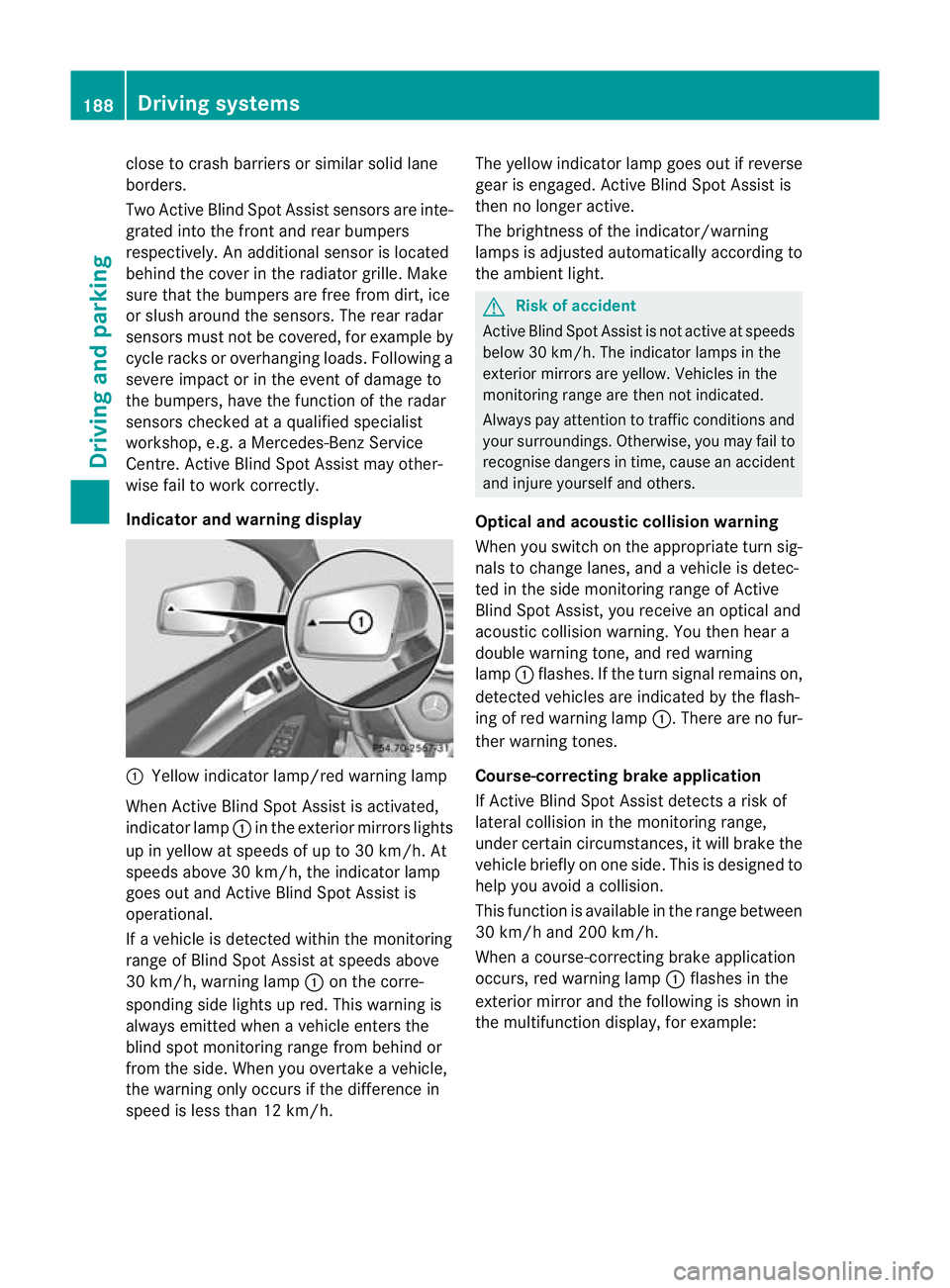
Indicator and warning display :
Yellow indicator lamp/red warning lamp
When Active Blind Spot Assist is activated,
indicator lamp :in the exterior mirrors lights
up in yellow at speeds of up to 30 km/h. At
speeds above 30 km/h, the indicator lamp
goes out and Active Blind Spot Assist is
operational.
If a vehicle is detected within the monitoring
range of Blind Spot Assist at speeds above
30 km/h, warning lamp :on the corre-
sponding side lights up red. This warning is
always emitted when a vehicle enters the
blind spot monitoring range from behind or
from the side. When you overtake a vehicle,
the warning only occurs if the difference in
speed is less than 12 km/h. The yellow indicator lamp goes out if reverse
gear is engaged. Active Blind Spot Assist is
then no longer active.
The brightness of the indicator/warning
lamps is adjusted automatically according to
the ambient light. G
Risk of accident
Active Blind Spot Assist is not active at speeds
below 30 km/h. The indicator lamps in the
exterior mirrors are yellow. Vehicles in the
monitoring range are then not indicated.
Always pay attention to traffic conditions and
your surroundings. Otherwise, you may fail to
recognise dangers in time, cause an accident
and injure yourself and others.
Optical and acoustic collision warning
When you switch on the appropriate turn sig-
nals to change lanes, and a vehicle is detec-
ted in the side monitoring range of Active
Blind Spot Assist, you receive an optical and
acoustic collision warning. You then hear a
double warning tone, and red warning
lamp :flashes. If the turn signal remains on,
detected vehicles are indicated by the flash-
ing of red warning lamp :.There are no fur-
ther warning tones.
Course-correcting brake application
If Active Blind Spot Assist detects a risk of
lateral collision in the monitoring range,
under certain circumstances, it will brake the
vehicle briefly on one side. This is designed to
help you avoid a collision.
This function is available in the range between
30 km/h and 200 km/h.
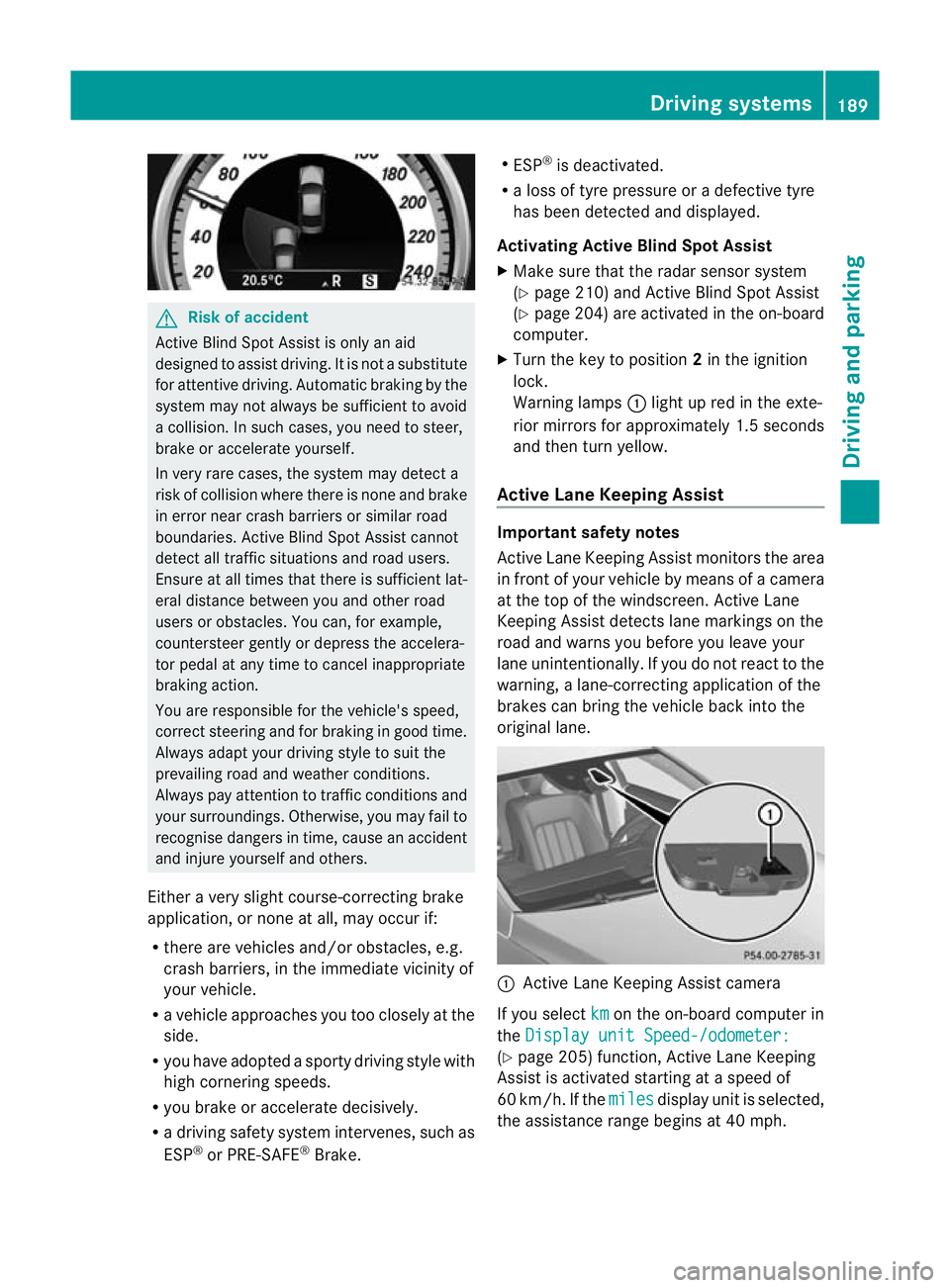
When a course-correcting brake application
occurs, red warning lamp :flashes in the
exterior mirror and the following is shown in
the multifunction display, for example: 188
Driving systemsDriving and parking
Page 192 of 337
G
Risk of accident
Active Blind Spot Assist is only an aid
designed to assist driving .Itis not a substitute
for attentive driving. Automatic braking by the
system may not always be sufficient to avoid
a collision. In such cases, you need to steer,
brake or accelerate yourself.
In very rare cases, the system may detect a
risk of collision where there is none and brake
in error near crash barriers or similar road
boundaries. Active Blind Spot Assist cannot
detect all traffic situations and road users.
Ensure at all times that there is sufficient lat-
eral distance between you and other road
users or obstacles. You can, for example,
countersteer gently or depress the accelera-
tor pedal at any time to cancel inappropriate
braking action.
You are responsible for the vehicle's speed,
correct steering and for braking in good time.
Always adapty our driving style to suit the
prevailing road and weather conditions.
Always pay attention to traffic conditions and
your surroundings. Otherwise, you may fail to
recognise dangers in time, cause an accident
and injure yourself and others.
Either a very slight course-correcting brake
application, or none at all, may occur if:
R there are vehicles and/or obstacles, e.g.
crash barriers, in the immediate vicinity of
your vehicle.
R a vehicle approaches you too closely at the
side.
R you have adopted a sporty driving style with
high cornering speeds.
R you brake or accelerate decisively.
R a driving safety system intervenes, such as
ESP ®
or PRE-SAFE ®
Brake. R
ESP ®
is deactivated.
R a loss of tyre pressure or a defective tyre
has been detected and displayed.
Activating Active Blind Spot Assist
X Make sure that the radar sensor system
(Y page 210) and Active Blind Spot Assist
(Y page 204) are activated in the on-board
computer.
X Turn the key to position 2in the ignition
lock.
Warning lamps :light up red in the exte-
rior mirrors for approximately 1.5 seconds
and then turn yellow.
Active Lane Keeping Assist Important safety notes
Active Lane Keeping Assist monitors the area
in front of your vehicle by means of a camera
at the top of the windscreen. Active Lane
Keeping Assist detects lane markings on the
road and warns you before you leave your
lane unintentionally. If you do not react to the
warning, a lane-correcting application of the
brakes can bring the vehicle back into the
original lane.
:
Active Lane Keeping Assist camera
If you select km on the on-board computer in
the Display unit Speed-/odometer: (Y
page 205) function, Active Lane Keeping
Assist is activated starting at a speed of
60 km/h. If the miles display unit is selected,
the assistance range begins at 40 mph. Driving systems
189Driving and parking Z
Page 213 of 337
Activating/deactivating the rada
rsensor
system
i You must deactivate the radar sensor sys-
tem in certain countries and near radio
telescope facilities. Further information
(Y page 327).
Vehicles with a navigation system: the radar
sensor system is deactivated automatically if
you are close to radio telescope facilities.
The following systems are switched off when
the radar sensor system is deactivated:
R DISTRONIC PLUS (Y page 154)
R BAS PLUS (Y page 57)
R PRE-SAFE ®
Brake (Y page 61)
R Blind Spo tAssist (Y page 183)
R Active Blind Spot Assist (Y page 186)
X Press the =or; button on the steer-
ing wheel to select the Settings menu.
X Press the :or9 button to select the
Vehicle submenu.
X Press the abutton to confirm.
X Press the 9or: button to select
Radar sensor (See Owner's Man.): .
You will see the selected setting: on or
off .
X Press the abutton to save the setting.
Heating menu Auxiliary heating departure time
This function is only available on vehicles with
auxiliary heating (Y
page 119).
In the Heating submenu, you can select a
stored departure time or change a departure
time.
The auxiliary heating timer function calcu-
lates the switch-on time according to the out-
side temperature so that the vehicle is pre-
heated by the departure time. When the
departure time is reached, the auxiliary heat-
ing continues to heat for a further five
minutes and then switches off. The auxiliary
heating adopts the THERMATIC or THERMA-
TRONIC temperature setting. You can switch off the auxiliary heating by
using the remote control or the auxiliary heat-
ing button on the centre console. G
Risk of poisoning
Exhaust fumes are produced when the auxili-
ary heating is in operation. Inhaling these
exhaust fumes can be poisonous. You should
therefore switch off the auxiliary heating in
confined spaces without an extraction sys-
tem, e.g. a garage. G
Risk of fire
When operating the auxiliary heating parts of
the vehicle can get very hot. Make sure that
the exhaust system does not under any cir-
cumstances come into contact with easily
ignitable material such as dry grass or fuels.
The material could otherwise ignite and set
the vehicle alight. Choose your parking spot
accordingly.
Operating the auxiliary heating is thus pro-
hibited at filling stations or when your vehicle
is being refuelled.Y ou must therefore switch
off the auxiliary heating at filling stations.
! Operating the auxiliary heating/ventila-
tion draws on the vehicle battery. After you
have heated or ventilated the vehicle a
maximum of two times, drive for a longer
distance.
i Switch the auxiliary heating on regularly
once a month for about ten minutes.
Selecting the departure time or deactivat-
ing a selected departure time
X Press the =or; button on the steer-
ing wheel to select the Settings menu.
X Press the :or9 button to select the
Heating submenu.
X Press the abutton to confirm.
You will see the selected setting.
X Press the abutton to confirm. 210
Menus and submenusOn-board computer and displays
Page 220 of 337
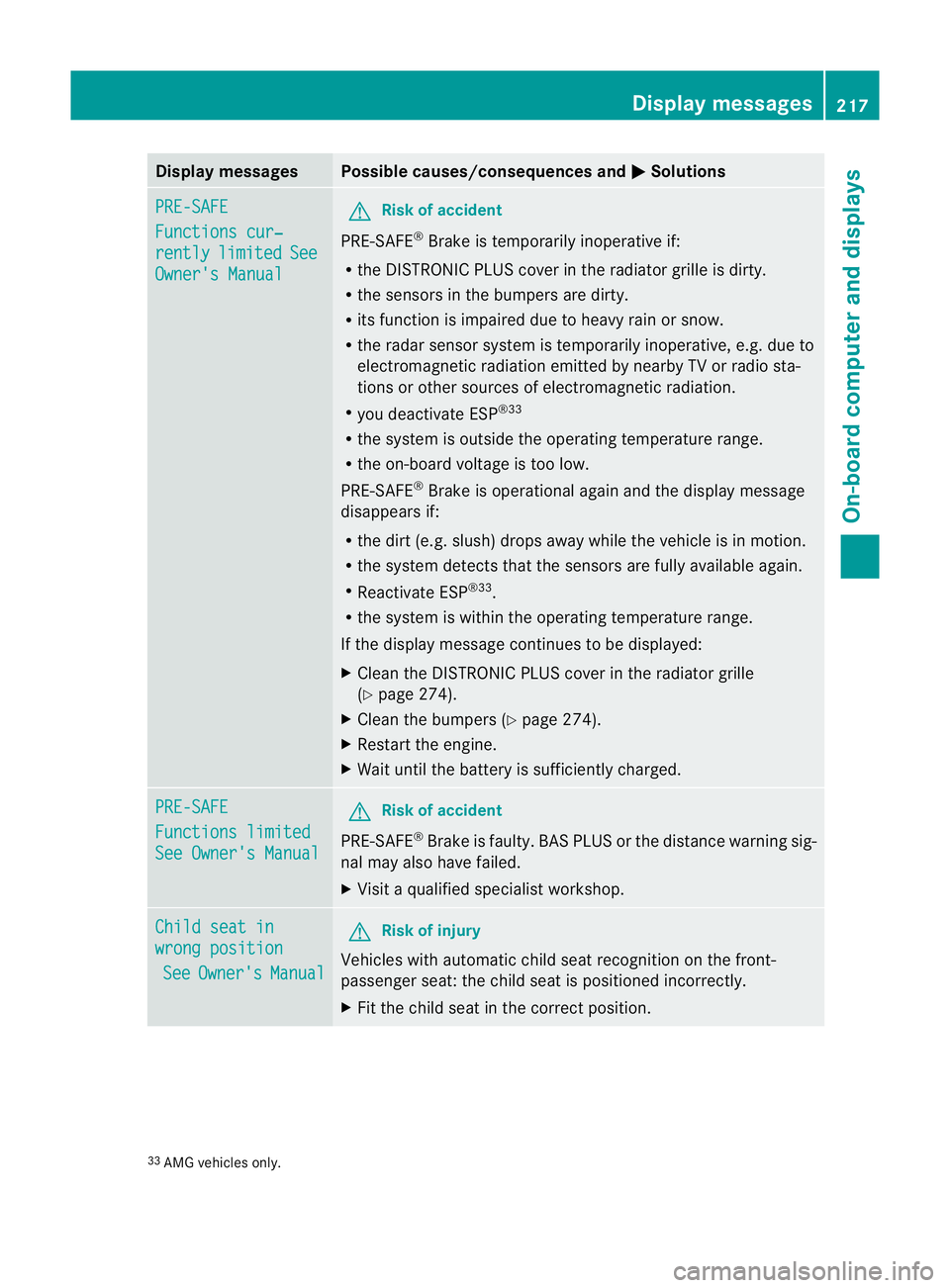
Display messages Possible causes/consequences and
M Solutions
PRE-SAFE
Functions cur‐
rently limited See
Owner's Manual G
Risk of accident
PRE-SAFE ®
Brake is temporarily inoperative if:
R the DISTRONIC PLUS cover in the radiator grille is dirty.
R the sensors in the bumpers are dirty.
R its function is impaired due to heavy rain or snow.
R the rada rsensor system is temporarily inoperative, e.g. due to
electromagnetic radiation emitted by nearby TV or radio sta-
tions or other sources of electromagnetic radiation.
R you deactivate ESP ®33
R the system is outside the operating temperature range.
R the on-board voltage is too low.
PRE-SAFE ®
Brake is operational again and the display message
disappears if:
R the dirt (e.g. slush) drops away while the vehicle is in motion.
R the system detects that the sensors are fully available again.
R Reactivate ESP ®33
.
R the system is within the operating temperature range.
If the display message continues to be displayed:
X Clean the DISTRONIC PLUS cover in the radiator grille
(Y page 274).
X Clean the bumpers (Y page 274).
X Restart the engine.
X Wait until the battery is sufficiently charged. PRE-SAFE
Functions limited
See Owner's Manual G
Risk of accident
PRE-SAFE ®
Brake is faulty. BASP LUS or the distance warning sig-
nal may also have failed.
X Visit a qualified specialist workshop. Child seat in
wrong position
See Owner's Manual G
Risk of injury
Vehicles with automatic child seat recognition on the front-
passenger seat: the child seat is positioned incorrectly.
X Fit the child seat in the correct position. 33
AMG vehicles only. Display messages
217On-board computer and displays Z
Page 231 of 337
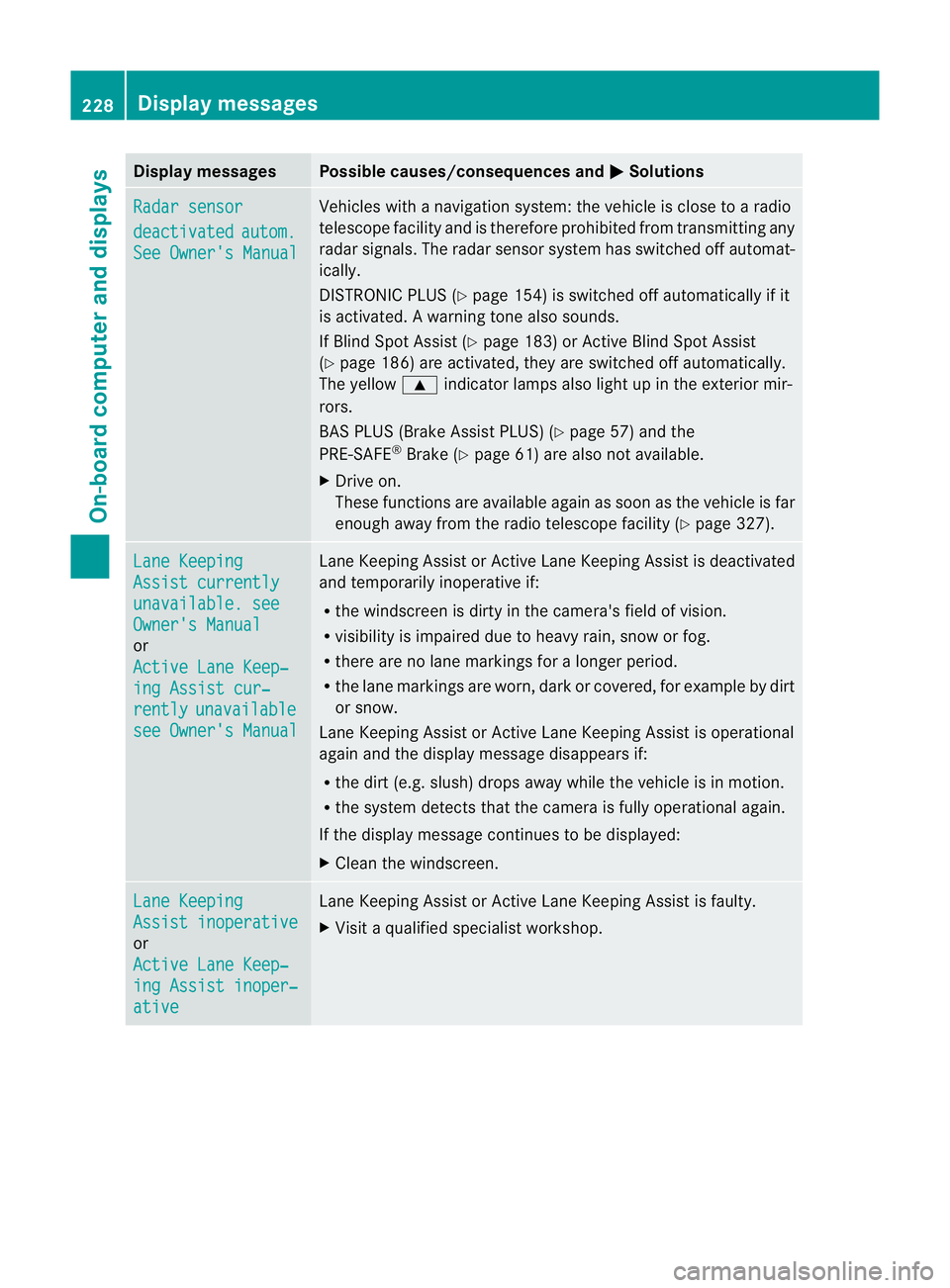
Display messages Possible causes/consequences and
M Solutions
Radar sensor
deactivated autom.
See Owner's Manual Vehicles with a navigation system: the vehicle is close to a radio
telescope facility and is therefore prohibited from transmitting any
rada
rsignals .The radar sensor system has switched off automat-
ically.
DISTRONIC PLUS (Y page 154) is switched off automatically if it
is activated. Awarning tone also sounds.
If Blind Spot Assist (Y page 183) or Active Blind Spot Assist
(Y page 186) are activated, they are switched off automatically.
The yellow 9indicator lamps also light up in the exterior mir-
rors.
BAS PLUS (Brake Assist PLUS) (Y page 57) and the
PRE-SAFE ®
Brake (Y page 61) are also no tavailable.
X Drive on.
These functions are available again as soon as the vehicle is far
enough away from the radio telescope facility (Y page 327).Lane Keeping
Assist currently
unavailable. see
Owner's Manual
or
Active Lane Keep‐
ing Assist cur‐
rently unavailable
see Owner's Manual Lane Keeping Assist or Active Lane Keeping Assist is deactivated
and temporarily inoperative if:
R
the windscreen is dirty in the camera's field of vision.
R visibility is impaired due to heavy rain, snow or fog.
R there are no lane markings for a longer period.
R the lane markings are worn, dark or covered, for example by dirt
or snow.
Lane Keeping Assist or Active Lane Keeping Assist is operational
again and the display message disappears if:
R the dirt (e.g. slush) drops away while the vehicle is in motion.
R the system detects that the camera is fully operational again.
If the display message continues to be displayed:
X Clean the windscreen. Lane Keeping
Assist inoperative
or
Active Lane Keep‐
ing Assist inoper‐
ative Lane Keeping Assist or Active Lane Keeping Assist is faulty.
X
Visi taqualified specialist workshop. 228
Display messagesOn-board computer and displays
Page 234 of 337
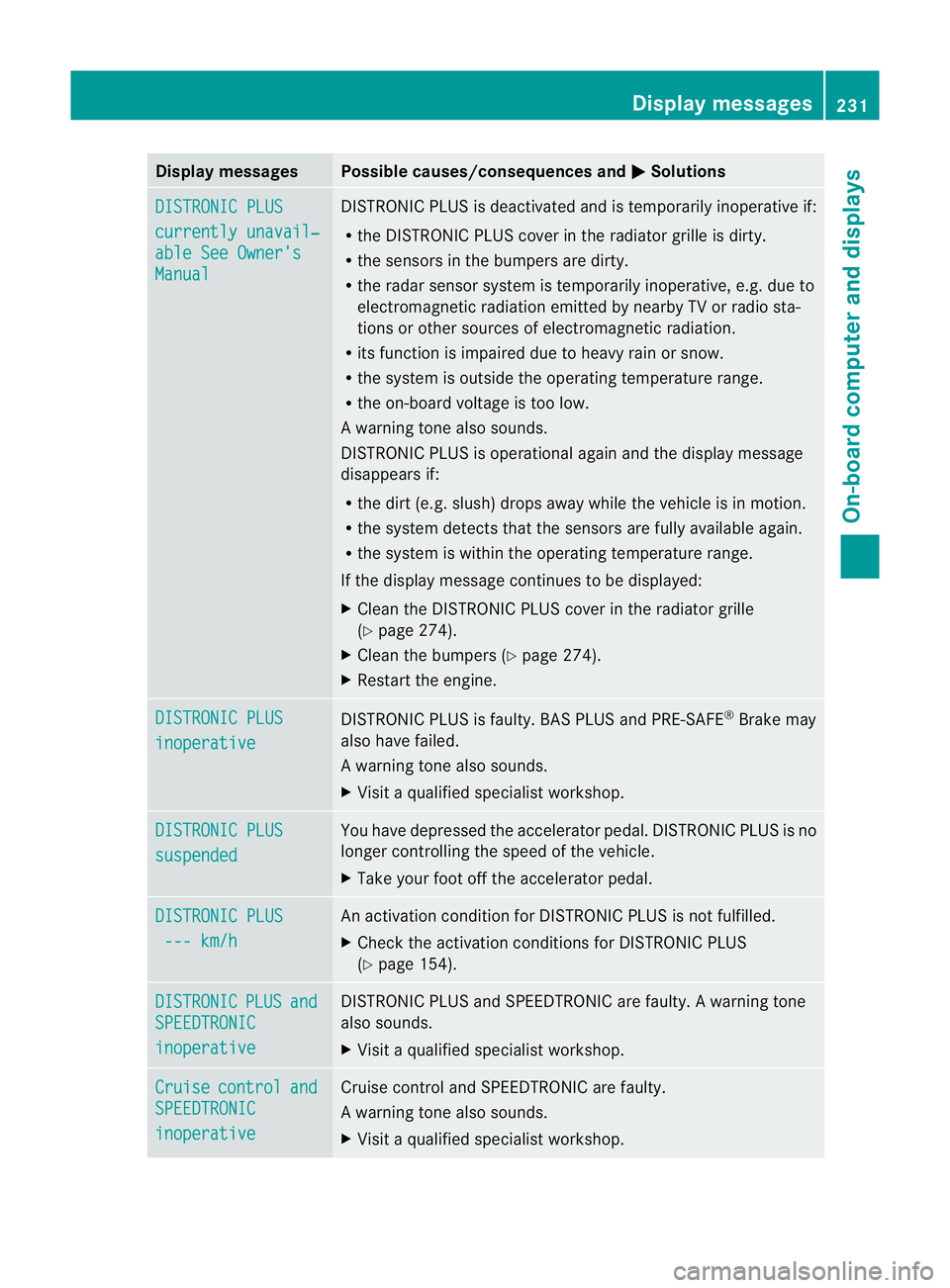
Display messages Possible causes/consequences and
M Solutions
DISTRONIC PLUS
currently unavail‐
able See Owner's
Manual DISTRONIC PLU
Sis deactivated and is temporarily inoperative if:
R the DISTRONIC PLUS cover in the radiator grille is dirty.
R the sensors in the bumpers are dirty.
R the radar sensor system is temporarily inoperative, e.g. due to
electromagnetic radiation emitted by nearby TV or radio sta-
tions or other sources of electromagnetic radiation.
R its function is impaired due to heavy rain or snow.
R the system is outside the operating temperature range.
R the on-board voltage is too low.
Aw arning tone also sounds.
DISTRONIC PLU Sis operational againa nd the display message
disappears if:
R the dirt (e.g. slush) drops away while the vehicle is in motion.
R the system detects tha tthe sensors are fully available again.
R the system is within the operating temperature range.
If the display message continues to be displayed:
X Clean the DISTRONIC PLUS cover in the radiator grille
(Y page 274).
X Cleant he bumpers (Y page 274).
X Restart the engine. DISTRONIC PLUS
inoperative DISTRONIC PLUS is faulty. BAS PLUS and PRE-SAFE
®
Brake may
also have failed.
Aw arning tone also sounds.
X Visi taqualified specialist workshop. DISTRONIC PLUS
suspended You have depressed the accelerator pedal. DISTRONIC PLUS is no
longer controlling the speed of the vehicle.
X
Take your foot off the accelerator pedal. DISTRONIC PLUS
--- km/h An activation condition for DISTRONIC PLUS is not fulfilled.
X
Check the activation conditions for DISTRONIC PLUS
(Y page 154). DISTRONIC PLUS and
SPEEDTRONIC
inoperative DISTRONIC PLUS and SPEEDTRONIC are faulty. A warning tone
also sounds.
X
Visit a qualified specialist workshop. Cruise control and
SPEEDTRONIC
inoperative Cruise control and SPEEDTRONIC are faulty.
Aw
arning tone also sounds.
X Visi taqualified specialist workshop. Display messages
231On-board computer and displays Z
Page 247 of 337
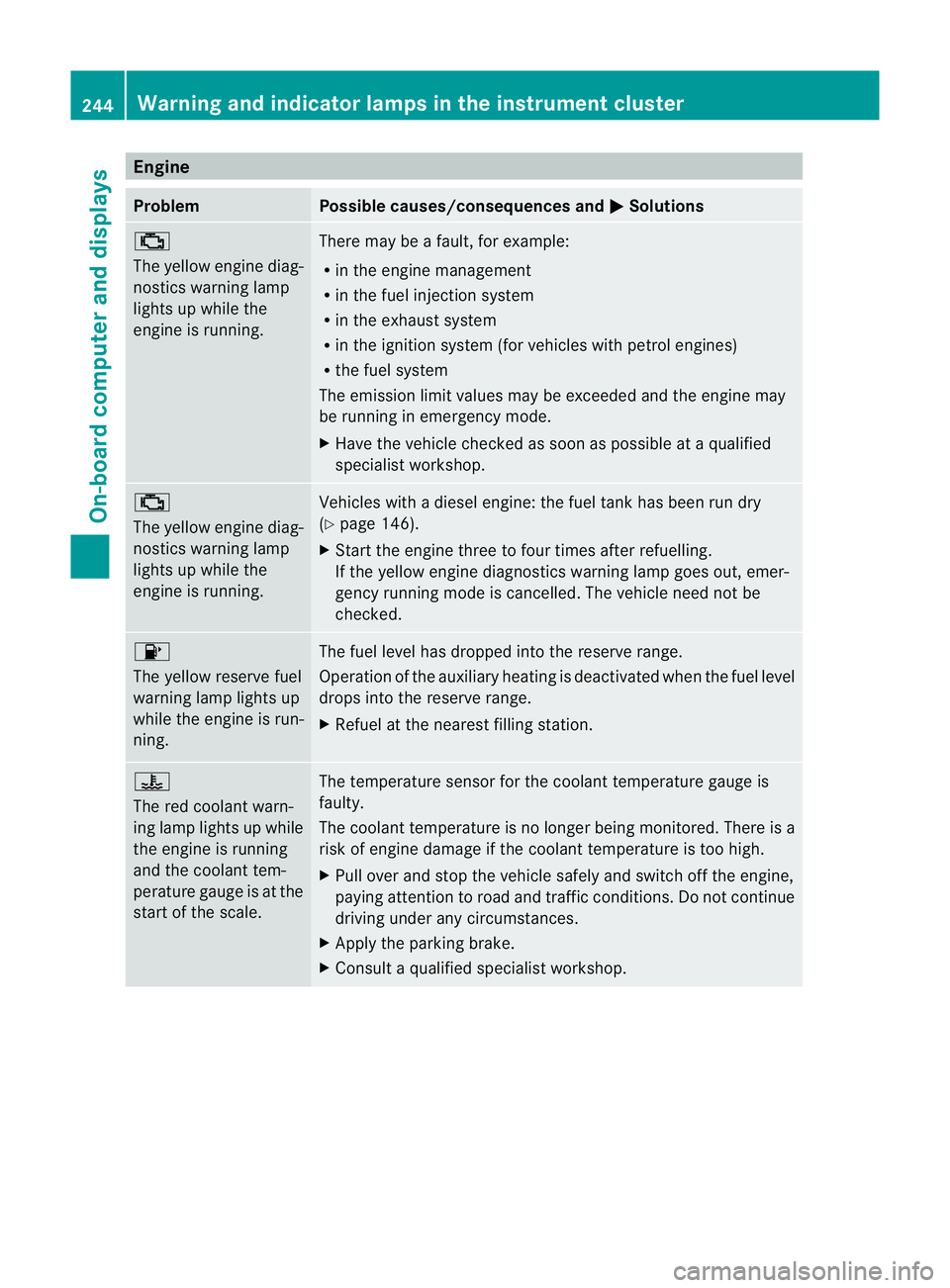
Engine
Problem Possible causes/consequences and
M Solutions
;
The yellow engine diag-
nostics warning lamp
lights up while the
engine is running.
There may be a fault, for example:
R
in the engine management
R in the fuel injection system
R in the exhaust system
R in the ignition system (for vehicles with petrol engines)
R the fuel system
The emission limit values may be exceeded and the engin emay
be running in emergency mode.
X Have the vehicle checked as soon as possible at a qualified
specialist workshop. ;
The yellow engine diag-
nostics warning lamp
lights up while the
engine is running.
Vehicles with a diesel engine: the fuel tan
khas been run dry
(Y page 146).
X Start the engine three to four times after refuelling.
If the yellow engine diagnostics warning lamp goes out, emer-
gency running mode is cancelled. The vehicle need no tbe
checked. 8
The yellow reserve fuel
warning lamp lights up
while the engine is run-
ning.
The fuel level has dropped into the reserve range.
Operation of the auxiliary heating is deactivated when the fuel level
drops into the reserve range.
X
Refuel at the nearest filling station. ?
The red coolant warn-
ing lamp lights up while
the engine is running
and the coolant tem-
perature gauge is at the
star
toft he scale. The temperature sensor for the coolant temperature gauge is
faulty.
The coolant temperature is no longer being monitored. There is a
risk of engine damage if the coolant temperature is too high.
X
Pull over and stop the vehicle safely and switch off the engine,
paying attention to road and traffic conditions. Do not continue
driving under any circumstances.
X Apply the parking brake.
X Consult a qualified specialist workshop. 244
Warning and indicator lamps in the instrument clusterOn-board computer and displays