Page 238 of 543
236
3-2. Using the audio system
ES350_U■
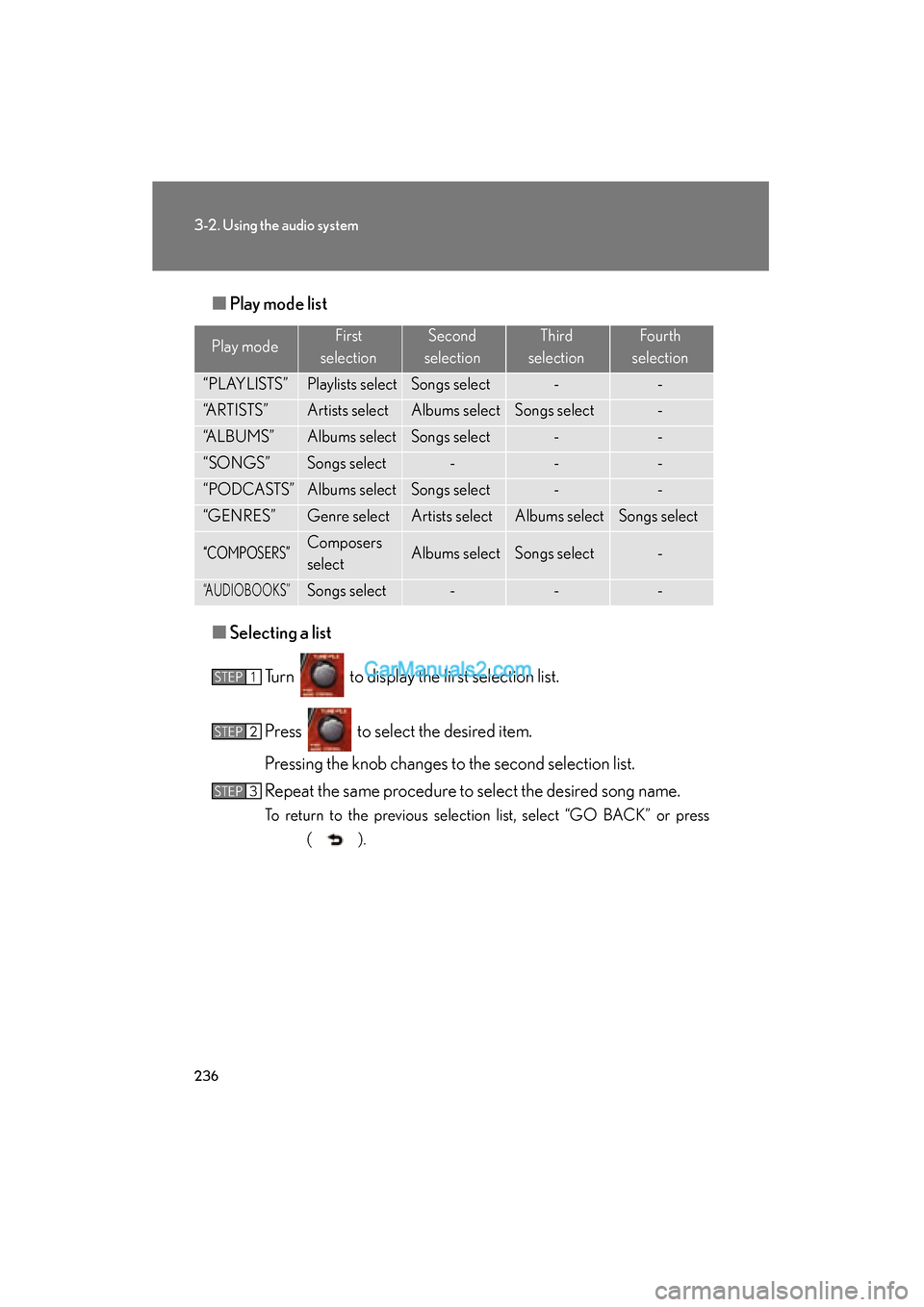
Play mode list
■ Selecting a list
Turn to display the first selection list.
Press to select the desired item.
Pressing the knob changes to the second selection list.
Repeat the same procedure to select the desired song name.
To return to the previous selection list, select “GO BACK” or press ( ).
Play modeFirst
selectionSecond
selectionThird
selectionFourth
selection
“PLAYLISTS”Playlists selectSongs select--
“ARTISTS”Artists selectAlbums selectSongs select-
“ALBUMS”Albums selectSongs select--
“SONGS”Songs select---
“PODCASTS”Albums selectSongs select--
“GENRES”Genre selectArtists selectAlbums selectSongs select
“COMPOSERS”Composers
selectAlbums selectSongs select-
“AUDIOBOOKS”Songs select---
STEP1
STEP2
STEP3
Page 240 of 543
238
3-2. Using the audio system
ES350_U
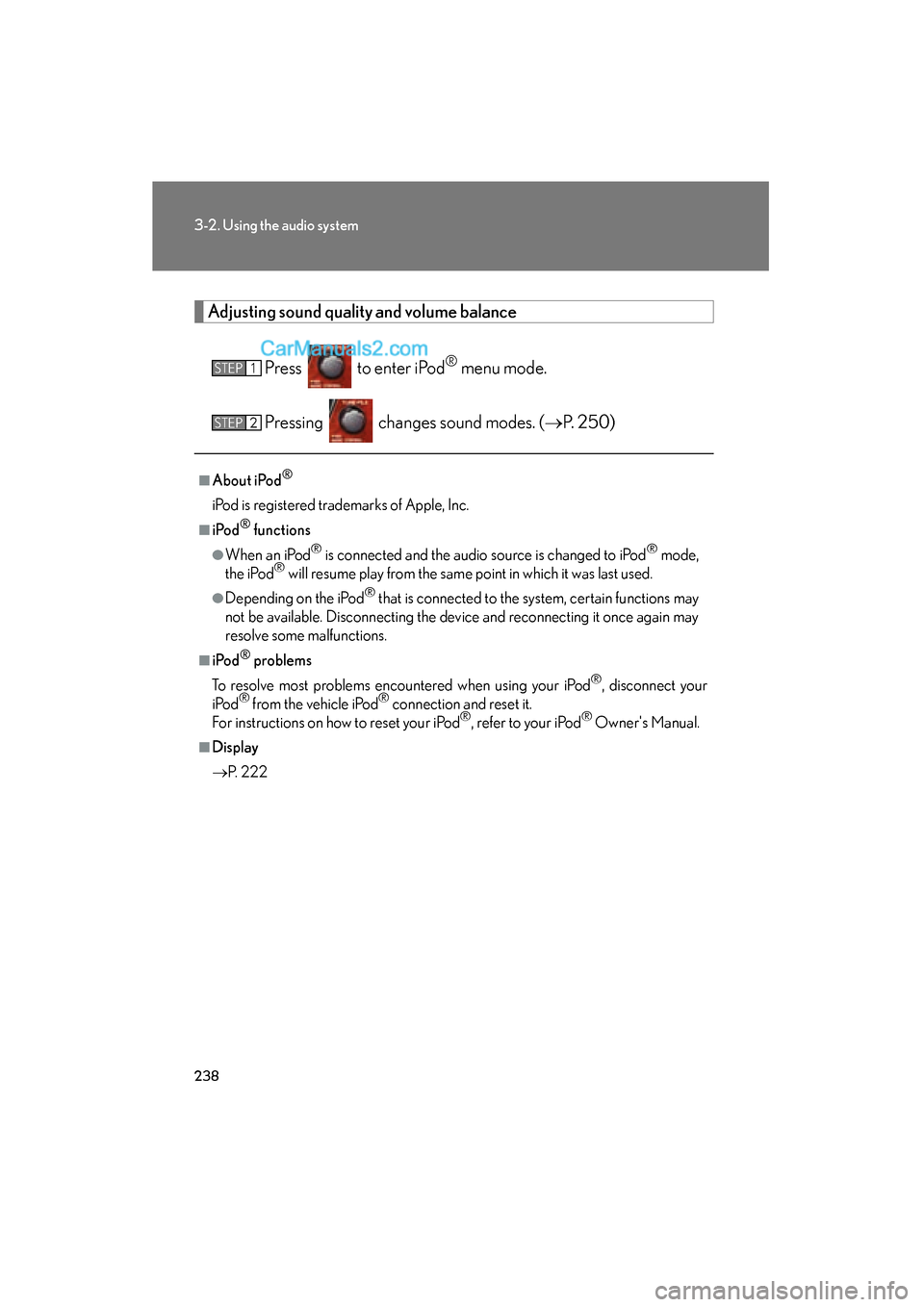
Adjusting sound quality and volume balancePress to enter iPod
® menu mode.
Pressing changes sound modes. ( oP. 2 5 0 )
■About iPod®
iPod is registered trademarks of Apple, Inc.
■i Po d® functions
●When an iPod® is connected and the audio source is changed to iPod® mode,
the iPod® will resume play from the same point in which it was last used.
●Depending on the iPod® that is connected to the system, certain functions may
not be available. Disconnecting the device and reconnecting it once again may
resolve some malfunctions.
■i Po d® problems
To resolve most problems encountered when using your iPod
®, disconnect your
iPod® from the vehicle iPod® connection and reset it.
For instructions on how to reset your iPod®, refer to your iPod® Owner's Manual.
■Display
o P. 222
STEP1
STEP2
Page 247 of 543
245
3-2. Using the audio system
3
Interior features
ES350_U
■USB memory functions
Depending on the USB memory that is connected to the system, certain functions
may not be available. Disconnecting the device and reconnecting it once again may
resolve some malfunctions.
■Display
oP. 2 2 2
■Error messages
“ERROR”: This indicates a problem in the USB memory or its connection.
“NO MUSIC”: This indicates that no MP3 /WMA files are included in the USB
m e m o r y.
Page 248 of 543
246
3-2. Using the audio system
ES350_U
■USB memory
●Compatible devices
USB memory that can be used for MP3 and WMA playback
●Compatible device formats
The following device formats can be used:
• USB communication formats: USB2.0 FS (12mbps)
• File formats: FAT16 /32 (Windows)
• Correspondence class: Mass storage class
MP3 and WMA files written in any format other than those listed above may not
play correctly, and their file names and folder names may not be displayed cor-
re ct l y.
Items related to standards and limitations are as follows:
• Maximum directory hierarchy: 8 levels
• Maximum number of folders in a device: 999 (including the root)
• Maximum number of files in a device: 65025
• Maximum number of files per folder: 255
●MP3 and WMA files
MP3 (MPEG Audio LAYER 3) is a standard audio compression format.
Files can be compressed to approximately 1 /10 of their original size using MP3
compression.
WMA (Windows Media
TM Audio) is a Microsoft audio compression format.
This format compresses audio data to a size smaller than that of the MP3 format.
There is a limit to the MP3 and WMA file standards that can be used and to the
media/formats on which the files are recorded.
Page 252 of 543
250
3-2. Using the audio system
ES350_U
Optimal use of the audio system
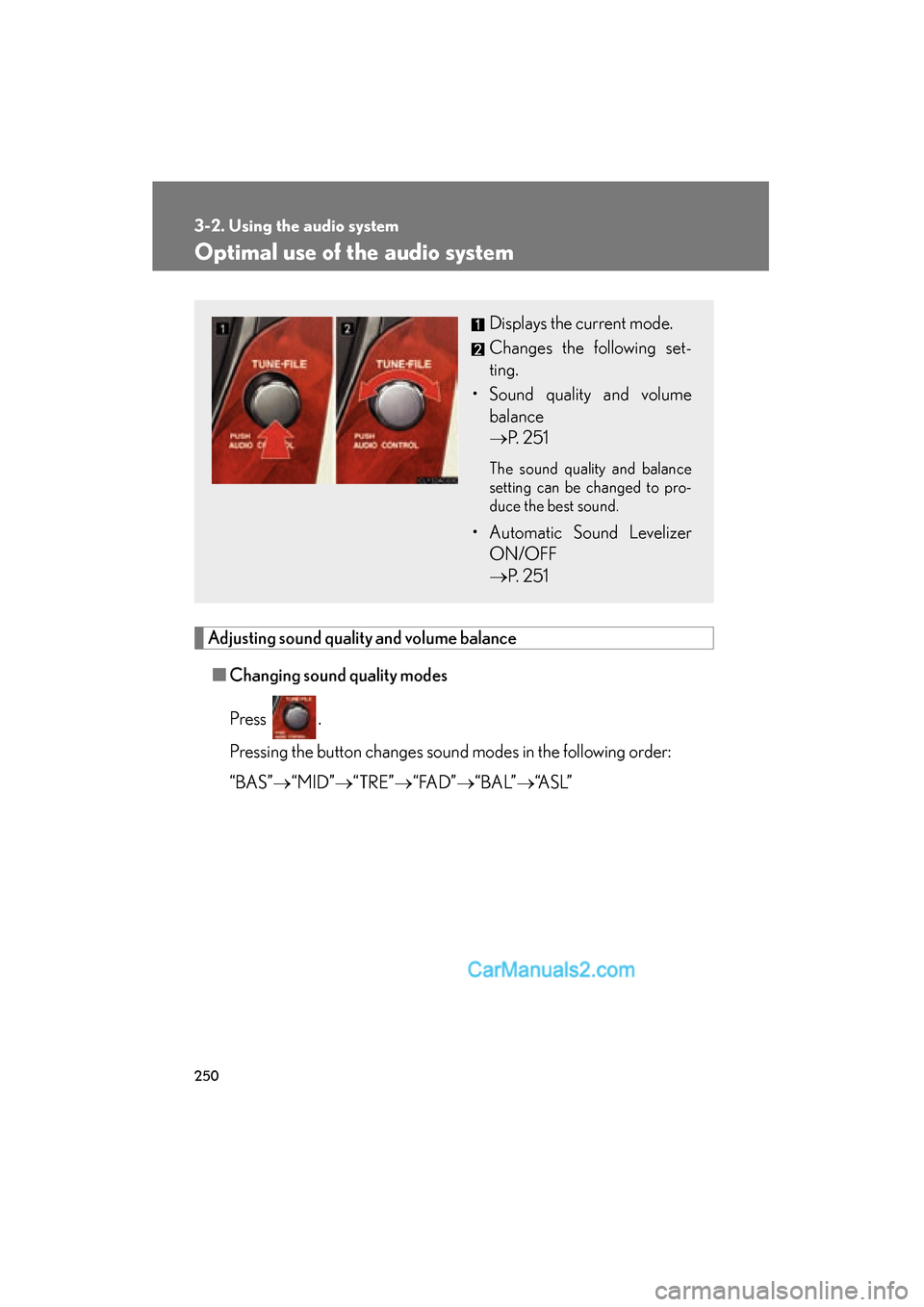
Adjusting sound quality and volume balance■ Changing sound quality modes
Press .
Pressing the button changes sound modes in the following order:
“BAS” o“MID” o“TRE” o“ FA D ” o“ B A L” o“A S L ”
Displays the current mode.
Changes the following set-
ting.
• Sound quality and volume balance
o P. 2 5 1
The sound quality and balance
setting can be changed to pro-
duce the best sound.
• Automatic Sound Levelizer
ON/OFF
o P. 2 5 1
Page 253 of 543
251
3-2. Using the audio system
3
Interior features
ES350_U■
Adjusting sound quality
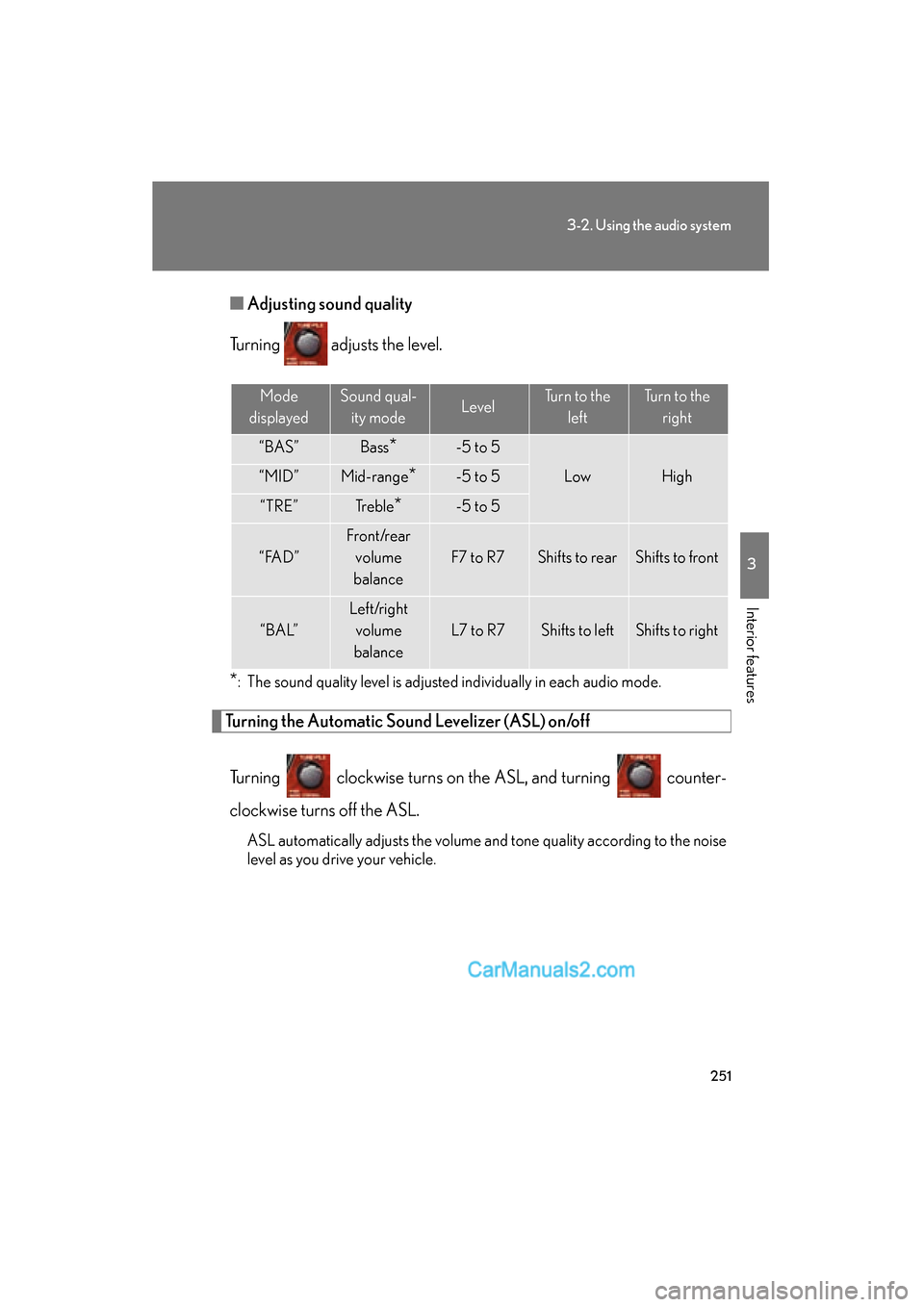
Turning adjusts the level.
*: The sound quality level is adjusted individually in each audio mode.
Turning the Automatic Sound Levelizer (ASL) on/off
Turning clockwise turns on the ASL, and turning counter-
clockwise turns off the ASL.
ASL automatically adjusts the volume and tone quality according to the noise
level as you drive your vehicle.
Mode
displayedSound qual- ity modeLevelTurn to the leftTurn to the right
“BAS”Bass*-5 to 5
LowHigh“MID”Mid-range*-5 to 5
“TRE”Tr e b l e*-5 to 5
“ FA D ”
Front/rear volume
balance
F7 to R7Shifts to rearShifts to front
“ B A L”
Left/right volume
balance
L7 to R7Shifts to leftShifts to right
Page 261 of 543
259
3-3. Using the Bluetooth® audio system
3
Interior features
ES350_U
Using the Bluetooth® audio system
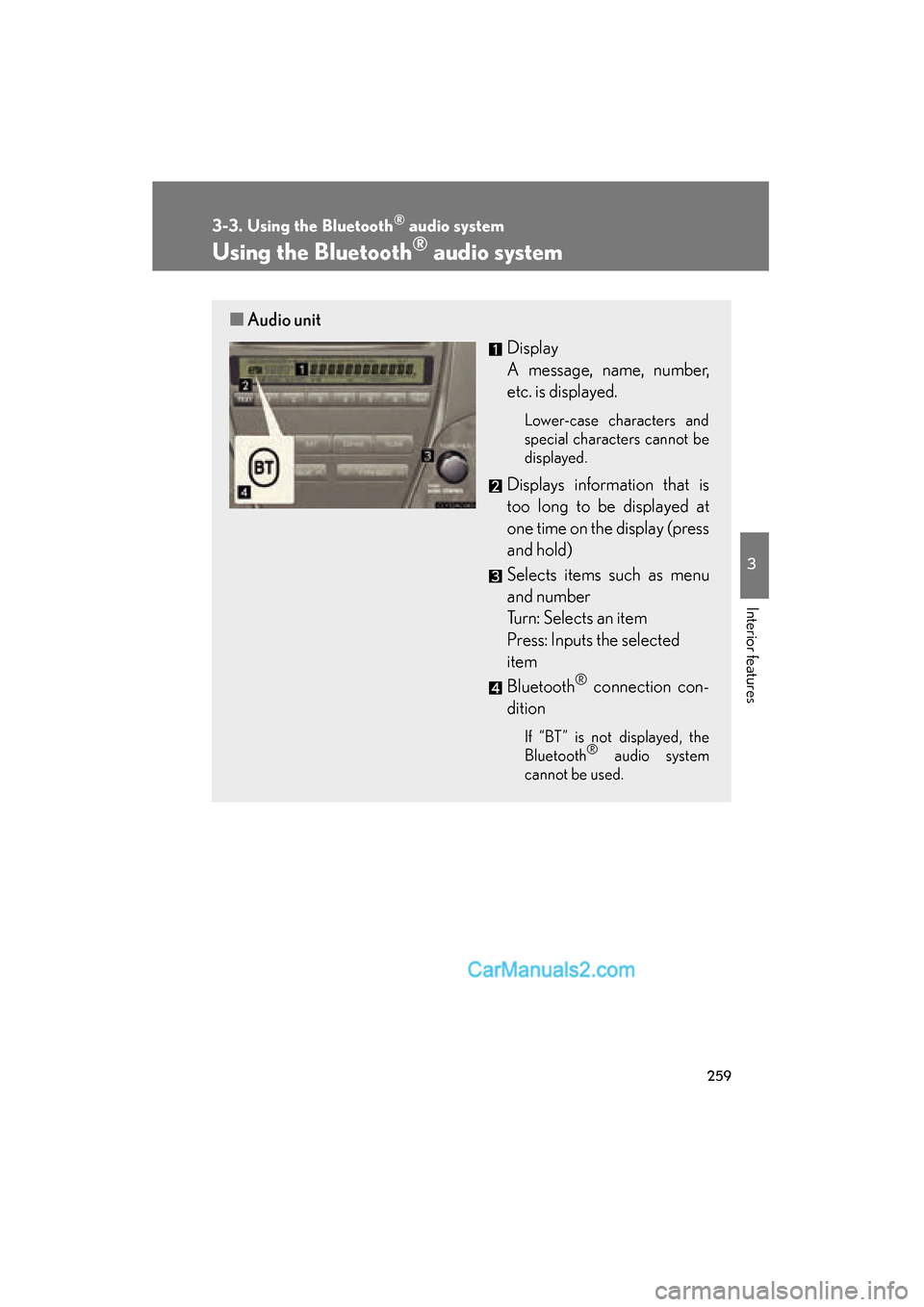
■Audio unit
Display
A message, name, number,
etc. is displayed.
Lower-case characters and
special characters cannot be
displayed.
Displays information that is
too long to be displayed at
one time on the display (press
and hold)
Selects items such as menu
and number
Turn: Selects an item
Press: Inputs the selected
item
Bluetooth
® connection con-
dition
If “BT” is not displayed, the
Bluetooth® audio system
cannot be used.
Page 262 of 543
260
3-3. Using the Bluetooth® audio system
ES350_U
Operating the system using voice commands
By following voice guidance instructions output from the speaker, voice
commands enable to the operation of the Bluetooth
® audio system with-
out the need to check the display or operate .
■ Operation procedure when using voice commands
Press the talk switch and follow voice guidance instructions.
■ Auxiliary commands when using voice commands
The following auxiliary commands can be used when operating the
system using a voice command:
“Cancel”: Exits the Bluetooth
® audio system
“Repeat”: Repeats the previous voice guidance instruction
“Go back”: Returns to the previous procedure
“Help”: Reads aloud the function summary if a help comment is regis-
tered for the selected function