Page 228 of 371
481
Driving your vehicle
1
2
3
4
5
6
7
8
9
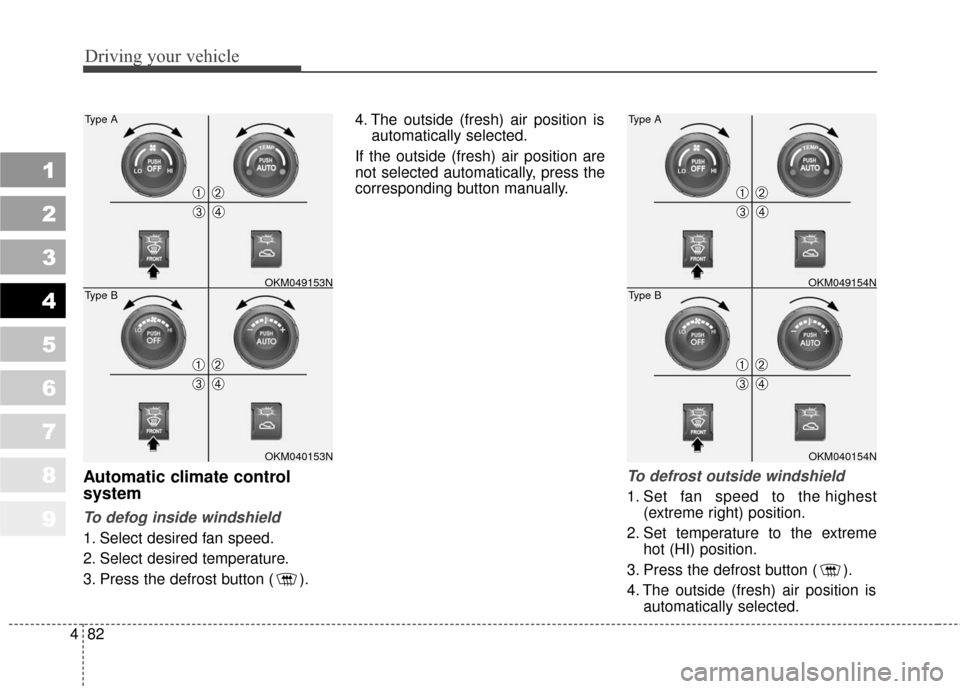
Manual climate control system
To defog inside windshield
1. Select any fan speed except “0”.
2. Select desired temperature.
3. Select the or position.
4. The outside (fresh) air position isautomatically selected.
If the outside (fresh) air position is
not selected automatically, press the
corresponding button manually.
To defrost outside windshield
1. Set the fan speed to the highest (extreme right) position.
2. Set the temperature to the extreme hot position.
3. Select the position.
4. The outside (fresh) air position is automatically selected.
WINDSHIELD DEFROSTING AND DEFOGGING
CAUTION
Do not use the or posi-tion during cooling operation inextremely humid weather. Thedifference between the tempera-ture of the outside air and thatof the windshield could causethe outer surface of the wind-shield to fog up, causing loss ofvisibility. In this case, set themode selection knob to the position and fan speed controlknob to the lower speed.
OKM049151NOKM049152N
➀➁
➂➃
➀➁
➂➃
Page 229 of 371
Driving your vehicle
82
4
1
2
3
4
5
6
7
8
9
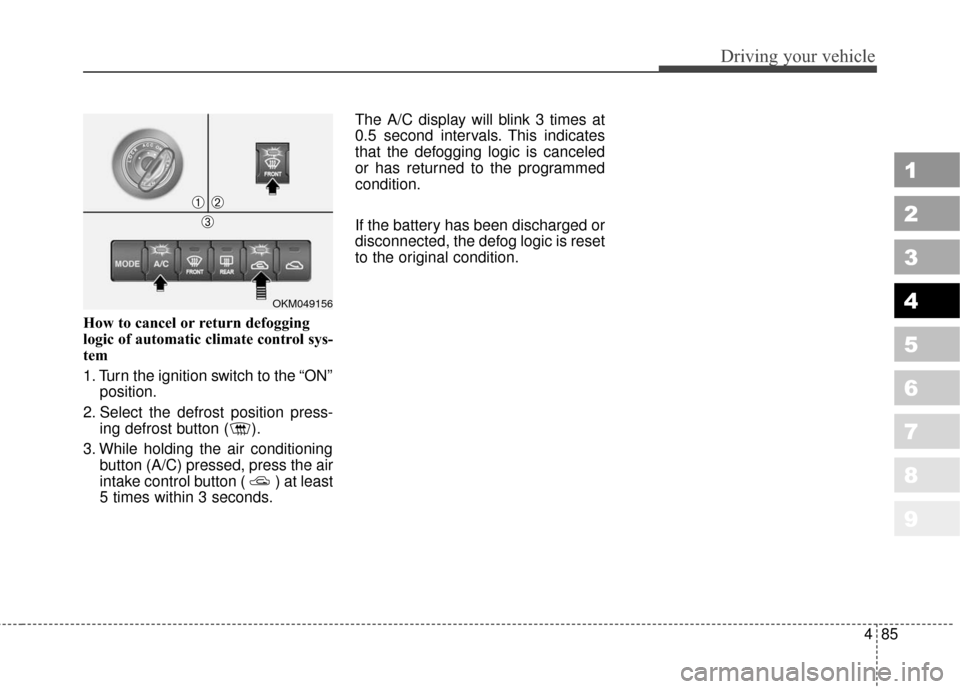
Automatic climate control
system
To defog inside windshield
1. Select desired fan speed.
2. Select desired temperature.
3. Press the defrost button ( ). 4. The outside (fresh) air position is
automatically selected.
If the outside (fresh) air position are
not selected automatically, press the
corresponding button manually.
To defrost outside windshield
1. Set fan speed to the highest (extreme right) position.
2. Set temperature to the extreme hot (HI) position.
3. Press the defrost button ( ).
4. The outside (fresh) air position is automatically selected.
OKM049153N
Type A
OKM040153N
Type B
➀➁
➂➃
➀➁
➂➃
OKM049154N
Type A
OKM040154N
Type B
➀➁
➂➃
➀➁
➂➃
Page 230 of 371
483
Driving your vehicle
1
2
3
4
5
6
7
8
9
For maximum defrosting, set thetemperature control to the extreme
right/hot position and the fan speed
control to the highest speed.
If warm air to the floor is desired while defrosting or defogging, set
the mode to the floor-defrost posi-
tion.
Before driving, clear all snow and ice from the windshield, rear win-
dow, outside rear view mirrors, and
all side windows.
Clear all snow and ice from the hood and air inlet in the cowl grill to
improve heater and defroster effi-
ciency and to reduce the probabili-
ty of fogging up inside of the wind-
shield.Defogging logic
Manual climate control system
To reduce the probability of fogging
up the inside of the windshield, the
air intake control is set to the outside
(fresh) air position automatically if
any of following occur.
The mode is selected to the , or while the system is
activated.
The ignition switch is turned on while the mode is selected to the ,or .
The ignition switch is turned off.
The fan is off.
The fan begins to be operated.
Press the air intake control button to
select the recirculated air position
while the ignition switch is on.
CAUTION
Do not use the or posi- tion during cooling operation inextremely humid weather. Thedifference between the tempera-ture of the outside air and thatof the windshield could causethe outer surface of the wind-shield to fog up, causing loss ofvisibility. In this case, set themode selection knob to the position and fan speed controlknob to the lower speed.
Page 231 of 371
Driving your vehicle
84
4
1
2
3
4
5
6
7
8
9
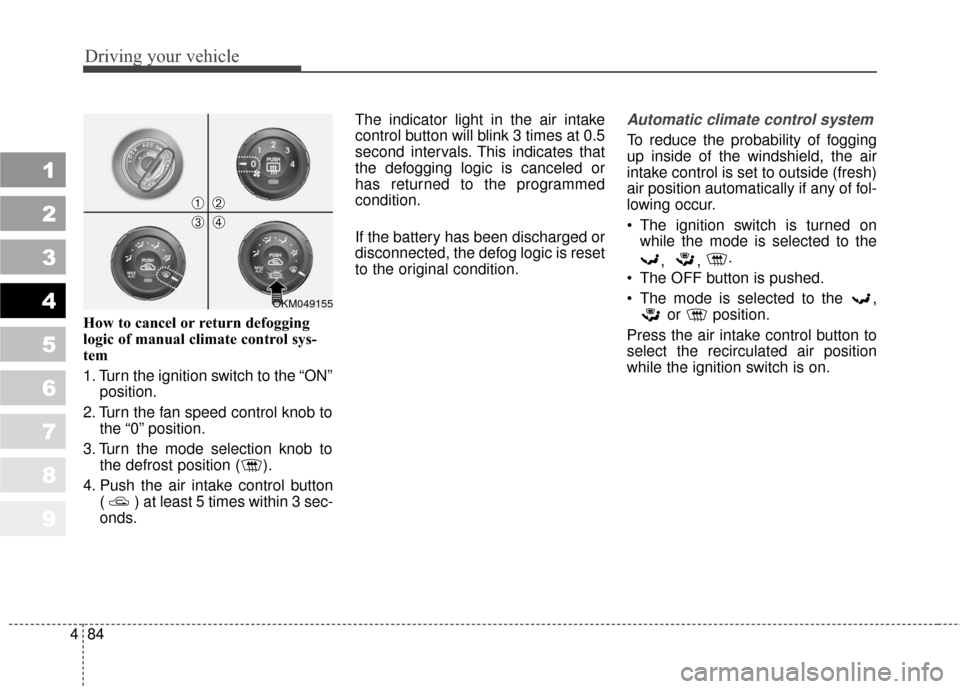
How to cancel or return defogging
logic of manual climate control sys-
tem
1. Turn the ignition switch to the “ON”
position.
2. Turn the fan speed control knob to the “0” position.
3. Turn the mode selection knob to the defrost position ( ).
4. Push the air intake control button ( ) at least 5 times within 3 sec-
onds. The indicator light in the air intake
control button will blink 3 times at 0.5
second intervals. This indicates that
the defogging logic is canceled or
has returned to the programmed
condition.
If the battery has been discharged or
disconnected, the defog logic is reset
to the original condition.
Automatic climate control system
To reduce the probability of fogging
up inside of the windshield, the air
intake control is set to outside (fresh)
air position automatically if any of fol-
lowing occur.
The ignition switch is turned on
while the mode is selected to the
, , .
The OFF button is pushed.
The mode is selected to the , or position.
Press the air intake control button to
select the recirculated air position
while the ignition switch is on.
OKM049155
➀➁
➂➃
Page 232 of 371
485
Driving your vehicle
1
2
3
4
5
6
7
8
9
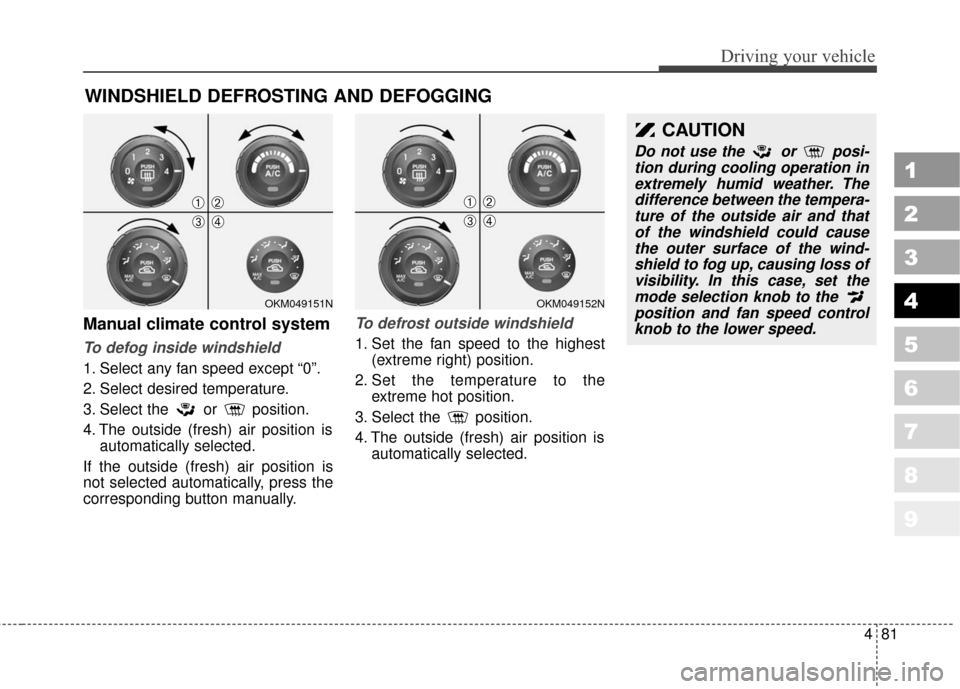
How to cancel or return defogging
logic of automatic climate control sys-
tem
1. Turn the ignition switch to the “ON”position.
2. Select the defrost position press- ing defrost button ( ).
3. While holding the air conditioning button (A/C) pressed, press the air
intake control button ( ) at least
5 times within 3 seconds. The A/C display will blink 3 times at
0.5 second intervals. This indicates
that the defogging logic is canceled
or has returned to the programmed
condition.
If the battery has been discharged or
disconnected, the defog logic is reset
to the original condition.
OKM049156
➀➁
➂
Page 310 of 371
1
2
3
4
5
6
7
8
9Maintenance services / 7-3
Maintenance schedule / 7-4
Explanation of scheduled maintenance items / 7-8
Owner maintenance / 7-12
Engine compartment / 7-15
Engine oil and oil filter / 7-17
Engine cooling system / 7-19
Brakes and clutch / 7-22
Parking brake / 7-23
Power steering / 7-24
Automatic transaxle / 7-25
Rear differential (4WD) / 7-27
Transfer case (4WD) / 7-27
Lubricants and fluids / 7-28
Air cleaner / 7-29
Climate control air filter / 7-30
Wiper blades / 7-31
Battery / 7-33
Tires and wheels / 7-36
Maintenance
Page 339 of 371
Maintenance
30
7
1
2
3
4
5
6
7
8
9
CLIMATE CONTROL AIR FILTER (IF EQUIPPED)
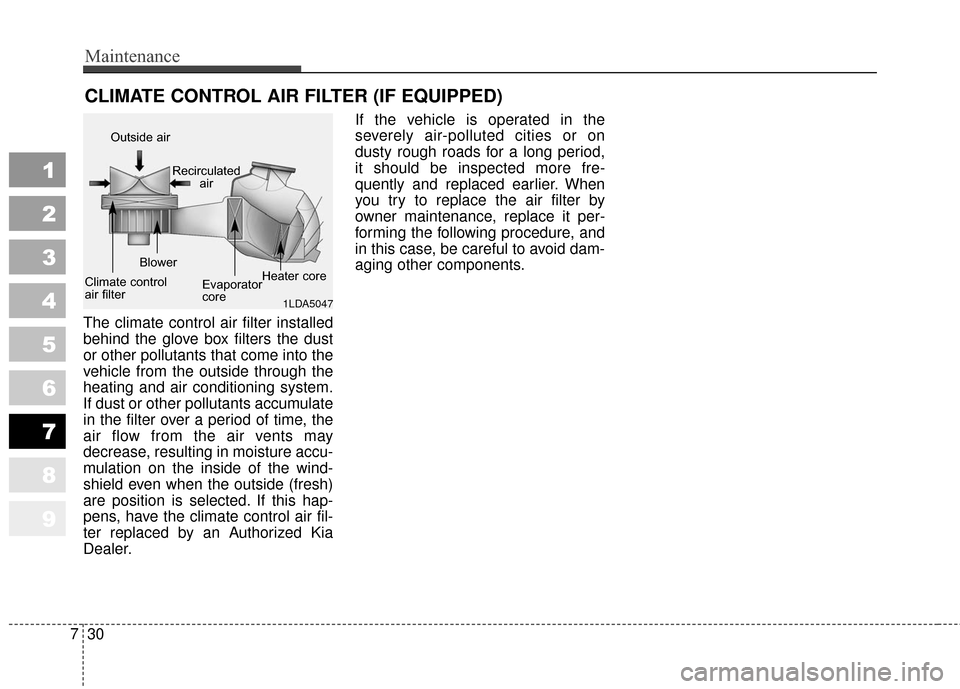
The climate control air filter installed
behind the glove box filters the dust
or other pollutants that come into the
vehicle from the outside through the
heating and air conditioning system.
If dust or other pollutants accumulate
in the filter over a period of time, the
air flow from the air vents may
decrease, resulting in moisture accu-
mulation on the inside of the wind-
shield even when the outside (fresh)
are position is selected. If this hap-
pens, have the climate control air fil-
ter replaced by an Authorized Kia
Dealer. If the vehicle is operated in the
severely air-polluted cities or on
dusty rough roads for a long period,
it should be inspected more fre-
quently and replaced earlier. When
you try to replace the air filter by
owner maintenance, replace it per-
forming the following procedure, and
in this case, be careful to avoid dam-
aging other components.
1LDA5047
Outside air
Recirculatedair
Climate control
air filter Blower
Evaporator
coreHeater core
Page 343 of 371
Maintenance
34
7
1
2
3
4
5
6
7
8
9
For best battery service :
Keep the battery securely mount-
ed.
Keep the battery top clean and dry.
Keep the terminals and connec- tions clean, tight, and coated with
petroleum jelly or terminal grease.
Rinse any spilled electrolyte from the battery immediately with a
solution of water and baking soda.
If the vehicle is not going to be used for an extended time, discon-
nect the battery cables.
Battery recharging
Your vehicle has a maintenance-free,
calcium-based battery.
If the battery becomes dischargedin a short time (because, for exam-
ple, the headlights or interior lights
were left on while the vehicle was
not in use), recharge it by slow
charging (trickle) for 10 hours.
If the battery gradually discharges because of high electric load while
the vehicle is being used, recharge
it at 20-30A for two hours.
Items to be reset after the batteryhas been discharged or the bat-tery has been disconnected.
Clock (See Chapter 3)
Sunroof (See Chapter 3)
Trip computer (See Chapter 4)
Compass (See Chapter 4)
Climate control system (See Chapter 4)
Audio (See Chapter 3)
1KMN5030
(Continued) An inappropriately dis-
posed battery can be
harmful to the environ-
ment and human health.
Dispose the battery
according to your local
law(s) or regulation.
When lifting a plastic-cased battery, excessive pressure on
the case may cause battery
acid to leak, resulting in per-
sonal injury. Lift with a battery
carrier or with your hands on
opposite corners.
Never attempt to recharge the battery when the battery
cables are connected.
The electrical ignition system works with high voltage.
Never touch these compo-
nents with the engine running
or the ignition switched on.
Failure to follow the above
warnings can result in serious
bodily injury or death.