2010 KIA Sportage ESP
[x] Cancel search: ESPPage 97 of 371
Knowing your vehicle
88
3
1
2
3
4
5
6
7
8
9
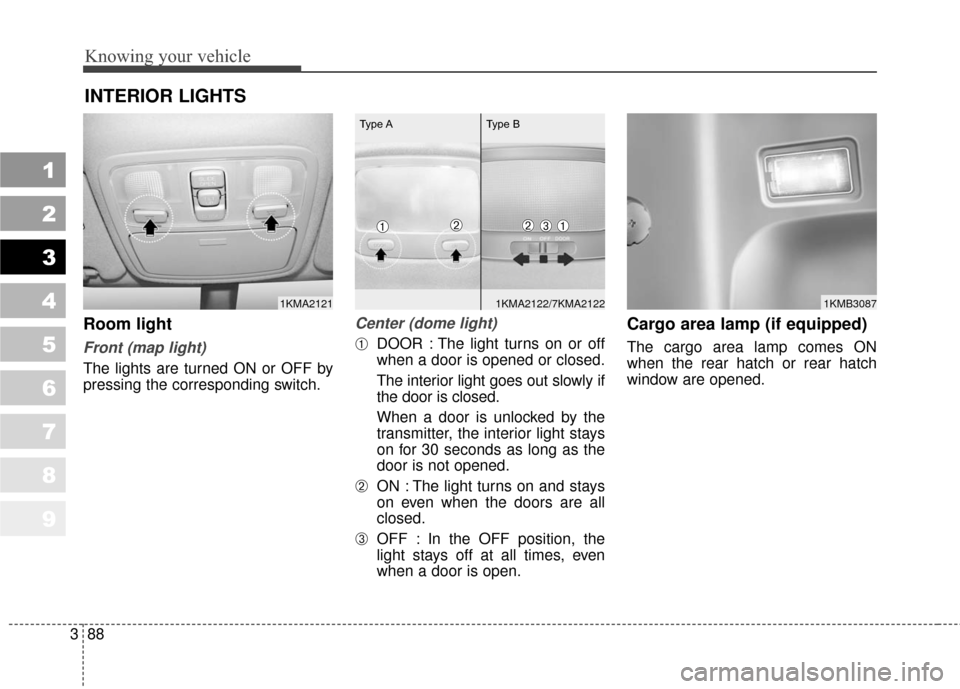
Room light
Front (map light)
The lights are turned ON or OFF by
pressing the corresponding switch.
Center (dome light)
➀DOOR : The light turns on or off
when a door is opened or closed.
The interior light goes out slowly if
the door is closed.
When a door is unlocked by the
transmitter, the interior light stays
on for 30 seconds as long as the
door is not opened.
➁ON : The light turns on and stays
on even when the doors are all
closed.
➂OFF : In the OFF position, the
light stays off at all times, even
when a door is open.
Cargo area lamp (if equipped)
The cargo area lamp comes ON
when the rear hatch or rear hatch
window are opened.
INTERIOR LIGHTS
1KMA21211KMB30871KMA2122/7KMA2122
➀➂➁
Type A Type B
➀➁
Page 113 of 371

Knowing your vehicle
104
3
1
2
3
4
5
6
7
8
9
If the vehicle has a roof rack, you can
load things on top of your vehicle.
Crossrails and fixing components to
adapt the roof rack on your vehicle
may be obtained from an authorized
Kia dealer.
✽ ✽
NOTICE
If the vehicle is equipped with a sun-
roof, be sure not to position cargo
onto the roof rack in such a way that
it could interfere with sunroof oper-
ation.
ROOF RACK (IF EQUIPPED)
1KMA2177
CAUTION
When carrying cargo on the
roof rack, take the necessaryprecautions to make sure thecargo does not damage theroof of the vehicle.
When carrying large objects on the roof rack, make surethey do not exceed the overallroof length or width.
WARNING
The following specification is the maximum weight that can
be loaded onto the roof rack.
Distribute the load as evenly as
possible across the roof rack
and secure the load firmly.
Loading cargo or luggage
above specification on the roof
rack may damage your vehicle.
(Continued)
(Continued)
The vehicle center of gravitywill be higher when items are
loaded onto the roof rack.
Avoid sudden starts, braking,
sharp turns, abrupt maneuvers
or high speeds that may result
in loss of vehicle control or
rollover causing an accident.
Always drive slowly and turn corners carefully when carrying
items on the roof rack. Severe
wind updrafts, caused by pass-
ing vehicles or natural causes,
can cause sudden upward
pressure on items loaded on
the roof rack. This is especially
true when carrying large, flat
items such as wood panels or
mattresses. This could cause
the items to fall off the roof rack
and cause damage to your vehi-
cle or others around you.
To prevent damage or loss of cargo while driving, check fre-
quently before or while driving
to make sure the items on the
roof rack are securely fastened.
ROOF 45 kg (100 lbs.)
RACK EVENLY DISTRIBUTED
Page 120 of 371
3111
Knowing your vehicle
1
2
3
4
5
6
7
8
9
11. TUNE/ENTER Button
Turn this button clockwise by one
notch to increase frequency by
200KHz (AM: 10KHz) from current
frequency.
Turn this button counterclockwise by
one notch to decrease frequency by
200KHz (AM: 10KHz) from current
frequency.
Press this button while holding SET
UP button to activate / inactivate the
item to.
Select SET UP item using left and
right function of the Tune button.
12. Pre-set Selection Button
Push [1]~[6] buttons less than 0.8
second to play the channel saved in
each button.
Push pre-set button for 0.8 second or
longer to save current channel to the
respective button with a beep.
Page 133 of 371
Knowing your vehicle
124
3
1
2
3
4
5
6
7
8
9
11. TUNE/ENTER Button
Turn this button clockwise by one
notch to increase frequency by
200kHz (AM: 10KHz) from current
frequency.
Turn this button counterclockwise by
one notch to decrease frequency by
200kHz (AM:10KHz) from current
frequency.
Press this button while holding SET
UP button to activate / inactivate the
item to.
Select SET UP item using left and
right function of the Tune button.
12. Pre-set Selection Button
Push [1]~[6] buttons less than 0.8 sec-
ond to play the channel saved in each
button.
Push pre-set button for 0.8 second or
longer to save current channel to the
respective button with a beep.
Page 144 of 371
3135
Knowing your vehicle
1
2
3
4
5
6
7
8
9
Satellite radio channels:
SIRIUS Satellite Radio has over 130
channels, including 69 channels of
100% commercial-free music, plus
sports, news, talk and entertainment
available nationwide in your vehicle.
For more information and a complete
list of SIRIUS Satellite Radio chan-
nels, visit sirius.com in the United
States, sirius-canada.ca in Canada, or
call SIRIUS at 1-888-539-7474.
Satellite radio reception fac-
tors:
To receive the satellite signal, your
vehicle has been equipped with a
satellite radio antenna located on the
roof of your vehicle. The vehicle roof
provides the best location for an
unobstructed, open view of the sky, a
requirement of a satellite radio sys-
tem. Like AM/FM, there are several
factors that can affect satellite
radio reception performance:
Antenna obstructions: For optimalreception performance, keep the
antenna clear of snow and ice
build-up and keep luggage and
other material as far away from the
antenna as possible. Terrain: Hills, mountains, tall build-
ings, bridges, tunnels, freeway
overpasses, parking garages,
dense tree foliage and thunder-
storms can interfere with your
reception.
SIRIUS Satellite Radio service:
SIRIUS Satellite Radio is a subscrip-
tionbased satellite radio service that
broadcasts music, sports, news and
entertainment programming to radio
receivers, which are available for
installation in motor vehicles or facto-
ry installed, as well as for the home,
portable and wireless devices, and
through an Internet connection on
personal computer.
Vehicles that are equipped with a
factory installed SIRIUS Satellite
Radio system include:
Hardware and an introductory trialsubscription term, which begins on
the date of sale or lease of the
vehicle.
For a small upgrade fee, access to SIRIUS music channels, and other
select channels over the Internet
using any computer connected to
the Internet (U.S. customers only). For information on extended sub-
scription terms, contact SIRIUS at
1-888-539-7474.
✽ ✽
NOTICE
Satellite Radio requires SIRIUS®
compatible receiver and a subscrip-
tion service fee after trial period.
Vehicles without a factory-installed
radio receiver require hardware pur-
chase and installation. Please see your
dealer for further details. All fees and
programming subject to change.
Subscriptions governed by the SIR-
IUS Terms & Conditions available at
www
.sirius.com/ serviceterms.
Available only in the 48 contiguous
United States and the District of
Columbia. Service available in
Canada;
see www
.siriuscanada.ca
Chrysler LLC shall not be responsi-
ble for any such programming
changes.
Satellite Radio Electronic Serial
Number (ESN): This 12-digit
Satellite Serial Number is needed to
re-activate, modify or track your
satellite radio account. You will need
this number when communicating
with SIRIUS.
SIRIUS SATELLITE RADIO INFORMATION (IF EQUIPPED)
Page 147 of 371
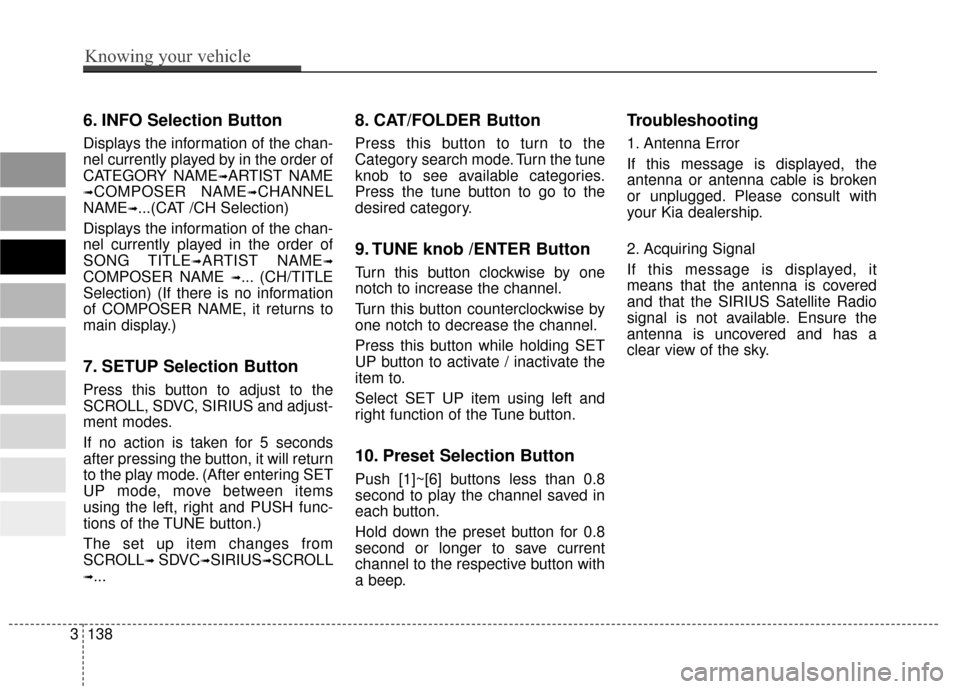
6. INFO Selection Button
Displays the information of the chan-
nel currently played by in the order of
CATEGORY NAME
➟ARTIST NAME
➟COMPOSER NAME➟CHANNEL
NAME
➟...(CAT /CH Selection)
Displays the information of the chan-
nel currently played in the order of
SONG TITLE
➟ARTIST NAME➟
COMPOSER NAME ➟... (CH/TITLE
Selection) (If there is no information
of COMPOSER NAME, it returns to
main display.)
7. SETUP Selection Button
Press this button to adjust to the
SCROLL, SDVC, SIRIUS and adjust-
ment modes.
If no action is taken for 5 seconds
after pressing the button, it will return
to the play mode. (After entering SET
UP mode, move between items
using the left, right and PUSH func-
tions of the TUNE button.)
The set up item changes from
SCROLL
➟ SDVC➟SIRIUS➟SCROLL
➟...
8. CAT/FOLDER Button
Press this button to turn to the
Category search mode. Turn the tune
knob to see available categories.
Press the tune button to go to the
desired category.
9. TUNE knob /ENTER Button
Turn this button clockwise by one
notch to increase the channel.
Turn this button counterclockwise by
one notch to decrease the channel.
Press this button while holding SET
UP button to activate / inactivate the
item to.
Select SET UP item using left and
right function of the Tune button.
10. Preset Selection Button
Push [1]~[6] buttons less than 0.8
second to play the channel saved in
each button.
Hold down the preset button for 0.8
second or longer to save current
channel to the respective button with
a beep.
Troubleshooting
1. Antenna Error
If this message is displayed, the
antenna or antenna cable is broken
or unplugged. Please consult with
your Kia dealership.
2. Acquiring Signal
If this message is displayed, it
means that the antenna is covered
and that the SIRIUS Satellite Radio
signal is not available. Ensure the
antenna is uncovered and has a
clear view of the sky.
9 8
7
6
5
4
3
2
1
3138
Knowing your vehicle
Page 159 of 371
Driving your vehicle
12
4
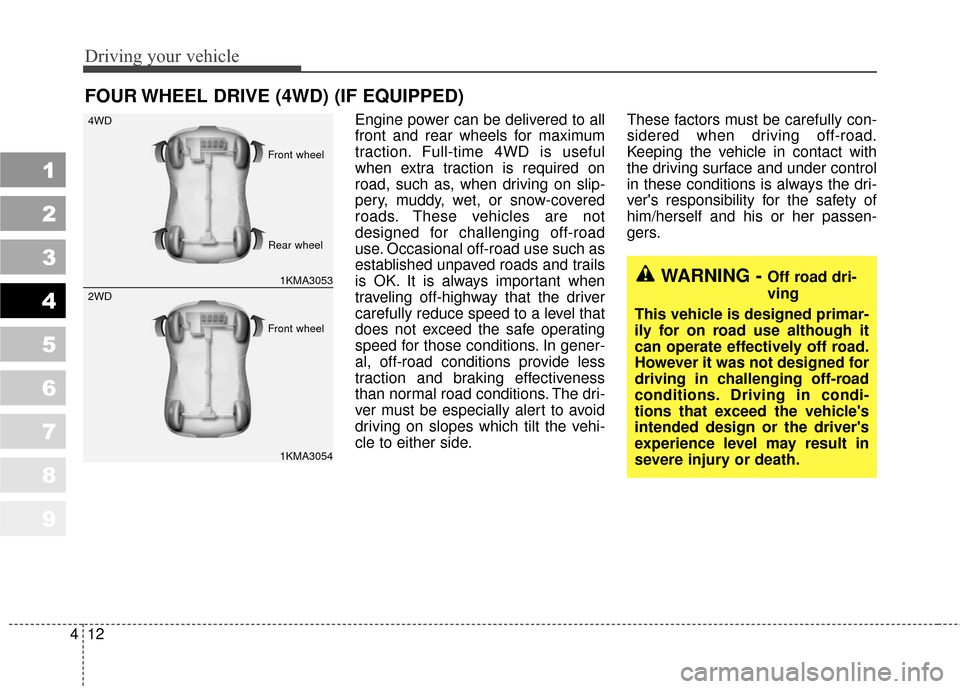
Engine power can be delivered to all
front and rear wheels for maximum
traction. Full-time 4WD is useful
when extra traction is required on
road, such as, when driving on slip-
pery, muddy, wet, or snow-covered
roads. These vehicles are not
designed for challenging off-road
use. Occasional off-road use such as
established unpaved roads and trails
is OK. It is always important when
traveling off-highway that the driver
carefully reduce speed to a level that
does not exceed the safe operating
speed for those conditions. In gener-
al, off-road conditions provide less
traction and braking effectiveness
than normal road conditions. The dri-
ver must be especially alert to avoid
driving on slopes which tilt the vehi-
cle to either side. These factors must be carefully con-
sidered when driving off-road.
Keeping the vehicle in contact with
the driving surface and under control
in these conditions is always the dri-
ver's responsibility for the safety of
him/herself and his or her passen-
gers.
FOUR WHEEL DRIVE (4WD) (IF EQUIPPED)
1
2
3
4
5
6
7
8
9
WARNING - Off road dri-
ving
This vehicle is designed primar-
ily for on road use although it
can operate effectively off road.
However it was not designed for
driving in challenging off-road
conditions. Driving in condi-
tions that exceed the vehicle's
intended design or the driver's
experience level may result in
severe injury or death.1KMA3053
4WD
1KMA3054
2WD
Front wheel
Front wheel Rear wheel
Page 160 of 371
413
Driving your vehicle
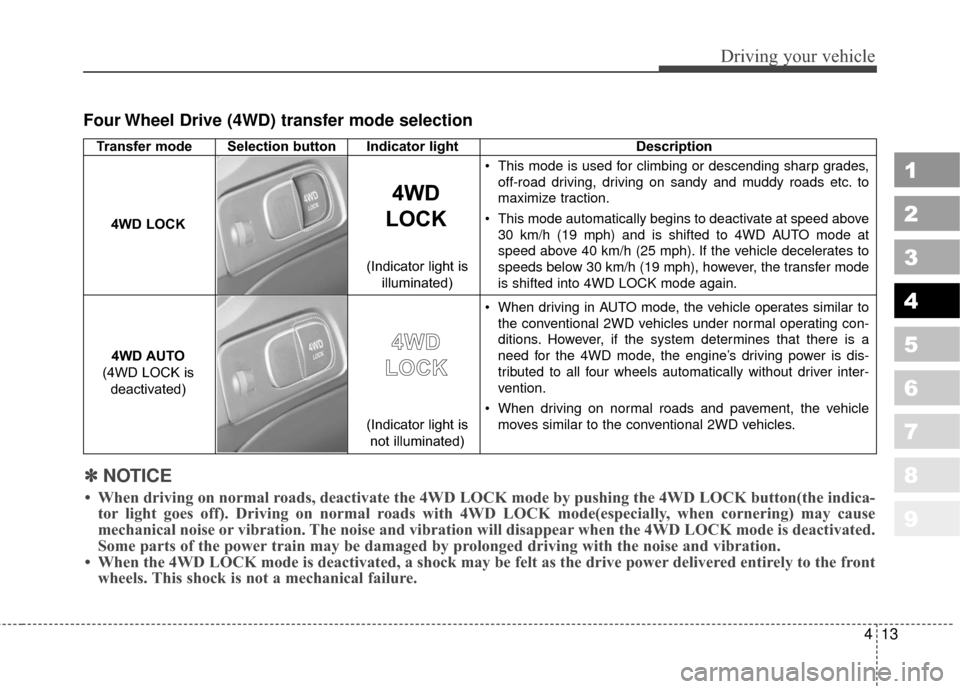
Four Wheel Drive (4WD) transfer mode selection
1
2
3
4
5
6
7
8
9
Transfer mode Selection button Indicator lightDescription
This mode is used for climbing or descending sharp grades,
off-road driving, driving on sandy and muddy roads etc. to
maximize traction.
This mode automatically begins to deactivate at speed above 30 km/h (19 mph) and is shifted to 4WD AUTO mode at
speed above 40 km/h (25 mph). If the vehicle decelerates to
speeds below 30 km/h (19 mph), however, the transfer mode
is shifted into 4WD LOCK mode again.
When driving in AUTO mode, the vehicle operates similar to the conventional 2WD vehicles under normal operating con-
ditions. However, if the system determines that there is a
need for the 4WD mode, the engine’s driving power is dis-
tributed to all four wheels automatically without driver inter-
vention.
When driving on normal roads and pavement, the vehicle moves similar to the conventional 2WD vehicles.
4WD
LOCK
4WD LOCK
4WD AUTO
(4WD LOCK is deactivated)
4 4W
W D
D
L
L O
O C
CK
K
(Indicator light is
not illuminated)
(Indicator light is
illuminated)
✽
✽
NOTICE
• When driving on normal roads, deactivate the 4WD LOCK mode by pushing the 4WD LOCK button(the i\
ndica-
tor light goes off). Driving on normal roads with 4WD LOCK mode(especially, when cornering) may cause
mechanical noise or vibration. The noise and vibration will disappear when the 4WD LOCK mode is deactivated.
Some parts of the power train may be damaged by prolonged driving with the noise and vibration.
• When the 4WD LOCK mode is deactivated, a shock may be felt as the drive \
power delivered entirely to the front wheels. This shock is not a mechanical failure.