Page 27 of 522
5. Reinstall and tighten the screw until snug (if
equipped).
General Information
This device complies with Part 15 of FCC rules and with
RS-210 of Industry Canada. Operation is subject to the
following conditions:
1. This device may not cause harmful interference.
2. This device must accept any interference that may be
received including interference that may cause undesired
operation.
NOTE:Changes or modifications not expressly ap-
proved by the party responsible for compliance could
void the user’s authority to operate the equipment.
If your RKE transmitter fails to operate from a normal
distance, check for these two conditions: 1. Weak battery in RKE transmitter. The expected life of
the battery is from one to two years.
2. Closeness to a radio transmitter such as a radio station
tower, airport transmitter, and some mobile or CB radios.
REMOTE STARTING SYSTEM — IF EQUIPPED
This system uses the Remote Keyless Entry
(RKE) transmitter to start the engine conve-
niently from outside the vehicle while still
maintaining security. The system has a range of
approximately 328 ft (100 m).
NOTE: The vehicle must be equipped with an auto-
matic transmission to be equipped with Remote Start.
How To Use Remote Start
All of the following conditions must be met before the
engine will remote start:
•Shift lever in PARK.
26 THINGS TO KNOW BEFORE STARTING YOUR VEHICLE
Page 47 of 522
5. Position the shoulder belt on your chest so that it is
comfortable and not resting on your neck. The retractor
will withdraw any slack in the belt.6. To release the belt, push the red button on the buckle.
The belt will automatically retract to its stowed position.
If necessary, slide the latch plate down the webbing to
allow the belt to retract fully.
WARNING!
A frayed or torn belt could rip apart in a collision and
leave you with no protection. Inspect the belt system
periodically, checking for cuts, frays, or loose parts.
Damaged parts must be replaced immediately. Do
not disassemble or modify the system. Seat belt
assemblies must be replaced after an accident if they
have been damaged (bent retractor, torn webbing,
etc.).
Lap/Shoulder Belt Untwisting Procedure
Use the following procedure to untwist a twisted lap/
shoulder belt.
Removing Slack From Belt
46 THINGS TO KNOW BEFORE STARTING YOUR VEHICLE
Page 53 of 522
3. Pulldownthenrearward towards the rear of the
vehicle then downto engage the locking mechanism.
4. The AHR front soft foam and trim half should lock
into the back decorative plastic half.
Down And Rearward Reset Movement
Down Movement To Engage Locking Mechanism
52 THINGS TO KNOW BEFORE STARTING YOUR VEHICLE
Page 95 of 522
MIRRORS
Inside Day/Night Mirror
A two-point pivot system allows for horizontal and
vertical mirror adjustment. Adjust the mirror to center on
the view through the rear window.
Headlight glare can be reduced by moving the small
control under the mirror to the night position (toward the
rear of vehicle). The mirror should be adjusted while set
in the day position (toward the windshield).
Automatic Dimming Mirror — If Equipped
This mirror automatically adjusts for headlight glare
from vehicles behind you. You can turn the feature on or
off by pressing the button at the base of the mirror. A light
next to the button will illuminate to indicate when the
dimming feature is activated.
Adjusting Rearview Mirror
94 UNDERSTANDING THE FEATURES OF YOUR VEHICLE
Page 99 of 522

2. Unclip the visor from the center clip.
3. Pull the sun visor toward the inside rearview mirror to
extend it.
uconnect™ phone — IF EQUIPPED
uconnect™ phone is a voice-activated, hands-free, in-
vehicle communications system. uconnect™ phone al-
lows you to dial a phone number with your cellular
phone using simple voice commands (e.g.,�Call”�
“Mike” �”Work� or�Dial” �“248-555-1212�). Your cellular
phone’s audio is transmitted through your vehicle’s
audio system; the system will automatically mute your
radio when using the uconnect™ phone.
NOTE: The uconnect™ phone requires a cellular phone
equipped with the Bluetooth�� Hands-Free Profile,�Ve r -
sion 0.96 or higher. See the uconnect™ website for
supported phones. For uconnect™ customer support, visit the following
websites:
•www.chrysler.com/uconnect
•www.dodge.com/uconnect
•www.jeep.com/uconnect
•or call 1–877–855–8400
uconnect™ phone allows you to transfer calls between
the system and your cellular phone as you enter or exit
your vehicle and enables you to mute the system’s
microphone for private conversation.
The uconnect™ phone is driven through your Bluetooth�
“Hands-Free Profile” cellular phone. uconnect™ features
Bluetooth� technology - the global standard that enables
different electronic devices to connect to each other
without wires or a docking station, so uconnect™ phone
works no matter where you stow your cellular phone (be
98 UNDERSTANDING THE FEATURES OF YOUR VEHICLE
Page 113 of 522
If the phone is not reachable and the uconnect™ phone is
operational, you may reach the emergency number as
follows:
•Press thebutton to begin.
•After the�Ready�prompt and the following beep, say
�Emergency� and the uconnect™ phone will instruct
the paired cellular phone to call the emergency num-
ber. This feature is supported in the U.S., Canada, and
Mexico.
NOTE:
•The emergency number dialed is based on the country
where the vehicle is purchased (911 for the U.S. and
Canada and 060 for Mexico). The number dialed may
not be applicable with the available cellular service
and area.
•If supported, this number may be programmable on
some systems. To do this, press the
button and say
‘Setup’, followed by ‘Emergency’.
•The uconnect™ phone does slightly lower your
chances of successfully making a phone call as to that
for the cellular phone directly.
WARNING!
Your phone must be turned on and paired to the
uconnect™ phone to allow use of this vehicle feature
in emergency situations, when the cellular phone has
network coverage and stays paired to the uconnect™
phone.
Towing Assistance
If you need towing assistance:
•Press thebutton to begin.
112 UNDERSTANDING THE FEATURES OF YOUR VEHICLE
Page 114 of 522
•After the�Ready�prompt and the following beep, say
�Towing Assistance.�
NOTE:
•The towing assistance number dialed is based on the
country where the vehicle is purchased (1-800-528-
2069 for the U.S., 1-877-213-4525 for Canada, 55-14-
3454 for Mexico City and 1-800-712-3040 for outside
Mexico City in Mexico). Please refer to the 24-Hour
�Towing Assistance� coverage details in the Warranty
Information Booklet and on the 24–Hour Towing
Assistance Card.
•If supported, this number may be programmable on
some systems. To do this, press the
button and
say “Setup”, followed by “Towing Assistance”.
Paging
To learn how to page, refer to �Working with Automated
Systems.� Paging works properly except for pagers of certain companies, which time out a little too soon to
work properly with the uconnect™ phone.
Voice Mail Calling
To learn how to access your voice mail, refer to
�Working
with Automated Systems.�
Working with Automated Systems
This method is used in instances where one generally has
to press numbers on the cellular phone keypad while
navigating through an automated telephone system.
You can use your uconnect™ phone to access a voice mail
system or an automated service, such as a paging service
or automated customer service line. Some services re-
quire immediate response selection. In some instances,
that may be too quick for use of the uconnect™ phone.
When calling a number with your uconnect™ phone that
normally requires you to enter in a touch-tone sequence
on your cellular phone keypad, you can press the
3
UNDERSTANDING THE FEATURES OF YOUR VEHICLE 113
Page 126 of 522
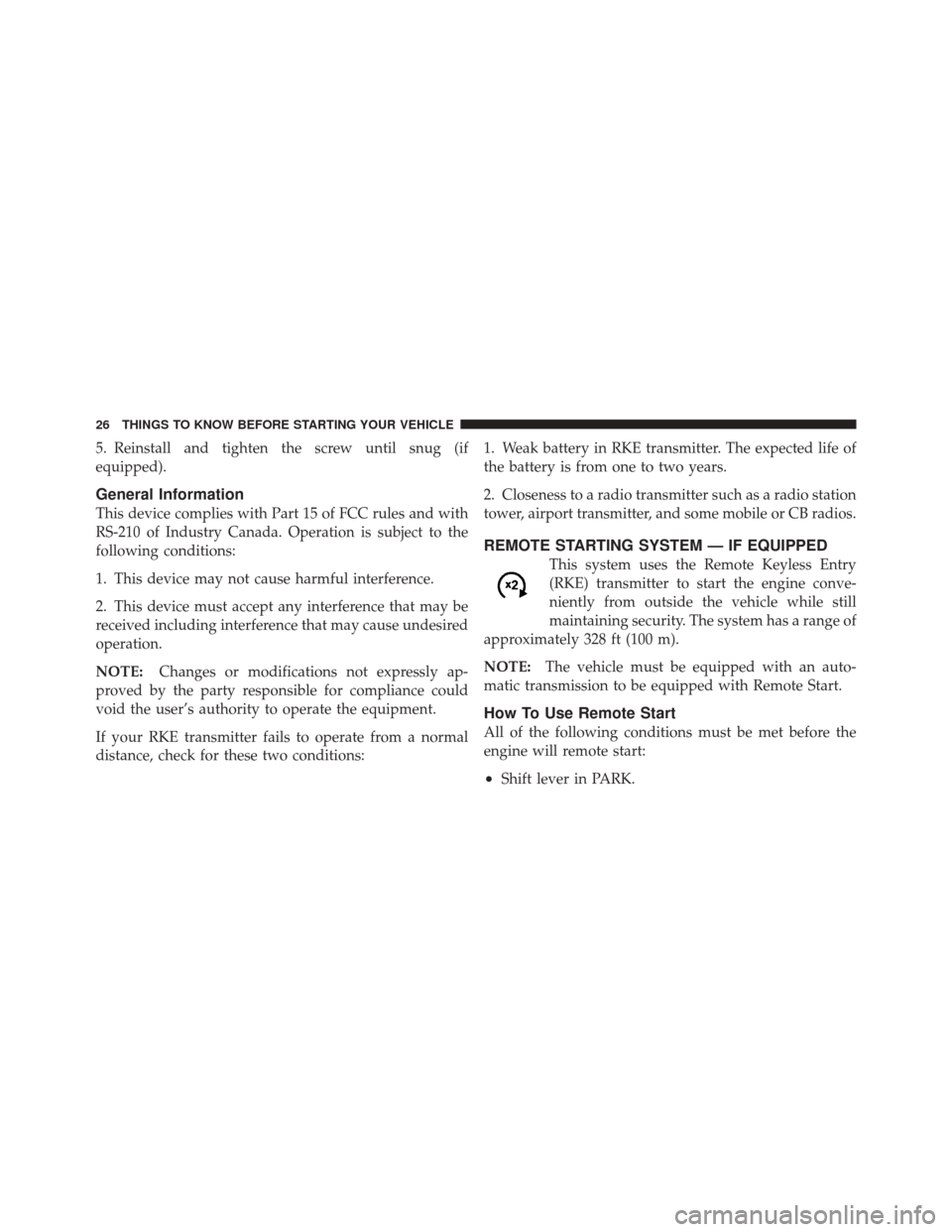
Voice Commands
Primary Alternate(s)
language
list names
list phones
mobile
mute
mute off
new entry
no
pager
pair a phone
phone pairing pairing
phonebook phone book
previous
record again
redialVoice Commands
Primary Alternate(s)
return to main menu return or main menu
select phone select
send
set up phone settings or phone set up
towing assistance
transfer call
uconnect™ Tutorial
try again
voice training
work
yes
3
UNDERSTANDING THE FEATURES OF YOUR VEHICLE 125