Page 215 of 407

•During all List modes, the iPod�displays all lists in
“wrap-around” mode. So if the track is at the
bottom of the list, just turn the wheel backwards
(counter-clockwise) to get to the track faster.
•In List mode, the radio PRESETbuttons are used as
shortcuts to the following lists on the iPod�.
•Preset 1 – Playlists
•Preset 2 – Artists
•Preset 3 – Albums
•Preset 4 – Genres
•Preset 5 – Audiobooks
•Preset 6 – Podcasts
•Pressing a PRESET button will display the current
list on the top line and the first item in that list on
the second line.
•To Exit List mode without selecting a track, press the
same PRESET button again to go back to Play
mode.
•LIST button: The LISTbutton will display the top
level menu of the iPod�. Turn the TUNEcontrol knob
to list the top-menu item you wish to select and press
the TUNE control knob. This will display the next
sub-menu list item on the iPod� then you can follow
the same steps to go to the desired track in that list.
Not all iPod� sub-menu levels are available on this
system.
•MUSIC TYPE button: TheMUSIC TYPE button is
another shortcut button to the genre listing on your
iPod�.
214 UNDERSTANDING YOUR INSTRUMENT PANEL
Page 224 of 407
REMOTE SOUND SYSTEM CONTROLS — IF
EQUIPPED
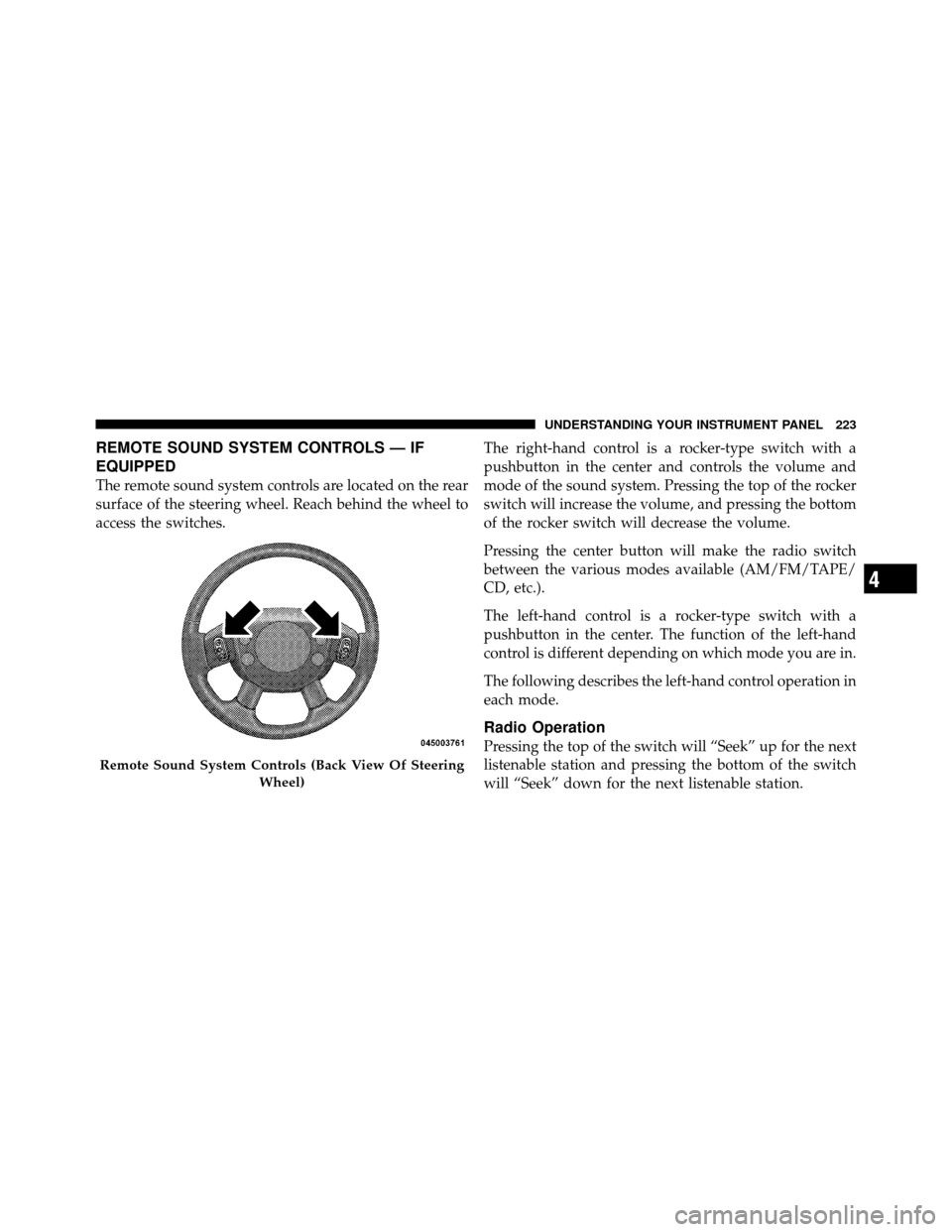
The remote sound system controls are located on the rear
surface of the steering wheel. Reach behind the wheel to
access the switches.The right-hand control is a rocker-type switch with a
pushbutton in the center and controls the volume and
mode of the sound system. Pressing the top of the rocker
switch will increase the volume, and pressing the bottom
of the rocker switch will decrease the volume.
Pressing the center button will make the radio switch
between the various modes available (AM/FM/TAPE/
CD, etc.).
The left-hand control is a rocker-type switch with a
pushbutton in the center. The function of the left-hand
control is different depending on which mode you are in.
The following describes the left-hand control operation in
each mode.
Radio Operation
Pressing the top of the switch will “Seek” up for the next
listenable station and pressing the bottom of the switch
will “Seek” down for the next listenable station.
Remote Sound System Controls (Back View Of Steering
Wheel)
4
UNDERSTANDING YOUR INSTRUMENT PANEL 223
Page 246 of 407
NOTE:The Electronic Stability Program (ESP) and
Traction Control (if equipped) should be turned OFF
before attempting to rock the vehicle. Refer to “Electronic
Brake Control System” in “Starting and Operating” for
further information.
The least amount of accelerator pedal pressure to main-
tain the rocking motion without spinning the wheels or
racing the engine is most effective. Racing the engine or
spinning the wheels, due to the frustration of not freeing
the vehicle, may lead to transmission overheating and
failure. Allow the engine to idle with the shift lever in
NEUTRAL for at least one minute after every five
rocking-motion cycles. This will minimize overheating
and reduce the risk of transmission failure during pro-
longed efforts to free a stuck vehicle.CAUTION!
When “rocking” a stuck vehicle by moving between
DRIVE and REVERSE, do not spin the wheels faster
than 15 mph (24 km/h), or drivetrain damage may
result.
AUTOSTICK�
AutoStick� is a driver-interactive transmission that offers
manual gear shifting capability to provide the driver
with more control. AutoStick� allows the driver to in-
crease engine braking ability, control upshift and down-
shift points, and enhance the driving experience. This
system can also provide the driver with more control
during passing, city driving, mountain driving, trailer
towing, and many other situations.
5
STARTING AND OPERATING 245
Page 249 of 407

•The transmission will automatically shift up when
maximum engine speed is reached while AutoStick�is
engaged.
•Transmission shifting will be more noticeable when
AutoStick� is engaged.
POWER STEERING
The standard power steering system will give you good
vehicle response and increased ease of maneuverability
in tight spaces. The system will provide mechanical
steering capability if power assist is lost.
If for some reason the power assist is interrupted, it will
still be possible to steer your vehicle. Under these condi-
tions, you will observe a substantial increase in steering
effort, especially at very low vehicle speeds and during
parking maneuvers. NOTE:
•Increased noise levels at the end of the steering wheel
travel are considered normal and do not indicate that
there is a problem with the power steering system.
•Upon initial start-up in cold weather, the power steer-
ing pump may make noise for a short amount of time.
This is due to the cold, thick fluid in the steering
system. This noise should be considered normal, and it
does not in any way damage the steering system.
WARNING!
Continued operation with reduced power steering
assist could pose a safety risk to yourself and others.
Service should be obtained as soon as possible.
248 STARTING AND OPERATING
Page 250 of 407

CAUTION!
Prolonged operation of the steering system at the end
of the steering wheel travel will increase the steering
fluid temperature and it should be avoided when
possible. Damage to the power steering pump may
occur.
Power Steering Fluid Check
The power steering system requires the use of MOPAR�
Hydraulic System Power Steering Fluid or equivalent,
which meets Chrysler Material Standard MS-10838.
CAUTION!
Do not use chemical flushes in your power steering
system as the chemicals can damage your power
steering components. Such damage is not covered by
the New Vehicle Limited Warranty.
WARNING!
Do not use Automatic Transmission Fluid (ATF), or
other types of power steering fluids, when servicing
the power steering system of this vehicle. Damage to
the power steering system can result from the use of
the wrong power steering fluid.
Checking the power steering fluid level at a defined
service interval is not required. The fluid should only be
checked if a leak is suspected, abnormal noises are
apparent, and/or the system is not functioning as antici-
pated. Coordinate inspection efforts through an autho-
rized dealer.
5
STARTING AND OPERATING 249
Page 252 of 407
NOTE:
•When the parking brake is applied vehicle speed is
detected, the light will flash and a chime will sound to
alert the driver. Fully release the parking brake before
attempting to move the vehicle.
•This light only shows that the parking brake is ap-
plied. It does not show the degree of brake application.
When parking on a hill, it is important to turn the front
wheels toward the curb on a downhill grade and away
from the curb on an uphill grade. For vehicles equipped
with an automatic transmission, apply the parking brake
before placing the shift lever in PARK, otherwise the load
on the transmission locking mechanism may make it
difficult to move the shift lever out of PARK. The parking
brake should always be applied whenever the driver is
not in the vehicle.
WARNING!
•Never use the PARK position as a substitute for
the parking brake. Always apply the parking
brake fully when parked to guard against vehicle
movement and possible injury or damage.
•Never leave children alone in a vehicle. Leaving
unattended children in a vehicle is dangerous for a
number of reasons. A child or others could be
seriously or fatally injured.
•Do not leave the key fob in the ignition switch. A
child could operate power windows, other con-
trols, or move the vehicle.
•Be sure the parking brake is fully disengaged
before driving; failure to do so can lead to brake
failure and an accident. (Continued)
5
STARTING AND OPERATING 251
Page 253 of 407
WARNING! (Continued)
•Always fully apply the parking brake when leav-
ing your vehicle, or it may roll and cause damage
or injury. Also be certain to leave the transmission
in PARK. Failure to do so may allow the vehicle to
roll and cause damage or injury.
CAUTION!
If the “Brake Warning Light” remains on with the
parking brake released, a brake system malfunction
is indicated. Have the brake system serviced by an
authorized dealer immediately.
ANTI-LOCK BRAKE SYSTEM
The Anti-Lock Brake System (ABS) is designed to aid the
driver in maintaining vehicle control under adverse
braking conditions. The system operates with a separatecomputer to modulate hydraulic pressure to prevent
wheel lock-up and help avoid skidding on slippery
surfaces.
All vehicle wheels and tires must be the same size and
type and tires must be properly inflated to produce
accurate signals for the computer.
WARNING!
Significant over or under inflation of tires can lead to
loss of braking effectiveness.
The Anti-Lock Brake System conducts a low-speed self-
test at about 12 mph (20 km/h). If you have your foot
lightly on the brake while this test is occurring you may
feel slight pedal movement. The movement can be more
apparent on ice and snow. This is normal.
252 STARTING AND OPERATING
Page 255 of 407
NOTE:During severe braking conditions, a pulsing
sensation may occur and a clicking noise will be heard.
This is normal, indicating that the Anti-Lock Brake
System is functioning.
WARNING!
To use your brakes and accelerator more safely,
follow these tips:
•Do not “ride” the brakes by resting your foot on
the pedal. This could overheat the brakes and
result in unpredictable braking action, longer
stopping distances, or brake damage.
•When descending mountains or hills, repeated
braking can cause brake fade with loss of braking
control. Avoid repeated heavy braking by down-
shifting the transmission or locking out overdrive
whenever possible.
(Continued)
WARNING! (Continued)
•Engines may idle at higher speeds during warm-
up, which could cause rear wheels to spin and
result in loss of vehicle control. Be especially
careful while driving on slippery roads, in close-
quarter maneuvering, parking or stopping.
•Do not drive too fast for road conditions, espe-
cially when roads are wet or slushy. A wedge of
water can build up between the tire tread and the
road. This hydroplaning action can cause loss of
traction, braking ability, and control.
•After going through deep water or a car wash,
brakes may become wet, resulting in decreased
performance and unpredictable braking action.
Dry the brakes by gentle, intermittent pedal action
while driving at very slow speeds.
254 STARTING AND OPERATING