2010 JAGUAR XFR Dtc
[x] Cancel search: DtcPage 2496 of 3039
Symptom Possible Causes Action outside (but opens from the
inside) GO to Pinpoint Test A. Door(s) will not unlatch/open when
using inside door handle
Child lock(s) engaged
Interior door handle
condition/installation
Interior release cable disconnected
from interior door handle or door
latch
Check that the child locks are
disengaged
Check the interior door handle
condition and installation
Check the condition and security of
the interior release cable
Single Door Will Not Open From
The Inside (but opens from the
outside) GO to Pinpoint Test B. Door(s) will not lock/unlock from key
fob, key or internal lock switch
Wiring harness/connectors
Central junction box (CJB)
Door lock switch
Cable fault
Check for relevant stored DTCs
Once any DTC related faults have
been rectified continue with the
diagnostic steps below
No lock / unlock function from
key-fob GO to Pinpoint Test C. Door ajar or miss lock signal at
message centre when door(s) are
closed or alarm triggering
Wiring harness
Instrument cluster
Incorrect striker
alignment/adjustment
Ajar switch circuit short circuit to
ground
Ajar switch failure
Latch Mounted Door Ajar Switch
Test GO to Pinpoint Test D. DTC Index
For a list of Diagnostic Trouble Codes (DTCs) that could be logged on this vehicle, please refer to Section 100-00.
REFER to: Communications Network (418-00, Diagnosis and Testing) /
Locks, Latches and Entry Systems - DTC: With (501-14, Diagnosis and Testing).
Pinpoint Test
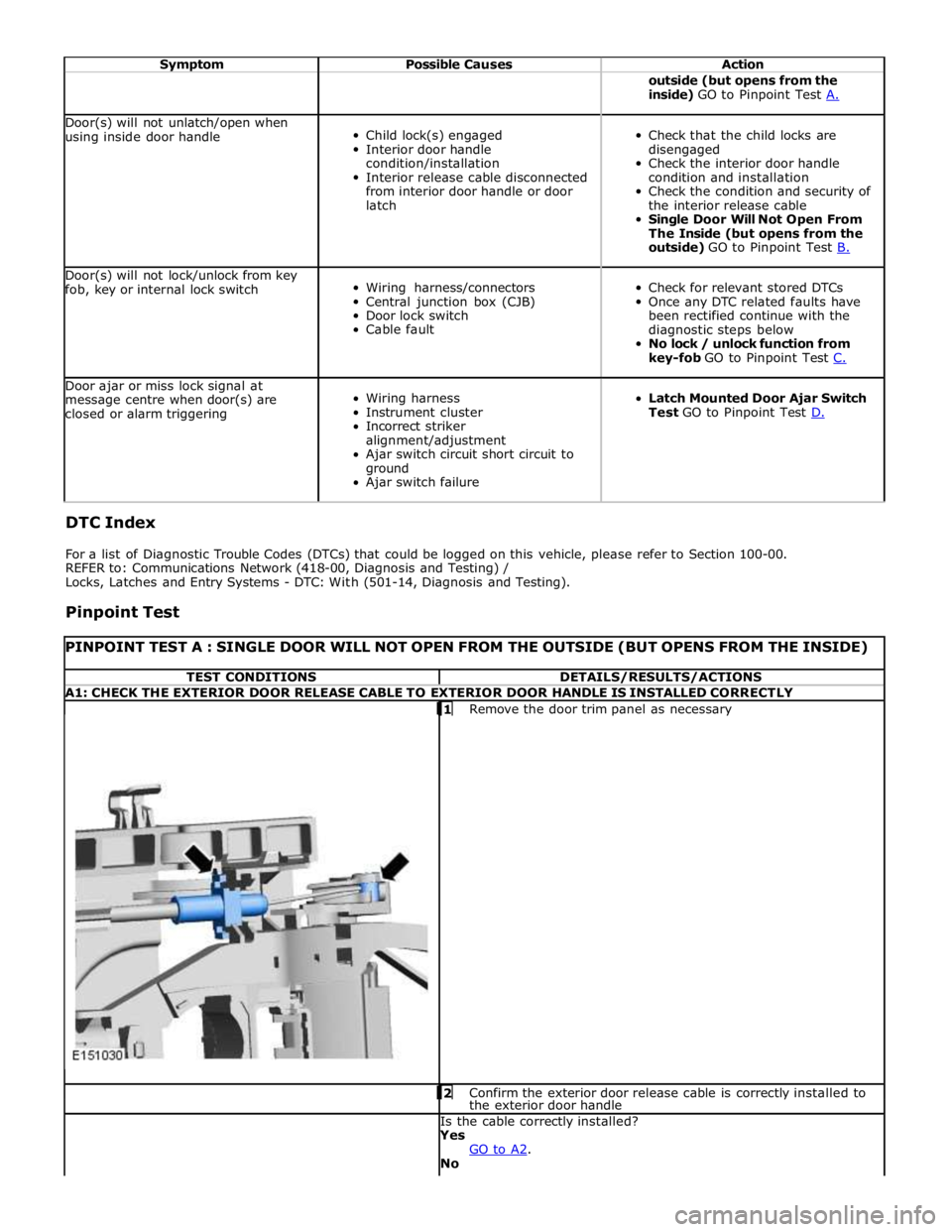
PINPOINT TEST A : SINGLE DOOR WILL NOT OPEN FROM THE OUTSIDE (BUT OPENS FROM THE INSIDE) TEST CONDITIONS DETAILS/RESULTS/ACTIONS A1: CHECK THE EXTERIOR DOOR RELEASE CABLE TO EXTERIOR DOOR HANDLE IS INSTALLED CORRECTLY
1 Remove the door trim panel as necessary 2 Confirm the exterior door release cable is correctly installed to the exterior door handle Is the cable correctly installed?
Yes
GO to A2. No
Page 2499 of 3039
NOTE: Test as a single component to ensure that the door latch is not replaced unnecessarily, when another component
may be at fault 1 Remove the door trim panel as necessary
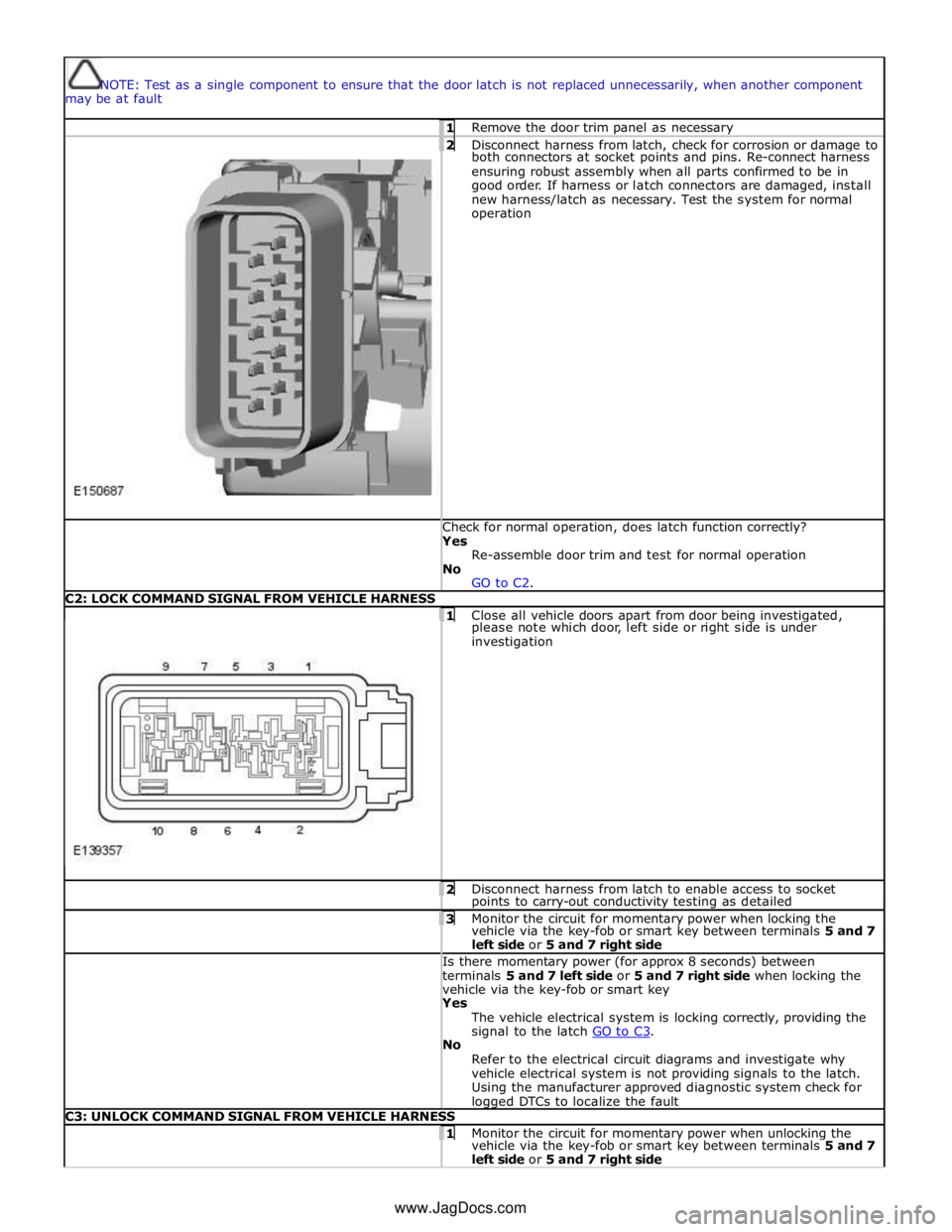
2 Disconnect harness from latch, check for corrosion or damage to both connectors at socket points and pins. Re-connect harness
ensuring robust assembly when all parts confirmed to be in
good order. If harness or latch connectors are damaged, install
new harness/latch as necessary. Test the system for normal
operation Check for normal operation, does latch function correctly? Yes
Re-assemble door trim and test for normal operation
No
GO to C2. C2: LOCK COMMAND SIGNAL FROM VEHICLE HARNESS
1 Close all vehicle doors apart from door being investigated, please note which door, left side or right side is under
investigation 2 Disconnect harness from latch to enable access to socket points to carry-out conductivity testing as detailed 3 Monitor the circuit for momentary power when locking the vehicle via the key-fob or smart key between terminals 5 and 7
left side or 5 and 7 right side Is there momentary power (for approx 8 seconds) between
terminals 5 and 7 left side or 5 and 7 right side when locking the
vehicle via the key-fob or smart key Yes
The vehicle electrical system is locking correctly, providing the
signal to the latch GO to C3. No
Refer to the electrical circuit diagrams and investigate why
vehicle electrical system is not providing signals to the latch.
Using the manufacturer approved diagnostic system check for logged DTCs to localize the fault C3: UNLOCK COMMAND SIGNAL FROM VEHICLE HARNESS 1 Monitor the circuit for momentary power when unlocking the vehicle via the key-fob or smart key between terminals 5 and 7
left side or 5 and 7 right side www.JagDocs.com
Page 2500 of 3039
Is there momentary power (for approx 8 seconds) between
terminals 5 and 7 left side and 5 and 7 right side when unlocking
the vehicle via the key-fob or smart key? Yes
The vehicle electrical system is unlocking correctly, providing
the signal to the latch GO to C4. No
Refer to the electrical circuit diagrams and investigate why
vehicle electrical system is not providing signals to the latch.
Using the manufacturer approved diagnostic system check for
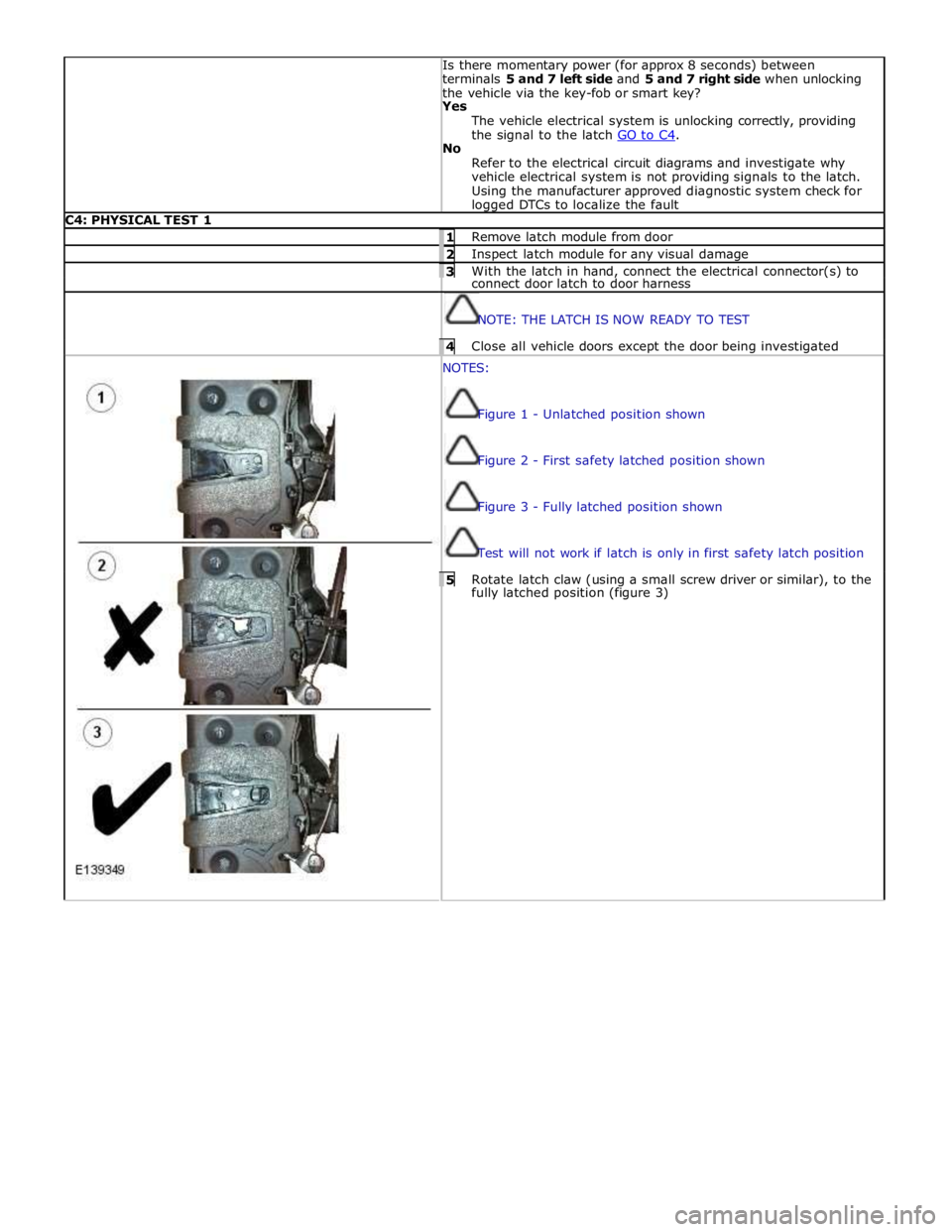
logged DTCs to localize the fault C4: PHYSICAL TEST 1 1 Remove latch module from door 2 Inspect latch module for any visual damage 3 With the latch in hand, connect the electrical connector(s) to connect door latch to door harness
NOTE: THE LATCH IS NOW READY TO TEST 4 Close all vehicle doors except the door being investigated NOTES:
Figure 1 - Unlatched position shown
Figure 2 - First safety latched position shown
Figure 3 - Fully latched position shown
Test will not work if latch is only in first safety latch position 5 Rotate latch claw (using a small screw driver or similar), to the fully latched position (figure 3)
Page 2504 of 3039
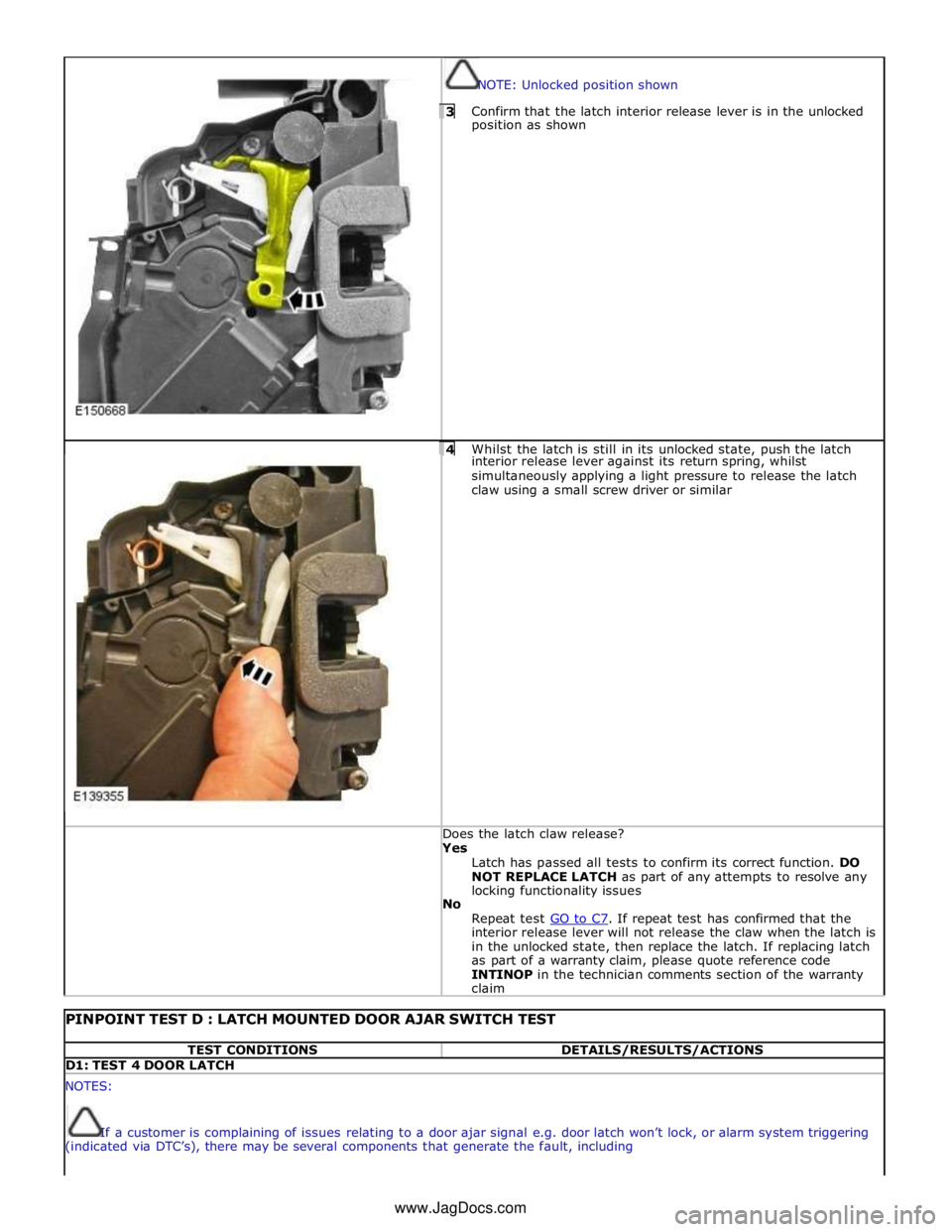
NOTE: Unlocked position shown 3 Confirm that the latch interior release lever is in the unlocked position as shown
4 Whilst the latch is still in its unlocked state, push the latch interior release lever against its return spring, whilst
simultaneously applying a light pressure to release the latch
claw using a small screw driver or similar Does the latch claw release? Yes
Latch has passed all tests to confirm its correct function. DO
NOT REPLACE LATCH as part of any attempts to resolve any
locking functionality issues
No
Repeat test GO to C7. If repeat test has confirmed that the interior release lever will not release the claw when the latch is
in the unlocked state, then replace the latch. If replacing latch
as part of a warranty claim, please quote reference code
INTINOP in the technician comments section of the warranty
claim
PINPOINT TEST D : LATCH MOUNTED DOOR AJAR SWITCH TEST TEST CONDITIONS DETAILS/RESULTS/ACTIONS D1: TEST 4 DOOR LATCH NOTES:
If a customer is complaining of issues relating to a door ajar signal e.g. door latch won’t lock, or alarm system triggering
(indicated via DTC’s), there may be several components that generate the fault, including www.JagDocs.com
Page 2543 of 3039
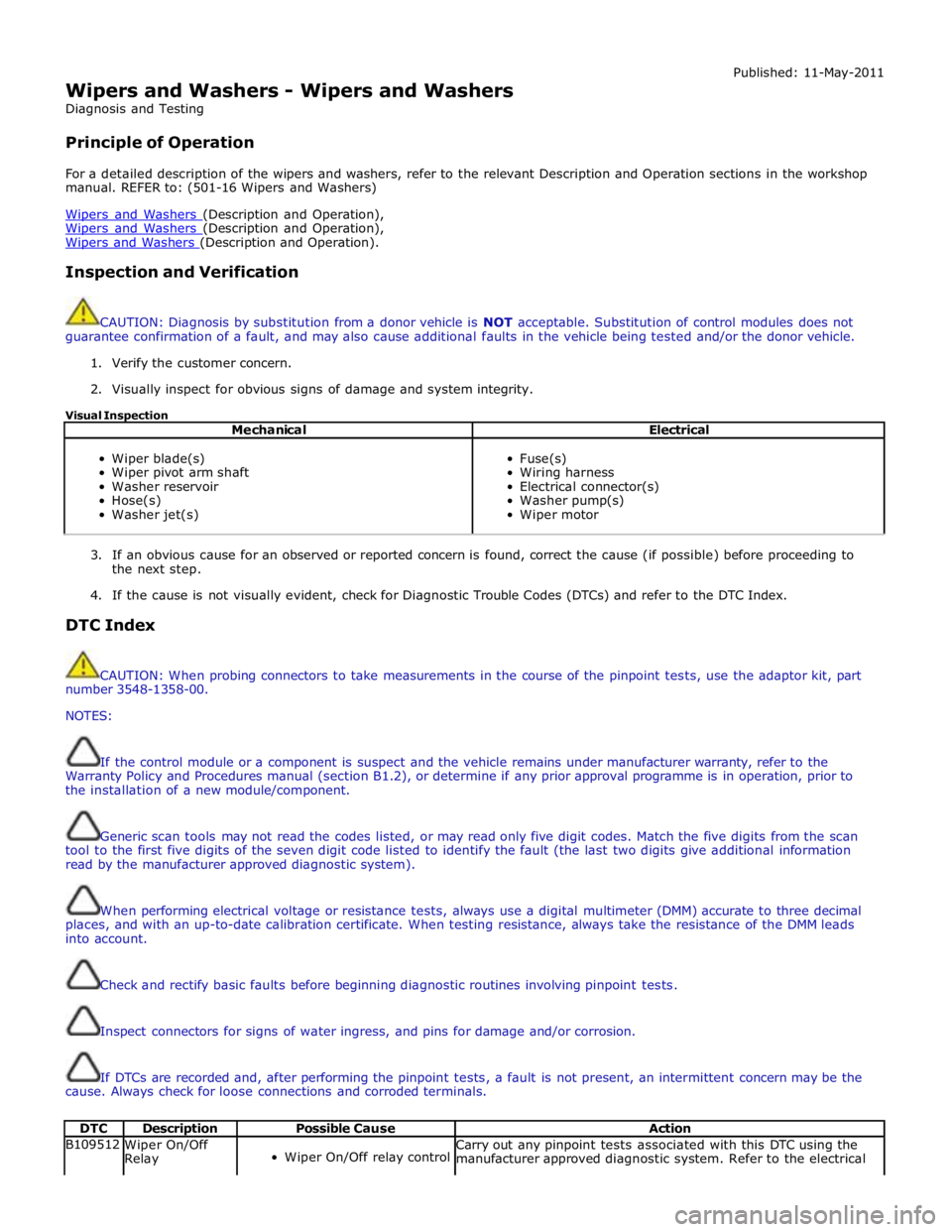
Wipers and Washers - Wipers and Washers
Diagnosis and Testing
Principle of Operation Published: 11-May-2011
For a detailed description of the wipers and washers, refer to the relevant Description and Operation sections in the workshop
manual. REFER to: (501-16 Wipers and Washers)
Wipers and Washers (Description and Operation), Wipers and Washers (Description and Operation), Wipers and Washers (Description and Operation).
Inspection and Verification
CAUTION: Diagnosis by substitution from a donor vehicle is NOT acceptable. Substitution of control modules does not
guarantee confirmation of a fault, and may also cause additional faults in the vehicle being tested and/or the donor vehicle.
1. Verify the customer concern.
2. Visually inspect for obvious signs of damage and system integrity.
Visual Inspection
Mechanical Electrical
Wiper blade(s)
Wiper pivot arm shaft
Washer reservoir
Hose(s)
Washer jet(s)
Fuse(s)
Wiring harness
Electrical connector(s)
Washer pump(s)
Wiper motor
3. If an obvious cause for an observed or reported concern is found, correct the cause (if possible) before proceeding to
the next step.
4. If the cause is not visually evident, check for Diagnostic Trouble Codes (DTCs) and refer to the DTC Index.
DTC Index
CAUTION: When probing connectors to take measurements in the course of the pinpoint tests, use the adaptor kit, part
number 3548-1358-00.
NOTES:
If the control module or a component is suspect and the vehicle remains under manufacturer warranty, refer to the
Warranty Policy and Procedures manual (section B1.2), or determine if any prior approval programme is in operation, prior to
the installation of a new module/component.
Generic scan tools may not read the codes listed, or may read only five digit codes. Match the five digits from the scan
tool to the first five digits of the seven digit code listed to identify the fault (the last two digits give additional information
read by the manufacturer approved diagnostic system).
When performing electrical voltage or resistance tests, always use a digital multimeter (DMM) accurate to three decimal
places, and with an up-to-date calibration certificate. When testing resistance, always take the resistance of the DMM leads
into account.
Check and rectify basic faults before beginning diagnostic routines involving pinpoint tests.
Inspect connectors for signs of water ingress, and pins for damage and/or corrosion.
If DTCs are recorded and, after performing the pinpoint tests, a fault is not present, an intermittent concern may be the
cause. Always check for loose connections and corroded terminals.
DTC Description Possible Cause Action B109512
Wiper On/Off
Relay
Wiper On/Off relay control Carry out any pinpoint tests associated with this DTC using the
manufacturer approved diagnostic system. Refer to the electrical
Page 2544 of 3039

DTC Description Possible Cause Action circuit - short to power
circuit diagrams and check wiper On/Off relay control circuit for
short to power B109514
Wiper On/Off
Relay
Wiper On/Off relay control
circuit - short to ground,
open circuit Refer to the electrical circuit diagrams and check wiper On/Off
relay control circuit for short to ground, open circuit B109612
Wiper High/Low
Relay
Wiper Fast/Slow relay
control circuit - short to
power Carry out any pinpoint tests associated with this DTC using the
manufacturer approved diagnostic system. Refer to the electrical
circuit diagrams and check wiper Fast/Slow relay control circuit for
short to power B109614
Wiper High/Low
Relay
Wiper Fast/Slow relay
control circuit - short to
ground, open circuit Refer to the electrical circuit diagrams and check wiper Fast/Slow
relay control circuit for short to ground, open circuit B10AD09 Rain Sensor
Component failures Carry out any pinpoint tests associated with this DTC using the
manufacturer approved diagnostic system. Suspect the rain/light
sensor, check and install a new sensor as required B10AD11 Rain Sensor
Rain/light sensor power
circuit - short to ground Carry out any pinpoint tests associated with this DTC using the
manufacturer approved diagnostic system. Refer to the electrical
circuit diagrams and check rain/light sensor power circuit for short
to ground B10AD96 Rain Sensor
Component internal
failure Suspect the rain/light sensor, check and install a new sensor as
required B117712
Screenwash
Level Switch
Screenwash level switch
signal circuit - short to
power Refer to the electrical circuit diagrams and check screenwash level
switch signal circuit for short to power B1C4513
Front Wiper Park
Position Switch
Windshield wiper motor
park switch signal circuit -
open circuit Refer to the electrical circuit diagrams and check windshield wiper
motor park switch signal circuit for open circuit B1C4523
Front Wiper Park
Position Switch
Signal stuck low Refer to the electrical circuit diagrams and check front wiper park
position switch input circuit for short, open circuit B1C7812 Powerwash Relay
Powerwash relay control
circuit - short to power Refer to the electrical circuit diagrams and check powerwash relay
control circuit for short to power B1C7814 Powerwash Relay
Powerwash relay control
circuit - short to ground,
open circuit Refer to the electrical circuit diagrams and check powerwash relay
control circuit for short to ground, open circuit B1C7911
Front Washer
Pump
Screenwash pump control
circuit - short to ground Refer to the electrical circuit diagrams and check screenwash
pump control circuit for short to ground B1C7913
Front Washer
Pump
Screenwash pump control
circuit - open circuit Carry out any pinpoint tests associated with this DTC using the
manufacturer approved diagnostic system. Refer to the electrical
circuit diagrams and check screenwash pump control circuit for open circuit www.JagDocs.com
Page 2563 of 3039
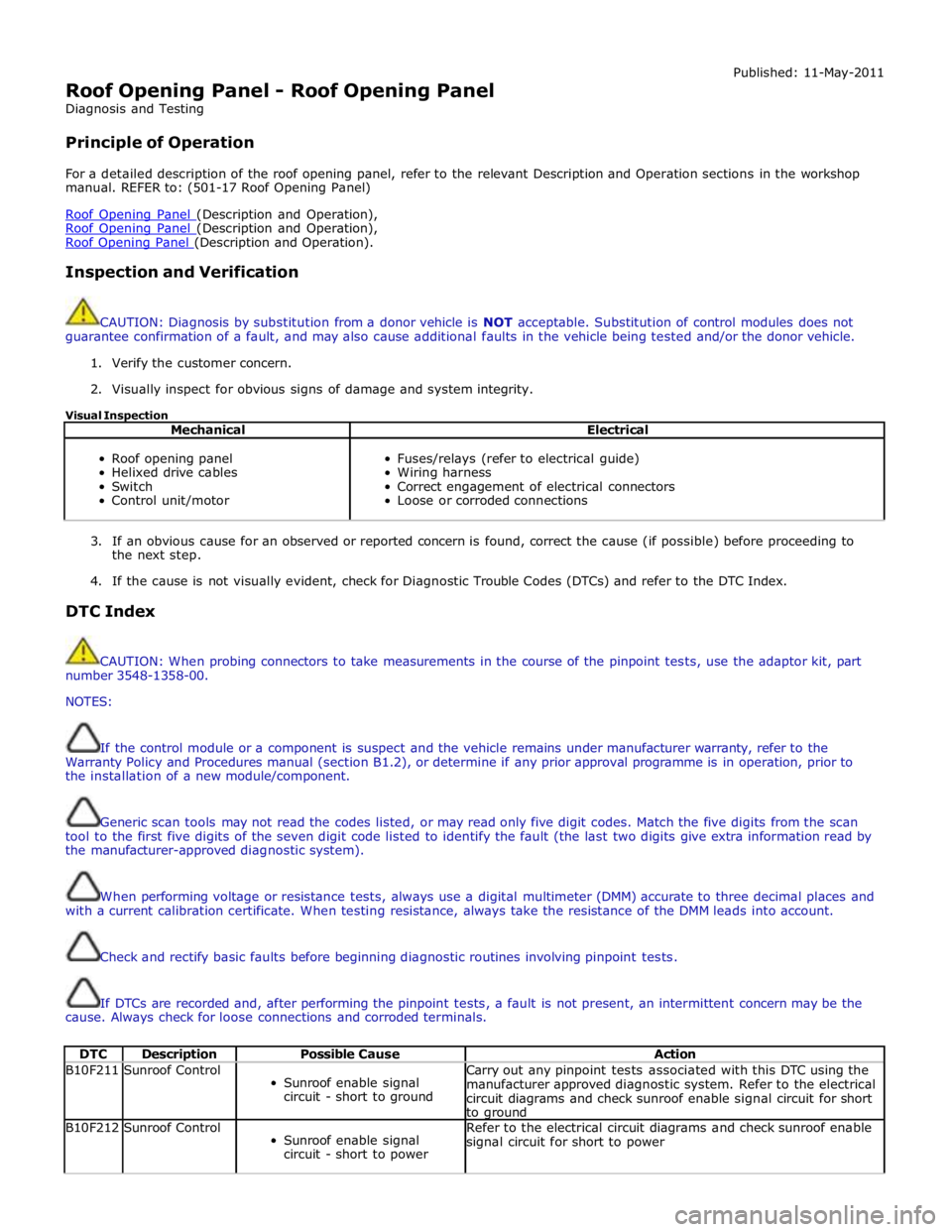
Roof Opening Panel - Roof Opening Panel
Diagnosis and Testing
Principle of Operation Published: 11-May-2011
For a detailed description of the roof opening panel, refer to the relevant Description and Operation sections in the workshop
manual. REFER to: (501-17 Roof Opening Panel)
Roof Opening Panel (Description and Operation), Roof Opening Panel (Description and Operation), Roof Opening Panel (Description and Operation).
Inspection and Verification
CAUTION: Diagnosis by substitution from a donor vehicle is NOT acceptable. Substitution of control modules does not
guarantee confirmation of a fault, and may also cause additional faults in the vehicle being tested and/or the donor vehicle.
1. Verify the customer concern.
2. Visually inspect for obvious signs of damage and system integrity.
Visual Inspection
Mechanical Electrical
Roof opening panel
Helixed drive cables
Switch
Control unit/motor
Fuses/relays (refer to electrical guide)
Wiring harness
Correct engagement of electrical connectors
Loose or corroded connections
3. If an obvious cause for an observed or reported concern is found, correct the cause (if possible) before proceeding to
the next step.
4. If the cause is not visually evident, check for Diagnostic Trouble Codes (DTCs) and refer to the DTC Index.
DTC Index
CAUTION: When probing connectors to take measurements in the course of the pinpoint tests, use the adaptor kit, part
number 3548-1358-00.
NOTES:
If the control module or a component is suspect and the vehicle remains under manufacturer warranty, refer to the
Warranty Policy and Procedures manual (section B1.2), or determine if any prior approval programme is in operation, prior to
the installation of a new module/component.
Generic scan tools may not read the codes listed, or may read only five digit codes. Match the five digits from the scan
tool to the first five digits of the seven digit code listed to identify the fault (the last two digits give extra information read by
the manufacturer-approved diagnostic system).
When performing voltage or resistance tests, always use a digital multimeter (DMM) accurate to three decimal places and
with a current calibration certificate. When testing resistance, always take the resistance of the DMM leads into account.
Check and rectify basic faults before beginning diagnostic routines involving pinpoint tests.
If DTCs are recorded and, after performing the pinpoint tests, a fault is not present, an intermittent concern may be the
cause. Always check for loose connections and corroded terminals.
DTC Description Possible Cause Action B10F211 Sunroof Control
Sunroof enable signal
circuit - short to ground Carry out any pinpoint tests associated with this DTC using the
manufacturer approved diagnostic system. Refer to the electrical
circuit diagrams and check sunroof enable signal circuit for short
to ground B10F212 Sunroof Control
Sunroof enable signal
circuit - short to power Refer to the electrical circuit diagrams and check sunroof enable
signal circuit for short to power
Page 2564 of 3039

DTC Description Possible Cause Action B10F213 Sunroof Control
Sunroof enable signal
circuit - open circuit Refer to the electrical circuit diagrams and check sunroof enable
signal circuit for open circuit B113D12
Sunroof Global
Open/Close
Control
Roof opening panel global
open/close control circuit -
short to power Carry out any pinpoint tests associated with this DTC using the
manufacturer approved diagnostic system. Refer to the electrical
circuit diagrams and check roof opening panel global open/close
control circuit for short to power B113D14
Sunroof Global
Open/Close
Control
Roof opening panel global
open/close control circuit -
short to ground, open
circuit Refer to the electrical circuit diagrams and check roof opening
panel global open/close control circuit for short to ground, open
circuit www.JagDocs.com