2010 JAGUAR XFR ECU
[x] Cancel search: ECUPage 2091 of 3039

DTC Description Possible Cause Action B1D2711
Heater Coolant
Pump
Heater coolant pump control
circuit - short to ground Carry out any pinpoint tests associated with this DTC
using the manufacturer approved diagnostic system.
Refer to the electrical circuit diagrams and check heater
coolant pump control circuit for short to ground B1D2713
Heater Coolant
Pump
Heater coolant pump control
circuit - open circuit Carry out any pinpoint tests associated with this DTC
using the manufacturer approved diagnostic system.
Refer to the electrical circuit diagrams and check heater
coolant pump control circuit for open circuit B1D9796 Tilt Sensor
Component internal failure Suspect the battery backed sounder, check and install a
new battery backed sounder as required P057112
Brake Switch A
Circuit
Footbrake switch circuit - short
to power Refer to the electrical circuit diagrams and check
footbrake switch circuit for short to power P080111
Reverse Inhibit
Control Circuit
Electrochromic rear view mirror,
reverse inhibit circuit - short to
ground Carry out any pinpoint tests associated with this DTC
using the manufacturer approved diagnostic system.
Refer to the electrical circuit diagrams and check
electrochromic rear view mirror, reverse inhibit circuit for
short to ground P080112
Reverse Inhibit
Control Circuit
Electrochromic rear view mirror,
reverse inhibit circuit - short to
power Refer to the electrical circuit diagrams and check
electrochromic rear view mirror, reverse inhibit circuit for
short to power P080113
Reverse Inhibit
Control Circuit
Electrochromic rear view mirror,
reverse inhibit circuit - open
circuit Refer to the electrical circuit diagrams and check
electrochromic rear view mirror, reverse inhibit circuit for
open circuit P085013
Park/Neutral Switch
Input Circuit
Park/Neutral signal circuit -
open circuit Refer to the electrical circuit diagrams and check
Park/Neutral signal circuit for open circuit P162413 Anti-theft System
RJB anti-theft signal circuit -
open circuit Refer to the electrical circuit diagrams and check RJB
anti-theft signal circuit for open circuit P254F13
Engine Hood Switch
Circuit/Open
Hood ajar switch signal circuit -
open circuit Refer to the electrical circuit diagrams and check hood
ajar switch signal circuit for open circuit U001988
Low Speed CAN
Communication Bus
Bus OFF Carry out any pinpoint tests associated with this DTC
using the manufacturer approved diagnostic system. U014200
Lost
Communication
With Body Control
Module "B"
No sub type information Carry out any pinpoint tests associated with this DTC
using the manufacturer approved diagnostic system. U015500
Lost
Communication
With Instrument
Panel Cluster (IPC)
Control Module
No sub type information Carry out any pinpoint tests associated with this DTC
using the manufacturer approved diagnostic system. U015600
Lost
Communication
With Information
Center "A"
No sub type information Carry out any pinpoint tests associated with this DTC
using the manufacturer approved diagnostic system. U016400
Lost
Communication
With HVAC Control
Module
No sub type information Carry out any pinpoint tests associated with this DTC
using the manufacturer approved diagnostic system. U016800
Lost
Communication
With Vehicle
Security Control
Module
No sub type information Check power and ground supplies to vehicle security
module U019900
Lost
Communication
With "Door Control
Module A"
No sub type information Carry out any pinpoint tests associated with this DTC
using the manufacturer approved diagnostic system. U020000
Lost
Communication
With "Door Control
Module B"
No sub type information Carry out any pinpoint tests associated with this DTC
using the manufacturer approved diagnostic system.
Page 2092 of 3039
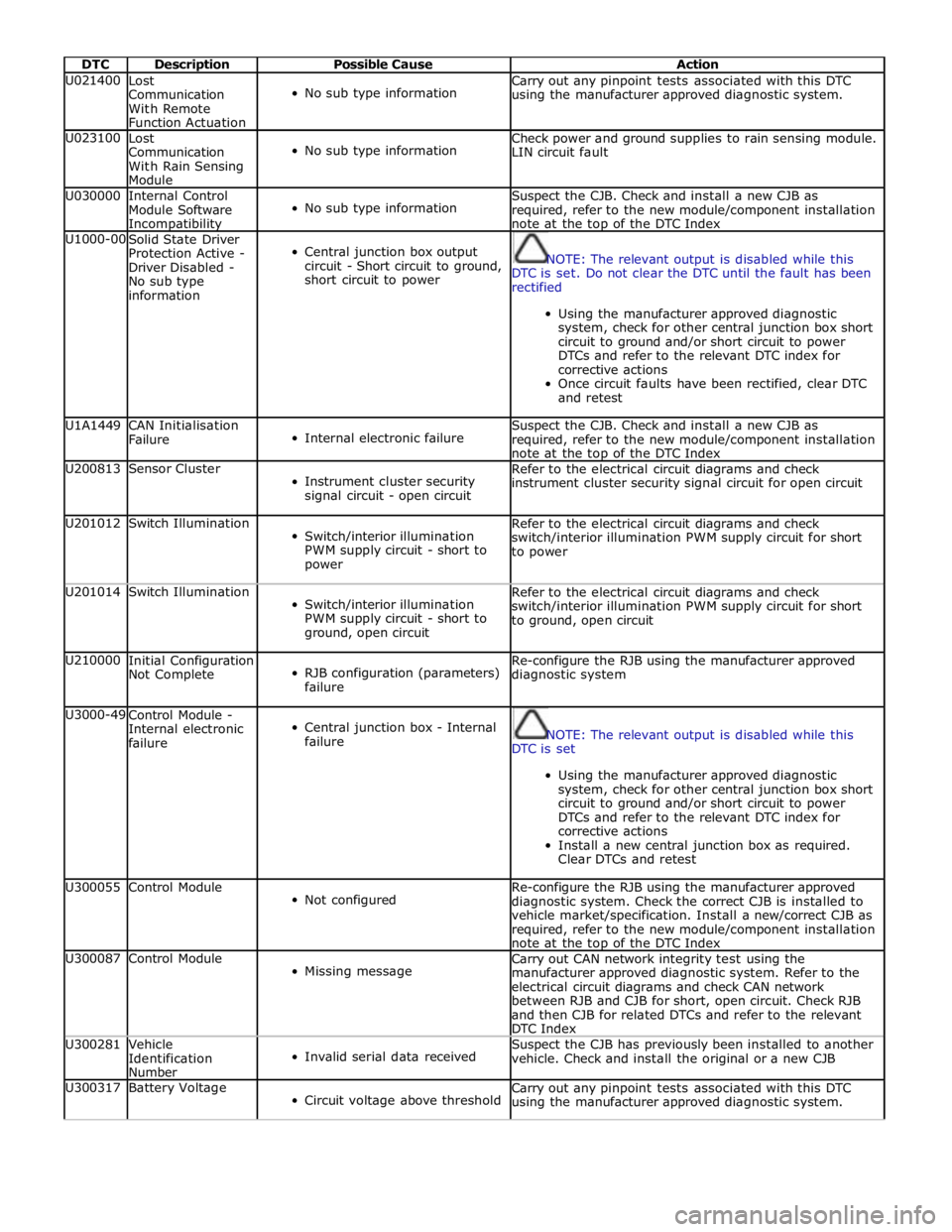
DTC Description Possible Cause Action U021400
Lost
Communication
With Remote
Function Actuation
No sub type information Carry out any pinpoint tests associated with this DTC
using the manufacturer approved diagnostic system. U023100
Lost
Communication
With Rain Sensing
Module
No sub type information Check power and ground supplies to rain sensing module.
LIN circuit fault U030000
Internal Control
Module Software Incompatibility
No sub type information Suspect the CJB. Check and install a new CJB as
required, refer to the new module/component installation
note at the top of the DTC Index U1000-00
Solid State Driver
Protection Active -
Driver Disabled -
No sub type
information
Central junction box output
circuit - Short circuit to ground,
short circuit to power
NOTE: The relevant output is disabled while this
DTC is set. Do not clear the DTC until the fault has been
rectified
Using the manufacturer approved diagnostic
system, check for other central junction box short
circuit to ground and/or short circuit to power
DTCs and refer to the relevant DTC index for
corrective actions
Once circuit faults have been rectified, clear DTC
and retest U1A1449
CAN Initialisation
Failure
Internal electronic failure Suspect the CJB. Check and install a new CJB as
required, refer to the new module/component installation
note at the top of the DTC Index U200813 Sensor Cluster
Instrument cluster security
signal circuit - open circuit Refer to the electrical circuit diagrams and check
instrument cluster security signal circuit for open circuit U201012 Switch Illumination
Switch/interior illumination
PWM supply circuit - short to
power Refer to the electrical circuit diagrams and check
switch/interior illumination PWM supply circuit for short
to power U201014 Switch Illumination
Switch/interior illumination
PWM supply circuit - short to
ground, open circuit Refer to the electrical circuit diagrams and check
switch/interior illumination PWM supply circuit for short
to ground, open circuit U210000
Initial Configuration
Not Complete
RJB configuration (parameters)
failure Re-configure the RJB using the manufacturer approved
diagnostic system U3000-49
Control Module -
Internal electronic
failure
Central junction box - Internal
failure
NOTE: The relevant output is disabled while this
DTC is set
Using the manufacturer approved diagnostic
system, check for other central junction box short
circuit to ground and/or short circuit to power
DTCs and refer to the relevant DTC index for
corrective actions
Install a new central junction box as required.
Clear DTCs and retest U300055 Control Module
Not configured Re-configure the RJB using the manufacturer approved
diagnostic system. Check the correct CJB is installed to
vehicle market/specification. Install a new/correct CJB as
required, refer to the new module/component installation
note at the top of the DTC Index U300087 Control Module
Missing message Carry out CAN network integrity test using the
manufacturer approved diagnostic system. Refer to the
electrical circuit diagrams and check CAN network
between RJB and CJB for short, open circuit. Check RJB
and then CJB for related DTCs and refer to the relevant
DTC Index U300281
Vehicle
Identification
Number
Invalid serial data received Suspect the CJB has previously been installed to another
vehicle. Check and install the original or a new CJB U300317 Battery Voltage
Circuit voltage above threshold Carry out any pinpoint tests associated with this DTC
using the manufacturer approved diagnostic system.
Page 2104 of 3039
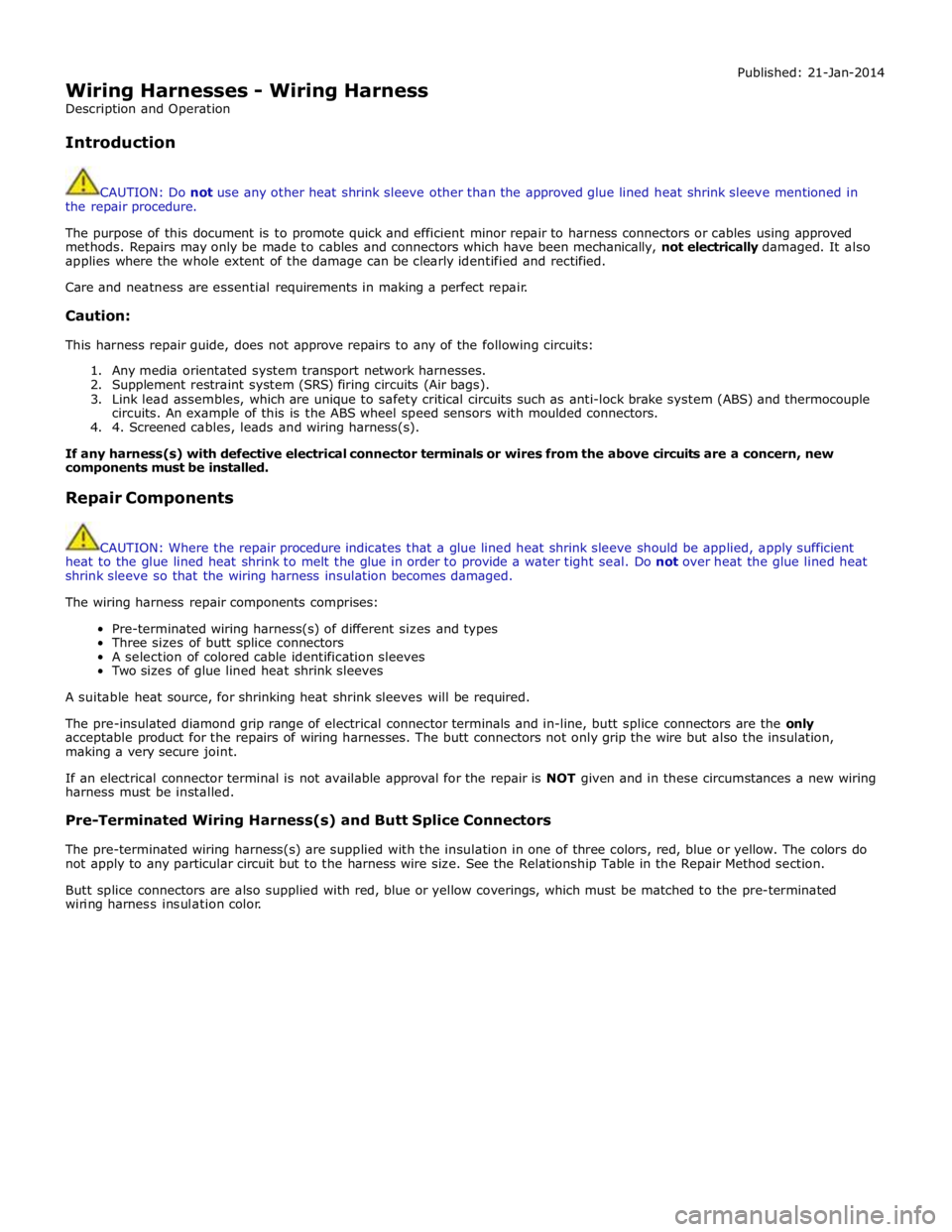
Wiring Harnesses - Wiring Harness
Description and Operation
Introduction Published: 21-Jan-2014
CAUTION: Do not use any other heat shrink sleeve other than the approved glue lined heat shrink sleeve mentioned in
the repair procedure.
The purpose of this document is to promote quick and efficient minor repair to harness connectors or cables using approved
methods. Repairs may only be made to cables and connectors which have been mechanically, not electrically damaged. It also
applies where the whole extent of the damage can be clearly identified and rectified.
Care and neatness are essential requirements in making a perfect repair.
Caution:
This harness repair guide, does not approve repairs to any of the following circuits:
1. Any media orientated system transport network harnesses.
2. Supplement restraint system (SRS) firing circuits (Air bags).
3. Link lead assembles, which are unique to safety critical circuits such as anti-lock brake system (ABS) and thermocouple
circuits. An example of this is the ABS wheel speed sensors with moulded connectors.
4. 4. Screened cables, leads and wiring harness(s).
If any harness(s) with defective electrical connector terminals or wires from the above circuits are a concern, new
components must be installed.
Repair Components
CAUTION: Where the repair procedure indicates that a glue lined heat shrink sleeve should be applied, apply sufficient
heat to the glue lined heat shrink to melt the glue in order to provide a water tight seal. Do not over heat the glue lined heat
shrink sleeve so that the wiring harness insulation becomes damaged.
The wiring harness repair components comprises:
Pre-terminated wiring harness(s) of different sizes and types
Three sizes of butt splice connectors
A selection of colored cable identification sleeves
Two sizes of glue lined heat shrink sleeves
A suitable heat source, for shrinking heat shrink sleeves will be required.
The pre-insulated diamond grip range of electrical connector terminals and in-line, butt splice connectors are the only
acceptable product for the repairs of wiring harnesses. The butt connectors not only grip the wire but also the insulation,
making a very secure joint.
If an electrical connector terminal is not available approval for the repair is NOT given and in these circumstances a new wiring
harness must be installed.
Pre-Terminated Wiring Harness(s) and Butt Splice Connectors
The pre-terminated wiring harness(s) are supplied with the insulation in one of three colors, red, blue or yellow. The colors do
not apply to any particular circuit but to the harness wire size. See the Relationship Table in the Repair Method section.
Butt splice connectors are also supplied with red, blue or yellow coverings, which must be matched to the pre-terminated
wiring harness insulation color.
Page 2115 of 3039
length.
4.
5.
6.
7.
8.
9.
10.
11.
12.
13.
14.
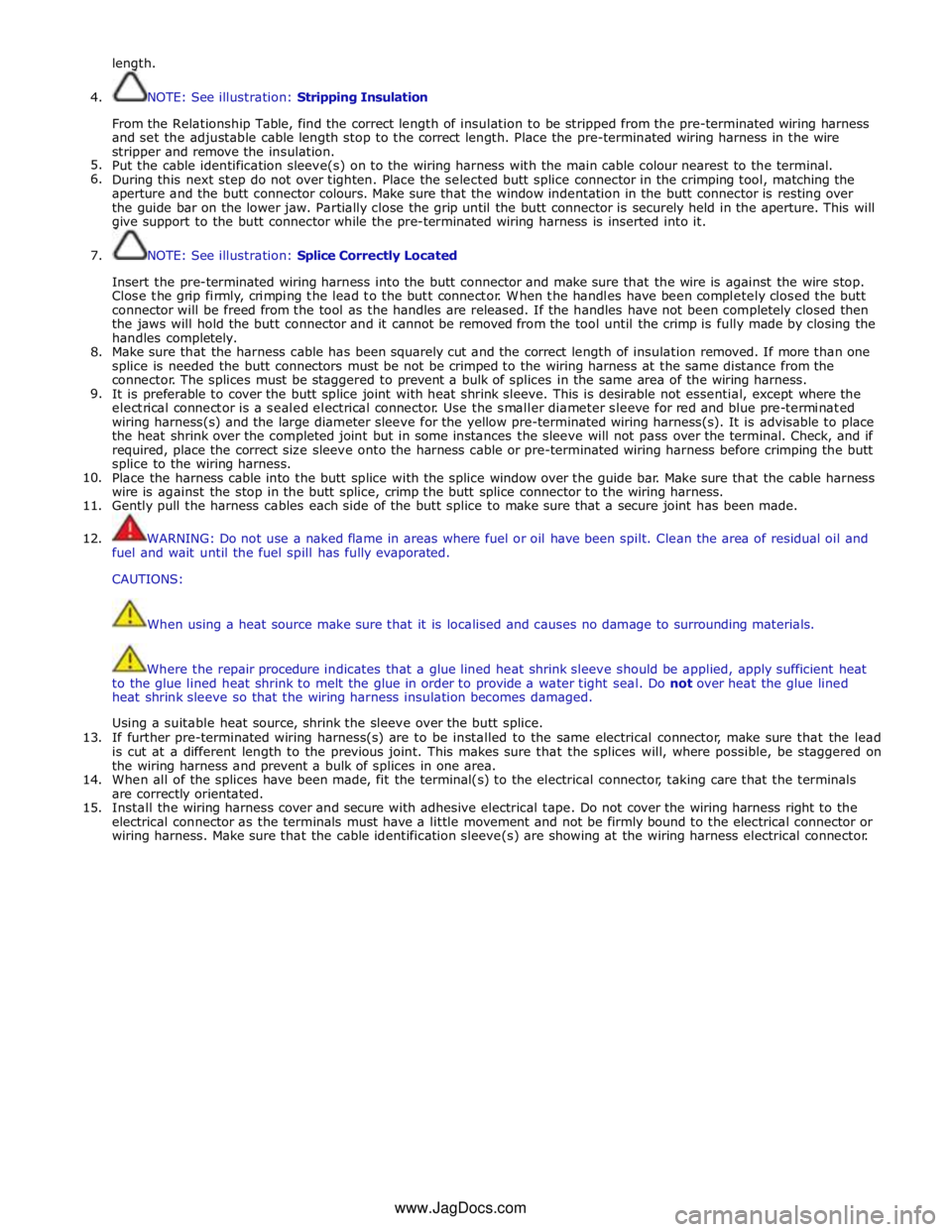
15. NOTE: See illustration: Stripping Insulation
From the Relationship Table, find the correct length of insulation to be stripped from the pre-terminated wiring harness
and set the adjustable cable length stop to the correct length. Place the pre-terminated wiring harness in the wire
stripper and remove the insulation.
Put the cable identification sleeve(s) on to the wiring harness with the main cable colour nearest to the terminal.
During this next step do not over tighten. Place the selected butt splice connector in the crimping tool, matching the
aperture and the butt connector colours. Make sure that the window indentation in the butt connector is resting over
the guide bar on the lower jaw. Partially close the grip until the butt connector is securely held in the aperture. This will
give support to the butt connector while the pre-terminated wiring harness is inserted into it.
NOTE: See illustration: Splice Correctly Located
Insert the pre-terminated wiring harness into the butt connector and make sure that the wire is against the wire stop.
Close the grip firmly, crimping the lead to the butt connector. When the handles have been completely closed the butt
connector will be freed from the tool as the handles are released. If the handles have not been completely closed then
the jaws will hold the butt connector and it cannot be removed from the tool until the crimp is fully made by closing the
handles completely.
Make sure that the harness cable has been squarely cut and the correct length of insulation removed. If more than one
splice is needed the butt connectors must be not be crimped to the wiring harness at the same distance from the
connector. The splices must be staggered to prevent a bulk of splices in the same area of the wiring harness.
It is preferable to cover the butt splice joint with heat shrink sleeve. This is desirable not essential, except where the
electrical connector is a sealed electrical connector. Use the smaller diameter sleeve for red and blue pre-terminated
wiring harness(s) and the large diameter sleeve for the yellow pre-terminated wiring harness(s). It is advisable to place
the heat shrink over the completed joint but in some instances the sleeve will not pass over the terminal. Check, and if
required, place the correct size sleeve onto the harness cable or pre-terminated wiring harness before crimping the butt
splice to the wiring harness.
Place the harness cable into the butt splice with the splice window over the guide bar. Make sure that the cable harness
wire is against the stop in the butt splice, crimp the butt splice connector to the wiring harness.
Gently pull the harness cables each side of the butt splice to make sure that a secure joint has been made.
WARNING: Do not use a naked flame in areas where fuel or oil have been spilt. Clean the area of residual oil and
fuel and wait until the fuel spill has fully evaporated.
CAUTIONS:
When using a heat source make sure that it is localised and causes no damage to surrounding materials.
Where the repair procedure indicates that a glue lined heat shrink sleeve should be applied, apply sufficient heat
to the glue lined heat shrink to melt the glue in order to provide a water tight seal. Do not over heat the glue lined
heat shrink sleeve so that the wiring harness insulation becomes damaged.
Using a suitable heat source, shrink the sleeve over the butt splice.
If further pre-terminated wiring harness(s) are to be installed to the same electrical connector, make sure that the lead
is cut at a different length to the previous joint. This makes sure that the splices will, where possible, be staggered on
the wiring harness and prevent a bulk of splices in one area.
When all of the splices have been made, fit the terminal(s) to the electrical connector, taking care that the terminals
are correctly orientated.
Install the wiring harness cover and secure with adhesive electrical tape. Do not cover the wiring harness right to the
electrical connector as the terminals must have a little movement and not be firmly bound to the electrical connector or
wiring harness. Make sure that the cable identification sleeve(s) are showing at the wiring harness electrical connector.
www.JagDocs.com
Page 2121 of 3039

Anti-Theft - Active - Anti-Theft - Active - Overview
Description and Operation
Overview Published: 11-May-2011
The active anti-theft system is available with three different levels of vehicle protection depending on market specification:
Hinged panel sensing
Hinged panel and intrusion sensing
Hinged panel, intrusion and inclination sensing.
The CJB (central junction box) automatically arms and disarms the active anti-theft system when it functions the central
locking system.
Refer to: Handles, Locks, Latches and Entry Systems (501-14 Handles, Locks, Latches and Entry Systems, Description and Operation).
Depending on market specification two modes of protection are used: perimeter mode and volumetric mode.
Perimeter mode
Perimeter mode, monitors the security of the hinged panels, which include:
all doors,
luggage compartment lid, and
engine compartment lid.
When perimeter mode is active, the CJB monitors the panel ajar switches in the latch mechanisms of the hinged panels.
Volumetric mode
In volumetric mode the CJB monitors the interior of the vehicle for movement using an ultrasonic sound wave sensor.
If the battery backed sounder incorporates an inclination sensor the vehicle will also be monitored for unauthorised tilting; for
example towing or jacking.
Page 2130 of 3039

DTC Description Possible Causes Action B117E-07 Front Power Window Up
- Mechanical failures
Set when window is reversed
during window up due to
mechanical problems, window
channel restriction preventing
window closure or Window
mechanism fault
Check for mechanical problems with the
window operation. Check for obstructions in
the window channels and that the glass is
not restricted in the full range of travel B117E-72 Front Power Window Up
- Actuator stuck open
Door module internal relay
sticking open
Renew the relevant front door module. Refer
to the warranty policy and procedures
manual if a module is suspect B117E-73 Front Power Window Up
- Actuator stuck closed
Door module internal relay
sticking closed
Renew the relevant front door module. Refer
to the warranty policy and procedures
manual if a module is suspect B117E-92 Front Power Window Up
- Performance or
incorrect operation
Set when auto window up was
interrupted (e.g. by pressing
local switch)
Check the window operation. Clear the DTC
and retest B117F-72
Front Power Window
Down - Actuator stuck
open
Door module internal relay
sticking open
Renew the relevant front door module. Refer
to the warranty policy and procedures
manual if a module is suspect B117F-73
Front Power Window
Down - Actuator stuck
closed
Door module internal relay
sticking closed
Renew the relevant front door module. Refer
to the warranty policy and procedures
manual if a module is suspect B1189-29
Front Window Position
Sensor - Signal invalid
Missing signal from position
sensor 1 or 2
Sensor circuit fault
Position sensor fault
Refer to the electrical circuit diagrams and
check the position sensor circuit between
the door module and window motor. Repair
as necessary. If the problem persists, renew
the window motor B118A-29
Rear Window Position
Sensor - Signal invalid
Missing signal from position
sensor 1 or 2
Sensor circuit fault
Position sensor fault
Refer to the electrical circuit diagrams and
check the position sensor circuit between
the door module and window motor. Repair
as necessary. If the problem persists, renew
the window motor B11C0-13
Driver Side Rear Door
Ajar Switch - Circuit
open
Left rear door ajar switch signal
circuit - open circuit
Refer to the electrical circuit diagrams and
check left rear door ajar switch signal circuit
for open circuit B11C1-13
Passenger Side Rear
Door Ajar Switch -
Circuit open
Right rear door ajar switch
signal circuit - open circuit
Refer to the electrical circuit diagrams and
check right rear door ajar switch signal
circuit for open circuit B11D1-83
LIN Bus "C" - Value of
signal protection
calculation incorrect
LIN Bus checksum error; driver
switchpack internal fault
Refer to the electrical circuit diagrams and
check the LIN Bus circuit between the driver
door window switch and the door module.
Check the connectors for integrity and
security. Clear the DTC and retest. If the
problem persists, renew the driver door
window switch B11D1-86
LIN Bus "C" - Signal
invalid
LIN Bus header error; driver
switchpack internal fault
Refer to the electrical circuit diagrams and
check the LIN Bus circuit between the driver
door window switch and the door module.
Check the connectors for integrity and
security. Clear the DTC and retest. If the
problem persists, renew the driver door
window switch B11D1-87
LIN Bus "C" - Missing
message
Slave node communication
missing; driver switchpack
internal fault
Refer to the electrical circuit diagrams and
check the LIN Bus circuit between the driver
door window switch and the door module.
Check the connectors for integrity and www.JagDocs.com
Page 2131 of 3039

DTC Description Possible Causes Action security. Clear the DTC and retest. If the
problem persists, renew the driver door
window switch B11F6-11
Driver Folding Mirror
Motor - Circuit short to
ground
Driver folding mirror motor
circuit short circuit to ground
Mirror motor failure
Refer to the electrical circuit diagrams and
check the mirror fold circuit between the
drivers door module and the mirror
assembly. Repair as necessary B11F6-15
Driver Folding Mirror
Motor - Circuit short to
battery or open
Driver mirror heater output
circuit short circuit to power or
open circuit
Mirror motor failure
Refer to the electrical circuit diagrams and
check the mirror fold circuit between the
drivers door module and the mirror
assembly. Repair as necessary B11F7-11
Passenger Folding Mirror
Motor - Circuit short to
ground
Passenger folding mirror motor
circuit short circuit to ground
Mirror motor failure
Refer to the electrical circuit diagrams and
check the mirror fold circuit between the
passenger door module and the mirror
assembly. Repair as necessary B11F7-15
Passenger Folding Mirror
Motor - Circuit short to
battery or open
Passenger mirror heater output
circuit short circuit to power or
open circuit
Mirror motor failure
Refer to the electrical circuit diagrams and
check the mirror fold circuit between the
passenger door module and the mirror
assembly. Repair as necessary B1222-23
Master Lock/Unlock
Switch - Signal stuck
low
Master lock or unlock switch
digital input circuit - signal
stuck low
Refer to the electrical circuit diagrams and
check master lock and unlock switch digital
input circuits for short to ground, open
circuit B1A98-83
LIN Bus Circuit #1 -
Value of signal
protection calculation
incorrect
Value of signal protection
calculation incorrect
Refer to the electrical circuit diagrams and
check the LIN Bus circuit between the rear
door control unit and the Driver Door
Module. Check the connectors for integrity
and security. Clear the DTC and retest. If
the problem persists, renew the rear door
control module B1A98-86
LIN Bus Circuit #1 -
Signal invalid
Signal invalid
Refer to the electrical circuit diagrams and
check the LIN Bus circuit between the rear
door control unit and the Driver Door
Module. Check the connectors for integrity
and security. Clear the DTC and retest. If
the problem persists, renew the rear door
control module B1A98-87
LIN Bus Circuit #1 -
Missing message
Missing message
Refer to the electrical circuit diagrams and
check the LIN Bus circuit between the rear
door control unit and the Driver Door
Module. Check the connectors for integrity
and security. Clear the DTC and retest. If
the problem persists, renew the rear door
control module B1C09-11
Driver Left/Right Mirror
Motor Circuit - Circuit
short to ground
Driver mirror adjustment motor
circuit short circuit to ground
Mirror left/right motor failure
Refer to the electrical circuit diagrams and
check the mirror motor circuit between the
drivers door module and the mirror
assembly. Repair as necessary B1C09-15
Driver Left/Right Mirror
Motor Circuit - Circuit
short to battery or open
Driver mirror adjustment motor
circuit short circuit to power or
open circuit
Mirror left/right motor failure
Refer to the electrical circuit diagrams and
check the mirror motor circuit between the
drivers door module and the mirror
assembly. Repair as necessary B1C10-11
Driver Up/Down Mirror
Motor Circuit - Circuit
short to ground
Driver mirror adjustment motor
circuit short circuit to ground
Mirror motor failure
Refer to the electrical circuit diagrams and
check the mirror motor circuit between the
drivers door module and the mirror
assembly. Repair as necessary
Page 2171 of 3039
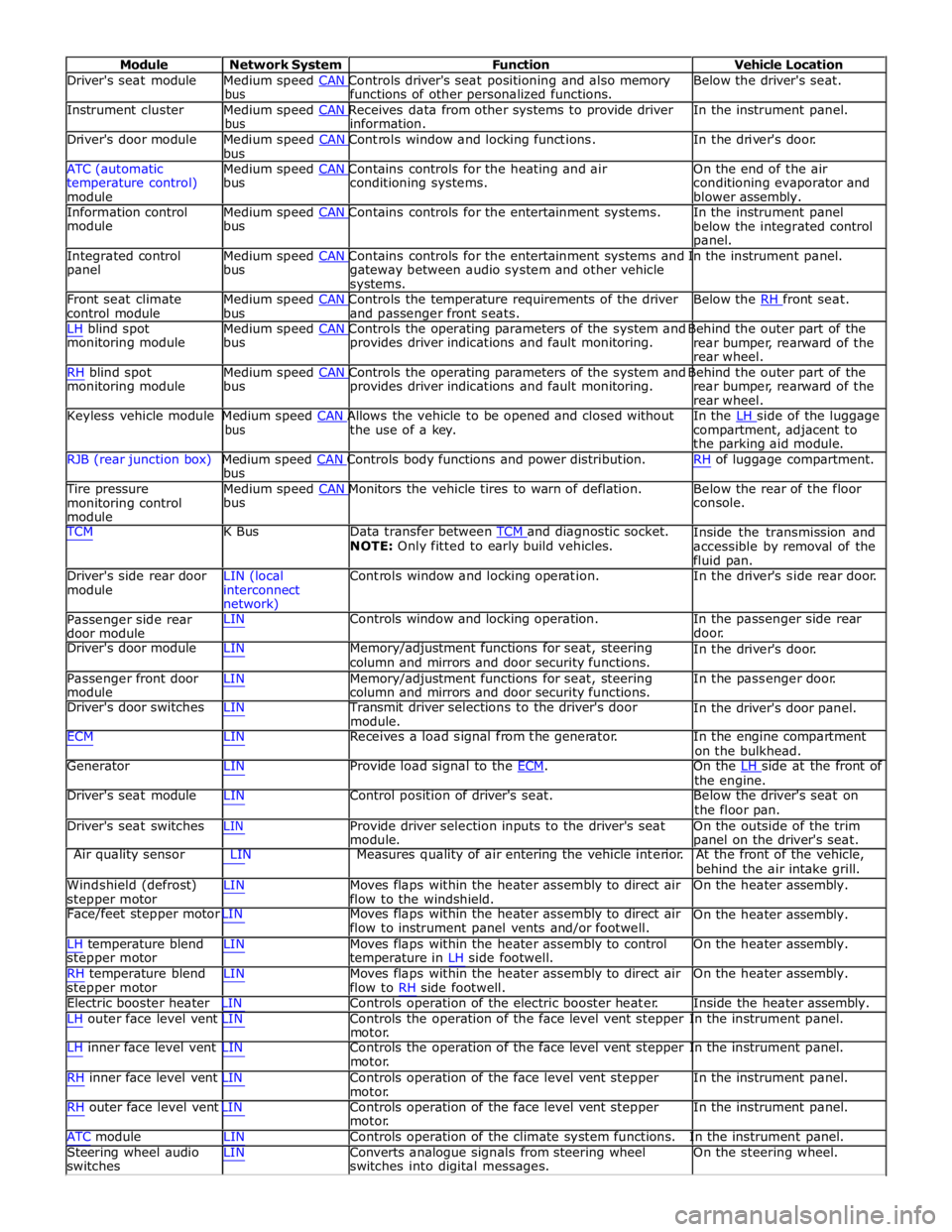
Module Network System Function Vehicle Location
Driver's seat module Medium speed CAN Controls driver's seat positioning and also memory Below the driver's seat. bus functions of other personalized functions.
Instrument cluster Medium speed CAN Receives data from other systems to provide driver In the instrument panel. bus information.
Driver's door module Medium speed CAN Controls window and locking functions. In the driver's door. bus
ATC (automatic Medium speed CAN Contains controls for the heating and air On the end of the air
temperature control)
module bus conditioning systems.
conditioning evaporator and
blower assembly.
Information control Medium speed CAN Contains controls for the entertainment systems. In the instrument panel module bus
below the integrated control
panel.
Integrated control Medium speed CAN Contains controls for the entertainment systems and In the instrument panel. panel bus
gateway between audio system and other vehicle
systems.
Front seat climate Medium speed CAN Controls the temperature requirements of the driver Below the RH front seat. control module bus and passenger front seats.
LH blind spot Medium speed CAN Controls the operating parameters of the system and Behind the outer part of the monitoring module bus provides driver indications and fault monitoring.
rear bumper, rearward of the
rear wheel.
RH blind spot Medium speed CAN Controls the operating parameters of the system and Behind the outer part of the monitoring module bus provides driver indications and fault monitoring.
rear bumper, rearward of the
rear wheel.
Keyless vehicle module Medium speed CAN Allows the vehicle to be opened and closed without In the LH side of the luggage bus the use of a key.
compartment, adjacent to
the parking aid module.
RJB (rear junction box) Medium speed CAN Controls body functions and power distribution. RH of luggage compartment. bus
Tire pressure Medium speed CAN Monitors the vehicle tires to warn of deflation. Below the rear of the floor monitoring control
module bus console.
TCM K Bus Data transfer between TCM and diagnostic socket. NOTE: Only fitted to early build vehicles. Inside the transmission and
accessible by removal of the
fluid pan.
Driver's side rear door
module LIN (local
interconnect
network) Controls window and locking operation. In the driver's side rear door.
Passenger side rear
door module LIN Controls window and locking operation. In the passenger side rear
door.
Driver's door module LIN Memory/adjustment functions for seat, steering
column and mirrors and door security functions. In the driver's door.
Passenger front door
module LIN Memory/adjustment functions for seat, steering
column and mirrors and door security functions. In the passenger door.
Driver's door switches LIN Transmit driver selections to the driver's door
module. In the driver's door panel.
ECM LIN Receives a load signal from the generator. In the engine compartment
on the bulkhead.
Generator LIN Provide load signal to the ECM. On the LH side at the front of the engine.
Driver's seat module LIN Control position of driver's seat. Below the driver's seat on
the floor pan.
Driver's seat switches LIN Provide driver selection inputs to the driver's seat
module. On the outside of the trim
panel on the driver's seat.
Air quality sensor LIN Measures quality of air entering the vehicle interior. At the front of the vehicle,
behind the air intake grill.
Windshield (defrost)
stepper motor LIN Moves flaps within the heater assembly to direct air
flow to the windshield. On the heater assembly.
Face/feet stepper motor LIN Moves flaps within the heater assembly to direct air
flow to instrument panel vents and/or footwell. On the heater assembly.
LH temperature blend
stepper motor
RH temperature blend
stepper motor LIN Moves flaps within the heater assembly to control
temperature in LH side footwell.
LIN Moves flaps within the heater assembly to direct air
flow to RH side footwell. On the heater assembly.
On the heater assembly.
Electric booster heater LIN Controls operation of the electric booster heater. Inside the heater assembly.
LH outer face level vent LIN Controls the operation of the face level vent stepper In the instrument panel.
motor.
LH inner face level vent LIN Controls the operation of the face level vent stepper In the instrument panel.
motor.
RH inner face level vent LIN Controls operation of the face level vent stepper
motor.
RH outer face level vent LIN Controls operation of the face level vent stepper
motor. In the instrument panel.
In the instrument panel.
ATC module LIN Controls operation of the climate system functions. In the instrument panel.
Steering wheel audio
switches LIN Converts analogue signals from steering wheel
switches into digital messages. On the steering wheel.