Page 222 of 387
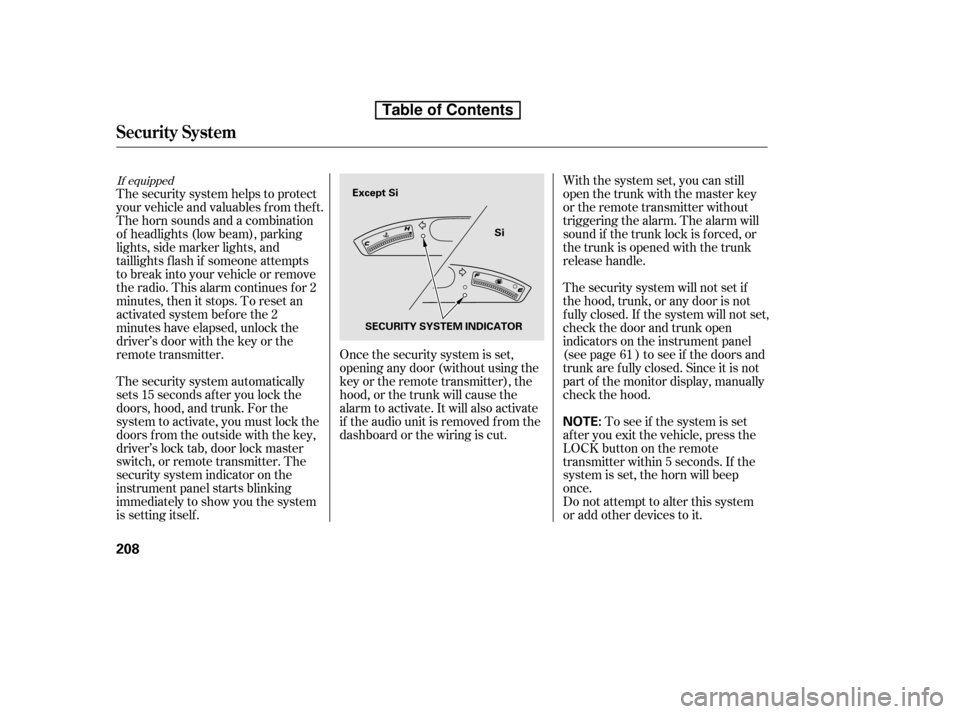
The security system automatically
sets 15 seconds after you lock the
doors, hood, and trunk. For the
system to activate, you must lock the
doors f rom the outside with the key,
driver’s lock tab, door lock master
switch, or remote transmitter. The
security system indicator on the
instrument panel starts blinking
immediately to show you the system
is setting itself .With the system set, you can still
open the trunk with the master key
or the remote transmitter without
triggering the alarm. The alarm will
sound if the trunk lock is f orced, or
the trunk is opened with the trunk
release handle.
The security system will not set if
the hood, trunk, or any door is not
f ully closed. If the system will not set,
check the door and trunk open
indicators on the instrument panel
(see page ) to see if the doors and
trunk are f ully closed. Since it is not
part of the monitor display, manually
check the hood.
Do not attempt to alter this system
or add other devices to it.
To see if the system is set
af ter you exit the vehicle, press the
LOCK button on the remote
transmitter within 5 seconds. If the
system is set, the horn will beep
once.
The security system helps to protect
your vehicle and valuables f rom thef t.
The horn sounds and a combination
of headlights (low beam), parking
lights, side marker lights, and
taillights f lash if someone attempts
to break into your vehicle or remove
the radio. This alarm continues f or 2
minutes, then it stops. To reset an
activated system before the 2
minutes have elapsed, unlock the
driver’s door with the key or the
remote transmitter. Once the security system is set,
opening any door (without using the
key or the remote transmitter), the
hood, or the trunk will cause the
alarm to activate. It will also activate
if the audio unit is removed f rom the
dashboard or the wiring is cut. 61
If equipped
Security System
208
NOTE:
Except Si
Si
SECURITY SYSTEM INDICATOR
Table of Contents
Page 231 of 387
�Î�Î
CONT INUED
BluetoothHandsFreeL ink
Features
217
‘‘Change Language’’
‘‘Hands Free Help’’
‘‘System
Set up’’
‘‘Tutorial’’ ‘‘Clear’’
‘‘Auto Transfer’’
‘‘Call Notification’’ ‘‘Security’’
‘‘Change Passcode’’
Press HFL
Talk button
Press and release the HFL Talk button each time you give a command.
: Canadian models Apply a security passcode to the system that must be input at each key
cycle to access the system (See page 232)
Change your security passcode (See page 233)
Set how you would like to be notified of an incoming call
(See page 233)
Set calls to automatically transfer from your phone to HFL when you
enter the vehicle (See page 233)
Clear the system of all paired phones, phonebook entries and security
passcode (See page 234)
Hear a tutorial for general rules on using the system (See page 213)
Hear a list of available commands and additional information describing each comma nd
(See page 213)
Change language from English to French (See page 234)
Table of Contents
Page 235 of 387

CONT INUED
You can make calls using any phone
number or a name in the HFL
phonebook. You can also redial the
last number called.Press and release the HFL Talk
button bef ore a command.
Say ‘‘ ’’ or ‘‘ .’’
Follow the HFL prompts and say
the phone number you want to dial.
Follow the HFL prompts to
conf irm the number and say
‘‘ ’’ or ‘‘ .’’
Once connected, you will hear the
person you called through the audio
speakers. Press and release the HFL Talk
button bef ore a command.
Follow the HFL prompts to
conf irm the name and make the
call.
Follow the HFL prompts and say
thenamestoredintheHFL
phonebook that you want to call.
Say ‘‘ ’’ or ‘‘ .’’
Bluetooth is the wireless technology
that links your phone to HFL. HFL
uses a Class 2 Bluetooth, which
means the maximum range between
yourphoneandvehicleis30feet(10
meters).
During a call, HFL allows you to talk
up to 30 minutes af ter you remove
the key from the ignition switch.
However, this may weaken the
vehicle’s battery. 1. 2. 3.
1. 2. 3.
BluetoothHandsFreeL ink
Making a Call
Call Dial
Call Dial Call DialT o make a call using a phone
number: Tomakeacallusinganameinthe
HFL phonebook:
Features
221
Table of Contents
Page 237 of 387
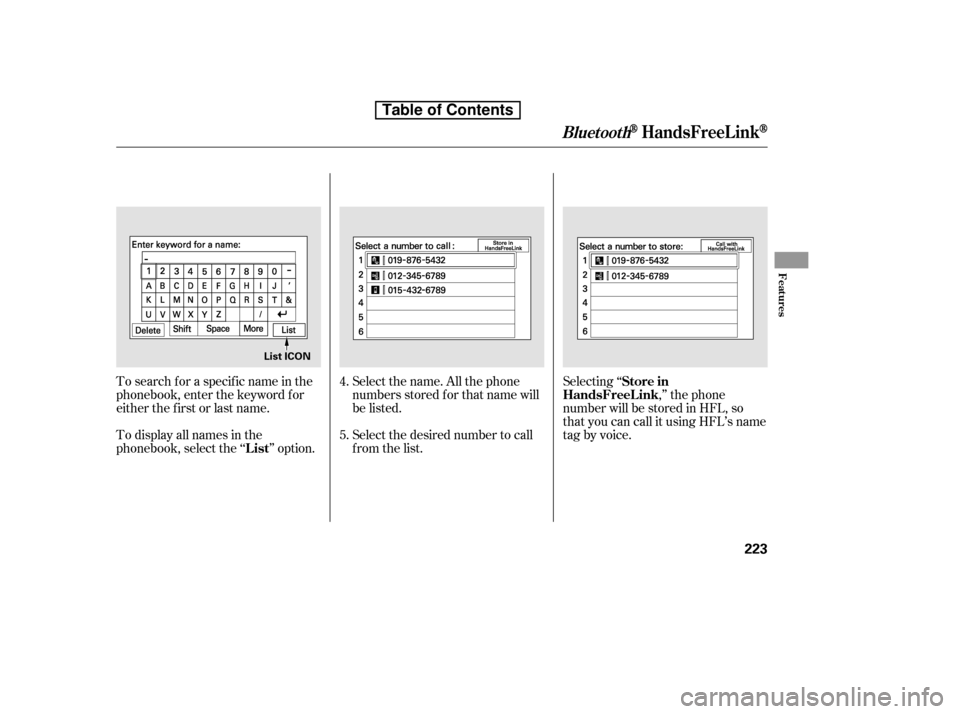
Select the name. All the phone
numbers stored f or that name will
be listed.
To search f or a specif ic name in the
phonebook, enter the keyword f or
either the f irst or last name.
To display all names in the
phonebook, select the ‘‘ ’’ option.
Select the desired number to call
from the list.Selecting ‘‘
,’’ the phone
number will be stored in HFL, so
that you can call it using HFL’s name
tag by voice.
4. 5.
BluetoothHandsFreeL ink
List Store in
HandsFreeL ink
Features
223
List ICON
Table of Contents
Page 243 of 387
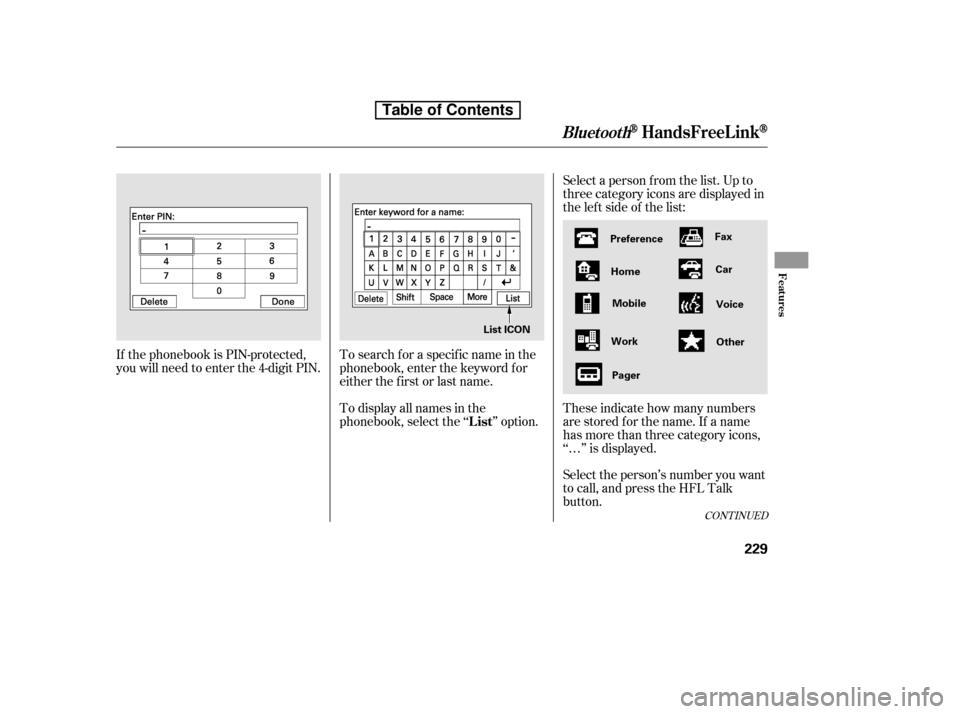
Select a person f rom the list. Up to
three category icons are displayed in
the lef t side of the list:
Select the person’s number you want
to call, and press the HFL Talk
button.
These indicate how many numbers
are stored for the name. If a name
has more than three category icons,
‘‘…’’ is displayed.
If the phonebook is PIN-protected,
you will need to enter the 4-digit PIN.
To search f or a specif ic name in the
phonebook, enter the keyword f or
either the f irst or last name.
To display all names in the
phonebook, select the ‘‘ ’’ option.
CONT INUED
List
BluetoothHandsFreeL ink
Features
229
Preference
Home Mobile
Work Pager Fax
Car
Voice
Other
List ICON
Table of Contents
Page 270 of 387
Apply the parking brake.
In cold weather, turn of f all
electrical accessories to reduce
the drain on the battery.
Press the clutch pedal down all the
way. The START (III) position
does not f unction unless the clutch
pedal is pressed.
Make sure the shif t lever is in
Park. Press on the brake pedal.Without touching the accelerator
pedal, turn the ignition key to the
START (III) position. Do not hold
the key in the START (III)
position f or more than 15 seconds
at a time. If the engine does not
start right away, pause for at least
10 seconds bef ore trying again.
1. 2. 3.
4.
Manual transmission:
Automatic transmission:
Starting the Engine
256
The engine is harder to start in cold
weather. Also, the thinner air f ound at
altitudes above 8,000 f eet (2,400
meters) adds to this problem.
T he immobilizer system protects your
vehicle f rom thef t. If an improperly
coded key (or other device) is used, the
engine’s f uel system is disabled. For
more inf ormation, see page .
79
Table de matières
Page 273 of 387
If you exceed the maximum speed
f or the gear you are in, the engine
speed will enter into the tachometer’s
red zone. If this occurs, you may f eel
the engine cut in and out. This is
caused by a limiter in the engine’s
computer controls. The engine will
run normally when you reduce the
rpm below the red zone.
Bef ore downshif ting, make sure the
engine will not go into the
tachometer’s red zone.
Your vehicle has a rev limit indicator
to show you when the engine speed
is near the tachometer’s red zone
(see page ).If you are still unable to shif t to
reverse, apply the parking brake,
and turn the ignition key to the
ACCESSORY (I) or LOCK (0)
position.
With the clutch pedal still pressed,
start the engine.
Press the clutch pedal, and shif t to
reverse.
If you need to use this procedure to
shif t to reverse, your vehicle may be
developing a problem. Have the
vehicle checked by your dealer.
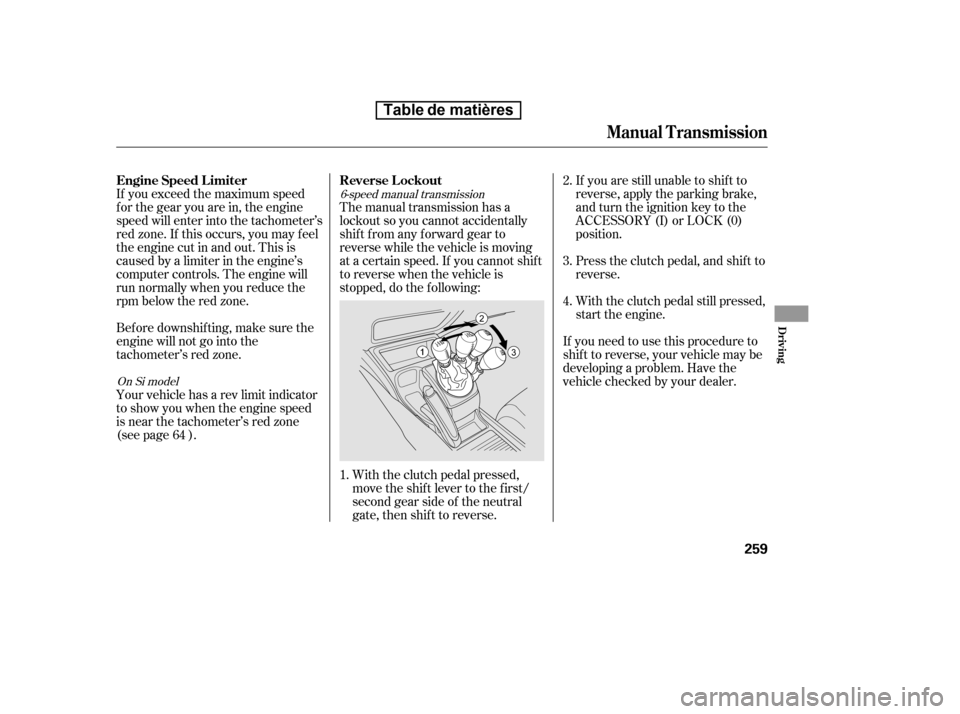
The manual transmission has a
lockout so you cannot accidentally
shif t f rom any f orward gear to
reverse while the vehicle is moving
at a certain speed. If you cannot shif t
to reverse when the vehicle is
stopped, do the f ollowing:
With the clutch pedal pressed,
move the shift lever to the first/
second gear side of the neutral
gate, then shif t to reverse.
1. 2. 3. 4.
646-speed manual transmission
On Si model
Engine Speed L imiter Reverse L ockout
Manual T ransmission
Driving
259
Table de matières
Page 275 of 387

�µ�µ �µ�µTo shift from:
PtoR
RtoP
NtoR
Dto2
2to1
1to2
2toD
DtoD
DtoN
DtoD NtoD
RtoN Do this:
Press the brake pedal, and
press the shift lever release
button.
Press the shift lever release
button.
Move the shift lever.
3
3
3
3
This position mechani-
cally locks the transmission. Use
Park whenever you are turning of f or
starting the engine. To shif t out of
Park, you must press on the brake
pedal and have your f oot of f the
accelerator pedal. Press the release
buttononthefrontof theshiftlever
to move it.
If you have done all of the above and
still cannot move the lever out of
Park, see on
page .
To avoid transmission damage, come
to a complete stop bef ore shif ting
into Park. You must also press the
release button to shift into Park. The
shif t lever must be in Park bef ore
you can remove the key f rom the
ignition switch.
Press the brake
pedal and press the release button to
shif t f rom Park to reverse. To shif t f rom reverse to neutral, come to a
completestopandthenshift.Press
the release button bef ore shif ting
into reverse f rom neutral.
Use this position f or
your normal driving. The
transmission automatically selects a
suitable gear (1 through 5) f or your
speed and acceleration. You may
notice the transmission shifting up at
higher engine speeds when the
engine is cold. This helps the engine
warm up f aster. Use neutral if you
need to restart a stalled engine, or if
it is necessary to stop brief ly with
the engine idling. Shif t to the Park
position if you need to leave your
vehicle for any reason. Press on the
brake pedal when you are moving
the shift lever from neutral to
another gear.
263
CONT INUED
Automatic Transmission
Park (P)
Shif t L ock Release
Reverse (R) Drive (D)
Neutral (N)
Driving
261
Table de matières