Page 103 of 387
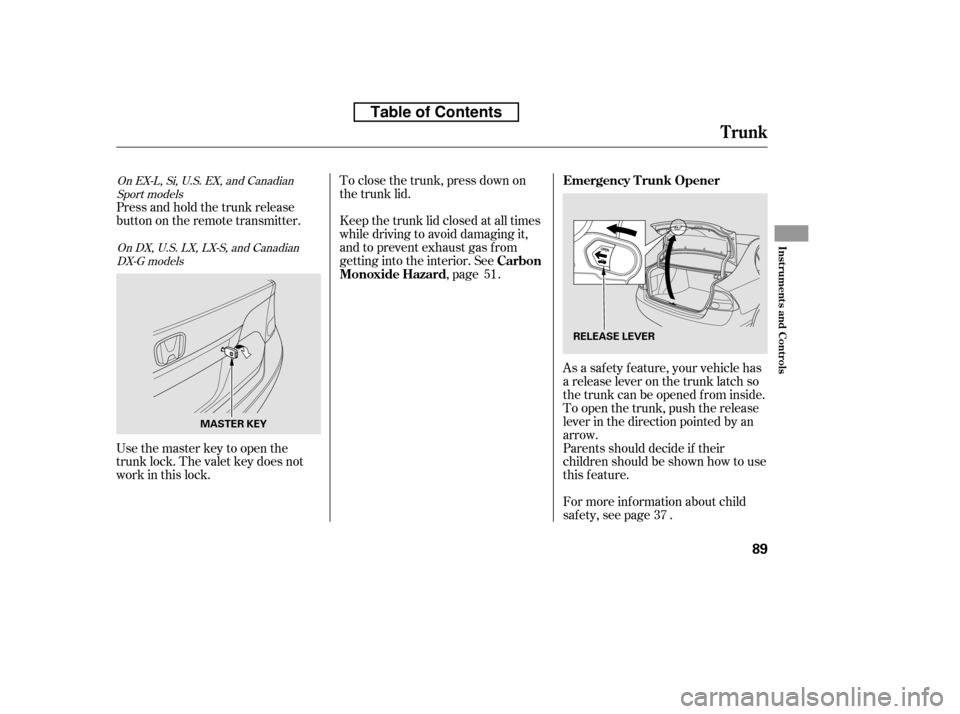
Parents should decide if their
children should be shown how to use
this feature.
As a saf ety f eature, your vehicle has
a release lever on the trunk latch so
the trunk can be opened f rom inside.
To open the trunk, push the release
lever in the direction pointed by an
arrow.
For more inf ormation about child
saf ety, see page .
Press and hold the trunk release
button on the remote transmitter.
Usethemasterkeytoopenthe
trunk lock. The valet key does not
work in this lock.
To close the trunk, press down on
the trunk lid.
Keep the trunk lid closed at all times
while driving to avoid damaging it,
and to prevent exhaust gas from
getting into the interior. See
,page .
37
51
On DX, U.S. LX, LX-S, and Canadian
DX-G models
On EX-L, Si, U.S. EX, and Canadian
Sport models
Emergency T runk Opener
Carbon
Monoxide Hazard
Trunk
Inst rument s and Cont rols
89
RELEASE LEVER
MASTER KEY
Table of Contents
Page 104 of 387
�µ�µ
�µ
�µ
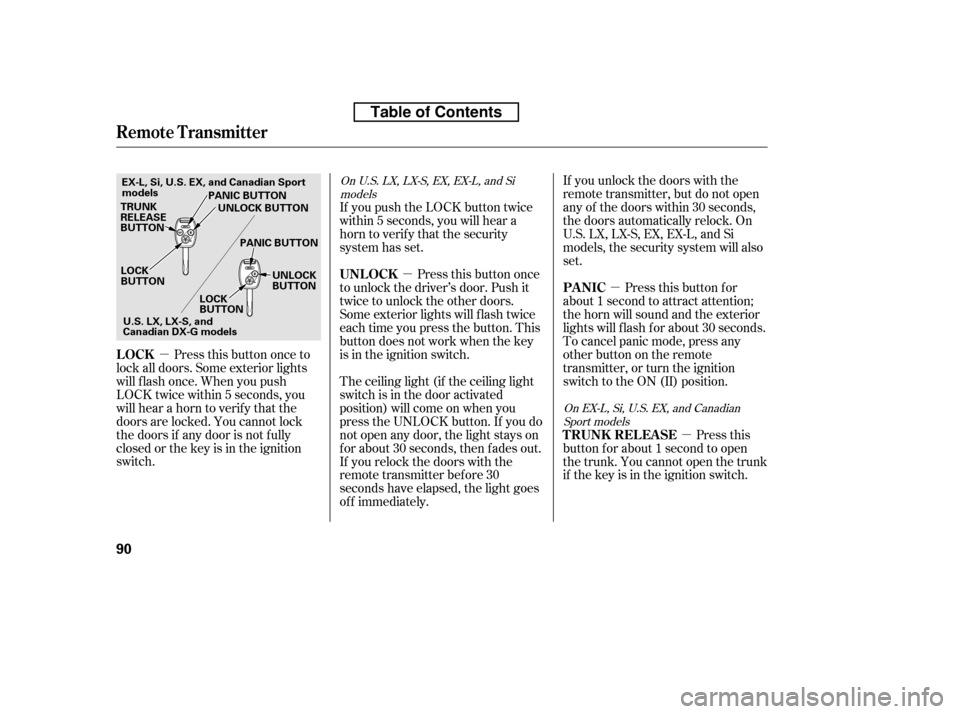
Press this button once to
lock all doors. Some exterior lights
will f lash once. When you push
LOCK twice within 5 seconds, you
will hear a horn to verif y that the
doors are locked. You cannot lock
the doors if any door is not f ully
closed or the key is in the ignition
switch. If you unlock the doors with the
remote transmitter, but do not open
any of the doors within 30 seconds,
the doors automatically relock. On
U.S. LX, LX-S, EX, EX-L, and Si
models, the security system will also
set.
If you push the LOCK button twice
within 5 seconds, you will hear a
horn to verify that the security
system has set.
Press this button once
to unlock the driver’s door. Push it
twice to unlock the other doors.
Some exterior lights will f lash twice
each time you press the button. This
button does not work when the key
is in the ignition switch.
The ceiling light (if the ceiling light
switch is in the door activated
position) will come on when you
press the UNLOCK button. If you do
not open any door, the light stays on
f or about 30 seconds, then f ades out.
If you relock the doors with the
remote transmitter before 30
seconds have elapsed, the light goes
of f immediately. Press this
button f or about 1 second to open
the trunk. You cannot open the trunk
if the key is in the ignition switch. Pressthisbuttonfor
about 1 second to attract attention;
thehornwillsoundandtheexterior
lights will f lash f or about 30 seconds.
To cancel panic mode, press any
other button on the remote
transmitter, or turn the ignition
switch to the ON (II) position.
On U.S. LX, LX-S, EX, EX-L, and Si
models
On EX-L, Si, U.S. EX, and CanadianSport models
LOCK UNL OCK
T RUNK REL EA SE
PA NIC
Remote Transmitter
90
LOCK
BUTTON
TRUNK
RELEASE
BUTTON
PANIC BUTTON
PANIC BUTTON UNLOCK
BUTTON
LOCK
BUTTON UNLOCK BUTTON
U.S.LX,LX-S,and
Canadian DX-G models
EX-L, Si, U.S. EX, and Canadian Sport
models
Table of Contents
Page 106 of 387

�´
Inside the transmitter, separate
the inner cover f rom the keypad
by releasing the two tabs on the
cover. Remove the old battery from the
back of the inner cover, and note
the polarity. Make sure the
polarity of the new battery is the
same ( side f acing down), then
insert it into the back of the cover.
An improperly disposed of battery
can hurt the environment.
Always conf irm local regulations
for battery disposal.
Install the parts in reverse order.
3. 4. 5.
As required by the FCC:
This device complies with Part 15 of theFCC rules. Operation is subject to the
f ollowing two conditions: (1) This devicemay not cause harmf ul interf erence, and(2) this device must accept any
interf erence received, includinginterf erence that may cause undesiredoperation.
Changes or modif ications not expresslyapproved by the party responsible f or
compliance could void the user’sauthority to operate the equipment.
This device complies with IndustryCanada Standard RSS-210.Operation is subject to the f ollowing two
conditions: (1) this device may not causeinterf erence, and (2) this device mustaccept any interf erence that may cause
undesired operation of the device.
Remote Transmitter
92
TAB
BATTERY
Table of Contents
Page 117 of 387

The moonroof has a key-of f delay.
You can open and close the
moonroof f or up to 10 minutes af ter
you turn of f the ignition switch. The
key-of f delay cancels as soon as you
open either f ront door. You must
then turn the ignition switch to the
ON (II) position f or the moonroof to
operate.If the moonroof runs into any
obstacle while it is closing
automatically, it will reverse
direction, and then stop. To close the
moonroof , remove the obstacle, then
use the moonroof switch again.
Auto reverse stops sensing when the
moonroof is almost closed. You
should always check that all
passengers and objects are away
f rom the moonroof bef ore closing it.
Keeptheinsideandoutsidemirrors
clean and adjusted f or best visibility.
Be sure to adjust the mirrors bef ore
you start driving.
The inside mirror has day and night
positions. The night position reduces
glare f rom headlights behind you.
Flip the tab on the bottom edge of
the mirror to select the day or night
position.
Auto Reverse Mirrors
Moonroof , Mirrors
Inst rument s and Cont rols
103
TAB
If you try to open the moonroof in
below-f reezing temperatures, or when
it is covered with snow or ice, you can
damage the moonroof panel or motor.
Table of Contents
Page 119 of 387
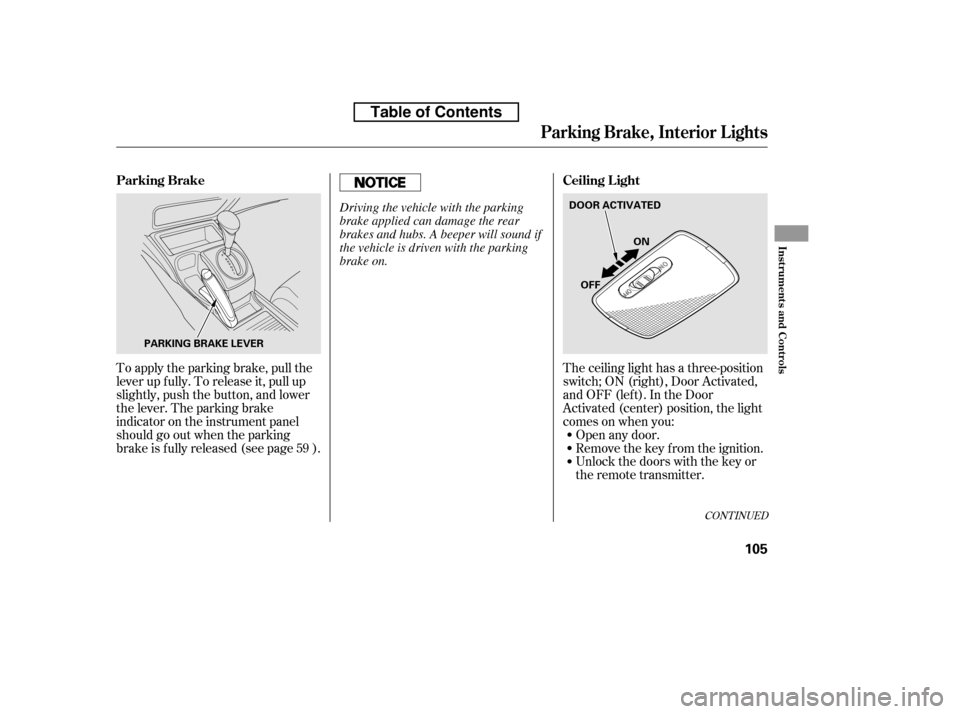
The ceiling light has a three-position
switch;ON(right),DoorActivated,
andOFF(left).IntheDoor
Activated (center) position, the light
comesonwhenyou:Open any door.
Unlock the doors with the key or
the remote transmitter.
Remove the key from the ignition.
To apply the parking brake, pull the
lever up f ully. To release it, pull up
slightly, push the button, and lower
the lever. The parking brake
indicator on the instrument panel
should go out when the parking
brake is f ully released (see page ).
59
CONT INUED
Parking Brake, Interior L ights
Ceiling L ight
Parking Brake
Inst rument s and Cont rols
105
PARKING BRAKE LEVER DOOR ACTIVATED
ON
OFF
Driving the vehicle with the parking
brake applied can damage the rear
brakes and hubs. A beeper will sound if
the vehicle is driven with the parking
brake on.
Table of Contents
Page 120 of 387
After all doors are closed tightly, the
light(s) dims slightly, then f ades out
in about 30 seconds.
If you do not open any door af ter you
unlock the driver’s door or remove
the key from the ignition switch, the
light(s) f ades out in about 30
seconds.
If you leave any door open without
the key in the ignition switch, the
ceiling light(s) will go of f af ter 3
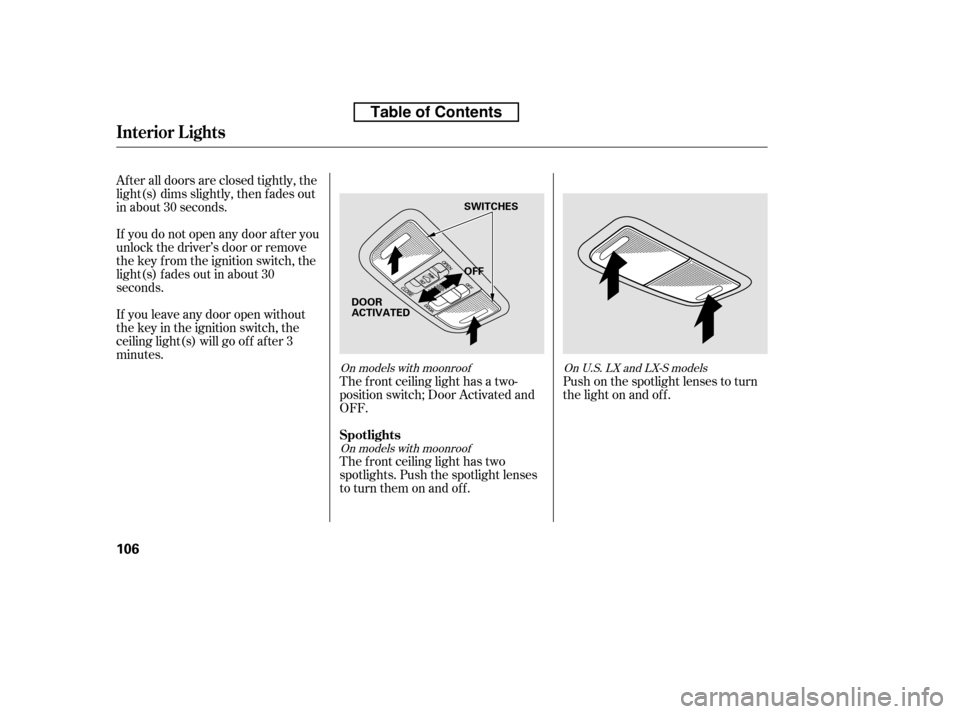
minutes.The f ront ceiling light has a two-
position switch; Door Activated and
OFF.
The f ront ceiling light has two
spotlights. Push the spotlight lenses
to turn them on and off.Push on the spotlight lenses to turn
the light on and of f .
On models with moonroof
On models with moonroof OnU.S.LXandLX-Smodels
Interior Lights
Spotlights
106
OFF
SWITCHES
DOOR
ACTIVATED
Table of Contents
Page 194 of 387
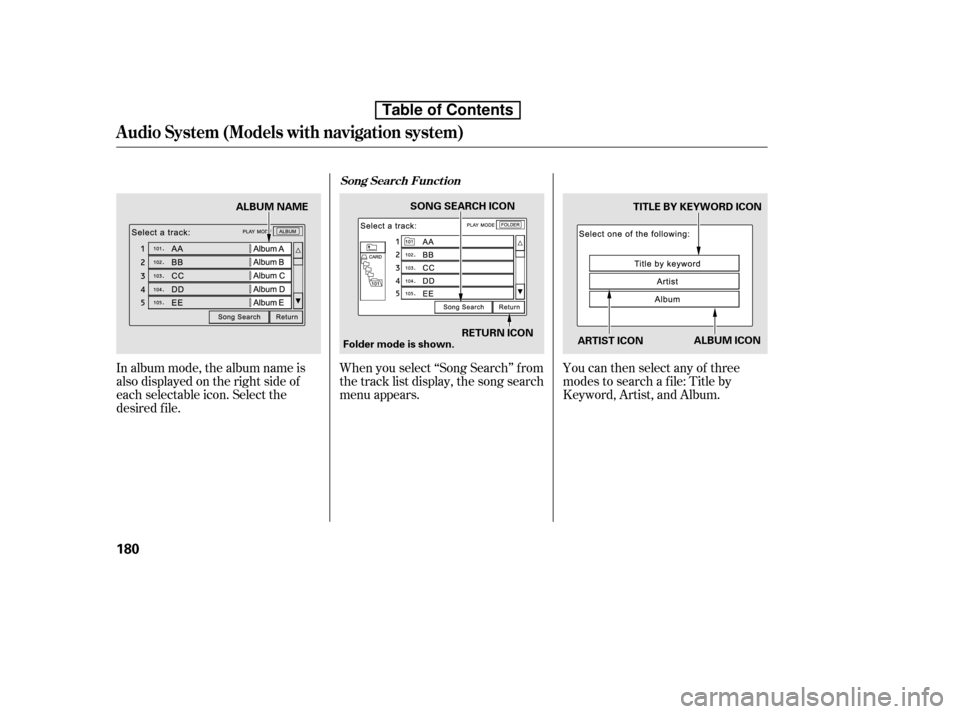
In album mode, the album name is
also displayed on the right side of
each selectable icon. Select the
desired f ile.When you select ‘‘Song Search’’ f rom
the track list display, the song search
menu appears.
You can then select any of three
modes to search a f ile: Title by
Keyword, Artist, and Album.
Song Search Funct ion
Audio System (Models with navigation system)
180
ARTIST ICONTITLE BY KEYWORD ICON
RETURN ICON
SONG SEARCH ICON
ALBUM ICON
Folder mode is shown.
ALBUM NAME
Table of Contents
Page 195 of 387
�Û�Ý
Searching f or a Song Title by KeywordSearching f or a Song by Artist Name
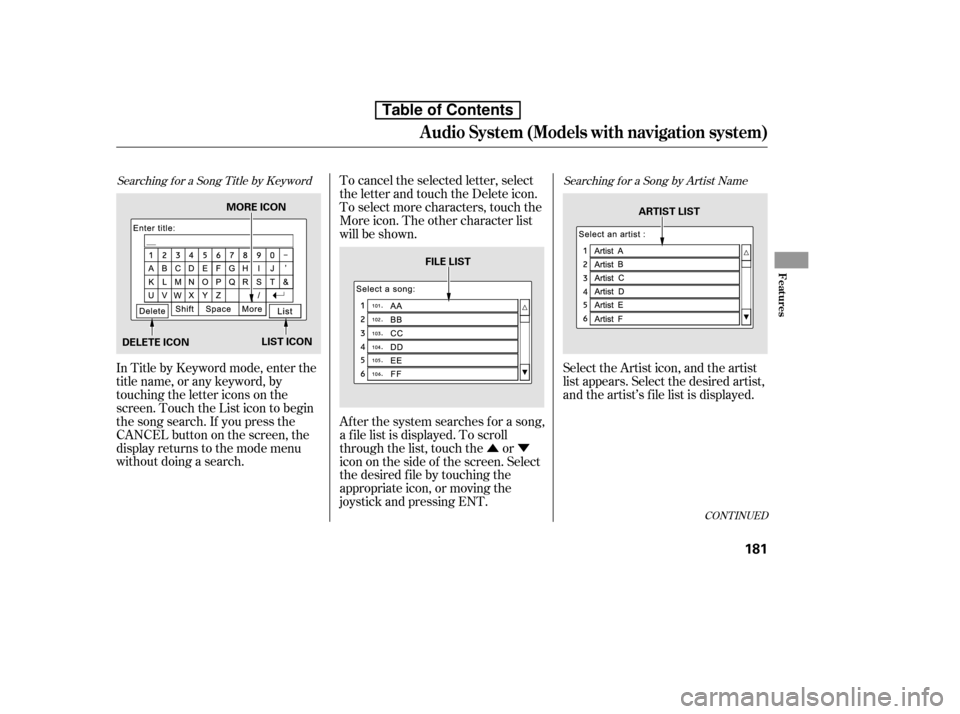
In Title by Keyword mode, enter the
title name, or any keyword, by
touching the letter icons on the
screen. Touch the List icon to begin
the song search. If you press the
CANCELbuttononthescreen,the
display returns to the mode menu
without doing a search.To cancel the selected letter, select
the letter and touch the Delete icon.
To select more characters, touch the
More icon. The other character list
will be shown.
Af ter the system searches f or a song,
a f ile list is displayed. To scroll
through the list, touch the or
icon on the side of the screen. Select
the desired f ile by touching the
appropriate icon, or moving the
joystick and pressing ENT.
Select the Artist icon, and the artist
list appears. Select the desired artist,
and the artist’s f ile list is displayed.
CONT INUED
Audio System (Models with navigation system)
Features
181
MORE ICON
DELETE ICON LIST ICON FILE LIST
ARTIST LIST
Table of Contents