Page 164 of 387

�µ�Û�Ý
�Û
�Ý
�Î �Î
�Î
The ignition switch must be in the
ACCESSORY (I) or ON (II) position.
Turn the system on by pushing the
power/volume knob or the AM/FM
button. Adjust the volume by turning
the power/volume knob.
Pushing the AUDIO button will also
turn on the system.
You can also operate the audio
system without using the control
icons on the audio screen. Use the
control buttons on the lef t side of the
screen. The status bar appears on
the bottom of the screen each time
you operate any of the control
buttons. On the navigation screen,
you can also see audio inf ormation
by touching the AUDIO INFO icon
on the lower half of the screen. You can use any of f ive methods to
f ind radio stations on the selected
band: tune, seek, scan, the preset
buttons, and auto select.
Use the TUNE bar to tune
the radio to a desired f requency.
Press the side of the bar to tune
to a higher f requency, and press the
side to tune to a lower
f requency.
Press and hold the or side of
the TUNE bar until you hear two
beeps to change the f requency
rapidly. Release the bar when the
display reaches the desired
f requency.
The band and f requency that the
radio was last tuned to are displayed.
To change bands, press the AM/FM
button, or touch the desired band
icon (FM1, FM2, AM, XM1 , or
XM2 ). On the FM band, STEREO
will be displayed if the station is
broadcasting in stereo. Stereo
reproduction on AM is not available.
If equipped
For inf ormation on XM Radio, see
page . :
153
T o Play the A M/FM Radio
T o Select a Station
TUNE
Audio System (Models with navigation system)
150
Table of Contents
Page 165 of 387

�µ
�µ
�Û�Ý
�µ Each preset button’s f requency is
shown on the bottom of the audio
display.
If you do nothing, the system will
then scan f or the next strong station
andplayitfor10seconds.Whenit
plays a station you want to listen to,
press the SCAN button again.
Each preset button can
store one f requency on AM and two
f requencies on FM.
The seek f unction
searches up and down f rom the
current f requency to f ind a station
with a strong signal. To activate it,
press and hold the or side of
the TUNE bar until you hear a beep,
then release it.
The scan f unction samples
all stations with strong signals on the
selected band. To activate it, press
the SCAN button, then release it.
You will see SCAN in the display.
When the system finds a strong
signal, it will stop and play that
station f or about 10 seconds. Select the desired band, AM or
FM. FM1 and FM2 let you store
six stations each.
Usethetune,seek,orscan
function to tune the radio to a
desired station.
Pick a preset button, and hold it
until you hear a beep.
Repeat steps 1 through 3 to store a
total of six stations on AM and
twelve stations on FM.
1. 2.3. 4.
CONT INUED
Preset
SEEK
SCAN
Audio System (Models with navigation system)
Features
151
Table of Contents
Page 166 of 387
�µIf you are
traveling far from home and can no
longer receive your preset stations,
you can use the auto select feature to
find stations in the local area.
Press the AUDIO button to view the
audio control icons, then touch the
AUTO SEL icon. You will see AUTO
SEL f lashing in the display, and the
system goes into scan mode f or
several seconds. It stores the
f requencies of six AM, and twelve
FM stations in the preset buttons. You will see a ‘‘0’’ displayed af ter
pressing a preset button if auto
select cannot f ind a strong station f or
every preset button.
If you do not like the stations auto
select has stored, you can store
other f requencies on the preset
buttons as previously described.
press the
AUTO SEL icon. This restores the
presets you originally set.
For inf ormation on AM/FM radio
f requencies and reception, see page .
199
To turn of f auto select,
AUTO SELECT
Audio System (Models with navigation system)
152
Table of Contents
Page 167 of 387
CONT INUED
Audio System (Models with navigation system)
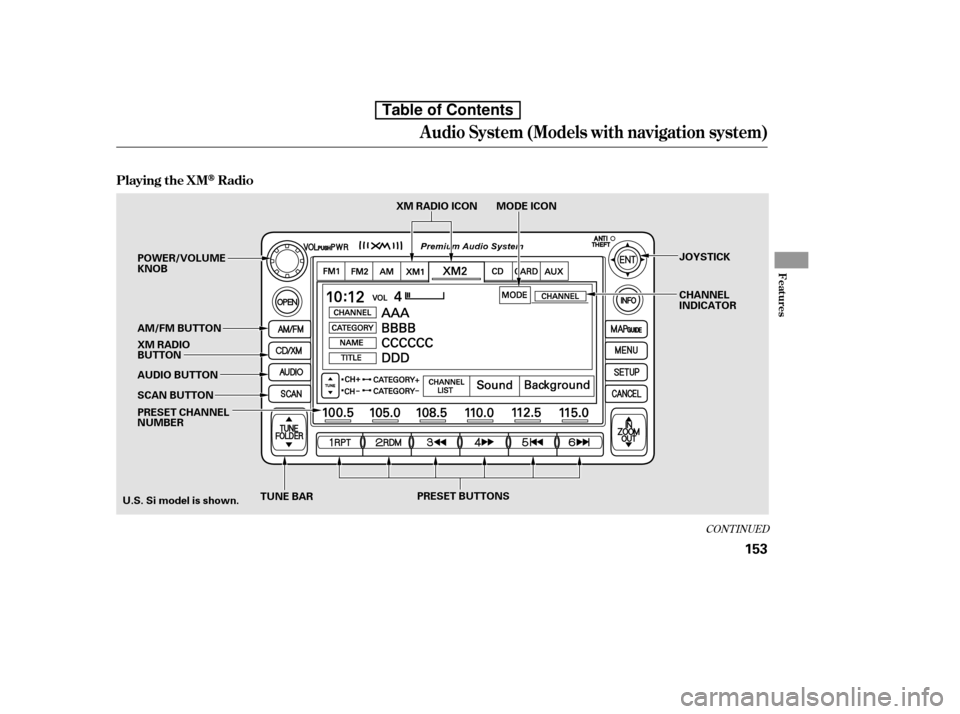
Playing the XMRadio
Features
153
TUNE BARXM RADIO ICON MODE ICON
PRESET CHANNEL
NUMBER
SCAN BUTTON
AUDIO BUTTON
AM/FM BUTTON
POWER/VOLUMEKNOB
JOYSTICK
CHANNEL
INDICATOR
U.S. Si model is shown. XM RADIO
BUTTON
PRESET BUTTONS
Table of Contents
Page 169 of 387
�µ
�µ
�µ �µ
�Û
�Ý
CONT INUED
Youcanstoreupto12
preset channels using each preset
button or preset icons on the screen.
Each preset button or icon stores
one channel f rom the XM1 band and
one channel f rom the XM2 band.
To store a channel:
Press the XM RADIO button.
Either XM1 or XM2 will show in
the display.
Usethetune,seek,orscan
function to tune to a desired
channel.
In category mode, only channels
within that category can be selected.
In channel mode, all channels can be
selected. Pick the preset button (icon) you
want f or that channel. Press and
hold the button (icon) until you
hear a beep.
Press the TUNE bar to
change channel selections. Press f or higher numbered channels
and f or lower numbered
channels. In the category mode, you
can only select channels within that
category.
The scan f unction gives
you a sampling of all channels while
in the channel mode. In the category
mode, only the channels within that
category are scanned. To activate
scan, press the SCAN button or
touch the SCAN icon on the screen.
The system plays each channel in
numerical order f or a f ew seconds,
then selects the next channel. When
you hear a channel you want to listen
to, press the button or touch the icon
again. Press and hold
either side of the TUNE bar
( or ) until you hear a beep
to select another category.
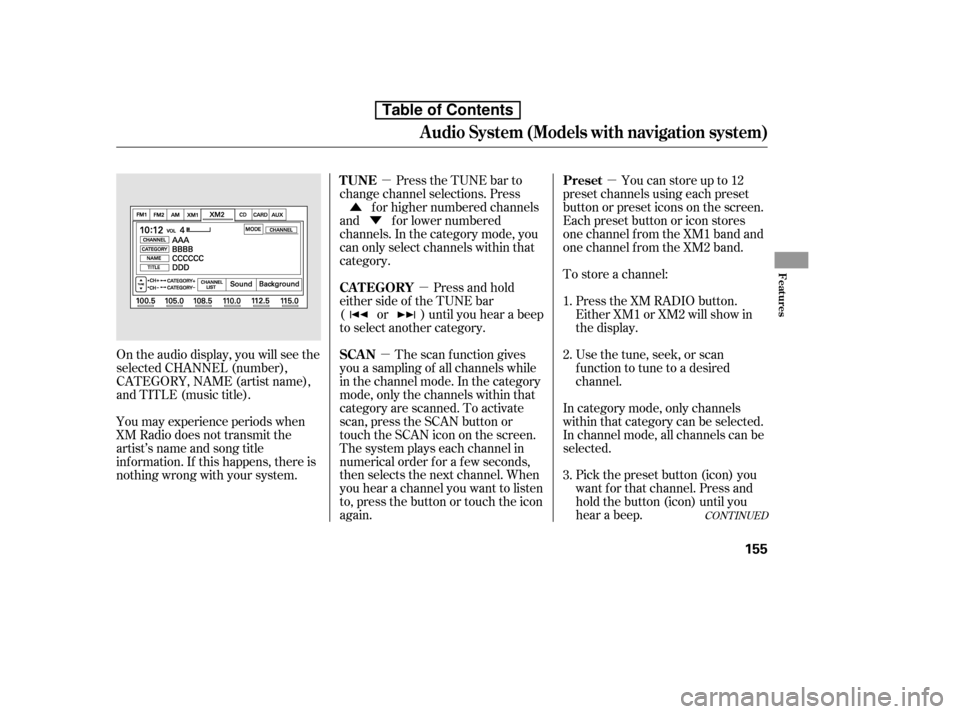
On the audio display, you will see the
selected CHANNEL (number),
CATEGORY, NAME (artist name),
and TITLE (music title).
You may experience periods when
XM Radio does not transmit the
artist’s name and song title
inf ormation. If this happens, there is
nothing wrong with your system. 1. 2. 3.
Audio System (Models with navigation system)
Preset
TUNE
SCAN
CAT EGORY
Features
155
Table of Contents
Page 170 of 387
�Û�Ý
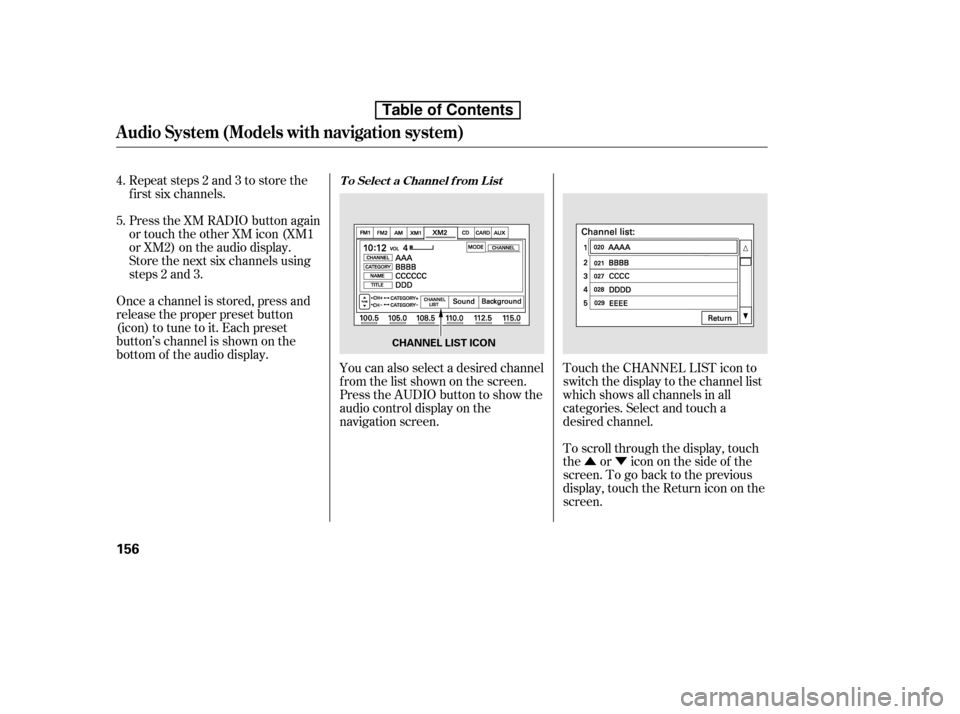
To scroll through the display, touch
the or icononthesideof the
screen.Togobacktotheprevious
display, touch the Return icon on the
screen.
Touch the CHANNEL LIST icon to
switch the display to the channel list
which shows all channels in all
categories. Select and touch a
desired channel.
Repeat steps 2 and 3 to store the
f irst six channels.
Press the XM RADIO button again
or touch the other XM icon (XM1
or XM2) on the audio display.
Store the next six channels using
steps 2 and 3.
Once a channel is stored, press and
release the proper preset button
(icon) to tune to it. Each preset
button’s channel is shown on the
bottom of the audio display. You can also select a desired channel
f rom the list shown on the screen.
Press the AUDIO button to show the
audio control display on the
navigation screen.
4. 5.
Audio System (Models with navigation system)
T o Select a Channel f rom L ist
156
CHANNEL LIST ICON
Table of Contents
Page 179 of 387
�µ�µ
Push the AUDIO button beside the
screen to show the audio display and
operate the disc player.
You can also operate the audio
system without using the control
icons on the audio screen. Press the
CD button. The status bar appears
on the bottom of the screen. On the
navigation screen, you can see the
audio inf ormation whenever you
touch the AUDIO INFO icon on the
lower portion of the screen.
When playing a CD recorded with
text data, the track, album, and artist
name are shown on the audio display.
When playing a disc in MP3 or WMA,
the f older number and name, the f ile
number and name, the artist name,
and the elapsed time are shown. The
system will continuously play a disc
until you change modes. If the disc
was not recorded with text data, it
will not be displayed. You can also select an icon with the
joystick. Move it to left, right, up, or
down to change the highlighting and
scroll through lists. Then press ENT
on the top of the joystick to select
the icon.
Each time you press and
release (preset 6), the player
skips forward to the beginning of the
next track (f ile in MP3 or WMA
mode). Press and release (preset 5), to skip backward to
the beginning of the current track.
Press it again to skip to the
beginning of the previous track.
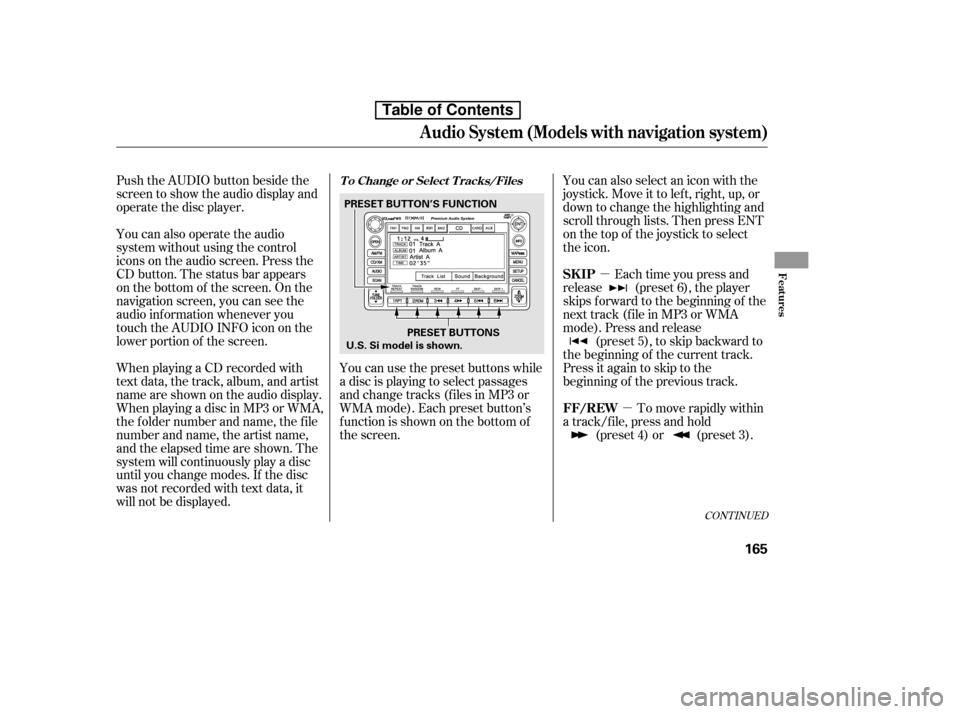
You can use the preset buttons while
a disc is playing to select passages
and change tracks (files in MP3 or
WMA mode). Each preset button’s
f unction is shown on the bottom of
the screen. To move rapidly within
a track/f ile, press and hold (preset 4) or (preset 3).
CONT INUED
T o Change or Select T racks/Files
SK IP
FF/REW
Audio System (Models with navigation system)
Features
165
PRESET BUTTONS
PRESET BUTTON’S FUNCTION
U.S. Si model is shown.
Table of Contents
Page 180 of 387

�µ
�Û �Ý
�µ �µ
�µ �µ
To
select a dif f erent f older, press either
side of the TUNE bar to move to the
beginning of the next f older. Press
the side of the TUNE bar to skip
to the next folder, and the side to
move to the beginning of the current
folder.Pressitagaintoskiptothe
beginning of the previous f older.
To continuously replay
a track (f ile in MP3 or WMA mode),
press and release the RPT button
(preset 1). You will see TRACK
REPEAT in the display. Press and
hold the RPT button for 2 seconds to
turn it off. This feature,
when activated, replays all f iles in
the selected f older in the order they
are compressed. To activate folder
repeat, press and hold the RPT
button (preset 1). You will see
FOLDER REPEAT in the display.
The system continuously replays the
current f older. Press the RPT button
again to turn it off. Pressing the
RDM button or selecting a dif f erent
folder with the TUNE bar also turns
of f f older repeat.
This
featureplaysthetrackswithinadisc
(the f iles within a f older) in random
order. To activate track random,
press and release the RDM button
(preset 2). You will see TRACK
RANDOM in the display. Press and
hold the RDM button for 2 seconds
to return to normal play. This
feature, when activated, plays all
f iles in each f older in random order,
rather than in the order they are
compressed. To activate folder
random, press the RDM button
(preset 2) twice. You will see
FOLDER RANDOM in the display.
The system then selects and plays
f iles randomly. This continues until
you deactivate folder random by
pressing the RDM button again, or if
you select a dif f erent f older with the
TUNE bar.
In MP3 or WMA mode
In MP3 or WMA mode In MP3 or WMA mode
FOLDER SELECTION
T RA CK REPEA T (FIL E
REPEAT) FOLDER REPEAT
TRACK RANDOM (Random
within a disc/f older)FOLDER RANDOM
Audio System (Models with navigation system)
166
Table of Contents