2010 GMC CANYON seats
[x] Cancel search: seatsPage 108 of 448

Adding Equipment to Your
Airbag-Equipped Vehicle
Q:Is there anything I might add to or change
about the vehicle that could keep the airbags
from working properly?
A:Yes. If you add things that change the vehicle’s
frame, bumper system, height, front end or side
sheet metal, they may keep the airbag system from
working properly. Changing or moving any parts
of the front seats, safety belts, the airbag sensing
and diagnostic module, steering wheel, instrument
panel, roof-rail airbag modules, ceiling headliner
or pillar garnish trim, front sensors, or airbag wiring
can affect the operation of the airbag system.
In addition, the vehicle may have a passenger
sensing system for the right front passenger
position, which includes sensors that are part of
the passenger seat. The passenger sensing system
may not operate properly if the original seat trim is
replaced with non-GM covers, upholstery or trim, or
with GM covers, upholstery or trim designed for a
different vehicle. Any object, such as an aftermarket
seat heater or a comfort enhancing pad or device,installed under or on top of the seat fabric, could also
interfere with the operation of the passenger sensing
system. This could either prevent proper deployment
of the passenger airbag(s) or prevent the passenger
sensing system from properly turning off the
passenger airbag(s). SeePassenger Sensing
System on page 2-73.
If you have any questions, call Customer
Assistance. The phone numbers and addresses
for Customer Assistance are in Step Two of
the Customer Satisfaction Procedure in this manual.
SeeCustomer Satisfaction Procedure on page 8-2.
Q:Because I have a disability, I have to get
my vehicle modied. How can I nd out whether
this will affect my airbag system?
A:If you have questions, call Customer Assistance.
The phone numbers and addresses for Customer
Assistance are in Step Two of the Customer
Satisfaction Procedure in this manual. See
Customer Satisfaction Procedure on page 8-2.
In addition, your dealer/retailer and the service manual
have information about the location of the airbag
sensors, sensing and diagnostic module and airbag
wiring.
2-80
Page 150 of 448
Storage Areas
Glove Box
Lift up on the glove box lever to open it.
Cupholders
This vehicle may have two cupholders located on the
lower part of the front doors as well as two cupholders
located at the front end of the console. Vehicles with
bench seats may have cupholders attached to the front
of the center seat.
For vehicles that are an extended cab or crew cab
model, the vehicle also has two rear cupholders.
On crew cab models, the cupholders are located at the
front end of the rear center seat cushion. On extended
cab models, the rear seat cupholders are located on top
of the rear center console.
Vehicles with ashtrays will use one of the cupholders.
Center Console Storage
For vehicles with bench seats, there may be a center
armrest storage area. Lift up on the upper tab located at
the front of the armrest to release the latch. Lift the lid
to open the storage area.
For vehicles with bucket seats or uplevel packages, the
vehicle may have a two-tiered center armrest storage
area. Lift up on the upper tab located at the front of the
armrest to release the latch. Lift the lid to the top
storage area. A second tab is located below the top one
and allows you to access the bottom storage area.
Lift up on the lower tab to release the latch. Then, raise
the lid of the lower storage area. The upper storage
area will lift up with the lid of the lower storage area.
To close the storage area(s), lower the lid(s) until
you feel the latch close.
Assist Handles
This vehicle may have assist handles to be used when
getting out of the vehicle. The assist handles are
located above the doors.
If the vehicle has roof-mounted side impact air bags,
there are assist handles located above both the
driver and front passenger doors.
3-40
Page 151 of 448
Rear Storage Area
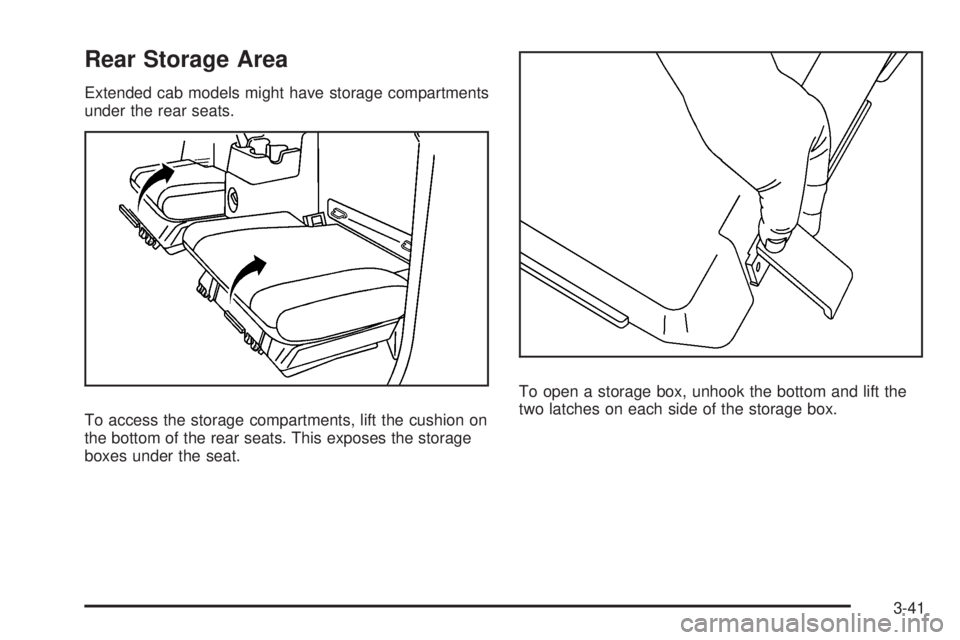
Extended cab models might have storage compartments
under the rear seats.
To access the storage compartments, lift the cushion on
the bottom of the rear seats. This exposes the storage
boxes under the seat.To open a storage box, unhook the bottom and lift the
two latches on each side of the storage box.
3-41
Page 166 of 448

Dome Lamp Override
The dome lamp override button is located below the
exterior lamps control.
E(Dome Lamp Override):Press this button in to
make the dome lamps remain off when the doors are
open. To return the lamps to automatic operation,
press
Eagain and return it to the out position.
Exit Lighting
The interior lamps will come on when the key is
removed from the ignition. The lamps will not come
on if the dome override button is pressed in.
Electric Power Management
The vehicle has Electric Power Management (EPM)
that estimates the battery’s temperature and state
of charge. It then adjusts the voltage for best
performance and extended life of the battery.
When the battery’s state of charge is low, the voltage is
raised slightly to quickly bring the charge back up. When
the state of charge is high, the voltage is lowered slightly
to prevent overcharging. If the vehicle has a voltmeter
gage or a voltage display on the Driver InformationCenter (DIC), you may see the voltage move up or down.
This is normal. If there is a problem, an alert will be
displayed.
The battery can be discharged at idle if the electrical
loads are very high. This is true for all vehicles.
This is because the generator (alternator) may not
be spinning fast enough at idle to produce all the
power that is needed for very high electrical loads.
A high electrical load occurs when several of the following
are on, such as: headlamps, high beams, fog lamps,
rear window defogger, climate control fan at high speed,
heated seats, engine cooling fans, trailer loads, and loads
plugged into accessory power outlets.
EPM works to prevent excessive discharge of the
battery. It does this by balancing the generator’s output
and the vehicle’s electrical needs. It can increase
engine idle speed to generate more power, whenever
needed. It can temporarily reduce the power demands
of some accessories.
Normally, these actions occur in steps or levels, without
being noticeable. In rare cases at the highest levels of
corrective action, this action may be noticeable to the
driver. If so, a Driver Information Center (DIC) message
might be displayed, such as BATTERY SAVER ACTIVE,
BATTERY VOLTAGE LOW, or LOW BATTERY. If this
message is displayed, it is recommended that the driver
reduce the electrical loads as much as possible. SeeDIC
Warnings and Messages on page 4-37.
4-14
Page 170 of 448

The recirculation mode cannot be used with floor/defog,
defrost, or defogging modes. If recirculation is selected in
these modes, the indicator will flash or not come on.
Outlet Adjustment
Use the thumbwheel on the outlets to change the
direction of the air flow.
Lift up or push down on the thumbwheel located in the
center of the outlet to direct the air up or down, or
slide the thumbwheel to the left or right to direct the
airflow from side-to-side.
Operation Tips
•
Clear away any ice, snow or leaves from the air
inlets at the base of the windshield that may
block the flow of air into the vehicle.
•Use of non-GM approved hood deflectors may
adversely affect the performance of the system.
•Keep the path under the front seats clear of objects
to help circulate the air inside of the vehicle more
effectively.
Warning Lights, Gages, and
Indicators
Warning lights and gages can signal that something
is wrong before it becomes serious enough to cause
an expensive repair or replacement. Paying attention
to the warning lights and gages could prevent injury.
Warning lights come on when there might be or there
is a problem with one of the vehicle’s functions. Some
warning lights come on briefly when the engine is started
to indicate they are working.
Gages can indicate when there might be or there is a
problem with one of the vehicle’s functions. Often gages
and warning lights work together to indicate a problem
with the vehicle.
When one of the warning lights comes on and stays on
while driving, or when one of the gages shows there
could be a problem, check the section that explains
what to do. Follow this manual’s advice. Waiting to
do repairs can be costly and even dangerous.
4-18
Page 255 of 448
{WARNING:
Do not load the vehicle any heavier than the
Gross Vehicle Weight Rating (GVWR), or
either the maximum front or rear Gross Axle
Weight Rating (GAWR). If you do, parts on the
vehicle can break, and it can change the way
your vehicle handles. These could cause you
to lose control and crash. Also, overloading
can shorten the life of the vehicle.
Using heavier suspension components to get
added durability might not change your weight
ratings. Ask your dealer/retailer to help you load
your vehicle the right way.
Notice
:Overloading the vehicle may cause
damage. Repairs would not be covered by the
vehicle warranty. Do not overload the vehicle.
If you put things inside your vehicle — like
suitcases, tools, packages, or anything
else — they will go as fast as the vehicle goes.
If you have to stop or turn quickly, or if there is a
crash, they will keep going.
{WARNING:
Things you put inside your vehicle can strike
and injure people in a sudden stop or turn, or
in a crash.
•Put things in the cargo area of your
vehicle. Try to spread the weight evenly.
•Never stack heavier things, like
suitcases, inside the vehicle so that some
of them are above the tops of the seats.
•Do not leave an unsecured child restraint
in your vehicle.
•When you carry something inside the
vehicle, secure it whenever you can.
•Do not leave a seat folded down unless
you need to.
There is also important loading information for
off-road driving in this manual.
See“Loading Your
Vehicle for Off-Road Driving”underOff-Road
Driving on page 5-13.
Remember not to exceed the Gross Axle Weight
rating (GAWR) of the front or rear axle.
5-39
Page 337 of 448
Tire Terminology and Denitions
Air Pressure:The amount of air inside the
tire pressing outward on each square inch of
the tire. Air pressure is expressed in pounds
per square inch (psi) or kilopascal (kPa).
Accessory Weight
:This means the combined
weight of optional accessories. Some examples of
optional accessories are, automatic transmission,
power steering, power brakes, power windows,
power seats, and air conditioning.
Aspect Ratio
:The relationship of a tire’s height
to its width.
Belt
:A rubber coated layer of cords that is
located between the plies and the tread. Cords
may be made from steel or other reinforcing
materials.
Bead
:The tire bead contains steel wires wrapped
by steel cords that hold the tire onto the rim.
Bias Ply Tire
:A pneumatic tire in which the plies
are laid at alternate angles less than 90 degrees
to the centerline of the tread.Cold Tire Pressure
:The amount of air pressure in
a tire, measured in pounds per square inch (psi) or
kilopascals (kPa) before a tire has built up heat
from driving. SeeInation - Tire Pressure on
page 6-64.
Curb Weight
:The weight of a motor vehicle
with standard and optional equipment including
the maximum capacity of fuel, oil, and coolant,
but without passengers and cargo.
DOT Markings
:A code molded into the sidewall
of a tire signifying that the tire is in compliance
with the U.S. Department of Transportation (DOT)
motor vehicle safety standards. The DOT code
includes the Tire Identification Number (TIN), an
alphanumeric designator which can also identify
the tire manufacturer, production plant, brand, and
date of production.
GVWR
:Gross Vehicle Weight Rating.
SeeLoading the Vehicle on page 5-33.
GAWR FRT
:Gross Axle Weight Rating for the
front axle. SeeLoading the Vehicle on page 5-33.
GAWR RR
:Gross Axle Weight Rating for the
rear axle. SeeLoading the Vehicle on page 5-33.
6-61
Page 358 of 448
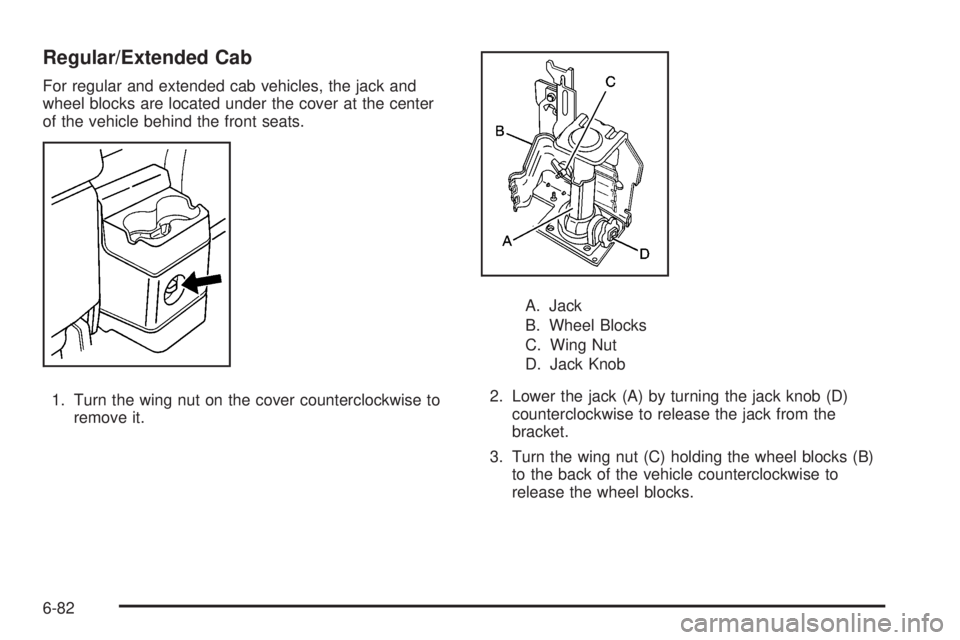
Regular/Extended Cab
For regular and extended cab vehicles, the jack and
wheel blocks are located under the cover at the center
of the vehicle behind the front seats.
1. Turn the wing nut on the cover counterclockwise to
remove it.A. Jack
B. Wheel Blocks
C. Wing Nut
D. Jack Knob
2. Lower the jack (A) by turning the jack knob (D)
counterclockwise to release the jack from the
bracket.
3. Turn the wing nut (C) holding the wheel blocks (B)
to the back of the vehicle counterclockwise to
release the wheel blocks.
6-82