2010 GMC CANYON Lower
[x] Cancel search: LowerPage 121 of 448
Power Windows
{WARNING:
Leaving children in a vehicle with the keys is
dangerous for many reasons, children or others
could be badly injured or even killed. They could
operate the power windows or other controls or
even make the vehicle move. The windows will
function and they could be seriously injured or
killed if caught in the path of a closing window.
Do not leave keys in a vehicle with children.
When there are children in the rear seat use the
window lockout button to prevent unintentional
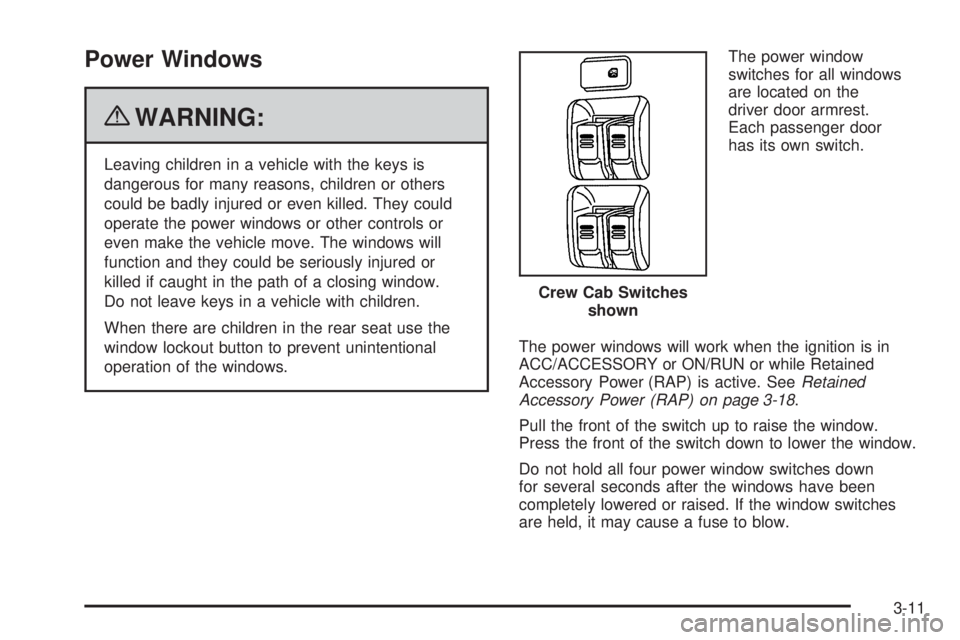
operation of the windows.The power window
switches for all windows
are located on the
driver door armrest.
Each passenger door
has its own switch.
The power windows will work when the ignition is in
ACC/ACCESSORY or ON/RUN or while Retained
Accessory Power (RAP) is active. SeeRetained
Accessory Power (RAP) on page 3-18.
Pull the front of the switch up to raise the window.
Press the front of the switch down to lower the window.
Do not hold all four power window switches down
for several seconds after the windows have been
completely lowered or raised. If the window switches
are held, it may cause a fuse to blow.Crew Cab Switches
shown
3-11
Page 122 of 448
Express-Down Windows
The driver window has an express-down feature that
allows the window to be lowered fully without
continuously holding the switch.
Press the front of the switch past the first position to
activate the express-down mode. The express-down
mode can be canceled at any time by pulling up on the
switch.
Window Lockout
o
(Window Lockout):On crew cab vehicles with
power windows, there is also a window lockout button
located forward of the window switches. This feature
disables the passenger window switches when the
window lockout button is pressed.
To turn the lockout feature on or off, press the window
lockout button. A red band on the side of the button
can be seen when the windows are not locked out.
Sliding Rear Window
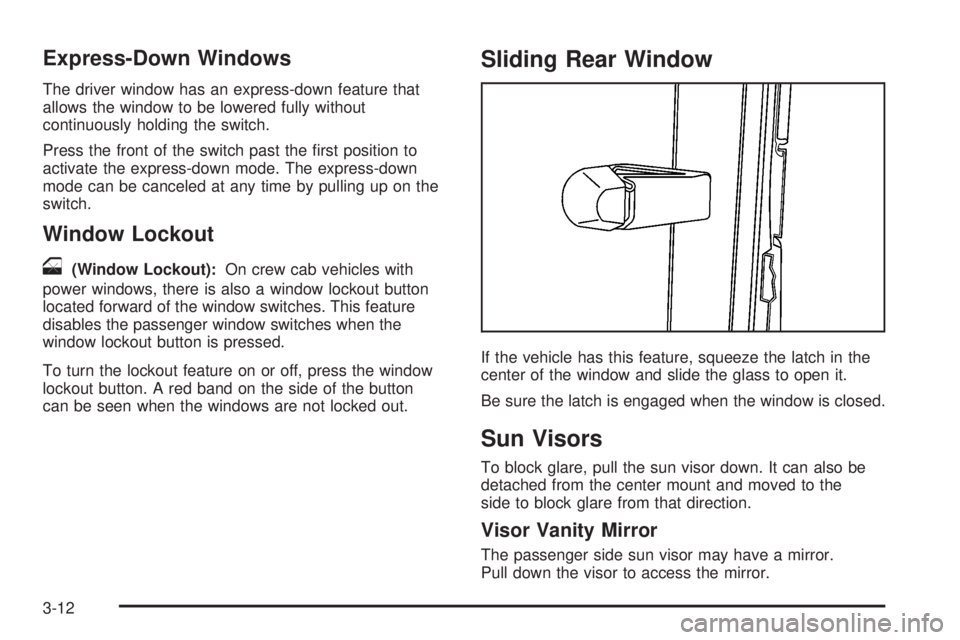
If the vehicle has this feature, squeeze the latch in the
center of the window and slide the glass to open it.
Be sure the latch is engaged when the window is closed.
Sun Visors
To block glare, pull the sun visor down. It can also be
detached from the center mount and moved to the
side to block glare from that direction.
Visor Vanity Mirror
The passenger side sun visor may have a mirror.
Pull down the visor to access the mirror.
3-12
Page 150 of 448
Storage Areas
Glove Box
Lift up on the glove box lever to open it.
Cupholders
This vehicle may have two cupholders located on the
lower part of the front doors as well as two cupholders
located at the front end of the console. Vehicles with
bench seats may have cupholders attached to the front
of the center seat.
For vehicles that are an extended cab or crew cab
model, the vehicle also has two rear cupholders.
On crew cab models, the cupholders are located at the
front end of the rear center seat cushion. On extended
cab models, the rear seat cupholders are located on top
of the rear center console.
Vehicles with ashtrays will use one of the cupholders.
Center Console Storage
For vehicles with bench seats, there may be a center
armrest storage area. Lift up on the upper tab located at
the front of the armrest to release the latch. Lift the lid
to open the storage area.
For vehicles with bucket seats or uplevel packages, the
vehicle may have a two-tiered center armrest storage
area. Lift up on the upper tab located at the front of the
armrest to release the latch. Lift the lid to the top
storage area. A second tab is located below the top one
and allows you to access the bottom storage area.
Lift up on the lower tab to release the latch. Then, raise
the lid of the lower storage area. The upper storage
area will lift up with the lid of the lower storage area.
To close the storage area(s), lower the lid(s) until
you feel the latch close.
Assist Handles
This vehicle may have assist handles to be used when
getting out of the vehicle. The assist handles are
located above the doors.
If the vehicle has roof-mounted side impact air bags,
there are assist handles located above both the
driver and front passenger doors.
3-40
Page 156 of 448

Turn Signal/Multifunction Lever
The lever on the left side of the steering column
includes the following:
G: Turn and Lane Change Signals
53: Headlamp High/Low-Beam Changer
N: Windshield Wipers
L: Windshield Washer
J: Cruise Control
Flash-to-Pass.
Information for these features is on the pages following.
Turn and Lane-Change Signals
An arrow on the instrument
panel cluster flashes in the
direction of the turn or
lane change.
Move the lever all the way up or down to signal a turn.
Raise or lower the lever until the arrow starts to flash
to signal a lane change. Hold it there until the lane
change is complete.
The lever returns to its starting position when it is
released.
If after signaling a turn or a lane change the arrows
flash rapidly or do not come on, a signal bulb may be
burned out.
Have the bulbs replaced. If the bulb is not burned out,
check the fuse. For bulb replacement, seeTaillamps,
Turn Signal, Stoplamps and Back-up Lamps on
page 6-53. For a blown fuse or circuit breaker,
seeFuses and Circuit Breakers on page 6-111.
4-4
Page 161 of 448
Increasing Speed While Using Cruise
Control
There are two ways to go to a higher speed:
•Use the accelerator pedal to get to the higher speed.
Press
rTat the end of the lever, then release
the button and the accelerator pedal. The vehicle
will cruise at the higher speed. If the accelerator
pedal is held longer than 60 seconds, cruise control
will turn off.
•Move the cruise lever fromRtoS. Hold it there until
the desired speed is reached, and then release the
lever. To increase the vehicle speed in very small
amounts, move the lever briefly to
S.
Reducing Speed While Using Cruise
Control
•
Press and holdrTuntil the lower speed
desired is reached, then release it.
•To slow down in very small amounts, briefly
press
rT.
Passing Another Vehicle While Using
Cruise Control
Use the accelerator pedal to increase the vehicle speed.
When you take your foot off the pedal, the vehicle
slows down to the cruise control speed you set earlier.
Using Cruise Control on Hills
How well the cruise control works on hills depends upon
the vehicle speed, load, and the steepness of the hills.
When going up steep hills, you might have to step on the
accelerator pedal to maintain the vehicle speed. When
going downhill, you might have to brake or shift to a lower
gear to keep the vehicle speed down. Applying the brake
will turn off the cruise control.
Ending Cruise Control
To turn off the cruise control, do one of the following:
•Step lightly on the brake pedal.
•Move the cruise control lever to9.
•Lightly tap or press the clutch, if you have a manual
transmission.
Erasing Speed Memory
The cruise control set speed memory is erased when
the cruise control or the ignition is turned off.
4-9
Page 166 of 448

Dome Lamp Override
The dome lamp override button is located below the
exterior lamps control.
E(Dome Lamp Override):Press this button in to
make the dome lamps remain off when the doors are
open. To return the lamps to automatic operation,
press
Eagain and return it to the out position.
Exit Lighting
The interior lamps will come on when the key is
removed from the ignition. The lamps will not come
on if the dome override button is pressed in.
Electric Power Management
The vehicle has Electric Power Management (EPM)
that estimates the battery’s temperature and state
of charge. It then adjusts the voltage for best
performance and extended life of the battery.
When the battery’s state of charge is low, the voltage is
raised slightly to quickly bring the charge back up. When
the state of charge is high, the voltage is lowered slightly
to prevent overcharging. If the vehicle has a voltmeter
gage or a voltage display on the Driver InformationCenter (DIC), you may see the voltage move up or down.
This is normal. If there is a problem, an alert will be
displayed.
The battery can be discharged at idle if the electrical
loads are very high. This is true for all vehicles.
This is because the generator (alternator) may not
be spinning fast enough at idle to produce all the
power that is needed for very high electrical loads.
A high electrical load occurs when several of the following
are on, such as: headlamps, high beams, fog lamps,
rear window defogger, climate control fan at high speed,
heated seats, engine cooling fans, trailer loads, and loads
plugged into accessory power outlets.
EPM works to prevent excessive discharge of the
battery. It does this by balancing the generator’s output
and the vehicle’s electrical needs. It can increase
engine idle speed to generate more power, whenever
needed. It can temporarily reduce the power demands
of some accessories.
Normally, these actions occur in steps or levels, without
being noticeable. In rare cases at the highest levels of
corrective action, this action may be noticeable to the
driver. If so, a Driver Information Center (DIC) message
might be displayed, such as BATTERY SAVER ACTIVE,
BATTERY VOLTAGE LOW, or LOW BATTERY. If this
message is displayed, it is recommended that the driver
reduce the electrical loads as much as possible. SeeDIC
Warnings and Messages on page 4-37.
4-14
Page 228 of 448

Loss of Control
Let us review what driving experts say about what
happens when the three control systems — brakes,
steering, and acceleration — do not have enough friction
where the tires meet the road to do what the driver
has asked.
In any emergency, do not give up. Keep trying to steer
and constantly seek an escape route or area of less
danger.
Skidding
In a skid, a driver can lose control of the vehicle.
Defensive drivers avoid most skids by taking reasonable
care suited to existing conditions, and by not overdriving
those conditions. But skids are always possible.
The three types of skids correspond to the vehicle’s three
control systems. In the braking skid, the wheels are not
rolling. In the steering or cornering skid, too much speed
or steering in a curve causes tires to slip and lose
cornering force. And in the acceleration skid, too much
throttle causes the driving wheels to spin.
Remember: StabiliTrak
®assists the driver with
directional control. SeeStabiliTrak®System on
page 5-6. If the StabiliTrak®System is off, then a
steering or cornering skid will need to be handledentirely by the driver using counter steering techniques
and an acceleration skid will be best handled by
easing your foot off the accelerator pedal.
If the vehicle starts to slide, ease your foot off the
accelerator pedal and quickly steer the way you want
the vehicle to go. If you start steering quickly enough,
the vehicle may straighten out. Always be ready for
a second skid if it occurs.
Of course, traction is reduced when water, snow, ice,
gravel, or other material is on the road. For safety, slow
down and adjust your driving to these conditions. It is
important to slow down on slippery surfaces because
stopping distance will be longer and vehicle control more
limited.
While driving on a surface with reduced traction, try your
best to avoid sudden steering, acceleration, or braking,
including reducing vehicle speed by shifting to a lower
gear. Any sudden changes could cause the tires to
slide. You may not realize the surface is slippery until
the vehicle is skidding. Learn to recognize warning
clues — such as enough water, ice, or packed snow on
the road to make a mirrored surface — and slow down
when you have any doubt.
Remember: Any Antilock Brake System (ABS) helps
avoid only the braking skid.
5-12
Page 239 of 448

Stalling on an Incline
{WARNING:
Getting out on the downhill (low) side of a vehicle
stopped across an incline is dangerous. If the
vehicle rolls over, you could be crushed or killed.
Always get out on the uphill (high) side of the
vehicle and stay well clear of the rollover path.
If the vehicle stalls when crossing an incline, be sure you,
and any passengers, get out on the uphill side, even if the
door there is harder to open. If you get out on the downhill
side and the vehicle starts to roll over, you will be right in
its path.
If you have to walk down the slope, stay out of the path
the vehicle will take if it does roll over.
Driving in Mud, Sand, Snow, or Ice
When you drive in mud, snow, or sand, the wheels do not
get good traction. Acceleration is not as quick, turning is
more difficult, and braking distances are longer.
It is best to use a low gear when in mud — the deeper
the mud, the lower the gear. In really deep mud,
keep the vehicle moving so it does not get stuck.When driving on sand, wheel traction changes. On
loosely packed sand, such as on beaches or sand
dunes, the tires will tend to sink into the sand. This
affects steering, accelerating, and braking. Drive
at a reduced speed and avoid sharp turns or abrupt
maneuvers.
Hard packed snow and ice offer the worst tire traction.
On these surfaces, it is very easy to lose control.
On wet ice, for example, the traction is so poor that you
will have difficulty accelerating. And, if the vehicle
does get moving, poor steering and difficult braking can
cause it to slide out of control.
{WARNING:
Driving on frozen lakes, ponds, or rivers can be
dangerous. Underwater springs, currents under
the ice, or sudden thaws can weaken the ice. Your
vehicle could fall through the ice and you and your
passengers could drown. Drive your vehicle on
safe surfaces only.
5-23