Page 164 of 404
Automatic disarming
Switching the ignition to the on position with acoded keydisarms the
vehicle.
•The theft indicator will illuminate for three seconds and then go out.
•If the theft indicator stays on for an extended period of time or
flashes rapidly, contact your authorized dealer as soon as possible.
Replacement keys
If your keys are lost or stolen and you don’t have an extra coded key,
you will need to have your vehicle towed to an authorized dealer. The
key codes need to be erased from your vehicle and new coded keys will
need to be programmed.
Replacing coded keys can be very costly. Store an extra programmed key
away from the vehicle in a safe place to help prevent any
inconveniences. Please visit an authorized dealer to purchase additional
spare or replacement keys.
Programming spare keys
You can program your own coded keys to your vehicle.
Tips:
•A maximum of eight keys can be coded to your vehicle.
•Only use SecuriLock�keys.
•You must have two previously programmed coded keys (keys that
already operate your vehicle’s engine) and the new unprogrammed
key(s) readily accessible.
•If two previously programmed coded keys are not available, you must
take your vehicle to your authorized dealer to have the spare key(s)
programmed.
Please read and understand the entire procedure before you begin.
1. Insert the first previously programmedcoded keyinto the ignition.
Locks and Security
164
2010 Explorer(exp)
Owners Guide(own2002), 1st Printing
USA(fus)
Page 165 of 404
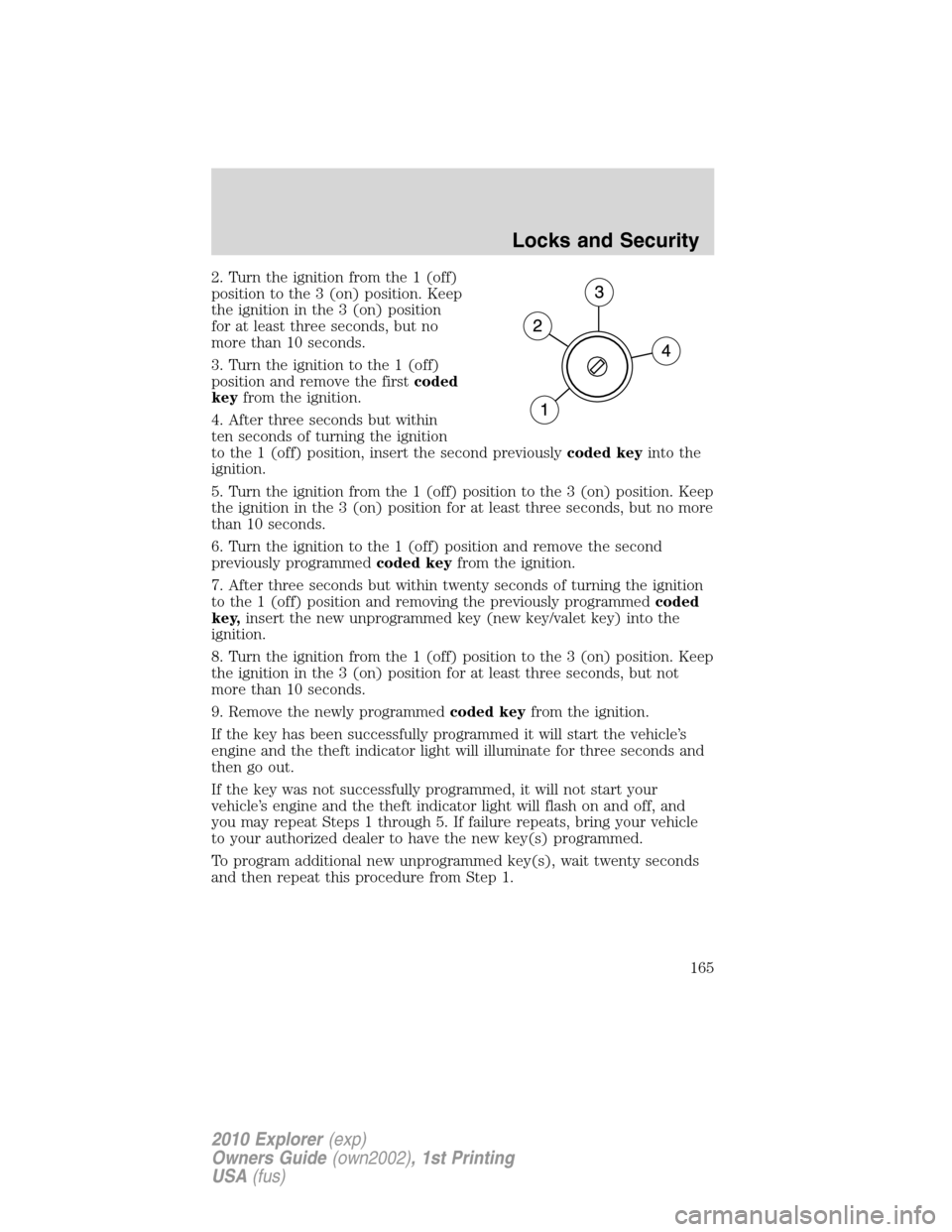
2. Turn the ignition from the 1 (off)
position to the 3 (on) position. Keep
the ignition in the 3 (on) position
for at least three seconds, but no
more than 10 seconds.
3. Turn the ignition to the 1 (off)
position and remove the firstcoded
keyfrom the ignition.
4. After three seconds but within
ten seconds of turning the ignition
to the 1 (off) position, insert the second previouslycoded keyinto the
ignition.
5. Turn the ignition from the 1 (off) position to the 3 (on) position. Keep
the ignition in the 3 (on) position for at least three seconds, but no more
than 10 seconds.
6. Turn the ignition to the 1 (off) position and remove the second
previously programmedcoded keyfrom the ignition.
7. After three seconds but within twenty seconds of turning the ignition
to the 1 (off) position and removing the previously programmedcoded
key,insert the new unprogrammed key (new key/valet key) into the
ignition.
8. Turn the ignition from the 1 (off) position to the 3 (on) position. Keep
the ignition in the 3 (on) position for at least three seconds, but not
more than 10 seconds.
9. Remove the newly programmedcoded keyfrom the ignition.
If the key has been successfully programmed it will start the vehicle’s
engine and the theft indicator light will illuminate for three seconds and
then go out.
If the key was not successfully programmed, it will not start your
vehicle’s engine and the theft indicator light will flash on and off, and
you may repeat Steps 1 through 5. If failure repeats, bring your vehicle
to your authorized dealer to have the new key(s) programmed.
To program additional new unprogrammed key(s), wait twenty seconds
and then repeat this procedure from Step 1.
Locks and Security
165
2010 Explorer(exp)
Owners Guide(own2002), 1st Printing
USA(fus)
Page 166 of 404
SEATING
WARNING:Reclining the seatback can cause an occupant to
slide under the seat’s safety belt, resulting in severe personal
injuries in the event of a collision.
WARNING:Do not pile cargo higher than the seatbacks to
reduce the risk of injury in a collision or sudden stop.
WARNING:Before returning the seatback to its original
position, make sure that cargo or any objects are not trapped
behind the seatback. After returning the seatback to its original
position, pull on the seatback to ensure that it has fully latched. An
unlatched seat may become dangerous in the event of a sudden stop or
collision.
Adjustable head restraints
Your vehicle is equipped with front row outboard head restraints that are
vertically adjustable.
WARNING:To minimize the risk of neck injury in the event of a
crash, the driver and passenger occupants should not sit in
and/or operate the vehicle, until the head restraint is placed in its
proper position. The driver should never adjust the head restraint
while the vehicle is in motion.
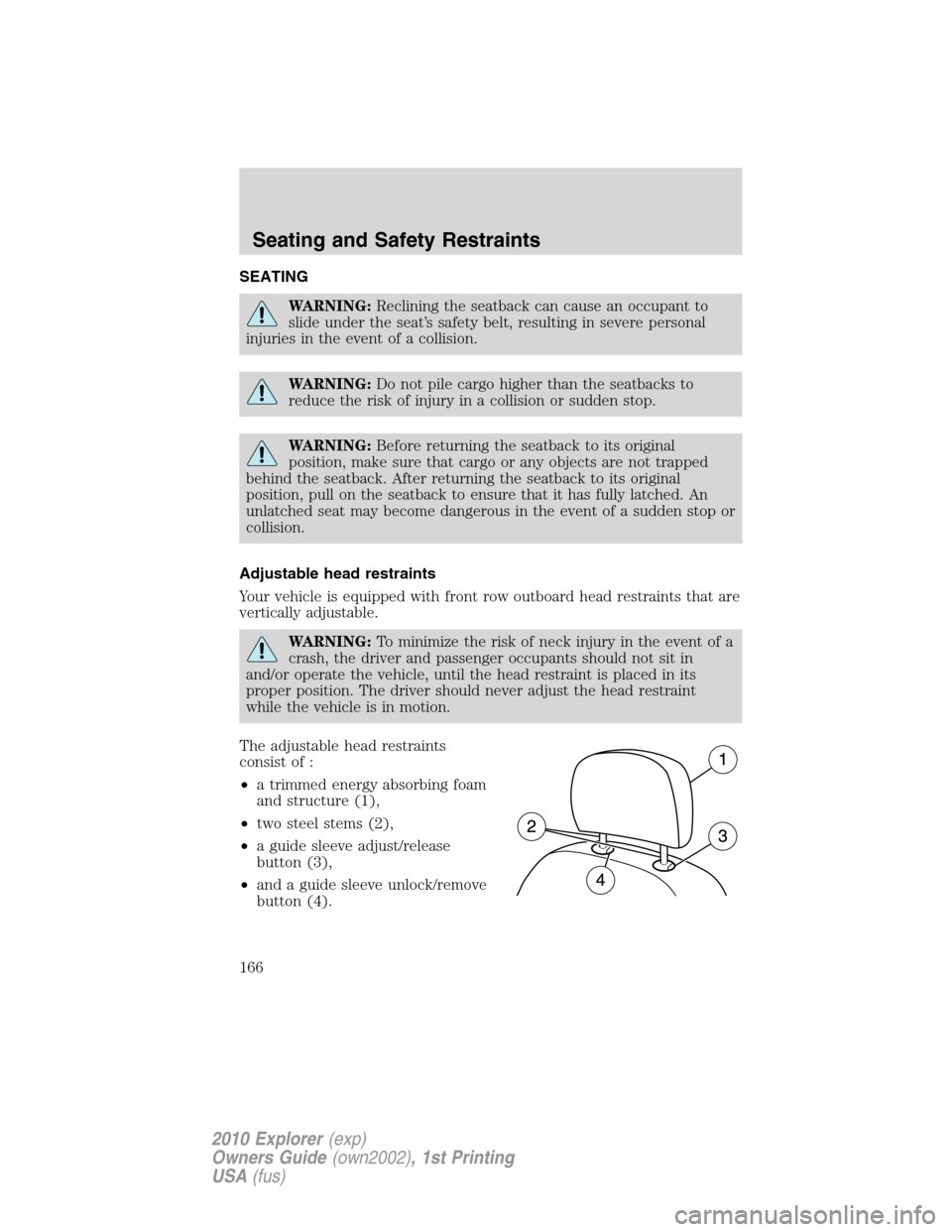
The adjustable head restraints
consist of :
•a trimmed energy absorbing foam
and structure (1),
•two steel stems (2),
•a guide sleeve adjust/release
button (3),
•and a guide sleeve unlock/remove
button (4).
Seating and Safety Restraints
166
2010 Explorer(exp)
Owners Guide(own2002), 1st Printing
USA(fus)
Page 168 of 404
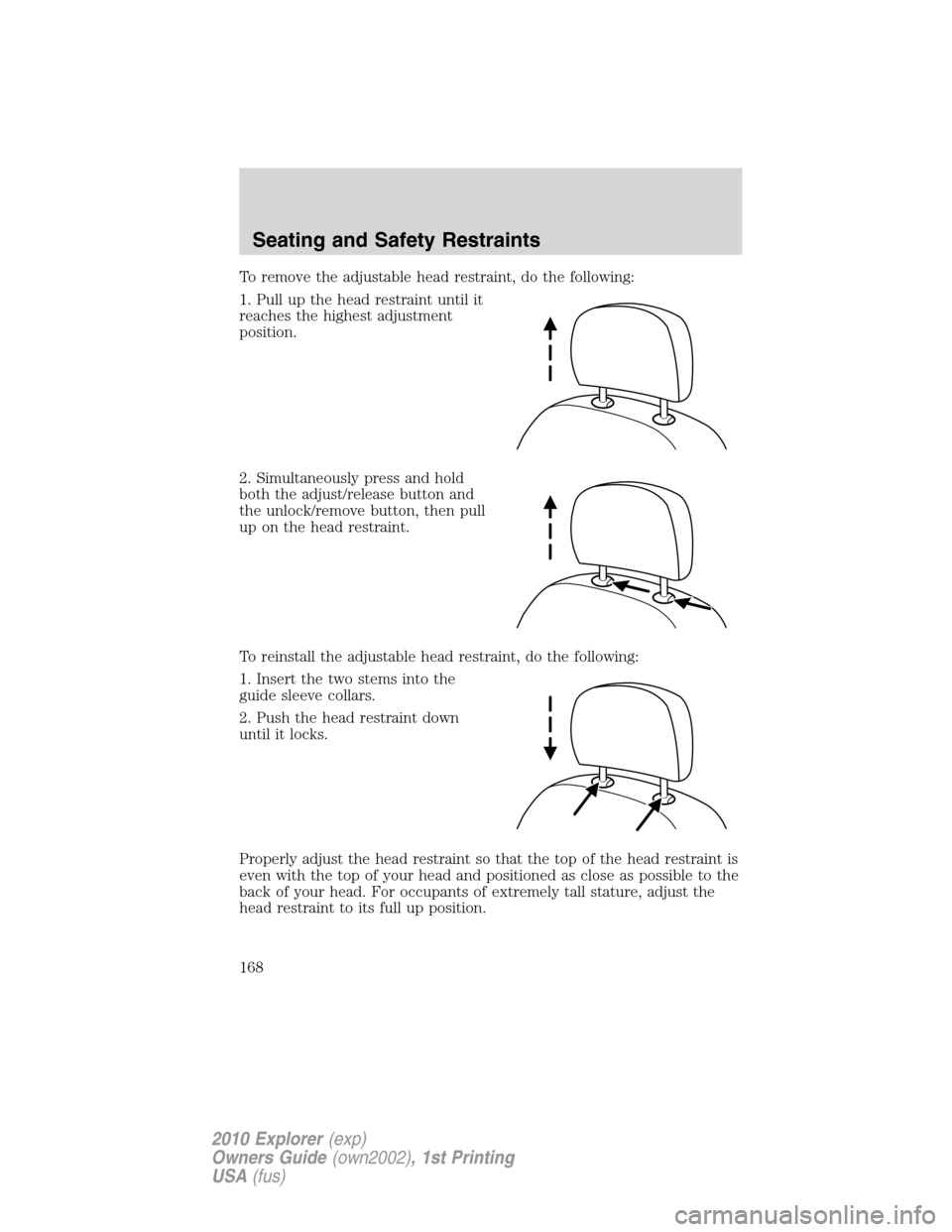
To remove the adjustable head restraint, do the following:
1. Pull up the head restraint until it
reaches the highest adjustment
position.
2. Simultaneously press and hold
both the adjust/release button and
the unlock/remove button, then pull
up on the head restraint.
To reinstall the adjustable head restraint, do the following:
1. Insert the two stems into the
guide sleeve collars.
2. Push the head restraint down
until it locks.
Properly adjust the head restraint so that the top of the head restraint is
even with the top of your head and positioned as close as possible to the
back of your head. For occupants of extremely tall stature, adjust the
head restraint to its full up position.
Seating and Safety Restraints
168
2010 Explorer(exp)
Owners Guide(own2002), 1st Printing
USA(fus)
Page 173 of 404
A position can be recalled:
•in any gearshift position if the ignition isnotin the on position.
•only in P (Park) or N (Neutral) if the ignition is in the on position.
A memory seat position may be programmed at any time.
The memory positions are also recalled when you press your remote
entry transmitter UNLOCK control if the transmitter is programmed to a
memory position or when you enter a valid personal entry code that is
programmed to a memory position.
To program the memory feature to a remote entry transmitter and for
more information on how to use the keypad, refer toRemote entry
systemandKeyless entry systemin theLocks and Securitychapter.
Easy entry/exit feature (if equipped)
The easy entry feature automatically moves the driver’s seat 2 inches
(5 cm) forward when:
•the transmission is in P (Park)
•the key is inserted into the ignition cylinder
(If the seat is located less than 2 inches [5 cm] from the front of the seat
track, the seat will travel up to
14inch (.64 cm) to the front of the seat
track).
The easy out feature automatically moves the driver’s seat 2 inches
(5 cm) backward when:
•the transmission is in P (Park)
•the key is removed from the ignition cylinder
(If the seat is located less than 2 inches (5 cm) from the rear of the seat
track, the seat will travel up to
14inch (.64 cm) to the rear of the seat
track).
If the memory setting is programmed through the remote transmitter,
upon unlocking the door via remote entry system, the seat position will
travel to the desired memory setting less 2 inches (5 cm). Once entering
the vehicle and inserting the key in the ignition while in P (Park), the
easy entry feature will move the seat an additional 2 inches (5 cm) to
the desired memory location. SeeLocks and Securityfor activating the
memory seat feature through the remote entry system.
Seating and Safety Restraints
173
2010 Explorer(exp)
Owners Guide(own2002), 1st Printing
USA(fus)
Page 175 of 404
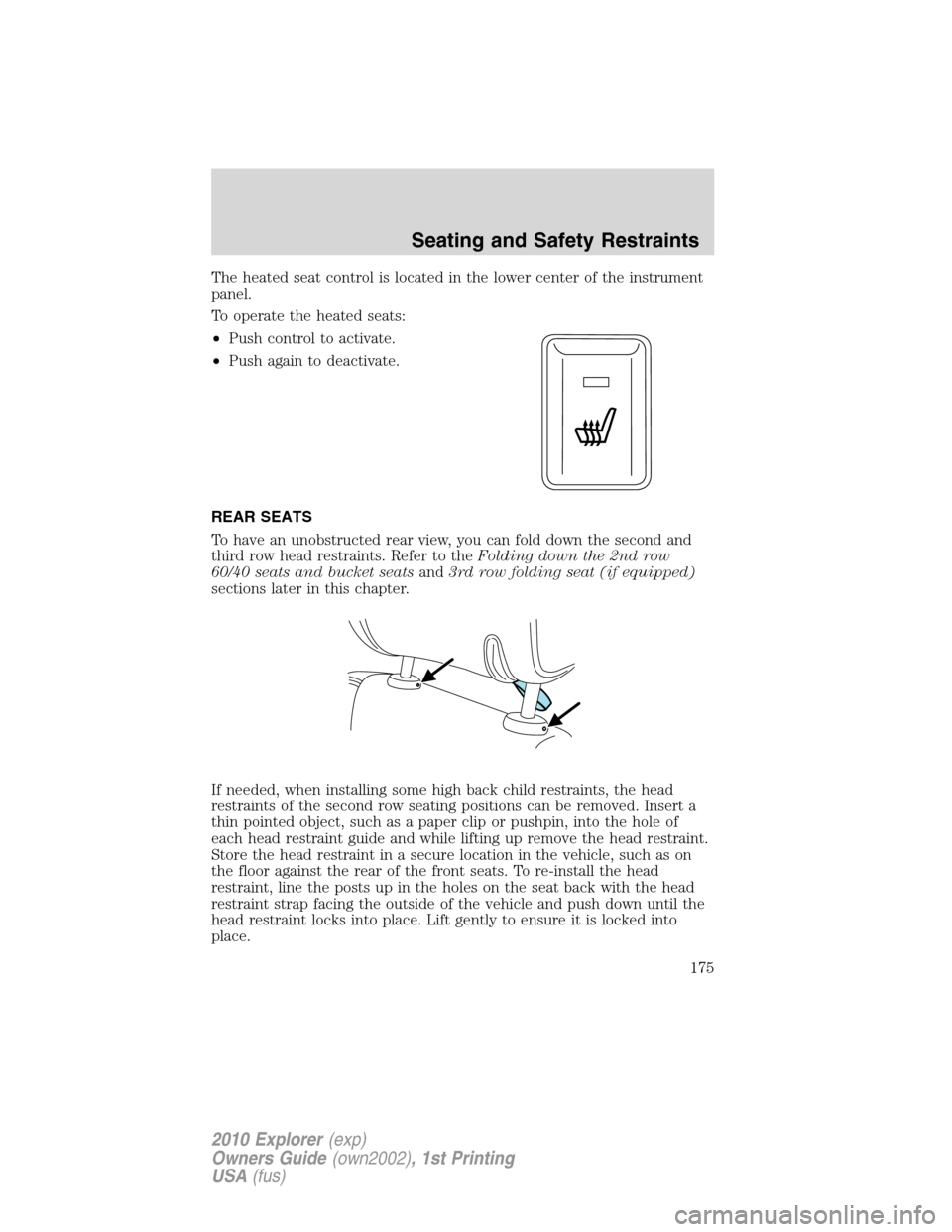
The heated seat control is located in the lower center of the instrument
panel.
To operate the heated seats:
•Push control to activate.
•Push again to deactivate.
REAR SEATS
To have an unobstructed rear view, you can fold down the second and
third row head restraints. Refer to theFolding down the 2nd row
60/40 seats and bucket seatsand3rd row folding seat (if equipped)
sections later in this chapter.
If needed, when installing some high back child restraints, the head
restraints of the second row seating positions can be removed. Insert a
thin pointed object, such as a paper clip or pushpin, into the hole of
each head restraint guide and while lifting up remove the head restraint.
Store the head restraint in a secure location in the vehicle, such as on
the floor against the rear of the front seats. To re-install the head
restraint, line the posts up in the holes on the seat back with the head
restraint strap facing the outside of the vehicle and push down until the
head restraint locks into place. Lift gently to ensure it is locked into
place.
Seating and Safety Restraints
175
2010 Explorer(exp)
Owners Guide(own2002), 1st Printing
USA(fus)
Page 177 of 404
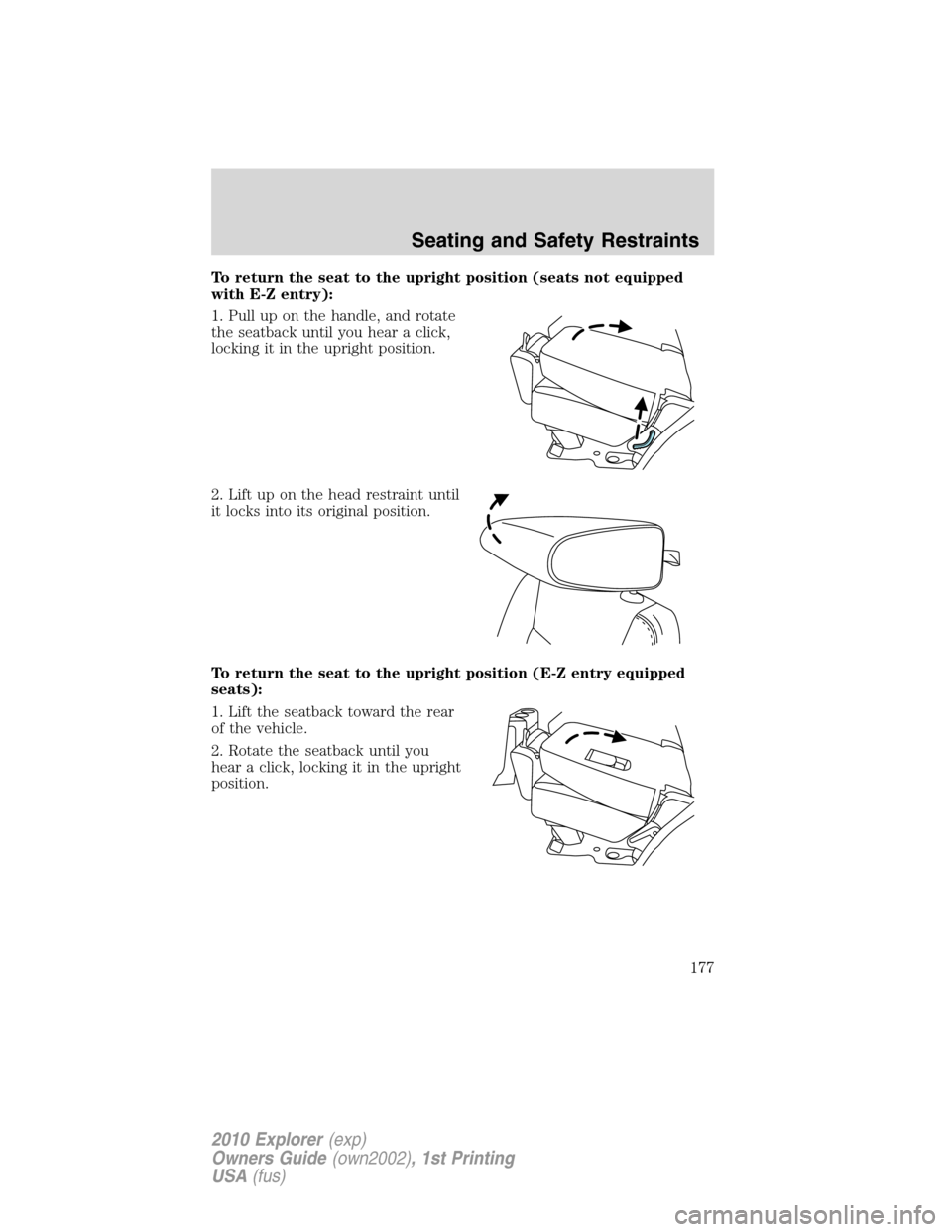
To return the seat to the upright position (seats not equipped
with E-Z entry):
1. Pull up on the handle, and rotate
the seatback until you hear a click,
locking it in the upright position.
2. Lift up on the head restraint until
it locks into its original position.
To return the seat to the upright position (E-Z entry equipped
seats):
1. Lift the seatback toward the rear
of the vehicle.
2. Rotate the seatback until you
hear a click, locking it in the upright
position.
Seating and Safety Restraints
177
2010 Explorer(exp)
Owners Guide(own2002), 1st Printing
USA(fus)
Page 178 of 404
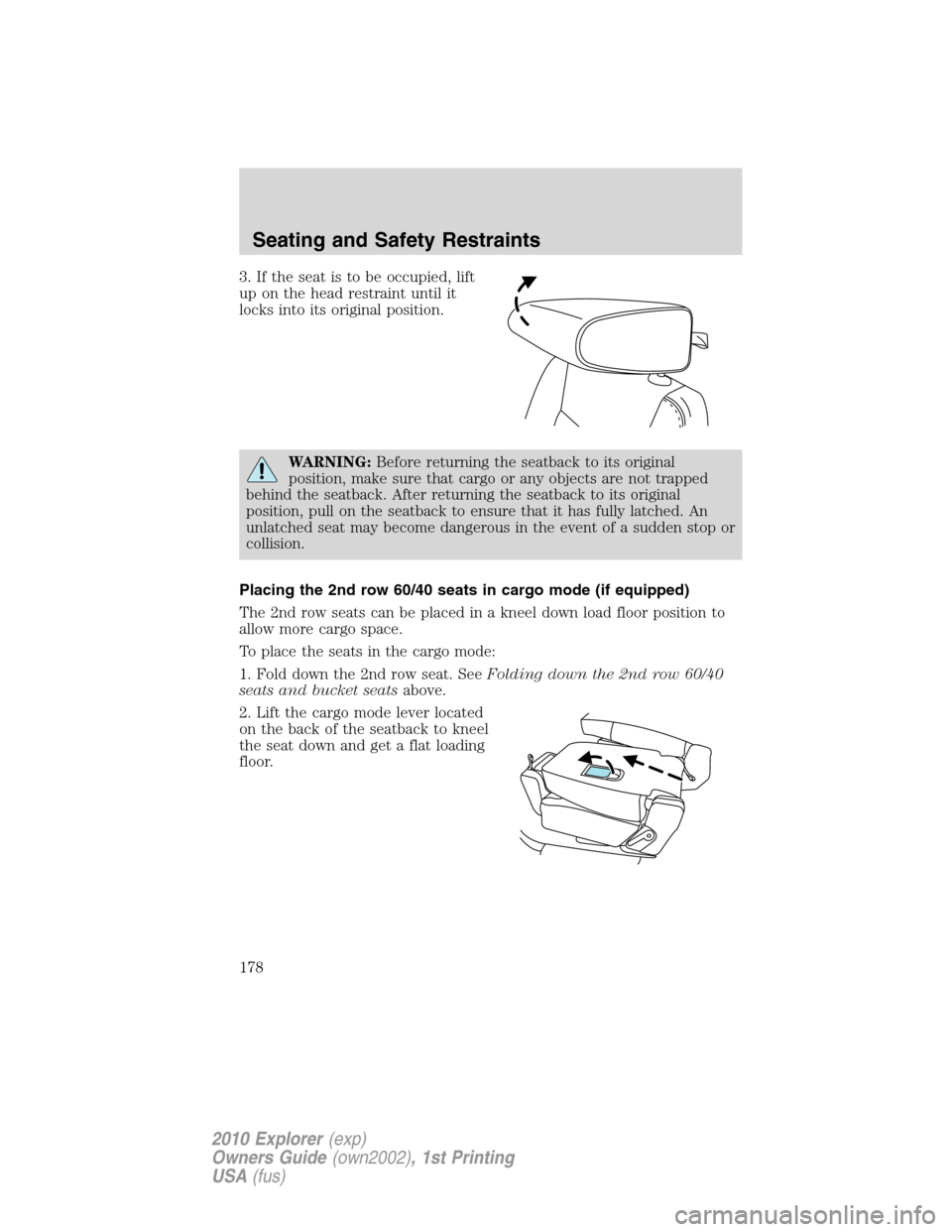
3. If the seat is to be occupied, lift
up on the head restraint until it
locks into its original position.
WARNING:Before returning the seatback to its original
position, make sure that cargo or any objects are not trapped
behind the seatback. After returning the seatback to its original
position, pull on the seatback to ensure that it has fully latched. An
unlatched seat may become dangerous in the event of a sudden stop or
collision.
Placing the 2nd row 60/40 seats in cargo mode (if equipped)
The 2nd row seats can be placed in a kneel down load floor position to
allow more cargo space.
To place the seats in the cargo mode:
1. Fold down the 2nd row seat. SeeFolding down the 2nd row 60/40
seats and bucket seatsabove.
2. Lift the cargo mode lever located
on the back of the seatback to kneel
the seat down and get a flat loading
floor.
Seating and Safety Restraints
178
2010 Explorer(exp)
Owners Guide(own2002), 1st Printing
USA(fus)