Page 20 of 450
VEHICLE SECURITY ALARM — IF EQUIPPED
The Vehicle Security Alarm monitors the vehicle doors
and ignition for unauthorized operation. When the Ve-
hicle Security Alarm is activated it will provide both
audible and visible signals. The horn will sound repeat-
edly for the three minutes and the headlights, park lamps
and/or turn signals and Vehicle Security Light will flash
for an additional 15 minutes. The engine will not run
until the Vehicle Security Alarm is disarmed
To Set the Alarm
The Vehicle Security Alarm will set when you use the
power door locks, or use the Remote Keyless Entry (RKE)
transmitter to lock the doors. After all the doors are
locked and closed, the Vehicle Security Light in the
instrument cluster will flash rapidly for approximately
15 seconds to signal that the Vehicle Security Alarm is
arming. After the Vehicle Security Alarm is set, the
Vehicle Security Light will flash at a slower rate to
indicate that the Vehicle Security Alarm is armed.NOTE:
If the Vehicle Security Light stays on continu-
ously during vehicle operation, have the Vehicle Security
Alarm checked by an authorized dealer.
To Disarm the System
Use the RKE transmitter to unlock the door. If something
has triggered the Vehicle Security Alarm in your absence,
the horn will sound three times when you unlock the
doors. Check the vehicle for tampering.
The Vehicle Security Alarm will also disarm if the vehicle
is started with a programmed Sentry Key�. If an unpro-
grammed Sentry Key� is used to start a vehicle, the
engine will run for two seconds and then shut down.
After six unsuccessful attempts at starting the engine, the
Vehicle Security Alarm will shut down until the correct
key is used. To exit alarming mode, press the RKE
transmitter UNLOCK button or start the vehicle with a
programmed Sentry Key�.
2
THINGS TO KNOW BEFORE STARTING YOUR VEHICLE 19
Page 55 of 450
It also includes diagnostics that will illuminate the instru-
ment cluster Airbag Warning Light if a malfunction is
noted. The diagnostics also record the nature of the
malfunction.
WARNING!
Ignoring the Airbag Warning Light in your instru-
ment panel could mean you won’t have the airbags to
protect you in a collision. If the light does not come
on, stays on after you start the vehicle, or if it comes
on as you drive, have the airbag system checked right
away.
Driver and Passenger Airbag Inflator Units
The Driver and Passenger Airbag/Inflator Units are
located in the center of the steering wheel and the right
side of the instrument panel. When the ORC detects a
collision requiring the airbags, it signals the inflator units.
A large quantity of non-toxic gas is generated to inflatethe Advanced Front Airbags. Different airbag inflation
rates are possible, based on the collision type and sever-
ity. The steering wheel hub trim cover and the upper
right side of the instrument panel separate and fold out
of the way as the bags inflate to their full size. The bags
fully inflate in about 50 to 70 milliseconds. This is about
half of the time it takes to blink your eyes. The bags then
quickly deflate while helping to restrain the driver and
front passenger.
The driver front airbag gas is vented through the vent
holes in the sides of the airbag. The passenger front
airbag gas is vented through the vent holes in the sides of
the airbag. In this way, the airbags do not interfere with
your control of the vehicle.Supplemental Side Airbag Inflatable Curtain
(SABIC) Inflator Units — If Equipped
During collisions where the impact is confined to a
particular area of the side of the vehicle, the ORC may
54 THINGS TO KNOW BEFORE STARTING YOUR VEHICLE
Page 104 of 450
The Uconnect™ Phone will then send the corresponding
phone number associated with the phonebook entry, as
tones over the phone.
NOTE:
•You may not hear all of the tones due to cellular phone
network configurations. This is normal.
•Some paging and voice mail systems have system time
out settings that are too short and may not allow the
use of this feature.
Barge In - Overriding Prompts
The “Voice Command” button can be used when you
wish to skip part of a prompt and issue your voice
command immediately. For example, if a prompt is
asking�Would you like to pair a phone, clear a...,� you
could press the
button and say, �Pair a Phone�to
select that option without having to listen to the rest of
the voice prompt.
Turning Confirmation Prompts ON/OFF
Turning confirmation prompts off will stop the system
from confirming your choices (e.g., the Uconnect™
Phone will not repeat a phone number before you dial it).
•Press thebutton to begin.
•After the �Ready�prompt and the following beep, say
�Setup Confirmations.� The Uconnect™ Phone will
play the current confirmation prompt status and you
will be given the choice to change it.
Phone and Network Status Indicators
If available on the radio and/or on a premium display
such as the instrument panel cluster, and supported by
your cellular phone, the Uconnect™ Phone will provide
notification to inform you of your phone and network
status when you are attempting to make a phone call
using Uconnect™ Phone. The status is given for roaming,
network signal strength, phone battery strength, etc.
3
UNDERSTANDING THE FEATURES OF YOUR VEHICLE 103
Page 133 of 450
Plastic is not as scratch resistant as glass and therefore
different lens cleaning procedures must be followed.
To minimize the possibility of scratching the lenses and
reducing light output, avoid wiping with a dry cloth. To
remove road dirt, wash with a mild soap solution fol-
lowed by rinsing.
Do not use abrasive cleaning components, solvents, steel
wool or other abrasive materials to clean the lenses.
Daytime Running Lights — If Equipped
The headlights on your vehicle will illuminate when the
engine is started, the transmission is out of the PARK
position and the parking brake is released. This provides
a constant�lights on� condition until the ignition is
turned OFF. The lights illuminate at less than normal
intensity. If the parking brake is applied or the transmis-
sion is in the PARK position, the Daytime Running Lights
(DRL) will turn off.
Lights-on Reminder
If the headlights, parking lights, courtesy lights or cargo
lights are left on, after the ignition is turned OFF, a chime
will sound when the driver’s door is opened.
Fog Lights — If Equipped
The Fog Lights are turned on by placing the
headlight rotary control in the parking light or
headlight position and pushing on the headlight
rotary control. The fog lights will operate only when the
parking lights are on, or when the vehicle headlights are
on low beam. An indicator light located in the instrument
cluster will illuminate when the fog lights are on. The fog
lights will turn off when the switch is pushed a second
time, also when the headlight switch is rotated to the off
position, or the high beam is selected.
132 UNDERSTANDING THE FEATURES OF YOUR VEHICLE
Page 134 of 450
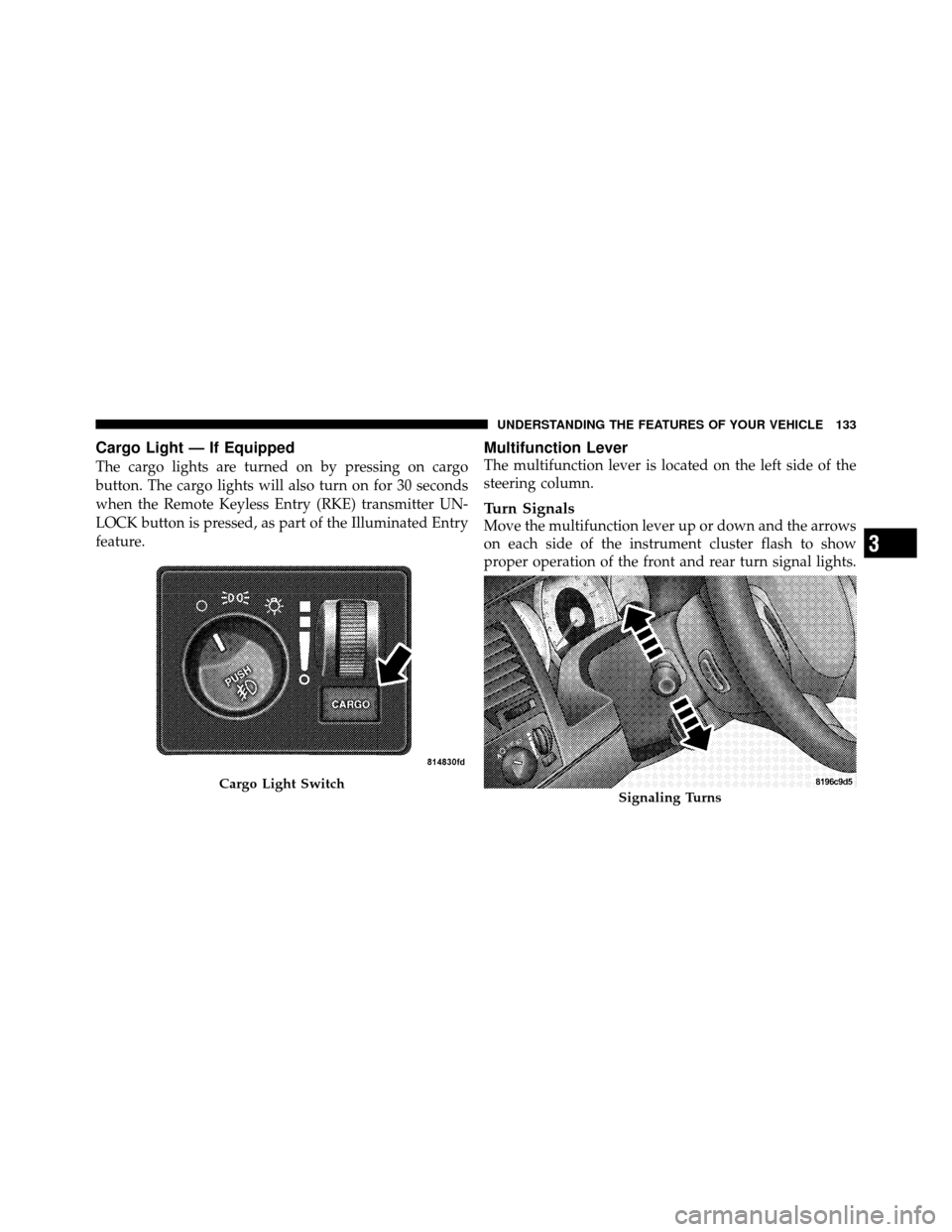
Cargo Light — If Equipped
The cargo lights are turned on by pressing on cargo
button. The cargo lights will also turn on for 30 seconds
when the Remote Keyless Entry (RKE) transmitter UN-
LOCK button is pressed, as part of the Illuminated Entry
feature.
Multifunction Lever
The multifunction lever is located on the left side of the
steering column.
Turn Signals
Move the multifunction lever up or down and the arrows
on each side of the instrument cluster flash to show
proper operation of the front and rear turn signal lights.
Cargo Light SwitchSignaling Turns
3
UNDERSTANDING THE FEATURES OF YOUR VEHICLE 133
Page 140 of 450
simultaneously. If this occurs, the Electronic Speed Con-
trol System can be reactivated by pushing the Electronic
Speed Control ON/OFF button and resetting the desired
vehicle set speed.
To Activate
Push the ON/OFF button to the ON position. In the
instrument cluster, the word “CRUISE” illuminates to
indicate that the system is on.
To Set a Desired Speed
When the vehicle has reached the desired speed, press
and release the SET button. Release the accelerator and
the vehicle will operate at the selected speed.
To Deactivate
A soft tap on the brake pedal, normal braking, or pressing
the CANCEL button will deactivate the speed control
without erasing the memory. Pushing the ON/OFF but-
ton to the OFF position or turning off the ignition erases
the memory.
WARNING!
Leaving the Electronic Speed Control ON when not
in use is dangerous. You could accidentally set the
Electronic Speed Control to cause it to go faster than
you want. You could lose control and have an acci-
dent. Always leave the system OFF when you are not
using it.
To Resume Speed
To resume a previously set speed, push and release the
RESUME button. Resume can be used at any speed above
20 mph (32 km/h).
To Vary the Speed Setting
When the Electronic Speed Control System is ON, the
speed can be increased by pressing and holding the
RESUME/ACCEL button. When the button is released, a
new set speed will be established.
3
UNDERSTANDING THE FEATURES OF YOUR VEHICLE 139
Page 170 of 450
UNDERSTANDING YOUR INSTRUMENT PANEL
CONTENTS
�Instrument Panel Features ............... 172
� Instrument Cluster .................... 173
� Instrument Cluster Descriptions ........... 174
� Electronic Digital Clock ................. 187
▫ Clock Setting Procedure ............... 187
� Media Center 230 (REQ) — AM/FM Stereo
Radio And 6–Disc CD/DVD Changer
(MP3/WMA AUX Jack) .................. 188 ▫
Operating Instructions - Radio Mode ...... 188
▫ Operation Instructions - (Disc Mode For CD
And MP3/WMA Audio Play, DVD-Video) . . . 196
▫ Notes On Playing MP3/WMA Files ....... 198
▫ List Button
(Disc Mode For MP3/WMA Play) ......... 201
▫ Info Button
(Disc Mode For MP3/WMA Play) ......... 201
4
Page 173 of 450
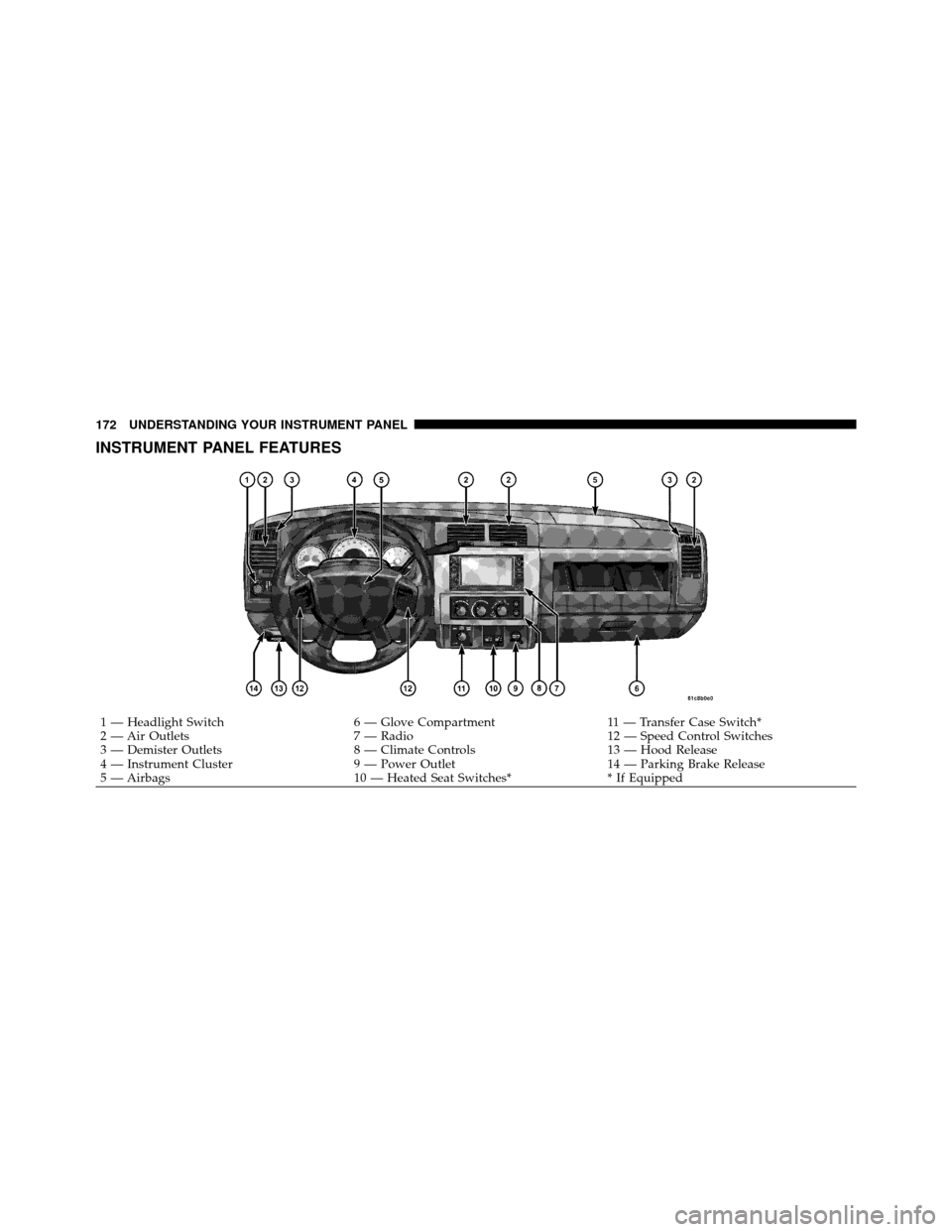
INSTRUMENT PANEL FEATURES
1 — Headlight Switch6 — Glove Compartment11 — Transfer Case Switch*
2 — Air Outlets 7 — Radio12 — Speed Control Switches
3 — Demister Outlets 8 — Climate Controls13 — Hood Release
4 — Instrument Cluster 9 — Power Outlet14 — Parking Brake Release
5 — Airbags 10 — Heated Seat Switches** If Equipped
172 UNDERSTANDING YOUR INSTRUMENT PANEL