Page 155 of 450
General Information
This device complies with FCC rules part 15 and Industry
Canada RSS-210. Operation is subject to the following
two conditions:
1. This device may not cause harmful interference.
2. This device must accept any interference that may be
received including interference that may cause undesired
operation.
NOTE:The transmitter has been tested and it complies
with FCC and IC rules. Changes or modifications not
expressly approved by the party responsible for compli-
ance could void the user ’s authority to operate the
device.
The term “IC” before the certification/registration num-
ber only signifies that Industry Canada technical specifi-
cations were met.
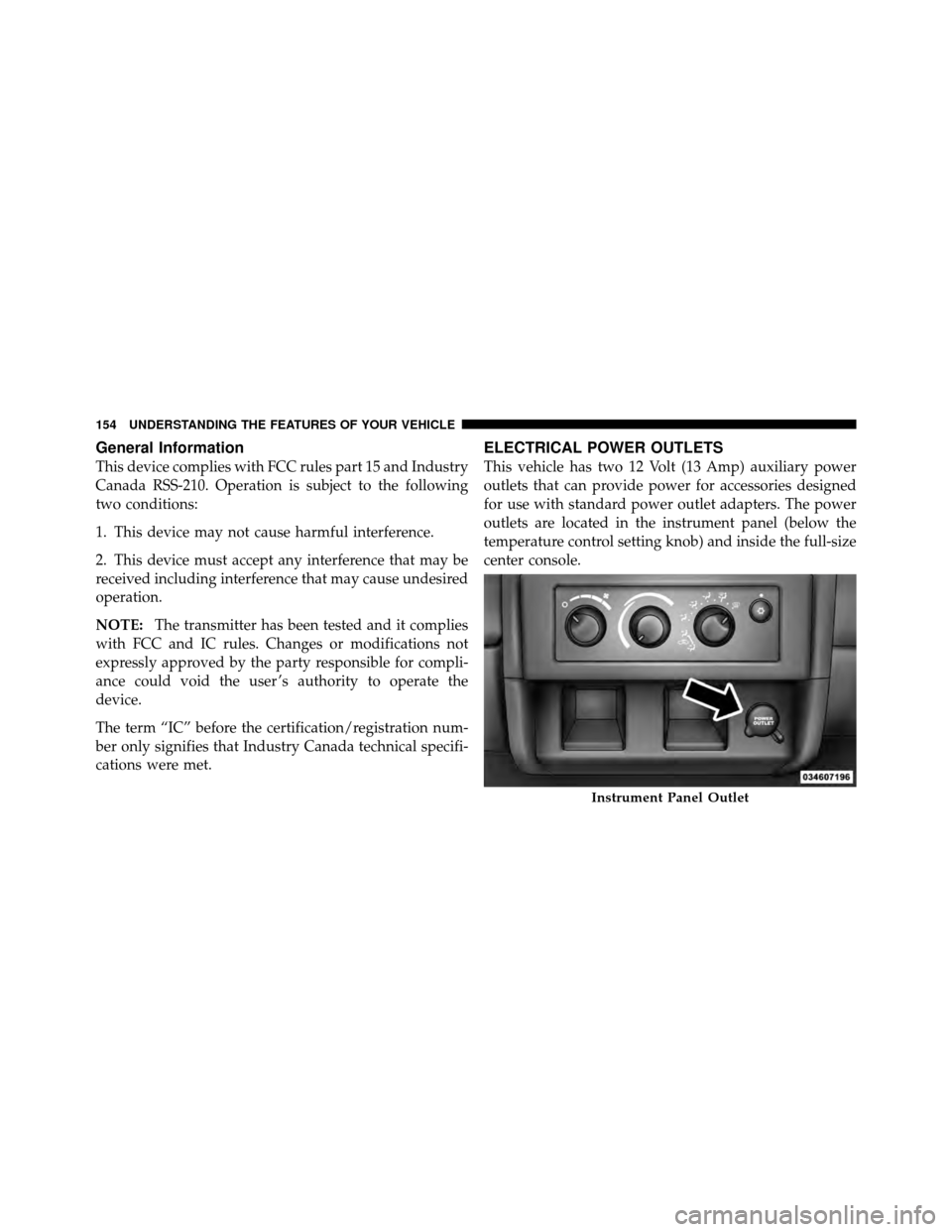
ELECTRICAL POWER OUTLETS
This vehicle has two 12 Volt (13 Amp) auxiliary power
outlets that can provide power for accessories designed
for use with standard power outlet adapters. The power
outlets are located in the instrument panel (below the
temperature control setting knob) and inside the full-size
center console.
Instrument Panel Outlet
154 UNDERSTANDING THE FEATURES OF YOUR VEHICLE
Page 170 of 450
UNDERSTANDING YOUR INSTRUMENT PANEL
CONTENTS
�Instrument Panel Features ............... 172
� Instrument Cluster .................... 173
� Instrument Cluster Descriptions ........... 174
� Electronic Digital Clock ................. 187
▫ Clock Setting Procedure ............... 187
� Media Center 230 (REQ) — AM/FM Stereo
Radio And 6–Disc CD/DVD Changer
(MP3/WMA AUX Jack) .................. 188 ▫
Operating Instructions - Radio Mode ...... 188
▫ Operation Instructions - (Disc Mode For CD
And MP3/WMA Audio Play, DVD-Video) . . . 196
▫ Notes On Playing MP3/WMA Files ....... 198
▫ List Button
(Disc Mode For MP3/WMA Play) ......... 201
▫ Info Button
(Disc Mode For MP3/WMA Play) ......... 201
4
Page 171 of 450

�Media Center 730N/430 (RER/REN/RBZ) —
AM/FM Stereo Radio And CD/DVD/HDD/
NAV — If Equipped .................... 203
▫ Operating Instructions — Voice Command
System — If Equipped ................. 204
▫ Operating Instructions — Uconnect™ phone
— If Equipped ...................... 204
▫
Clock Setting Procedure — RBZ Radio...... 204
▫
Clock Setting Procedure — RER/REN Radio. . 206
� Media Center 130 (RES) — AM/FM Stereo
Radio With CD Player (MP3 AUX Jack) ....... 208
▫ Operating Instructions — Radio Mode ..... 208
▫ Operation Instructions — CD Mode For CD
And MP3 Audio Play ................. 211
▫ Notes On Playing MP3 Files ............ 213▫
Operation Instructions - Auxiliary Mode .... 216
� Media Center 130 (RES/RSC) — AM/FM
Stereo Radio With CD Player (MP3 AUX Jack)
And Sirius Radio ...................... 217
▫ Operating Instructions — Radio Mode ..... 217
▫ Operation Instructions — CD Mode For CD
And MP3 Audio Play ................. 223
▫ Notes On Playing MP3 Files ............ 225
▫ List Button (CD Mode For MP3 Play) ...... 227
▫ Info Button (CD Mode For MP3 Play) ...... 228
� Sound Box Operation ................... 229
� Uconnect™ Multimedia (Satellite Radio) —
If Equipped (REN/REQ/RER/RES/REU/RBZ
Radios Only) ......................... 230
▫ System Activation .................... 230
170 UNDERSTANDING YOUR INSTRUMENT PANEL
Page 189 of 450
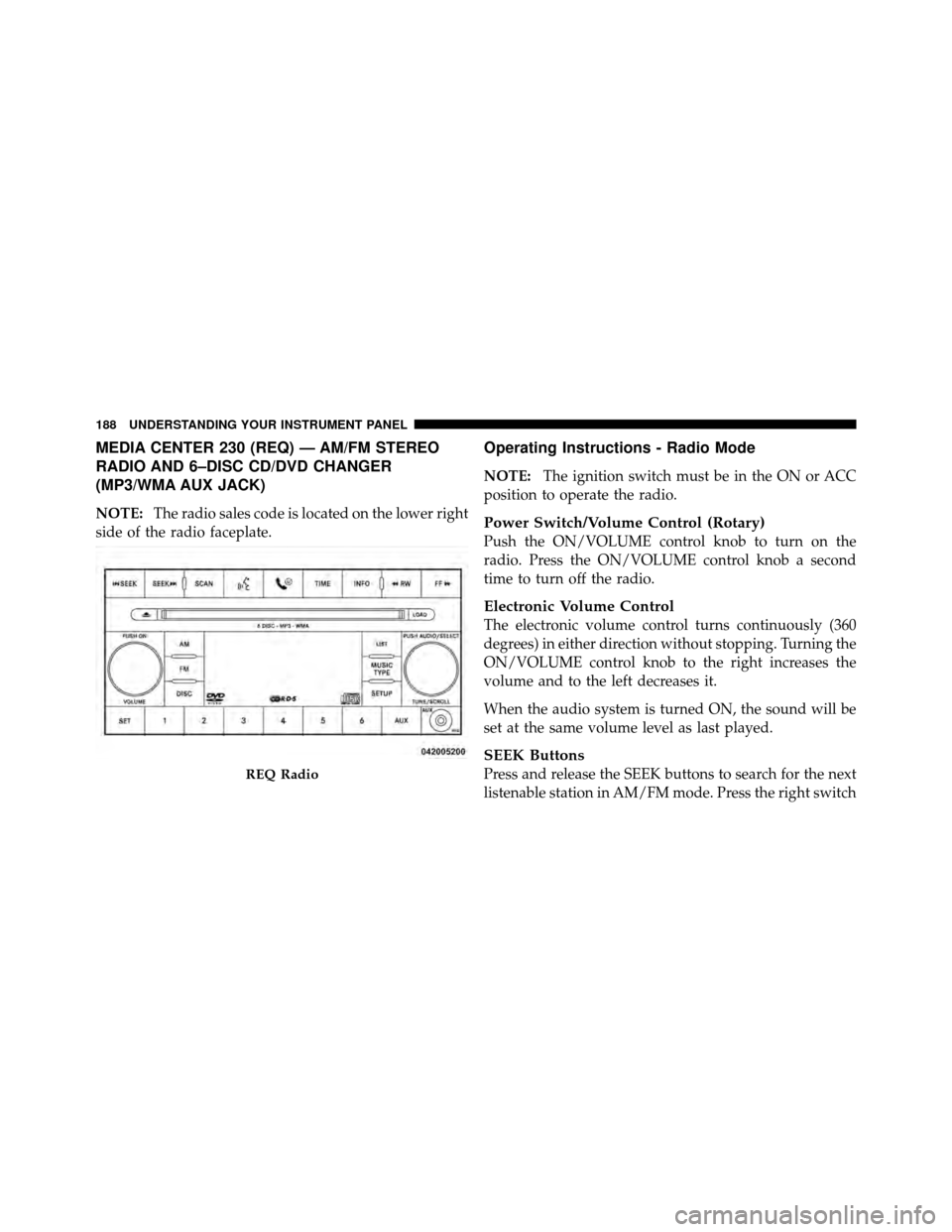
MEDIA CENTER 230 (REQ) — AM/FM STEREO
RADIO AND 6–DISC CD/DVD CHANGER
(MP3/WMA AUX JACK)
NOTE:The radio sales code is located on the lower right
side of the radio faceplate.
Operating Instructions - Radio Mode
NOTE: The ignition switch must be in the ON or ACC
position to operate the radio.
Power Switch/Volume Control (Rotary)
Push the ON/VOLUME control knob to turn on the
radio. Press the ON/VOLUME control knob a second
time to turn off the radio.
Electronic Volume Control
The electronic volume control turns continuously (360
degrees) in either direction without stopping. Turning the
ON/VOLUME control knob to the right increases the
volume and to the left decreases it.
When the audio system is turned ON, the sound will be
set at the same volume level as last played.
SEEK Buttons
Press and release the SEEK buttons to search for the next
listenable station in AM/FM mode. Press the right switchREQ Radio
188 UNDERSTANDING YOUR INSTRUMENT PANEL
Page 202 of 450
LIST Button (DISC Mode for MP3/WMA Play)
Pressing the LIST button will bring up a list of all folders
on the disc. Scrolling up or down the list is done by
turning the TUNE/SCROLL control knob. Selecting a
folder by pressing the TUNE/SCROLL control knob will
begin playing the files contained in that folder (or the
next folder in sequence if the selection does not contain
playable files).
The folder list will time out after five seconds.
INFO Button (DISC Mode for MP3/WMA Play)
Pressing the INFO button repeatedly will scroll through
the following TAG information: Song Title, Artist, File
Name, and Folder Name (if available).
Press the INFO button once more to return to�elapsed
time� priority mode.
Press and hold the INFO button for three seconds or
more and radio will display song titles for each file. Press and hold the INFO button again for three seconds
to return to
�elapsed time� display.
Operation Instructions - Auxiliary Mode
The auxiliary (AUX) jack is an audio input jack which
allows the user to plug in a portable device such as an
MP3/WMA player, cassette player, or microphone and
utilize the vehicle’s audio system to amplify the source
and play through the vehicle speakers.
Pressing the AUX button will change the mode to auxil-
iary device if the AUX jack is connected.
NOTE:The AUX device must be turned on and the
device’s volume set to the proper level. If the AUX audio
is not loud enough, turn the device’s volume up. If the
AUX audio sounds distorted, turn the device’s volume
down.
SEEK Button (Auxiliary Mode)
No function.
4
UNDERSTANDING YOUR INSTRUMENT PANEL 201
Page 203 of 450
SCAN Button (Auxiliary Mode)
No function.
EJECT Button (Auxiliary Mode)
No function.
TIME Button (Auxiliary Mode)
Press the TIME button to change the display from
elapsed playing time to time of day. The time of day will
display for five seconds.
RW/FF (Auxiliary Mode)
No function.
SET Button (Auxiliary Mode)
No function.
Operating Instructions — Voice Command System
(If Equipped)
For the radio, refer to “Voice Command” in “Understand-
ing The Features Of Your Vehicle”.
For Uconnect™ “Voice Command,” refer to “Uconnect™
Phone” in “Understanding The Features Of Your
Vehicle”.
Operating Instructions - Uconnect™ Phone (If
Equipped)
Refer to “Uconnect™ Phone” in “Understanding The
Features Of Your Vehicle”.
Operating Instructions - Uconnect™ Multimedia
(Satellite Radio) (If Equipped)
Refer to “Uconnect™ Multimedia (Satellite Radio)”.
202 UNDERSTANDING YOUR INSTRUMENT PANEL
Page 209 of 450
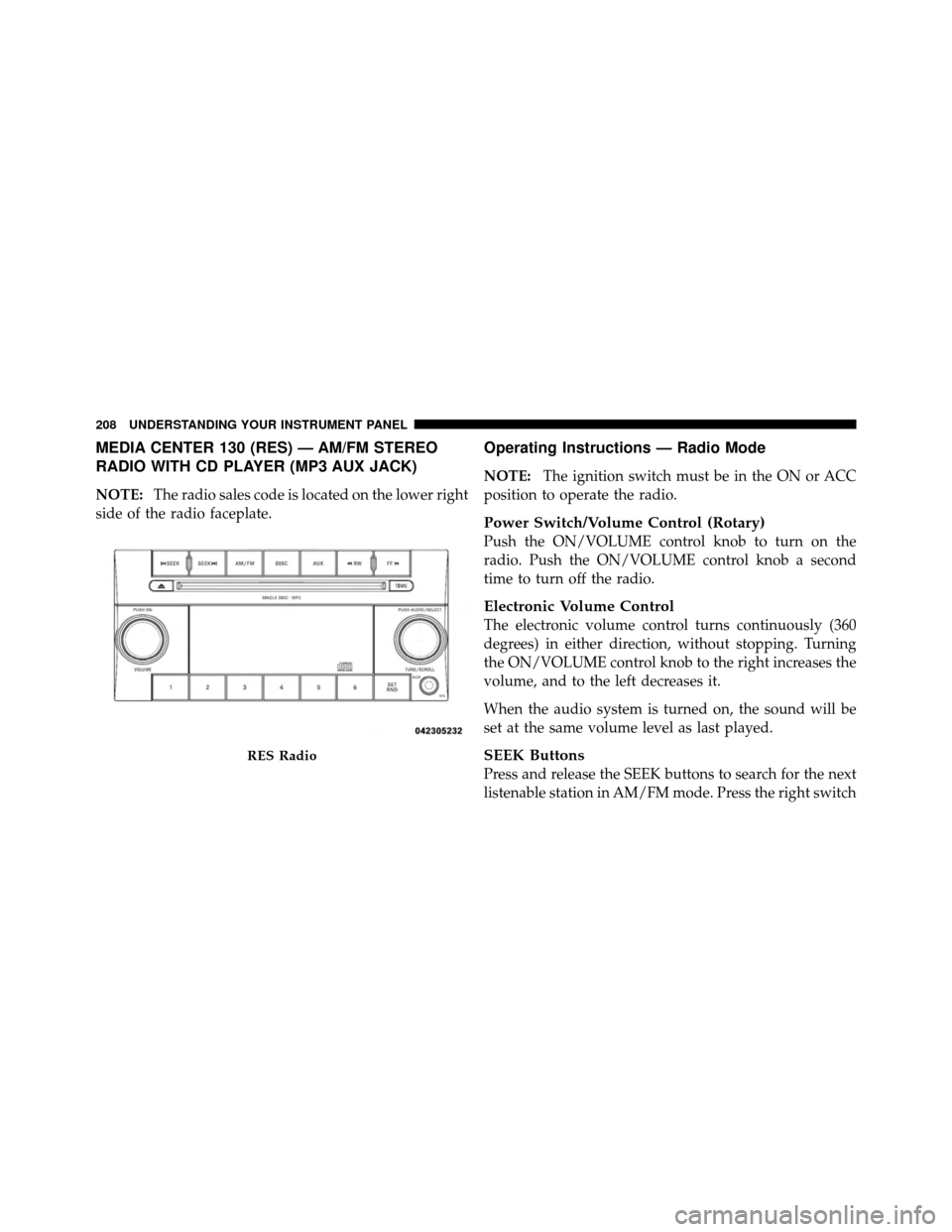
MEDIA CENTER 130 (RES) — AM/FM STEREO
RADIO WITH CD PLAYER (MP3 AUX JACK)
NOTE:The radio sales code is located on the lower right
side of the radio faceplate.
Operating Instructions — Radio Mode
NOTE: The ignition switch must be in the ON or ACC
position to operate the radio.
Power Switch/Volume Control (Rotary)
Push the ON/VOLUME control knob to turn on the
radio. Push the ON/VOLUME control knob a second
time to turn off the radio.
Electronic Volume Control
The electronic volume control turns continuously (360
degrees) in either direction, without stopping. Turning
the ON/VOLUME control knob to the right increases the
volume, and to the left decreases it.
When the audio system is turned on, the sound will be
set at the same volume level as last played.
SEEK Buttons
Press and release the SEEK buttons to search for the next
listenable station in AM/FM mode. Press the right switch
RES Radio
208 UNDERSTANDING YOUR INSTRUMENT PANEL
Page 217 of 450
Playback of MP3 Files
When a medium containing MP3 data is loaded, the
radio checks all files on the medium. If the medium
contains a lot of folders or files, the radio will take more
time to start playing the MP3 files.
Loading times for playback of MP3 files may be affected
by the following:
•Media - CD-RW media may take longer to load than
CD-R media
•Medium formats - Multisession discs may take longer
to load than non-multisession discs
•Number of files and folders - Loading times will
increase with more files and folders
To increase the speed of disc loading, it is recommended
to use CD-R media and single-session discs. To create a
single-session disc, enable the “Disc at Once” option
before writing to the disc.
Operation Instructions - Auxiliary Mode
The auxiliary (AUX) jack is an audio input jack, which
allows the user to plug in a portable device, such as an
MP3 player, or cassette player, and utilize the vehicle’s
audio system to amplify the source and play through the
vehicle speakers.
Pressing the DISC/AUX button will change the mode to
auxiliary device if the AUX jack is connected.
NOTE: The AUX device must be turned on and the
device’s volume set to proper level. If the AUX audio is
not loud enough, turn the device’s volume up. If the AUX
audio sounds distorted, turn the device’s volume down.
TIME Button (Auxiliary Mode)
Press this button to change the display to time of day. The
time of day will display for five seconds (when ignition is
OFF).
216 UNDERSTANDING YOUR INSTRUMENT PANEL