Page 241 of 436
•Insert the ignition key into the ignition switch and
rotate it to the ON position.
•Remove the cup holder liner.
•Insert a key, screwdriver, or finger into the hole at the
front of the cup holder and push and hold the manual
override release lever forward.
•While holding the release lever forward, move the
shift lever from PARK to NEUTRAL.
•Release the manual override.
NOTE: If this occurs, even if the override is successful,
it is recommended that you visit a dealer at your earliest
possible convenience. Your dealer has diagnostic equip-
ment to determine if the problem could recur.
Automatic Transaxle Ignition Interlock System
This system prevents the key from being removed unless
the shift lever is in PARK. It also prevents shifting out of
PARK unless the ignition switch is in the ON position,
and the brake pedal is applied.
NOTE: If a malfunction occurs, the system will trap the
key in the ignition switch lock cylinder to warn you that
this safety feature is inoperable. The engine can be started
and stopped, but the key cannot be removed until you
obtain service.
5
STARTING AND OPERATING 241
Page 245 of 436

LOW — Four-Speed Transaxle
This range should be used for engine braking when
descending very steep grades. In this range, upshifts will
occur only to prevent engine overspeed while downshifts
occur earlier than other gear range selections.
CAUTION!
If the transaxle operating temperature exceeds ac-
ceptable limits, the vehicle computer will override
DRIVE (OVERDRIVE) and [5] for six–speed
AutoStick�transaxle and [3] for four–speed trans-
axle, range by changing shift points. This is done to
prevent transaxle damage due to overheating.
Reset Mode - Electronic Transaxle
The transaxle is monitored electronically for abnormal
conditions. If a condition is detected that could cause
damage, the transaxle automatically shifts into second
gear (third gear for six–speed). The transaxle remains in second gear (third gear for six–speed) despite the for-
ward gear selected. PARK, REVERSE, and NEUTRAL
will continue to operate. The Reset feature allows the
vehicle to be driven to a dealer for service without
damaging the transaxle.
In the event of a momentary problem, the transaxle can
be reset to regain all forward gears by performing the
following steps:
1. Stop the vehicle.
2. Shift the shift lever into PARK.
3. Turn the ignition switch to the LOCK position.
4. Restart the engine.
5. Shift the shift lever into the desired gear range and
resume driving.
5
STARTING AND OPERATING 245
Page 246 of 436

NOTE:Even if the transaxle can be reset, it is recom-
mended that you visit a dealer at your earliest possible
convenience. Your dealer has diagnostic equipment to
determine if the problem could recur.
If the transaxle cannot be reset, dealer service is required.
AUTOSTICK� — IF EQUIPPED
AutoStick�is a driver-interactive transaxle that offers six
manual ratio changes to provide you with more control.
AutoStick� allows you to maximize engine braking,
eliminate undesirable upshifts and downshifts, and im-
prove overall vehicle performance. This system can also
provide you with more control during passing, city
driving, cold slippery conditions, mountain driving,
trailer towing, and many other situations.
Operation
By placing the shift lever one shift-level below the DRIVE
position, it can be moved from side to side. This allows
the driver to select a higher or lower range of gears. Moving the shift lever to the left (-) triggers a downshift
and to the right (+) an upshift. The gear position will
display in the instrument cluster on the transaxle range
indicator.
NOTE:
In Autostick� mode, the transaxle will only shift
up or down when the driver moves the shift lever to the
right (+) or left (-).
AutoStick� is deactivated when the shift lever is moved
from the AutoStick (+/-) position into the DRIVE
position.
General Information
•
You can start out, from a stop, in any gear except sixth.
The system will ignore attempts to upshift at too low
of a vehicle speed.
•If a ratio other than first is selected, and the vehicle is
brought to a stop, the transaxle control logic will
automatically select the first gear ratio.
246 STARTING AND OPERATING
Page 251 of 436

WARNING!
Continued operation with reduced power steering
assist could pose a safety risk to yourself and others.
Service should be obtained as soon as possible.
CAUTION!
Prolonged operation of the steering system at the end
of the steering wheel travel will increase the steering
fluid temperature and it should be avoided when
possible. Damage to the power steering pump may
occur.
Power Steering Fluid Check
Checking the power steering fluid level at a defined
service interval is not required. The fluid should only be
checked if a leak is suspected, abnormal noises areapparent, and/or the system is not functioning as antici-
pated. Coordinate inspection efforts through an autho-
rized dealer.
CAUTION!
Do not use chemical flushes in your power steering
system as the chemicals can damage your power
steering components. Such damage is not covered by
the New Vehicle Limited Warranty.
WARNING!
Fluid level should be checked on a level surface and
with the engine off to prevent injury from moving
parts and to ensure accurate fluid level reading. Do
not overfill. Use only manufacturer’s recommended
power steering fluid.
5
STARTING AND OPERATING 251
Page 253 of 436
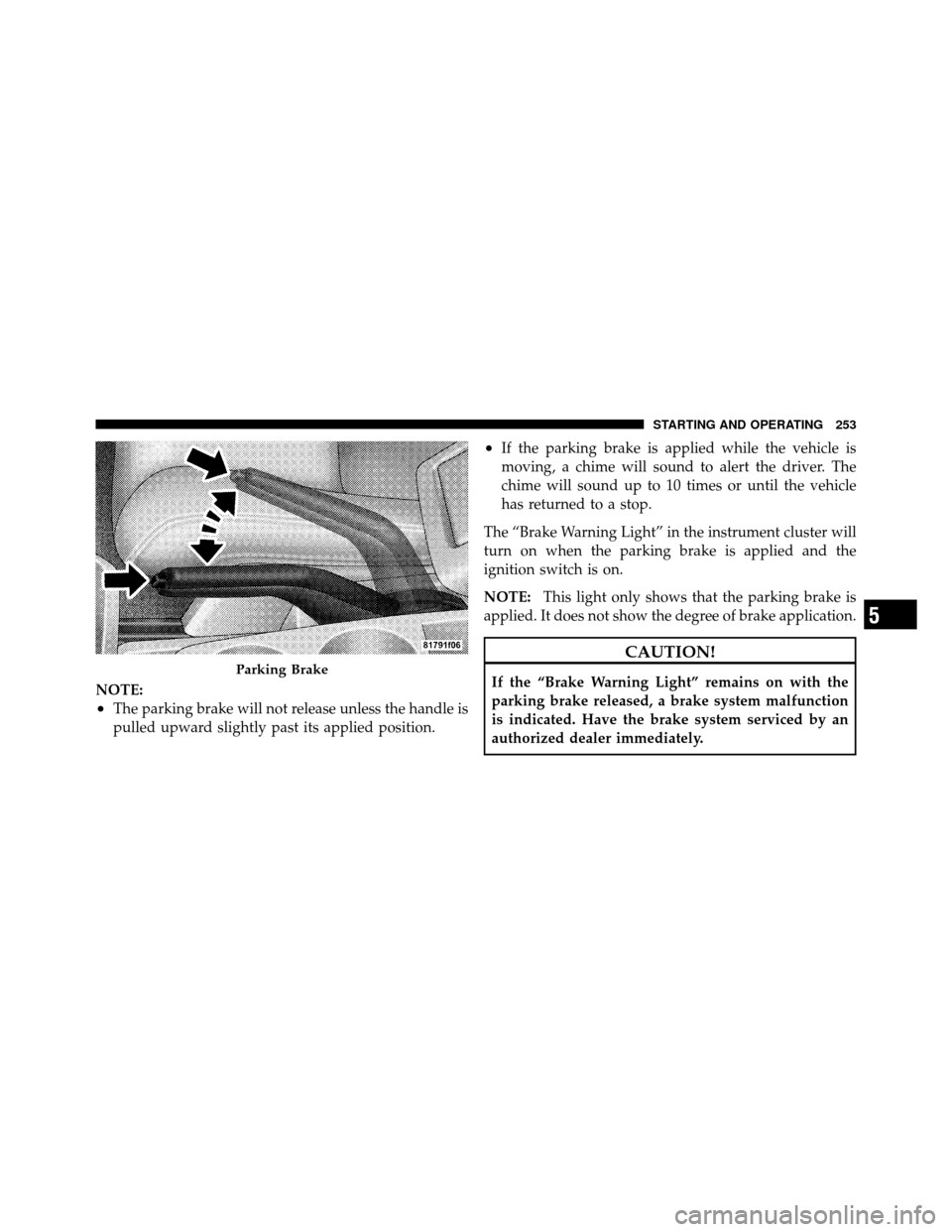
NOTE:
•The parking brake will not release unless the handle is
pulled upward slightly past its applied position.
•If the parking brake is applied while the vehicle is
moving, a chime will sound to alert the driver. The
chime will sound up to 10 times or until the vehicle
has returned to a stop.
The “Brake Warning Light” in the instrument cluster will
turn on when the parking brake is applied and the
ignition switch is on.
NOTE: This light only shows that the parking brake is
applied. It does not show the degree of brake application.
CAUTION!
If the “Brake Warning Light” remains on with the
parking brake released, a brake system malfunction
is indicated. Have the brake system serviced by an
authorized dealer immediately.Parking Brake
5
STARTING AND OPERATING 253
Page 255 of 436
WARNING! (Continued)
•The capabilities of an ABS-equipped vehicle must
never be exploited in a reckless or dangerous
manner, which could jeopardize the user’s safety
or the safety of others.The “Anti-Lock Brake Warning Light” moni-
tors the Anti-Lock Brake System. The light will
come on when the ignition switch is turned to
the ON position and may stay on for as long as
four seconds.
If the “Anti-Lock Brake Warning Light” remains on or
comes on while driving, it indicates that the anti-lock
portion of the brake system is not functioning and that
service is required. However, the conventional brake
system will continue to operate normally if the “Brake
Warning Light” is not on. If the “Anti-Lock Brake Warning Light” is on, the brake
system should be serviced as soon as possible to restore
the benefits of anti-lock brakes. If the “Anti-Lock Brake
Warning Light” does not come on when the ignition
switch is turned to the ON position, have the bulb
repaired as soon as possible.
If both the “Brake Warning Light” and the “Anti-Lock
Brake Warning Light” remain on, the Anti-Lock Brake
(ABS) and Electronic Brake Force Distribution (EBD)
Systems are not functioning. Immediate repair to the ABS
system is required. See your authorized dealer.
When the vehicle is driven over 7 mph (11 km/h), you
may hear a slight clicking sound as well as some related
motor noises. These noises are the system performing its
self-check cycle to ensure that the ABS system is working
properly. This self check occurs each time the vehicle is
started and accelerated past 7 mph (11 km/h).
5
STARTING AND OPERATING 255
Page 264 of 436

TIRE SAFETY INFORMATION
Tire MarkingsNOTE:
•P (Passenger) - Metric tire sizing is based on U.S.
design standards. P-Metric tires have the letter “P”
molded into the sidewall preceding the size designa-
tion. Example: P215/65R15 95H.
•European-Metric tire sizing is based on European
design standards. Tires designed to this standard have
the tire size molded into the sidewall beginning with
the section width. The letter�P�is absent from this tire
size designation. Example: 215/65R15 96H.
•LT (Light Truck) - Metric tire sizing is based on U.S.
design standards. The size designation for LT-Metric
tires is the same as for P-Metric tires except for the
letters “LT” that are molded into the sidewall preced-
ing the size designation. Example: LT235/85R16.
•Temporary spare tires are high-pressure compact
spares designed for temporary emergency use only.
Tires designed to this standard have the letter “T”
molded into the sidewall preceding the size designa-
tion. Example: T145/80D18 103M.1 — U.S. DOT Safety Stan-
dards Code (TIN) 4 — Maximum Load
2 — Size Designation 5 — Maximum Pressure
3 — Service Description 6 — Treadwear, Traction and Temperature Grades
264 STARTING AND OPERATING
Page 266 of 436
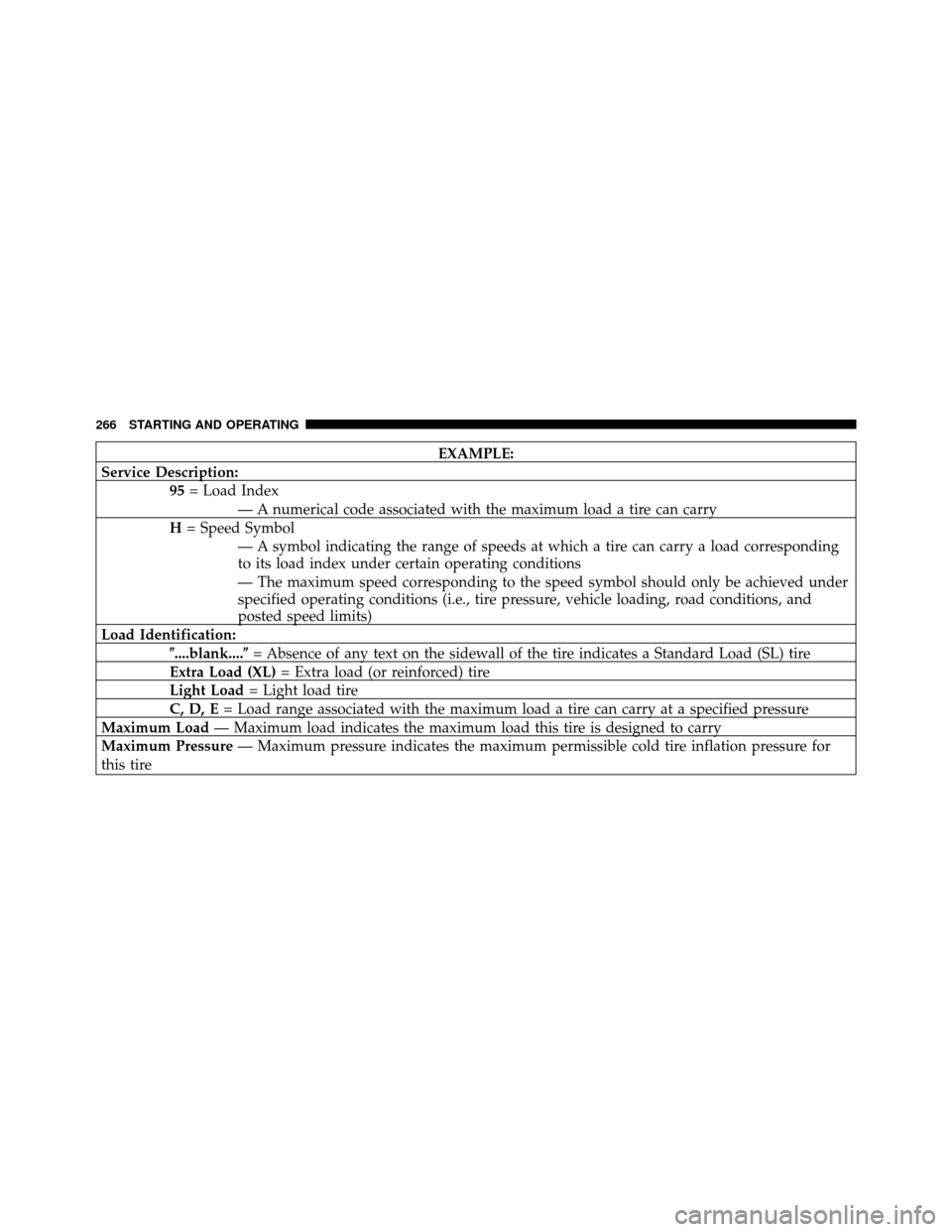
EXAMPLE:
Service Description: 95= Load Index
— A numerical code associated with the maximum load a tire can carry
H = Speed Symbol
— A symbol indicating the range of speeds at which a tire can carry a load corresponding
to its load index under certain operating conditions
— The maximum speed corresponding to the speed symbol should only be achieved under
specified operating conditions (i.e., tire pressure, vehicle loading, road conditions, and
posted speed limits)
Load Identification: �....blank....� = Absence of any text on the sidewall of the tire indicates a Standard Load (SL) tire
Extra Load (XL) = Extra load (or reinforced) tire
Light Load = Light load tire
C, D, E = Load range associated with the maximum load a tire can carry at a specified pressure
Maximum Load — Maximum load indicates the maximum load this tire is designed to carry
Maximum Pressure — Maximum pressure indicates the maximum permissible cold tire inflation pressure for
this tire
266 STARTING AND OPERATING