Page 153 of 436

16. Odometer/Trip Odometer Reset Button
Single Trip Odometer
Press and release this button to change the display from
odometer to trip odometer. The word “Trip” displays to
show that the odometer is in Trip Mode. Press and release
the button again to change the display back to the
odometer.
To reset the trip odometer, first set the display to Trip
Mode. Then push and hold the button (approximately
2 seconds) until the display resets to 0 miles (km). The
odometer must be in Trip Mode to reset the trip odom-
eter.
Dual Trip Odometer — If Equipped
Press and release this button to change the display from
odometer to “Trip A.” Press and release it a second time
to change the display to “Trip B.” Press and release it a
third time to change the display back to the odometer.To reset the trip odometer, first display the trip mileage
that you want to reset, “Trip A” or “Trip B.” Then push
and hold the button (approximately 2 seconds) until the
display resets to 0 miles (km). The odometer must be in
Trip Mode to reset the trip odometer.
17. Electronic Throttle Control (ETC) Indicator Light
This light informs you of a problem with the
Electronic Throttle Control (ETC) system. If a
problem is detected, the light will come on
while the engine is running. If the light remains
lit with the engine running, your vehicle will usually be
drivable and not need towing, however see your autho-
rized dealer for service as soon as possible.
If the light is flashing when the engine is running you
may experience power loss, an elevated/rough idle, and
increased brake pedal effort, and your vehicle may
require towing. Immediate service is required.
4
UNDERSTANDING YOUR INSTRUMENT PANEL 153
Page 155 of 436

the conventional brake system will continue to operate
normally provided that the BRAKE warning light is not
on.
If the ABS light is on, the brake system should be serviced
as soon as possible to restore the benefit of Anti-Lock
Brakes.
The ABS warning light should be checked frequently to
assure that it is operating properly. Turn the ignition key
to the on position, but do not start the vehicle. The light
should come on. If the light does not come on, have the
system inspected by an authorized dealer.
24. Electronic Stability Control (ESC) Malfunction
Indicator Light — If EquippedThe “ESC Indicator Light” in the instrument
cluster will come on when the ignition switch
is turned to the ON position. It should go out
with the engine running. If the “ESC Indicator
Light” comes on continuously with the engine running, a malfunction has been detected in the ESC system. If this
light remains on after several ignition cycles, and the
vehicle has been driven several miles (kilometers) at
speeds greater than 30 mph (48 km/h), see your autho-
rized dealer as soon as possible to have the problem
diagnosed and corrected.
NOTE:
•The “ESC Indicator Light” come on momentarily each
time the ignition switch is turned ON.
•Each time the ignition is turned ON, the ESC system
will be ON even if it was turned off previously.
•The ESC system will make buzzing or clicking sounds
when it is active. This is normal; the sounds will stop
when ESC becomes inactive following the maneuver
that caused the ESC activation.
4
UNDERSTANDING YOUR INSTRUMENT PANEL 155
Page 157 of 436
TPMS malfunction telltale after replacing one or more
tires or wheels on your vehicle, to ensure that the
replacement or alternate tires and wheels allow the TPMS
to continue to function properly.
CAUTION!
The TPMS has been optimized for the original
equipment tires and wheels. TPMS pressures and
warning have been established for the tire size
equipped on your vehicle. Undesirable system opera-
tion or sensor damage may result when using re-
placement equipment that is not of the same size,
type, and/or style. Aftermarket wheels can cause
sensor damage. Do not use tire sealant from a can, or
balance beads if your vehicle is equipped with a
TPMS, as damage to the sensors may result.26. Malfunction Indicator Light (MIL)
The Malfunction Indicator Light (MIL) is part of
an onboard diagnostic system called OBD that
monitors emissions, engine, and automatic trans-
axle control systems. The light will illuminate when the
key is in the ON position before engine start. If the bulb
does not come on when turning the key from LOCK to
ON, have the condition checked promptly.
Certain conditions such as a loose or missing gas cap,
poor fuel quality, etc., may illuminate the light after
engine start. The vehicle should be serviced if the light
stays on through several of your typical driving cycles. In
most situations, the vehicle will drive normally and will
not require towing.4
UNDERSTANDING YOUR INSTRUMENT PANEL 157
Page 158 of 436

CAUTION!
Prolonged driving with the MIL on could cause
damage to the engine control system. It also could
affect fuel economy and drivability. If the MIL is
flashing, severe catalytic converter damage and
power loss will soon occur. Immediate service is
required.
WARNING!
A malfunctioning catalytic converter, as referenced
above, can reach higher temperatures than in normal
operating conditions. This can cause a fire if you
drive slowly or park over flammable substances such
as dry plants or wood or cardboard, etc. This could
result in death or serious injury to the driver, occu-
pants or others.27. Transmission Temperature Indicator — If Equipped
During sustained high speed driving on hot
days, the automatic transmission oil may be-
come too hot. If this happens, the transmission
overheat indicator light will come on and the
vehicle will slow slightly until the automatic transmis-
sion cools down enough to allow a return to the re-
quested speed. If the high speed is maintained, the
overheating will reoccur as before in a cyclic fashion.
CAUTION!
Continuous driving with the Transmission Tempera-
ture Indicator illuminated will eventually cause se-
vere transmission damage or transmission failure.
158 UNDERSTANDING YOUR INSTRUMENT PANEL
Page 159 of 436
WARNING!
In some circumstances a Transmission Temperature
Indicator, under continued operation, could cause the
fluid to boil over, come in contact with hot engine or
exhaust components and cause a fire.
28. High Beam Indicator This light indicates that the headlights are on high
beam. Pull the turn signal lever toward the steer-
ing wheel to switch the headlights to low beam.
29. Electronic Vehicle Information Center (EVIC)
Display — If Equipped
This display shows the EVIC messages when the appro-
priate conditions exist. Refer to “Electronic Vehicle Infor-
mation Center (EVIC)” in this section for more
information.
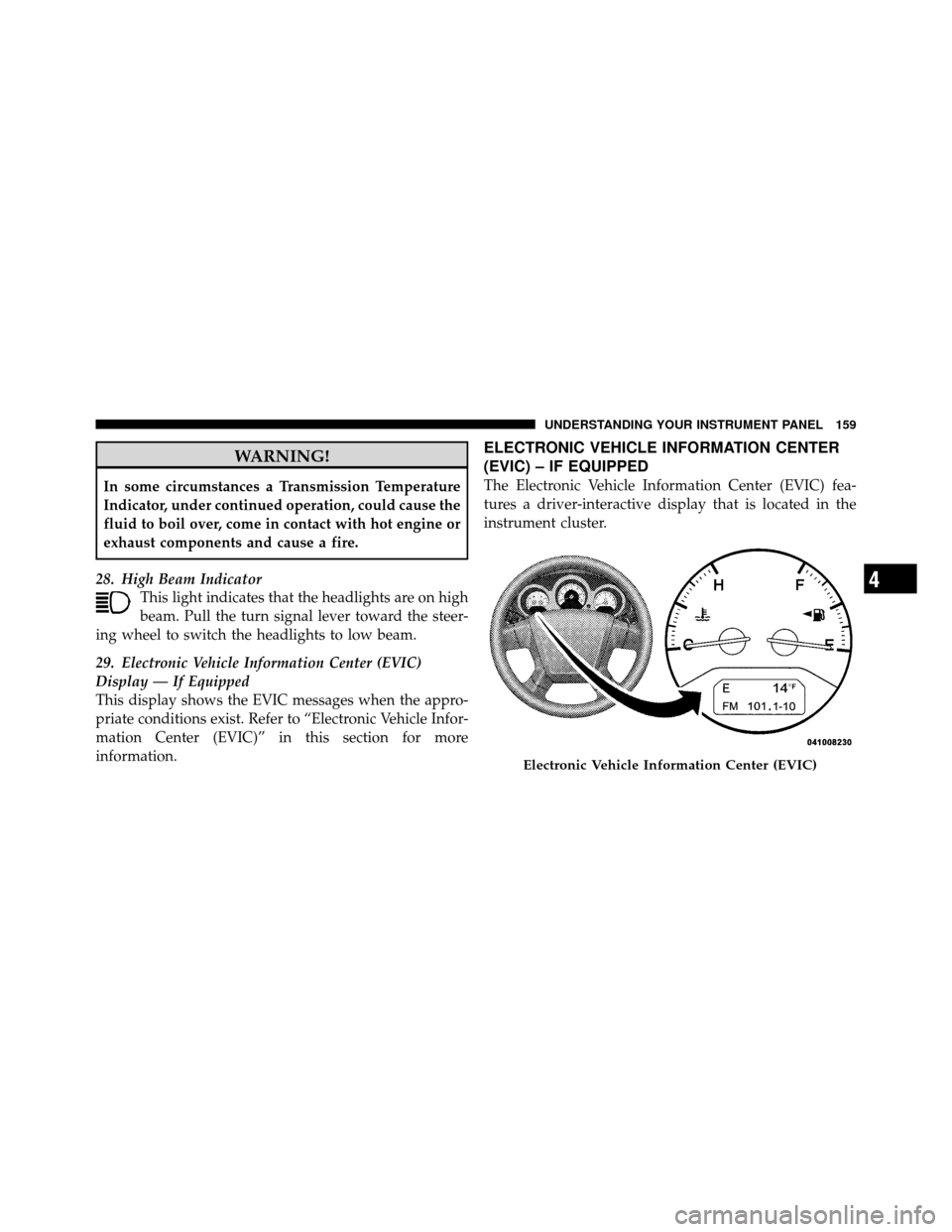
ELECTRONIC VEHICLE INFORMATION CENTER
(EVIC) – IF EQUIPPED
The Electronic Vehicle Information Center (EVIC) fea-
tures a driver-interactive display that is located in the
instrument cluster.
Electronic Vehicle Information Center (EVIC)
4
UNDERSTANDING YOUR INSTRUMENT PANEL 159
Page 162 of 436

Oil Change Required
Your vehicle is equipped with an engine oil change
indicator system. The Oil Change Required message will
flash in the EVIC display for approximately five seconds
after a single chime has sounded to indicate the next
scheduled oil change interval. The engine oil change
indicator system is duty cycle based, which means the
engine oil change interval may fluctuate dependent upon
your personal driving style.
Unless reset, this message will continue to display each
time you turn the ignition switch to the ON/RUN
position. To turn off the message temporarily, press and
release the MENU button. To reset the oil change indica-
tor system (after performing the scheduled maintenance)
perform the following procedure:
1. Turn the ignition switch to the ON position (Do not
start the engine).2. Fully depress the accelerator pedal slowly three times
within 10 seconds.
3. Turn the ignition switch to the LOCK position.
NOTE:
If the indicator message illuminates when you
start the vehicle, the oil change indicator system did not
reset. If necessary repeat this procedure.
Trip Functions
Press and release the MENU button until one of the
following Trip Functions displays in the EVIC:
•ECO (Fuel Saver Indicator) — If Equipped
•Average Fuel Economy
•Distance To Empty
•Elapsed Time
•Display Units of Measure in
162 UNDERSTANDING YOUR INSTRUMENT PANEL
Page 165 of 436
NOTE:A good calibration requires a level surface and
an environment free from large metallic objects such as
buildings, bridges, underground cables, railroad tracks,
etc.
Manual Compass Calibration
If the compass appears erratic or inaccurate, and the
variance has been properly set, you may wish to manu-
ally recalibrate the compass. To manually calibrate the
compass:
1. Start the engine. Leave the shift lever in PARK in order
to enter the EVIC Programming Menus.
2. Press and release the MENU button until “Personal
Settings” displays in the EVIC.
3. Press and release the STEP button until “Calibrate
Compass Yes” displays in the EVIC. 4. Press and release the RESET button and the “CAL”
indicator will quit flashing.
5. Drive the vehicle slowly (under 5 mph / 8 km/h),
completing one or more circles (in an area free from large
metal or metallic objects) until the “CAL” indicator turns
off. The compass will now function normally.
Compass Variance
Compass Variance is the difference between Magnetic
North and Geographic North. To compensate for the
differences, the variance should be set for the zone where
the vehicle is driven, per the zone map. Once properly
set, the compass will automatically compensate for the
differences and provide the most accurate compass head-
ing.4
UNDERSTANDING YOUR INSTRUMENT PANEL 165
Page 185 of 436
Operating Instructions - uconnect™ phone (If
Equipped)
Refer to “uconnect™ phone” in the uconnect™ User
Manual located on the DVD for further details.
Operating Instructions - uconnect™ studios
(Satellite Radio) (If Equipped)
Refer to “uconnect™ studios (Satellite Radio)” in the
uconnect™ User Manual located on the DVD for further
details.
Operating Instructions - Video Entertainment
System (VES)™ (If Equipped)
Refer to “Video Entertainment System (VES)™” in the
uconnect™ User Manual located on the DVD for further
details.Dolby�
Manufactured under license from Dolby�
Laboratories.
�Dolby�� and the double-D symbol are trademarks of
Dolby� Laboratories.
Macrovision
This product incorporates copyright protection technol-
ogy that is protected by U.S. patents and other intellec-
tual property rights. Use of this copyright protection
technology must be authorized by Macrovision, and is
intended for home and other limited viewing uses only,
unless otherwise authorized by Macrovision. Reverse
engineering or disassembly is prohibited.
DTS™
�DTS™� and�DTS™ 2.0� are trademarks of Digital The-
ater Systems, Inc.
4
UNDERSTANDING YOUR INSTRUMENT PANEL 185