Page 140 of 444
UNDERSTANDING YOUR INSTRUMENT PANEL
CONTENTS
�Instrument Panel Features ............... 143
� Instrument Cluster .................... 144
� Instrument Cluster Descriptions ........... 145
� Electronic Vehicle Information Center (EVIC) –
If Equipped .......................... 158
▫ Electronic Vehicle Information Center (EVIC)
Displays ........................... 160
▫ Oil Change Required — If Equipped ...... 161
▫ Trip Functions ...................... 162
▫ Compass Display .................... 163 ▫
Personal Settings
(Customer-Programmable Features) ....... 166
� Setting The Analog Clock ................ 169
� Media Center 230 (REQ) — AM/FM Stereo
Radio And 6–Disc CD/DVD Changer
(MP3/WMA AUX Jack) .................. 169
▫ Operating Instructions - Radio Mode ...... 170
▫ Operation Instructions - (Disc Mode For CD
And MP3/WMA Audio Play, DVD-Video) . . . 178
▫ Notes On Playing MP3/WMA Files ....... 180
4
Page 141 of 444

▫List Button
(Disc Mode For MP3/WMA Play) ......... 182
▫ Info Button
(Disc Mode For MP3/WMA Play) ......... 183
� Media Center 730N/430 (RER/REN/RBZ) —
AM/FM Stereo Radio And CD/DVD/HDD/
NAV — If Equipped .................... 185
▫ Operating Instructions — Voice Command
System — If Equipped ................. 185
▫ Operating Instructions —
Uconnect™ Phone — If Equipped ........ 185
▫ Clock Setting Procedure — RBZ Radio ..... 186
▫ Clock Setting Procedure —
RER/REN Radio ..................... 187 �
Media Center 130 (RES) — AM/FM Stereo
Radio With CD Player (MP3 AUX Jack) ....... 189
▫ Operating Instructions — Radio Mode ..... 190
▫ Operation Instructions — CD Mode For CD
And MP3 Audio Play ................. 193
▫ Notes On Playing MP3 Files ............ 195
▫ Operation Instructions - Auxiliary Mode .... 197
� Media Center 130 (RES/RSC) — AM/FM
Stereo Radio With CD Player (MP3 AUX Jack)
And Sirius Radio ...................... 198
▫ Operating Instructions — Radio Mode ..... 198
▫ Operation Instructions — CD Mode For CD
And MP3 Audio Play ................. 204
▫ Notes On Playing MP3 Files ............ 206
▫ List Button (CD Mode For MP3 Play) ...... 209
140 UNDERSTANDING YOUR INSTRUMENT PANEL
Page 142 of 444

▫Info Button (CD Mode For MP3 Play) ...... 209
▫ Operating Instructions - Uconnect™ Phone
(If Equipped) ....................... 210
� Uconnect™ Multimedia (Satellite Radio) —
If Equipped (REN/REQ/RER/RBZ/RES
Radios Only) ......................... 210
▫ System Activation .................... 211
▫ Electronic Serial Number/Sirius
Identification Number (ESN/SID) ......... 211
▫ Selecting Uconnect™ Multimedia (Satellite)
Mode ............................. 211
▫ Satellite Antenna ..................... 212
▫ Reception Quality .................... 212 ▫
Operating Instructions - Uconnect™
Multimedia (Satellite) Mode ............. 212
▫ Operating Instructions - Uconnect™ Phone
(If Equipped) ....................... 214
� Video Entertainment System (VES)™ —
If Equipped .......................... 214
� Remote Sound System Controls —
If Equipped .......................... 216
▫ Right-Hand Switch Functions ............ 217
▫ Left-Hand Switch Functions For Radio
Operation .......................... 217
▫ Left-Hand Switch Functions For Media
(i.e., CD) Operation ................... 218
4
UNDERSTANDING YOUR INSTRUMENT PANEL 141
Page 143 of 444
�CD/DVD Disc Maintenance .............. 218
� Radio Operation And Cellular Phones ....... 219
� Climate Controls ...................... 219
▫ Manual Heating And Air Conditioning ..... 219▫
Automatic Temperature Control (ATC) —
If Equipped ........................ 223
▫ Operating Tips ...................... 229
142 UNDERSTANDING YOUR INSTRUMENT PANEL
Page 144 of 444
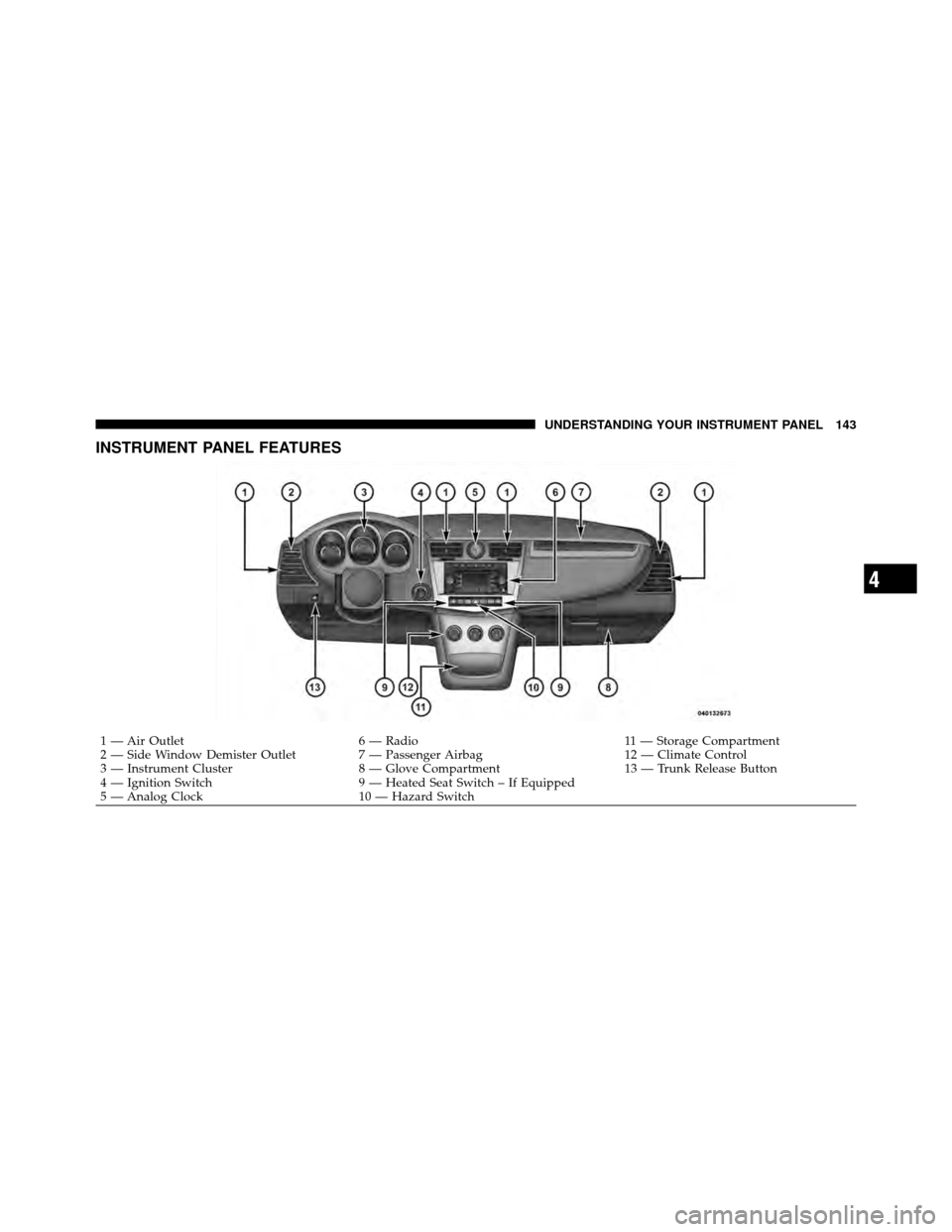
INSTRUMENT PANEL FEATURES
1 — Air Outlet6 — Radio 11 — Storage Compartment
2 — Side Window Demister Outlet 7 — Passenger Airbag 12 — Climate Control
3 — Instrument Cluster 8 — Glove Compartment 13 — Trunk Release Button
4 — Ignition Switch 9 — Heated Seat Switch – If Equipped
5 — Analog Clock 10 — Hazard Switch
4
UNDERSTANDING YOUR INSTRUMENT PANEL 143
Page 160 of 444
The EVIC consists of the following:
•System status
•Vehicle information warning message displays
•Personal Settings (Customer-Programmable Features)
•Compass heading display (N, S, E, W, NE, NW, SE,
SW)
•Outside temperature display (°F or °C)
•Trip computer functions
•Audio mode displays – 12 preset Radio Stations or CD
Title and Track number when playing
•Tire Pressure Monitor System (TPMS) displays (if
equipped)
The system allows the driver to select information by
pressing the following buttons on the instrument panel
switch bank located below the climate controls: Press and release the MENU button to advance
the display to Trip Functions or Personal set-
tings or to return to the default System status
display.
Electronic Vehicle Information Center (EVIC)
MENUButton
4
UNDERSTANDING YOUR INSTRUMENT PANEL 159
Page 169 of 444

headlights will also turn off when the wipers are turned
off if they were turned on by this feature. To make your
selection, press and hold the RESET button until ON or
OFF appears.
NOTE:Turning the headlights on during the daytime
causes the instrument panel lights to dim. To increase the
brightness, refer to “Lights” in “Understanding The
Features Of Your Vehicle”.
Key-Off Power Delay
When this feature is selected, the power window
switches, radio, Uconnect™ Phone (if equipped), and
power outlets will remain active for up to 10 minutes
after the ignition switch is turned to the LOCK position.
Opening a vehicle door will cancel this feature. To make
your selection, press and hold the RESET button until
Off, 45 sec., 5 min., or 10 min. appears.
Illuminated Approach
When this feature is selected, the headlights will activate
and remain on for up to 90 seconds when the doors are
unlocked with the remote keyless entry transmitter. To
make your selection, press and hold the RESET button
until “OFF,” “30 sec,” “60 sec,” or “90 sec” appears.
Display ECO — If Equipped
The “ECO” message is located in the EVIC, this message
can be turned on or off. To make your selection, press and
release the FUNCTION SELECT button until “ON” or
“OFF” appears.
Display Units In
The EVIC and odometer can be changed between English
and Metric units of measure. To make your selection,
press and release the RESET button until “ENGLISH” or
“METRIC” appears.
168 UNDERSTANDING YOUR INSTRUMENT PANEL
Page 170 of 444
SETTING THE ANALOG CLOCK
To set the analog clock, located at the top center of the
instrument panel, press and hold the button in until the
setting is correct. The clock will adjust slowly at first and
then quicker the longer the button is held.
MEDIA CENTER 230 (REQ) — AM/FM STEREO
RADIO AND 6–DISC CD/DVD CHANGER
(MP3/WMA AUX JACK)
NOTE:The radio sales code is located on the lower right
side of the radio faceplate.
Media Center 230 (REQ)
4
UNDERSTANDING YOUR INSTRUMENT PANEL 169