Page 61 of 444
5.If the airbag system in this vehicle needs to be
modified to accommodate a disabled person, contact
the Customer Center. Phone numbers are provided
under �If You Need Assistance�.
WARNING!
•Relying on the airbags alone could lead to more
severe injuries in a collision. The airbags work with
your seat belt to restrain you properly. In some
collisions, the airbags won’t deploy at all. Always
wear your seat belts even though you have airbags.
•Being too close to the steering wheel or instrument
panel during Advanced Front Airbag deployment
could cause serious injury, including death. Air-
bags need room to inflate. Sit back, comfortably
extending your arms to reach the steering wheel or
instrument panel.
(Continued)
WARNING! (Continued)
•Side airbags also need room to inflate. Do not lean
against the door or window. Sit upright in the
center of the seat.
Airbag Deployment Sensors and Controls
Occupant Restraint Controller (ORC)
TheORC is part of a Federally regulated safety system
required for this vehicle.
The ORC determines if deployment of the front and/or
side airbags in a frontal or side collision is required.
Based on the impact sensors signals, a central electronic
ORC deploys the Advanced Front Airbags, SABIC air-
bags — if equipped, Supplemental Seat-Mounted Side
Airbags — if equipped, and front seat belt pretensioners
— if equipped, as required, depending on the severity
and type of impact.
60 THINGS TO KNOW BEFORE STARTING YOUR VEHICLE
Page 86 of 444
UNDERSTANDING THE FEATURES OF YOUR VEHICLE
CONTENTS
�Mirrors .............................. 89
▫ Inside Day/Night Mirror ................ 89
▫ Automatic Dimming Mirror — If Equipped . . . 90
▫ Power Mirrors ....................... 90
▫ Adjusting Sideview Mirrors .............. 91
▫ Illuminated Vanity Mirrors — If Equipped . . . 92
� Uconnect™ Phone — If Equipped ........... 93
� Voice Command — If Equipped ............ 93�
Seats ............................... 93
▫ Manual Front Seat Adjustment ............ 94
▫ Driver Seat Manual Height Adjuster —
If Equipped ......................... 94
▫ Reclining Bucket Seats .................. 95
▫ Lumbar Support — If Equipped ........... 96
▫ Power Seats — If Equipped .............. 97
▫ Adjusting Active Head Restraints .......... 98
▫ Heated Seats — If Equipped ............ 101
3
Page 94 of 444
Uconnect™ Phone — IF EQUIPPED
Uconnect™ Phone is a hands-free system that allows you
to use voice commands to dial a phone number stored
in your cellular phone. Press the Uconnect™ Phone
button
on the radio or steering wheel controls (if
equipped) and follow the instructions to pair the cellular
phone.
Refer to “Uconnect™ Phone” in the Uconnect™ User
Manual located on the DVD for further details.
VOICE COMMAND — IF EQUIPPED
Voice Command can be initiated by pressing the VR
button
located on the radio or steering wheel
controls (if equipped).
Refer to “Voice Command” in the Uconnect™ Phone
User Manual located on the DVD for further details.
SEATS
Seats are a primary part of the Occupant Restraint System
of the vehicle. They need to be used properly for safe
operation of the vehicle.
WARNING!
•DO NOT allow people to ride in any area of your
vehicle that is not equipped with seats and seat
belts. In a collision, people riding in these areas
are more likely to be seriously injured or killed.
•Be sure everyone in your vehicle is in a seat and
using a seat belt properly.
3
UNDERSTANDING THE FEATURES OF YOUR VEHICLE 93
Page 132 of 444
CAUTION!
•Many accessories that can be plugged in draw
power from the vehicle’s battery, even when not in
use (i.e., cellular phones, etc.). Eventually, if
plugged in long enough, the vehicle’s battery will
discharge sufficiently to degrade battery life
and/or prevent the engine from starting.
•Accessories that draw higher power (i.e., coolers,
vacuum cleaners, lights, etc.) will degrade the
battery even more quickly. Only use these inter-
mittently and with greater caution.
•After the use of high power draw accessories, or
long periods of the vehicle not being started (with
accessories still plugged in), the vehicle must be
driven a sufficient length of time to allow the
generator to recharge the vehicle’s battery.
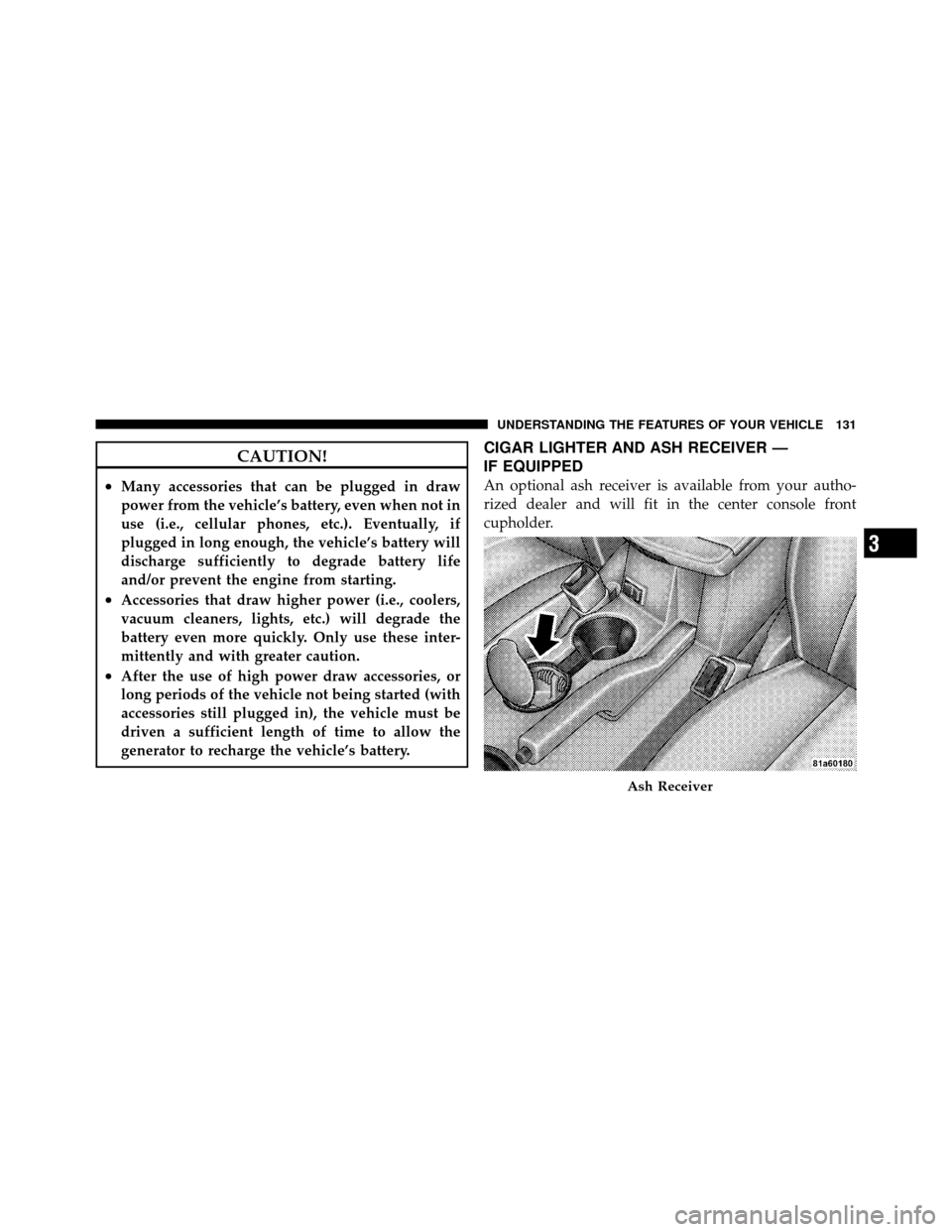
CIGAR LIGHTER AND ASH RECEIVER —
IF EQUIPPED
An optional ash receiver is available from your autho-
rized dealer and will fit in the center console front
cupholder.
Ash Receiver
3
UNDERSTANDING THE FEATURES OF YOUR VEHICLE 131
Page 137 of 444
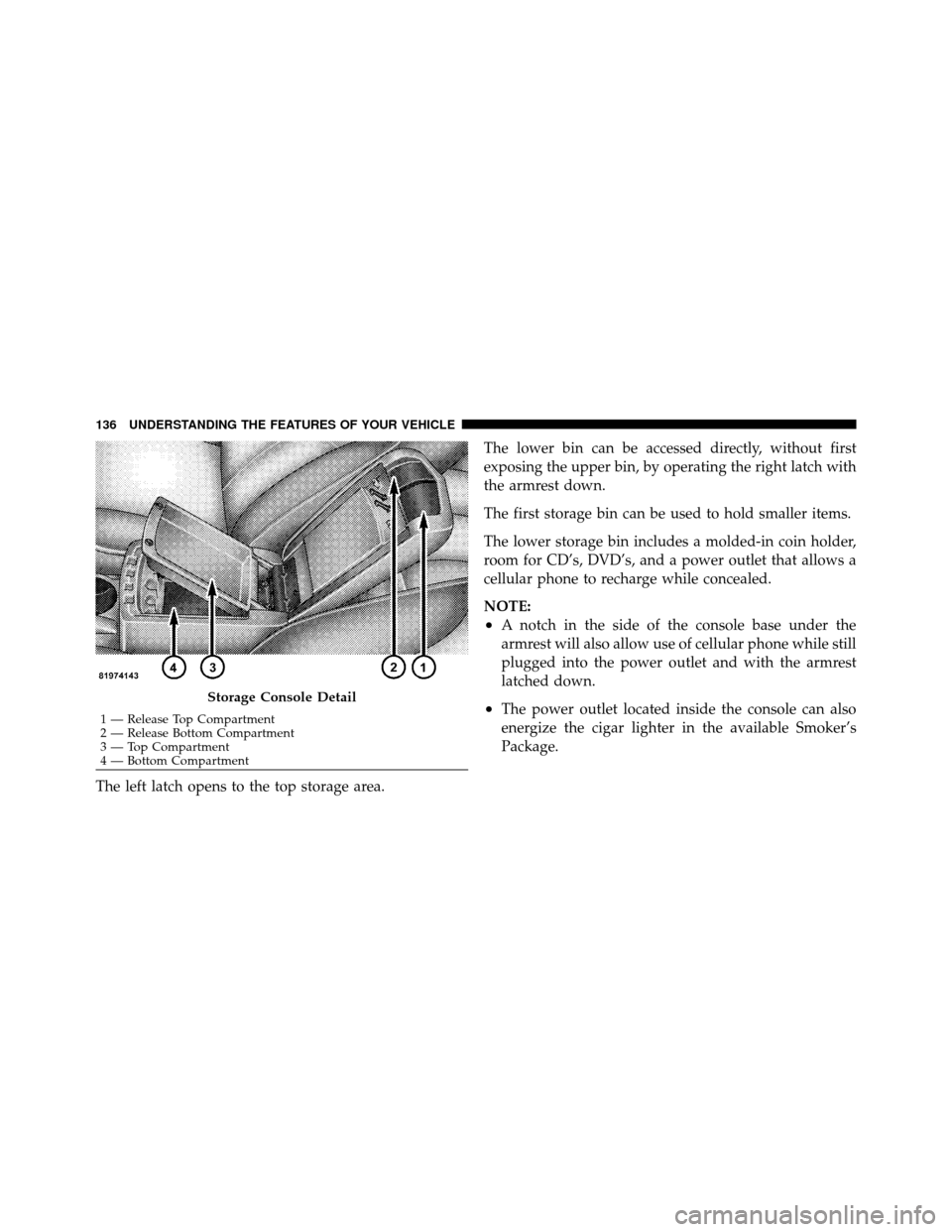
The left latch opens to the top storage area.The lower bin can be accessed directly, without first
exposing the upper bin, by operating the right latch with
the armrest down.
The first storage bin can be used to hold smaller items.
The lower storage bin includes a molded-in coin holder,
room for CD’s, DVD’s, and a power outlet that allows a
cellular phone to recharge while concealed.
NOTE:
•A notch in the side of the console base under the
armrest will also allow use of cellular phone while still
plugged into the power outlet and with the armrest
latched down.
•The power outlet located inside the console can also
energize the cigar lighter in the available Smoker’s
Package.Storage Console Detail
1 — Release Top Compartment
2 — Release Bottom Compartment
3 — Top Compartment
4 — Bottom Compartment
136 UNDERSTANDING THE FEATURES OF YOUR VEHICLE
Page 141 of 444

▫List Button
(Disc Mode For MP3/WMA Play) ......... 182
▫ Info Button
(Disc Mode For MP3/WMA Play) ......... 183
� Media Center 730N/430 (RER/REN/RBZ) —
AM/FM Stereo Radio And CD/DVD/HDD/
NAV — If Equipped .................... 185
▫ Operating Instructions — Voice Command
System — If Equipped ................. 185
▫ Operating Instructions —
Uconnect™ Phone — If Equipped ........ 185
▫ Clock Setting Procedure — RBZ Radio ..... 186
▫ Clock Setting Procedure —
RER/REN Radio ..................... 187 �
Media Center 130 (RES) — AM/FM Stereo
Radio With CD Player (MP3 AUX Jack) ....... 189
▫ Operating Instructions — Radio Mode ..... 190
▫ Operation Instructions — CD Mode For CD
And MP3 Audio Play ................. 193
▫ Notes On Playing MP3 Files ............ 195
▫ Operation Instructions - Auxiliary Mode .... 197
� Media Center 130 (RES/RSC) — AM/FM
Stereo Radio With CD Player (MP3 AUX Jack)
And Sirius Radio ...................... 198
▫ Operating Instructions — Radio Mode ..... 198
▫ Operation Instructions — CD Mode For CD
And MP3 Audio Play ................. 204
▫ Notes On Playing MP3 Files ............ 206
▫ List Button (CD Mode For MP3 Play) ...... 209
140 UNDERSTANDING YOUR INSTRUMENT PANEL
Page 142 of 444

▫Info Button (CD Mode For MP3 Play) ...... 209
▫ Operating Instructions - Uconnect™ Phone
(If Equipped) ....................... 210
� Uconnect™ Multimedia (Satellite Radio) —
If Equipped (REN/REQ/RER/RBZ/RES
Radios Only) ......................... 210
▫ System Activation .................... 211
▫ Electronic Serial Number/Sirius
Identification Number (ESN/SID) ......... 211
▫ Selecting Uconnect™ Multimedia (Satellite)
Mode ............................. 211
▫ Satellite Antenna ..................... 212
▫ Reception Quality .................... 212 ▫
Operating Instructions - Uconnect™
Multimedia (Satellite) Mode ............. 212
▫ Operating Instructions - Uconnect™ Phone
(If Equipped) ....................... 214
� Video Entertainment System (VES)™ —
If Equipped .......................... 214
� Remote Sound System Controls —
If Equipped .......................... 216
▫ Right-Hand Switch Functions ............ 217
▫ Left-Hand Switch Functions For Radio
Operation .......................... 217
▫ Left-Hand Switch Functions For Media
(i.e., CD) Operation ................... 218
4
UNDERSTANDING YOUR INSTRUMENT PANEL 141
Page 143 of 444
�CD/DVD Disc Maintenance .............. 218
� Radio Operation And Cellular Phones ....... 219
� Climate Controls ...................... 219
▫ Manual Heating And Air Conditioning ..... 219▫
Automatic Temperature Control (ATC) —
If Equipped ........................ 223
▫ Operating Tips ...................... 229
142 UNDERSTANDING YOUR INSTRUMENT PANEL