Page 90 of 457

•The Power Top Control Module (PTCM) monitors and
controls lowering and raising of the top. A series of
micro-switches verify that operations are complete
before allowing the next stage of lowering or raising
operation.
•Opening and closing the top consecutively without the
engine running may run the battery down.
•If a fluttering noise is heard from the rear seat belts
while driving with the top down, safely bring the
vehicle to a stop and buckle the rear seat belts over the
empty seats. This will keep tension on the seat belts
and remove the fluttering condition.
CAUTION!
•Correctly position the cargo shield in the trunk
before stowing the top. Doing so closes a switch
that allows top operation (stowing) to proceed. If
the switch is not closed, a warning message dis-
plays in the instrument cluster to notify the driver.
•Always place items carefully into the trunk.
•Do not push items too far into the trunk, particu-
larly when the top is retracted into its stowage area
in the trunk.
•Do not use the area near the tonneau cover for
storage.
Failure to follow these cautions can cause damage
to the convertible top components, trunk contents,
and the vehicle interior.
3
UNDERSTANDING THE FEATURES OF YOUR VEHICLE 89
Page 102 of 457
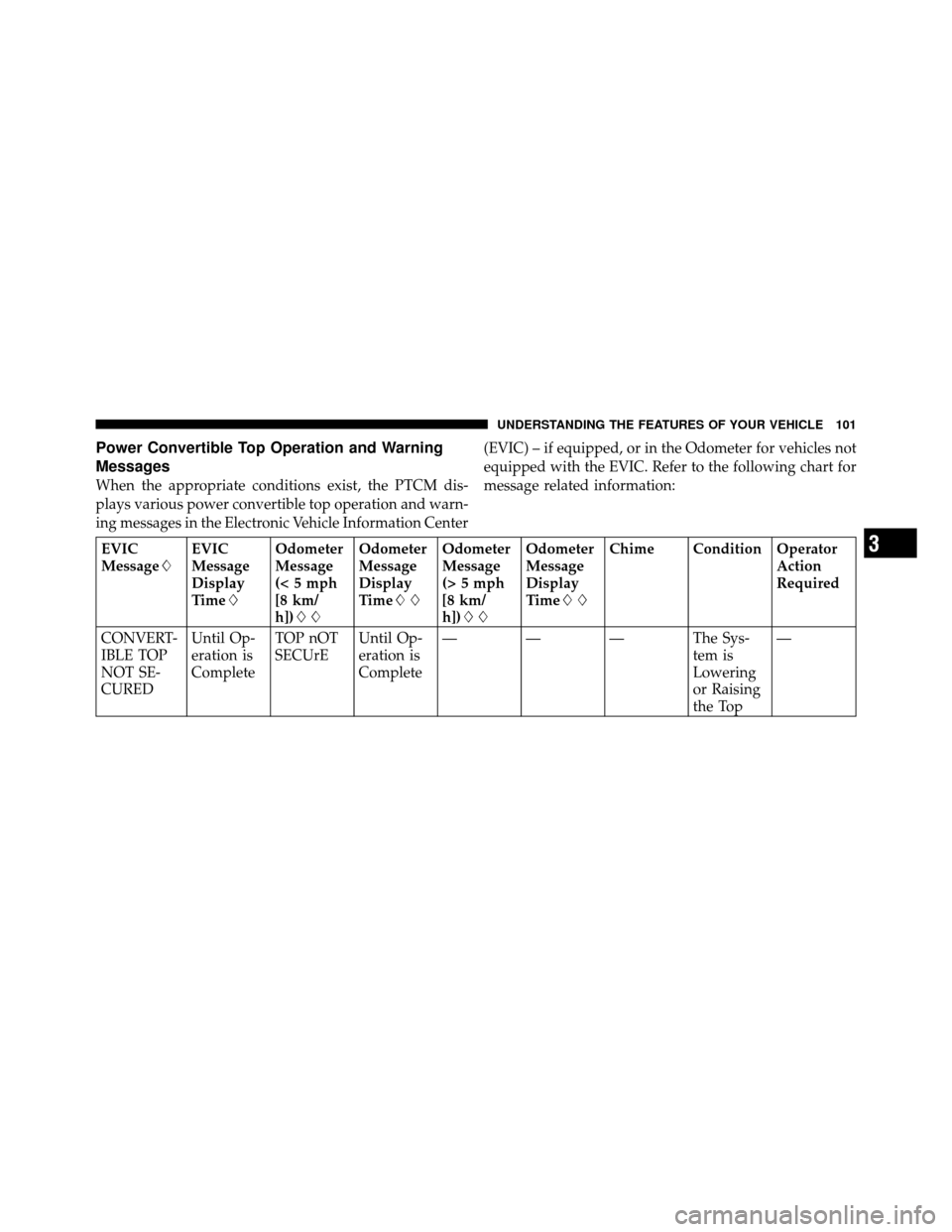
Power Convertible Top Operation and Warning
Messages
When the appropriate conditions exist, the PTCM dis-
plays various power convertible top operation and warn-
ing messages in the Electronic Vehicle Information Center(EVIC) – if equipped, or in the Odometer for vehicles not
equipped with the EVIC. Refer to the following chart for
message related information:
EVIC
Message�
EVIC
Message
Display
Time�Odometer
Message
(< 5 mph
[8 km/
h])��Odometer
Message
Display
Time��
Odometer
Message
(> 5 mph
[8 km/
h])��Odometer
Message
Display
Time��
Chime Condition Operator
Action
Required
CONVERT-
IBLE TOP
NOT SE-
CURED Until Op-
eration is
Complete
TOP nOT
SECUrE
Until Op-
eration is
Complete— — — The Sys-
tem is
Lowering
or Raising
the Top—3
UNDERSTANDING THE FEATURES OF YOUR VEHICLE 101
Page 103 of 457
EVIC
Message�EVIC
Message
Display
Time�Odometer
Message
(< 5 mph
[8 km/
h])��Odometer
Message
Display
Time��
Odometer
Message
(> 5 mph
[8 km/
h])��Odometer
Message
Display
Time��
Chime Condition Operator
Action
Required
CONVERT-
IBLE TOP
COMPLETE 9 sec. TOP
DONEDisplay
Scrolls for
6 sec.— — Single
ChimeThe Sys-
tem Com-
pletes Op-
eration of
Lowering
or Raising
the Top—
SECURE
CARGO
SHIELD 9 sec. SET
CARGO
SHIELDDisplay
Scrolls for
9 sec.— — Single
ChimeThe Top
Fails to
Move
When Op-
erating the
Power Top
ControlPosition
the Cargo
Shield in
the Trunk
to Allow
Top Op-
eration
102 UNDERSTANDING THE FEATURES OF YOUR VEHICLE
Page 104 of 457
EVIC
Message�EVIC
Message
Display
Time�Odometer
Message
(< 5 mph
[8 km/
h])��Odometer
Message
Display
Time��
Odometer
Message
(> 5 mph
[8 km/
h])��Odometer
Message
Display
Time��
Chime Condition Operator
Action
Required
CONVERT-
IBLE TOP
NOT SE-
CURED Until Op-
eration is
Complete
TOP nOT
SECUrE
Until Op-
eration is
CompleteTOP nOT
SECUrE
Until Op-
eration is
CompleteSingle
Chime
The Sys-
tem Fails
to Com-
plete Op-
eration of
Lowering
or Raising
the TopCycle
Power Top
Control
3
UNDERSTANDING THE FEATURES OF YOUR VEHICLE 103
Page 108 of 457

•If you are trying to lower the top and ambient temperature is 0°F (-18°C) or lower, wait until the temperature
rises and the top is thawed and dry before operating the power top. A soft top should not be lowered at tem-
peratures below 32°F (0°C).
• If you are trying to raise the top and ambient temperature is below -40°F (-40°C), wait until the temperature
rises before operating the power top.
• If the vehicle charging system is malfunctioning, see your authorized dealer for service.
• If the battery is run down, have it recharged and tested at your authorized dealer.
• Hydraulic pump overheating can occur if you lower and raise the top consecutively (usually more than six or
seven times depending upon the ambient temperature). Wait at least five minutes before operating the power
top again. NOTE:If lockout occurs due to hydraulic pump overheating, the system will allow you to raise the
top without waiting five minutes. However, do so only if necessary.
3
UNDERSTANDING THE FEATURES OF YOUR VEHICLE 107
Page 123 of 457
2. Move to the outside of the vehicle and lift the second-
ary latch underneath the center front edge of the hood
and raise the hood.
Use the hood prop rod to secure the hood in the open
position. Place the upper end of the prop rod in the hole
on the underside of the hood.Before closing the hood, make sure to stow the prop rod
in its proper location.
Hood Safety Catch
Hood Prop Rod Hole Location
122 UNDERSTANDING THE FEATURES OF YOUR VEHICLE
Page 139 of 457
On steep hills, a greater speed loss or gain may occur so
it may be preferable to drive without Electronic Speed
Control.
WARNING!
Electronic Speed Control can be dangerous where the
system cannot maintain a constant speed. Your ve-
hicle could go too fast for the conditions, and you
could lose control. An accident could be the result.
Do not use Electronic Speed Control in heavy traffic
or on roads that are winding, icy, snow-covered or
slippery.
GARAGE DOOR OPENER — IF EQUIPPED
HomeLink�replaces up to three remote controls (hand-
held transmitters) that operate devices such as garage
door openers, motorized gates, lighting or home security
systems. The HomeLink� unit operates off your vehicle’s
battery. The HomeLink�
buttons that are located in the headliner
or sun visor designate the three different HomeLink�
channels.
NOTE: HomeLink� is disabled when the Vehicle Secu-
rity Alarm is active.HomeLink� Buttons
138 UNDERSTANDING THE FEATURES OF YOUR VEHICLE
Page 143 of 457

Using HomeLink�
To operate, press and release the programmed
HomeLink�button. Activation will now occur for the
trained device (i.e., garage door opener, gate operator,
security system, entry door lock, home/office lighting,
etc.,). The handheld transmitter of the device may also be
used at any time.
Reprogramming a Single HomeLink� Button
To reprogram a channel that has been previously trained,
follow these steps:
1. Turn the ignition switch to the ON/RUN position.
2. Press and hold the desired HomeLink� button until
the indicator light begins to flash after 20 seconds. Do not
release the button.
3. Without releasing the button, proceed with Program-
ming HomeLink� Step 2 and follow all remaining steps.
Gate Operator/Canadian Programming
Canadian radio frequency laws require transmitter sig-
nals to time-out (or quit) after several seconds of trans-
mission – which may not be long enough for HomeLink�
to pick up the signal during programming. Similar to this
Canadian law, some U.S. gate operators are designed to
time-out in the same manner.
It may be helpful to unplug the device during the cycling
process to prevent possible overheating of the garage
door or gate motor.
If you are having difficulties programming a garage door
opener or a gate operator, replace “Programming
HomeLink�” Step 3, with the following:
3. Continue to press and hold the HomeLink� button,
while you press and release (“cycle”), your handheld
transmitter every two seconds until HomeLink� has
142 UNDERSTANDING THE FEATURES OF YOUR VEHICLE