Page 19 of 368

your vehicle. The remaining keys must then be repro-
grammed. All vehicle keys must be taken to the autho-
rized dealer at the time of service to be reprogrammed.
General Information
The Sentry Key�system complies with FCC rules Part 15
and with RSS-210 of Industry Canada. Operation is
subject to the following conditions:
•This device may not cause harmful interference.
•This device must accept any interference that may be
received, including interference that may cause undes-
ired operation.
VEHICLE SECURITY ALARM — IF EQUIPPED
The Vehicle Security Alarm monitors the doors, liftgate,
and ignition switch for unauthorized operation. The
Vehicle Security Alarm provides both audible and visible
signals when activated. If something triggers the Vehicle Security Alarm, it signal
for about 18 minutes. For the first three minutes the horn
will sound and the headlights, park lights, tail lights and
the Vehicle Security Light in the cluster will flash. Then
the exterior lights will flash for another 15 minutes.
If the disturbance that triggered the alarm is no longer
present (doors, liftgate, ignition switch), the alarm will
continue to sound until three minutes of alarm time is
reached.
To Set the Alarm
1. Remove the key from the ignition switch and get out
of the vehicle.
2. Lock the door using either the power door lock switch,
or the Remote Keyless Entry (RKE) transmitter, and close
all doors.
3. The Vehicle Security Light in the instrument cluster
will flash rapidly for 16 seconds. This shows that the
18 THINGS TO KNOW BEFORE STARTING YOUR VEHICLE
Page 24 of 368

Using The Panic Alarm
To turn the Panic Alarm feature ON or OFF, press and
hold the PANIC button on the RKE transmitter for at
least one second and release. When the Panic Alarm is on,
the headlights and park lights will flash, the horn will
pulse on and off, and the interior lights will turn on.
The Panic Alarm will stay on for three minutes unless
you turn it off by pressing the PANIC button a second
time or if the vehicle speed is 5 mph (8 km/h) or greater.
NOTE:When you turn off the Panic Alarm by pressing
the PANIC button a second time, you may have to be
closer to the vehicle due to the Radio Frequency (RF)
noises of the system.
To Program Additional Transmitters
Each vehicle is shipped from the assembly plant with two
RKE transmitters programmed only for that vehicle. A total of eight RKE transmitters can be programmed to
your vehicle through the use of a currently-programmed
RKE transmitter.
NOTE:
If vehicle is equipped with the optional EVIC in
the instrument cluster, the RKE transmitters may also be
programmed through the EVIC display.
Use the following procedure to program additional RKE
transmitters if the vehicle is not equipped with Sentry
Key�:
NOTE: When entering program mode using currently-
programmed RKE transmitter, all other programmed
transmitters will be erased and you will have to repro-
gram them for your vehicle.
1. Gather every transmitter that is to be used with the
vehicle, including any transmitters that are currently
programmed.
2
THINGS TO KNOW BEFORE STARTING YOUR VEHICLE 23
Page 55 of 368

Front PassengerSeat Occupant Passenger Air-
bag Disable
(PAD) Indicator Light Airbag Status
Adult OFF ON Child ON OFF
Grocery Bags,
Heavy Briefcases and Other Rela-
tively Light Ob- jects ON OFF
Empty or Very Small Objects OFF* OFF
* Since the system senses weight, some small objects will turn the PAD Indicator Light on.
Drivers and adult passengers should verify that the PAD
Indicator Light is not illuminated when an adult is riding
in the front passenger seat. If an adult occupant’s weight
is transferred to another part of the vehicle (like the door or instrument panel), the weight sensors in the seat may
not properly classify the occupant. Objects lodged under
the seat or between the seat and the center console can
prevent the occupant’s weight from being measured
properly and may result in the occupant being improp-
erly classified. Ensure that the front passenger seat back
does not touch anything placed on the second row of
seats because this can also affect occupant classification.
Also, if you fold down the seats in the second row check
to be sure they don’t touch the front passenger seat.
If the front passenger seat is damaged in any way, it
should only be serviced by an authorized dealer. If the
seat is removed (or even if the seat attachment bolts are
loosened or tightened in any way), take the vehicle to an
authorized dealer.
If there is a fault present in the OCS, the Airbag Warning
Light (a red light located in the center of the instrument
cluster directly in front of the driver) will be turned on.
54 THINGS TO KNOW BEFORE STARTING YOUR VEHICLE
Page 105 of 368

Turn Signals
Move the multifunction lever up or down and the arrows
on each side of the instrument cluster flash to show
proper operation of the front and rear turn signal lights.NOTE:•If either light remains on and does not flash, or there is
a very fast flash rate, check for a defective outside light
bulb. If an indicator fails to light when the lever is
moved, it would suggest that the indicator bulb is
defective.
•A tone will chime if the turn signals are left on for
more than 1 mile (2 km).
Lane Change Assist
Tap the lever up or down once, without moving beyond
the detent, and the turn signal (right or left) will flash
three times then automatically turn off.
Daytime Running Lights — If Equipped
The high beam headlights will turn on as Daytime
Running Lights (DRL) and operate at lower intensity
whenever the ignition is ON, the engine is running, the
headlight switch is off, the parking brake is released and
the shift lever is in any position except PARK.
Turn Signal Operation
104 UNDERSTANDING THE FEATURES OF YOUR VEHICLE
Page 113 of 368
ELECTRONIC SPEED CONTROL — IF EQUIPPED
When engaged, Electronic Speed Control takes over the
accelerator operation at approximately either 30 mph
(40 km/h ) or 35 mph (56 km/h) depending on the model
or engine size. The Electronic Speed Control lever is
located on the right side of the steering wheel.NOTE:
In order to ensure proper operation, the Elec-
tronic Speed Control System has been designed to shut
down if multiple Speed Control functions are operated
simultaneously. If this occurs, the Electronic Speed Con-
trol System can be reactivated by pushing the Electronic
Speed Control ON/OFF button and resetting the desired
vehicle set speed.
To Activate
Push the ON/OFF button. The CRUISE indicator in the
instrument cluster will illuminate. To turn the system off,
push the ON/OFF button a second time. The CRUISE
indicator will turn off. The system should be turned off
when not in use.
Electronic Speed Control Lever
112 UNDERSTANDING THE FEATURES OF YOUR VEHICLE
Page 138 of 368
UNDERSTANDING YOUR INSTRUMENT PANEL
CONTENTS
�Instrument Panel Features ............... 140
� Instrument Cluster — Base ............... 141
� Instrument Cluster — Premium ........... 142
� Instrument Cluster Descriptions ........... 143
� Compass Mini-Trip Computer (CMTC) — If
Equipped ............................ 155
▫ Compass Mini-Trip Computer Reset Button . . 155
▫ Compass/Temperature Display .......... 156
▫ Odometer Display .................... 158 ▫
Trip Odometer (ODO) ................. 158
� Electronic Vehicle Information Center (EVIC) –
If Equipped .......................... 159
▫ EVIC Functions ..................... 160
▫ To Reset The Display ................. 161
▫ Compass/Temperature/Audio ........... 161
▫ Average Fuel Economy ................ 161
▫ Distance To Empty (DTE) .............. 162
▫ Elapsed Time ....................... 162
4
Page 141 of 368
INSTRUMENT PANEL FEATURES
1 — Air Vent5 — Glove Compartment9 — Storage Cubby
2 — Instrument Cluster 6 — Power Windows10 — Lower Switch Bank
3 — Analog Clock 7 — Radio11 — Side Mirror Control *
4 — Assist Handle 8 — Climate Controls* If Equipped
140 UNDERSTANDING YOUR INSTRUMENT PANEL
Page 142 of 368
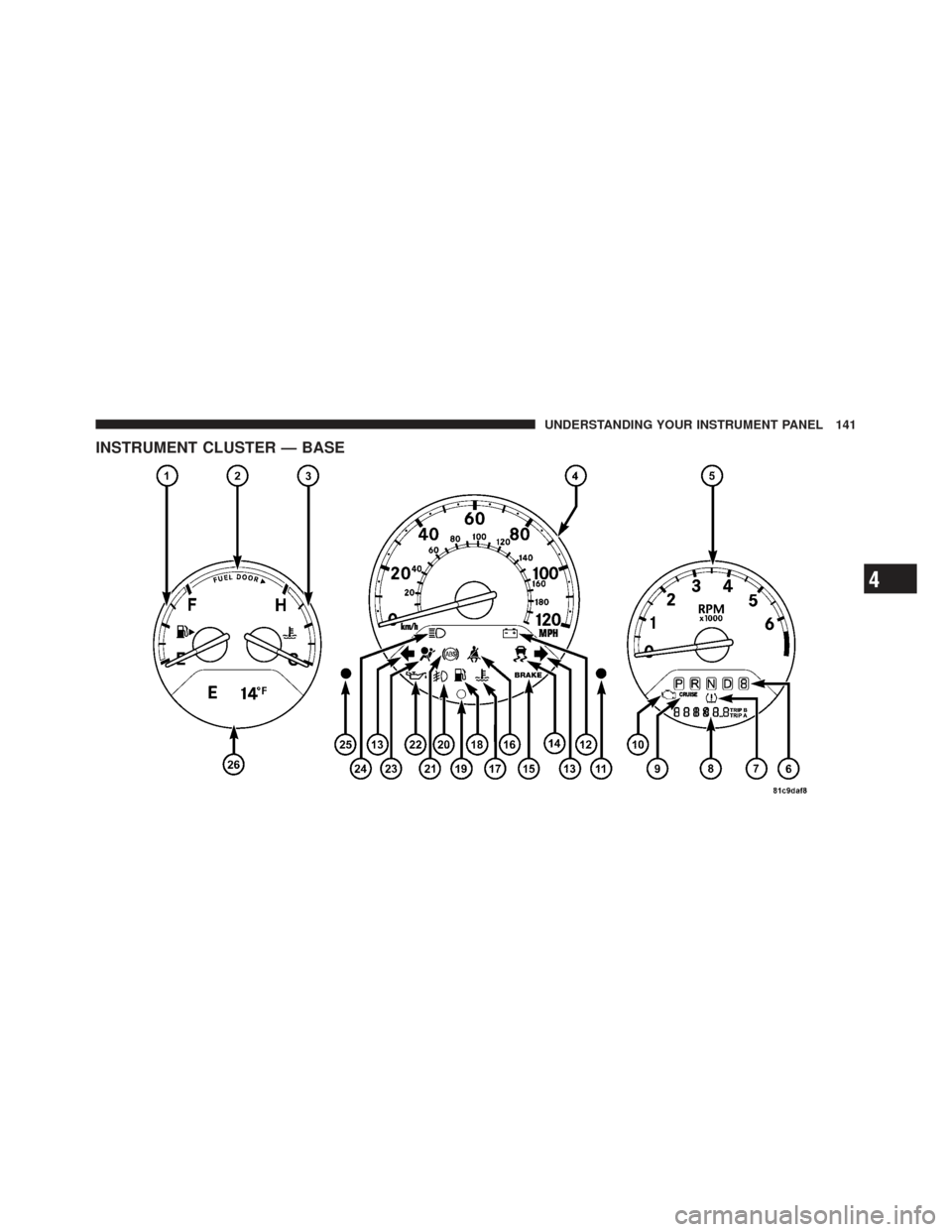
INSTRUMENT CLUSTER — BASE
4
UNDERSTANDING YOUR INSTRUMENT PANEL 141