Page 76 of 368

inspect the exhaust system each time the vehicle is raised
for lubrication or oil change. Replace as required.
Safety Checks You Should Make Inside the
Vehicle
Seat Belts
Inspect the belt system periodically, checking for cuts,
frays, and loose parts. Damaged parts must be replaced
immediately. Do not disassemble or modify the system.
Front seat belt assemblies must be replaced after a
collision. Rear seat belt assemblies must be replaced after
a collision if they have been damaged (i.e., bent retractor,
torn webbing, etc.). If there is any question regarding belt
or retractor condition, replace the belt.
Airbag Warning Light
The light should come on and remain on for four to eight
seconds as a bulb check when the ignition switch is first
turned ON. If the light is not lit during starting, see yourauthorized dealer. If the light stays on, flickers, or comes
on while driving, have the system checked by an autho-
rized dealer.
Defroster
Check operation by selecting the defrost mode and place
the blower control on high speed. You should be able to
feel the air directed against the windshield. See your
authorized dealer for service if your defroster is
inoperable.
Floor Mat Safety Information
Always use floor mats designed to fit the foot well of
your vehicle. Use only floor mats that leave the pedal
area unobstructed and that are firmly secured so that
they cannot slip out of position and interfere with the
pedals or impair safe operation of your vehicle in other
ways.
2
THINGS TO KNOW BEFORE STARTING YOUR VEHICLE 75
Page 77 of 368

WARNING!
Pedals that cannot move freely can cause loss of
vehicle control and increase the risk of serious per-
sonal injury.
•Always make sure that floor mats are properly
attached to the floor mat fasteners.
•Never place or install floor mats or other floor
coverings in the vehicle that cannot be properly
secured to prevent them from moving and inter-
fering with the pedals or the ability to control the
vehicle.
•Never put floor mats or other floor coverings on
top of already installed floor mats. Additional
floor mats and other coverings will reduce the size
of the pedal area and interfere with the pedals.(Continued)
WARNING! (Continued)
•Check mounting of mats on a regular basis. Al-
ways properly reinstall and secure floor mats that
have been removed for cleaning.
•Always make sure that objects cannot fall into the
driver foot well while the vehicle is moving.
Objects can become trapped under the brake pedal
and accelerator pedal causing a loss of vehicle
control.
•If required, mounting posts must be properly
installed, if not equipped from the factory.
Failure to properly follow floor mat installation or
mounting can cause interference with the brake
pedal and accelerator pedal operation causing loss
of control of the vehicle.
76 THINGS TO KNOW BEFORE STARTING YOUR VEHICLE
Page 82 of 368

▫Using Electronic Speed Control On Hills .... 114
� Garage Door Opener — If Equipped ........ 115
▫ Programming HomeLink� .............. 116
▫ Gate Operator/Canadian Programming .... 119
▫ Security ........................... 120
▫ Troubleshooting Tips .................. 120
▫ General Information .................. 120
� Power Sunroof — If Equipped ............ 121
▫ Express-Open Feature ................. 122
▫ Wind Buffeting ...................... 123
▫ Sunroof Maintenance ................. 123
� Electrical Power Outlets ................. 123
� Storage ............................. 126 ▫
Center Console/Armrest Storage Bin ...... 126
▫ Storage Pockets ..................... 128
� Console Features ...................... 128
� Rear Shelf Panel — If Equipped ........... 129
▫ Position 1 (Top) ..................... 130
▫ Position 2 (Middle) ................... 130
▫ Position 3 (Floor) .................... 131
▫ Position 4 (Vertical) ................... 132
▫ Position 5 (Table) .................... 132
� Rear Window Features .................. 134
▫ Rear Window Wiper/Washer ............ 134
▫ Rear Window Defroster ................ 135
3
UNDERSTANDING THE FEATURES OF YOUR VEHICLE 81
Page 94 of 368

WARNING!
The rear center lap/shoulder belt is equipped with a
lockout feature to ensure that the seatback is in the
fully upright and locked position when occupied. If
the rear seatback is not fully upright and locked and
the rear center lap/shoulder belt can be pulled out of
the retractor, the vehicle should immediately be
taken to an authorized dealer for service. Failure to
follow this warning could result in serious or fatal
injury.
Tumbling Rear Seat
To provide additional storage in the cargo area, each rear
seat can be tumbled forward.
CAUTION!
It is important that the front seats be pulled forward
to the midpoint of the seat track to avoid contact
between the rear seat and the front seatback. If the
front seat is not pulled forward the two seats will
make contact during the tumbling motion and cause
damage to the rear seat material. After the rear seat is
tumbled forward and secured the front seat can then
be repositioned to the preferred position.3
UNDERSTANDING THE FEATURES OF YOUR VEHICLE 93
Page 99 of 368
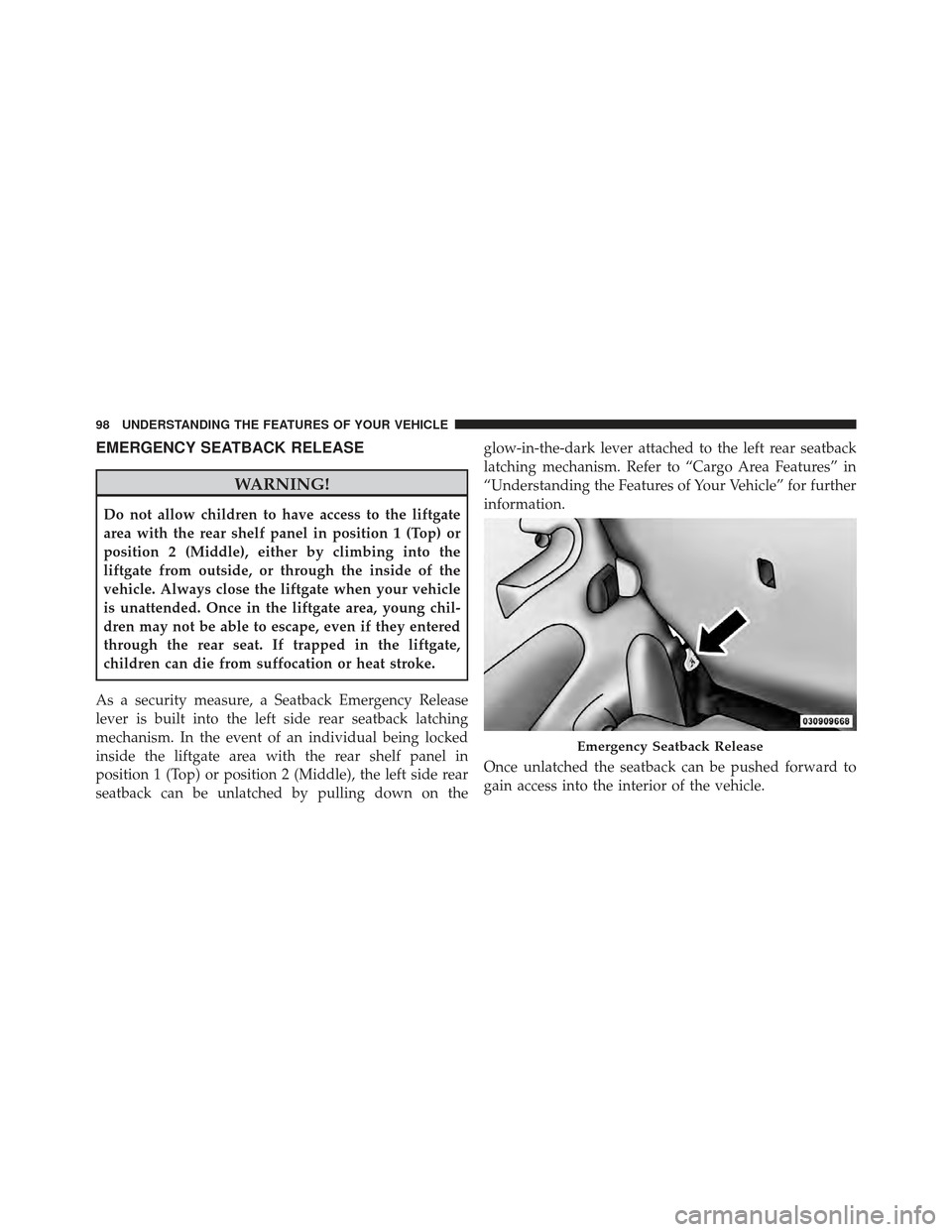
EMERGENCY SEATBACK RELEASE
WARNING!
Do not allow children to have access to the liftgate
area with the rear shelf panel in position 1 (Top) or
position 2 (Middle), either by climbing into the
liftgate from outside, or through the inside of the
vehicle. Always close the liftgate when your vehicle
is unattended. Once in the liftgate area, young chil-
dren may not be able to escape, even if they entered
through the rear seat. If trapped in the liftgate,
children can die from suffocation or heat stroke.
As a security measure, a Seatback Emergency Release
lever is built into the left side rear seatback latching
mechanism. In the event of an individual being locked
inside the liftgate area with the rear shelf panel in
position 1 (Top) or position 2 (Middle), the left side rear
seatback can be unlatched by pulling down on the glow-in-the-dark lever attached to the left rear seatback
latching mechanism. Refer to “Cargo Area Features” in
“Understanding the Features of Your Vehicle” for further
information.
Once unlatched the seatback can be pushed forward to
gain access into the interior of the vehicle.
Emergency Seatback Release
98 UNDERSTANDING THE FEATURES OF YOUR VEHICLE
Page 101 of 368
2.Move the safety latch, located under the front edge of
the hood, slightly to the right of center and raise the hood.
Use the hood prop rod clipped to the driver’s side of the
engine compartment to secure the hood in the open
position. Place the hood prop at the location stamped into
the inner hood surface.
CAUTION!
To prevent possible damage, do not slam the hood to
close it. Lower the hood until it is open approxi-
mately 8 in (20 cm) and then drop it. This should
secure both latches. Never drive your vehicle unless
the hood is fully closed, with both latches engaged.
WARNING!
Be sure the hood is fully latched before driving your
vehicle. If the hood is not fully latched, it could open
when the vehicle is in motion and block your vision.
Failure to follow this warning could result in serious
injury or death.
Safety Latch
100 UNDERSTANDING THE FEATURES OF YOUR VEHICLE
Page 116 of 368
WARNING!
Electronic Speed Control can be dangerous where the
system cannot maintain a constant speed. Your ve-
hicle could go too fast for the conditions, and you
could lose control. An accident could be the result.
Do not use Electronic Speed Control in heavy traffic
or on roads that are winding, icy, snow-covered or
slippery.
GARAGE DOOR OPENER — IF EQUIPPED
HomeLink�replaces up to three remote controls (hand-
held transmitters) that operate devices such as garage
door openers, motorized gates, lighting or home security
systems. The HomeLink� unit operates off your vehicle’s
battery.
The HomeLink� buttons that are located in the headliner
or sun visor designate the three different HomeLink �
channels. NOTE:
HomeLink� is disabled when the Vehicle Secu-
rity Alarm is active.HomeLink� Buttons
3
UNDERSTANDING THE FEATURES OF YOUR VEHICLE 115
Page 120 of 368

Using HomeLink�
To operate, press and release the programmed
HomeLink�button. Activation will now occur for the
trained device (i.e., garage door opener, gate operator,
security system, entry door lock, home/office lighting,
etc.,). The handheld transmitter of the device may also be
used at any time.
Reprogramming a Single HomeLink �Button
To reprogram a channel that has been previously trained,
follow these steps:
1. Turn the ignition switch to the ON/RUN position.
2. Press and hold the desired HomeLink� button until
the indicator light begins to flash after 20 seconds. Do not
release the button.
3. Without releasing the button, proceed with Program-
ming HomeLink� Step 2 and follow all remaining steps.
Gate Operator/Canadian Programming
Canadian radio frequency laws require transmitter sig-
nals to time-out (or quit) after several seconds of trans-
mission – which may not be long enough for HomeLink �
to pick up the signal during programming. Similar to this
Canadian law, some U.S. gate operators are designed to
time-out in the same manner.
It may be helpful to unplug the device during the cycling
process to prevent possible overheating of the garage
door or gate motor.
If you are having difficulties programming a garage door
opener or a gate operator, replace “Programming
HomeLink�” Step 3, with the following:
3. Continue to press and hold the HomeLink� button,
while you press and release (“cycle”), your handheld
transmitter every two seconds until HomeLink� has
3
UNDERSTANDING THE FEATURES OF YOUR VEHICLE 119

