Page 23 of 368

2. While the LOCK button is pressed (after four seconds),
press the PANIC button. Release both buttons.
The “Sound Horn on Lock” feature can be reactivated by
repeating this procedure.
To Turn Off “Flash Lights with Lock”
NOTE:The “Flash Lights with Lock” feature can be
turned on or off. For EVIC-equipped vehicles refer to
“Electronic Vehicle Information Center (EVIC) — If
Equipped/Personal Settings (Customer-Programmable
Features)” in “Understanding Your Instrument Panel” for
further information. For non-EVIC-equipped vehicles,
perform the following steps:
1. Press the UNLOCK button for 4 to 10 seconds.
2. While the UNLOCK button is pressed, (after four
seconds) press the LOCK button. Release both buttons. 3. Test the “Flash Lights with Lock” feature while out-
side of the vehicle by pressing the LOCK button on the
RKE transmitter with the ignition in the LOCK position,
and the key removed.
NOTE:
Pressing the LOCK button on the RKE transmit-
ter while you are in the vehicle will activate the Security
Alarm. Opening a door with the Security Alarm activated
will cause the alarm to sound. Press the UNLOCK button
to deactivate the Security Alarm.
The “Flash Lights on Lock” features can be reactivated by
repeating this procedure.
Panic Alarm
The Panic Alarm mode flashes the park lights, and
sounds the horn for about three minutes or until the
alarm is turned off.
22 THINGS TO KNOW BEFORE STARTING YOUR VEHICLE
Page 25 of 368

2. Enter your vehicle and close all doors.
3. Fasten your seatbelt. (Fastening the seatbelt will cancel
any chimes that may confuse you during this program-
ming procedure.)
4. Place the key into the ignition.
5. Turn the ignition to the ON position.Do not start the
engine.
6. Press and hold the UNLOCK button on the RKE
transmitter.
7. After holding the UNLOCK button for four seconds,
also press the PANIC button within six seconds.
8. When a single chime is heard, release both buttons.
The chime is an indication that you have successfully
entered program mode. All RKE transmitters that are to
be programmed must be done so within 60 seconds of
when the chime was heard. 9. Using the RKE transmitter to be programmed, press
and release both the LOCK and UNLOCK buttons,
simultaneously.
10. A single chime will be heard.
11. Within four seconds of hearing the chime, press and
release the UNLOCK button on the RKE transmitter.
12. A single chime will be heard.
13. Repeat steps 8 through 10 to program up to six
additional RKE transmitters.
14. Turn the ignition to the OFF position.
15. Your vehicle will remain in program mode up to
60 seconds from when the original chime was heard.
After 60 seconds, all programmed RKE transmitters
function normally.
NOTE:
If you do not have a programmed RKE trans-
mitter, contact your authorized dealer for details.
24 THINGS TO KNOW BEFORE STARTING YOUR VEHICLE
Page 28 of 368
WARNING!
•For personal security and safety in the event of an
accident, lock the vehicle doors while you drive,
when you park, and when leaving the vehicle.
•When leaving the vehicle, always remove the key
from the ignition lock, and lock your vehicle. Do
not leave children unattended in the vehicle, or
with access to an unlocked vehicle. Unsupervised
use of vehicle equipment may cause severe per-
sonal injuries and death.
CAUTION!
An unlocked vehicle is an invitation to thieves.
Always remove the key from the ignition and lock all
the doors when leaving the vehicle unattended.
Door Lock Plunger
2
THINGS TO KNOW BEFORE STARTING YOUR VEHICLE 27
Page 30 of 368

For vehicles not equipped with the EVIC, the Auto Lock
can be enabled or disabled by performing the following
procedure:
1. Close all doors and place the key in the ignition.
2. Cycle the ignition switch between LOCK and ON, and
back to LOCK four times, ending up in the LOCK
position.
3. Press the power door LOCK switch to lock the doors.
4. A single chime will indicate the completion of the
programming.
Auto Unlock — If Equipped
The doors will unlock automatically on vehicles with
power door locks if:
1. The Auto Unlock feature is enabled.
2. The shift lever was in gear and the vehicle speed
returned to 0 mph (0 km/h).3. The shift lever is in NEUTRAL or PARK.
4. The driver door is opened.
5. The doors were not previously unlocked.
6. The vehicle speed is 0 mph (0 km/h).
The Auto Unlock feature can be enabled or disabled.
Refer to “Electronic Vehicle Information Center (EVIC) —
If Equipped/Personal Settings (Customer-Programmable
Features)” in “Understanding Your Instrument Panel” for
further information.
For vehicles not equipped with the EVIC, the Auto
Unlock Feature can be enabled or disabled by performing
the following procedure:
1. Close all doors and place the key in the ignition.
2. Cycle the ignition switch between LOCK and ON, and
back to LOCK four times, ending up in the LOCK
position.
2
THINGS TO KNOW BEFORE STARTING YOUR VEHICLE 29
Page 33 of 368
WARNING!
Never leave children in a vehicle with the key in the
ignition switch. Occupants, particularly unattended
children, can become entrapped by the windows
while operating the power window switches. Such
entrapment may result in serious injury or death.
Auto-Down Feature
The driver’s and passenger’s front window switches
have an Auto-Down feature. Press the window switch
past the detent, release, and the window will go down
automatically. Press the switch a second time in either
direction to stop the window.
To open the window part way, press the window switch
part way and release it when you want the window to
stop.
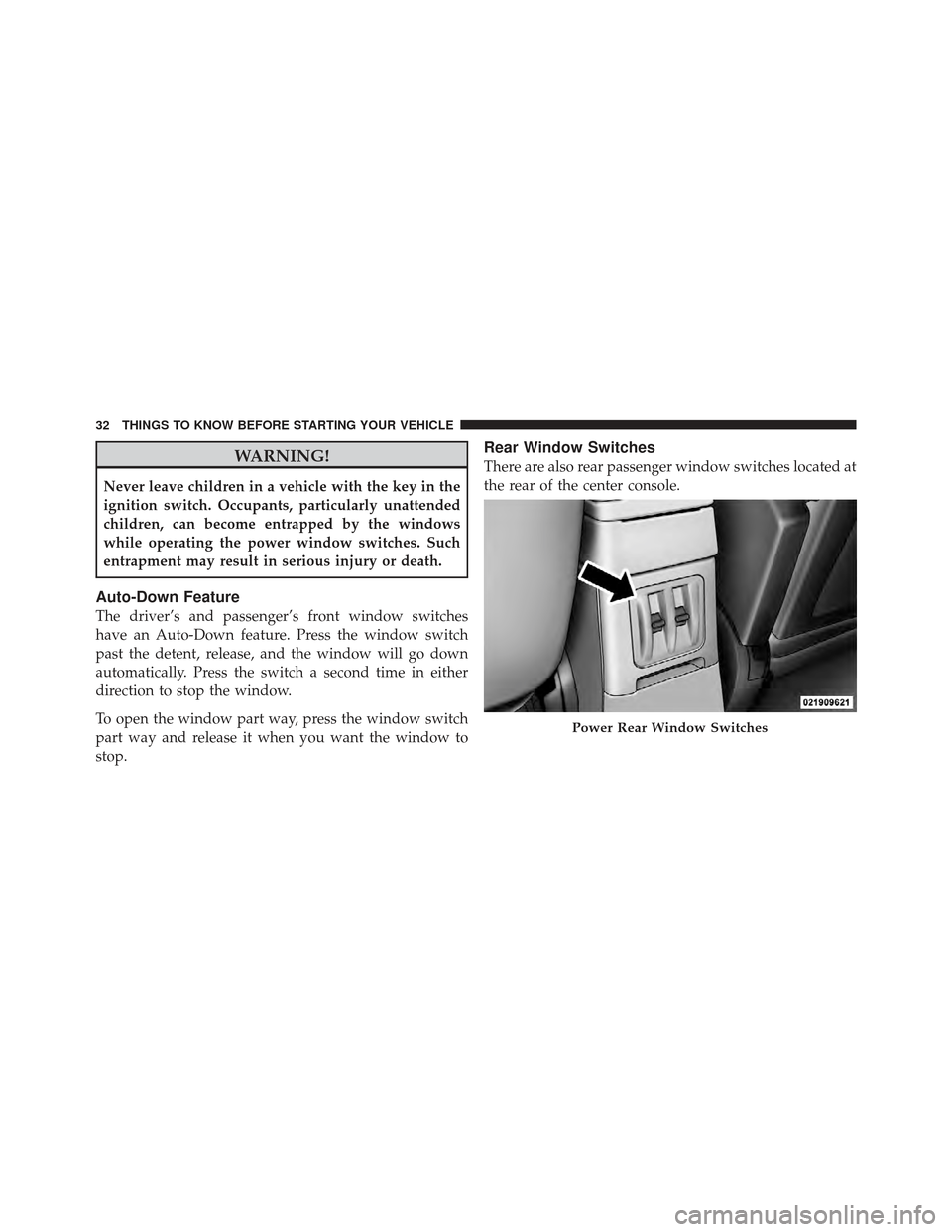
Rear Window Switches
There are also rear passenger window switches located at
the rear of the center console.
Power Rear Window Switches
32 THINGS TO KNOW BEFORE STARTING YOUR VEHICLE
Page 52 of 368

•Driver and Front Passenger Seat Belt Pretensioners
•Occupant Classification System (OCS) for the Front
Passenger Seat
Occupant Classification Module
Passenger Airbag Disable (PAD) Indicator Light
Weight Sensors
How The Airbag System Works
•
TheOccupant Restraint Controller (ORC) determines
if a frontal collision is severe enough to require the
airbags to inflate. The front airbag inflators are de-
signed to provide different rates of airbag inflation
from direction provided by the ORC. The ORC may
also modify the rate of inflation based on the occupant
size provided by the Occupant Classification Module.
The ORC will not detect roll over. The ORC also monitors the readiness of the electronic
parts of the system whenever the ignition switch is in
the START or RUN positions. These include all of the
items listed above except the steering wheel and
column, and knee bolsters. If the key is in the OFF
position, in the ACC position, or not in the ignition,
the airbags are not on and will not inflate.
During a moderate-to-severe rear impact the ORC may
deploy the seat belt pretensioners alone. Also, the ORC turns on the AIRBAG warning
light and PAD indicator light in the instrument
panel for 6 to 8 seconds for a self-check when
the ignition is first turned on. After the self-
check, the AIRBAG warning light will turn off. The PAD
indicator light will function normally (Refer to �Passen-
ger Airbag Disable (PAD) Indicator Light� in this section).
If the ORC detects a malfunction in any part of the
system, it turns on the AIRBAG warning light either
momentarily or continuously. A single chime will sound
if the light comes on again after initial start up.
2
THINGS TO KNOW BEFORE STARTING YOUR VEHICLE 51
Page 57 of 368

determine whether the front passenger airbag should
be turned off. It also determines the rate of airbag
inflation during a collision.
•Your vehicle has fourWeight Sensorslocated between
the seat and the floor pan. The weight sensors measure
applied weight and transfers that information to the
OCM.
•The Side Impact (SRS) Seat Mounted Side Airbags
(If equipped) are designed to activate only in certain
side collisions.
The ORC module determines if a side collision is
severe enough to require the side airbags to inflate.
The side airbag control module will not detect roll
over, front or rear collisions. The ORC Module monitors the readiness of the electronic
parts of the system whenever the ignition switch is in the
START or ON positions. These include all of the items
previously mentioned.
In moderate to severe side collisions, the side airbag
inflator on the crash side of the vehicle is triggered,
releasing a quantity of nontoxic gas. The inflating side
airbag exits through the seat seam into the space between
the occupant and the door. The side airbag moves at a
very high speed and with such a high force, that it could
injure you if you are not seated properly, or if items are
positioned in the area where the side airbag inflates. This
especially applies to children.
NOTE:
If your vehicle is equipped with left and right
side curtain air bags, do not install a clothing bar
mounted to the coat hooks (or similarly mounted). A
clothing bar will impede the proper performance of the
bags.
56 THINGS TO KNOW BEFORE STARTING YOUR VEHICLE
Page 62 of 368

WARNING! (Continued)
•Do not attempt to modify any part of your ad-
vanced airbag system. The airbag may inflate
accidentally or may not function properly if modi-
fications are made. Take your vehicle to an autho-
rized dealer for any advanced airbag system ser-
vice. If your seat, including your trim cover and
cushion, needs to be serviced in any way (includ-
ing removal or loosening/tightening of seat attach-
ment bolts), take the vehicle to your authorized
dealer. Only manufacturer approved seat accesso-
ries may be used. If it is necessary to modify the
airbag system for persons with disabilities, contact
your authorized dealer.
Airbag Warning Light
You will want to have the airbags ready to
inflate for your protection in a collision. While
the airbag system is designed to be mainte-
nance free, if any of the following occurs, have
an authorized dealer service the system immediately.
•The Airbag Warning Light does not come on for
approximately six to eight seconds when the ignition
switch is first turned ON.
•The Airbag Warning Light remains on after the ap-
proximate six to eight-second interval.
•The Airbag Warning Light comes on intermittently or
remains on while driving.
NOTE: If the speedometer, tachometer, or any engine
related gauges are not working, the Occupant Restraint
Controller (ORC) may also be disabled. The airbags may
not be ready to inflate for your protection. Promptly
2
THINGS TO KNOW BEFORE STARTING YOUR VEHICLE 61