Page 76 of 368

inspect the exhaust system each time the vehicle is raised
for lubrication or oil change. Replace as required.
Safety Checks You Should Make Inside the
Vehicle
Seat Belts
Inspect the belt system periodically, checking for cuts,
frays, and loose parts. Damaged parts must be replaced
immediately. Do not disassemble or modify the system.
Front seat belt assemblies must be replaced after a
collision. Rear seat belt assemblies must be replaced after
a collision if they have been damaged (i.e., bent retractor,
torn webbing, etc.). If there is any question regarding belt
or retractor condition, replace the belt.
Airbag Warning Light
The light should come on and remain on for four to eight
seconds as a bulb check when the ignition switch is first
turned ON. If the light is not lit during starting, see yourauthorized dealer. If the light stays on, flickers, or comes
on while driving, have the system checked by an autho-
rized dealer.
Defroster
Check operation by selecting the defrost mode and place
the blower control on high speed. You should be able to
feel the air directed against the windshield. See your
authorized dealer for service if your defroster is
inoperable.
Floor Mat Safety Information
Always use floor mats designed to fit the foot well of
your vehicle. Use only floor mats that leave the pedal
area unobstructed and that are firmly secured so that
they cannot slip out of position and interfere with the
pedals or impair safe operation of your vehicle in other
ways.
2
THINGS TO KNOW BEFORE STARTING YOUR VEHICLE 75
Page 91 of 368

Heated Seats — If Equipped
The heaters provide the same heat level for both cushion
and seatback. The driver and front passenger seats are
heated. The controls for each heater are located near the
bottom center of the instrument panel.
After turning the ignition ON, you can choose from High,
Low, or Off heat settings. Amber indicator lights in each
switch indicate the level of heat in use. Two indicator
lights will illuminate for High, one for Low, and none for
Off.Press the switch once to select High-level heat-
ing. Press the switch a second time to select
Low-level heating. Press the switch a third time
to shut Off the heating elements.
If High-level heating is selected, the system automatically
switches to Low-level heating and turns one indicator
light off after 30 minutes of continuous operation. It will
turn the heater and the remaining indicator light off after an additional 30 minutes of continuous operation. If
Low-level heating is selected, the system automatically
turns the heater and the indicator light off after 30 min-
utes of continuous operation.
NOTE:
Once a heat setting is selected, heat will be felt
within two to five minutes.
WARNING!
•Persons who are unable to feel pain to the skin
because of advanced age, chronic illness, diabetes,
spinal cord injury, medication, alcohol use, ex-
haustion or other physical condition must exercise
care when using the seat heater. It may cause burns
even at low temperatures, especially if used for
long periods of time.
(Continued)
90 UNDERSTANDING THE FEATURES OF YOUR VEHICLE
Page 103 of 368

To change the brightness of the instrument panel lights,
rotate the center portion of the multifunction lever up or
down.
NOTE:If the driver’s door is left open, and the head-
lights or parking lights are left on, a chime will sound.
Lights-On Reminder
If the headlights or parking lights are on after the ignition
is turned OFF, a chime will sound when the driver’s door
is opened.
Instrument Panel Dimmer
Rotate the center portion of the lever to the extreme
bottom position to fully dim the instrument panel lights
and prevent the interior lights from illuminating when a
door is opened.
Rotate the center portion of the lever up to increase the
brightness of the instrument panel lights when the park-
ing lights or headlights are on. Rotate the center portion of the lever upward to the next
detent position to brighten the odometer and radio when
the parking lights or headlights are on.
Rotate the center portion of the lever upward to the last
detent to turn on the interior lighting.
Dimmer Control
102 UNDERSTANDING THE FEATURES OF YOUR VEHICLE
Page 105 of 368

Turn Signals
Move the multifunction lever up or down and the arrows
on each side of the instrument cluster flash to show
proper operation of the front and rear turn signal lights.NOTE:•If either light remains on and does not flash, or there is
a very fast flash rate, check for a defective outside light
bulb. If an indicator fails to light when the lever is
moved, it would suggest that the indicator bulb is
defective.
•A tone will chime if the turn signals are left on for
more than 1 mile (2 km).
Lane Change Assist
Tap the lever up or down once, without moving beyond
the detent, and the turn signal (right or left) will flash
three times then automatically turn off.
Daytime Running Lights — If Equipped
The high beam headlights will turn on as Daytime
Running Lights (DRL) and operate at lower intensity
whenever the ignition is ON, the engine is running, the
headlight switch is off, the parking brake is released and
the shift lever is in any position except PARK.
Turn Signal Operation
104 UNDERSTANDING THE FEATURES OF YOUR VEHICLE
Page 106 of 368
NOTE:The Daytime Running Lights will turn off
automatically when a turn signal is in operation and turn
on again when the turn signal is not operating.
Map/Reading Lights
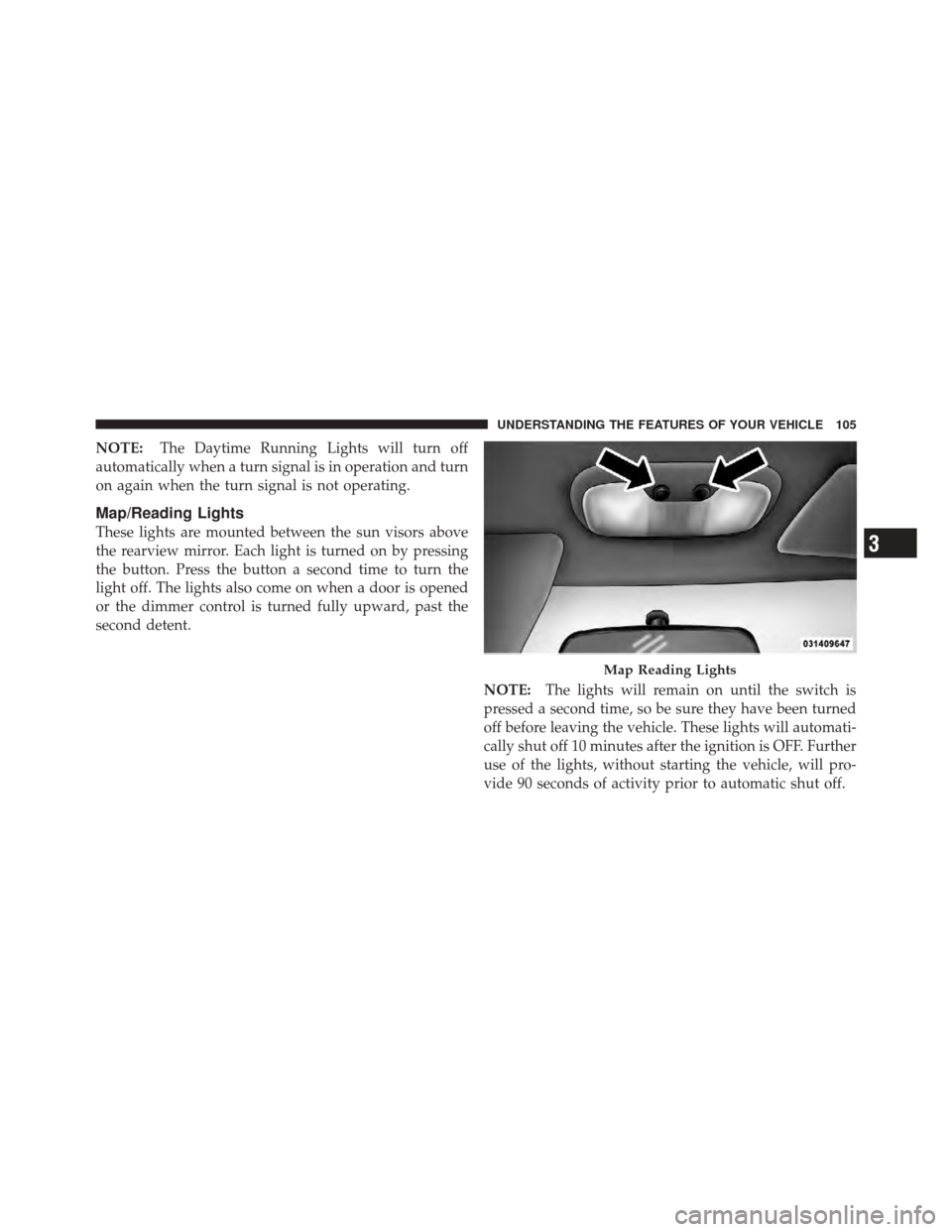
These lights are mounted between the sun visors above
the rearview mirror. Each light is turned on by pressing
the button. Press the button a second time to turn the
light off. The lights also come on when a door is opened
or the dimmer control is turned fully upward, past the
second detent.
NOTE:The lights will remain on until the switch is
pressed a second time, so be sure they have been turned
off before leaving the vehicle. These lights will automati-
cally shut off 10 minutes after the ignition is OFF. Further
use of the lights, without starting the vehicle, will pro-
vide 90 seconds of activity prior to automatic shut off.
Map Reading Lights
3
UNDERSTANDING THE FEATURES OF YOUR VEHICLE 105
Page 108 of 368

NOTE:The wipers will automatically return to the
“park” position if you turn OFF the ignition switch while
they are operating. The wipers will resume operation
when you turn the ignition switch back to the ON
position.
CAUTION!
•Turn the windshield wipers OFF when driving
through an automatic car wash. Damage to the
windshield wipers may result if the wiper control
is left in any position other than OFF.
•In cold weather, always turn OFF the wiper switch
and allow the wipers to return to the park position
before turning OFF the engine. If the wiper switch
is left ON and the wipers freeze to the windshield,
damage to the wiper motor may occur when the
vehicle is restarted.
(Continued)
CAUTION! (Continued)
•Always remove any buildup of snow that prevents
the windshield wiper blades from returning to the
park position. If the windshield wiper control is
turned OFF and the blades cannot return to the
park position, damage to the wiper motor may
occur.
3
UNDERSTANDING THE FEATURES OF YOUR VEHICLE 107
Page 114 of 368

WARNING!
Leaving the Electronic Speed Control system on
when not in use is dangerous. You could accidentally
set the system or cause it to go faster than you want.
You could lose control and have an accident. Always
leave the system off when you are not using it.
To Set a Desired Speed
When the vehicle has reached the desired speed, pull
down on the lever and release. Release the accelerator
and the vehicle will operate at the selected speed.
NOTE:The vehicle should be traveling at a steady
speed and on level ground before pressing the SET lever.
While in the AutoStick� mode, Electronic Speed Control
will only operate in 3rd and 4th gear.
To Deactivate
A soft tap on the brake pedal, pulling the Electronic
Speed Control lever toward CANCEL, or normal brake
or clutch pressure while slowing the vehicle will deacti-
vate Electronic Speed Control without erasing the set
speed memory. Pressing the ON/OFF button or turning
off the ignition switch erases the set speed memory.
To Resume Speed
To resume a previously set speed, pull the RESUME
ACCEL lever up and release. Resume can be used at any
speed above 20 mph (32 km/h).
To Vary the Speed Setting
When the Electronic Speed Control is ON, speed can be
increased by pulling up and holding RESUME ACCEL.
Release the lever when the desired speed is reached, and
the new speed will be set.
3
UNDERSTANDING THE FEATURES OF YOUR VEHICLE 113
Page 117 of 368

WARNING!
•Your motorized door or gate will open and close
while you are training the universal transceiver.
Do not train the transceiver if people, pets or other
objects are in the path of the door or gate. Only use
this transceiver with a garage door opener that has
a “stop and reverse” feature as required by Federal
safety standards. This includes most garage door
opener models manufactured after 1982. Do not
use a garage door opener without these safety
features. Call toll-free 1–800–355–3515 or, on the
Internet at www.HomeLink.com for safety infor-
mation or assistance.
•Vehicle exhaust contains carbon monoxide, a dan-
gerous gas. Do not run your vehicle in the garage
while training the transceiver. Exhaust gas can
cause serious injury or death.
Programming HomeLink�
Before You Begin
If you have not trained any of the HomeLink �buttons,
erase all channels before you begin training.
To do this, press and hold the two outside buttons for up
to 20 seconds until the red indicator flashes.
It is recommended that a new battery be placed in the
handheld transmitter of the device that is being copied to
HomeLink� for more efficient training and accurate
transmission of the radio-frequency signal.
Your vehicle should be parked outside of the garage
when programming.
Begin Programming
1. Turn the ignition switch to the ON/RUN position.
2. Hold the battery side of the handheld transmitter
away from the HomeLink� button you wish to program.
116 UNDERSTANDING THE FEATURES OF YOUR VEHICLE