Page 153 of 465
POWER TILT/TELESCOPING STEERING COLUMN
— IF EQUIPPED
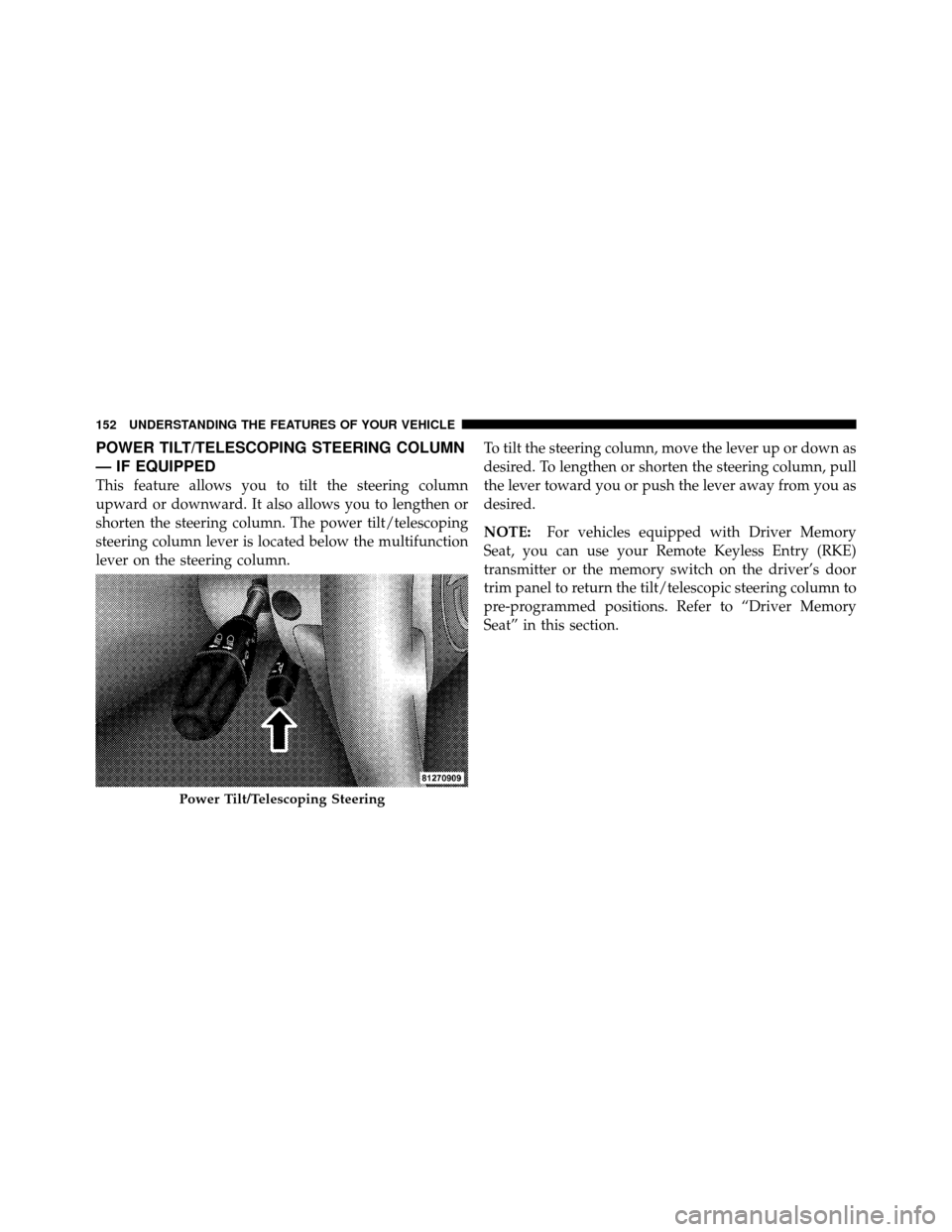
This feature allows you to tilt the steering column
upward or downward. It also allows you to lengthen or
shorten the steering column. The power tilt/telescoping
steering column lever is located below the multifunction
lever on the steering column.To tilt the steering column, move the lever up or down as
desired. To lengthen or shorten the steering column, pull
the lever toward you or push the lever away from you as
desired.
NOTE:
For vehicles equipped with Driver Memory
Seat, you can use your Remote Keyless Entry (RKE)
transmitter or the memory switch on the driver’s door
trim panel to return the tilt/telescopic steering column to
pre-programmed positions. Refer to “Driver Memory
Seat” in this section.
Power Tilt/Telescoping Steering
152 UNDERSTANDING THE FEATURES OF YOUR VEHICLE
Page 155 of 465
•The pedals can be adjusted while driving.
•The pedalscannotbe adjusted when the vehicle is in
REVERSE or when the Electronic Speed Control is on.
One of the following messages will display in the
Electronic Vehicle Information Center (EVIC) if a pedal
adjustment is attempted when the system is locked
out: “Adjustable Pedal Disabled — Cruise Control
Engaged” or “Adjustable Pedal Disabled — Vehicle In
Reverse.”
NOTE: For vehicles equipped with Driver Memory
Seat, you can use your Remote Keyless Entry (RKE)
transmitter or the memory switch on the driver’s door
trim panel to return the adjustable pedals to pre-
programmed positions. Refer to “Driver Memory Seat”
in “Understanding the Features of Your Vehicle” for
further information.
WARNING!
Do not adjust the pedals while the vehicle is moving.
You could lose control and have an accident. Always
adjust the pedals while the vehicle is parked.
CAUTION!
Do not place any article under the adjustable pedals
or impede its ability to move as it may cause damage
to the pedal controls. Pedal travel may become lim-
ited if movement is stopped by an obstruction in the
adjustable pedal’s path.
154 UNDERSTANDING THE FEATURES OF YOUR VEHICLE
Page 162 of 465
•When you turn ParkSense�off, the instrument cluster
will display “PARK ASSIST DISABLED.” Further-
more, once you turn ParkSense� off, it remains off
until you turn it on again, even if you cycle the ignition
key.
•When you move the shift lever to the REVERSE
position and ParkSense� is turned off, the instrument
cluster will display “PARK ASSIST DISABLED” mes-
sage for as long as the vehicle is in REVERSE.
•ParkSense�, when on, will MUTE the radio when it is
sounding a tone.
•If a ParkSense� system malfunction occurs, a single
chime will sound once per ignition cycle. In addition,
the Electronic Vehicle Information Center (EVIC) will
display “SERVICE PARK ASSIST SYSTEM” and the
LED in the ParkSense� switch will illuminate. If this
occurs after making sure the rear fascia/bumper is clean and clear of snow, ice, mud, dirt, or other
obstruction, see your authorized dealer for service.
•Clean the ParkSense�
sensors regularly, taking care
not to scratch or damage them. The sensors must not
be covered with ice, snow, slush, mud, dirt, or debris.
Failure to do so can result in ParkSense� not working
properly. The ParkSense� system might not detect an
obstacle behind the fascia/bumper, or it could provide
a false indication that an obstacle is behind the fascia/
bumper.
•Objects must not be within 12 in (30 cm) from the rear
fascia/bumper while driving the vehicle. Failure to do
so can result in the system misinterpreting a close
object as a sensor problem, causing the “SERVICE
PARK ASSIST SYSTEM” message to be displayed in
the instrument cluster.
3
UNDERSTANDING THE FEATURES OF YOUR VEHICLE 161
Page 165 of 465
Courtesy/Reading Lights
At the forward end of the console are two courtesy/
reading lights.
Press the lens to turn on the light. Press it a second time
to turn off the light.
These lights also turn on when a door is opened, when
the UNLOCK button on the Remote Keyless Entry (RKE)
transmitter is pressed, when the Passive Entry door
handle is used (refer to “Passive Entry” in “Things to
Know Before Starting Your Vehicle” for further informa-
tion) or when the dimmer control is turned fully upward,
past the second detent.
Sunglasses Storage
At the rear of the overhead console, a compartment is
provided for the storage of a pair of sunglasses.The storage compartment access is a
�push/push�design.
Push on the raised bar on the compartment door to open.
Push on the raised bar to close.
GARAGE DOOR OPENER — IF EQUIPPED
HomeLink� replaces up to three remote controls (hand-
held transmitters) that operate devices such as garage
door openers, motorized gates, lighting or home security
systems. The HomeLink� unit operates off your vehicle’s
battery.
The HomeLink� buttons are located in the overhead
console, and contain one, two or three dots/lines desig-
nating the different HomeLink� channels.
164 UNDERSTANDING THE FEATURES OF YOUR VEHICLE
Page 172 of 465
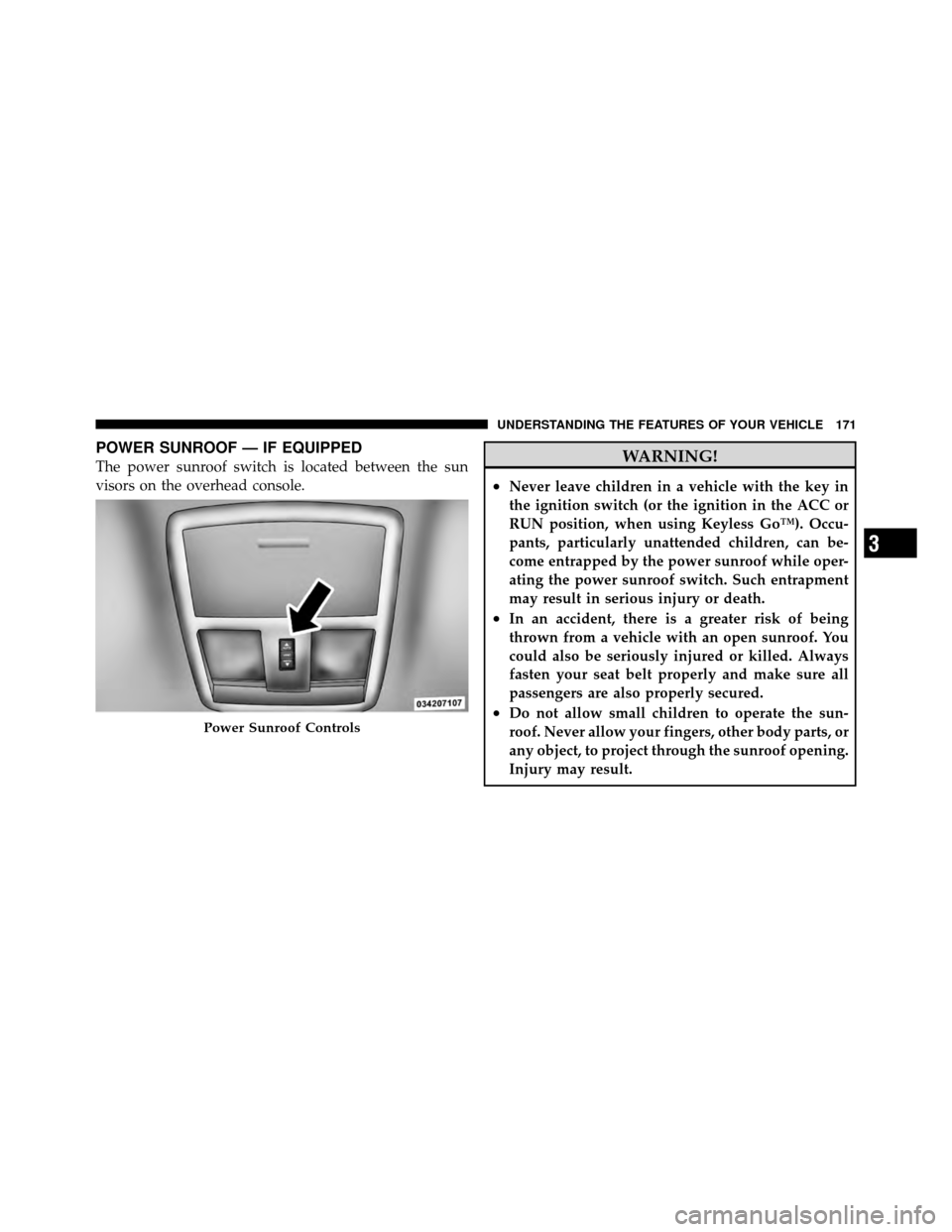
POWER SUNROOF — IF EQUIPPED
The power sunroof switch is located between the sun
visors on the overhead console.WARNING!
•Never leave children in a vehicle with the key in
the ignition switch (or the ignition in the ACC or
RUN position, when using Keyless Go™). Occu-
pants, particularly unattended children, can be-
come entrapped by the power sunroof while oper-
ating the power sunroof switch. Such entrapment
may result in serious injury or death.
•In an accident, there is a greater risk of being
thrown from a vehicle with an open sunroof. You
could also be seriously injured or killed. Always
fasten your seat belt properly and make sure all
passengers are also properly secured.
•Do not allow small children to operate the sun-
roof. Never allow your fingers, other body parts, or
any object, to project through the sunroof opening.
Injury may result.Power Sunroof Controls
3
UNDERSTANDING THE FEATURES OF YOUR VEHICLE 171
Page 184 of 465
UNDERSTANDING YOUR INSTRUMENT PANEL
CONTENTS
�Instrument Panel Features ............... 187
� Instrument Cluster .................... 188
� Instrument Cluster Descriptions ........... 189
� Electronic Vehicle Information Center (EVIC) . . 199
▫ Electronic Vehicle Information Center (EVIC)
Displays ........................... 202
▫ Engine Oil Change Indicator System ....... 206
▫ Trip Functions ...................... 206
▫ Performance Pages — If Equipped ........ 208▫
Keyless Go Display — If Equipped ........ 212
▫ Driver-Selectable Surround Sound (DSS)
– If Equipped ....................... 212
▫ Compass Display .................... 213
▫ Uconnect™ GPS — If Equipped .......... 215
▫ System Warnings (Customer Information
Features) .......................... 216
▫ Personal Settings (Customer-Programmable
Features) .......................... 216
� Setting The Analog Clock ................ 221
4
Page 192 of 465

If the ABS light remains on or turns on while driving,
then the Anti-Lock portion of the brake system is not
functioning and service is required. However, the con-
ventional brake system will continue to operate normally
if the BRAKE warning light is not on.
If the ABS light is on, the brake system should be serviced
as soon as possible to restore the benefits of Anti-Lock
brakes. If the ABS light does not turn on when the
ignition switch placed in the RUN position, have the light
inspected by an authorized dealer.
10. Electronic Stability Program (ESP) / Brake Assist
System (BAS) Malfunction Indicator LightThe yellow Electronic Stability Program (ESP)
/ Brake Assist System (BAS) Malfunction Indi-
cator Light will turn on when the key in the
ignition switch placed in the RUN position.
The light should go out with the engine running. If the
light remains on after several ignition cycles, and the vehicle has been driven several miles (kilometers) at
speeds greater than 30 mph (48 km/h), see an authorized
dealer as soon as possible to have the problem diagnosed
and corrected.
WARNING!
If a warning light remains on the system may not be
working and you will not have the benefit of ESP or
BAS. Under certain driving conditions, where ESP or
BAS would be beneficial, you - if you have not
adjusted your driving speeds and stopping in or to
account for the lack of the feature, may be in acci-
dent.
11. Airbag Warning Light This light will turn on for six to eight seconds
as a bulb check when the ignition switch is first
placed in the RUN position. If the light is either
not on during starting, or stays on, or turns on4
UNDERSTANDING YOUR INSTRUMENT PANEL 191
Page 199 of 465

non-essential electrical devices or increase engine speed
(if at idle). If the charging system light remains on, it
means that the vehicle is experiencing a problem with the
charging system. Obtain SERVICE IMMEDIATELY. See
an authorized dealer.
If jump starting is required, refer to “Jump Starting
Procedures” in “What To Do In Emergencies”.
24. Malfunction Indicator Light (MIL)The Malfunction Indicator Light (MIL) is part of
an onboard diagnostic system called OBD. The
OBD system monitors engine and automatic
transmission control systems. The MIL will turn on when
the ignition is in the RUN position before engine start. If
the MIL does not come on when turning the key from
OFF to RUN, have the condition checked promptly. Certain conditions such as a loose or missing gas cap,
poor fuel quality, etc., may illuminate the MIL after
engine start. The vehicle should be serviced if the MIL
stays on through several of your typical driving cycles. In
most situations, the vehicle will drive normally and will
not require towing.
CAUTION!
Prolonged driving with the MIL on could cause
damage to the engine control system. It also could
affect fuel economy and drivability. If the MIL is
flashing, severe catalytic converter damage and
power loss will soon occur. Immediate service is
required.
198 UNDERSTANDING YOUR INSTRUMENT PANEL