Page 67 of 465
WARNING! (Continued)
•Do not attempt to modify any part of your ad-
vanced airbag system. The airbag may inflate
accidentally or may not function properly if modi-
fications are made. Take your vehicle to an autho-
rized dealer for any advanced airbag system ser-
vice. If your seat, including your trim cover and
cushion, needs to be serviced in any way (includ-
ing removal or loosening/tightening of seat attach-
ment bolts), take the vehicle to your authorized
dealer. Only manufacturer approved seat accesso-
ries may be used. If it is necessary to modify the
airbag system for persons with disabilities, contact
your authorized dealer.
Airbag Warning Light
You will want to have the airbags ready to
inflate for your protection in a collision. While
the airbag system is designed to be mainte-
nance free, if any of the following occurs, have
an authorized dealer service the system immediately.
•The Airbag Warning Light does not come on for
approximately six to eight seconds when the ignition
switch is first placed into the RUN position.
•The Airbag Warning Light remains on after the ap-
proximate six to eight-second interval.
•The Airbag Warning Light comes on intermittently or
remains on while driving.
66 THINGS TO KNOW BEFORE STARTING YOUR VEHICLE
Page 82 of 465
Safety Checks You Should Make Inside the
Vehicle
Seat Belts
Inspect the belt system periodically, checking for cuts,
frays, and loose parts. Damaged parts must be replaced
immediately. Do not disassemble or modify the system.
Front seat belt assemblies must be replaced after a
collision. Rear seat belt assemblies must be replaced after
a collision if they have been damaged (i.e., bent retractor,
torn webbing, etc.). If there is any question regarding belt
or retractor condition, replace the belt.
Airbag Warning Light
The light should come on and remain on for four to eight
seconds as a bulb check when the ignition switch is first
turned ON. If the light is not lit during starting, see your
authorized dealer. If the light stays on, flickers, or comes
on while driving, have the system checked by an autho-
rized dealer.
Defroster
Check operation by selecting the defrost mode and place
the blower control on high speed. You should be able to
feel the air directed against the windshield. See your
authorized dealer for service if your defroster is
inoperable.
Floor Mat Safety Information
Always use floor mats designed to fit the foot well of
your vehicle. Use only floor mats that leave the pedal
area unobstructed and that are firmly secured so that
they cannot slip out of position and interfere with the
pedals or impair safe operation of your vehicle in other
ways.
2
THINGS TO KNOW BEFORE STARTING YOUR VEHICLE 81
Page 89 of 465
�Overhead Console ..................... 163
▫ Courtesy/Reading Lights .............. 164
▫ Sunglasses Storage ................... 164
� Garage Door Opener — If Equipped ........ 164
▫ Programming HomeLink� .............. 166
▫ Gate Operator/Canadian Programming .... 168
▫ Using HomeLink� ................... 169
▫ Reprogramming A Single HomeLink�
Button ............................ 169
▫ Security ........................... 169
▫ Troubleshooting Tips .................. 170
▫ General Information .................. 170
� Power Sunroof — If Equipped ............ 171▫
Opening Sunroof — Express ............ 172
▫ Closing Sunroof — Express ............. 172
▫ Pinch Protect Feature ................. 172
▫ Pinch Protect Override ................ 172
▫ Venting Sunroof — Express ............. 172
▫ Sunshade Operation .................. 173
▫ Wind Buffeting ...................... 173
▫ Sunroof Maintenance ................. 173
▫ Ignition Off Operation ................. 173
▫ Sunroof Fully Closed .................. 173
� Electrical Power Outlets ................. 174
� Cupholders .......................... 177
▫ Front Seat Cupholders ................. 177
88 UNDERSTANDING THE FEATURES OF YOUR VEHICLE
Page 93 of 465
Tilt Mirror in Reverse
The Tilt Mirror in Reverse feature tilts the outside rear-
view mirrors downward when the ignition is placed in
the RUN position and the transmission is in REVERSE.
This feature provides the driver with a better view of the
ground and vehicle in the area of the rear tires when
backing up. The mirrors will move back to their previous
position when the transmission is shifted out of RE-
VERSE.
The Tilt Mirror in Reverse feature can be enabled or
disabled. Refer to “Electronic Vehicle Information Center
(EVIC)/Personal Settings (Customer-Programmable Fea-
tures)” in “Understanding Your Instrument Panel” for
further information.
Power Mirrors
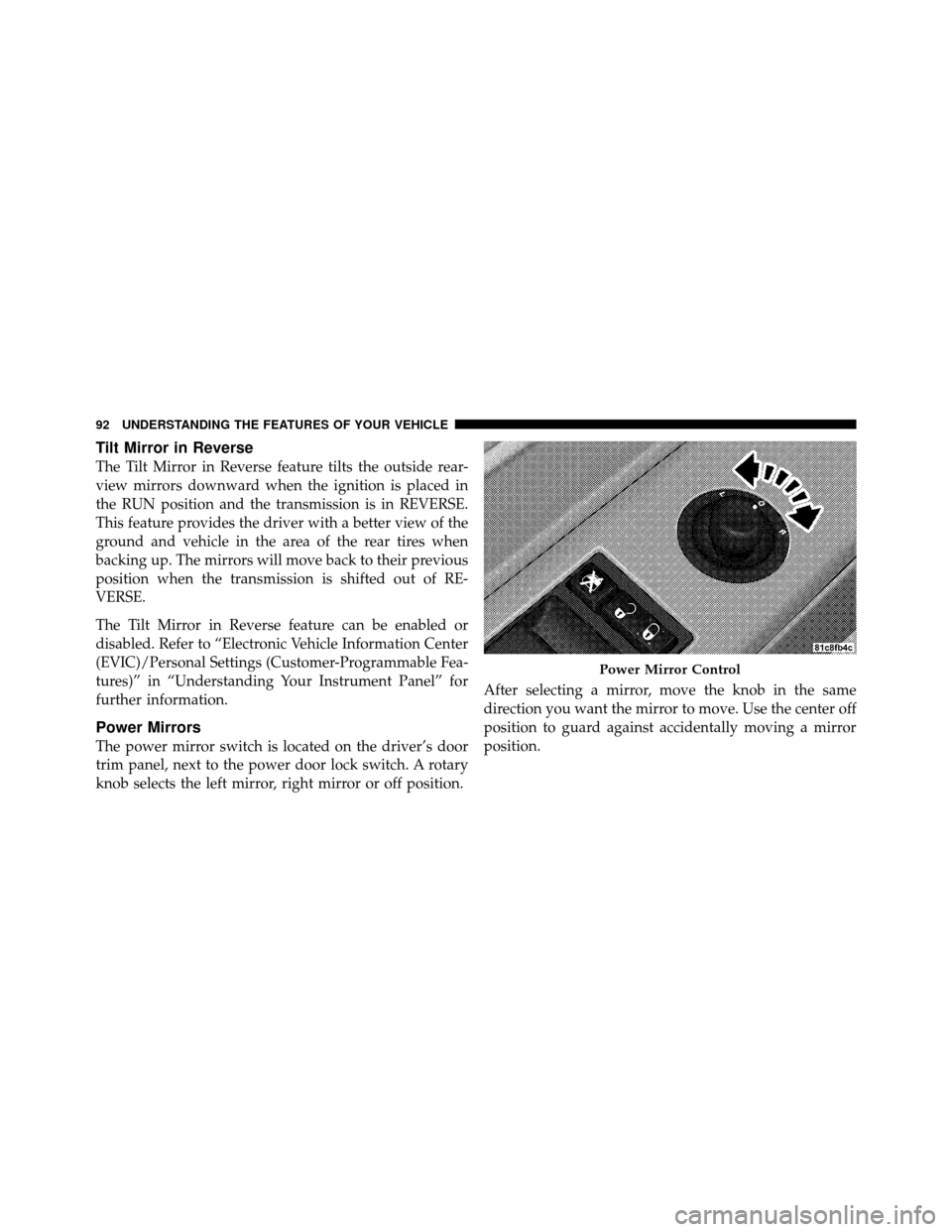
The power mirror switch is located on the driver’s door
trim panel, next to the power door lock switch. A rotary
knob selects the left mirror, right mirror or off position.After selecting a mirror, move the knob in the same
direction you want the mirror to move. Use the center off
position to guard against accidentally moving a mirror
position.
Power Mirror Control
92 UNDERSTANDING THE FEATURES OF YOUR VEHICLE
Page 107 of 465
Call Termination
To end a call in progress, momentarily press the
button. Only the active call(s) will be terminated and if
there is a call on hold, it will become the new active call.
If the active call is terminated by the phone far end, a call
on hold may not become active automatically. This is cell
phone-dependent. To bring the call back from hold, press
and hold the
button until you hear a single beep.
Redial
•
Press thebutton to begin.
•After the�Ready�prompt and the following beep, say
�Redial.�
•The Uconnect™ Phone will call the last number that
was dialed from your cellular phone.
NOTE: This may not be the last number dialed from the
Uconnect™ Phone.
Call Continuation
Call continuation is the progression of a phone call on the
Uconnect™ Phone after the vehicle ignition key has been
switched to OFF. Call continuation functionality avail-
able on the vehicle can be any one of three types:
•After the ignition key is switched to OFF, a call can
continue on the Uconnect™ Phone either until the call
ends, or until the vehicle battery condition dictates
cessation of the call on the Uconnect™ Phone and
transfer of the call to the cellular phone.
•After the ignition key is switched to OFF, a call can
continue on the Uconnect™ Phone for a certain dura-
tion, after which the call is automatically transferred
from the Uconnect™ Phone to the cellular phone.
•An active call is automatically transferred to the
cellular phone after the ignition key is switched to
OFF.
106 UNDERSTANDING THE FEATURES OF YOUR VEHICLE
Page 117 of 465
•Performance, such as audio clarity, echo, and loudness
to a large degree rely on the phone and network, and
not the Uconnect™ Phone.
•Echo at the phone far end can sometimes be reduced
by lowering the in-vehicle audio volume.
•In a convertible vehicle, system performance may be
compromised with the convertible top down.
Bluetooth�Communication Link
Cellular phones have been found to lose connection to
the Uconnect™ Phone. When this happens, the connec-
tion can generally be reestablished by switching the
phone off/on. Your cellular phone is recommended to
remain in Bluetooth� ON mode.
Power-Up
After switching the ignition key from OFF to either the
ON or ACC position, or after a language change, you
must wait at least five seconds prior to using the system.
116 UNDERSTANDING THE FEATURES OF YOUR VEHICLE
Page 133 of 465
NOTE:Ensure that the front of the head restraint is
facing toward the front of the vehicle.
WARNING!
Driving a vehicle with the head restraints removed or
improperly adjusted could cause serious injury or
death in the event of a collision. The head restraints
should always be checked prior to operating the
vehicle and never adjusted while the vehicle is in
motion. Always adjust the head restraints when the
vehicle is in PARK.
Heated Seats
This feature heats the front driver, passenger, and second
row seats. The controls for each heater are located near
the bottom center of the instrument panel. After turning the ignition ON, you can choose from High,
Low, or Off heat settings. Amber indicator lights in each
switch indicate the level of heat in use. Two indicator
lights will illuminate for High, one for Low, and none for
Off.
Front Heated Seat Switch
132 UNDERSTANDING THE FEATURES OF YOUR VEHICLE
Page 138 of 465
1. Adjust all memory profile settings to desired prefer-
ences (i.e., seat, side mirror, adjustable pedals, power tilt,
telescopic steering column, and radio station presets).
2. Press and release the SET button on the Memory
switch, then press the side of the rocker switch labeled (2)
within five seconds. The EVIC will display which
memory position is being set.
NOTE:
•Memory profiles can be set without the vehicle in
PARK, but the vehicle must be in PARK to recall a
memory profile.
•The Recall Memory with Remote Key Unlock feature
can be enabled or disabled. For details, refer to “Elec-
tronic Vehicle Information Center (EVIC)/Customer-
Programmable Features” in “Understanding Your In-
strument Panel” for further information.
Linking and Unlinking the Remote Keyless Entry
Transmitter to Memory
Your RKE transmitters can be programmed to recall one
of two pre-programmed memory profiles by pressing the
UNLOCK button on the RKE transmitter.
To program your RKE transmitters, perform the follow-
ing:
1. Remove the Key Fob from the ignition (or change the
ignition to OFF, for vehicles equipped with Keyless
Go™).
2. Select the desired memory profile 1 or 2.
3. Press and release the SET button on the Memory
switch, then press and release the side of the rocker
switch labeled 1 or 2 accordingly.�Memory Profile Set” (1
or 2) will display in the EVIC.
4. Press and release the LOCK button on the RKE
transmitter within 10 seconds.
3
UNDERSTANDING THE FEATURES OF YOUR VEHICLE 137