2010 CHRYSLER 300 SRT stop start
[x] Cancel search: stop startPage 39 of 465
AUTO-Down Feature
The driver door power window switch and some model
passenger door power window switches have an AUTO-
down feature. Press the window switch to the second
detent, release, and the window will go down automati-
cally.
To open the window part way, press the window switch
to the first detent and release it when you want the
window to stop.
To stop the window from going all the way down during
the AUTO-down operation, pull up on the switch briefly.
The power window switches will remain active for up to
60 minutes after the ignition switch is turned OFF.
Opening either front door will cancel this feature. The
time for this feature is programmable. Refer to “Elec-
tronic Vehicle Information Center (EVIC)/Personal Set-
tings (Customer-Programmable Features)” in “Under-
standing Your Instrument Panel” for further information.
AUTO-Up Feature with Anti–Pinch Protection — If
Equipped
Lift the window switch to the second detent, release, and
the window will go up automatically.
To stop the window from going all the way up during the
AUTO-up operation, push down on the switch briefly.
To close the window part way, lift the window switch to
the first detent and release it when you want the window
to stop.
The power window switches will remain active for up to
60 minutes after the ignition switch is turned off. Open-
ing either front door will cancel this feature. The time for
this feature is programmable. Refer to “Electronic Vehicle
Information Center (EVIC)/Personal Settings (Customer-
Programmable Features)” in “Understanding Your In-
strument Panel” for further information.
38 THINGS TO KNOW BEFORE STARTING YOUR VEHICLE
Page 45 of 465
ejection and the risk of injury caused by striking the
inside of the vehicle.Everyone in a motor vehicle should
be belted at all times.
Lap/Shoulder Belts
All seating positions in your vehicle are equipped with
lap/shoulder belts.
The belt webbing retractor is designed to lock during
very sudden stops or impacts. This feature allows the
shoulder part of the belt to move freely with you under
normal conditions. However, in a collision, the belt will
lock and reduce your risk of striking the inside of the
vehicle or being thrown out.
WARNING!
•It is dangerous to ride in a cargo area, inside or
outside of a vehicle. In a collision, people riding in
these areas are more likely to be seriously injured
or killed.
•Do not allow people to ride in any area of your
vehicle that is not equipped with seats and seat
belts.
•Be sure everyone in your vehicle is in a seat and
using a seat belt properly.
•Wearing a seat belt incorrectly is dangerous. Seat
belts are designed to go around the large bones of
your body. These are the strongest parts of your
body and can take the forces of a collision best.
(Continued)
44 THINGS TO KNOW BEFORE STARTING YOUR VEHICLE
Page 47 of 465
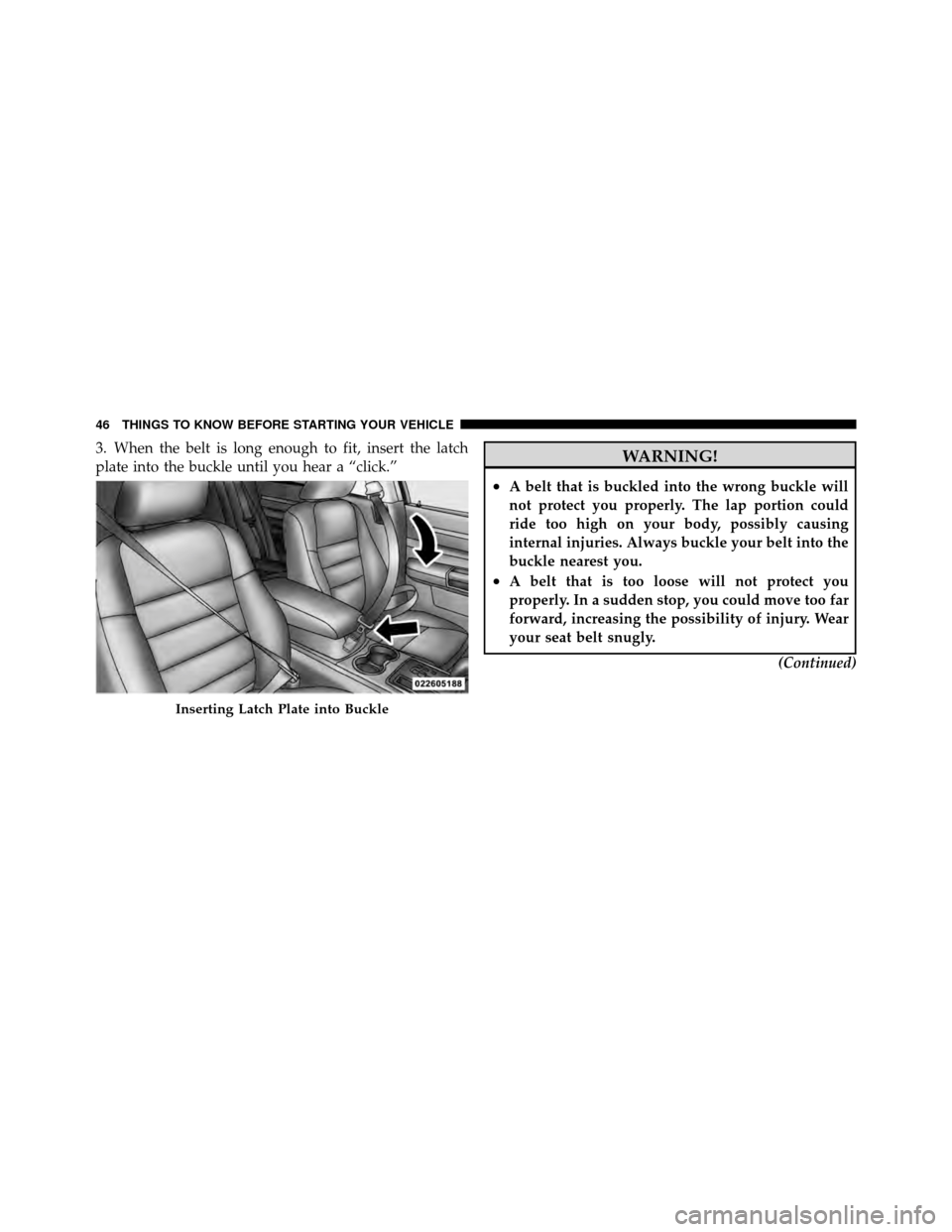
3. When the belt is long enough to fit, insert the latch
plate into the buckle until you hear a “click.”WARNING!
•A belt that is buckled into the wrong buckle will
not protect you properly. The lap portion could
ride too high on your body, possibly causing
internal injuries. Always buckle your belt into the
buckle nearest you.
•A belt that is too loose will not protect you
properly. In a sudden stop, you could move too far
forward, increasing the possibility of injury. Wear
your seat belt snugly.(Continued)
Inserting Latch Plate into Buckle
46 THINGS TO KNOW BEFORE STARTING YOUR VEHICLE
Page 64 of 465
covers the window. The airbag inflates in about 30 ms
(about one-quarter of the time that it takes to blink your
eyes) with enough force to injure you if you are not belted
and seated properly, or if items are positioned in the area
where the side curtain airbag inflates. This especially
applies to children. The side curtain airbag is only about
3-1/2 in (9 cm) thick when it is inflated.
Because airbag sensors estimate deceleration over time,
vehicle speed and damage are not good indicators of
whether or not an airbag should have deployed.
NOTE:In a rollover the pretensioners and/or SABIC
airbags may deploy on both sides of the vehicle.
Front and Side Impact Sensors
In front and side impacts, impact sensors can aid the
ORC in determining appropriate response to impact
events. Additional sensors in the ORC determine the
level of airbag deployment and provide verification.
Enhanced Accident Response System
In the event of an impact causing airbag deployment, if
the communication network remains intact, and the
power remains intact, depending on the nature of the
event the ORC will determine whether to have the
Enhanced Accident Response System perform the follow-
ing functions:
•Cut off fuel to the engine.
•Flash hazard lights as long as the battery has power or
until the ignition key is turned off.
•Turn on the interior lights, which remain on as long as
the battery has power, until the ignition key is re-
moved or the ignition switch is changed to OFF using
the Keyless Go Start/Stop button.
•Unlock the doors automatically.
2
THINGS TO KNOW BEFORE STARTING YOUR VEHICLE 63
Page 73 of 465
WARNING!
•Improper installation can lead to failure of an
infant or child restraint. It could come loose in a
collision. The child could be badly injured or
killed. Follow the manufacturer’s directions ex-
actly when installing an infant or child restraint.
•A rearward-facing child restraint should only be
used in a rear seat. A rearward-facing child re-
straint in the front seat may be struck by a deploy-
ing passenger airbag, which may cause severe or
fatal injury to the infant.
Here are some tips on getting the most out of your child
restraint:
•Before buying any restraint system, make sure that it
has a label certifying that it meets all applicable Safety Standards. We also recommend that you make sure
that you can install the child restraint in the vehicle
where you will use it before you buy it.
•The restraint must be appropriate for your child’s
weight and height. Check the label on the restraint for
weight and height limits.
•Carefully follow the instructions that come with the
restraint. If you install the restraint improperly, it may
not work when you need it.
•Buckle the child into the seat according to the child
restraint manufacturer’s directions.
•When your child restraint is not in use, secure it in the
vehicle with the seat belt or remove it from the vehicle.
Do not leave it loose in the vehicle. In a sudden stop or
collision, it could strike the occupants or seatbacks and
cause serious personal injury.
72 THINGS TO KNOW BEFORE STARTING YOUR VEHICLE
Page 192 of 465

If the ABS light remains on or turns on while driving,
then the Anti-Lock portion of the brake system is not
functioning and service is required. However, the con-
ventional brake system will continue to operate normally
if the BRAKE warning light is not on.
If the ABS light is on, the brake system should be serviced
as soon as possible to restore the benefits of Anti-Lock
brakes. If the ABS light does not turn on when the
ignition switch placed in the RUN position, have the light
inspected by an authorized dealer.
10. Electronic Stability Program (ESP) / Brake Assist
System (BAS) Malfunction Indicator LightThe yellow Electronic Stability Program (ESP)
/ Brake Assist System (BAS) Malfunction Indi-
cator Light will turn on when the key in the
ignition switch placed in the RUN position.
The light should go out with the engine running. If the
light remains on after several ignition cycles, and the vehicle has been driven several miles (kilometers) at
speeds greater than 30 mph (48 km/h), see an authorized
dealer as soon as possible to have the problem diagnosed
and corrected.
WARNING!
If a warning light remains on the system may not be
working and you will not have the benefit of ESP or
BAS. Under certain driving conditions, where ESP or
BAS would be beneficial, you - if you have not
adjusted your driving speeds and stopping in or to
account for the lack of the feature, may be in acci-
dent.
11. Airbag Warning Light This light will turn on for six to eight seconds
as a bulb check when the ignition switch is first
placed in the RUN position. If the light is either
not on during starting, or stays on, or turns on4
UNDERSTANDING YOUR INSTRUMENT PANEL 191
Page 193 of 465
while driving, then have the system inspected at an
authorized dealer as soon as possible. Refer to “Occupant
Restraints” in “Things To Know Before Starting Your
Vehicle” for further information.
12. Brake Warning LightThis light monitors various brake functions,
including brake fluid level and parking brake
application. If the brake light turns on, it may
indicate that the parking brake is applied, that
the brake fluid level is low, or that there is a problem with
the anti-lock brake system reservoir.
If the light remains on when the parking brake has been
disengaged, and the fluid level is at the full mark on the
master cylinder reservoir, it indicates a possible brake
hydraulic system malfunction. In this case, the light will
remain on until the condition has been corrected.
The dual brake system provides a reserve braking capac-
ity in the event of a failure to a portion of the hydraulic system. A leak in either half of the dual brake system is
indicated by the Brake Warning Light which will turn on
when the brake fluid level in the master cylinder has
dropped below a specified level.
The light will remain on until the cause is corrected.
NOTE:
The light may flash momentarily during sharp
cornering maneuvers which change fluid level condi-
tions. The vehicle should have service performed, and
the brake fluid level checked.
If brake failure is indicated, immediate repair is neces-
sary.
WARNING!
Driving a vehicle with the brake light on is danger-
ous. Part of the brake system may have failed. It will
take longer to stop the vehicle. You could have an
accident. Have the vehicle checked immediately.
192 UNDERSTANDING YOUR INSTRUMENT PANEL
Page 196 of 465

16. High Beam LightThis light will turn on when the high beam
headlights are ON. Push the multifunction lever
away from the steering wheel to switch the headlights to
high beam.
17. Shift Lever Indicator
The Shift Lever Indicator is self-contained within the
instrument cluster. It displays the gear position of the
automatic transmission.
18. Seat Belt Reminder Light This light will turn on for five to eight seconds as
a bulb check when the ignition switch is first
placed in the RUN position. A chime will sound if
the driver’s seat belt is unbuckled during the bulb check.
The Seat Belt Warning Light will flash, or remain on
continuously, if the driver’s seat belt remains unbuckled
after the bulb check or when driving. Refer to “Occupant
Restraints” in “Things To Know Before Starting Your
Vehicle” for further information. 19. Vehicle Security Light — If Equipped
This light will flash at a fast rate for approxi-
mately 15 seconds, when the vehicle security
alarm is arming, and then will flash slowly
until the vehicle is disarmed.
20. Fuel Gauge
The pointer shows the level of fuel in the fuel tank when
the ignition switch is placed in the RUN position.
21. Electronic Throttle Control (ETC) Light This light will turn on briefly as a bulb check
when the ignition switch is placed in the RUN
position. This light will also turn on while the
engine is running if there is a problem with the
Electronic Throttle Control (ETC) system.
If the light comes on while the engine is running, safely
bring the vehicle to a complete stop as soon as possible,
place the shift lever in PARK, and cycle the ignition
through the ACC and RUN positions. The light should
4
UNDERSTANDING YOUR INSTRUMENT PANEL 195