Page 5 of 432
Vehicle Symbol ChartHere are some additional symbols that may be found on
the vehicle and what they mean. For more information
on the symbol, refer to the index.9
:Airbag Readiness Light
#
:Air Conditioning
!
:Antilock Brake System (ABS)
g
:Audio Steering Wheel Controls or OnStar
®
$
:Brake System Warning Light
"
:Charging System
I
:Cruise Control
B
:Engine Coolant Temperature
O
:Exterior Lamps
#
:Fog Lamps
.
:Fuel Gage
+
:Fuses
i
:Headlamp High/Low-Beam Changer
j
:LATCH System Child Restraints
*
:Malfunction Indicator Lamp
:
:Oil Pressure
}
:Power
/
:Remote Vehicle Start
>
:Safety Belt Reminders
7
:Tire Pressure Monitor
F
:Traction Control
M
:Windshield Washer Fluid
v
Page 7 of 432

Instrument Panel..............................................1-2
Initial Drive Information....................................1-4
Remote Keyless Entry (RKE) System................1-4
Remote Vehicle Start......................................1-4
Door Locks....................................................1-5
Trunk Release...............................................1-5
Windows.......................................................1-6
Seat Adjustment.............................................1-6
Second Row Seats.........................................1-8
Head Restraint Adjustment...............................1-8
Safety Belt....................................................1-9
Sensing System for Passenger Airbag...............1-9
Mirror Adjustment.........................................1-10
Steering Wheel Adjustment............................1-11
Interior Lighting............................................1-11
Exterior Lighting...........................................1-12
Windshield Wiper/Washer...............................1-13
Climate Controls...........................................1-14Vehicle Features.............................................1-15
Radio(s)......................................................1-15
Satellite Radio..............................................1-16
Portable Audio Devices ..................................1-16
Steering Wheel Controls . . ..............................1-17
Bluetooth
®
...................................................1-17
Cruise Control..............................................1-18
Power Outlets..............................................1-18
Performance and Maintenance.........................1-19
Traction Control System (TCS).......................1-19
Electronic Stability Control (ESC)....................1-19
Tire Pressure Monitor....................................1-20
Engine Oil Life System ..................................1-20
Fuel E85 (85% Ethanol) . . ..............................1-20
Driving for Better Fuel Economy . . ...................1-21
Roadside Assistance Program........................1-21
OnStar
®
......................................................1-22
Section 1 In Brief
1-1
Page 9 of 432
A.Outlet Adjustment on page 4-20.
B. Remote Trunk Release Button. SeeTrunk on
page 3-12.
C.Turn Signal/Multifunction Lever on page 4-4.
D.Instrument Panel Cluster on page 4-22.
E.Hazard Warning Flashers on page 4-3.
F.Driver Information Center (DIC) on page 4-37.
G.Passenger Airbag Status Indicator on page 4-25.
H.Audio System(s) on page 4-57.
I.Exterior Lamps on page 4-9.
J.Instrument Panel Brightness on page 4-11.
K.Traction Control System (TCS) on page 5-7
(If Equipped).L.Tilt Wheel on page 4-3.
M.Cruise Control on page 4-6.
N.Hood Release on page 6-13.
O.Horn on page 4-3.
P.Audio Steering Wheel Controls on page 4-84
(If Equipped).
Q.Ignition Positions on page 3-20.
R.Climate Control System on page 4-16.
S.Accessory Power Outlet(s) on page 4-15.
T. Center Console Shift Lever (If Equipped).
SeeShifting Into Park on page 3-28.
U.Glove Box on page 3-42.
1-3
Page 17 of 432
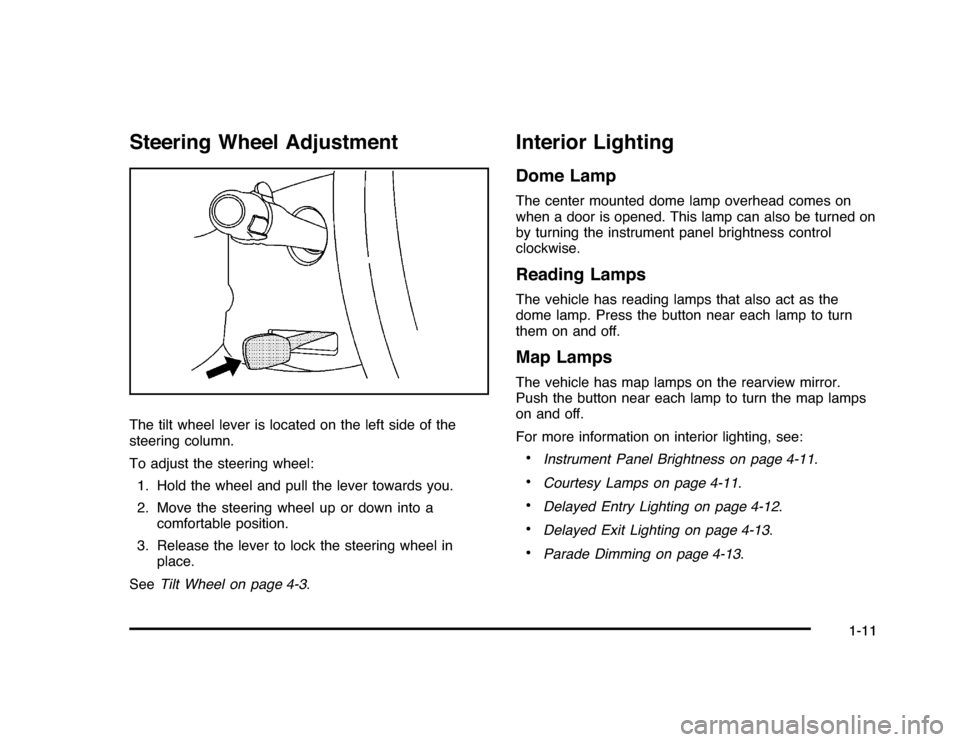
Steering Wheel AdjustmentThe tilt wheel lever is located on the left side of the
steering column.
To adjust the steering wheel:
1. Hold the wheel and pull the lever towards you.
2. Move the steering wheel up or down into a
comfortable position.
3. Release the lever to lock the steering wheel in
place.
SeeTilt Wheel on page 4-3.
Interior LightingDome LampThe center mounted dome lamp overhead comes on
when a door is opened. This lamp can also be turned on
by turning the instrument panel brightness control
clockwise.Reading LampsThe vehicle has reading lamps that also act as the
dome lamp. Press the button near each lamp to turn
them on and off.Map LampsThe vehicle has map lamps on the rearview mirror.
Push the button near each lamp to turn the map lamps
on and off.
For more information on interior lighting, see:•
Instrument Panel Brightness on page 4-11.
•
Courtesy Lamps on page 4-11.
•
Delayed Entry Lighting on page 4-12.
•
Delayed Exit Lighting on page 4-13.
•
Parade Dimming on page 4-13.
1-11
Page 18 of 432
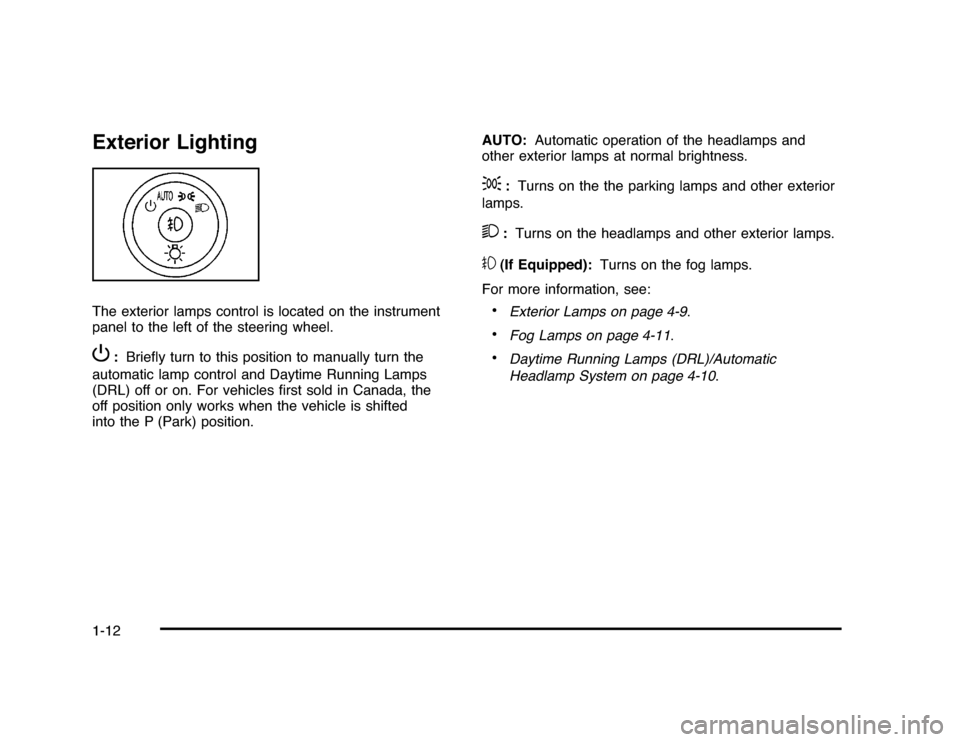
Exterior LightingThe exterior lamps control is located on the instrument
panel to the left of the steering wheel.P
:Briefly turn to this position to manually turn the
automatic lamp control and Daytime Running Lamps
(DRL) off or on. For vehicles first sold in Canada, the
off position only works when the vehicle is shifted
into the P (Park) position.AUTO:Automatic operation of the headlamps and
other exterior lamps at normal brightness.
;
:Turns on the the parking lamps and other exterior
lamps.
2
:Turns on the headlamps and other exterior lamps.
#
(If Equipped):Turns on the fog lamps.
For more information, see:•
Exterior Lamps on page 4-9.
•
Fog Lamps on page 4-11.
•
Daytime Running Lamps (DRL)/Automatic
Headlamp System on page 4-10.
1-12
Page 19 of 432
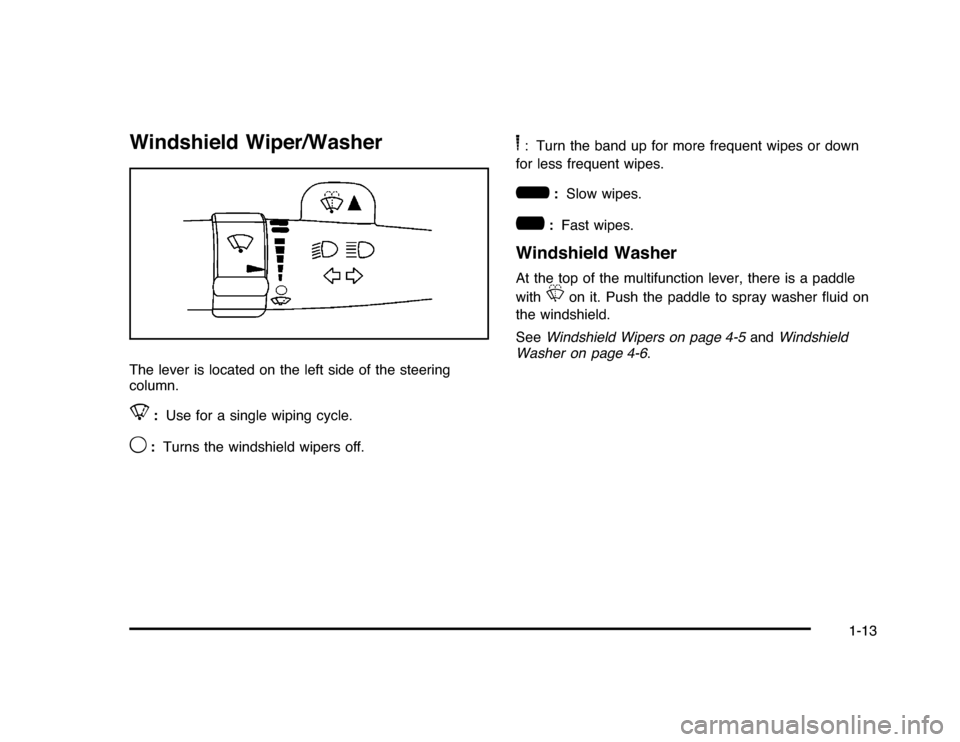
Windshield Wiper/WasherThe lever is located on the left side of the steering
column.8
:Use for a single wiping cycle.
9
:Turns the windshield wipers off.
6: Turn the band up for more frequent wipes or down
for less frequent wipes.6
:Slow wipes.
?
:Fast wipes.
Windshield WasherAt the top of the multifunction lever, there is a paddle
with
L
on it. Push the paddle to spray washer fluid on
the windshield.
SeeWindshield Wipers on page 4-5andWindshield
Washer on page 4-6.
1-13
Page 23 of 432
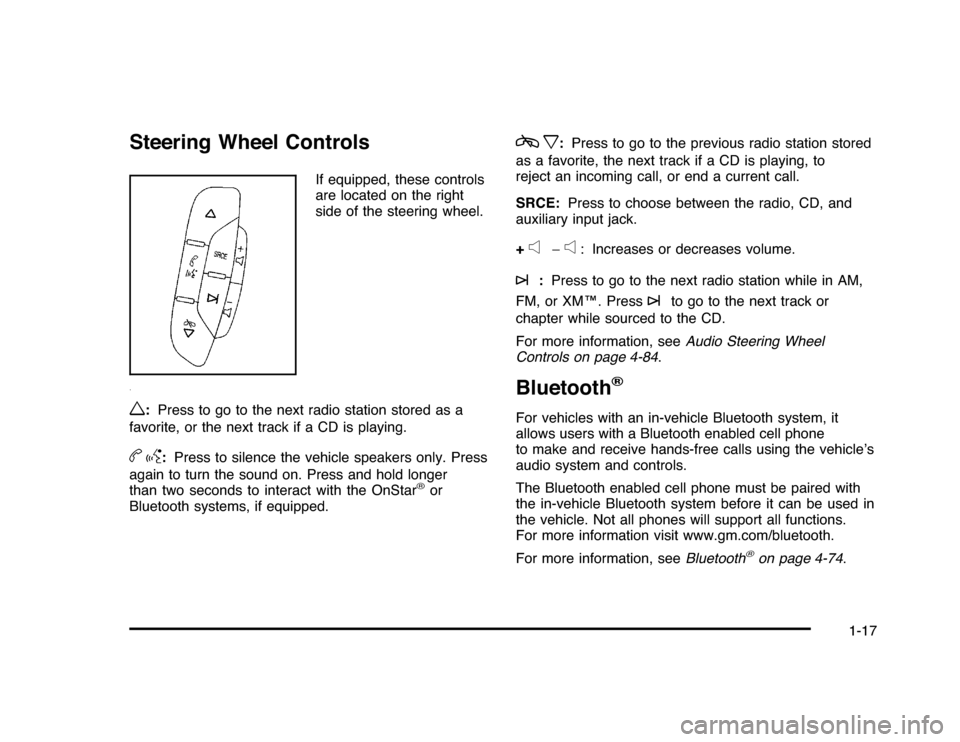
Steering Wheel Controls
If equipped, these controls
are located on the right
side of the steering wheel.
w
:Press to go to the next radio station stored as a
favorite, or the next track if a CD is playing.
bg
:Press to silence the vehicle speakers only. Press
again to turn the sound on. Press and hold longer
than two seconds to interact with the OnStar
®
or
Bluetooth systems, if equipped.
cx
:Press to go to the previous radio station stored
as a favorite, the next track if a CD is playing, to
reject an incoming call, or end a current call.
SRCE:Press to choose between the radio, CD, and
auxiliary input jack.
+
e
−
e
: Increases or decreases volume.
¨
:Press to go to the next radio station while in AM,
FM, or XM™. Press
¨
to go to the next track or
chapter while sourced to the CD.
For more information, seeAudio Steering Wheel
Controls on page 4-84.
Bluetooth
®
For vehicles with an in-vehicle Bluetooth system, it
allows users with a Bluetooth enabled cell phone
to make and receive hands-free calls using the vehicle’s
audio system and controls.
The Bluetooth enabled cell phone must be paired with
the in-vehicle Bluetooth system before it can be used in
the vehicle. Not all phones will support all functions.
For more information visit www.gm.com/bluetooth.
For more information, seeBluetooth
®
on page 4-74.
1-17
Page 24 of 432
Cruise Control
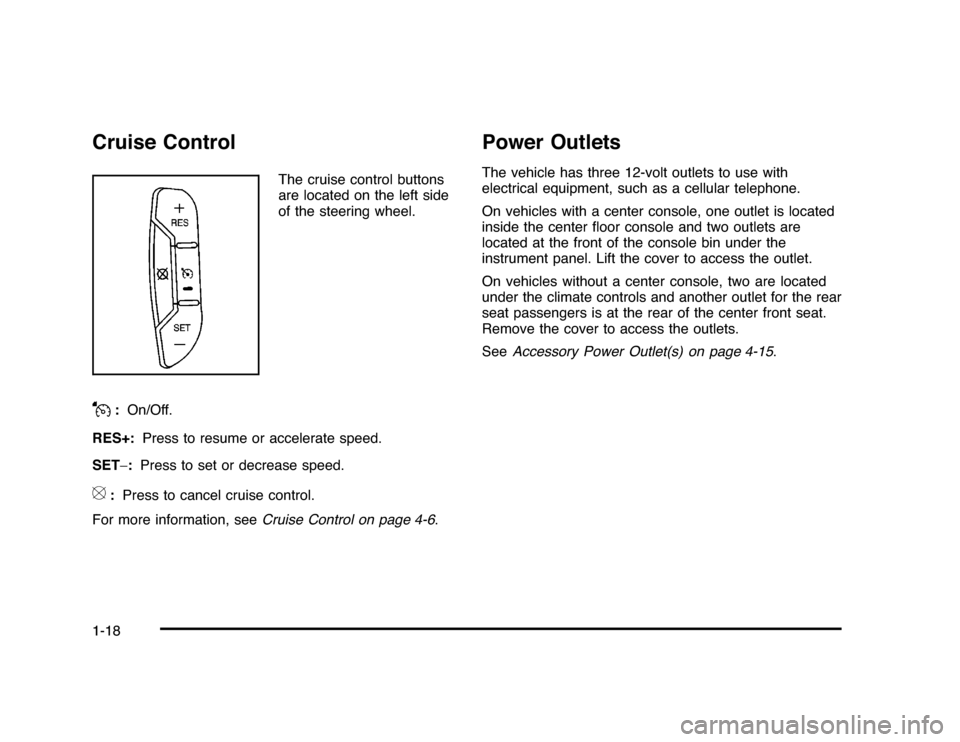
The cruise control buttons
are located on the left side
of the steering wheel.
J
:On/Off.
RES+:Press to resume or accelerate speed.
SET−:Press to set or decrease speed.
[
:Press to cancel cruise control.
For more information, seeCruise Control on page 4-6.
Power OutletsThe vehicle has three 12-volt outlets to use with
electrical equipment, such as a cellular telephone.
On vehicles with a center console, one outlet is located
inside the center floor console and two outlets are
located at the front of the console bin under the
instrument panel. Lift the cover to access the outlet.
On vehicles without a center console, two are located
under the climate controls and another outlet for the rear
seat passengers is at the rear of the center front seat.
Remove the cover to access the outlets.
SeeAccessory Power Outlet(s) on page 4-15.
1-18