2010 CHEVROLET IMPALA battery location
[x] Cancel search: battery locationPage 29 of 432
![CHEVROLET IMPALA 2010 9.G Owners Manual The OnStar system can record and transmit vehicle
information. This information is automatically sent to an
OnStar call center when
Q
is pressed,
]
is pressed, or
if the airbags or ACR system deploy.](/manual-img/24/8202/w960_8202-28.png "CHEVROLET IMPALA 2010 9.G Owners Manual The OnStar system can record and transmit vehicle
information. This information is automatically sent to an
OnStar call center when
Q
is pressed,
]
is pressed, or
if the airbags or ACR system deploy.")
The OnStar system can record and transmit vehicle
information. This information is automatically sent to an
OnStar call center when
Q
is pressed,
]
is pressed, or
if the airbags or ACR system deploy. This information
usually includes the vehicle’s GPS location and, in the
event of a crash, additional information regarding the
crash that the vehicle was involved in (e.g. the direction
from which the vehicle was hit). When the virtual advisor
feature of OnStar hands-free calling is used, the vehicle
also sends OnStar the vehicle’s GPS location so they can
provide services where it is located.
Location information about the vehicle is only available
if the GPS satellite signals are unobstructed and
available.
The vehicle must have a working electrical system,
including adequate battery power, for the OnStar
equipment to operate. There are other problems OnStar
cannot control that may prevent OnStar from providing
OnStar service at any particular time or place. Some
examples are damage to important parts of the vehicle
in a crash, hills, tall buildings, tunnels, weather or
wireless phone network congestion.
OnStar Steering Wheel ControlsThis vehicle may have a Talk/Mute button that can be
used to interact with OnStar hands-free calling. See
Audio Steering Wheel Controls on page 4-84for more
information.
On some vehicles, the mute button can be used to dial
numbers into voice mail systems, or to dial phone
extensions. See the OnStar Owner’s Guide for more
information.Your ResponsibilityIncrease the volume of the radio if the OnStar advisor
cannot be heard.
If the light next to the OnStar buttons is red, the system
may not be functioning properly. Press
Q
and request
a vehicle diagnostic. If the light appears clear (no light is
appearing), your OnStar subscription has expired and
all services have been deactivated. PressQ
to confirm
that the OnStar equipment is active.
1-23
Page 110 of 432

Remote Keyless Entry (RKE)
SystemSeeRadio Frequency Statement on page 8-20for
information regarding Part 15 of the Federal
Communications Commission (FCC) Rules and
RSS-210/211 of Industry and Science Canada.
Changes or modifications to this system by other than
an authorized service facility could void authorization to
use this equipment.
If there is a decrease in the RKE operating range,
try this:•
Check the distance. The transmitter may be too far
from the vehicle. Stand closer during rainy or
snowy weather.
•
Check the location. Other vehicles or objects may
be blocking the signal. Take a few steps to the
left or right, hold the transmitter higher, and
try again.
•
Check the transmitter’s battery. See “Battery
Replacement” later in this section.
•
If the transmitter is still not working correctly, see
your dealer/retailer or a qualified technician for
service.
Remote Keyless Entry (RKE)
System OperationThe Remote Keyless Entry (RKE) transmitter functions
work up to 195 feet (60 m) away from the vehicle.
There are other conditions which can affect the
performance of the transmitter. SeeRemote Keyless
Entry (RKE) System on page 3-4./
(Remote Vehicle Start):For vehicles with this
feature, press to start the engine from outside the vehicle
using the RKE transmitter. SeeRemote Vehicle Start on
page 3-7for additional information. With Remote Start
Shown, Without Remote
Start Similar
3-4
Page 136 of 432
The shift lock is always functional except in the case of a
an uncharged or low voltage (less than 9 volt) battery.
If the vehicle has an uncharged battery or a battery with
low voltage, try charging or jump starting the battery.
SeeJump Starting on page 6-39.Console ShiftIf the console shift lever cannot be moved out of
P (Park):
1. Apply and maintain the regular brakes.
2. Turn the ignition to ON/RUN position. SeeIgnition
Positions on page 3-20for more information.
3. Let up on the shift lever and make sure the shift
lever is pushed all the way into P (Park).
4. Press the shift lever button
5. Then, move the shift into the desired gear.
If you still cannot move the shift lever from P (Park),
consult your dealer/retailer or a professional towing
service.
Column ShiftIf the column shift lever cannot be moved out of
P (Park):
1. Apply and maintain the regular brakes.
2. Turn the ignition key to the ON/RUN position. See
Ignition Positions on page 3-20for more information.
3. Shift out of the P (Park) position to the N (Neutral)
position.
4. Move the vehicle to a safe location.
If you still cannot move the shift lever from P (Park),
consult your dealer/retailer or a professional towing
service.Parking Over Things That Burn
{
WARNING:
Things that can burn could touch hot exhaust
parts under the vehicle and ignite. Do not park
over papers, leaves, dry grass, or other things that
can burn.
3-30
Page 200 of 432
TIRE LOW ADD AIR TO TIREOn vehicles with the Tire Pressure Monitor System
(TPMS), this message displays when the pressure in one
or more of the vehicle’s tires is low. This message also
displays LEFT FRT (left front), RIGHT FRT (right front),
LEFT RR (left rear), or RIGHT RR (right rear) to indicate
the location of the low tire. The low tire pressure warning
light will also come on. SeeTire Pressure Light on
page 4-31. You can receive more than one tire pressure
message at a time. To read the other messages that may
have been sent at the same time, press the set/reset
button. If a tire pressure message appears on the DIC,
stop as soon as you can. Have the tire pressures
checked and set to those shown on the Tire Loading
Information label. SeeTires on page 6-51,Loading the
Vehicle on page 5-20, andInflation - Tire Pressure on
page 6-59. The DIC also shows the tire pressure values.
SeeDIC Operation and Displays on page 4-37.TRACTION CONTROL OFFIf your vehicle has the Traction Control System (TCS),
this message displays when the TCS turns off.
SeeTraction Control System (TCS) on page 5-7
for more information.
This message only displays while the ignition is in
ON/RUN and disappears after 10 seconds, unless
it is acknowledged or an urgent warning appears.Any of the following conditions may cause the TCS to
turn off:
•
The TCS is turned off by pressing the traction
control button. SeeTraction Control System (TCS)
on page 5-7for more information.
•
The battery is low.
•
There is a TCS failure. See your dealer/retailer for
service.
TRACTION CONTROL ONIf your vehicle has the Traction Control System (TCS),
this message displays when the TCS is turned on.
SeeTraction Control System (TCS) on page 5-7
for more information.TRANSMISSION HOT IDLE ENGINEThis message displays when the transmission fluid in
your vehicle is too hot. Stop the vehicle and allow it to idle
until it cools down. If the warning message continues to
display, have the vehicle serviced by your dealer/retailer
as soon as possible.TRUNK OPENThis message displays when the trunk is not closed
completely. Make sure that the trunk is closed
completely. SeeTrunk on page 3-12.
4-50
Page 285 of 432

A. Windshield Washer Fluid Reservoir. See “Adding
Washer Fluid” underWindshield Washer Fluid
on page 6-33.
B. Battery. SeeBattery on page 6-38.
C. Underhood Fuse Block. SeeUnderhood Fuse Block
on page 6-97.
D. Remote Positive (+) Terminal. SeeJump Starting on
page 6-39.
E. Coolant Recovery Tank. See “Checking Coolant”
underCooling System on page 6-24.
F. Pressure Cap. SeeCooling System on page 6-24.
G. Power Steering Fluid Cap. SeePower Steering Fluid
on page 6-32.
H. Engine Oil Fill Cap. See “When to Add Engine Oil”
underEngine Oil on page 6-15.
I. Engine Oil Dipstick. See “Checking Engine Oil”
underEngine Oil on page 6-15.
J. Automatic Transmission Fluid Dipstick (Out of View).
See “Checking the Fluid Level” underAutomatic
Transmission Fluid on page 6-22.
K. Brake Master Cylinder Reservoir. See “Brake Fluid”
underBrakes on page 6-35.
L. Engine Air Cleaner/Filter. SeeEngine Air
Cleaner/Filter on page 6-19.
Engine OilChecking Engine OilIt is a good idea to check the engine oil level at each
fuel fill. In order to get an accurate reading, the oil must
be warm and the vehicle must be on level ground.
The engine oil dipstick handle is a yellow loop.
SeeEngine Compartment Overview on page 6-14
for the location of the engine oil dipstick.
1. Turn off the engine and give the oil several minutes
to drain back into the oil pan. If this is not done, the
oil dipstick might not show the actual level.
2. Pull out the dipstick and clean it with a paper towel
or cloth, then push it back in all the way. Remove it
again, keeping the tip down, and check the level.
6-15
Page 308 of 432
BatteryRefer to the replacement number on the original battery
label when a new battery is needed. SeeEngine
Compartment Overview on page 6-14for battery location.
{
DANGER:
Battery posts, terminals, and related accessories
contain lead and lead compounds, chemicals
known to the State of California to cause cancer
and reproductive harm. Wash hands after handling.
Vehicle Storage
{
WARNING:
Batteries have acid that can burn you and gas that
can explode. You can be badly hurt if you are not
careful. SeeJump Starting on page 6-39for tips
on working around a battery without getting hurt.
Infrequent Usage: Remove the black, negative (−) cable
from the battery to keep the battery from running down.
Extended Storage: Remove the black, negative (−) cable
from the battery or use a battery trickle charger.
6-38
Page 310 of 432
Notice:If you leave the radio or other accessories
on during the jump starting procedure, they could be
damaged. The repairs would not be covered by the
warranty. Always turn off the radio and other
accessories when jump starting the vehicle.
3. Turn off the ignition on both vehicles. Unplug
unnecessary accessories plugged into the cigarette
lighter or the accessory power outlets. Turn off the
radio and all lamps that are not needed. This will
avoid sparks and help save both batteries. And it
could save the radio!
4. Open the hoods and locate the batteries. Find the
positive (+) and negative (−) terminal locations on
each vehicle.
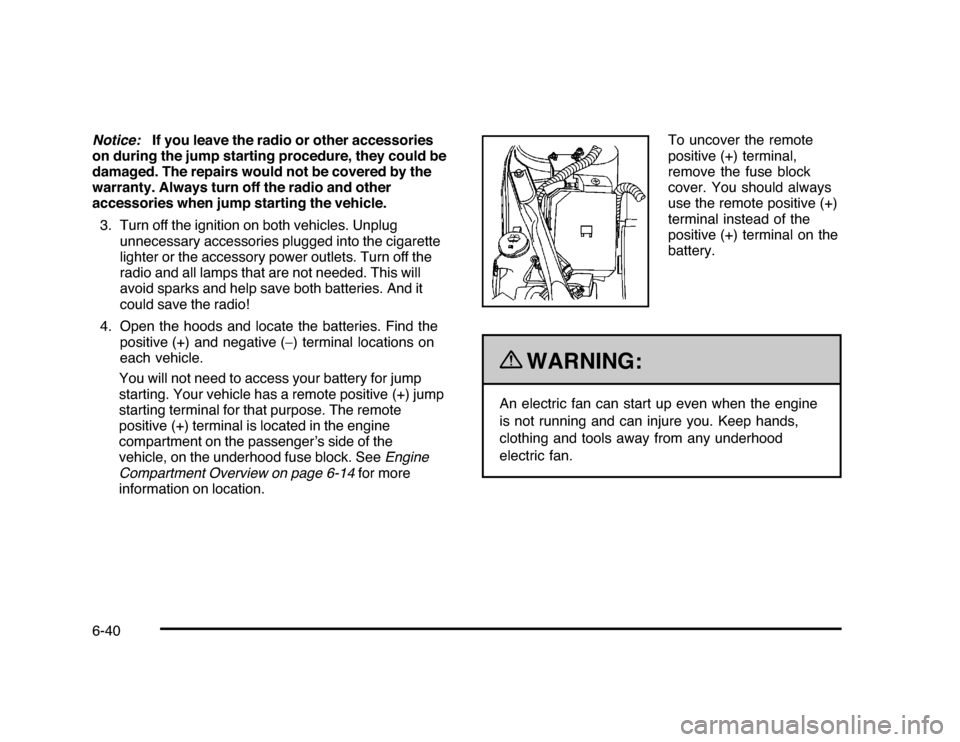
You will not need to access your battery for jump
starting. Your vehicle has a remote positive (+) jump
starting terminal for that purpose. The remote
positive (+) terminal is located in the engine
compartment on the passenger’s side of the
vehicle, on the underhood fuse block. SeeEngine
Compartment Overview on page 6-14for more
information on location.To uncover the remote
positive (+) terminal,
remove the fuse block
cover. You should always
use the remote positive (+)
terminal instead of the
positive (+) terminal on the
battery.
{
WARNING:
An electric fan can start up even when the engine
is not running and can injure you. Keep hands,
clothing and tools away from any underhood
electric fan.
6-40
Page 312 of 432

6. Connect the red positive (+) cable to the positive (+)
terminal location of the vehicle with the dead
battery. Use a remote positive (+) terminal if the
vehicle has one.
7. Do not let the other end touch metal. Connect it to
the positive (+) terminal location of the vehicle with
the good battery. Use a remote positive (+)
terminal if the vehicle has one.
8. Now connect the black negative (−) cable to the
negative (−) terminal location of the vehicle with
the good battery. Use a remote negative (−) terminal
if the vehicle has one.
Do not let the other end touch anything until the
next step. The other end of the negative (−) cable
does not go to the dead battery. It goes to a
heavy, unpainted metal engine part or to a remote
negative (−) terminal on the vehicle with the
dead battery.
9. Connect the other end of the negative (−) cable at
least 18 inches (45 cm) away from the dead battery,
but not near engine parts that move. The electrical
connection is just as good there, and the chance
of sparks getting back to the battery is much less.
10. Now start the vehicle with the good battery and run
the engine for a while.
11. Try to start the vehicle that had the dead battery.
If it will not start after a few tries, it probably needs
service.Notice:If the jumper cables are connected or
removed in the wrong order, electrical shorting may
occur and damage the vehicle. The repairs would
not be covered by the vehicle warranty. Always
connect and remove the jumper cables in the correct
order, making sure that the cables do not touch
each other or other metal.
A. Heavy, Unpainted Metal Engine Part or Remote
Negative (−) Terminal
B. Good Battery or Remote Positive (+) Terminal and
Remote Negative (−) Terminals
C. Dead Battery or Remote Positive (+) TerminalJumper Cable Removal6-42