2010 CHEVROLET EQUINOX park assist
[x] Cancel search: park assistPage 251 of 394
Driving and Operating 8-47
{WARNING
The Ultrasonic Rear Parking
Assist (URPA) system does not
replace driver vision. It cannot
detect:
.Objects that are below the
bumper, underneath the
vehicle, or if they are too
close or far from the vehicle
.Children, pedestrians,
bicyclists, or pets.
If you do not use proper care
before and while backing; vehicle
damage, injury, or death could
occur. Even with URPA, always
check behind the vehicle before
backing up. While backing, be
sure to look for objects and check
the vehicle's mirrors. The display is located in the
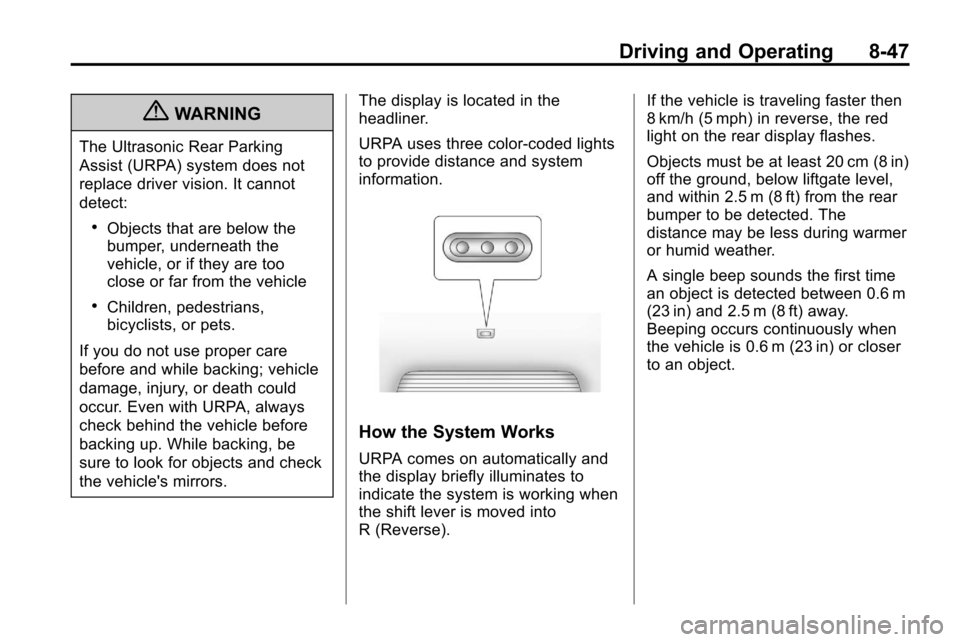
headliner.
URPA uses three color-coded lights
to provide distance and system
information.
How the System Works
URPA comes on automatically and
the display briefly illuminates to
indicate the system is working when
the shift lever is moved into
R (Reverse). If the vehicle is traveling faster then
8 km/h (5 mph) in reverse, the red
light on the rear display flashes.
Objects must be at least 20 cm (8 in)
off the ground, below liftgate level,
and within 2.5 m (8 ft) from the rear
bumper to be detected. The
distance may be less during warmer
or humid weather.
A single beep sounds the first time
an object is detected between 0.6 m
(23 in) and 2.5 m (8 ft) away.
Beeping occurs continuously when
the vehicle is 0.6 m (23 in) or closer
to an object.
Page 252 of 394
8-48 Driving and Operating
The following describes how the URPA display lights appear as the vehicle
gets closer to a detected object:Description Metric Englishamber light 2.5 m 8 ft
amber/amber lights 1.0 m 40 in
amber/amber/red lights and continuous beeping for five seconds 0.6 m 23 in
amber/amber/red lights flashing and continuous beeping for five seconds 0.3 m 1 ft
Park Assist Off displays on the
Driver Information Center (DIC) to
indicate that URPA is off, see Driver
Information Center (DIC)
on
page 4‑24for more information.
System Settings
Each time the vehicle is started
URPA defaults to the On setting.
Use the Vehicle Personalization
on
page 4‑34menu to
configure URPA. The settings are:
.On: Turns URPA on
.Off: Turns URPA off
.Tow Bar: Use when a tow bar is
attached to the vehicle
Tow Bar
When the tow bar setting is used,
an area of 16 cm (6 in) around the
hitch is not detected by the system.
When the System Does Not
Seem to Work Properly
If the URPA system does not
activate due to a temporary
condition, the message Park Assist
Off displays on the DIC and a red
light is shown on the rear URPA
display when the shift lever is
moved into R (Reverse). This can
occur under the following
conditions:
.The ultrasonic sensors are not
clean. Keep the vehicle's rear
bumper free of mud, dirt, snow,
ice and slush. For cleaning
instructions, see Exterior Care
on page 9‑75.
.A trailer was attached to the
vehicle, or an object was
hanging out of the liftgate during
the last drive cycle, a red light
may come on in the rear display.
Once the attached object is
removed, URPA will return to
normal operation.
Page 255 of 394
Driving and Operating 8-51
Symbols
The navigation system may have a
feature that lets the driver view
symbols on the navigation screen
while using the RVC. The Ultrasonic
Rear Park Assist (URPA) system
must not be disabled to use the
caution symbols. The error message
“Rear Parking Assist Symbols
Unavailable”may display if URPA
has been disabled and the symbols
have been turned on. See
Ultrasonic Parking Assist
on
page 8‑46.
The symbols appear and may cover
an object when viewing the
navigation screen when an object is
detected by the URPA system.
To turn the symbols on or off:
1. Shift into P (Park).
2. Press the CONFIG button.
3. Select Display.
4. Select Symbols. When a check mark appears next to the
Symbols option, symbols will
appear. Guidelines
The RVC system has a guideline
overlay that can help the driver align
the vehicle when backing into a
parking spot.
To turn the guidelines on or off:
1. Shift into P (Park).
2. Press the CONFIG button.
3. Select Display.
4. Select Guidelines. When a
check mark appears next to the
Guidelines option, guidelines will
appear.
Rear Vision Camera Error
Messages
SERVICE REAR VISION CAMERA
SYSTEM: This message can
display on the navigation screen
when the system is not receiving
information it requires from other
vehicle systems.
If any other problem occurs or if a
problem persists, see your dealer.
Rear Vision Camera Location
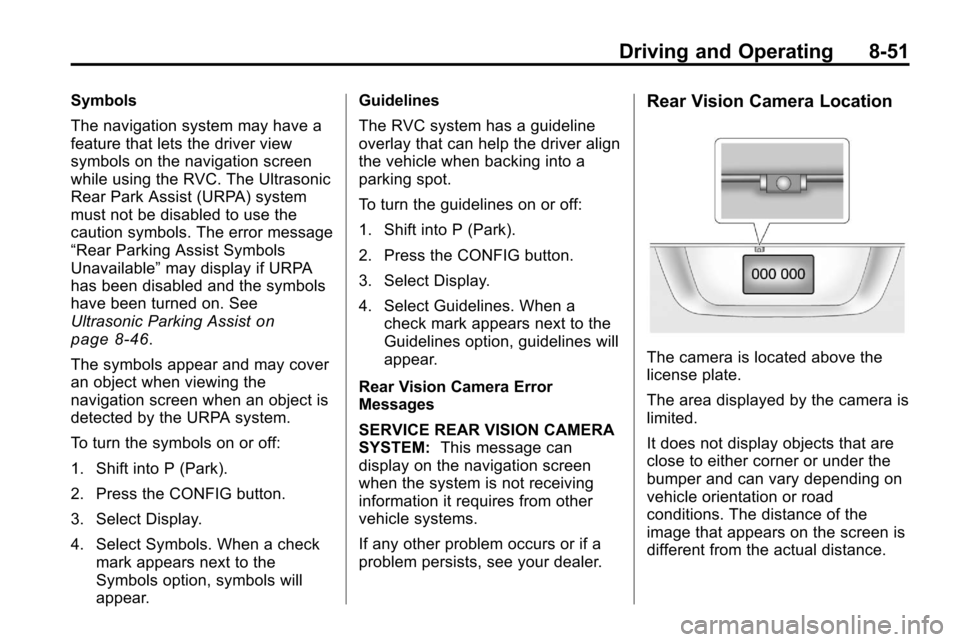
The camera is located above the
license plate.
The area displayed by the camera is
limited.
It does not display objects that are
close to either corner or under the
bumper and can vary depending on
vehicle orientation or road
conditions. The distance of the
image that appears on the screen is
different from the actual distance.
Page 263 of 394
Driving and Operating 8-59
.Do not use the Fuel Saver Mode
when towing.
.Obey speed limit restrictions.
Do not drive faster than the
maximum posted speed for
trailers, or no more than 90 km/h
(55 mph), to reduce wear on the
vehicle.
.For vehicles with the Ultra Rear
Parking Assist (URPA) system,
turn the system off when towing
a trailer. If the tow bar is
installed while not towing a
trailer, change the URPA system
to the“Tow Bar” setting. See
Ultrasonic Parking Assist
on
page 8‑46for more information.
Driving with a Trailer
Towing a trailer requires experience.
Get familiar with handling and
braking with the added trailer
weight. The vehicle is now longer
and not as responsive as the
vehicle is by itself. Check all trailer hitch parts and
attachments, safety chains,
electrical connectors, lamps, tires
and mirror adjustments. If the trailer
has electric brakes, start the vehicle
and trailer moving and then apply
the trailer brake controller by hand
to be sure the brakes are working.
During the trip, check regularly to be
sure that the load is secure, and the
lamps and trailer brakes are working
properly.
Towing with a Stability Control
System
When towing, the sound of the
stability control system might be
heard. The system is reacting to the
vehicle movement caused by the
trailer, which mainly occurs during
cornering. This is normal when
towing heavier trailers.
Following Distance
Stay at least twice as far behind the
vehicle ahead as you would when
driving the vehicle without a trailer.
This can help to avoid situations
that require heavy braking and
sudden turns.
Passing
More passing distance is needed
when towing a trailer. Because the
rig is longer, it is necessary to go
farther beyond the passed vehicle
before returning to the lane.
Backing Up
Hold the bottom of the steering
wheel with one hand. To move the
trailer to the left, move that hand to
the left. To move the trailer to the
right, move your hand to the right.
Always back up slowly and,
if possible, have someone
guide you.
Page 328 of 394
9-60 Vehicle Care
If a tire goes flat, avoid further tire
and wheel damage by driving slowly
to a level place. Turn on the hazard
warning flashers. SeeHazard
Warning Flashers on page 5‑2.
{WARNING
Changing a tire can be
dangerous. The vehicle can slip
off the jack and roll over or fall on
you or other people. You and they
could be badly injured or even
killed. Find a level place to
change your tire. To help prevent
the vehicle from moving:
1. Set the parking brake firmly.
2. Put an automatic transmission shift lever in
P (Park), or shift a manual
transmission to 1 (First) or
R (Reverse).
(Continued)
WARNING (Continued)
3. Turn off the engine and donot restart while the vehicle
is raised.
4. Do not allow passengers to remain in the vehicle.
To be certain the vehicle will not
move, put blocks at the front and
rear of the tire farthest away from
the one being changed. That
would be the tire on the other
side, at the opposite end of the
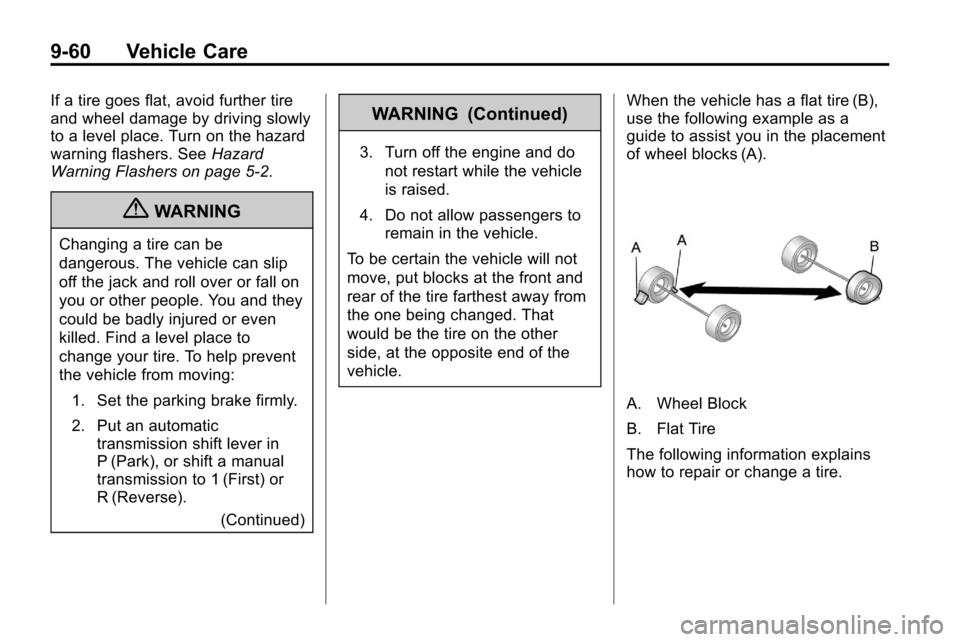
vehicle. When the vehicle has a flat tire (B),
use the following example as a
guide to assist you in the placement
of wheel blocks (A).
A. Wheel Block
B. Flat Tire
The following information explains
how to repair or change a tire.
Page 384 of 394

i-2 INDEX
B
Battery . . . . . . . . . . . . . . . . . . . . . . . . 9-24Jump Starting . . . . . . . . . . . . . . . . . 9-69
Voltage and ChargingMessages . . . . . . . . . . . . . . . . . . . 4-28
Blade Replacement, Wiper . . . . 9-26
Bluetooth . . . . 6-42, 6-43, 6-46, 6-58
Brakes . . . . . . . . . . . . . . . . . . . . . . . . . 9-21 Antilock . . . . . . . . . . . . . . . . . . . . . . . 8-38
Assist . . . . . . . . . . . . . . . . . . . . . . . . . 8-40
Fluid . . . . . . . . . . . . . . . . . . . . . . . . . . 9-22
Parking . . . . . . . . . . . . . . . . . . . . . . . 8-40
System Messages . . . . . . . . . . . . 4-28
Braking . . . . . . . . . . . . . . . . . . . . . . . . . 8-4
Break-In, New Vehicle . . . . . . . . . 8-28
Bulb Replacement . . . . . . . . . . . . . 9-34 Fog Lamps . . . . . . . . . . . . . . 5-3, 9-31
Headlamp Aiming . . . . . . . . . . . . . 9-27
Headlamps . . . . . . . . . . . . . . . . . . . 9-30
Headlamps, Front TurnSignal, Sidemarker, and
Parking Lamps . . . . . . . . . . . . . . 9-30 Bulb Replacement (cont.)
License Plate Lamps . . . . . . . . . 9-33
Taillamps, Turn Signal,
Sidemarker, Stoplamps,
and Backup Lamps . . . . . . . . . . 9-32
Buying New Tires . . . . . . . . . . . . . . 9-54
C
Calibration . . . . . . . . . . . . . . . . . . . . . . 4-8
California Fuel Requirements . . . . . . . . . . . 8-54
Perchlorate Materials
Requirements . . . . . . . . . . . . . . . . 9-3
Warning . . . . . . . . . . . . . . . . . . . . . . . 9-3
Camera, Rear Vision . . . . . . . . . . 8-49
Canadian Vehicle Owners . . . . . . . . iv
Capacities and Specifications . . . . . . . . . . . . . . . . 11-2
Carbon Monoxide Engine Exhaust . . . . . . . . . . . . . . . 8-34
Liftgate . . . . . . . . . . . . . . . . . . . . . . . . 1-8
Winter Driving . . . . . . . . . . . . . . . . 8-21 Cargo
Cover . . . . . . . . . . . . . . . . . . . . . . . . . . 3-1
Cautions, Danger, and Warnings . . . . . . . . . . . . . . . . . . . . . . . . iv
CD DVD Player . . . . . . . . . . . . . . . . . . . 6-21
CD Player . . . . . . . . . . . . . . . . . . . . . 6-19
Center Console Storage . . . . . . . . 3-1
Chains, Tire . . . . . . . . . . . . . . . . . . . 9-58
Charging System Light . . . . . . . . 4-16
Check
Engine Light . . . . . . . . . . . . . . . . . . 4-16
Ignition Transmission Lock . . . 9-25
Child Restraints Infants and YoungChildren . . . . . . . . . . . . . . . . . . . . . 2-39
Lower Anchors and Tethers for Children . . . . . . . . . 2-45
Older Children . . . . . . . . . . . . . . . . 2-37
Securing . . . . . . . . . . . . . . . . 2-51, 2-54
Systems . . . . . . . . . . . . . . . . . . . . . . 2-41
Where to Put the Restraint . . . 2-43
Page 387 of 394

INDEX i-5
Fuel (cont.)Gasoline Specifications . . . . . . . 8-54
Gauge . . . . . . . . . . . . . . . . . . . . . . . . 4-13
Low Fuel Warning Light . . . . . . . 4-22
Recommended . . . . . . . . . . . . . . . 8-54
Requirements, California . . . . . 8-54
System Messages . . . . . . . . . . . . 4-30
Fuel Economy Mode . . . . . . . . . . . 8-37
Fuses . . . . . . . . . . . . . . . . . . . . . . . . . 9-34 Engine Compartment FuseBlock . . . . . . . . . . . . . . . . . . . . . . . . 9-34
Instrument Panel Fuse Block . . . . . . . . . . . . . . . . . . . . . . . . 9-37
G
GasolineSpecifications . . . . . . . . . . . . . . . . . 8-54
Gauges Engine CoolantTemperature . . . . . . . . . . . . . . . . 4-14
Fuel . . . . . . . . . . . . . . . . . . . . . . . . . . 4-13
Odometer . . . . . . . . . . . . . . . . . . . . . 4-13
Speedometer . . . . . . . . . . . . . . . . . 4-13
Tachometer . . . . . . . . . . . . . . . . . . . 4-13
Warning Lights and Indicators . . . . . . . . . . . . . . . . . . . 4-11 General Information
Service and Maintenance . . . . . 10-1
Towing . . . . . . . . . . . . . . . . . . . . . . . . 8-57
Vehicle Care . . . . . . . . . . . . . . . . . . . 9-3
Glove Box . . . . . . . . . . . . . . . . . . . . . . 3-1
GM Mobility Reimbursement Program . . . . . . . . . . . . . . . . . . . . . . 12-5
H
Hazard Warning Flashers . . . . . . . 5-2
Head Restraints . . . . . . . . . . . . . . . . 2-2
HeadlampsAiming . . . . . . . . . . . . . . . . . . . . . . . . 9-27
Bulb Replacement . . . . . . . . . . . . 9-30
Daytime Running
Lamps (DRL) . . . . . . . . . . . . . . . . . 5-2
Flash-to-Pass . . . . . . . . . . . . . . . . . . 5-2
Headlamps, Front Turn Signal, Sidemarker, and
Parking Lamps . . . . . . . . . . . . . . 9-30
High-Beam On Light . . . . . . . . . . 4-23
High/Low Beam Changer . . . . . . 5-1
Lamps On Reminder . . . . . . . . . 4-23
Heated Front Seats . . . . . . . . . . . . . 2-7
Heated Mirrors . . . . . . . . . . . . . . . . . 1-14 Heater
Engine Coolant . . . . . . . . . . . . . . . 8-31
High-Beam On Light . . . . . . . . . . . 4-23
Highway Hypnosis . . . . . . . . . . . . . 8-20
Hill and Mountain Roads . . . . . . . 8-20
Hill Start Assist (HSA) . . . . . . . . . 8-41
Hood . . . . . . . . . . . . . . . . . . . . . . . . . . . 9-5
Horn . . . . . . . . . . . . . . . . . . . . . . . . . . . . 4-7
How to Wear Safety Belts Properly . . . . . . . . . . . . . . . . . . . . . . 2-12
I
Ignition Positions . . . . . . . . . . . . . . 8-28
Ignition Transmission LockCheck . . . . . . . . . . . . . . . . . . . . . . . . 9-25
Immobilizer . . . . . . . . . . . . . . . . . . . . 1-13
Infants and Young Children, Restraints . . . . . . . . . . . . . . . . . . . . 2-39
Instrument Cluster . . . . . . . . . . . . . 4-12
Instrument Panel Storage Area . . . . . . . . . . . . . . . . . . 3-1
Instrument Panel Overview . . . . . 4-4
Introduction . . . . . . . . . . . . . . . . . . .iii, 6-1
Page 390 of 394

i-8 INDEX
Operation, InfotainmentSystem . . . . . . . . . . . . . . . . . . . . . . . . 6-7
Outlets Power . . . . . . . . . . . . . . . . . . . . . . . . 4-10
Overheating, Engine . . . . . . . . . . . 9-18
Overview Instrument Panel . . . . . . . . . . . . . . 4-4
Overview, Infotainment System . . . . . . . . . . . . . . . . . . . . 6-3, 6-5
P
ParkShifting Into . . . . . . . . . . . . . . . . . . . 8-32
Shifting Out of . . . . . . . . . . . . . . . . 8-33
Park Tilt Mirrors . . . . . . . . . . . . . . . . 1-15
Parking Assist, Ultrasonic . . . . . . . . . . . . . 8-46
Brake . . . . . . . . . . . . . . . . . . . . . . . . . 8-40
Brake and P (Park)Mechanism Check . . . . . . . . . . 9-26
Over Things That Burn . . . . . . . 8-33
Passenger Airbag Status Indicator . . . . . . . . . . . . . . . . . . . . . 4-15
Passenger Compartment Air Filter . . . . . . . . . . . . . . . . . . . . . . . . . . 7-6 Passenger Sensing System . . . 2-30
Perchlorate Materials
Requirements, California . . . . . . 9-3
Phone Bluetooth . . . . . . . 6-42, 6-43, 6-46, 6-58
Power
Door Locks . . . . . . . . . . . . . . . . . . . . 1-7
Mirrors . . . . . . . . . . . . . . . . . . . . . . . . 1-14
Outlets . . . . . . . . . . . . . . . . . . . . . . . 4-10
Retained Accessory (RAP) . . . 8-29
Seat Adjustment . . . . . . . . . . . . . . . 2-3
Steering Fluid . . . . . . . . . . . . . . . . . 9-20
Windows . . . . . . . . . . . . . . . . . . . . . 1-16
Pregnancy, Using Safety Belts . . . . . . . . . . . . . . . . . . . . . . . . . 2-21
Privacy Radio Frequency
Identification (RFID) . . . . . . . 12-16
Program Courtesy Transportation . . . . . . 12-8
Proposition 65 Warning, California . . . . . . . . . . . . . . . . . . . . . . 9-3
R
Radio Frequency
Identification (RFID) . . . . . . . . 12-16
Statement . . . . . . . . . . . . . . . . . . 12-16
Radios AM-FM Radio . . . . . . . . . . . . . . . . . 6-11
CD/DVD Player . . . . . . . . . . . . . . . 6-21
Reception . . . . . . . . . . . . . . . . . . . . 6-18
Satellite . . . . . . . . . . . . . . . . . . . . . . . 6-14
Reading Lamps . . . . . . . . . . . . . . . . . 5-4
Rear Seat Entertainment System . . . . . . . . . . . . . . . . . . . . . . . 6-33
Rear Seats . . . . . . . . . . . . . . . . . . . . . 2-8
Rear Vision Camera (RVC) . . . . 8-49
Rear Window Washer/Wiper . . . . 4-8
Rearview Mirrors . . . . . . . . . . . . . . 1-15 Automatic Dimming . . . . . . . . . . . 1-15
Reclining Seatbacks . . . . . . . . . . . . 2-5
Recommended Fluids and Lubricants . . . . . . . . . . . . . . . . . . . . 10-7
Recommended Fuel . . . . . . . . . . . 8-54
Records Maintenance . . . . . . . . . . . . . . . . 10-10