2010 CHEVROLET CORVETTE battery
[x] Cancel search: batteryPage 184 of 472

Battery Run-Down Protection
This vehicle has a feature to help prevent the battery
from being drained in case any of the following lamps
are left on; the underhood lamp, if your vehicle has
this feature, vanity mirror lamps, cargo lamps, reading
lamps, console or glove box lamps. If any of these
lamps are left on, they will automatically time-out after
about 10 minutes. To reset it, all of the above lamps
must be turned off or the ignition key on.
Head-Up Display (HUD)
{WARNING:
If the HUD image is too bright, or too high in your
field of view, it may take you more time to see
things you need to see when it is dark outside.
Be sure to keep the HUD image dim and placed
low in your field of view.
For vehicles with the Head-Up Display (HUD), you can
see some of the driver information that appears on the
instrument panel cluster. The information may be displayed in English or metric
units and appears as an image focused out toward the
front of the vehicle. The HUD consists of the following
information:
.Speedometer
.Turn Signal Indicators
.High-Beam Indicator Symbol
.Tachometer
.Manual Paddle Shift Gear Indicator (If Equipped)
These displays on the HUD are for use when
using the manual paddle shift controls to shift
the transmission. See
“Manual Paddle Shift”in
Automatic Transmission Operation on page 3‑26.
.Shift Light
This light is used for performance driving to
indicate that the vehicle's best performance level
has been reached to shift the transmission into the
next higher gear. An arrow pointing up will light up
on the display just prior to reaching the engine fuel
cut-off mode. This cut-off is about 6,500 RPM for
the LS3 engine, 6,600 RPM for the LS9 & ZR1
engines and 7,000 RPM for the LS7 engine.
.Check Gauges Warning
.Engine Coolant Temperature Gauge
4-16
Page 188 of 472
To change the language and unit selections, see
“OPTION” underDIC Operation and Displayson
page 4‑47.
Clean the inside of the windshield as needed to remove
any dirt or film that reduces the sharpness or clarity of
the HUD image.
To clean the HUD, spray household glass cleaner on a
soft, clean cloth. Wipe the HUD lens gently, then dry it.
Do not spray cleaner directly on the lens because the
cleaner could leak into the unit.
If the ignition is on and the HUD image cannot be seen,
check to see if:
.Something is covering the HUD unit.
.The HUD dimmer control is adjusted properly.
.The HUD image is adjusted to the proper height.
.Ambient light is low, in the direction the vehicle is
facing.
.A fuse is blown. See Fuses and Circuit Breakerson page 6‑101.
Keep in mind that the windshield is part of the HUD
system. See Windshield Replacement on page 6‑59.
Accessory Power Outlet(s)
The accessory power outlet can be used to connect
electrical equipment, such as a cellular phone.
The accessory power outlet is located inside the center
console storage compartment, on the forward left side.
To use the outlet, remove the tethered cap. When not
using it, always cover the outlet with the protective cap.
Notice: Leaving electrical equipment plugged in for
an extended period of time while the vehicle is off
will drain the battery. Power is always supplied to
the outlets. Always unplug electrical equipment
when not in use and do not plug in equipment that
exceeds the maximum 20 ampere rating.
Certain electrical accessories may not be compatible
with the accessory power outlet and could result in
blown vehicle or adapter fuses. If you experience
a problem, see your dealer/retailer for additional
information on accessory power outlets.
4-20
Page 196 of 472
Passenger Compartment Air Filter
The passenger compartment air filter removes certain
particles from the air including pollen and dust particles.
Reductions in airflow, which may occur more often in
dusty areas, indicate that the filter may need to be
replaced. See Scheduled Maintenance
on page 7‑3for information on how often to replace the filter.
Notice: Driving without a passenger compartment
air filter in place can cause water and small
particles, like paper and leaves, to be pulled into
your climate control system which may cause
damage to it. Make sure you always replace the
old filter with a new one.
The passenger compartment air filter is located on the
passenger side of the engine compartment near the
battery. See Engine Compartment Overview
on
page 6‑14. To check or replace the air filter:
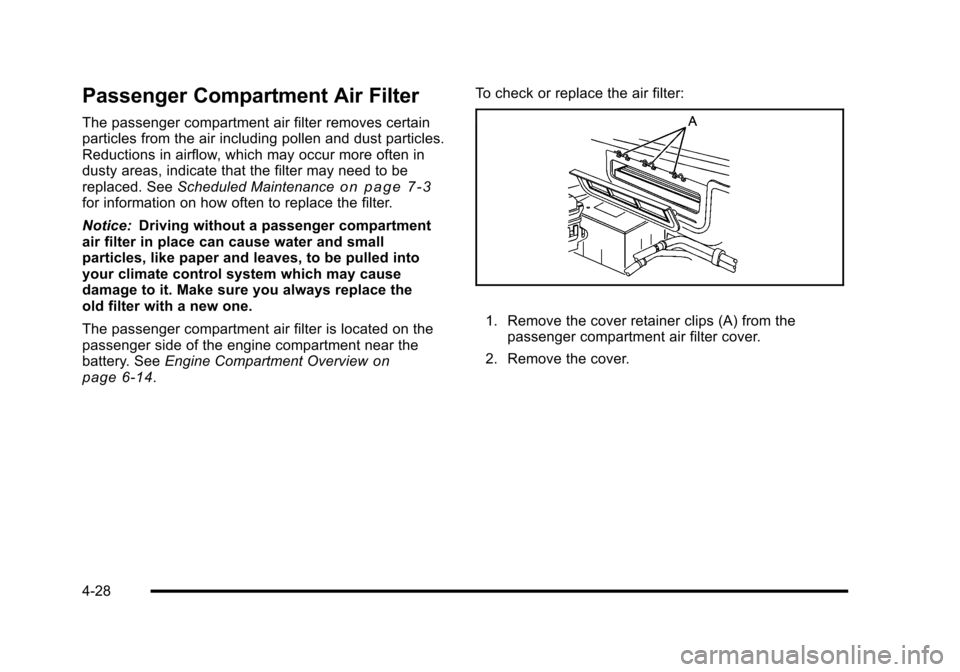
1. Remove the cover retainer clips (A) from the
passenger compartment air filter cover.
2. Remove the cover.
4-28
Page 203 of 472
If, after several seconds, both status indicator lights
remain on, or if there are no lights at all, there may be
a problem with the lights or the passenger sensing
system. See your dealer/retailer for service.
{WARNING:
If the airbag readiness light ever comes on and
stays on, it means that something may be wrong
with the airbag system. To help avoid injury to
yourself or others, have the vehicle serviced right
away. See Airbag Readiness Light
on page 4‑33
for more information, including important safety
information.
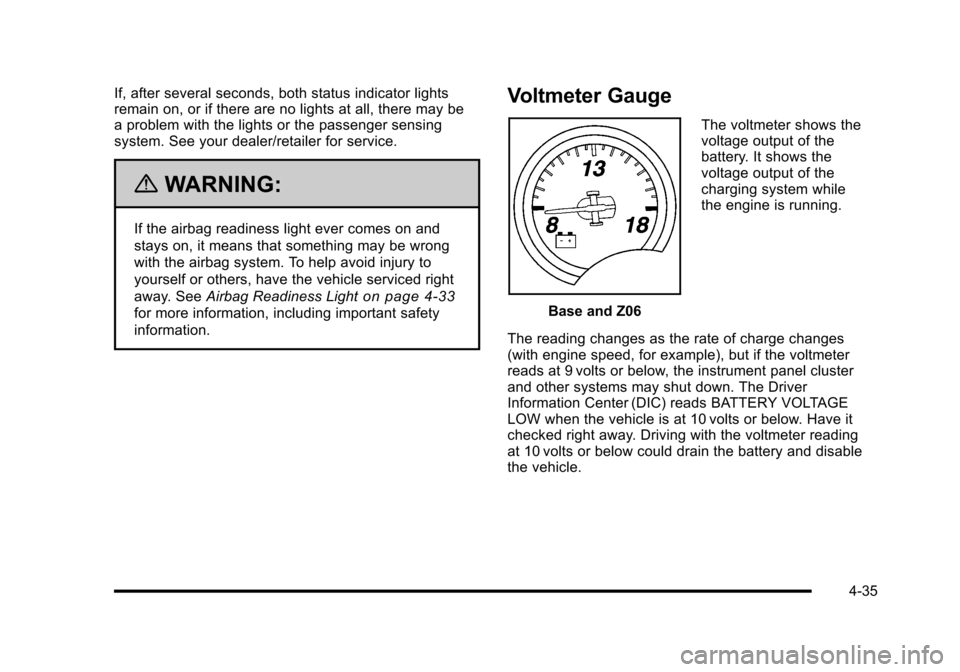
Voltmeter Gauge
Base and Z06 The voltmeter shows the
voltage output of the
battery. It shows the
voltage output of the
charging system while
the engine is running.
The reading changes as the rate of charge changes
(with engine speed, for example), but if the voltmeter
reads at 9 volts or below, the instrument panel cluster
and other systems may shut down. The Driver
Information Center (DIC) reads BATTERY VOLTAGE
LOW when the vehicle is at 10 volts or below. Have it
checked right away. Driving with the voltmeter reading
at 10 volts or below could drain the battery and disable
the vehicle.
4-35
Page 211 of 472
If none of the above have made the light turn off, your
dealer/retailer can check the vehicle. The dealer/retailer
has the proper test equipment and diagnostic tools to fix
any mechanical or electrical problems that might have
developed.
Emissions Inspection and Maintenance
Programs
Some state/provincial and local governments have
or might begin programs to inspect the emission
control equipment on the vehicle. Failure to pass this
inspection could prevent getting a vehicle registration.
Here are some things to know to help the vehicle pass
an inspection:
.The vehicle will not pass this inspection if the
check engine light is on with the engine running.
To perform a check engine light bulb check with
the keyless ignition, make sure the transmitter fob
is in the passenger compartment. See Ignition
Positions
on page 3‑23. Press the bottom of the
Acc. button on the instrument panel and hold the button down for five seconds. The instrument
panel, including the check engine light, will light up
and the ignition will be on, but the engine will not
start
—press the bottom of the Acc. button only
briefly, less than five seconds, the accessory
power mode will be turned on, but not the ignition.
After the bulb check, press and release the Acc.
button again to turn the ignition off and avoid
draining the vehicle's battery.
.The vehicle will not pass this inspection if the
OBD II (on-board diagnostic) system determines
that critical emission control systems have not
been completely diagnosed by the system.
The vehicle would be considered not ready for
inspection. This can happen if the battery has
recently been replaced or if the battery has run
down. The diagnostic system is designed to
evaluate critical emission control systems during
normal driving. This can take several days of
routine driving. If this has been done and the
vehicle still does not pass the inspection for lack
of OBD II system readiness, your dealer/retailer
can prepare the vehicle for inspection.
4-43
Page 216 of 472
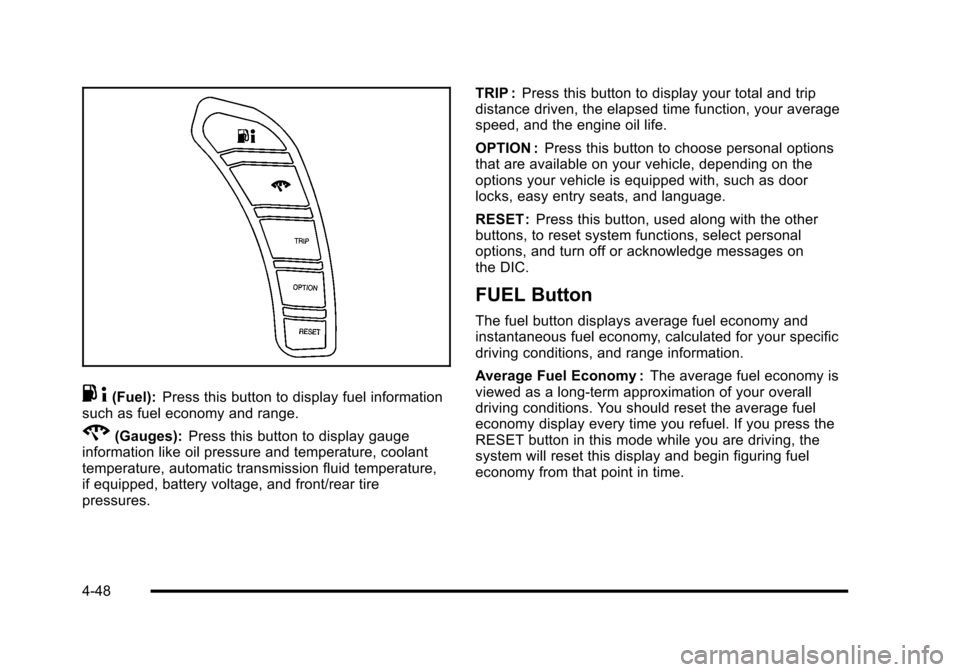
.4(Fuel): Press this button to display fuel information
such as fuel economy and range.
2(Gauges): Press this button to display gauge
information like oil pressure and temperature, coolant
temperature, automatic transmission fluid temperature,
if equipped, battery voltage, and front/rear tire
pressures. TRIP :
Press this button to display your total and trip
distance driven, the elapsed time function, your average
speed, and the engine oil life.
OPTION : Press this button to choose personal options
that are available on your vehicle, depending on the
options your vehicle is equipped with, such as door
locks, easy entry seats, and language.
RESET : Press this button, used along with the other
buttons, to reset system functions, select personal
options, and turn off or acknowledge messages on
the DIC.
FUEL Button
The fuel button displays average fuel economy and
instantaneous fuel economy, calculated for your specific
driving conditions, and range information.
Average Fuel Economy : The average fuel economy is
viewed as a long-term approximation of your overall
driving conditions. You should reset the average fuel
economy display every time you refuel. If you press the
RESET button in this mode while you are driving, the
system will reset this display and begin figuring fuel
economy from that point in time.
4-48
Page 217 of 472
Press the fuel button to display average fuel economy,
such as:
.AVERAGE FUEL ECONOMY 11.7 L/100 km or
.AVERAGE FUEL ECONOMY 20.1 MPG
Instantaneous Fuel Economy : Instantaneous fuel
economy reflects only the fuel economy that the vehicle
has right now and will change frequently as driving
conditions change. Unlike average fuel economy, this
menu item cannot be reset.
Press the fuel button again to display instantaneous fuel
economy, such as:
.INSTANT FUEL ECONOMY 11.7 L/100 km or
.INSTANT FUEL ECONOMY 20.1 MPG
Fuel Range : The range calculates the remaining
distance you can drive without refueling. It is based
on fuel economy and the fuel remaining in the tank.
Press the fuel button again to display the range,
such as:
.RANGE 48 km or
.RANGE 30 MI
If the LOW FUEL warning is displayed or if RANGE is
less than 64 km (40 miles), the display will read
RANGE LOW. The fuel economy data used to determine fuel range is
an average of recent driving conditions. As your driving
conditions change, this data is gradually updated
automatically.
If the vehicle has been idling for a long time, the
range displayed on the DIC could be abnormally low.
The vehicle must be driven 8–16 km (5–10 miles) to
get an accurate reading.
GAGES Button
The gauges button displays oil pressure, oil
temperature, coolant temperature, transmission fluid
temperature for automatic transmission vehicles only,
battery voltage, and tire pressure information.
Oil Pressure :
This display shows the oil pressure.
Press the gauges button to display the oil pressure,
such as:
.OIL PRESSURE 276 kPa or
.OIL PRESSURE 40 PSI
Oil Temperature : This display shows the oil
temperature.
Press the gauges button again to display the oil
temperature, such as:
.OIL TEMPERATURE 112°C or
.OIL TEMPERATURE 234°F
4-49
Page 218 of 472
If the oil temperature is low, the display will show OIL
TEMPERATURE LOW. If the oil temperature is high, the
display will show OIL TEMPERATURE HIGH.
Coolant Temperature : This display shows the engine
coolant temperature.
Press the gauges button again to display the coolant
temperature, such as:
.COOLANT TEMPERATURE 51°C or
.COOLANT TEMPERATURE 123°F
If the coolant temperature is low, the display will show
COOLANT TEMPERATURE LOW. If the coolant
temperature is high, the display will show COOLANT
TEMPERATURE HIGH.
Transmission Fluid Temperature : If you have an
automatic transmission vehicle, this display shows the
automatic transmission fluid temperature.
Press the gauges button again to display the automatic
transmission fluid temperature, such as:
.TRANS FLUID TEMP 51°C or
.TRANS FLUID TEMP 123°F If the transmission fluid temperature is low, the
display will show TRANS FLUID TEMP LOW. If the
transmission fluid temperature is high, the display
will show TRANS FLUID TEMP HIGH.
Battery Voltage :
This display shows the current
battery voltage.
Press the gauges button again to display the battery
voltage, such as:
.BATTERY VOLTAGE 13.5 VOLTS
Tire Pressure : This display shows the tire pressure for
each tire.
Press the gauges button again to display the tire
pressure for the front tires, such as:
.FRONT TIRE PRESSURES L 234 kPa
R 228 kPa or
.FRONT TIRE PRESSURES L 34 PSI R 33 PSI
Press the gauges button again to display the tire
pressure for the rear tires, such as:
.REAR TIRE PRESSURES L 234 kPa R 228 kPa or
.REAR TIRE PRESSURES L 34 PSI R 33 PSI
4-50