2010 CADILLAC ESCALADE air conditioning
[x] Cancel search: air conditioningPage 5 of 616
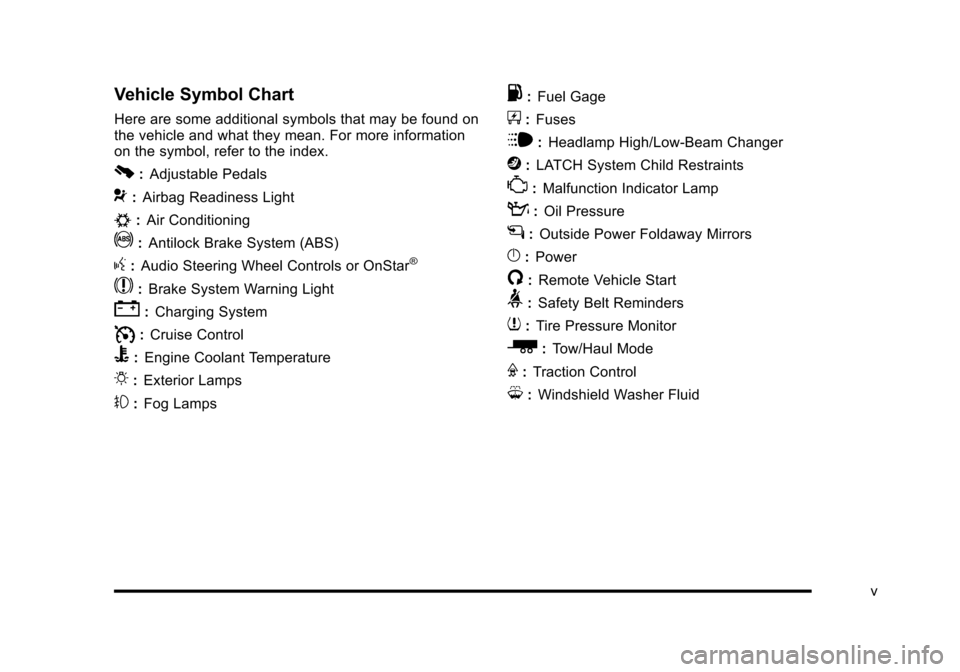
Vehicle Symbol Chart
Here are some additional symbols that may be found onthe vehicle and what they mean. For more informationon the symbol, refer to the index.
0:Adjustable Pedals
9:Airbag Readiness Light
#:Air Conditioning
!:Antilock Brake System (ABS)
g:Audio Steering Wheel Controls or OnStar®
$:Brake System Warning Light
":Charging System
I:Cruise Control
B:Engine Coolant Temperature
O:Exterior Lamps
#:Fog Lamps
.:Fuel Gage
+:Fuses
i:Headlamp High/Low-Beam Changer
j:LATCH System Child Restraints
*:Malfunction Indicator Lamp
::Oil Pressure
g:Outside Power Foldaway Mirrors
}:Power
/:Remote Vehicle Start
>:Safety Belt Reminders
7:Tire Pressure Monitor
_:Tow/Haul Mode
F:Traction Control
M:Windshield Washer Fluid
v
Page 21 of 616

Windshield Wiper/Washer
The lever is on the left side of the steering column.
8:Single wipe, turn to8, then release.
Several wipes, hold the band on8longer.
9:Turns the windshield wipers off.
6:Turn the band up for more frequent wipes or downfor less frequent wipes.
6:Slow wipes.
?:Fast wipes.
L:Push the paddle at the top of the lever to spraywasher fluid on the windshield.
SeeWindshield Wiperso n p a g e 4!6andWindshieldWasher on page 4!7.
Climate Controls
The heating, cooling, and ventilation in the vehicle canbe controlled with this system.
Climate Control with Cooledand Heated Seats shown
A. Driver and PassengerTemperature Controls
B. AUTO
C. Defrost
D. Air Recirculation
E. Rear WindowDefogger
F. Air Conditioning
G. Heated andCooled Seats
H. Fan Control
I. REAR
J. Air DeliveryMode Control
1-15
Page 22 of 616

SeeDual Automatic Climate Control Systemonpage 4!20andRear Air Conditioning and HeatingSystem and Electronic Climate Controlson page 4!26(If Equipped).
Transmission
Driver Shift Control (DSC)
The DSC switch is located on the shift lever.To enable the DSC feature, move the column shiftlever to the M (Manual) position. The Driver InformationCenter (DIC) display will show the message MANUALSHIFT on the first line and the current gear will bedisplayed on the second line. SeeDriver Information
Center (DIC)on page 4!41andDIC Operation andDisplayson page 4!41for more information. This is thehighest attainable range with all lower gears accessible.As an example, when 4 (Fourth) gear is selected,1 (First) through 4 (Fourth) gears are available.
Press the plus/minus buttons, located on the steeringcolumn shift lever, to select the desired range of gearsfor current driving conditions. SeeAutomaticTransmission Operationon page 3!32.
While using DSC, cruise control and the tow/haul modecan be used.
Grade Braking is not available when DSC is active.SeeTow/Haul Mode on page 3!36.
Vehicle Features
Satellite Radio
XM is a satellite radio service that is based in the48 contiguous United States and 10 Canadianprovinces. XM satellite radio has a wide varietyof programming and commercial-free music,coast-to-coast, and in digital-quality sound.
A fee is required to receive the XM service.
For more information, refer to:
.www.xmradio.com or call 1-800-929-2100 (U.S.)
.www.xmradio.ca or call 1-877-438-9677 (Canada)
1-16
Page 131 of 616

To replace the battery:
1. Separate the transmitter with a flat, thin objectinserted into the notch, located above themetal base.
2. Remove the old battery. Do not use a metal object.
3. Insert the new battery, positive side facing up.Replace with a CR2032 or equivalent battery.
4. Snap the transmitter back together.
Remote Vehicle Start
This feature allows you to start the engine from outsideof the vehicle. It may also start up the vehicle's heatingor air conditioning systems and rear window defogger.Normal operation of the system will return after the keyis turned to the ON/RUN position.
During a remote start, the climate control system willdefault to a heating or cooling mode depending on theoutside temperatures.
During a remote start, if your vehicle has an automaticclimate control system and heated seats, the heatedseats will turn on during colder outside temperaturesand will shut off when the key is turned to ON/RUN.If your vehicle does not have an automatic climatecontrol system, during remote start, you will need tomanually turn the heated seats on and off. SeeHeatedand Cooled Seatso n p a g e 2!5for additionalinformation.
Laws in some communities may restrict the use ofremote starters. For example, some laws may require aperson using the remote start to have the vehicle inview when doing so. Check local regulations for anyrequirements on remote starting of vehicles.
Do not use the remote start feature if your vehicle is lowon fuel. Your vehicle may run out of fuel.
3-7
Page 193 of 616

Section 4 Instrument Panel
Instrument Panel Overview. . . . . . . . . . . . . . . . . . . . . . . . 4-3Hazard Warning Flashers . . . . . . . . . . . . . . . . . . . . . . . 4-3Horn . . . . . . . . . . . . . . . . . . . . . . . . . . . . . . . . . . . . . . . . . . . . 4-3Tilt Wheel . . . . . . . . . . . . . . . . . . . . . . . . . . . . . . . . . . . . . . . 4-3Heated Steering Wheel . . . . . . . . . . . . . . . . . . . . . . . . . 4-4Turn Signal/Multifunction Lever . . . . . . . . . . . . . . . . . . 4-4Turn and Lane-Change Signals . . . . . . . . . . . . . . . . . 4-5Headlamp High/Low-Beam Changer . . . . . . . . . . . . 4-5Flash-to-Pass . . . . . . . . . . . . . . . . . . . . . . . . . . . . . . . . . . . 4-6Windshield Wipers . . . . . . . . . . . . . . . . . . . . . . . . . . . . . . 4-6Windshield Washer . . . . . . . . . . . . . . . . . . . . . . . . . . . . . 4-7Rear Window Wiper/Washer . . . . . . . . . . . . . . . . . . . . 4-7Cruise Control . . . . . . . . . . . . . . . . . . . . . . . . . . . . . . . . . . 4-8Exterior Lamps . . . . . . . . . . . . . . . . . . . . . . . . . . . . . . . . . 4-11Headlamps on Reminder . . . . . . . . . . . . . . . . . . . . . . 4-15Daytime Running Lamps (DRL) . . . . . . . . . . . . . . . . 4-15Automatic Headlamp System . . . . . . . . . . . . . . . . . . 4-15Fog Lamps . . . . . . . . . . . . . . . . . . . . . . . . . . . . . . . . . . . . 4-16Instrument Panel Brightness . . . . . . . . . . . . . . . . . . . 4-16Dome Lamps . . . . . . . . . . . . . . . . . . . . . . . . . . . . . . . . . . 4-17Dome Lamp Override . . . . . . . . . . . . . . . . . . . . . . . . . . 4-17Entry Lighting . . . . . . . . . . . . . . . . . . . . . . . . . . . . . . . . . . 4-17Exit Lighting . . . . . . . . . . . . . . . . . . . . . . . . . . . . . . . . . . . 4-17
Reading Lamps . . . . . . . . . . . . . . . . . . . . . . . . . . . . . . . . 4-17Electric Power Management . . . . . . . . . . . . . . . . . . . 4-18Battery Run-Down Protection . . . . . . . . . . . . . . . . . . 4-18Accessory Power Outlet(s) . . . . . . . . . . . . . . . . . . . . . 4-19Ashtray(s) and Cigarette Lighter . . . . . . . . . . . . . . . 4-20Analog Clock . . . . . . . . . . . . . . . . . . . . . . . . . . . . . . . . . . 4-20
Climate Controls. . . . . . . . . . . . . . . . . . . . . . . . . . . . . . . . . . 4-20Dual Automatic Climate Control System . . . . . . . 4-20Outlet Adjustment . . . . . . . . . . . . . . . . . . . . . . . . . . . . . . 4-25Rear Air Conditioning and Heating System andElectronic Climate Controls . . . . . . . . . . . . . . . . . . 4-26
Warning Lights, Gages, and Indicators. . . . . . . . . . 4-27Instrument Panel Cluster . . . . . . . . . . . . . . . . . . . . . . . 4-28Speedometer and Odometer . . . . . . . . . . . . . . . . . . . 4-29Trip Odometer . . . . . . . . . . . . . . . . . . . . . . . . . . . . . . . . . 4-29Tachometer . . . . . . . . . . . . . . . . . . . . . . . . . . . . . . . . . . . . 4-29Safety Belt Reminders . . . . . . . . . . . . . . . . . . . . . . . . . 4-29Airbag Readiness Light . . . . . . . . . . . . . . . . . . . . . . . . 4-30Passenger Airbag Status Indicator . . . . . . . . . . . . . 4-31Charging System Light . . . . . . . . . . . . . . . . . . . . . . . . 4-32Brake System Warning Light . . . . . . . . . . . . . . . . . . . 4-33Antilock Brake System (ABS) Warning Light . . . 4-34
4-1
Page 213 of 616

Climate Control with Heated and CooledSeats shown
A. Driver and PassengerTemperature Controls
B. AUTO
C. Defrost
D. Recirculation
E. Rear WindowDefogger
F. Air Conditioning
G. Heated and CooledSeats
H. Fan Control
I. REAR
J. Air Delivery ModeControl
O(Off):Press the driver side temperature knob toturn the climate control system off. Outside air stillenters the vehicle, and is directed to the floor. Thisdirection can be changed by pressing the mode button.
The temperature can also be adjusted using eithertemperature knob. Press the up or down arrows on thefan switch, the defrost button, the AUTO button, driver'sside temperature knob, or the air conditioning button toturn the system on when it is off.
Driver and Passenger Side
Temperature Knob
The driver and passenger side temperature knobs areused to adjust the temperature of the air comingthrough the system on the driver or passenger's side ofthe vehicle. The temperature can be adjusted even ifthe system is turned off. This is possible since outsideair always flows through the system as the vehicle ismoving forward unless it is set to recirculation mode.See“Recirculation”later in this section.
Turn the knob clockwise or counterclockwise toincrease or decrease the cabin temperature.The display will show the temperature settingincreasing or decreasing.
Set the passenger temperature setting to match thedriver temperature setting by pressing the passengertemperature knob.
When in defrost mode the passenger temperaturesetting cannot be changed.
4-21
Page 214 of 616

Automatic Operation
AUTO (Automatic) :When automatic operation isactive the system will control the inside temperature, theair delivery, and the fan speed.
Use the steps below to place the entire system inautomatic mode:
1. Press the AUTO button.
When AUTO is selected, the display will change toshow the current temperature(s) and AUTO comeon the display. The current delivery mode and fanspeed will also be displayed for approximatelyfive seconds.
When AUTO is selected, the air conditioningoperation and air inlet will be automaticallycontrolled. The air conditioning compressor willrun when the outside temperature is over about4°C (40°F). The air inlet will normally be set tooutside air. If it is hot outside, the air inlet mayautomatically switch to recirculate inside air tohelp quickly cool down the vehicle. The lighton the button comes on in recirculation.
2. Set the driver's and passenger's temperature.
To find your comfort setting, start with a 23°C(74°F) temperature setting and allow about20 minutes for the system to regulate. Use thedriver or passenger temperature buttons to adjustthe temperature setting as necessary. If atemperature setting of 15°C (60°F) is chosen, thesystem remains at the maximum cooling setting.If a temperature setting of 32°C (90°F) is chosen,the system remains at the maximum heat setting.Choosing either maximum setting will not causethe vehicle to heat or cool any faster.
Be careful not to cover the sensor located on the top ofthe instrument panel near the windshield. This sensorregulates air temperature based on sun load and alsoturns on the headlamps.
To avoid blowing cold air in cold weather, the systemwill delay turning on the fan until warm air is available.The length of delay depends on the engine coolanttemperature. Pressing the fan switch will override thisdelay and change the fan to a selected speed.
4-22
Page 215 of 616

Manual Operation
y9z(Fan Control):Press the up or down arrowsto increase or decrease the fan speed
Pressing this button when the system is off will turn thesystem on.
Pressing either arrow while using automatic operationwill place the fan in manual operation. The fan settingwill display and the AUTO light will turn off. The airdelivery will remain in automatic operation.
N(Air Delivery Mode Control):Press to change thedirection of the airflow in the vehicle. Repeatedly pressthe button until the desired mode appears on thedisplay.
When the system is turned off, the display goes blankafter displaying the current status of the system.
H(Vent):Air is directed to the instrument paneloutlets.
)(Bi-Level):Air is divided between the instrumentpanel and floor outlets. Some air is directed towards thewindshield and side window outlets. Cooler air isdirected to the upper vents and warmer air to thefloor vents.
6(Floor):Air is directed to the floor outlets, with someto the windshield, side window outlets, and second rowfloor outlets. In this mode, the system automaticallyselects outside air.
-(Defog):This mode clears the windows of fog ormoisture. Air is directed to the windshield, floor outlets,and side window vents. In this mode, the system turnsoff recirculation and runs the air conditioningcompressor unless the outside temperature is close tofreezing. The recirculation mode cannot be selectedwhile in the defog mode.
0(Defrost):This mode removes fog or frost from thewindshield more quickly. Air is directed to thewindshield and side window vents, with some directedto the floor vents. In this mode, the systemautomatically forces outside air into the vehicle andruns the air conditioning compressor unless the outsidetemperature is close to freezing. The recirculation modecannot be selected while in the defrost mode.
The passenger temperature control cannot be activatedwhile in defrost mode. If the passenger control knob ispressed, the passenger temperature flashes three timesand will not work. If the passenger control knob isadjusted, the driver temperature indicator changes.The passenger temperature will not be displayed.
If vent, bi-level, or floor mode is selected again, theclimate control system displays the previoustemperature settings.
Do not drive the vehicle until all the windows are clear.
4-23