Page 352 of 580
USB Supported File and Folder Structure
The guidelines that must be met while using USB
supported files and folders are:
.Up to 700 folders.
.Up to 8 folders in depth.
.Up to 65,535 files.
.Folder and file names up to 64 bytes.
.Files with an .mp3 or .wma file extension.
.AAC files stored on an iPod.
.FAT16
.FAT32
Using the Navigation Audio System to
Control a USB Storage Device or iPod®
The navigation audio system can control a USB storage
device or an iPod by using the radio touch screens and
steering wheel controls.1. Touch the AUX buttton and then the USB button.
2. Press center screen button to enter the music navigator main screen.
3. Touch or tap the left or right arrow to select desired Category such as: Artist, Album, Genre, etc. A list
of that category will display.
5-82
Page 356 of 580
Auxiliary Devices
The vehicle may have a rear entertainment system
(RSE) with a second and third row screen. The RSE
has audio adapters to allow you to connect auxiliary
devices. The audio can be heard through the speakers
or through the wireless or wired headphones. See
“Audio/Video Jacks”under,Rear Seat Entertainment
(RSE) System
on page 4‑77for more information.
Drivers are encouraged to set up any auxiliary device
while the vehicle is in P (Park). See Defensive Driving
on page 6‑2for more information on driver distraction.
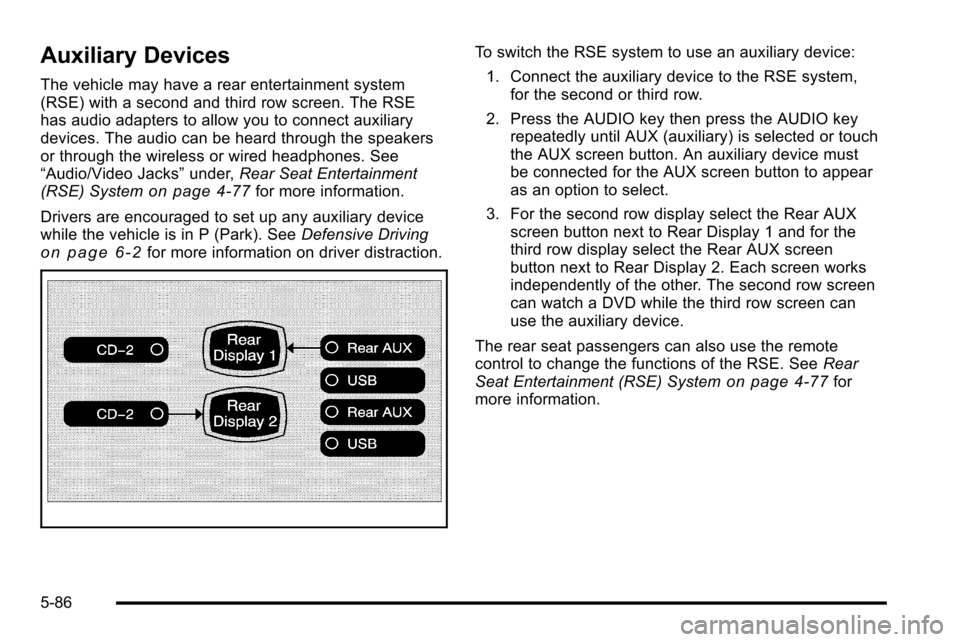
To switch the RSE system to use an auxiliary device:
1. Connect the auxiliary device to the RSE system, for the second or third row.
2. Press the AUDIO key then press the AUDIO key repeatedly until AUX (auxiliary) is selected or touch
the AUX screen button. An auxiliary device must
be connected for the AUX screen button to appear
as an option to select.
3. For the second row display select the Rear AUX screen button next to Rear Display 1 and for the
third row display select the Rear AUX screen
button next to Rear Display 2. Each screen works
independently of the other. The second row screen
can watch a DVD while the third row screen can
use the auxiliary device.
The rear seat passengers can also use the remote
control to change the functions of the RSE. See Rear
Seat Entertainment (RSE) System
on page 4‑77for
more information.
5-86
Page 360 of 580

CD Commands
The following are CD, MP3, and DVD commands that
can be accessed by clearly stating the commands
exactly as they are written.
CD, DVD, Disc :Use this command to select a CD,
DVD, or disc that is currently loaded.
CD, DVD, Disc, [select] track (one, two, three, etc.) :
Instructs the system to select a specific track number.
CD, DVD, Disc select next folder : Use this command
to select the next folder on the MP3 or audio DVD.
CD, DVD, Disc select previous folder : Use this
command to select the previous folder on the MP3 or
audio DVD.
CD help, DVD help, Disc help : Instructs the system to
assist with CD and DVD commands.
Auxiliary Commands
The following auxiliary commands can be accessed by
clearly stating the commands exactly as they are
written. The commands are available when the auxiliary
source is available.
Aux, Auxiliary : Use this command to select the
auxiliary device, when a device is connected.
Voice Help
Voice help : Provides a description of help commands
that can be used.
5-90
Page 524 of 580
FusesUsage
24Fuel Injectors, Ignition Coils
(Left Side)
25 Trailer Park Lamps
26 Driver Side Park Lamps
27 Passenger Side Park Lamps
28 Fog Lamps
29 Horn
30 Passenger Side High-Beam
Headlamp
31 Daytime Running Lamps (DRL)
32 Driver Side High-Beam Headlamp
33 Daytime Running Lights 2
34 Sunroof
35 Key Ignition System, Theft Deterrent
System
36 Windshield Wiper
37 SEO B2 Upfitter Usage (Battery)
38 Electric Adjustable Pedals
39 Climate Controls (Battery)
40 Airbag System (Ignition)
Fuses Usage
41 Amplifier
42 Audio System
43Miscellaneous (Ignition), Cruise
Control
44 Liftgate Release
45 Airbag System (Battery)
46 Instrument Panel Cluster
47 Not Used
48 Auxiliary Climate Control (Ignition)
49 Center High-Mounted Stoplamp
50 Rear Defogger
51 Heated Mirrors
52 SEO B1 Upfitter Usage (Battery)
53 Cigarette Lighter, Auxiliary Power
Outlet
54 Automatic Level Control Compressor
Relay
55 Climate Controls (Ignition)
56 Engine Control Module, Secondary
Fuel Pump (Ignition)
7-110
Page:
< prev 1-8 9-16 17-24

