2010 CADILLAC ESCALADE ESV radio
[x] Cancel search: radioPage 310 of 620

Black plate (8,1)Cadillac Escalade/Escalade ESV Owner Manual - 2010
Setting the Clock The navigation system time and the analog clock
operate independently. Changing the time through the
navigation system does not change the time on the
analog clock. See Analog Clock
on page 4 ‑ 20 to
change the analog clock time.
To set the time for the navigation system:
1. Press the CONFIG key to enter the configure
menu options, then press the CONFIG key
repeatedly until the time is selected or touch the
time screen button.
2. Press the Hours and Minutes − (minus) and
+ (plus) signs to decrease or to increase the time.
See “ Setting the Clock ” under Configure Menu
on
page 5 ‑ 42
for more information. Entering an Address and Point of
Interest, and Storing Preset
Destinations Entering an Address Enter a destination by inputting the city name first:
1. If the radio is already on with a map disc inserted,
skip to Step 5.
2. Press
O to turn the system on.
3. Insert the DVD map disc. See “ Installing the Map
DVD ” under Maps on page 5 ‑ 14 for more
information.
4. A caution may appear. Touch the OK screen button
to proceed.
5. Press the DEST hard key.
6. Press the
2 Address Entry screen button.
5-8
Page 311 of 620

Black plate (9,1)Cadillac Escalade/Escalade ESV Owner Manual - 2010
7. Select the state/province screen button, if needed,
to change the current state or province. A list of all
of the available states and provinces appear.
Select the state or province.
8. Once a state or province has been selected the
City name category is automatically selected for
entry.
If five or less names are available, a list displays.
If more than five are available, the List screen
button displays a number. This number represents
the number of available cities. Select this button to
view the list and select a city.
9. Once a city has been selected the Street name
category is automatically selected for entry.
If five or less streets are available for the selected
city, the system displays the list of streets. If more
than five streets are available the system displays
the alpha keyboard. Start entering the street name.
If five or less names are available, a list displays.
If more than five are available, the List screen
button displays a number. This button represents
the number of available streets. Select this button
to view the list and select a street.
10. Once a street has been selected, select the
House # screen button to enter the house number.
The system displays the house number range that
is available for the street. 11. Select the Go screen button. A map screen, with
the destination marked appears.
12. Select the route preference (Fastest, Shortest,
or Other). The system calculates and highlights the
route.
13. Select the Start Guidance screen button. You are
now ready to start your route.
See “ Address Entry ” under Destination
on page 5 ‑ 24
for more information.
Entering a Point of Interest (POI) To set a destination by entering a Point of Interest
(POI), do the following:
1. If the radio is already on with a map disc inserted,
skip to Step 5.
2. Press
O to turn the system on.
3. Insert the DVD map disc. See “ Installing the Map
DVD ” under Maps on page 5 ‑ 14 for more
information.
4. A caution may appear. Touch the OK screen button
to proceed.
5. Press the DEST hard key.
6. Press the
i Point of Interest screen button.
5-9
Page 312 of 620

Black plate (10,1)Cadillac Escalade/Escalade ESV Owner Manual - 2010
7. Select the state/province screen button, if needed,
to change the current state or province. A list of all
of the available states and provinces appear.
Select the state or province.
8. Enter the specific title of the POI in the POI name
space (e.g. Washington Monument).
If five or less names are available, a list displays.
If more than five are available, the List screen
button displays a number. This button represents
the number of available POIs. Select this button to
view the list.
9. Select the Go screen button next to the POI.
A map screen, with the destination marked
appears.
10. Select the route preference (Fastest, Shortest,
or Other). The system calculates and highlights the
route.
11. Select the Start Guidance screen button. The route
is now ready to be started.
See “ Point of Interest (POI) ” under Destination
on
page 5 ‑ 24 for more information.
Storing Preset Destinations 1. If the radio is already on with a map disc inserted,
skip to Step 5.
2. Press
O to turn the system on. 3. Insert the DVD map disc. See “ Installing the Map
DVD ” under Maps
on page 5 ‑ 14 for more
information.
4. A caution may appear. Touch the OK screen button
to proceed.
5. Press the DEST hard key.
Enter a destination. See Destination on page 5 ‑ 24
for more information on how to enter a destination.
6. Press the DEST hard key, the Route screen
displays. Press the Final Destination or Stopover
screen button. The information screen displays for
that location. Press the Add to Address Book
screen button. The address book screen appears.
7. Select the Name screen button. An alpha-keyboard
displays. Enter the name. Select the Back screen
button.
8. Press and hold one of the screen buttons at the
bottom of the screen until the name appears in the
screen button on the display.
The name appears in that preset destination
screen button and is now available to select from
the Destination Entry screen. See “ Using Your
Stored Preset Destinations ” next in this section to
select it as a destination.
See “ Adding or Changing Preset Destinations ”
under Destination
on page 5 ‑ 24 for more
information on how to add preset destinations.
5-10
Page 313 of 620

Black plate (11,1)Cadillac Escalade/Escalade ESV Owner Manual - 2010
Using Your Stored Preset Destinations These destinations are available for selection while
driving.
1. If the radio is already on with a map disc inserted,
skip to Step 5.
2. Press
O to turn the system on.
3. Insert the DVD map disc. See “ Installing the Map
DVD ” under Maps on page 5 ‑ 14 for more
information.
4. A caution may appear. Touch the OK screen button
to proceed.
5. Press the DEST hard key.
6. Select one of the available preset destination
screen buttons. A map screen, with the destination
marked appears.
7. Select the route preference (Fastest, Shortest,
or Other). The system calculates and highlights the
route.
8. Select the Start Guidance screen button. The route
is now ready to be started.
See “ Preset Destination ” under Destination
on
page 5 ‑ 24
for more information. Canceling Guidance Guidance is canceled once the final destination is
reached. To cancel guidance prior to arrival at the final
destination:
1. Press the DEST hard key.
2. Press the Cancel Guidance screen button.
3. Press OK to confirm.
Guidance Volume Adjust the volume of voice guidance prompts:
1. Press the CONFIG hard key to enter the menu
options, then press the CONFIG key repeatedly
until Nav is selected or touch the Nav screen
button.
2. Press the Voice Prompt screen button.
3. Press the + (plus) or – (minus) screen buttons to
increase or to decrease the volume of the voice
prompts. The system responds with the adjusted
voice level.
See “ Voice Prompt ” under Configure Menu on
page 5 ‑ 42
for more information.
Cleaning the Display Use a soft clean cotton cloth dampened with clean
water.
5-11
Page 314 of 620

Black plate (12,1)Cadillac Escalade/Escalade ESV Owner Manual - 2010
Features and Controls Using the Navigation System This section presents basic information needed to
operate the navigation system.
Use the hard keys located on the navigation system
along with the available touch-sensitive screen buttons
on the navigation screen to operate the system. See
Navigation System Overview on page 5 ‑ 2 for more
information.
Once the vehicle is moving, various functions are
disabled to reduce driver distractions.
Hard Keys The following hard keys are located on the navigation
system:
O /
n (Power/Volume): Press to turn the system
on and off. Turn to increase or decrease the volume to
the audio system.
Press and hold for more than two seconds to turn off
the navigation system, the Rear Seat Entertainment
(RSE), and Rear Seat Audio (RSA). If the vehicle has
not been tuned off, the RSE and the RSA can be turned
back on by pressing this knob and continues play of the
last active source. w (Tune): Turn to go to the next or previous radio
station or disc track or chapter. See Navigation Audio
System on page 5 ‑ 60 , CD Player on page 5 ‑ 68 ,
or DVD Player
on page 5 ‑ 75 for more information.
Z (DVD Map Disc Eject): Press to eject the DVD
map disc. This button is located next to the upper disc
slot. See Maps on page 5 ‑ 14 for more information.
M (Load): Press to load CDs or audio/video DVDs. See
CD Player on page 5 ‑ 68 or DVD Player on page 5 ‑ 75
for more information.
Z (CD/DVD Eject): Press to eject CDs or audio/video
DVDs. This button is located under the load button. See
CD Player on page 5 ‑ 68 or DVD Player on page 5 ‑ 75
for more information.
M (Disc Up/Down): Press the up or down arrows to go
to the next or previous disc.
AUDIO: Press to access the full Audio screen to
change AM, FM, XM ™ Satellite Radio Service (if
equipped), CD/DVD, and auxiliary input. See “ Audio ”
under Navigation Audio System
on page 5 ‑ 60 for more
information.
FAV (Favorite): Press to access the preset stations.
See “ Storing Radio Station Presets ” under Navigation
Audio System on page 5 ‑ 60 for more information.
5-12
Page 315 of 620

Black plate (13,1)Cadillac Escalade/Escalade ESV Owner Manual - 2010
5 (Phone): Press to access calling through OnStar ®
.
See the OnStar ®
owner guide and Bluetooth ®
on
page 4 ‑ 68 for more information.
e (Sound): Press to access the Sound screen to
adjust bass, midrange, treble, and Digital Signal
Processing (DSP). See “ Sound Menu ” under Navigation
Audio System on page 5 ‑ 60 for more information.
DEST (Destination): Press to access the Destination
Entry screen to plan a destination. See Destination on
page 5 ‑ 24 for more information.
CONFIG (Configure Menu): Press to adjust features
for sound, radio, navigation, and the display. See
Configure Menu on page 5 ‑ 42 for more information.
NAV (Navigation): Press to view your vehicle's current
position on the map screen. Each press of this key
cycles through Full Map and the tab that displays the
current audio source (AM, FM, CD, etc.). Full Map
displays the screen in full map view. Selecting the audio
tab splits the screen between the map screen and the
current audio source screen menu. See “ Audio ” under
Navigation Audio System
on page 5 ‑ 60 for more
information.
RPT (Navigation Repeat): Press to repeat the last
voice guidance prompt. y © ¨ z (Seek): Press the seek arrows to seek and
scan radio stations, to seek tracks on a CD, and to seek
chapters on a DVD. See Navigation Audio System on
page 5 ‑ 60
, CD Player on page 5 ‑ 68 , or DVD Player
on page 5 ‑ 75 for more information.
Touch-Sensitive Screen Buttons Touch-sensitive screen buttons are located on the
screen. When a screen button has been selected, a
beep sounds. Screen buttons are highlighted when a
feature is available.
Alpha-Numeric Keyboard Letters of the alphabet, symbols, punctuation, and
numbers, when available, displays on the navigation
screen as an alpha or numeric keyboard. The alpha
keyboard displays when the system requires entry of a
city or street name.
All characters are touch-sensitive screen buttons. Touch
a character to select it.
A-Y (Accent Alphabet): Select to enter letters with
accent symbols. This button may toggle to A-Z.
A-Z (Alphabet): Select to enter letters from the
alphabet. This button may toggle to A-Y.
0-9 (Numbers): Select to enter numbers.
5-13
Page 338 of 620
Black plate (36,1)Cadillac Escalade/Escalade ESV Owner Manual - 2010
Previous Destinations Previous OnStar Destination Downloads are saved
under Previous Destinations in the navigation system
where they can be accessed or saved to the
address book.
Important Notes regarding OnStar Destination
Download: .
If the navigation system is turned off when the
destination download is attempted, the navigation
system will automatically turn on and display the
OnStar Destination Download Screen. The radio
will remain on after the download occurs. .
If OnStar downloads a destination and the address
is not found in the mapping disc ’ s database and
routing by coordinates is not available, the Go
and Map buttons gray out and routing will not be
available. Press the blue OnStar button for further
assistance. .
The Call button grays out when there is no phone
number available for your destination and while
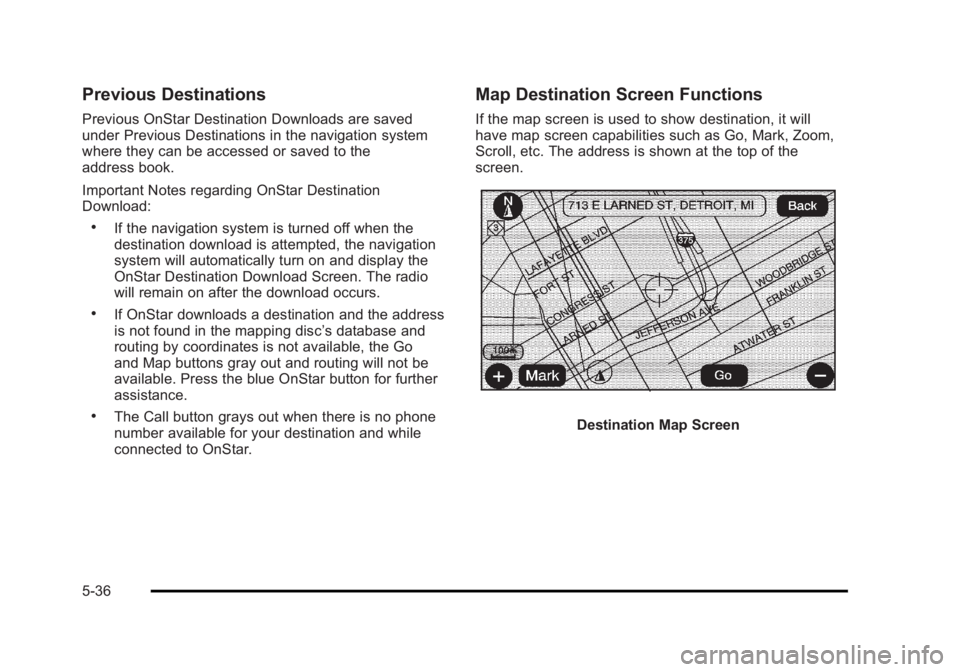
connected to OnStar. Map Destination Screen Functions If the map screen is used to show destination, it will
have map screen capabilities such as Go, Mark, Zoom,
Scroll, etc. The address is shown at the top of the
screen.
Destination Map Screen
5-36
Page 344 of 620

Black plate (42,1)Cadillac Escalade/Escalade ESV Owner Manual - 2010
Configure Menu
Press the CONFIG (Configure) hard key to adjust
several of the system's features and preferences.
The last selected CONFIG screen is the screen that
displays: Sound, Radio, Nav (navigation), Display,
or Time. Sound Press the CONFIG key to enter the configure menu
options, then press the CONFIG key repeatedly until
Sound is selected or touch the Sound screen button to
make speaker and DSP (Digital Signal Processing)
adjustments. See “ Sound Menu ” under, Navigation
Audio System on page 5 ‑ 60 for more information.
Radio Press the CONFIG key to enter the configure menu
options, then press the CONFIG key repeatedly until
Radio is selected or touch the Radio screen button to
make changes for radio information displayed, preset
pages, XM ™ categories, and Bose ®
AudioPilot ®
. See
“ Radio Menu ” under, Navigation Audio System on
page 5 ‑ 60 for more information.
5-42