Page 134 of 414

4-46 Instruments and Controls
Do not use the Universal Home
Remote with any garage door
opener that does not have the stop
and reverse feature. This includes
any garage door opener model
manufactured before April 1, 1982.
Read the instructions completely
before attempting to program the
Universal Home Remote. Because
of the steps involved, it may be
helpful to have another person
available to assist you with
programming the Universal Home
Remote.
Keep the original hand-held
transmitter for use in other vehicles
as well as for future Universal Home
Remote programming. It is also
recommended that upon the sale of
the vehicle, the programmed
Universal Home Remote buttons
should be erased for security
purposes. See“Erasing Universal
Home Remote Buttons” later in this
section. When programming a garage door,
park outside of the garage. Park
directly in line with and facing the
garage door opener motor-head or
gate motor-head. Be sure that
people and objects are clear of the
garage door or gate that is being
programmed.
It is recommended that a new
battery be installed in your
hand-held transmitter for quicker
and more accurate transmission of
the radio-frequency signal.
Programming the Universal
Home Remote System
For questions or help programming
the Universal Home Remote
System, call 1-800-355-3515 or go
to www.homelink.com.
Programming a garage door opener
involves time-sensitive actions, so
read the entire procedure before
starting. Otherwise, the device will
time out and the procedure will have
to be repeated.To program up to three devices:
1. Hold the end of your hand-held
transmitter about 3 to 8 cm
(1 to 3 inches) away from the
Universal Home Remote buttons
while keeping the indicator light
in view. The hand-held
transmitter was supplied by the
manufacturer of your garage
door opener receiver
(motor-head unit).
2. At the same time, press and hold both the hand-held
transmitter button and one of the
three Universal Home Remote
buttons to be used to operate
the garage door. Do not release
the Universal Home Remote
button or the hand-held
transmitter button until the
indicator light changes from a
slow to a rapidly flashing light.
You now may release both
buttons.
Page 135 of 414

Instruments and Controls 4-47
Some entry gates and garage
door openers may require
substitution of Step 2 with the
procedure noted in“Gate
Operator and Canadian
Programming” later in this
section.
3. Press and hold for five seconds the newly-trained Universal
Home Remote button (selected
button from Step 2) while
observing the indicator light and
garage door activation.
.If the indicator light stays on
continuously or the garage
door starts to move when
the Universal Home
Remote button is pressed
and released, then the
programming is complete.
There is no need to
continue programming
Steps 4 through 6.
.If the Universal Home
Remote indicator light
blinks rapidly for two seconds, then turns to
a constant light and the
garage door does not
move, continue with the
programming Steps 4
through 6.
It may be helpful to have
another person to assist
with the remaining Steps 4
through 6.
“Learn”
or“Smart” Buttons
4. After Steps 1 through 3 have been completed, locate the
“Learn” or“Smart” button inside
the garage on the garage door opener receiver (motor-head
unit). The name and color of the
button may vary by
manufacturer.
5. Firmly press and release the “Learn” or“Smart” button. After
you press this button, you will
have 30 seconds to complete
Step 6.
6. Immediately return to the vehicle. Firmly press and hold
for two seconds the Universal
Home Remote button, selected
in Step 2 to control the garage
door, and then release it. If the
garage door does not move or
the lamp on the garage door
opener receiver (motor-head
unit) does not flash, press and
hold the same button a second
time for two seconds, and then
release it. Again, if the door
does not move or the garage
door lamp does not flash, press
and hold the same button a third
time for two seconds, and then
release.
Page 136 of 414
4-48 Instruments and Controls
The Universal Home Remote should
now activate the garage door.
To program the remaining two
Universal Home Remote buttons,
begin with Step 1 of“Programming
the Universal Home Remote
System”.
Gate Operator and Canadian
Programming
If you have questions or need help
programming the Universal Home
Remote System, call
1-800-355-3515 or go to
www.homelink.com.
Canadian radio-frequency laws
require transmitter signals to time
out or quit after several seconds of
transmission. This may not be long
enough for Universal Home Remote
to pick up the signal during
programming. Similarly, some U.S.
gate operators are manufactured to
time out in the same manner. If you live in Canada, or you are
having difficulty programming a gate
operator or garage door opener by
using the
“Programming Universal
Home Remote” procedures,
regardless of where you live,
replace Step 2 under “Programming
Universal Home Remote” with the
following:
2. Continue to press and hold the
Universal Home Remote button
while you press and release every
two seconds (cycle) the hand-held
transmitter button until the
frequency signal has been
successfully accepted by the
Universal Home Remote. The
Universal Home Remote indicator
light will flash slowly at first and then
rapidly. Proceed with Step 3 under
“Programming Universal Home
Remote” to complete.
Universal Remote System
Operation
Using Universal Home Remote
Press and hold the appropriate
Universal Home Remote button for
at least half of a second. The
indicator light will come on while the
signal is being transmitted.
Erasing Universal Home
Remote Buttons
All programmed buttons should be
erased when the vehicle is sold or
the lease ends.
To erase all programmed buttons on
the Universal Home Remote device:
1. Press and hold down the two
outside buttons until the
indicator light begins to flash,
after 10 seconds.
2. Release both buttons.
Page 137 of 414
Instruments and Controls 4-49
Reprogramming a Single
Universal Home Remote
Button
To reprogram any of the three
Universal Home Remote buttons:
1. Press and hold the desiredUniversal Home Remote button.
Do not release the button.
2. The indicator light will begin to flash after 20 seconds. Without
releasing the button, proceed
with Step 1 of the section
“Programming Universal Home
Remote”.
If you have questions or need help
programming the Universal Home
Remote System, call
1-800-355-3515 or go to
www.homelink.com. You may also
call the customer assistance phone
number under Customer Assistance
Offices (US, Can) on page 12‑3.
Page 143 of 414

Lighting 5-5
Fog Lamps
For vehicles with fog lamps, the
button is located on the exterior
lamp control, on the outboard side
of the steering wheel.
To turn on the fog lamps, the ignition
and the headlamps or parking lamps
must be on.
If the fog lamps are turned on while
the exterior lamp switch is in the
AUTO position, the headlamps
come on automatically.
#:Press to turn on or off. An
indicator light on the instrument
panel cluster comes on when the
fog lamps are on.
Some localities have laws that
require the headlamps to be on
along with the fog lamps.
Interior Lighting
Instrument Panel
Illumination Control
The brightness of the instrument
panel lighting and steering wheel
controls can be adjusted. Use the
thumbwheel located next to the
exterior lamps control on the
outboard side of the steering wheel.
D: Move the thumbwheel up or
down to brighten or dim the lights.
Dome Lamps
The interior lamps control located in
the overhead console controls both
the front and rear interior lamps.
To operate, press the following
buttons:
*(Off): Turns the lamp off.
1Door: Turns the lamp on when
any door is opened.
+ON: Keeps the lamp on all
the time.
Reading Lamps
There are front and rear reading
lamps.
The front reading lamps are located
in the overhead console.
# $: Press to turn each lamp on
or off.
Sun Visor Lamps
This lamp turns on when the cover
is opened.
Page 149 of 414
Infotainment System 6-3
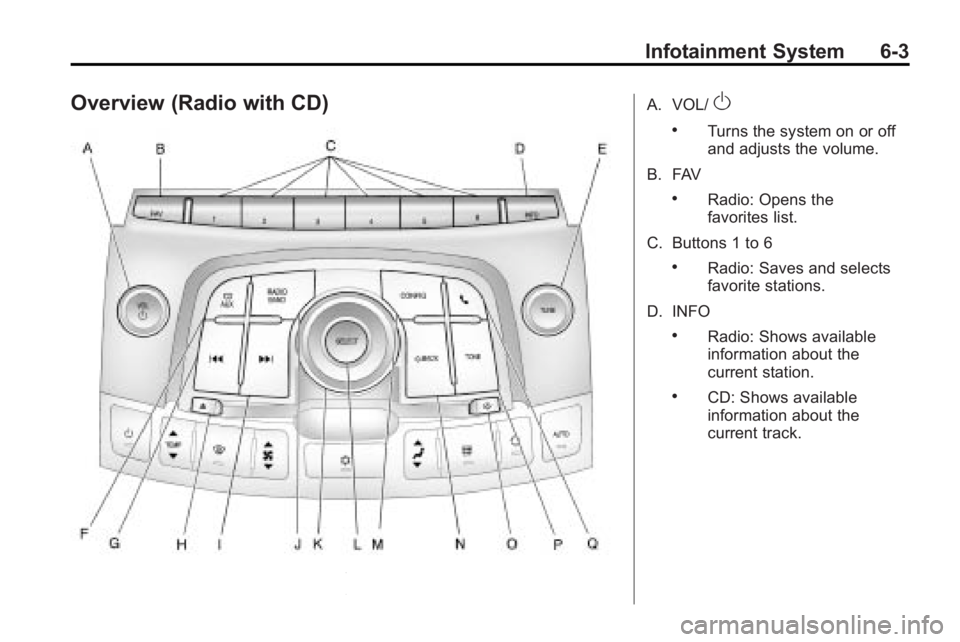
Overview (Radio with CD)A. VOL/O
.Turns the system on or off
and adjusts the volume.
B. FAV
.Radio: Opens the
favorites list.
C. Buttons 1 to 6
.Radio: Saves and selects
favorite stations.
D. INFO
.Radio: Shows available
information about the
current station.
.CD: Shows available
information about the
current track.
Page 151 of 414
Infotainment System 6-5
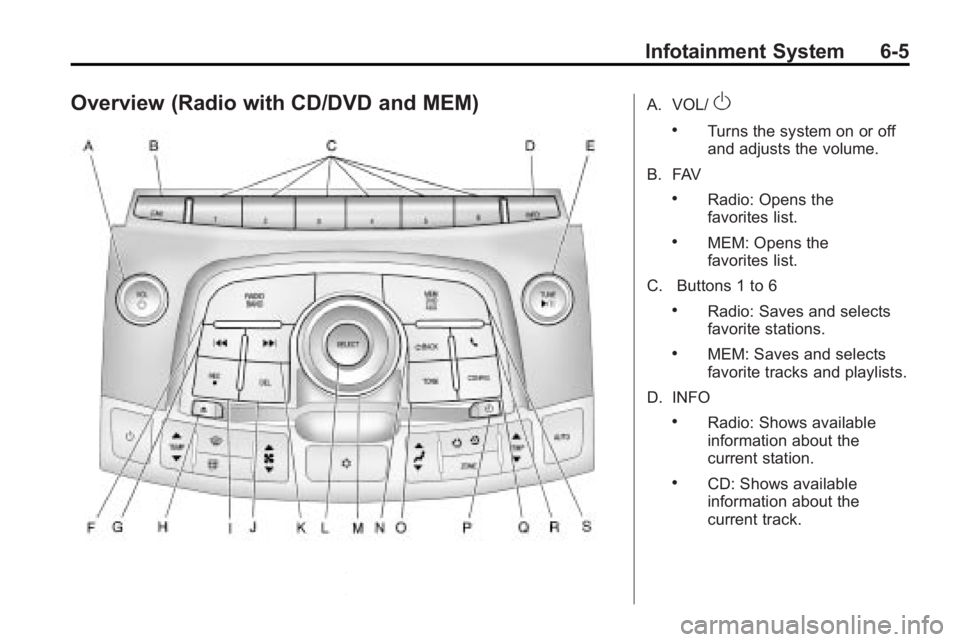
Overview (Radio with CD/DVD and MEM)A. VOL/O
.Turns the system on or off
and adjusts the volume.
B. FAV
.Radio: Opens the
favorites list.
.MEM: Opens the
favorites list.
C. Buttons 1 to 6
.Radio: Saves and selects
favorite stations.
.MEM: Saves and selects
favorite tracks and playlists.
D. INFO
.Radio: Shows available
information about the
current station.
.CD: Shows available
information about the
current track.
Page 153 of 414
Infotainment System 6-7
R.5
.Opens the phone
main menu.
.Mutes the audio system.
S. MEM/DVD/AUX
.Selects MEM, CD/DVD,
USB, or a connected front
or rear auxillary audio
source.
Operation
Controls
The infotainment system is operated
by using the pushbuttons,
multifunction knobs, menus that are
shown on the display, and steering
wheel controls, if equipped.
Turning the System On or Off
VOL/O(Volume/Power): Press to
turn the system on and off.
Automatic Switch-Off
If the infotainment system has been
turned on after the ignition is turned
off, the system will turn off
automatically after ten minutes.
Volume Control
VOL/O(Volume/Power): Turn to
adjust the volume.
5(Phone/Mute): For vehicles with
OnStar®, press and hold5to mute
the infotainment system. Press and
hold
5again, or turn the VOL/O
knob to cancel mute.
For vehicles without OnStar
®, press5to mute the infotainment system.
Press
5again, or turn the VOL/O
knob to cancel mute.
Menu System
Controls
The Menu knob, SELECT button,
and the
0BACK button are used to
navigate the menu system.
Menu Knob: Turn to:
.Enter the menu system.
.Highlight a menu option.
.Select a value.
SELECT: Press to:
.Select or activate the highlighted
menu option.
.Confirm a set value.
.Turn a system setting on or off.
0BACK:Press to:
.Exit a menu.
.Return from a submenu screen
to the previous menu screen.
.Delete the last character in a
sequence.