2010 AUDI S8 brake
[x] Cancel search: brakePage 156 of 384

ffl..__A_ u_t _o _m_ a_ t_ i _c_ t_r a _ n_s_ m_ i_ s _s _ i_o _n _________________________________________ _
Automatic transmission
tiptronic® (6-speed automatic
transmission)
General information
Your vehicle is equipped with an electron ica lly contro lled automatic
transmission . Upshifting and downshifting takes place
automati
cally.
The transmission is also equipped with tiptronic®. It allows the driver
to shift gears
manually if desired ~ page 158 . •
Driving the automat ic transmission
St art ing the engin e
-The selector lever must be in Nor P.
Starting off
- Press and hold the brake pedal.
Fig. 168 Shift ga te on
t he cente r conso le:
selec tor lever with
release button
- Press and hold the release button in the selector lever
handle and move the selector lever from
P or N to D and
release the button => & .
- Wait briefly until the transmission has shifted (you will
feel a slight movement).
- Remove your foot from the brake pedal and accelerate .
Rocking back and forth to become unstuc k
-Shift only between D and R when the vehicle is at a full
stop and the engine is running at idle speed.
Stopping
- Press and hold the brake pedal until the vehicle has come
to a complete stop .
- Keep the brake pedal depressed so that the vehicle cannot
roll forward or backward while i t is idling =>& .
- Once stopped,
do not depress the accelerator pedal to rev
up the engine=> &.
Parking
-Press and hold the brake pedal until the vehicle has come
to a complete stop .
- Set the parking brake firmly=>
page 124, "Parking".
- Press and hold the release button in the selector lever
handle, move the selector lever into
P and then let go of
the release button=> & . .,
Page 157 of 384

Automatic transmission Ill
----------------
The selector lever must be in Nor P . If one o f the dr iv in g positions is
e n gag ed a saf ety s witch will prev ent th e engin e from b eing sta rt e d.
S ee also~
page 119.
Be fore you move t he se lecto r lever from t he P position , yo u m ust
a lw ay s a ppl y the b rake pedal before and while depr ess ing the bu tton
in t he handle of the selector lever.
_& WARNING
• Unintended vehicle movement can cause serious injury.
- When the selector lever is
in a driving position, the vehicle
may creep, even at idle speed. Therefore do not release the
parking brake or foot brake until you are ready to move,
because power is transmitted to the wheels as soon as a driving
position is engaged.
- Do not accelerate while selecting a driving position. At this
time the engine must be at idle speed so that undue stress is
not placed on the clutches in the transmission.
- Remember : · even when stopped briefly with the automatic
transmission in "D" or "R", engine power is being transmitted
to the wheels. Your vehicle could "creep " forward or backward.
When stopped, keep the brake pedal fully depressed and use
the parking brake if necessary to keep the vehicle from rolling.
• If the selector lever is unintentionally moved into N while you
are driving, take your foot off the accelerator pedal and wait for
the engine to return to idle speed before selecting a driving posi
tion .
• Never shift into "R" or "P" when the vehicle is in motion.
• Never get out of the driver's seat when the engine is running.
• If you must get out of the vehicle , move the selector lever
securely into the P position and apply the parking brake firmly.
• If the engine must remain running, never have any driving
position engaged when checking under the hood. Make sure the
selector lever has securely engaged and is locked in "P" with the
parking brake firmly set~
page 281, "Engine compartment ".
Controls and equip
ment Safety first
& WARNING
(cont inued)
Otherwise, any increase in engine speed may set the vehicle in
motion, even with the parking brake applied. •
Selector lever positions
This section descr ibes the select or lever posi tions and
dr iv ing ranges .
Fig. 169 Display in
the instrument cl uster :
selector lever
in posi
tion D
Th e sele cto r lever p osition eng ag ed a ppe ars n ext to t he se le cto r lever
as well as in the i nstr ument cluster display. A lso, the cur rent gear
en gage d is s hown i n positions D a nd 5.
P -Park
In t his se le cto r lever p osit io n th e tran smi ssion i s m ec hanicall y
loc ked. Engage
P o nly when the vehicle is completely stopped~ &
in "Driving the autom ati c transmis sion " on page 154.
To shift in o r o ut of position P , yo u must first pre ss and hold the brake
peda l
and then press t he release button in t he se lecto r leve r hand le
while moving the sel ecto r le v e r to or fro m
P. Y ou ca n shift out of this
posit ion on ly with t he i gnit io n on .
R -Reverse
Th e transm ission wi ll automat ica lly se lect t he lowest gear ratio w hen
you s hift in to reverse . ..,_
Vehicle care Technical data
Page 158 of 384

1111....__A_ u_ t_o _m_ a_ t_ic _ t_ r_ a_ n_s _m_ i _s_ s_ i_ o_ n ____________________________________________ _
Select R only when the vehicle is at a full stop and the engine is
running at id le speed =>
& in "Driving the automatic transmission"
on
page 154.
Before you move the selector lever to R , press both the button in the
hand le of the selector lever
and the brake pedal at the same time.
When the ignition is on, the backup lights illuminate when the
selector lever is moved into
R .
N -Neutral
The transmission is in neutral in this position. Shift to this position
for standing with the brakes applied =>
page 156.
When the vehicle is stationary or at speeds be low 3 mph (5 km/h),
you must always apply the footbrake before and while mov ing the
lever out of
N.
D -Normal position for driving forward
Posit ion Dis fo r normal city and highway driving . It ranges from zero
to top speed and all six gears shift automatically, depending on
engine load, driving speed and automat ica lly se lected shift
programs.
When the vehicle is stationary or at speeds below 3 mph (5 km/h),
you must always apply the foot bra ke before and while moving the
lever to
D out of N .
In certa in circumstances it may be advantageous to temporarily
switch to the manual sh ift program to manually select gear ratios to
match specific driving conditions =>
page 158.
S -Sport position
Select this position for sportie r performance. In this position, the
transmission will not upshift as soon, allowing the vehicle to use the
increased power available at higher engine speeds to achieve livelier
acceleration .
When the vehicle is stationary or at speeds be low 3 mph (5 km/h),
you must always apply the foot bra ke before and while moving the
lever to
S out of N .
& WARNING
Read and follow all WARNINGS=> & in "Driving the automatic
transmi ssion" on
page 154.
0 Note
Coasting downhill with the transmission in N and the engine not
running will result in damage to the automatic transmission and
possibly the catalytic converter. •
Automatic Shift Lock (ASL)
Automatic shift lock prevents you from accidentally
shifting into a forward gear or into reverse, thus causing
the vehicle to move unintentionally.
0
Fig . 170 Shift gate
se lector lever lock posi
tions and interlock
button highlighted
The selector lever lock is released as follows:
- Turn the ignition on .
- Step on the brake pedal.
At the same time press and hold
the lock button on the side of the gear selector knob
=:> fig. 170 with your thumb until you have moved the
selector lever to the desired position. .,_
Page 159 of 384

______________________________________________ A_ u_ t_ o _ m_ a_ t_ ic_ t_r_a _ n_ s_m_ i_ s _s_ i_ o _ n __ ffllll
Automatic selector lever lock
The se lector lever is locked in the P and N positions when the ignition
is turned on. To move the lever from these posit ions the driver must
depress the brake pedal. As a reminder to the driver, the following
warning appears in the instrument cluster display when the selector
is in
P and N:
When stationary apply foot brake while selecting gear
A time delay element prevents the selector lever from lock ing when
it is moved through the
N position (going from R to D). The locking
element will lock the selector lever if the lever is left in N (Neutra l) for
more than approximately
l second, w ithout the brake pedal being
pressed.
At speeds above about 3 mph (5 km/h) the Automat ic Shift Lock is
automatically deactivated in the
N position.
Interlock button
The lock button o n the selector lever prevents the lever from being
accidentally shifted into certain positions. Pressing this button deac
tivates the selector lever lock . Depending on the direction of the
shift, the selector lever locks at different positions . The pos itions are
highlighted in the illustration ~
page 156, fig. 170.
Ignition key safety interlock
The key cannot be removed from the ignition un less the selector lever
is in the
P park position. When the ignition key is removed, the
selector lever will be locked in the
P position.•
Kick-down
The kick-down feature allows the vehicle to generate
maximum acceleration.
When you press the accelerator pedal beyond the resistance point
that is reached at full throttle, the transmission will select a lower
gear ratio based on vehicle speed and engine RPM. The engine RPM
will be controlled to produce maximum vehicle acceleration as long
Controls and equip
ment Safety first
as you cont
inue to press the accelerator pedal beyond this resistance
point.
& WARNING
Be careful when using the kick -down feature on slippery roads.
Rapid acceleration may cause the vehicle to skid. •
Dynamic shift program (DSP)
The automatic transmission is electronically controlled.
The transmission is self adapting and will automatically select the
best sh ift p rogram su ited to the driv ing cond it ions and driving style.
The transmission will select one of the
economy programs when you
drive at a steady speed or a gradually changing speed without heavy
acceleration . This ach ieves optimum fuel efficiency, with early
upshifting and delayed downshifting.
Th e transmission will automatically select the
sporty shift programs
when you dr ive at higher speeds, or w ith heavy acceleration and
frequently changing speeds. Upshifts are delayed to make full use of
engine power . Downshifting takes place at higher engine speeds than
in the economy programs .
The select ion of the most suitable shift program is a cont inuous,
automatic p rocess. The driver can also make the transmission switch
t o a spo rty program by
quickly pressing down the gas pedal.
Th is causes the transmission to shift down to a lower gear to achieve
rap id acceleration, e.g . for quickly passing another vehicle. Yo u do
not need to press the gas pedal into the kick -down range . After the
transmission has upshifted, the original program is selected
according to your driving style.
An additional shift program allows the automatic transmission to select the proper gear for uph ill and downhill gradients.
Th is prevents the transmission from upshifting and downshifting
unnecessari ly on hills. The transmission will shift down to a lower _,.
Vehicle care Technical data
Page 160 of 384
llffl..__A_ u_ t_ o_ m_ a_ t _ ic_ t_r_a _ n_ s_m _ i_ s _s_ i_ o _ n _____________________________________________ _
gear when the driver presses the brake pedal on a downhill gradient.
This makes use of the braking effect of the engine w ithout the need
to shift down manually .•
Manual shift program
Using the manual shift program you can manually select
gears.
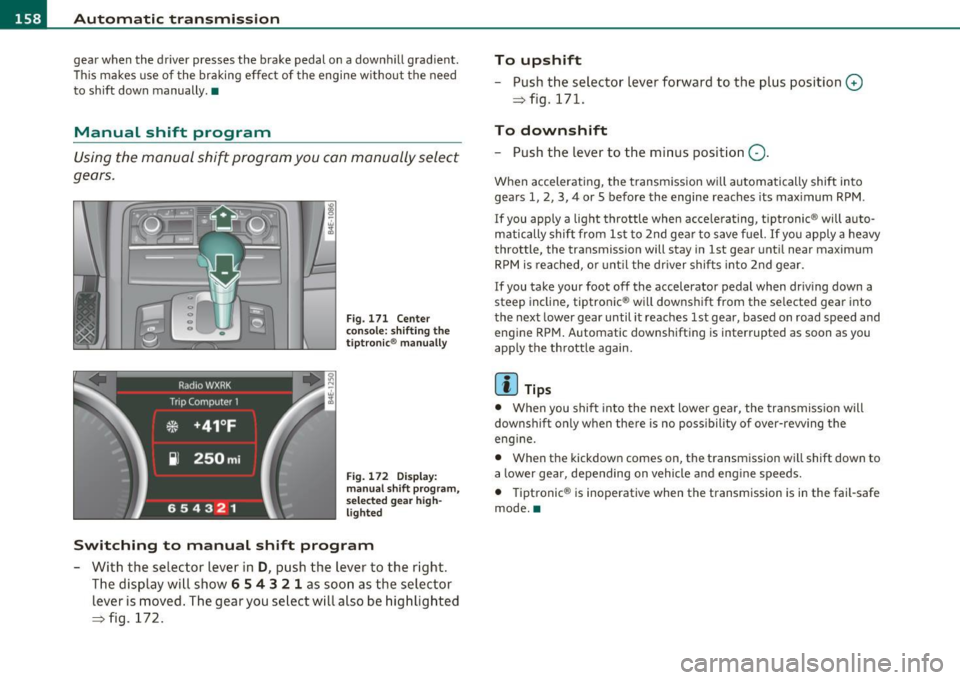
Fig. 171 Center
conso le: shifting the
tiptronic ® manually
Fig. 172 Display:
manual shift program,
selected gear high
lighted
Switching to manual shift program
- With the selector lever in D, push the lever to the right.
The display will show
6 5 4 3 2 1 as soon as the selector
lever is moved. The gear you select will also be highlighted
=> fig. 172.
To upshift
-Push the selector lever forward to the plus position 0
=> fig. 171 .
To downshift
-Push the lever to the minus position Q.
When accelerating, the transmission will automatically shift into
gears 1, 2, 3, 4 or 5 before the engine reaches its maximum RPM .
I f you apply a light throttle when acce lerating, t iptronic ® will auto
matically shift from 1st to 2nd gear to save fuel.
If you apply a heavy
throttle, the transmission will stay in 1st gear until near maximum
RPM is reached, or unt il the dr iver shifts into 2nd gear .
I f you take your foot off the accelerator pedal when driving down a
steep incline, tiptronic ® will downsh ift from the se lected gear into
the next lower gear until it reaches 1st gear , based on road speed and
engine RPM. Automatic downshifting is interrupted as soon as you
apply the th rottle again.
lI] Tips
• When you shift into the next lower gear, the transmission will
downshif t only when there is no possibility of over- rewing the
eng ine.
• When the kickdown comes on, the transmission will sh ift down to
a lower gear, depending on vehicle and eng ine speeds.
• Tiptronic ® is inoperative when the transmission is in the fail-safe
mode. •
Page 183 of 384

_____________________________________________________ H_ o_m_ e_ L_i_n _k_ ®_ • __ _
Homelink ®
Universal remote control
Applies to veh icles: w ith Hom eli nk ® universal remote control
General information
The Homelink ® feature can learn up to three radio
frequency codes for most current transmitters used for
operating garage doors, estate gates, home or outdoor
lighting systems, and other devices.
You must first program the Homelink ® transm itter before you can
use the system=>
page 182, "Programming the Home link® trans
mitter".
I n order to program the Homelink ® transmitter for devices utilizing
rolling code, a second person on a ladder who can safe ly reach the
garage door opener motor is recommended. It is also necessary to
locate the "learn" button on your garage door opener motor. Refer to
the operating instructions for the opener, as the location and color of
this button may vary by manufacturer.
You can still use the original remote control for the device at any
time.
& WARNING
• Never use the Homelink'"' transmitter with any garage door
opener that does have not the safety stop and reverse feature as
required by federal safety standards. This includes any garage
door opener model manufactured before Aprill, 1982.
• A garage door opener which cannot detect an object, signaling
the door to stop and reverse does not meet current federal safety
standards. Using a garage door opener without these features
increases risk of serious injury or death.
Controls and equip
ment Safety first
& WARNING
(continued)
• For safety reasons never release the parking brake or start the
engine while anyone is standing in front of the vehicle.
• A garage door or an estate gate may sometimes be set in
motion when the Homelink ® remote control is being
programmed. If the device is repeatedly activated, this can over
strain motor and damage its electrical components -an over
heated motor is a fire hazard!
• To avoid possible injuries or property damage, please always
make absolutely certain that no persons or objects are located in
the range of motion of any equipment being operated.
rn Tips
• If you would like more information on Homelink ®, where to
purchase the Homelink ® compatible products, or would like to
purchase the Homelink ® Home Lighting Package, please call toll
free: 1-800-355-3515.
• For Declaration of Compliance to United States FCC and Industry
Canada regulations=>
page 364 . •
Vehicle care Technical data
Page 184 of 384

.,..__H_ o_m_ e_ L_ i _n_ k_ ® _______________________________________________ _
Applies to veh icles : w ith Homelin k® un iversa l remote control
Programming the Homel ink ® transmitter
The transmitter is programmed in two phases . For rolling
code transmitters, a third phase is also necessary .
i--------------~
I----~---------.---- "' :;
N
"' M ~ w
~
Fig. 195 Overhead
conso le: Homelink ®
keypad
F ig . 196 F ront
bumpe r, driver side:
location of transmitter
u n it
Phas e 1: programming the o verhead k eyp ad
1. Make sure your vehicle is within operating range of the
remote controlled garage door opener.
2 . Set the parking brake=>
& in "General information " on
page 181.
3. Turn the ignition on. Do not start the engine! 4
. Press and hold the two outside Homelink ® buttons
G) and
@ for approximately 20 seconds until indicator light@
=> fig.
195 begins to flash . Then release both buttons . Do
not hold the buttons for longer than 30 seconds .
- This procedure only needs to be performed
once. It erases
the factory-set default codes and does not have to be repeated to program additional remote controls .
5. Press and hold the Homelink ® button
G) , @ or@ until
the indicator light@ starts flashing
slowly . Release the
button .
-The system will remain in programming mode for 5
minutes. Co to the front of the vehicle and proceed with
phase
2 .
Phase 2:
programming the bumper mounted tr ansmit
ter
6 . Hold the original r emote control at a distance between 0-
6 in. (0 -15 cm) from the bumper below the appropriate
headlight for your vehicle=> fig .
196 (use the shortest
distance possible) .
7 . Aim the remote control just below the
driver side head
light .
8. Press and hold the activation button on the remote control.
- May be different in Canada . If so, press and re-press
(cycle) the activation button on your remote control every
two seconds. .-,,
Page 194 of 384

• ....__D_ r_iv _i_ n_, g=-- S_ a _ f_e _,Ly _ ______________________________________________ _
examples will make you more aware o f seat ing pos itions that are
d ang erou s.
Therefore, whenever the vehicle is moving:
• never s tand u p in the ve hicle
• never stand on the seats
• nev er knee l on the seats
• never ride with t he se atb ack reclined
• never lie dow n on the rear seat
• neve r lean up agains t th e i nstr ument pane l
• never sit on the edge of the seat
• never sit s ideways
• never le an out the w indow
• never p ut your feet o ut the window
• never p ut your fe e t on th e ins trumen t panel
• never rest your feet on t he se at cushio n or back of the se at
• never ride in t he footwell
• neve r ride in t he cargo area
& WARNING
Improper seating positions increase the risk of serious personal
injury and death whenever a vehicle is being used.
• Always make sure that all veh icle occupants stay
in a proper
seating position and are properly re strained whenever the vehicle
is being used. •
Driver and passenger side footwell
Important safety instructions
& WARNING
Always make sure that the knee airbag can inflate without inter
ference. Objects between yourself and the airbag can increase the
risk of injury in an accident by interfering w ith the way the airbag
deploys or by being pushed into you as the airbag deploys .
• No persons (children) or animals should ride in the footwell in
front of the passenger seat. If the airbag deploys, this can result in serious or fatal injuries.
• No objects of any kind should be carried in the footwell area in
front of the driver's or passenger's seat. Bulky objects (shopping
bags, for example) can hamper or prevent proper deployment of
the airbag. Small objects can be thrown through the vehicle if the
airbag deploys and injure you or your passengers. •
Pedal area
Pedals
The peda ls must a lway s be free to move an d must n ever
be interfered with by a floor mat or a ny othe r o bj e ct.
M ake sure that all pedals move freely without interference and that
no thing preven ts them from re tu rning to the ir original pos it io ns.
On ly use floor mats that leave the pedal area free and can be secured
w ith floor mat fas tene rs .
If a brake circu it fails, inc reas ed b rak e pedal trav el is req uired to b rin g
the vehicle to a f ull stop. ...