2010 AUDI S8 rear view mirror
[x] Cancel search: rear view mirrorPage 172 of 384

ffl..__A_ d _ v_a_ n_ c_e _d _ P_ a_ r_ k_ i _n_ g:- S_,,_ y_s _t _e _m ________________________________________ _
& WARN ING (con tin ue d)
• The Audi pa rkin g system is not a substitute for being careful
and alert when backing up. Be especially careful during parking
and similar maneuve rs. Always watch where you are driving and
make sure that nothing i s in the way.
• When maneuvering or parking, do not only use the MMI
Display for or ientation. Certain object s - depending on the screen
resolution - may not , o r not entirely , be displ ayed ; for e xample
trailer hitches, chains , narrow post s, or fences.
• Improper rel iance on the Audi parking sy stem can cau se colli
sions and seriou s personal injury.
- Ne ver rely only on par king assi st when ch anging ba cking up .
- Always check rear view mirrors to make sure it is safe to back
up .•
Applies to vehicles: w it h Advanced Parking System with r ear view camera
Notes on distance information
Fig. 1 88 MMI Di splay:
displayed re d li ne
to uches the bumpe r
Fig. 18 9 Actual
di stanc e from bumpe r
The red line in the MMI Disp lay~ fig. 188 indicates the d ista nce you
should maintain from an obstacle, when park ing. If an obstacle is
located at road level, you can ap proach the obstacle unti l the red line
touches the obstacle ( 1.3
ft, or 40 cm, distance). On the other hand,
if a n obstacle is not located at road level (t he b umper of a vehi cle, for
example), you should not approach this obstacle unti l the red line
to uch es the obsta cle.
For instance, if you back up toward another vehicle , it will appear as
t hough t he guide hel p lines and s urf aces are bein g pushed over the
vehicle behind you~ fig. 188. I n this example, it can be recogn ized
in th e MM I Display that the red line exactly touches the bumpe r of t he
vehicle be hind you. Indeed, however, t he red line @ ~ fig. 189 does
not touch the bumper, but has rather been pushed underneath the
bu mper. The actual d istance (dashed line@) to t he ve hicle beh ind
you is meanwhile less than 1.3 ft (40 cm). Your veh icle b umper must
a lso be taken into con siderat ion fo r the distance ~& .
& WARNING
• Please note that objects not touching the ground can appear to
be further away than they really are (for example , the bumper of
a parked vehicle, a trailer hitch , or the rear of a truck ). In thi s case,
you should not use the guide help lines to measure distance -
danger of accident! .,
Page 173 of 384
Advanced Parking System -
---------------=---:.--
& WARNING (co ntinued )
• Maintain plenty of di stance from an obstacle , so that your
outside mirror or a corner of your vehicle does not collide with any
obstacle s -danger of accident!
• The Audi parking system is not a substitute for being careful
and alert when backing up. Be e specially careful during parking
and similar maneuvers . Always watch where you are driving and
make sure that nothing is in the
w ay.
• When maneuvering or parking, do not only u se the MMI
Di splay for orientation. Certain obje cts -depending on the s creen
resolution -may not , or not entirely, be di splayed; for e xample
trailer hitches , chains , na rrow posts, or fences. •
Applies to vehicles: with Advanced Park ing System w ith rear view camera and a trailer h itch
i nstalled acco rding to fact ory spec ificat ion s
Towing hitch
For vehicles with a tra ile r hitc h installed according to factory spec ifi
cat ions, the rear acoust ic parking senso rs are not activated when the
vehicle is pu t in r everse gear while an e lec trica l connec tion to t he
trai ler socket* is established. No distance ale rt occurs in the rear
~ page 161. T he re ar-view camera picture ~ page 164 is di splayed
without o rientation lines and without blue surfaces .•
Controls and equip
ment Safety first
Settings in the MMI
App
lies to vehicles: w ith Advanced Parking System w ith rear view camera
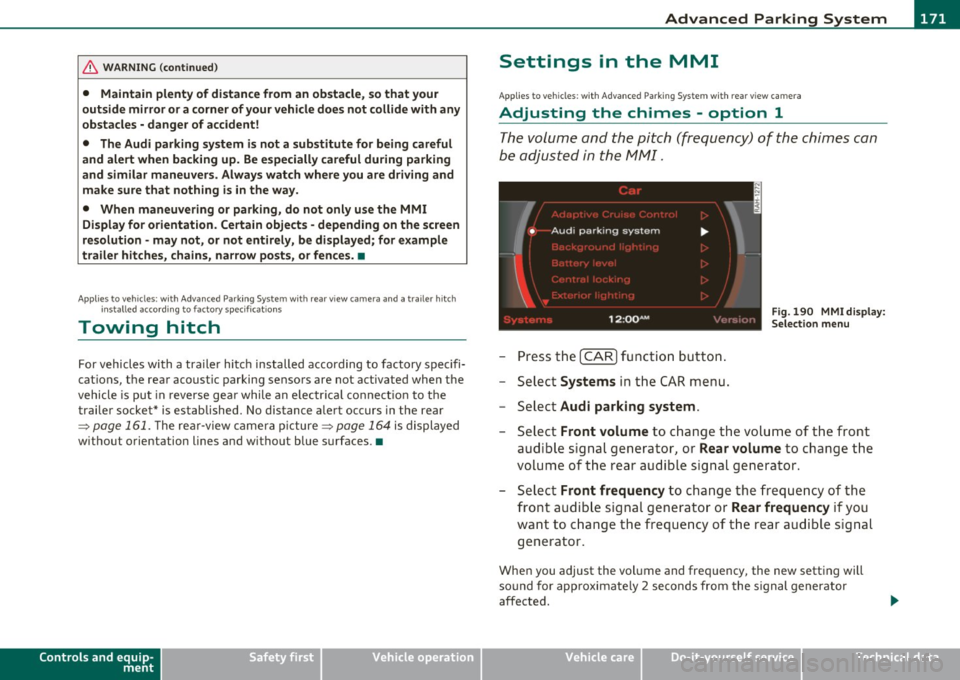
Adjusting the chimes -option 1
The volume and the pitch (frequency) of the chimes can
be adjusted in th e MM I.
Fig. 190 MM I di sp lay :
Selec tion menu
-Press th e [ C A R] fu nctio n bu tto n.
- Selec t
Systems in th e CAR me nu.
- Select
Audi parking system .
-Select Front volume to c hange t he volu me of t he fro nt
aud ible signal generator , or
Rear volume to change t he
volume of t he rea r aud ible s ignal genera tor.
- Selec t
Front frequency to change the freq uen cy of th e
front audib le s ignal gener ato r or
Rear frequency if you
wa nt to c hange t he freque ncy of t he rear a udible s ig nal
generato r.
When you adjust the vol ume and freq uency, the new setti ng will
so und for app roxim ate ly 2 s econds from the s ignal generator
affected.
Vehicle care Technical data
Page 176 of 384

IIII.___A_ d_v_ a_ n _ c_e _d _ P_ a_ rk_ in--= g'-S -=- y_s_t_ e_ m _________________________________________ _
switch PwA flashes when you engage the reverse gear, there is a
ma lf u nct ion in the acous tic p arking ass ist.
T hi s system error is immediately output after:
• Every manua l activat ion via the switch
P '".li => page 161,
• Reverse gear is engaged for the first time duri ng an ignition cycle,
or
• An error is detected during operation .
(I] Tips
If the system reports an error, have an Audi dealer o r an authorized
dea lership correct this system error .•
A pplies to veh icles : wit h Adva nced Park in g S ystem with rear view c amera
Rear-view camera tips
We recommend that you practice parking w ith the rear-v iew camera
in a traffic -free location, o r parking lot, to become familiar with the
system, the or ient atio n lines , and the ir fun ct ion. W hen do ing t his,
there should be good light and weather cond itions.
In the MM I Display, objec ts or vehicles appe ar close r or f urther aw ay
if:
• you are driving in reverse gear from a level surface onto an incline,
or a downwa rd slope,
• you are driv ing in reverse gear towar d prot ruding objects,
• the vehicle is carry ing too much load in the rear .
T he accuracy of the orientatio n lines and blue su rfaces diminishes if :
• t he Ad aptive Air S uspension is defective, o r th e dynamic o r lift
mode is switched on,
• the rear-v iew camera does not provide a reliable image, for
example, in poor visib ility conditions or if the lens is dirty, •
the image on the screen is not v is ib le due to sun glare and reflec
tion .
Caring for the rear-view camera lens:
• Dampen the lens with a household alcoho l-based glass cleaner,
a nd clean the lens wi th
a d ry cl oth.
• Remove snow w ith a hand br ush .
• Remove ice, preferab ly with de-icing spray=>
0 .
& WARNING
• The rea r-view camera does not replace the view to the rear and
the rear view mirror s.
• The rear-view camera -because of technical limitations -does
not show the entire area behind the vehicle=> page
165, fig. 182.
Be especially careful to check for small children and animals
before ba cking up . Small children and animals will not always be
shown in the r ear-view display.
• The Audi parking sys tem is not a sub stitute for being careful
and alert when backing up. Be especially careful during park ing
and similar maneuvers . Always watch where you are driving and
make sure that nothing is in the way.
• Do not allow your self to be distracted from traffi c by the rear
view camera pictures.
• When maneuvering or parking, do not only u se the MMI
Display for orientat ion. Certa in objects -depending on the sc reen
resolution -may not, or not entirely, be di splayed ; for example
trailer hitches , chains, na rrow posts, or fences.
• Only use the rear-view camera for aid if it shows a good, clear
picture. The image may be obscured , for e xample, by the sun
shining into the len s, dirt on the len s, or a s the re sult of a defect -
danger of accident!
• If the imag e is hazy when the MMI Display is swit ched on or the
area behind the vehicle is not vis ible (for example , as the result of .,_