2010 AUDI S8 warning
[x] Cancel search: warningPage 158 of 384

1111....__A_ u_ t_o _m_ a_ t_ic _ t_ r_ a_ n_s _m_ i _s_ s_ i_ o_ n ____________________________________________ _
Select R only when the vehicle is at a full stop and the engine is
running at id le speed =>
& in "Driving the automatic transmission"
on
page 154.
Before you move the selector lever to R , press both the button in the
hand le of the selector lever
and the brake pedal at the same time.
When the ignition is on, the backup lights illuminate when the
selector lever is moved into
R .
N -Neutral
The transmission is in neutral in this position. Shift to this position
for standing with the brakes applied =>
page 156.
When the vehicle is stationary or at speeds be low 3 mph (5 km/h),
you must always apply the footbrake before and while mov ing the
lever out of
N.
D -Normal position for driving forward
Posit ion Dis fo r normal city and highway driving . It ranges from zero
to top speed and all six gears shift automatically, depending on
engine load, driving speed and automat ica lly se lected shift
programs.
When the vehicle is stationary or at speeds below 3 mph (5 km/h),
you must always apply the foot bra ke before and while moving the
lever to
D out of N .
In certa in circumstances it may be advantageous to temporarily
switch to the manual sh ift program to manually select gear ratios to
match specific driving conditions =>
page 158.
S -Sport position
Select this position for sportie r performance. In this position, the
transmission will not upshift as soon, allowing the vehicle to use the
increased power available at higher engine speeds to achieve livelier
acceleration .
When the vehicle is stationary or at speeds be low 3 mph (5 km/h),
you must always apply the foot bra ke before and while moving the
lever to
S out of N .
& WARNING
Read and follow all WARNINGS=> & in "Driving the automatic
transmi ssion" on
page 154.
0 Note
Coasting downhill with the transmission in N and the engine not
running will result in damage to the automatic transmission and
possibly the catalytic converter. •
Automatic Shift Lock (ASL)
Automatic shift lock prevents you from accidentally
shifting into a forward gear or into reverse, thus causing
the vehicle to move unintentionally.
0
Fig . 170 Shift gate
se lector lever lock posi
tions and interlock
button highlighted
The selector lever lock is released as follows:
- Turn the ignition on .
- Step on the brake pedal.
At the same time press and hold
the lock button on the side of the gear selector knob
=:> fig. 170 with your thumb until you have moved the
selector lever to the desired position. .,_
Page 159 of 384

______________________________________________ A_ u_ t_ o _ m_ a_ t_ ic_ t_r_a _ n_ s_m_ i_ s _s_ i_ o _ n __ ffllll
Automatic selector lever lock
The se lector lever is locked in the P and N positions when the ignition
is turned on. To move the lever from these posit ions the driver must
depress the brake pedal. As a reminder to the driver, the following
warning appears in the instrument cluster display when the selector
is in
P and N:
When stationary apply foot brake while selecting gear
A time delay element prevents the selector lever from lock ing when
it is moved through the
N position (going from R to D). The locking
element will lock the selector lever if the lever is left in N (Neutra l) for
more than approximately
l second, w ithout the brake pedal being
pressed.
At speeds above about 3 mph (5 km/h) the Automat ic Shift Lock is
automatically deactivated in the
N position.
Interlock button
The lock button o n the selector lever prevents the lever from being
accidentally shifted into certain positions. Pressing this button deac
tivates the selector lever lock . Depending on the direction of the
shift, the selector lever locks at different positions . The pos itions are
highlighted in the illustration ~
page 156, fig. 170.
Ignition key safety interlock
The key cannot be removed from the ignition un less the selector lever
is in the
P park position. When the ignition key is removed, the
selector lever will be locked in the
P position.•
Kick-down
The kick-down feature allows the vehicle to generate
maximum acceleration.
When you press the accelerator pedal beyond the resistance point
that is reached at full throttle, the transmission will select a lower
gear ratio based on vehicle speed and engine RPM. The engine RPM
will be controlled to produce maximum vehicle acceleration as long
Controls and equip
ment Safety first
as you cont
inue to press the accelerator pedal beyond this resistance
point.
& WARNING
Be careful when using the kick -down feature on slippery roads.
Rapid acceleration may cause the vehicle to skid. •
Dynamic shift program (DSP)
The automatic transmission is electronically controlled.
The transmission is self adapting and will automatically select the
best sh ift p rogram su ited to the driv ing cond it ions and driving style.
The transmission will select one of the
economy programs when you
drive at a steady speed or a gradually changing speed without heavy
acceleration . This ach ieves optimum fuel efficiency, with early
upshifting and delayed downshifting.
Th e transmission will automatically select the
sporty shift programs
when you dr ive at higher speeds, or w ith heavy acceleration and
frequently changing speeds. Upshifts are delayed to make full use of
engine power . Downshifting takes place at higher engine speeds than
in the economy programs .
The select ion of the most suitable shift program is a cont inuous,
automatic p rocess. The driver can also make the transmission switch
t o a spo rty program by
quickly pressing down the gas pedal.
Th is causes the transmission to shift down to a lower gear to achieve
rap id acceleration, e.g . for quickly passing another vehicle. Yo u do
not need to press the gas pedal into the kick -down range . After the
transmission has upshifted, the original program is selected
according to your driving style.
An additional shift program allows the automatic transmission to select the proper gear for uph ill and downhill gradients.
Th is prevents the transmission from upshifting and downshifting
unnecessari ly on hills. The transmission will shift down to a lower _,.
Vehicle care Technical data
Page 164 of 384

IIII.___A_ d_v_ a_ n _ c_e _d _ P_ a_ rk_ in--= g'-S -=- y_s_t_ e_ m _________________________________________ _
- Press the switch P1JJ! in the center console=:, page 161,
fig. 177 to activate the Audi parking system manually.
Activation of the acoustic parking system is confirmed by
a brief acknowledgement sound. The indicator light in the
switch lights up.
Deactivation
- If you drive forwards faster than approx. 6 mph (10 km/h), or
- if you switch the ignition off, the entire acoustic parking
assist is automatically deactivated, or
- you can press the switch
Pw! in the center console
=:, page 161, fig. 177 to deactivate the Audi parking
system. The indicator light in the switch goes out.
You have to turn on the acoustic parking assist manually if you wish
to park the vehicle forwards or if you wish to approach an obstacle
forwards and want a distance warning.
The range at which the sensors start to measure is
about :
Front
Rear
Warning tones
side
center
side
center 3 ft (0.90 m)
4 ft (1.20 m)
2 ft (0.60 m)
5.2 ft (1.60 m)
Distance warning is given by chimes which are generated by a signal
generator . The volume and the pitch of the chimes can be adjusted in
the MMI =>
page 171.
Mute
In the case of vehicles with automatic transmission, an acoustic
distance warning is discontinued when the transmission selector lever is moved to the P position
. However, the system remains active.
As soon as the selector lever is moved from the
P position and the
vehicle approaches an obstacle, the acoustic distance warning
resumes.
Driving forward/backward
Distance warning when driving forward/backward is based on detec
tion of an obstacle in the range of the parking assist . As the distance
decreases, the time interval between the audible tones becomes
shorter.
When the distance is less than approx. 1 ft (0.30 m), the tone
becomes continuous. At this point you should stop backing up or
driving forward .
If the distance to an obstacle remains the same, the volume of the
distance warning is gradually reduced after about
4 seconds (does
not apply to the zone for the continuous tone). If you start to
approach the detected obstacle again, the distance warning will
sound at the normal volume again.
Parking
When you select another gear when parking (e.g. reverse/forward),
the warning tones are temporarily suppressed, but the visual display
remains on the MMI display. If you start approaching a detected
obstacle again, the distance warning will sound at the normal volume
again.
Visual display
The segments on the MMI display indicate a change in the distance
between the vehicle and an obstacle . The number of segments
displayed depends on the obstacles in front of or behind the vehicle.
The closer the vehicle comes to the obstacle, the closer the segments
approach the vehicle=>
page 161, fig. 178. When the segment
before last is displayed, the vehicle has reached the collision zone. At
this point you should stop backing up or driving forward=>& .
The image in the visual display can be switched off on the MMI display
=>
page 173 . The acoustic distance warning remains active. .,,
Page 165 of 384

_________________________________________ A_ d_v _ a_ n_ c_e _d _ P_ a_ rk_ in_ g =- S -.:.y_s _t _e _ m ___ _
If you press a fu nction bu tto n on t he M MI termina l, the v is u a l display
dis appea rs. Manu ally sw itchin g th e par king assist on ag ain via the
p,qA
switch s hows th e visual image on the MMI display again . Further
info rmation regarding the MMI term inal is in cl uded in the MMI user's
ma nual.
Rear-view camera (rear view)
The rear-view camera picture~ page 166, fig . 183 appears on the
MM I d is play as a mir ror im age. The re ar-view came ra pic ture has
or ientat ion lines and mar ked surfaces projected into i t as an a id to
the par king process ~
page 164. The red line in the picture
~ pag e 164, fig. 179 or~ page 164, fig. 1 80 indicates the coll is ion
area . You s houl d sto p bac kin g up, prefera bly befo re yo u reac h this
poin t~ & -
lf your vehicle is close to an obstacle , th e visual d istance d isplay also
appe ars in th e pic t ur e fr om t he re ar -view camera. This s uperim posed
display is intended to help d isplay the re levant cr itical ve hicle area .
If the visual dis play is shown on the MMI display and you press the
co ntr ol bu tton wi th the
Rear view funct ion ~ page 161 , fig. 178, the
pict ure from t he rear -view came ra is disp laye d.
If the pic ture from t he re ar-view camera is sh own and yo u pre ss the
cont rol button with the
Graphic f unction~ page 166 , fig. 183, t he
visual displ ay is s hown.
Th e p icture from th e re ar-v iew ca mera can b e sw itche d off o n the
MM I dis play ~
page 173 . The acoust ic distance warning remains
a cti ve.
If you press a function b utton on the MMI term ina l, the rear-v iew
c amera picture d is app ears. The rear -view came ra pictur e re a ppears
the next time you pa rk . But the picture from the rear-view camera can
also be show n ag a in on the MMI display by manua lly switc hing off
and on wi th t he
p,,1 A swi tch. Fu rther in fo rm ation r egard ing the M MI
terminal is incl uded i n th e MM I user 's manual.
Controls and equip
ment Safety first
& WARNING
•
Sensors have dead spaces in which objects cannot be detected .
Be especially careful to check for small children and animals
before backing up. Small children and animals will not always be
detected by the sensors .
• The Audi parking system is not a substitute for being careful
and alert when backing up. Be especially careful during parking
and similar maneuvers . Always watch where you are driving and
make sure that nothing is in the way.
• Remember that low obstacles which have already been
signaled may pass below the system's sensing zone when the
vehicle is backing up. The fact that the signal stops does not mean
that you have cleared the obstacle. When the signal stops, impact is imminent . Objects such as trailer hitches, chains, narrow posts
or fences covered by a thin layer of paint may not always be
detected by the sy stem. They can still damage your vehicle
without warning.
• Always make sure that the volume and frequency of the chimes
is adjusted so that you can easily hear the acoustic distance signal
even if the radio is playing, the air-conditioner blower is on High
or there is a high level of outside no ise.
- Check the settings whenever someone else has driven the
vehicle before you.
• Improper reliance on the Audi parking system can cause colli
sions and serious personal injury.
-Never rely only on parking assist when backing up.
- Always che ck rear view mirrors to make sure it i s safe to back
up.
[ i ] Tips
• The rear -view came ra pict ure is avai lab le as soon as the M MI
D ispl ay or the MMI i s swi tched o n, or the s tart -up ph ase is comple ted. _,.
Vehicle care Technical data
Page 166 of 384
IIII.___A_ d_v_ a_ n _ c_e _d _ P_ a_ rk_ in--= g'-S -=- y_s_t_ e_ m _________________________________________ _
• Keep the sensors in the rear bumper and the rear-view camera lens
clean and free of snow and ice, so that the Aud i parking system can
work properly. Please follow the additional notes on=> page 173 . •
A pplie s to v eh icle s: w ith Adva nce d Park ing Sys tem with rear vie w c amera
Rear-view camera (Rear View)
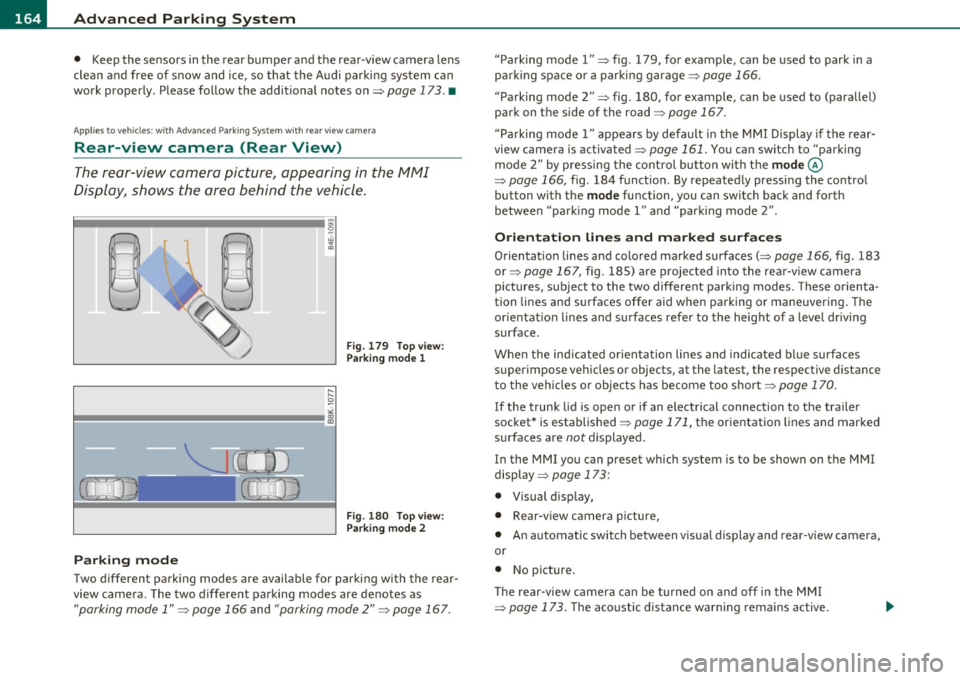
The rear-view camera picture, appearing in the MMI
Display, shows the area behind the vehicle.
"-.J l
-
Fig. 179 Top view:
Parking mode 1
Fig . 180 Top view:
Parking mode 2
Parking mode
Two different parking modes are available for parking with the rear
view camera. The two different parking modes are denotes as
"parking mode 1" => page 166 and "parking mode 2" => page 167. "Parking mode
l" => fig . 179, for example, can be used to park in a
parking space or a parking garage=> page 166.
" Parking mode
2" => fig . 180, for example , can be used to (parallel)
park on the side of the road=> page 167.
" Parking mode l" appears by default in the MMI Display if the rear
view camera is activated=> page 161. You can switch to "parking
mode
2" by pressing the control button with the mode©
=> page 166, fig. 184 function. By repeatedly pressing the control
button with the
mode function, you can switch back and forth
between "park ing model" and "parking mode
2" .
Orientation lines and marked surfaces
Orientation lines and colored marked surfaces(:::::> page 166, fig. 183
or=> page 167, fig. 185) are projected into the rear-view camera
pictures, subject to the two different parking modes. These orienta
tion lines and surfaces offer aid when parking or maneuvering. The
orientat ion lines and surfaces refer to the height of a level driving
surface .
When the indicated or ientation lines and indicated blue surfaces
super impose veh icles or objects, at the latest, the respective distance
to the vehicles o r objects has become too short => page 170.
I f the trunk lid is open or if an electrical connection to the trailer
socket* is established => page 171, the orientation lines and marked
surfaces are not displayed .
I n the MMI you can preset which system is to be shown on the MMI
display => page 173:
• Visual d isplay,
• Rear-v iew camera picture,
• An automatic switch between visual display and rear-view camera,
or
• No picture.
Th e rear-view camera can be turned on and off in the MMI
=> page 173. The acoustic distance warning remains active.
Page 167 of 384

_________________________________________ A_ d_v _a_ n_ c_e _d _ P_ a_ r _k_ , _· n_ g=- S-=- y_s _t _e _m __ ....JIJII
& WARNING
• The rear-view cam era has blind spots, in which objects cannot
be detected. Be especiall y carefu l to check for small children and
animal s before backing up . Small childr en and animals will not
always be detected by the sensor s.
• The Audi parking system is not a subst itute for being careful
and alert when ba cking up. Be e specially careful dur ing parking
and similar maneuvers . Always watch where you are driving and
make sure that nothing is in the way.
• Remember that low obstacles which have already been
s ignaled may pass below the system 's sensing zone when the
vehicle is back ing up . Th e fact that the signal stop s does not mean
that you have cleared the obstacle . When the signal stops , impact
is imminent . Objects su ch as trailer hitches, chains, narrow posts
or fences covered by a thin la yer of paint may not always be
detected by the system. They c an still damage your vehicle
without warning.
• Alway s make sure that the volume and frequency of the chimes
is adjusted so th at you can eas ily hear the acoustic distance s ignal
even if the radio is playing, the air-conditioner blower is on High
or there is a high level of outside noise .
- Che ck the setting s whenever someone el se has driven the
vehicle befo re you.
• Improper reliance on the Aud i parking system can caus e colli
sions and seriou s per sonal injury.
- Never rely only on parking assist when changing ba cking up.
- Alway s check re ar view mirrors to make sure it is safe to back
up.
[ i ) Tips
• Before parking with the rear-view camera, the Adaptive A ir
S uspension stan dard or au tomatic mo de must be swit ched on
=> page 18.
Cont rols a nd e quip
m en t
Vehicle OP-eration
• The rear-view camera pict ure is avai lab le as soon as the MMI
Display or the MMI is sw itched on , or the sta rt-u p ph ase is completed .
• In or der for the rear-view camera to function p roper ly, the came ra
lens =>
page 16 1, fig. 176 mus t be kept clean , a nd free o f snow and
ice . Please follow t he addit ional notes on =>
page 174 .
• The c ame ra cover age angle change s when the t runk lid is o pen.
The refore, the rear-v iew camera pict ure is displayed without orienta
t ion lines and w ithout blu e surfaces.
• Obse rve and fo llow the notes on towing mode on=>
page 171. •
Applies to ve hicles: w it h Advanced Pa rking System w ith rear view camera
Rear -view camera coverage area
0
Vehicle care
I)
Fig. 18 1 Top vie w:
R ear-v iew came ra
c o ve rage a re a
Fi g. 182 Side view :
Cov ered ar ea @ and
u nc overed are a@ of
th e re ar -vi ew c am era ..
Do-it-yourselt service iTechnical data
Page 168 of 384

llffl..__A_ d _ v_a_ n_ c_e _d _ P_ a_ r_ k_ i _n_ g:- S_,,_ y_s _t _e _m ________________________________________ _
The rear-view camera section appearing in the MMI Display is approx
imately the same as the coverage area represented in=>
page 165,
fig. 181 or© in=> page 165, fig. 182. Objects located in the rear
view camera's uncovered area@=>
page 165, fig. 182 or in the close
vicinity of the bumper are not recognized .
& WARNING
Please note that objects not touching the ground can appear to be
further away than they really are (for example, the bumper of a
parked vehicle, a trailer hitch, or the rear of a truck). In this case,
you should not use the guide help lines to measure distance -
danger of accident! •
Applies to veh ic les : w ith Advan ced Parking System with rear v iew camera
Parking mode 1
"Parking mode 1" can aid when parking in a garage or
parking space, for example.
Fig. 183 MMI Display:
Aiming at the parking
spot by adjusting the
steering wheel angle Fig. 184 MMI Display:
Orienting the vehicle
with aid of the blue
surface
- Before parking , switch on the Adaptive Air Suspension
=> page 18 standard or automatic mode .
- Activate the Audi parking system=>
page 161. "Parking
mode 1"
=;, fig. 183 is displayed by default. Dynamic
orange orientation lines ® and a blue static surface ©
are projected into the rear-view camera picture.
- With the vehicle stationary, select the proper steering
wheel angle for the parking spot with the aid of the orange orientation lines.
- While driving in reverse gear, adjust the steering wheel
angle to fit the parking space with the aid of the orange
orientation lines =>
0.
- Align your vehicle corresponding to the blue surface. The
blue surface should be parallel to the parking spot lines
=> fig.
184.
© Blue surface
The surface behind the vehicle, identified by various shades of blue,
represents an extens ion of th e outer vehicle outline by approximately
16
ft (5 m) to the rear . The transitions of the blue surfa ces are
distanced approximately 3
ft (1 m), 6 ft (2 m), and 16 ft (5 m) away
from the vehicle. .,
Page 169 of 384

_______________________________________ ..:.A ..:. d=...::. v..=a :.:n..:..: c::.: e=. d=-..: P:....= a..:.r .:.:k ..:..:in :....:.2 9~ S ::.:l: y..:s :.:t :.:e :.:m..:....:...__Jffl11
@ and @ Orange orientation lin es
The orientation lines change d irect ion with the steer ing wheel angle .
T hese lines identify the direction of t ravel the rear of the ve hicle
would be taking, driving in reverse gea r with the current stee ring
w heel ang le .
The dynamic orientation lines are provided with markers @. These
ma rkers are each pla ced at a d ista nce of app rox . 3 ft (1 m) from o ne
another. Th rough these markers, the distance to an obstacle can be
es tim ated .
© Redline
The dista nce between your rear b umpe r© and the red line is approx
imate ly 16 inches (40 cm)=>& . Here, at the latest, you should stop
ba ckin g up =>
page 170 .
© Rear bumper
The rear bumpe r of your ve hicle also appea rs in the MM I Display, for
better or ientation.
& WARNING
Please note that objects not tou ching the ground can appear to be
further away than they really are (for example, the bumper of a
parked vehicle, a trailer hit ch , or the rear of a truck). In this case,
you should not use the guide help line s to measure di stance -
danger of accident!
0 Note
In the MMI D isplay, the direction of travel of the vehicle rear is shown
depe nd ing on the stee ring whee l angle . T he ve hicle front swi ngs out
more than the vehicle rear.
Con tro ls a nd e quip
m en t Vehicle
OP-eration
(I) Tips
• In order for the rear-view came ra to func tion p roperly, the came ra
lens =>
page 161, fig. 176 must be kept clean, and free of snow and
i c e. Please follow t he addit ional no tes on =>
page 174 .
• T he positions of the orientat ion lines /surfaces are displaced up
or dow n if the par king p ro cess is car ried ou t with the rea r-view
camera in Adaptive Air Suspension=>
page 18 dynamic or lift mode.
Th erefore, the ac curacy is red uced. •
App lies to veh icl es : w it h A dvance d Park ing Sys tem w ith rea r view ca mera
Parking mode 2
"P arking mode 2" ca n be used as aid when (parallel)
parking on the side of the road , for e xample .
Vehicle care
Fig. 185 MMI Di spl ay:
Blue su rface aligned
with targeted p arking
s p ot ...
Do-it-yourselt service iTechnical data